AUX Citroen C4 PICASSO 2015 2.G Owner's Manual
[x] Cancel search | Manufacturer: CITROEN, Model Year: 2015, Model line: C4 PICASSO, Model: Citroen C4 PICASSO 2015 2.GPages: 420, PDF Size: 10.72 MB
Page 111 of 420

109
Central storage compartment
F To open the central storage compartment, p
ull the grip and lower the cover.
It
is illuminated on opening.
A
button on the upper part allows the lighting to
b
e deactivated.
Depending
on equipment, it may contain:
-
o
ne 12 V socket,
-
o
ne or two USB ports,
-
o
ne auxiliary socket
12 V accessory socket
F To connect a 12 V accessory (maximum p
ower: 120 Watts), lift the cover and
c
onnect a suitable adaptor.
Do
not exceed the maximum power
r
ating of the socket (risk of damage to
y
our device). The
auxiliary socket is located in the central s
torage box.
It
permits the connection of a portable device,
s
uch as a digital audio player of the iPod
® type,
to
listen
to
your
music
files
using
the
vehicle's
s
peakers.
The
management
of
the
files
is
done
using your
p
ortable
d
evice.
Auxiliary socket
For more information on the use of this e quipment, refer to the "Audio and telematics"
s
ection.
3
Comfort
Page 281 of 420
279
Type 1 fuse tables
Fusebox 1
Dashboard fuses
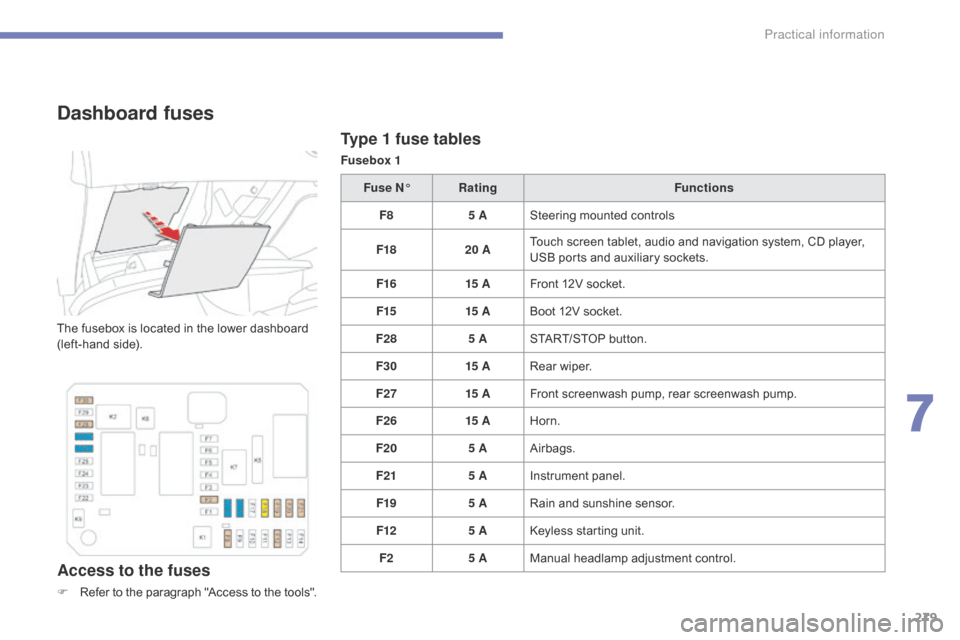
The fusebox is located in the lower dashboard (left-hand side).
Access to the fuses
F Refer to the paragraph "Access to the tools".Fuse N°
Rating Functions
F8 5 ASteering mounted controls
F18 20 ATouch screen tablet, audio and navigation system, CD player,
U
SB ports and auxiliary sockets.
F16 15 AFront 12V socket.
F15 15 ABoot 12V socket.
F28 5 ASTART/STOP button.
F30 15 ARear wiper.
F27 15 AFront screenwash pump, rear screenwash pump.
F26 15 AHorn.
F20 5 AAirbags.
F21 5 AInstrument panel.
F19 5 ARain and sunshine sensor.
F12 5 AKeyless starting unit.
F2 5 AManual
h
eadlamp
a
djustment
c
ontrol.
7
Practical information
Page 283 of 420
281
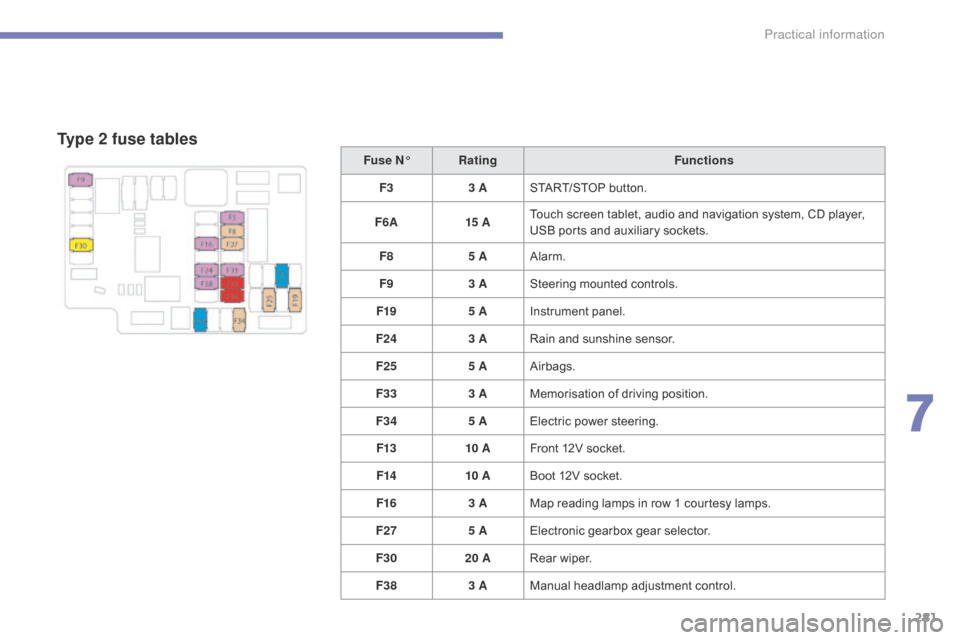
Type 2 fuse tables
Fuse N°Rating Functions
F3 3 ASTART/STOP
button.
F6 A 15 ATouch
screen tablet, audio and navigation system, CD player,
U
SB ports and auxiliary sockets.
F8 5 AAlarm.
F9 3 ASteering
mounted controls.
F19 5 AInstrument
panel.
F24 3 ARain
and sunshine sensor.
F25 5 AAirbags.
F33 3 AMemorisation
o
f
d
riving
p
osition.
F34 5 AElectric
power steering.
F13 10 AFront
12V socket.
F14 10 ABoot
12V socket.
F16 3 AMap
reading lamps in row 1 courtesy lamps.
F27 5 AElectronic
gearbox gear selector.
F30 20 ARear
wiper.
F38 3 AManual
h
eadlamp
a
djustment
c
ontrol.
7
Practical information
Page 341 of 420
339
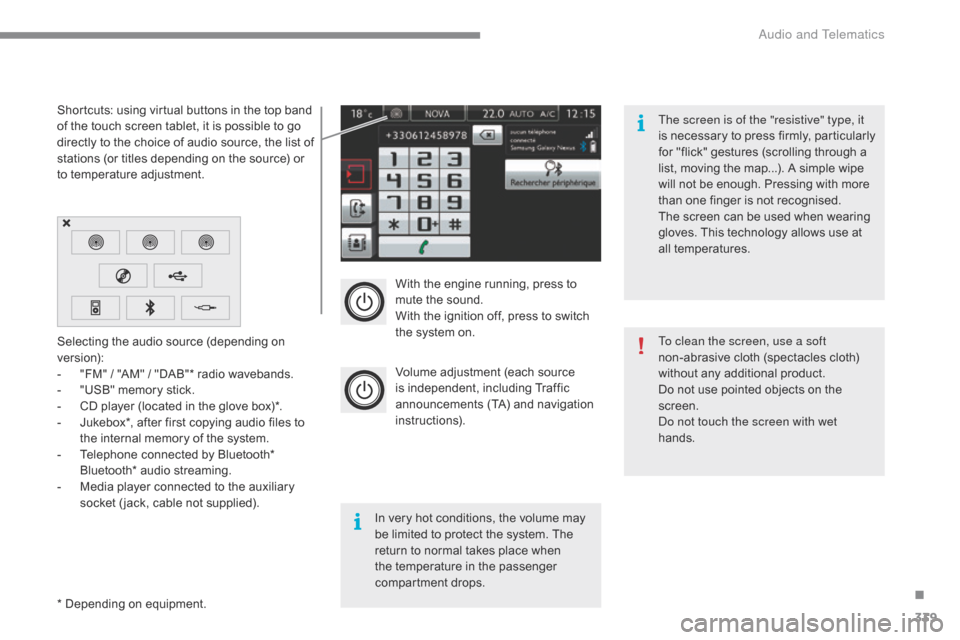
With the engine running, press to mute the sound.
With
the ignition off, press to switch
t
he system on.
Volume
adjustment (each source
i
s
i
ndependent,
i
ncluding
T
raffic
a
nnouncements (TA) and navigation
i
nstructions).
Selecting
the
audio
source
(depending
on
ve
rsion):
-
"
FM"
/
"AM"
/
"DAB"*
radio
wavebands.
-
"
USB"
memory
stick.
-
C
D
player
(located
in
the
glove
box)*.
-
J
ukebox*,
after
first
copying
audio
files
to
t
he
internal
memory
of
the
system.
-
T
elephone
connected
by
Bluetooth*
B
luetooth*
audio
streaming.
-
M
edia
player
connected
to
the
auxiliary
s
ocket
( jack,
cable
not
supplied).
*
Depending
on
equipment.
Shortcuts:
using
virtual
buttons
in
the
top
band
o
f
the
touch
screen
tablet,
it
is
possible
to
go
d
irectly
to
the
choice
of
audio
source,
the
list
of
s
tations
(or
titles
depending
on
the
source)
or
t
o
temperature
adjustment.
The screen is of the "resistive" type, it
is
n
ecessary
t
o
p
ress
f
irmly,
p
articularly
f
or "flick" gestures (scrolling through a
l
ist, moving the map...). A simple wipe
w
ill not be enough. Pressing with more
t
han one finger is not recognised.
The screen can be used when wearing
g
loves. This technology allows use at
a
ll
t
emperatures.
In
very hot conditions, the volume may
b
e
limited to protect the system. The
r
eturn to normal takes place when
t
he
temperature in the passenger
c
ompartment drops. To clean the screen, use a soft
non-abrasive
cloth (spectacles cloth)
w
ithout any additional product.
Do
not use pointed objects on the
sc
reen.
do n
ot touch the screen with wet
hands.
.
audio and Telematics
Page 347 of 420
345
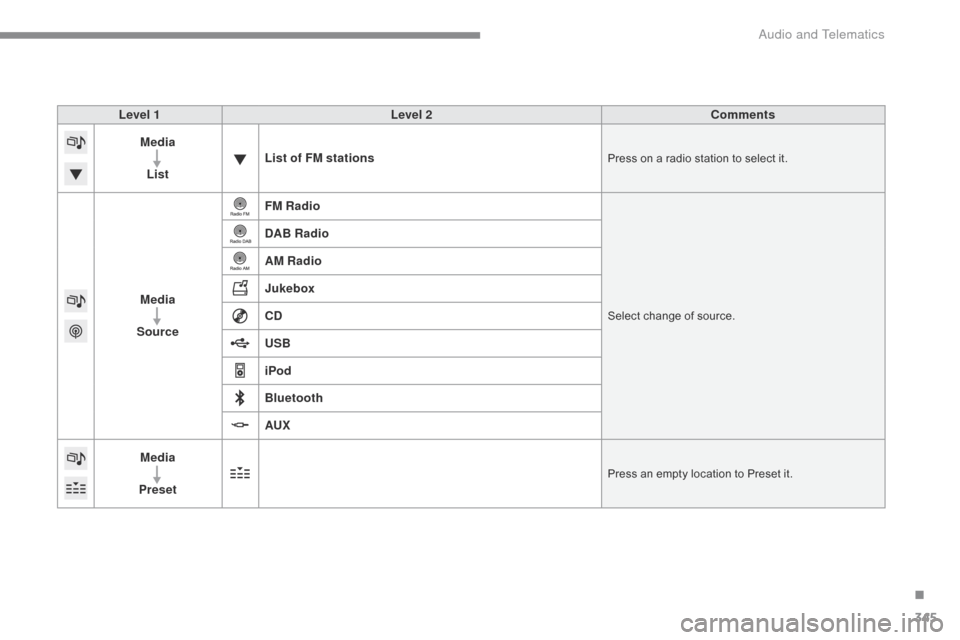
Level 1Level 2 Comments
Media
List List of FM stations
Press on a radio station to select it.
Media
Source FM RadioSelect change of source.
DAB Radio
AM Radio
Jukebox
CD
USB
iPod
Bluetooth
AUX
Media
Preset
Press an empty location to Preset it.
.
Audio and Telematics
Page 351 of 420

349
Level 1Level 2 Level 3 Comments
Media
Secondary page Media list Presentation
of the last media used.
Media
Secondary page Settings Media
Settings Random
(
all tracks):Choose
the play settings.
Random
(
current album):
Loop:
Aux.
a
mplification
Radio
Settings R
dS
optionsActivate
or deactivate the options.
DAB/FM
options
Display
Radio Text
DAB
radio thumbnails
Announcements Settings
Traffic announcements (TA)
Activate or deactivate the options.
W
eather
Varied
-
Sport
Alert
se
ttings
Confirm Save
the settings.
.
Audio and Telematics
Page 356 of 420

354
Music
USB playerSelection of source
The steering mounted SRC (source) b
utton can be used to go to the next
m
edia source, available if the source
i
s active.
Select
change of source.
Press on Media
to display the
p
rimary
pag
e.
The
system
builds
playlists
(in
temporary
m
emory),
an
operation
which
can
take
from
a
few
seconds
to
several
minutes
at
the
first
c
onnection.
Reduce
the
number
of
non-music
files
and
the
n
umber
of
folders
to
reduce
the
waiting
time.
The
playlists
are
updated
every
time
the
i
gnition
is
switched
off
or
connection
of
a
USB
m
emory
stick.
The
lists
are
memorised:
if
they
a
re
not
modified,
the
subsequent
loading
time
w
ill
be
shorter.
Insert
the
USB
memory
stick
into
the
USB
port
o
r
connect
the
USB
device
to
the
USB
port
u
sing
a
suitable
cable
(not
supplied).
Auxiliary socket (AUX)
Connect the portable device (MP3 player…) to t
he auxiliary Jack socket using an audio cable
(
not
sup
plied).
First
adjust the volume of your portable device
(
to a high level). Then adjust the volume of your
a
udio system.
Display
and management of the controls are
v
ia the portable device. Choose
the source.
Press OK
to confirm the selection.
CD player
Insert the CD in the player.
audio and Telematics
Page 359 of 420

357
Managing the Jukebox
Connect the device (MP3 player...) to the USB port or auxiliary Jack socket using a suitable
a
udio cable.
When
no audio file is copied to the
s
ystem, which has a capacity of 8 GB,
a
ll of the Jukebox function symbols are
g
reyed and are not available.
Select " Media list ". Select
the magnifying glass to enter t
he folder or album and select audio
f
ile by audio file.
Select copy " Copy Jukebox ". Select "
Confirm " then "Copy".
Select " Sor t by folder ". Select "
New folder " to create a
folder
structure in the Jukebox.
" Sor t by album ". Select "
Keep structure " to retain the
structure
from the device.
While
copying the system returns
t
o the primary page; you can go
b
ack to the copy view at any time by
s
electing this button.
o
r
o
r
.
Audio and Telematics
Page 402 of 420
400
accessories ..................................................298ac
cessory position ....................................... 12
7
Access
to the 3rd row
..................................... 84
Ad
ditive,
Ad
Blue
.................. 2
1, 22, 38, 314, 318
Adjusting
h
eadlamps
.................................... 19
8
Adjusting
head restraints
................................77
A
djusting
s
eats
.......................................... 73
-82
Adjusting
the air distribution
.....................9
4, 97
Adjusting
the air flow
.................................9
5, 99
Adjusting
the date
........................................... 47
A
djusting the height and reach
of
the steering wheel
....................................91
A
djusting the seat belt height
.......................2
18
Adjusting
the temperature
..................9
4, 95, 97
Adjusting
the time
........................................... 47
A
dvice on care and
maintenance
............................................... 3
13
Advice
on driving
..............................
............121
Airbags
...............
.....................................35, 223
Airbags,
c
urtain
..................................... 2
27, 228
Airbags,
front.........................................224, 228
Airbags,
la
teral
..................................... 2
26, 228
Air
c
onditioning
...............................
......9, 95, 97
Air
conditioning, automatic
.......................9
3, 97
Air
c
onditioning,
m
anual
...........................9
3, 95
Air
d
istribution
a
djustment
................. 9
4, 95, 99
Air
intake
...............
..................................96, 100
ai
r vents
..............................
............................92
Alarm
............................................................... 68
A
nti-pinch
................................................ 7
1, 207
Anti-theft
..............................
.........................127
Armrest,
front
..........................................7
9, 106
as
sistance call
...............................
.......210, 334
Audible
w
arning
............................................ 20
9
Audio
streaming
(Bluetooth)
..............................
....................356
Automatic
hea
dlamps
d
ipping
................ 2
7, 195
Auxiliary
................................................1
09, 354bat tery ............................... ............ 284-286, 312
Battery, c harging ............................... ............286
Battery,
remote control
.............................5
9, 60
Black
pan
el...................................................... 46
Blanking
screen (snow shield)
......................2
97
Blind,
panoramic sunroof
..............................2
07
Blind
spot sensors
........................................17
3
Blinds,
side
.............................................1
07, 114
b
lueH
di ...............................
.......... 146, 307, 314
Bluetooth
(hands-free)
......................... 3
88, 389
Bluetooth
(
telephone)
........................... 3
88, 389
bo
nnet
...............
............................................301
b
oot
........
...................................................64-66
Boot
(fittings)
...............................
..................117
Boot,
motorised
.........................................6
5, 66
Boot
(opening)
...............................
..................51
Bottle
holder
...............................
...................10 6
Brake
discs
....................................................3
13
Brake
lamps
...............................
............272-275
Brakes
............................................... 3
4, 37, 313
Braking,
d
ynamic
em
ergency
............... 1
28, 133
Bulbs
(
changing)
...............................
....268 -276 Central
locking .................................... 5 1, 55, 61
Changing a bu lb ....................................2
68 -276
Changing
a f
use
.....................................2
7 7-2 8 3
Changing
a wheel
...............................
..257-2 6 6
Changing
a wiper blade
....................... 2
05, 288
Changing
the remote control battery
..............59
C
hecking the engine oil level
................. 4
3, 308
Checking
the levels
...............................3
08-311
Checking
tyre pressures
(using
the kit)
..............................
................256
Checks
...............
...................302, 303, 312, 313
Child
lock
...............................
........................248
Children
...............................
.. 222, 225, 229 -248
Child
seats
..............................
.............229 -247
Child
seats, conventional
..............................23
5
Child
seats, ISOFIX
......................................2
41
CITROËN
Connect Box
...............................33
4
CITROËN
Localised Emergency
Call
........
......................................................334
CITR
oËn M
ulticity Connect
.........................3
83
Closing
the boot
...............................
.........64, 65
Closing
the doors
...............................
.52, 55, 58
Configurations,
s
eats
...................................... 87
C
onfiguration,
v
ehicle
............................... 1
1, 13
Connection,
b
l
uetooth
......................... 3
88, 389
Control,
emergency boot
release
.......................................................... 67
C
ontrol,
em
ergency
do
or
................................63
C
ontrol, heated seats
......................................79
C
ontrols, steering mounted
..........................3
40
Control
stalk, lighting
............................1
8 9 -19 4
Control
stalk, wipers
.............................20
1-204
Courtesy
lamps
.............................................20
6
Cruise control
........................................ 15
4,
15
8
Cruise control, active
.................................... 16
1
Cup
holder
...............................
......................10 6
AB
Cable, audio ..........................1 09, 110, 354, 356
Capacity, fuel tank .............................. ..........304
Cap, fuel filler
................................................ 3
04
Cartridge,
f
ragrance
..................................... 10
4
C
d
..............................
...................................354
C
alphabetical index