alarm Citroen C4 PICASSO 2015 2.G Owner's Manual
[x] Cancel search | Manufacturer: CITROEN, Model Year: 2015, Model line: C4 PICASSO, Model: Citroen C4 PICASSO 2015 2.GPages: 420, PDF Size: 10.72 MB
Page 4 of 420
7-inch touch screen tablet 11
Instrument panels
2
0
Indicator
and warning lamps
2
5
Adjustment
buttons
4
4
Setting
the date and time
4
7
Trip
computer
4
8
Monitoring
ove
r view
Electronic key - remote control 5
1
Keyless Entry and Starting
5
4
Central
locking
6
1
Doors
6
2
Boot
6
4
Motorised
tailgate
6
5
Alarm
6
8
Electric
windows
7
1
access
Front seats 73
Rear seats
8
0
Seat
modularity
87
M
irrors
8
9
Steering
wheel adjustment
9
1
Ventilation
9
2
Heating
9
4
Dual-zone
m
anual
a
ir
c
onditioning
9
5
Dual-zone
automatic air conditioning
9
7
Front
demist - defrost
1
02
Rear
screen demist -
d
efrost
10
3
Scented
air freshener
1
04
Interior
fittings
1
06
Comfort
Driving recommendations 1 21
Starting-switching off the engine with
t
he electronic key
1
22
Starting-switching
off the engine with
t
he "Keyless Entry and Starting" system
1
24
Electric
parking brake
1
28
Hill
start assist
1
35
5 -speed
manual gearbox
1
36
6 -speed
manual gearbox
1
36
Electronic
gearbox (ETG6)
1
37
Automatic
gearbox
1
41
Gear
ef ficiency indicator
1
46
Stop
& Start
1
47
Display
of inter-vehicle time
1
50
Memorising
speeds
1
54
Speed
limiter
1
55
Cruise
control
1
58
Active
cruise control
1
61
Collision
risk alert
1
69
Lane
departure warning
system
1
72
Blind
spot sensors
1
73
Parking
sensors
1
76
Reversing
camera
1
78
360
Vision
1
79
Park
Assist
1
81
Driving
Eco-driving
Contents
Page 6 of 420
4
Exterior
Fuel tank, misfuel
p revention 3 04-306
Wipers,
screenwash
2
01-205
Changing a wiper blade
2
88
Exterior welcome lighting
1
97
Door mirror spotlamps
1
97
Cornering lighting
1
99
Directional
l
ighting
2
00
Manual headlamp height adjustment
19
8
Changing
bu
lbs
2
68-272
-
f
ront lamps
-
fo
glamps
-
d
irection indicator repeaters
Very cold climate screen
2
97
Door mirrors
8
9 -90
Panoramic
sunroof
2
07
Roof
bars
2
95 -296
Accessories
2
98-299
ESC:
ABS,
EBA,
ASR,
DSC
2
14-217
Tyre
under-inflation
detection
2
11-213
Tyre
pressures
3
33
Temporary
pu
ncture
r
epair
kit
2
49 -256
Changing
a
wheel
2
57-266
-
t
ools
-
s
pare
wheel
-
r
emoving
/
refitting
Snow
chains
2
67
Changing
bu
lbs
2
72-276
-
r
ear
lamps
-
3
rd
brake
lamp
-
n
umber
plate
lamps
-
fo
glamps
Parking
sensors
1
76 -177
Reversing
camera
1
78
360
Vision
1
79 -180
Park
Assist
1
81-188
Towbar
29
3-294
Towing
(advice)
2
89 -290
Towbar
with
quickly
detachable
tow
ball
2
91-292
Boot
6
4-67
-
o
pening
/
closing
-
em
ergency
r
elease
Motorised
tailgate
6
5 - 67
Electronic
key
/
"Keyless
Entry
and
S
tarting"
system
5
1- 60
-
o
pening
/
closing
-
a
nti-theft
protection
-
b
ack-up
control
-
b
attery
Doors
6
2- 63
-
o
pening / closing
-
em
ergency
c
ontrol
Central locking
6
1
Alarm
6
8-70
Electric windows
7
1-72
over view
Page 53 of 420
51
remote control Electronic key -
System which permits remote locking or unlocking o
f the vehicle as well as opening the boot and, d
epending on version, operation of the alarm.
It
also allows the location and starting of the
v
ehicle as well as providing protection against
t
heft.Unlocking the vehicle
F Press this button.
Unlocking the vehicle and
opening the boot
The direction indicators flash for a f
ew seconds. The door mirror spot
l
amps come on. Depending on version,
t
he door mirrors unfold, the welcome
l
ighting comes on, the alarm is
d
eactivated. F
M
ake a long press on this
b
utton to unlock the vehicle
a
nd, depending on version,
r
elease the tailgate or open the
m
otorised
t
ailgate.
F
T
o
unlock
the
other
doors
and
the
boot,
p
ress
this
button
again.
The
setting
of
the
selective
unlocking
is
done
in
t
he " Driving assistance "
menu,
then
" Vehicle
settings ".
Complete
unlocking
is
activated
by
default.
Complete unlocking
F To unlock only the driver's door, p
ress this button once.
Selective unlockingSettings for the motorised tailgate can be adjusted in the "Driving assistance "
menu,
t
hen " Vehicle settings ".
Motorised
operation is activated by default.
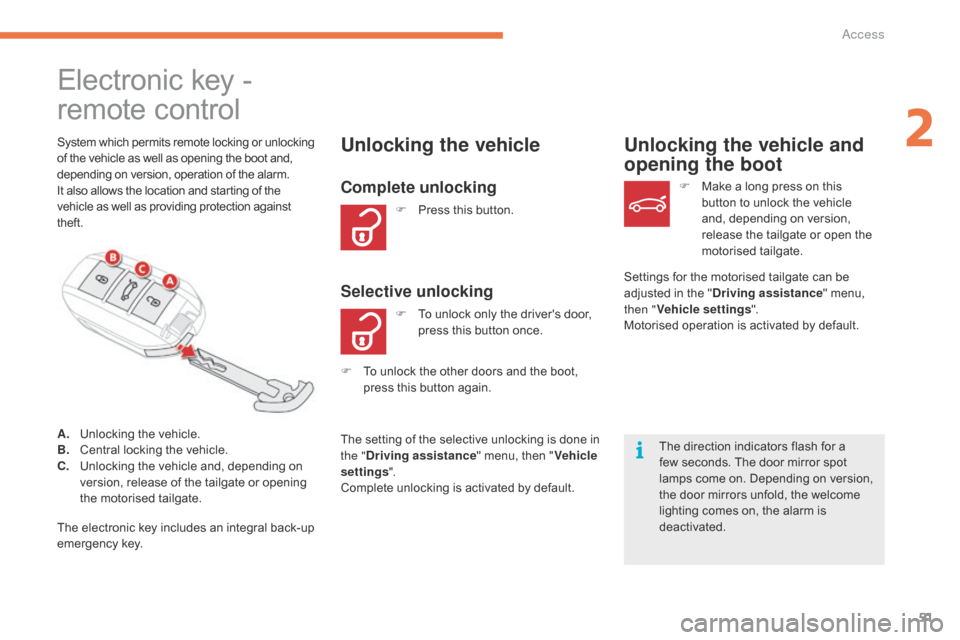
A.
U
nlocking
the
vehicle.
B.
C
entral
locking
the
vehicle.
C.
U
nlocking
the
vehicle
and,
depending
on
v
ersion,
release
of
the
tailgate
or
opening
t
he
motorised
tailgate.
The
electronic
key
includes
an
integral
back-up
em
ergency
k
ey.
2
Access
Page 54 of 420

52
F Press this button. H
olding the button allows the
w
indows to be raised to the
de
sired
p
osition.
Normal locking
If a door or the boot is not properly closed, locking does not take place.
Nevertheless,
the alarm (if fitted) will be
f
ully activated after around 45 seconds.
If
the vehicle is unlocked by mistake
a
nd no action is taken on the doors or
b
oot, the vehicle will lock itself again
a
utomatically after about thirty seconds.
If
the alarm had already been activated,
i
t will not be reactivated automatically.
The
direction
indicators
come
on
for
a
f
ew
seconds.
Depending
on
your
version,
the
door
m
irrors
fold,
the
alarm
is
activated.
Locking the vehicle
Ensure that nothing could prevent the c orrect closing of the windows.
Be
aware of children when operating
t
he
w
indows.
The
automatic folding and unfolding
o
f the door mirrors can be deactivated
b
y a CITROËN dealer or a qualified
w
orkshop.
Access
Page 56 of 420
54
System that allows the unlocking, locking and starting of the vehicle while keeping the
e
lectronic key on your person.
For
reasons of safety and theft
p
rotection, do not leave your electronic
k
ey in the vehicle, even when you are
c
lose to it.
It
is recommended that you keep it on
y
our person.
The
electronic key can also be used as
a
remote control.
For
more information, refer to the
"
Electronic key - remote control"
s
ection.
Keyless Entry and Starting
Unlocking the vehicle
Complete unlocking
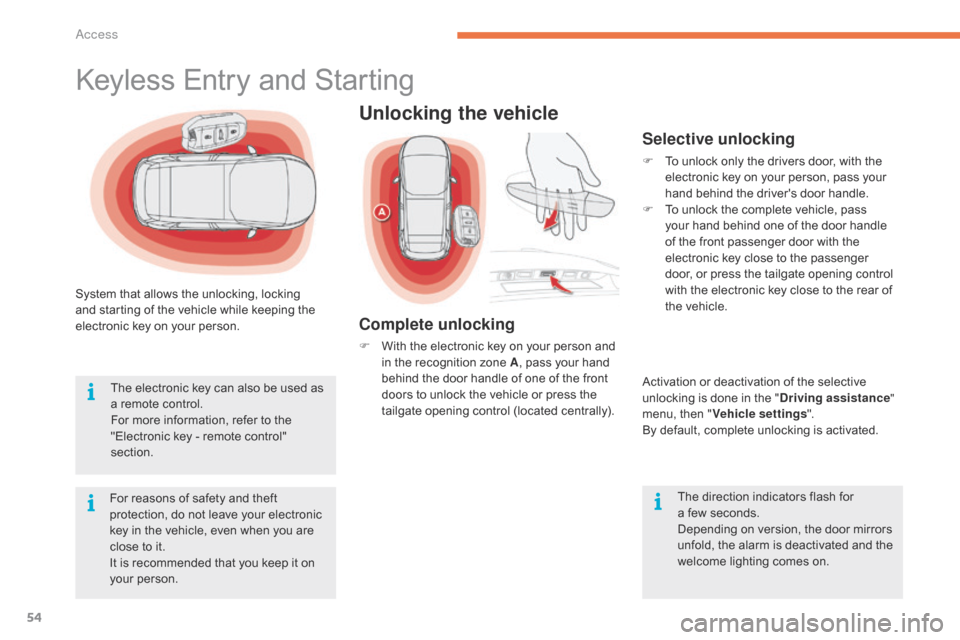
F With the electronic key on your person and i
n the recognition zone A,
pass your hand
b
ehind the door handle of one of the front
d
oors to unlock the vehicle or press the
t
ailgate opening control (located centrally).
Selective unlocking
F To unlock only the drivers door, with the e
lectronic key on your person, pass your
h
and behind the driver's door handle.
F
T
o unlock the complete vehicle, pass
y
our hand behind one of the door handle
o
f the front passenger door with the
e
lectronic key close to the passenger
d
oor, or press the tailgate opening control
w
ith the electronic key close to the rear of
t
he vehicle.
Activation
or deactivation of the selective
u
nlocking is done in the "Driving assistance "
menu,
then "Vehicle settings ".
By
default, complete unlocking is activated.
The
direction indicators flash for
a f
ew seconds.
Depending
on version, the door mirrors
u
nfold, the alarm is deactivated and the
w
elcome lighting comes on.
Access
Page 57 of 420
55
Ensure that nothing could prevent the correct operation of the windows.
Be
aware of children when operating
t
he
w
indows.
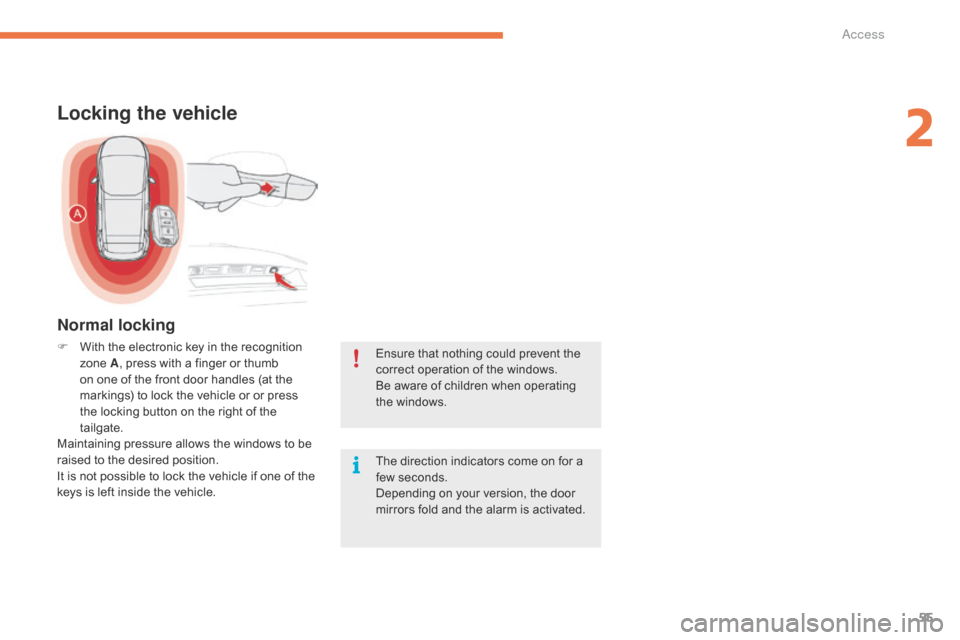
Locking the vehicle
F With the electronic key in the recognition z
one A,
press with a finger or thumb
o
n one of the front door handles (at the
m
arkings) to lock the vehicle or or press
t
he locking button on the right of the
t
ailgate.
Maintaining
pressure allows the windows to be
r
aised to the desired position.
It
is not possible to lock the vehicle if one of the
k
eys is left inside the vehicle. The
direction indicators come on for a
f
ew seconds.
Depending
on your version, the door
m
irrors fold and the alarm is activated.
Normal locking
2
Access
Page 59 of 420
57
As a safety measure (children on board), never leave the vehicle without
t
aking the key for the Keyless Entry and
S
tarting
system,
even
for
a
short
period.
Be
aware of the risk of theft when the
k
ey for the Keyless Entry and Starting
s
ystem is in one of the defined zones
w
ith the vehicle unlocked.
If
one
of
the
doors
or
the
boot
is
still
o
pen
or
if
the
electronic
key
for
the
K
eyless
Entry
and
Starting
system
has
b
een
left
inside
the
vehicle,
the
central
l
ocking
does
not
take
place.
However,
the
alarm
(if
present)
will
be
f
ully
activated
after
about
45
seconds. In
order to preserve the battery in the
e
lectronic key and the vehicle's battery,
t
he "Hands-free" functions are put into
l
ong-term standby after 21 days without
u
se. To restore these functions, press
o
ne of the remote control buttons or
s
tart the engine with the electronic key
i
n the reader (see the "Starting with
t
he Keyless Entry and Starting system"
s
ection).
If
the
vehicle
is
unlocked
by
mistake
a
nd
with
no
action
on
the
doors
or
boot,
t
he
vehicle
will
lock
again
automatically
a
fter
about
thirty
seconds.
If
the
alarm
had
been
activated
p
reviously,
it
will
not
be
reactivated
au
tomatically.
The
automatic
folding
and
unfolding
o
f
the
door
mirrors
can
be
deactivated
b
y
a
CITROËN
dealer
or
a
qualified
w
orkshop. Accumulations
(water, dust, grime,
s
alt...) on the inner sur face if the door
h
andle may affect detection.
If
cleaning the inner sur face of the door
h
andle using a cloth does not restore
d
etection, contact a CITROËN dealer or
a
qualified workshop.
A
sudden splash of water (stream of
w
ater, high pressure jet washer, …)
m
ay be identified by the system as the
d
esire to open the vehicle.
2
Ac
Page 60 of 420
58
Normal locking
F Turn the key towards the rear of the vehicle t
o lock the vehicle completely.
Deadlocking
F Turn the key towards the rear in the driver's d
oor lock to lock the vehicle completely.
F
T
urn the key towards the rear again within
f
ive seconds to deadlock the vehicle.
Depending
on your version, the
d
irection indicators flash for a
few
seconds, the door mirrors fold.
If
your vehicle has an alarm, this
f
unction is not activated by locking with
t
he integral key.
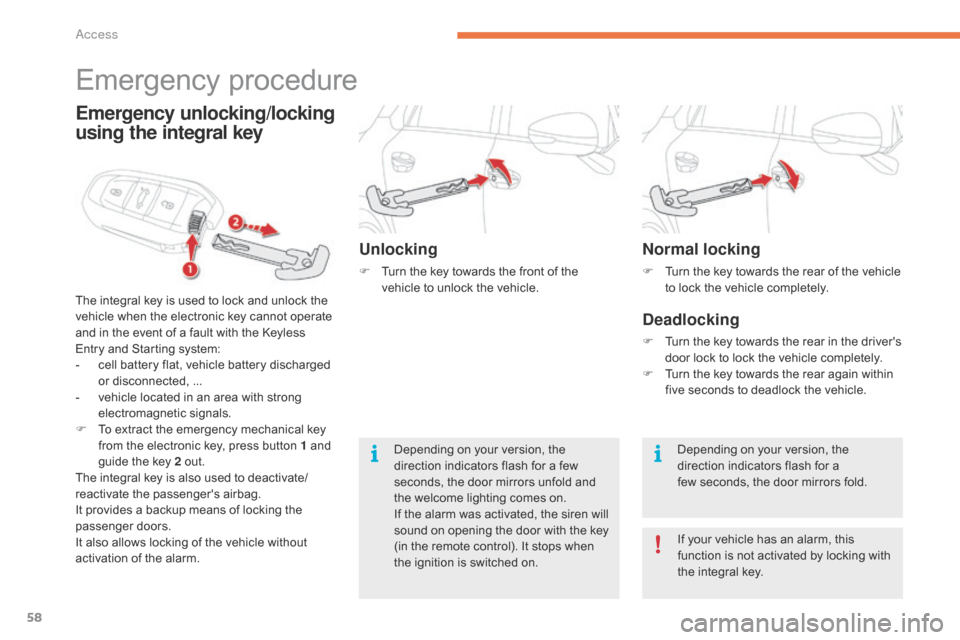
Emergency procedure
The integral key is used to lock and unlock the v
ehicle when the electronic key cannot operate
a
nd in the event of a fault with the Keyless
E
ntry and Starting system:
-
c
ell battery flat, vehicle battery discharged
o
r disconnected, ...
-
v
ehicle located in an area with strong
e
lectromagnetic
si
gnals.
F
T
o extract the emergency mechanical key
f
rom the electronic key, press button 1 and
g
uide the key 2 out.
The
integral key is also used to deactivate/
reactivate
t
he
p
assenger's
a
irbag.
It
provides a backup means of locking the
p
assenger
do
ors.
It
also allows locking of the vehicle without
a
ctivation of the alarm.
Emergency unlocking/locking
using the integral key
Unlocking
F Turn the key towards the front of the v
ehicle to unlock the vehicle.
Depending
on your version, the
d
irection indicators flash for a few
s
econds, the door mirrors unfold and
t
he welcome lighting comes on.
If
the alarm was activated, the siren will
s
ound on opening the door with the key
(
in the remote control). It stops when
t
he ignition is switched on.
Access
Page 70 of 420
68
For all work on the alarm system, contact a CITROËN dealer or a
q
ualified
w
orkshop.
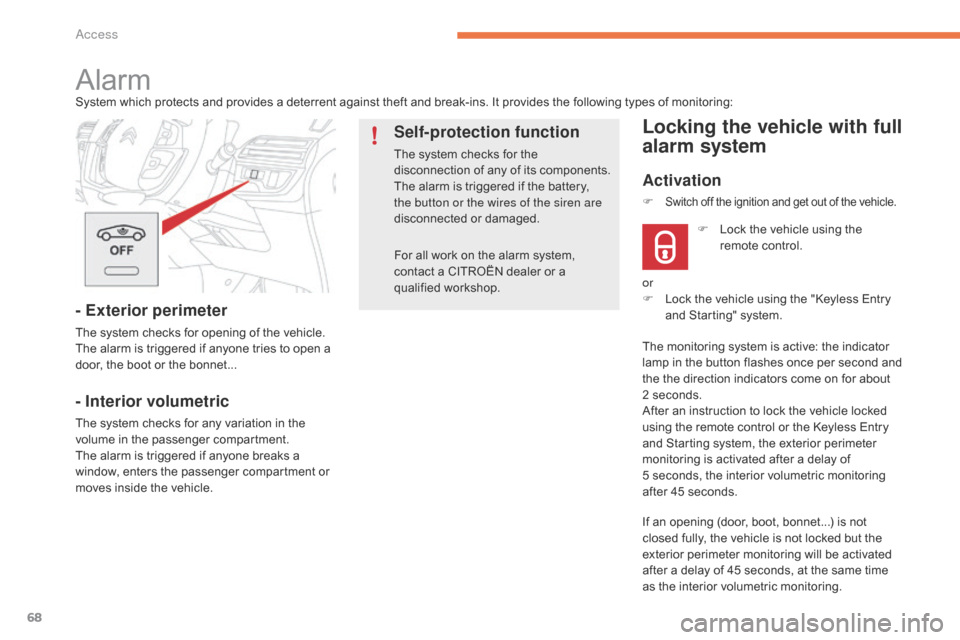
AlarmSystem which protects and provides a deterrent against theft and break-ins. It provides the following types of monitoring:
- Exterior perimeter
The system checks for opening of the vehicle.
T he alarm is triggered if anyone tries to open a
d
oor, the boot or the bonnet...
- Interior volumetric
The system checks for any variation in the volume in the passenger compartment.
The
alarm is triggered if anyone breaks a
w
indow, enters the passenger compartment or
m
oves inside the vehicle.
Self-protection function
The system checks for the disconnection of any of its components.
The
alarm is triggered if the battery,
t
he button or the wires of the siren are
disconnected
o
r
d
amaged.
Locking the vehicle with full
alarm system
Activation
If an opening (door, boot, bonnet...) is not closed fully, the vehicle is not locked but the
e
xterior perimeter monitoring will be activated
a
fter a delay of 45 seconds, at the same time
a
s the interior volumetric monitoring.
F
L
ock the vehicle using the
r
emote control.
F
Switch off the ignition and get out of the vehicle.
or
F
L ock the vehicle using the "Keyless Entry
a
nd Starting" system.
The
monitoring system is active: the indicator
l
amp in the button flashes once per second and
t
he the direction indicators come on for about
2
seconds.
After
an instruction to lock the vehicle locked
u
sing the remote control or the Keyless Entry
a
nd Starting system, the exterior perimeter
m
onitoring is activated after a delay of
5 s
econds, the interior volumetric monitoring
a
fter 45 seconds.
Access
Page 71 of 420

69
OFF
Locking the vehicle
with exterior perimeter
monitoring only
Deactivate the interior volumetric monitoring to avoid unwanted triggering of the alarm in
c
ertain cases such as:
-
l
eaving a window partially open,
-
w
ashing your vehicle,
-
c
hanging a wheel.
Deactivating the volumetric
monitoring
F Switch of the ignition and within t
en seconds press this button
u
ntil its indicator lamp is on fixed.
F
G
et
out of the vehicle.
F
I
mmediately lock the vehicle using the
r
emote control or the "Keyless Entry and
S
tarting" system.
Only
the
exterior perimeter protection system is
a
ctive:
the indicator lamp in the button flashes
o
nce
per
second.
To
be
effective, this deactivation must be done
e
very
time the ignition is switched off.
In
the
case
of
automatic
locking
of
the
v
ehicle
(which
occurs
after
a
period
of
3
0
seconds
if
a
door
or
the
boot
is
not
o
pened),
the
monitoring
system
is
not
r
eactivated
automatically.
To
reactivate
i
t,
it
is
necessary
to
unlock
the
vehicle
a
nd
lock
it
again,
using
the
remote
c
ontrol
or
the
"Keyless
Entry
and
S
tarting"
system.
Deactivation
F Press
one of the unlocking buttons on the r
emote control:
short press
long
press
or
F
U
nlock the vehicle using the "Keyless Entry
a
nd Starting" system.
The
monitoring system is deactivated: the
i
ndicator lamp in the button is off and the
d
irection indicators flash for about 2 seconds.
2
Access