phone Citroen C4 PICASSO 2015 2.G Owner's Manual
[x] Cancel search | Manufacturer: CITROEN, Model Year: 2015, Model line: C4 PICASSO, Model: Citroen C4 PICASSO 2015 2.GPages: 420, PDF Size: 10.72 MB
Page 8 of 420
6
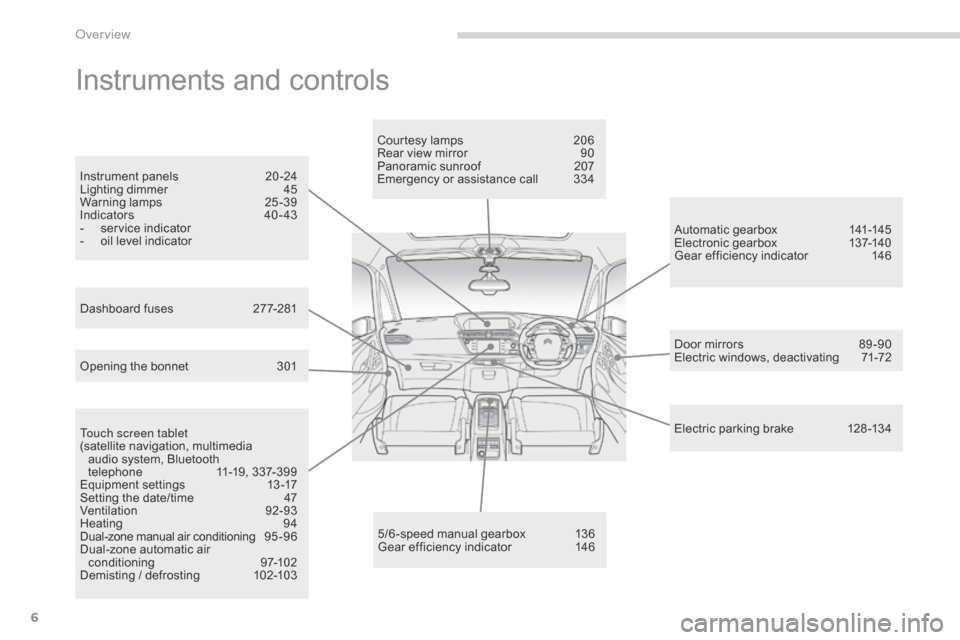
Instruments and controls
Touch screen tablet
(satellite navigation, multimedia
a
udio system, Bluetooth
t
elephone
1
1-19, 337-399
Equipment
se
ttings
1
3-17
Setting
the date/time
4
7
Ventilation
9
2-93
Heating
9
4
Dual-zone
m
anual
a
ir
c
onditioning
9
5 - 9 6
Dual-zone
automatic air
c
onditioning
9
7-102
Demisting
/ defrosting
1
02-103 Door
mirrors
8
9 -90
Electric windows, deactivating
7
1-72
5/6 -speed manual gearbox
1
36
Gear
efficiency indicator
1
46Automatic
gearbox
1
41-145
Electronic gearbox
1
37-140
Gear efficiency indicator
1
46
Opening the bonnet
3
01Courtesy lamps
2
06
Rear view mirror
9
0
Panoramic sunroof
2
07
Emergency or assistance call
3
34
Instrument panels
2
0 -24
Lighting dimmer
4
5
Warning
lam
ps
2
5-39
Indicators
4
0 - 43
-
s
ervice indicator
-
o
il level indicator
Electric parking brake 1 28 -134
Dashboard fuses
2
77-281
over view
Page 13 of 420
11
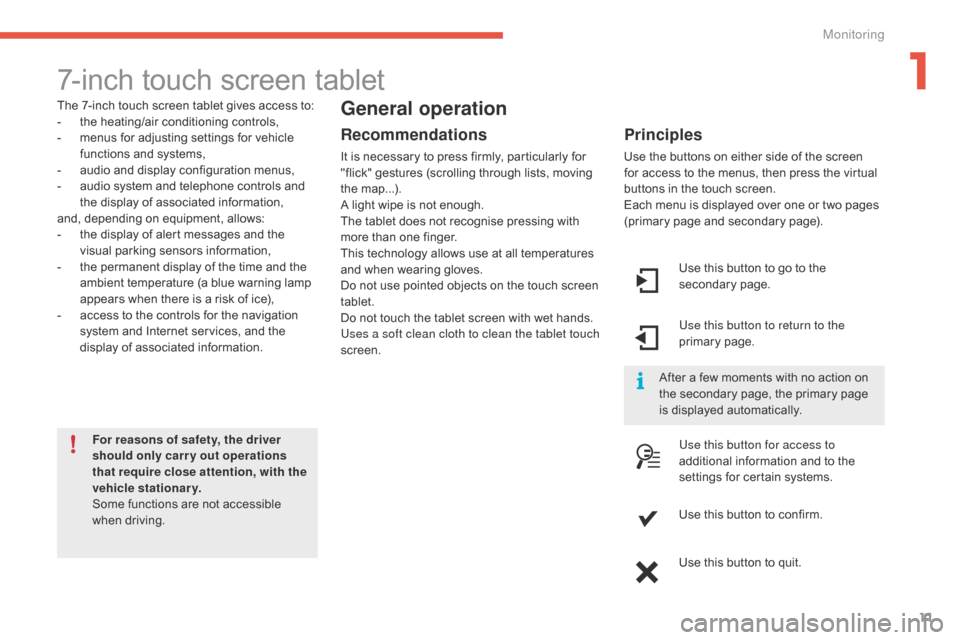
7-inch touch screen tablet
The 7-inch touch screen tablet gives access to:
- t he heating/air conditioning controls,
-
m
enus for adjusting settings for vehicle
f
unctions and systems,
-
a
udio and display configuration menus,
-
a
udio system and telephone controls and
t
he display of associated information,
and,
depending on equipment, allows:
-
t
he display of alert messages and the
v
isual
par
king
s
ensors
in
formation,
-
t
he permanent display of the time and the
a
mbient temperature (a blue warning lamp
a
ppears when there is a risk of ice),
-
a
ccess to the controls for the navigation
s
ystem and Internet services, and the
d
isplay of associated information.
For reasons of safety, the driver
should only carr y out operations
that require close attention, with the
vehicle stationary.
Some
functions are not accessible
w
hen
d
riving.General operation
Recommendations
It is necessary to press firmly, particularly for "flick" gestures (scrolling through lists, moving
t
he
m
ap...).
A
light wipe is not enough.
The
tablet does not recognise pressing with
m
ore than one finger.
This
technology allows use at all temperatures
a
nd when wearing gloves.
Do
not use pointed objects on the touch screen
t
ablet.
Do
not touch the tablet screen with wet hands.
Uses a soft clean cloth to clean the tablet touch
screen. Use
this button to go to the
s
econdary
pag
e.
Use this button to return to the
primary
pag
e.
Use this button for access to
additional
information and to the
s
ettings for certain systems.
Use
this button to confirm.
Use
this button to quit.
Principles
Use the buttons on either side of the screen for access to the menus, then press the virtual
b
uttons in the touch screen.
Each
menu is displayed over one or two pages
(
primary page and secondary page).
After
a few moments with no action on
t
he secondary page, the primary page
i
s displayed automatically.
1
Monitoring
Page 14 of 420
12
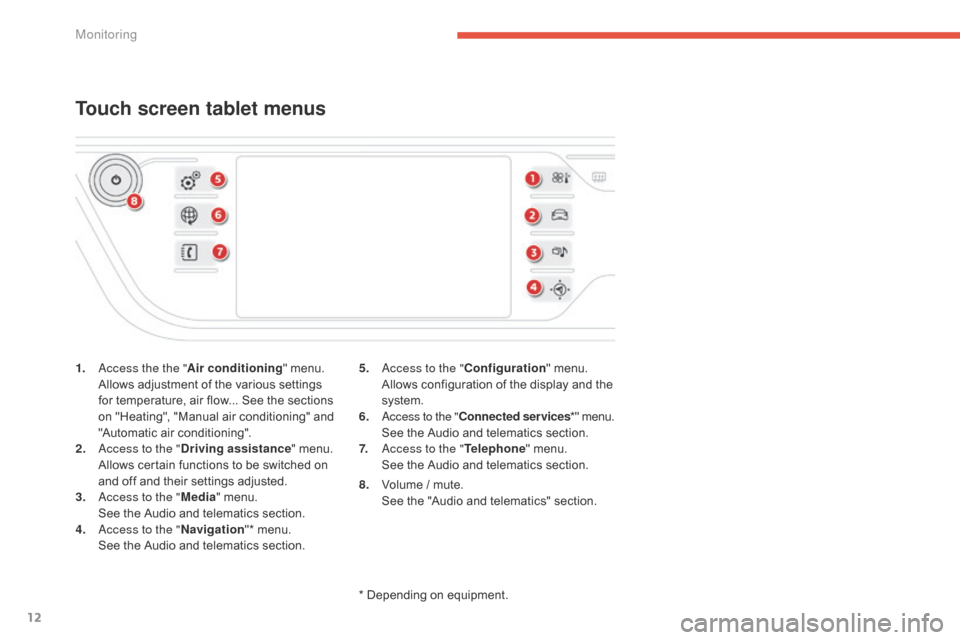
1. access the the "Air conditioning" menu. A
llows adjustment of the various settings
f
or temperature, air flow... See the sections
o
n "Heating", "Manual air conditioning" and
"
Automatic air conditioning".
2.
a
c
cess to the " Driving assistance "
menu.
A
llows certain functions to be switched on
a
nd off and their settings adjusted.
3.
a
c
cess to the " Media"
menu.
S
ee the Audio and telematics section.
4.
a
c
cess to the " Navigation"*
menu.
S
ee the Audio and telematics section.
Touch screen tablet menus
5. access to the "Configuration" menu. A
llows configuration of the display and the
s
ystem.
6.
a
c
cess to the " Connected services *"
menu.
S
ee the Audio and telematics section.
7.
a
c
cess to the " Telephone"
menu.
S
ee the Audio and telematics section.
*
Depending on equipment.
8.
V
olume / mute.
S
ee the "Audio and telematics" section.
Monitoring
Page 23 of 420
21
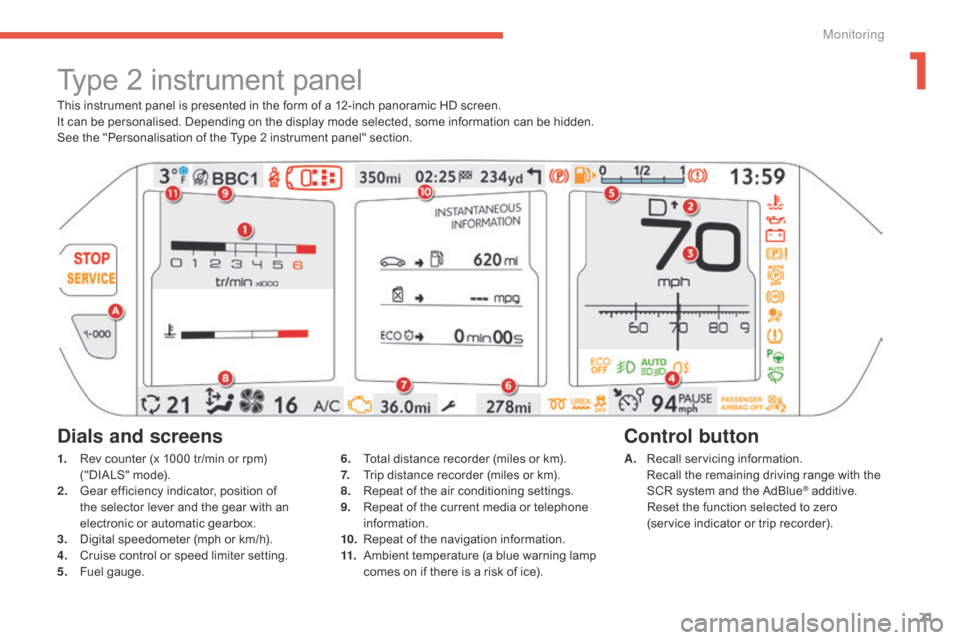
This instrument panel is presented in the form of a 12-inch panoramic HD screen.
I t can be personalised. Depending on the display mode selected, some information can be hidden.
See
the "Personalisation of the Type 2 instrument panel" section.
Type 2 instrument panel
1. Rev counter (x 1000 tr/min or rpm) (
"DIALS" mode).
2.
G
ear efficiency indicator, position of
t
he selector lever and the gear with an
e
lectronic or automatic gearbox.
3.
D
igital speedometer (mph or km/h).
4.
C
ruise control or speed limiter setting.
5.
F
uel gauge. A. R
ecall servicing information. R
ecall the remaining driving range with the
S
CR system and the AdBlue
® additive. R
eset
the
function
selected
to zero
(service
indicator
or
trip
recorder).
Control button
Dials and screens
6. Total distance recorder (miles or km).
7. T rip distance recorder (miles or km).
8.
R
epeat of the air conditioning settings.
9.
R
epeat of the current media or telephone
i
nformation.
10.
R
epeat of the navigation information.
11.
A
mbient temperature (a blue warning lamp
c
omes on if there is a risk of ice).
1
Monitoring
Page 62 of 420
60
Lost electronic key
Visit a CITROËN dealer with the vehicle's registration certificate, your personal identification documents and if possible the key code label.
T he CITROËN dealer will be able to retrieve the key code and the transponder code required to order a new key.
Electronic key
The electronic key is a sensitive system; do not operate it while it is in your pocket as there is a possibility that it may unlock the vehicle, without you being aware of it.
Do
not repeatedly press the buttons of your electronic key out of range and out of sight of your vehicle. You run the risk of stopping it from
w
orking and the remote control would have to be reinitialised.
The
electronic key cannot operate as a remote control when it is in the reader or even when the ignition is switched on.
Locking the vehicle
Driving with the doors locked may make access to the passenger compartment by the emergency services more difficult in an emergency.
A s a safety precaution (with children on board), take the electronic key with you when you leave the vehicle, even for a short time.
Electrical interference
The electronic key may not operate if close to certain electronic devices: telephone, laptop computer, strong magnetic fields, ...
Anti-theft protection
Do not make any modifications to the electronic engine immobiliser system; this could cause malfunctions.
When purchasing a second-hand vehicle
Have all of the keys in your possession paired by a CITROËN dealer, to ensure that only your keys allow your vehicle to be unlocked and started.
Access
Page 289 of 420
287
Exiting economy mode
These functions are reactivated automatically next time the vehicle is driven.
F
I
n order to restore the use of these
f
unctions immediately, start the engine and
l
et it run:
-
f
or less than ten minutes, to use
t
he equipment for approximately
f
ive minutes,
-
f
or more than ten minutes, to use the
e
quipment for up to approximately
t
hirty
m
inutes.
Let
the engine run for the duration specified to
e
nsure that the battery charge is sufficient.
Do
not repeatedly and continuously restart the
e
ngine in order to charge the battery.
A
flat battery prevents the engine from starting
(
refer to the "Battery" section).
Load reduction mode
System which manages the use of certain functions according to the level of charge
r
emaining in the battery.
When
the vehicle is being driven, the load
r
eduction function temporarily deactivates
c
ertain functions, such as the air conditioning,
t
he heated rear screen...
The
deactivated functions are reactivated
a
utomatically as soon as conditions permit.
Energy economy mode
Switching to economy mode
A message then appears in the instrument p
anel screen indicating that the vehicle has
s
witched to economy mode and the active
f
unctions are put on standby.
If
a telephone call is being made at this time,
i
t will be maintained for around 10 minutes
w
ith the Bluetooth hands-free system of your
a
udio system.
System
which manages the duration of use of
c
ertain functions to conserve a sufficient level
of charge in the battery.
After the engine has stopped, you can
s
till use functions such as the audio and
t
elematics system, windscreen wipers, dipped
b
eam headlamps, courtesy lamps, etc. for
a
maximum combined duration of about
f
orty
m
inutes.
7
Practical information
Page 301 of 420
299
The fitting of electrical equipment or accessories which are not
recommended
by CITROËN may result
i
n a failure of your vehicle's electronic
s
ystem and excessive electrical
c
onsumption.
Contact
a CITROËN dealer
f
or information on the range of
r
ecommended equipment and
a
ccessories.
Installation of radio
communication transmitters
Before installing any after-market radio communication transmitter, you can
c
ontact a CITROËN dealer for the
s
pecification of transmitters which can
b
e fitted (frequency, maximum power,
a
erial position, specific installation
requirements),
in line with the Vehicle
E
lectromagnetic
C
ompatibility
D
irective (2004/104/EC). Depending
on the legislation in force in
t
he country, certain safety equipment m
ay be compulsory: high visibility s
afety vests, warning triangles,
b
reathalyzers,
spar
e
bu
lbs,
spar
e
f
uses,
f
ire extinguisher, first aid kit, mud flaps
a
t the rear of the vehicle.
"Multimedia"
Speakers, Hi-Fi module, head-up display screen, portable satellite navigation system, driving a
ssistance systems, reversing camera, portable
v
ideo screen, portable video carrier, telephone
c
arrier, two-screen video pack, portable
v
ideo player, CD player, 230 V/50 Hz socket,
2
30 V/12 V adaptor, iPhone/iPad charger...
By
visiting a CITROËN dealer you can also
o
btain cleaning and maintenance products
(
interior and exterior) - including ecological
p
roducts in the "TECHNATURE" range,
p
roducts for topping up (screenwash...), paint
t
ouch-up pens and aerosols for the exact
c
olour of your vehicle, refills (sealant cartridge
f
or the temporary puncture repair kit...), ...
7
Practical information
Page 339 of 420
337
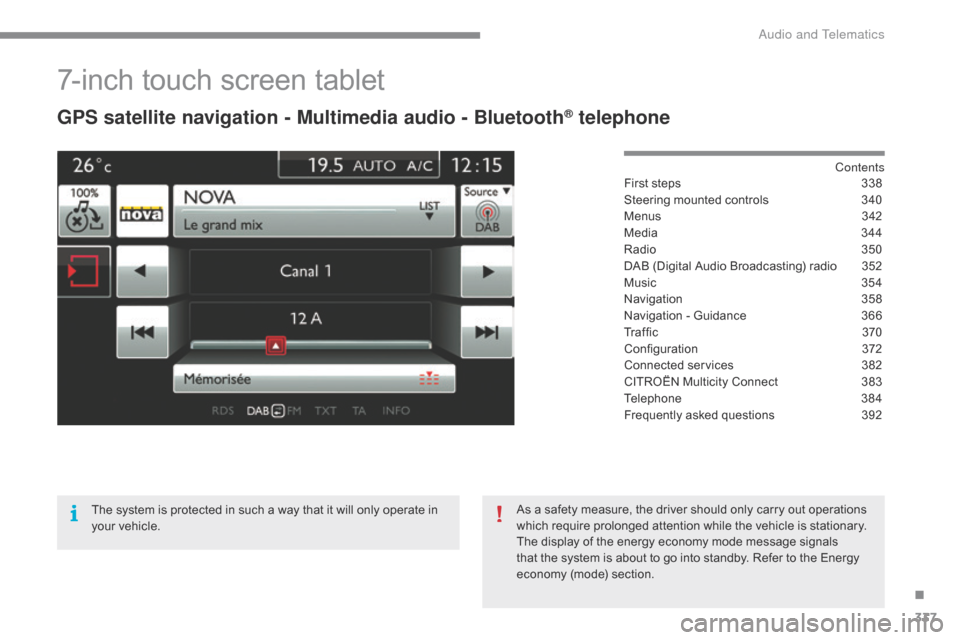
7-inch touch screen tablet
GPS satellite navigation - Multimedia audio - Bluetooth® telephone
Contents
First
steps
3 38
Steering
mounted
controls
3
40
Menus
3
42
Media
3
44
Radio
3
50
DAB
(Digital
Audio
Broadcasting)
radio
3
52
Music
3
54
Navigation
3
58
Navigation
-
Guidance
3
66
Tr a f fi c
3
7 0
Configuration
3
72
Connected
services
3
82
CITROËN
Multicity
Connect
3
83
Telephone
3
84
Frequently
asked
questions
3
92
The
system
is
protected
in
such
a
way
that
it
will
only
operate
in
y
our
vehicle. As
a
safety
measure,
the
driver
should
only
carry
out
operations
w
hich
require
prolonged
attention
while
the
vehicle
is
stationary.
The
display
of
the
energy
economy
mode
message
signals
t
hat
the
system
is
about
to
go
into
standby.
Refer
to
the
Energy
ec
onomy
(
mode)
s
ection.
.
Audio and Telematics
Page 341 of 420
339
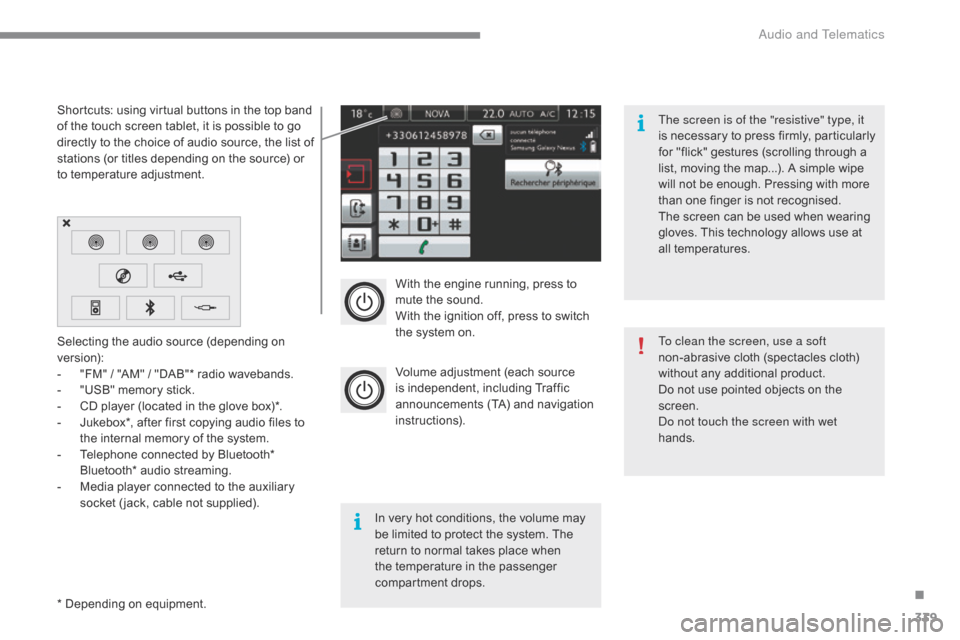
With the engine running, press to mute the sound.
With
the ignition off, press to switch
t
he system on.
Volume
adjustment (each source
i
s
i
ndependent,
i
ncluding
T
raffic
a
nnouncements (TA) and navigation
i
nstructions).
Selecting
the
audio
source
(depending
on
ve
rsion):
-
"
FM"
/
"AM"
/
"DAB"*
radio
wavebands.
-
"
USB"
memory
stick.
-
C
D
player
(located
in
the
glove
box)*.
-
J
ukebox*,
after
first
copying
audio
files
to
t
he
internal
memory
of
the
system.
-
T
elephone
connected
by
Bluetooth*
B
luetooth*
audio
streaming.
-
M
edia
player
connected
to
the
auxiliary
s
ocket
( jack,
cable
not
supplied).
*
Depending
on
equipment.
Shortcuts:
using
virtual
buttons
in
the
top
band
o
f
the
touch
screen
tablet,
it
is
possible
to
go
d
irectly
to
the
choice
of
audio
source,
the
list
of
s
tations
(or
titles
depending
on
the
source)
or
t
o
temperature
adjustment.
The screen is of the "resistive" type, it
is
n
ecessary
t
o
p
ress
f
irmly,
p
articularly
f
or "flick" gestures (scrolling through a
l
ist, moving the map...). A simple wipe
w
ill not be enough. Pressing with more
t
han one finger is not recognised.
The screen can be used when wearing
g
loves. This technology allows use at
a
ll
t
emperatures.
In
very hot conditions, the volume may
b
e
limited to protect the system. The
r
eturn to normal takes place when
t
he
temperature in the passenger
c
ompartment drops. To clean the screen, use a soft
non-abrasive
cloth (spectacles cloth)
w
ithout any additional product.
Do
not use pointed objects on the
sc
reen.
do n
ot touch the screen with wet
hands.
.
audio and Telematics
Page 342 of 420
340
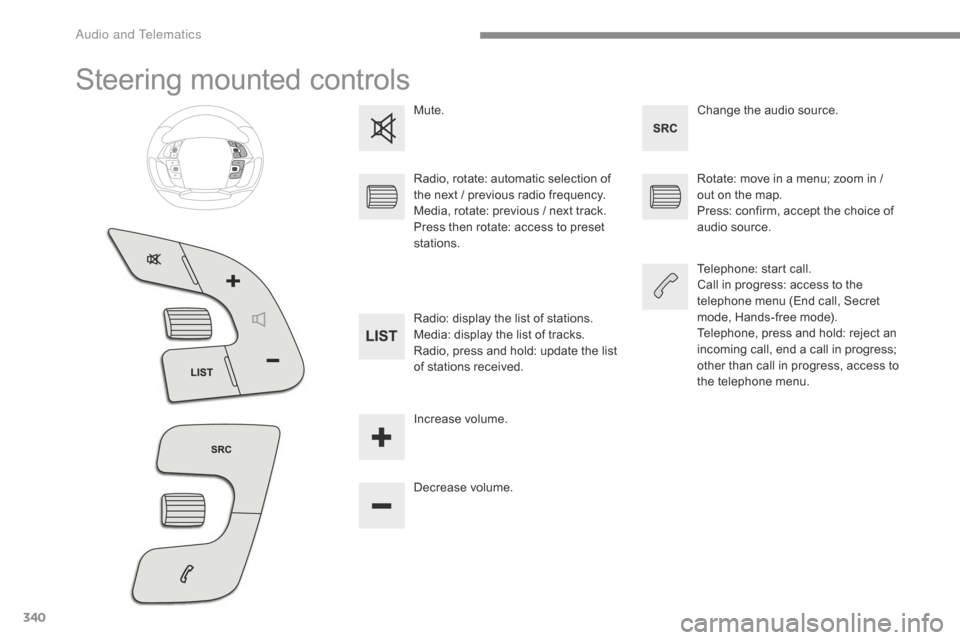
Steering mounted controls
Change the audio source.
M
ute.
Decrease
volume.
Radio,
rotate:
automatic
selection
of
t
he
next
/
p
revious
radio
frequency.
Media,
rotate:
previous
/
next
track.
Press
then
rotate:
access
to
preset
s
tations. Rotate:
move in a menu; zoom in /
o
ut on the map.
Press:
confirm, accept the choice of
a
udio source.
Telephone:
start call.
Call
in progress: access to the
t
elephone menu (End call, Secret
m
ode, Hands-free mode).
Telephone,
press and hold: reject an
i
ncoming call, end a call in progress;
o
ther than call in progress, access to
t
he telephone menu.
Radio:
display
the
list
of
stations.
Media:
display
the
list
of
tracks.
Radio,
press
and
hold:
update
the
list
o
f
stations
received.
Increase
volume.
A