Multimedia Citroen C4 PICASSO 2016 2.G Owner's Manual
[x] Cancel search | Manufacturer: CITROEN, Model Year: 2016, Model line: C4 PICASSO, Model: Citroen C4 PICASSO 2016 2.GPages: 527, PDF Size: 13.72 MB
Page 4 of 527
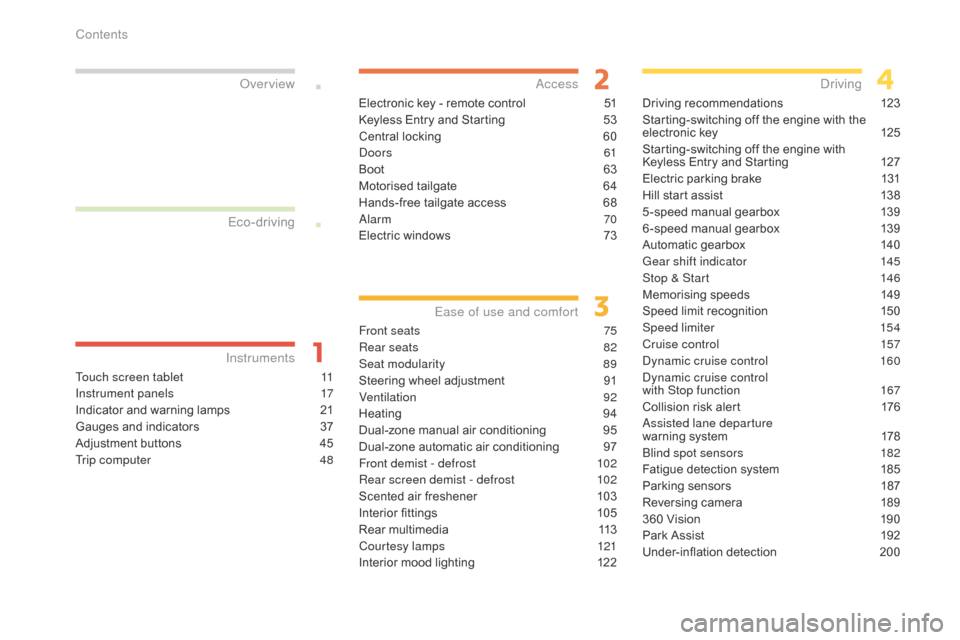
C4-Picasso-II_en_Chap00a_sommaire_ed01-2016
Touch screen tablet 11
Instrument panels
1
7
Indicator
and warning lamps
2
1
Gauges
and indicators
3
7
Adjustment
buttons
4
5
Trip computer
4
8
InstrumentsOver view
Electronic key - remote control 5
1
Keyless Entry and Starting
5
3
Central
locking
6
0
Doors
61
Boot
6
3
Motorised
tailgate
6
4
Hands-free
tailgate access
6
8
Alarm
70
Electric
windows
7
3
Access
Front seats 75
Rear seats
8
2
Seat modularity
8
9
Steering
wheel adjustment
9
1
Ventilation
92
Heating
9
4
Dual-zone
m
anual
a
ir
c
onditioning
9
5
Dual-zone
automatic air conditioning
9
7
Front demist - defrost
1
02
Rear screen demist - defrost
1
02
Scented
air freshener
1
03
Interior
fittings
1
05
Rear
multimedia
1
13
Courtesy lamps
1
21
Interior
mood lighting
1
22
Ease of use and comfort
Driving recommendations 1 23
Starting-switching off the engine with the
e
lectronic key
1
25
Starting-switching
off the engine with
K
eyless Entry and Starting
1
27
Electric
parking brake
1
31
Hill
start assist
1
38
5 -speed
manual gearbox
1
39
6 -speed
manual gearbox
1
39
Automatic
gearbox
1
40
Gear shift indicator
1
45
Stop & Start
1
46
Memorising
speeds
1
49
Speed
limit recognition
1
50
Speed limiter
1
54
Cruise control
1
57
Dynamic cruise control
1
60
Dynamic cruise control
with Stop function
1
67
Collision
risk alert
1
76
Assisted lane departure
warning
system
1
78
Blind spot sensors
1
82
Fatigue
detection system
1
85
Parking
sensors
1
87
Reversing
camera
1
89
360
Vision
1
90
Park
Assist
1
92
Under-inflation
d
etection
20
0
Driving
Eco-driving
Contents
Page 7 of 527
5
C4-Picasso-II_en_Chap00b_vue-ensemble_ed01-2016
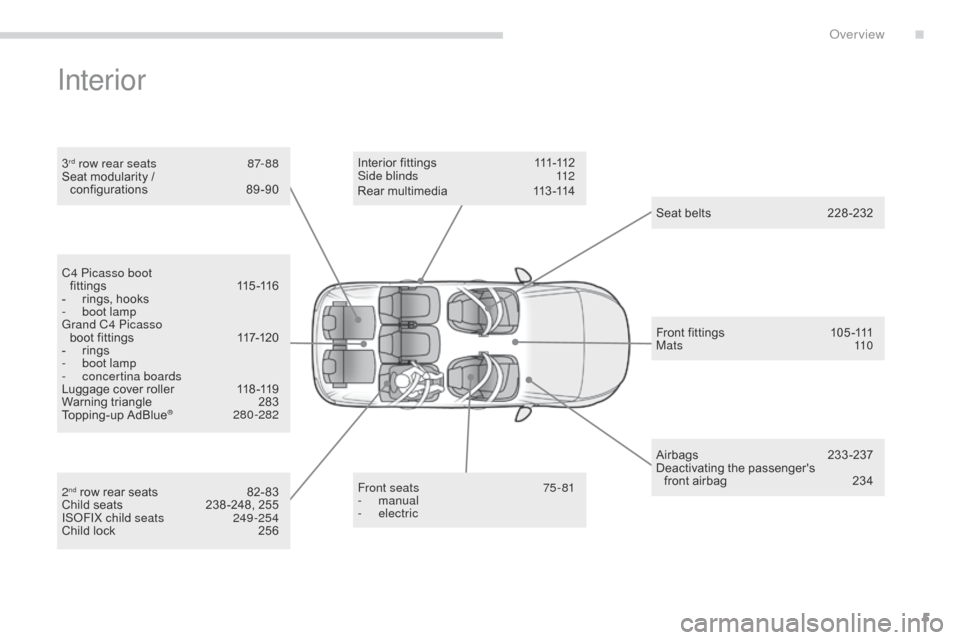
Interior
3rd row rear seats 87- 88
Seat modularity /
configurations
8
9-90
Front seats
7
5 - 81
-
manual
-
electric
I n t e r i o r f
i t t i n g s 111 -112
Side blinds 1 12
Seat
bel
ts
2
28-232
Airbags
2
33-237
Deactivating
t
he
p
assenger's
f
ront airbag
2
34
Front
fittings
1
05 -111
M a t s
11 0
C4 Picasso boot
f i t t i n g s
11
5 -11 6
-
r
ings, hooks
-
b
oot lamp
Grand C4 Picasso boot
fittings
1
17-120
-
r
ings
-
b
oot lamp
-
c
oncertina boards
Luggage
cover roller
1
18 -119
Warning
triangle
2
83
Topping-up
AdBlue
® 28 0-282
2
nd row rear seats 8 2- 83
Child seats 2 38 -248, 255
ISOFIX child seats
2
49 -254
Child
lock
2
56Rear
multimedia
1
13 -114
.
Over view
Page 8 of 527
6
C4-Picasso-II_en_Chap00b_vue-ensemble_ed01-2016
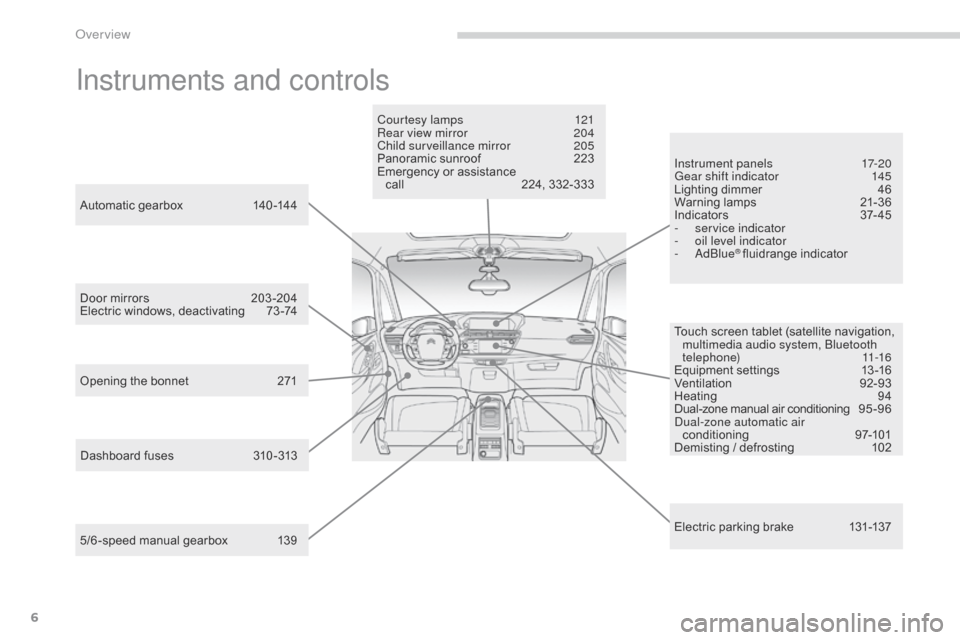
Instruments and controls
Touch screen tablet (satellite navigation, multimedia audio system, Bluetooth
telephone)
11-16
Equipment
se
ttings
1
3-16
Ventilation
9
2-93
Heating
9
4
Dual-zone
m
anual
a
ir
c
onditioning
9
5 - 9 6
Dual-zone automatic air conditioning
9
7-101
Demisting
/ defrosting
1
02
Door
mirrors
2
03 -204
Electric
windows,
deactivating
7
3 -74
5/6 -speed
manual
gearbox
1
39
Automatic
gearbox
1
40 -144
Opening
the
bonnet
2
71 Courtesy lamps
1
21
Rear view mirror
2
04
Child surveillance mirror
2
05
Panoramic
sunroof
2
23
Emergency
or
assistance
c
all
2
24,
332-333
Instrument panels
1
7-20
Gear shift indicator
1
45
Lighting dimmer
4
6
Warning
lam
ps
2
1-36
I n di c ato r s
3
7- 4 5
-
ser
vice indicator
-
o
il level indicator
-
AdBlue
® fluidrange indicator
E
lectric
parking brake
1
31-137
Dashboard
fuses
3
10 -313
Over view
Page 11 of 527
9
C4-Picasso-II_en_Chap00c_eco-conduite_ed01-2016
Optimise the use of your gearbox
With a manual gearbox, move off gently and change up without waiting. During acceleration change up early.
With
an automatic gearbox, give preference to automatic mode and
a
void pressing the accelerator pedal heavily or suddenly.
Control the use of your electrical
equipment
Before moving off, if the passenger compartment is too warm, ventilate it by opening the windows and air vents before using the air
c
onditioning.
Above
30 mph (50 km/h), close the windows and leave the air vents
ope
n.
Remember
to make use of equipment that can help keep the temperature
i
n the passenger compartment down (sunroof and window blinds...).
Switch
off the air conditioning, unless it has automatic regulation, as
s
oon as the desired temperature is attained.
Switch
off the demisting and defrosting controls, if not automatic.
Switch
off the heated seat as soon as possible.
Switch
off the headlamps and front foglamps when the ambient light
l
evel does not require their use.
Avoid
running the engine before moving off, particularly in winter; your
v
ehicle will warm up much faster while driving.
As
a passenger, if you avoid connecting your multimedia devices
(
film, music, video game...), you will contribute towards limiting the
c
onsumption of electrical energy, and so of fuel.
Disconnect
your portable devices before leaving the vehicle.
Eco-driving
Eco-driving is a range of everyday practices that allow the motorist to optimise their fuel consumption and CO2 emissions.
Drive smoothly
Maintain a safe distance between vehicles, use engine braking rather than the brake pedal, and press the accelerator progressively. These
p
ractices contribute towards a reduction in fuel consumption and CO
2
emissions
and
also
helps
reduce
the
background
traffic
noise.
If
your
vehicle
has
cruise
control,
make
use
of
the
system
at
speeds
a
bove
25
mph
(40
km/h)
when
the
traffic
is
flowing
well.
The
gear
shift
indicator
invites
you
engage
the
most
suitable
gear:
as
s
oon as the indication is displayed in the instrument panel, follow it
straight
away.
For
vehicles
fitted
with
an
automatic
gearbox,
this
indicator
appears
o
nly
in
manual
mode.
.
Eco-driving
Page 110 of 527
108
C4-Picasso-II_en_Chap03_ergonomie-confort_ed01-2016
Central storage compartment
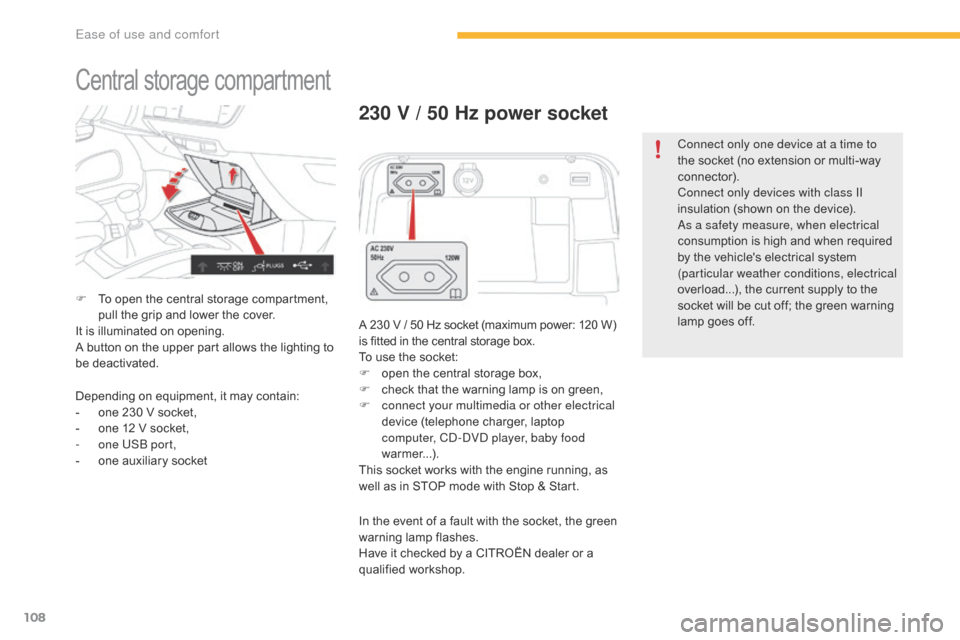
F To open the central storage compartment, p
ull the grip and lower the cover.
It
is illuminated on opening.
A
button on the upper part allows the lighting to
b
e deactivated.
230 V / 50 Hz power socket
A 230 V / 50 Hz socket (maximum power: 120 W) is fitted in the central storage box.
To
use the socket:
F
o
pen the central storage box,
F
c
heck that the warning lamp is on green,
F
c
onnect your multimedia or other electrical
device
(telephone charger, laptop
c
omputer, CD-DVD player, baby food
warmer...).
This
socket works with the engine running, as
w
ell as in STOP mode with Stop & Start.
Depending
on
equipment,
it
may
contain:
-
o
ne
230
V
socket,
-
o
ne
12
V
socket,
-
o
ne USB port,
-
o
ne
auxiliary
socket In
the event of a fault with the socket, the green
w
arning
lam
p
f
lashes.
Have
it checked by a CITROËN dealer or a
q
ualified
w
orkshop. Connect only one device at a time to
the
socket (no extension or multi-way
c
onnector).
Connect only devices with class II
insulation (shown on the device).
As a safety measure, when electrical
consumption is high and when required
b
y the vehicle's electrical system
(
particular weather conditions, electrical
overload...), the current supply to the
s
ocket will be cut off; the green warning l
amp goes off.
Ease of use and comfort
Page 115 of 527
113
C4-Picasso-II_en_Chap03_ergonomie-confort_ed01-2016
Rear multimedia
This multimedia system allows rear passengers to connect one or two external portable
s
ystems (audio or video player, games
c
onsoles, DVD player...). The sound is played
t
hrough two Bluetooth
® wireless headphone
sets, while the video content is displayed in
two 7-inch
screens
built into the backs of the
f
ront
seat
head
restraints.
Description
This system operates only with the
engine r unning. The
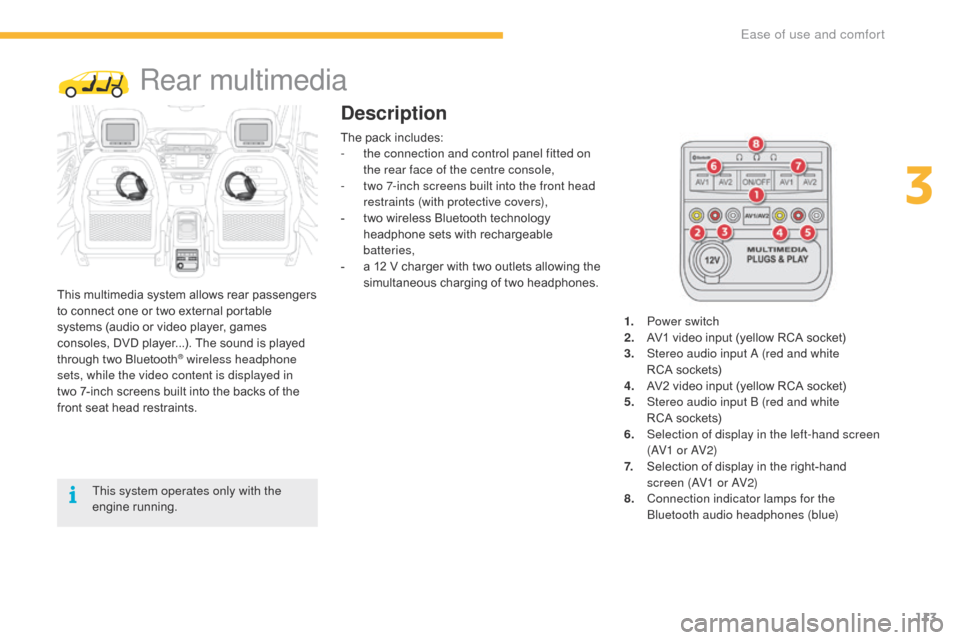
pack includes:
-
t
he connection and control panel fitted on
the rear face of the centre console,
-
t
wo 7-inch screens built into the front head
restraints (with protective covers),
-
t
wo wireless Bluetooth technology
h
eadphone sets with rechargeable
b
atteries,
-
a
12 V charger with two outlets allowing the
s
imultaneous charging of two headphones.
1.
P
ower switch
2.
A
V1 video input (yellow RCA socket)
3.
S
tereo audio input A (red and white
RCA sockets)
4.
A
V2 video input (yellow RCA socket)
5.
S
tereo audio input B (red and white
RCA sockets)
6.
S
election of display in the left-hand screen
(AV1 o r AV2)
7.
S
election of display in the right-hand s
creen (AV1 or AV2)
8. C onnection indicator lamps for the
Bluetooth audio headphones (blue)
3
Ease of use and comfort
Page 116 of 527

114
C4-Picasso-II_en_Chap03_ergonomie-confort_ed01-2016
1. Screen power switch
2. Display a djustment bu ttons
Each headphone set has a switch,
a connection indicator lamp (blue)
and
a channel selector (A or B).F
W ith the engine running, connect your
p
ortable system to the RCA connectors
(e.g.
with AV1 on the left).
F
P
ress the switch on the control panel, the
indicator lamp comes on and
the
AV1 indicator lamps come on.
F
M
ake a long press on the switch, its
i
ndicator lamp flashes in blue.
F
M
ake a long press on the control panel
s
witch, the pairing with the headphone set
i
s complete when the blue indicator lamps
on the headphones and on the system are
on
continuously.
F
R
epeat the operation for the other
headphone
se
t.
F
P
ress the screen switch if you have a video
source.
F
S
tart playing your portable system.
Operation
The Multimedia system allows the
connection of a third Bluetooth
headphone set, not supplied.
If your seat is in the table position,
position
a cover to avoid damaging the
sc
reen.
These covers also conceal each
screen.
F
I
t is possible at any time to modify the
source for the video display (using button 6
or 7 on the control panel: the indicator lamp
f
or the source selected comes on) as well
as the audio channel (using the selector on
t
he
hea
dphones).
Ease of use and comfort
Page 269 of 527
267
C4-Picasso-II_en_Chap07_info-pratiques_ed01-2016
The fitting of electrical equipment or accessories which are not
recommended by CITROËN may result
in
a failure of your vehicle's electronic
s
ystem and excessive electrical
c
onsumption.
Contact a CITROËN dealer
for
information on the range of
r
ecommended equipment and
accessories.
Installation of radio
communication
transmitters
Before installing any after-market radio c ommunication transmitter, you can
contact a CITROËN dealer for the
specification of transmitters which can
be
fitted (frequency, maximum power,
a
erial position, specific installation
requirements), in line with the Vehicle
Electromagnetic
C
ompatibility
D
irective (2004/104/EC). Depending
on the legislation in force in
t
he country, certain safety equipment
may be compulsory: high visibility s
afety vests, warning triangles, b
reathalyzers, spare bulbs, spare fuses,
fire
extinguisher, first aid kit, mud flaps
a
t the rear of the vehicle.
"Multimedia"
Portable satellite navigation system, driving assistance systems, reversing camera,
p
ortable video screen, portable video carrier,
smartphone carrier, Bluetooth
® hands-free kit, t
wo-screen
video
pack,
portable video player,
C
D
player,
230
V/50
Hz
socket, 230 V/12 V
a
daptor,
iPhone/iPad
charger...
By
visiting
a
CITROËN
dealer
you can also
o
btain
cleaning
and
maintenance products
(
interior
and
exterior)
-
including ecological
p
roducts
in
the
"TECHNATURE" range,
p
roducts
for
topping-up
(screenwash...), paint
t
ouch-up
pens
and
aerosols
for the exact
c
olour
of
your
vehicle,
refills
(sealant cartridge
f
or
the
temporary
puncture
repair kit...), ...
7
Practical information
Page 314 of 527
312
C4-Picasso-II_en_Chap08_en-cas-panne_ed01-2016
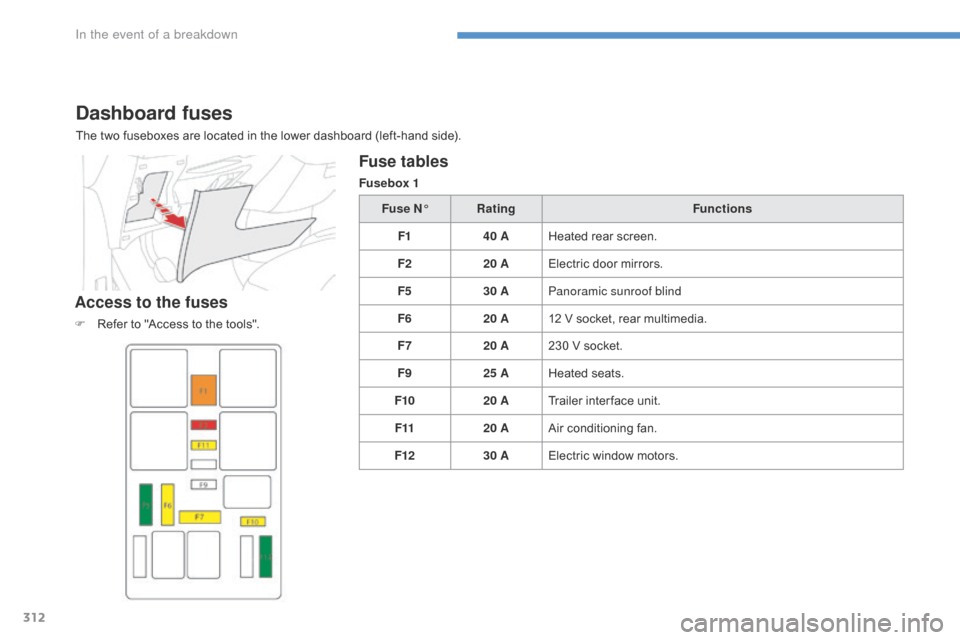
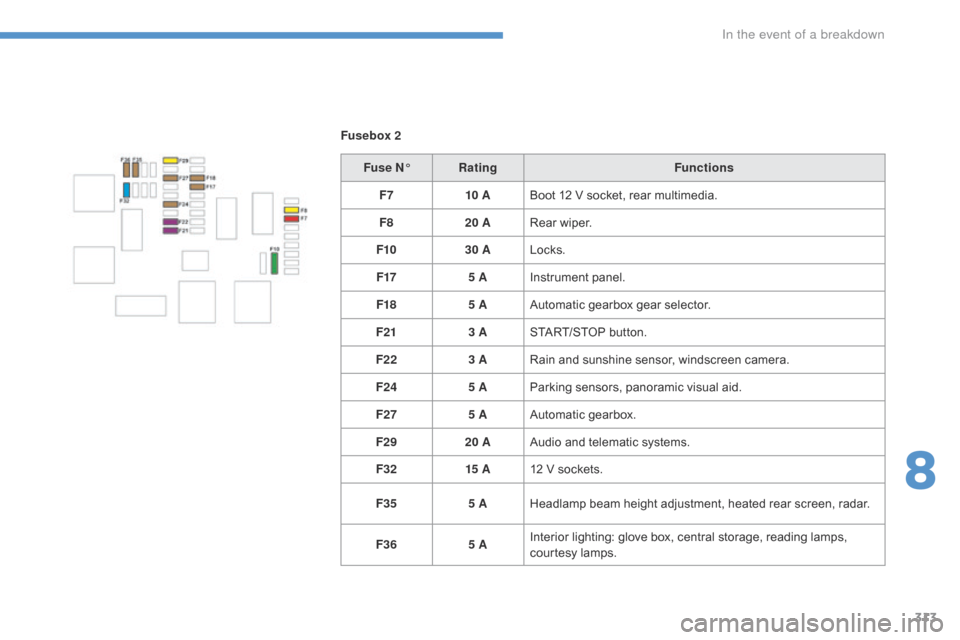
Dashboard fuses
The two fuseboxes are located in the lower dashboard (left-hand side).
Access to the fuses
F Refer to "Access to the tools".
Fuse tables
Fusebox 1
Fuse N° Rating Functions
F1 40 AHeated
rear screen.
F2 20 AElectric
door mirrors.
F5 30 APanoramic sunroof blind
F6 20 A12 V
socket, rear multimedia.
F7 20 A230
V socket.
F9 25 AHeated
s
eats.
F10 20 ATrailer
inter face unit.
F11 20 AAir
conditioning fan.
F12 30 AElectric
window motors.
In the event of a breakdown
Page 315 of 527
313
C4-Picasso-II_en_Chap08_en-cas-panne_ed01-2016
Fusebox 2Fuse N° Rating Functions
F7 10 ABoot
12 V socket, rear multimedia.
F8 20 ARear
wiper.
F10 30 ALocks.
F17 5 AInstrument
panel.
F18 5 AAutomatic
gearbox gear selector.
F21 3 ASTART/STOP
button.
F22 3 ARain
and sunshine sensor, windscreen camera.
F24 5 AParking
sensors, panoramic visual aid.
F27 5 AAutomatic
gearbox.
F29 20 AAudio
and telematic systems.
F32 15 A12
V sockets.
F35 5 AHeadlamp
beam height adjustment, heated rear screen, radar.
F36 5 AInterior
lighting: glove box, central storage, reading lamps,
c
ourtesy lamps.
8
In the event of a breakdown