light CITROEN C4 PICASSO 2017 User Guide
[x] Cancel search | Manufacturer: CITROEN, Model Year: 2017, Model line: C4 PICASSO, Model: CITROEN C4 PICASSO 2017Pages: 316, PDF Size: 10.36 MB
Page 29 of 316
27
You can access the ser vice information at any
time.
F
P
ress the trip distance recorder reset
button.
The ser vice information is displayed for
a
few seconds, then disappears.
Engine coolant temperature
gauge
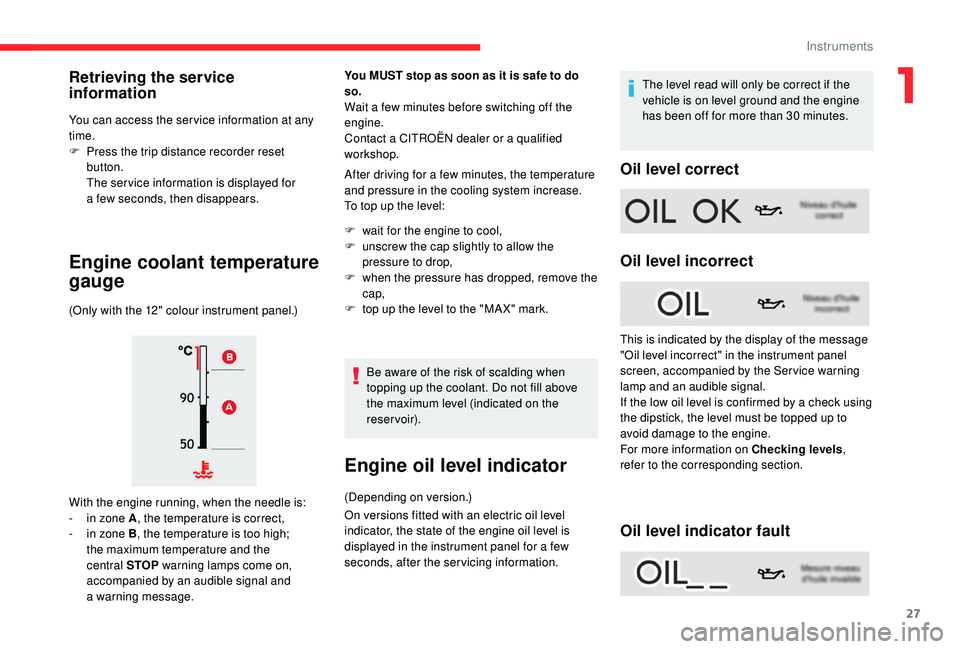
(Only with the 12" colour instrument panel.)
With the engine running, when the needle is:
-
i
n zone A , the temperature is correct,
-
i
n zone B , the temperature is too high;
the maximum temperature and the
central STOP warning lamps come on,
accompanied by an audible signal and
a
warning message.
You MUST stop as soon as it is safe to do
so.
Wait a few minutes before switching off the
e ngine.
Contact a
CITROËN dealer or a qualified
workshop.
After driving for a
few minutes, the temperature
and pressure in the cooling system increase.
To top up the level:
F
w
ait for the engine to cool,
F
u
nscrew the cap slightly to allow the
pressure to drop,
F
w
hen the pressure has dropped, remove the
cap,
F
t
op up the level to the "MA X" mark.Be aware of the risk of scalding when
topping up the coolant. Do not fill above
the maximum level (indicated on the
reservoir).
Engine oil level indicator
(Depending on version.)
On versions fitted with an electric oil level
indicator, the state of the engine oil level is
displayed in the instrument panel for a few
seconds, after the servicing information. The level read will only be correct if the
vehicle is on level ground and the engine
has been off for more than 30
minutes.
Oil level correct
Oil level incorrect
Oil level indicator fault
Retrieving the service
information
This is indicated by the display of the message
"Oil level incorrect" in the instrument panel
screen, accompanied by the Ser vice warning
lamp and an audible signal.
If the low oil level is confirmed by a
check using
the dipstick, the level must be topped up to
avoid damage to the engine.
For more information on Checking levels ,
refer to the corresponding section.
1
Instruments
Page 30 of 316
28
This is signalled by the display of the message "Oil
level measurement invalid" in the instrument panel.
Contact a CITROËN dealer or a qualified
workshop.
In the event of a fault with the electric
i ndicator, the engine oil level is no longer
monitored.
If the system is faulty, you must check the
engine oil level using the manual dipstick
located under the bonnet.
For more information on Checking levels ,
refer to the corresponding section.
AdBlue® range indicators
These range indicators are present only on
BlueHDi Diesel versions.
Once the AdBlue
® tank is on reser ve or after
detection of a
fault with the SCR emissions
control system, when the ignition is switched
on, an indicator displays an estimate of the
distance that can be covered, the range, before
engine starting is prevented.
In the event of the risk of non-
starting related to a lack of
AdBlue
®
The engine starting prevention system
required by regulations is activated
automatically once the AdBlue
® tank is
e m pt y.
Range greater than 1,500
miles (2,400 km)
When switching on the ignition, there is no
automatic display of range in the instrument
panel.
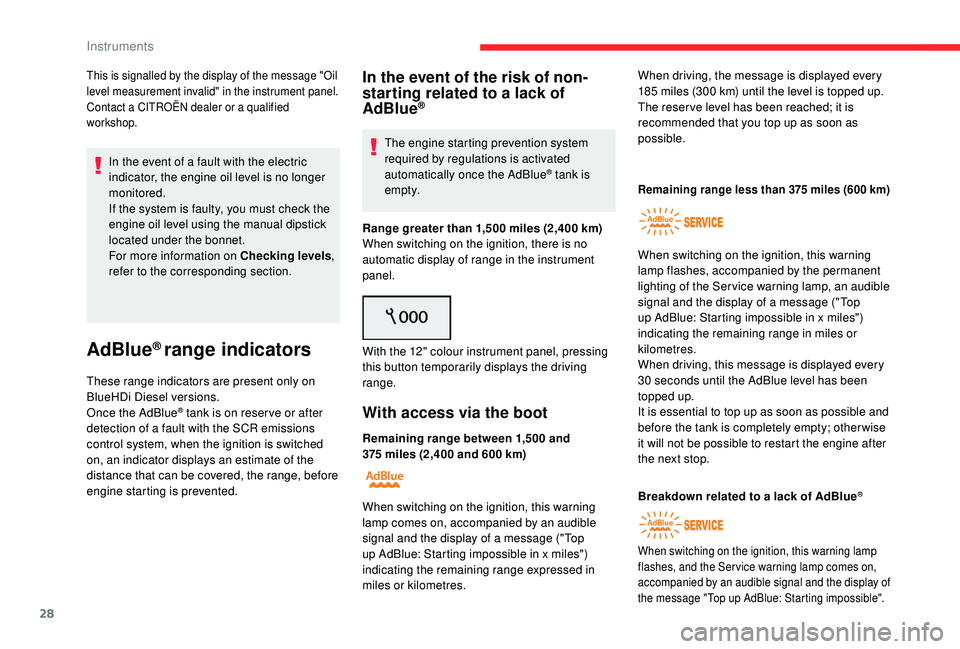
With the 12" colour instrument panel, pressing
this button temporarily displays the driving
range.
With access via the boot
Remaining range between 1,500 and
3 75 miles (2,400 and 600 km) When driving, the message is displayed every
185
miles (300 km) until the level is topped up.
The reser ve level has been reached; it is
recommended that you top up as soon as
possible.
When switching on the ignition, this warning
lamp comes on, accompanied by an audible
signal and the display of a message ("Top
up AdBlue: Starting impossible in x miles")
indicating the remaining range expressed in
miles or kilometres.
Remaining range less than 375 miles (600 km)
When switching on the ignition, this warning
lamp flashes, accompanied by the permanent
lighting of the Ser vice warning lamp, an audible
signal and the display of a
message ("Top
up AdBlue: Starting impossible in x miles")
indicating the remaining range in miles or
kilometres.
When driving, this message is displayed every
30
seconds until the AdBlue level has been
topped up.
It is essential to top up as soon as possible and
before the tank is completely empty; other wise
it will not be possible to restart the engine after
the next stop.
Breakdown related to a
lack of AdBlue
®
When switching on the ignition, this warning lamp
flashes, and the Ser vice warning lamp comes on,
accompanied by an audible signal and the display of
the message "Top up AdBlue: Starting impossible".
Instruments
Page 33 of 316
31
Total distance recorder
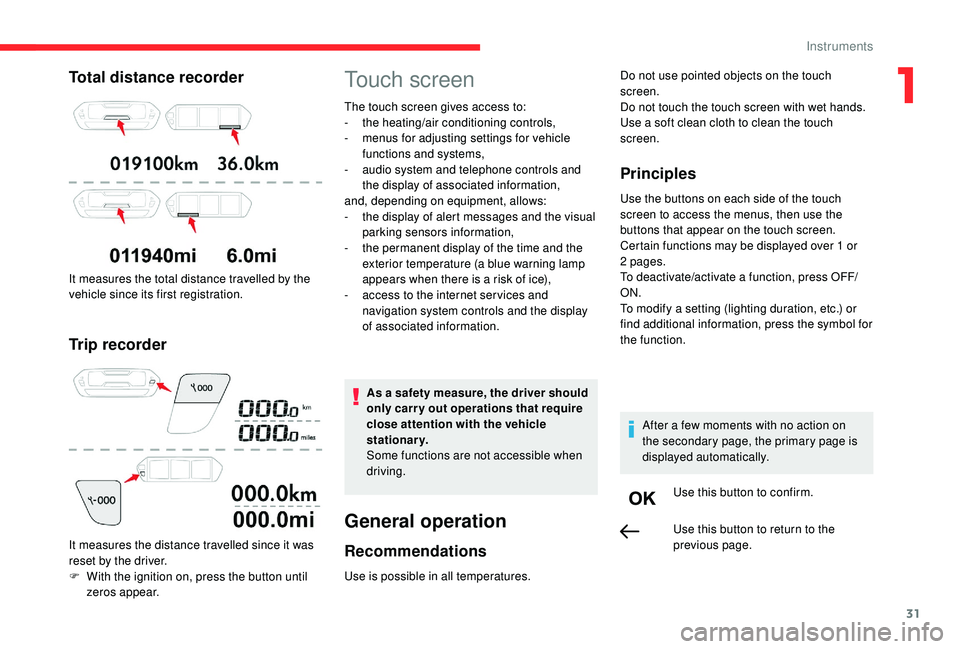
It measures the total distance travelled by the
vehicle since its first registration.
Trip recorder
It measures the distance travelled since it was
reset by the driver.
F
W
ith the ignition on, press the button until
zeros appear.
Touch screen
The touch screen gives access to:
- t he heating/air conditioning controls,
-
m
enus for adjusting settings for vehicle
functions and systems,
-
a
udio system and telephone controls and
the display of associated information,
and, depending on equipment, allows:
-
t
he display of alert messages and the visual
parking sensors information,
-
t
he permanent display of the time and the
exterior temperature (a blue warning lamp
appears when there is a
risk of ice),
-
a
ccess to the internet ser vices and
navigation system controls and the display
of associated information.
As a
safety measure, the driver should
only carry out operations that require
close attention with the vehicle
stationary.
Some functions are not accessible when
driving.
General operation
Recommendations
Use is possible in all temperatures.
Principles
Use the buttons on each side of the touch
screen to access the menus, then use the
buttons that appear on the touch screen.
Certain functions may be displayed over 1
or
2
pages.
To deactivate/activate a
function, press OFF/
ON.
To modify a
setting (lighting duration, etc.) or
find additional information, press the symbol for
the function.
After a
few moments with no action on
the secondary page, the primary page is
displayed automatically.
Use this button to confirm.
Do not use pointed objects on the touch
screen.
Do not touch the touch screen with wet hands.
Use a
soft clean cloth to clean the touch
screen.
Use this button to return to the
previous page.
1
Instruments
Page 35 of 316
33
Driving menu
Vehicle settings tab
FamiliesFunctions with CITROËN Connect Radio Functions with CITROËN Connect Nav
Driving lighting -
"
Guide-me-home lighting": activation/deactivation of
automatic guide-me-home lighting.
-
"
Welcome lighting": activation/deactivation of exterior
welcome lighting.
-
"
Directional headlamps": activation/deactivation of the
cornering lighting/directional headlamps.
-
"Daytime running lamps" (LED daytime running lamps)
depending on country of sale.
- "Directional headlamps": activation/deactivation of the cornering lighting/directional headlamps.
-
"Daytime running lamps" (LED daytime running lamps)
depending on country of sale.
Vehicle access - " Unlock driver's door only": activation/deactivation of
selective unlocking of the driver's door.
-
"
Unlock boot only": activation/deactivation of unlocking
at the tailgate.
-
"
Motorised tailgate": activation/deactivation of
motorised operation of the tailgate.
-
"
Hands-Free Tailgate Access": activation/deactivation
of the hands-free tailgate function. -
" Unlock driver's door only": activation/deactivation of
selective unlocking of the driver's door.
-
"
Unlock boot only": activation/deactivation of unlocking
at the tailgate.
-
"
Motorised tailgate": activation/deactivation of
motorised operation of the tailgate.
-
"
Hands-Free Tailgate Access": activation/deactivation
of the hands-free tailgate function.
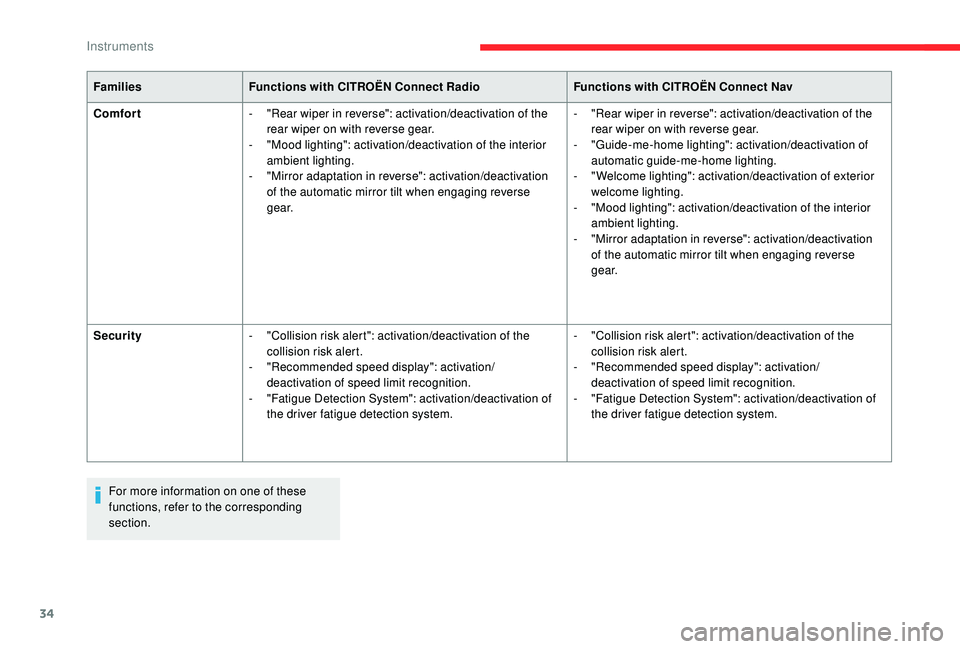
The functions are grouped into 4
families.
1
Instruments
Page 36 of 316
34
FamiliesFunctions with CITROËN Connect Radio Functions with CITROËN Connect Nav
Comfort -
"
Rear wiper in reverse": activation/deactivation of the
rear wiper on with reverse gear.
-
"
Mood lighting": activation/deactivation of the interior
ambient lighting.
-
"
Mirror adaptation in reverse": activation/deactivation
of the automatic mirror tilt when engaging reverse
g e a r. -
"
Rear wiper in reverse": activation/deactivation of the
rear wiper on with reverse gear.
-
"
Guide-me-home lighting": activation/deactivation of
automatic guide-me-home lighting.
-
"
Welcome lighting": activation/deactivation of exterior
welcome lighting.
-
"
Mood lighting": activation/deactivation of the interior
ambient lighting.
-
"
Mirror adaptation in reverse": activation/deactivation
of the automatic mirror tilt when engaging reverse
g e a r.
Security -
"
Collision risk alert": activation/deactivation of the
collision risk alert.
-
"
Recommended speed display": activation/
deactivation of speed limit recognition.
-
"
Fatigue Detection System": activation/deactivation of
the driver fatigue detection system. -
"
Collision risk alert": activation/deactivation of the
collision risk alert.
-
"
Recommended speed display": activation/
deactivation of speed limit recognition.
-
"
Fatigue Detection System": activation/deactivation of
the driver fatigue detection system.
For more information on one of these
functions, refer to the corresponding
section.
Instruments
Page 42 of 316
40
Electronic key – Remote
control
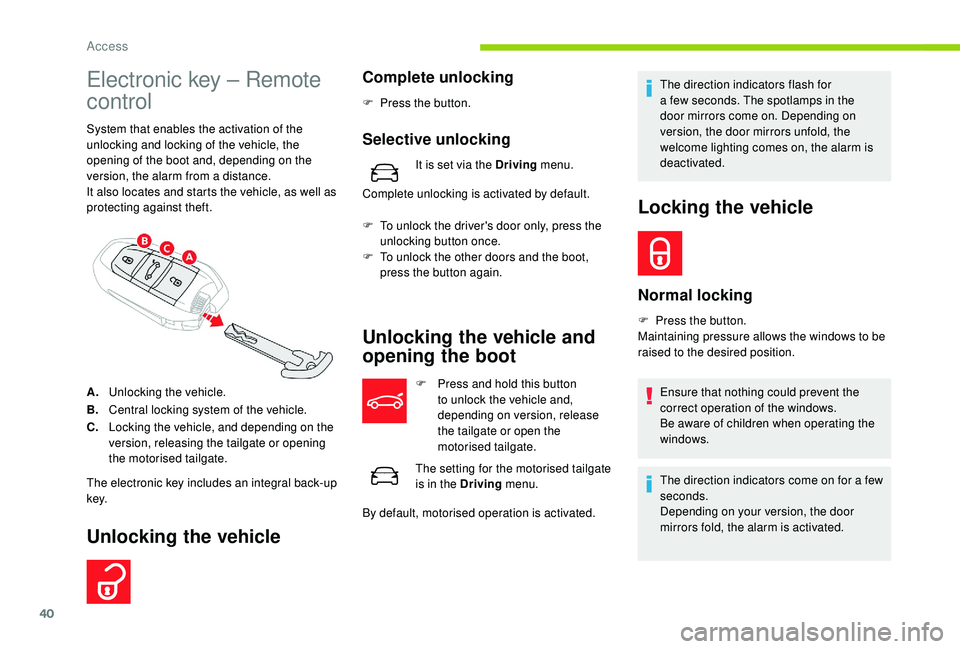
System that enables the activation of the
unlocking and locking of the vehicle, the
opening of the boot and, depending on the
version, the alarm from a distance.
It also locates and starts the vehicle, as well as
protecting against theft.
A. Unlocking the vehicle.
B. Central locking system of the vehicle.
C. Locking the vehicle, and depending on the
version, releasing the tailgate or opening
the motorised tailgate.
The electronic key includes an integral back-up
key.
Unlocking the vehicle
Complete unlocking
F Press the button.
Selective unlocking
It is set via the Driving menu.
Complete unlocking is activated by default.
F
T
o unlock the driver's door only, press the
unlocking button once.
F
T
o unlock the other doors and the boot,
press the button again.
Unlocking the vehicle and
opening the boot
F Press and hold this button to unlock the vehicle and,
depending on version, release
the tailgate or open the
motorised tailgate.
The setting for the motorised tailgate
is in the Driving menu.
By default, motorised operation is activated. The direction indicators flash for
a
few seconds. The spotlamps in the
door mirrors come on. Depending on
version, the door mirrors unfold, the
welcome lighting comes on, the alarm is
deactivated.
Locking the vehicle
Normal locking
F Press the button.
Maintaining pressure allows the windows to be
raised to the desired position.
Ensure that nothing could prevent the
correct operation of the windows.
Be aware of children when operating the
windows.
The direction indicators come on for a
few
seconds.
Depending on your version, the door
mirrors fold, the alarm is activated.
Access
Page 43 of 316
41
This function allows you to identify your vehicle
from a distance, particularly in poor light. Your
vehicle must be locked.
If one of the openings (doors or boot) is
still open, the locking does not take place.
However, the alarm (if fitted) will be fully
activated after about 45
seconds.
If the vehicle is unlocked inadvertently and
with no action on the doors or boot, the
vehicle will lock itself again automatically
after about 30
seconds.
If fitted to your vehicle, the alarm will also
be reactivated automatically.
The automatic folding and unfolding
of the door mirrors can be deactivated
by a
CITROËN dealer or a
qualified
workshop.
Deadlocking
Deadlocking deactivates the interior door
controls and it also deactivates the manual
central control button.
Therefore, never leave anyone inside the
vehicle when it is deadlocked.
F
W
ith the vehicle unlocked, press the locking
button.
Locating your vehicle
F Within five seconds, press the button again to deadlock the vehicle.
F
P
ress this button.
The direction indicators will flash for around
10 seconds and the courtesy lamps will switch on.
Keyless Entry and
Starting
The electronic key is also used as
a remote control. For more information
on the Remote Control , refer to the
corresponding section.
For reasons of safety and theft protection,
do not leave your electronic key in the
vehicle, even when you are close to it.
It is recommended that you keep it on your
person.
Unlocking the vehicle
Complete unlocking
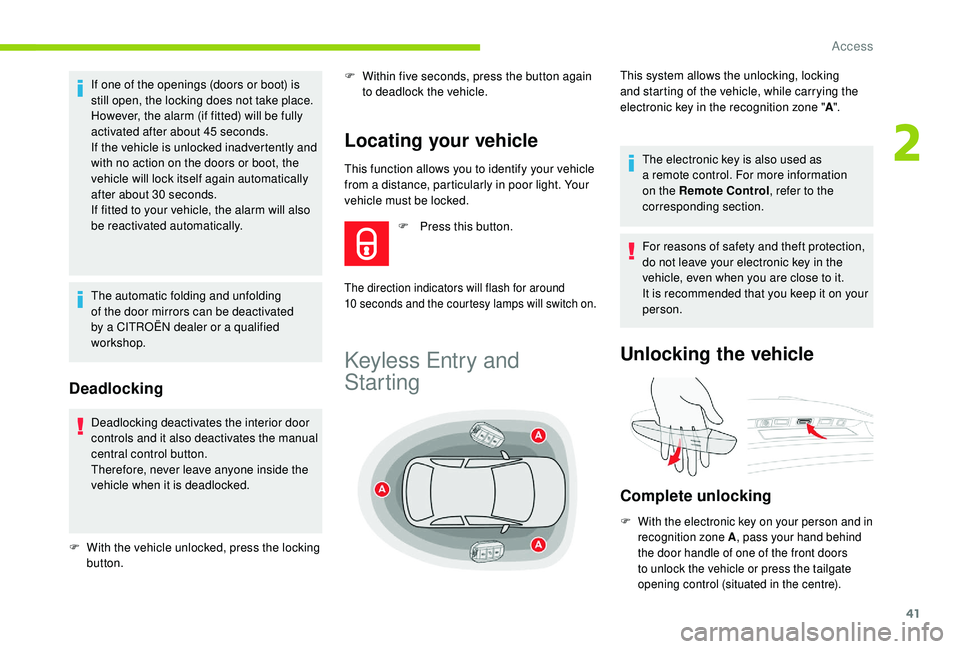
F With the electronic key on your person and in recognition zone A , pass your hand behind
the door handle of one of the front doors
to unlock the vehicle or press the tailgate
opening control (situated in the centre).
This system allows the unlocking, locking
and starting of the vehicle, while carrying the
electronic key in the recognition zone " A".
2
Access
Page 44 of 316
42
Selective unlocking
Activation or deactivation of selective
locking of the tailgate is done in the
Driving menu.
Complete unlocking is activated by default.
F
T
o unlock only the driver's door, with the
electronic key on your person, pass your
hand behind the driver's door handle.
F
T
o unlock the complete vehicle, pass your
hand behind the front passenger door
handle with the electronic key close to
the passenger door, or press the tailgate
opening control with the electronic key close
to the rear of the vehicle.
The direction indicators flash for a
few
seconds.
Depending on your version, the door
mirrors fold, the alarm is deactivated and
the welcome lighting comes on.
Locking the vehicle
Normal locking
Ensure that nothing could prevent the
proper closure of the windows.
Be aware of children when operating the
windows.
The direction indicators come on for a
few
seconds.
Depending on version, the door mirrors
fold and the alarm is activated.
Deadlocking
Deadlocking deactivates the interior door
controls and it also deactivates the manual
central control button.
Therefore, never leave anyone inside the
vehicle when it is deadlocked.
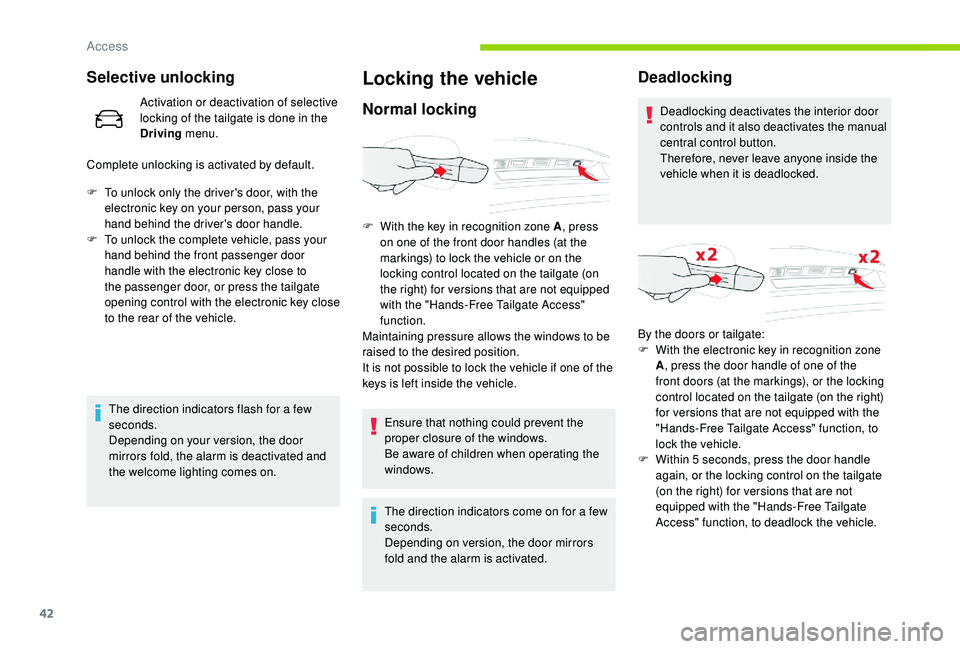
F
W
ith the key in recognition zone A , press
on one of the front door handles (at the
markings) to lock the vehicle or on the
locking control located on the tailgate (on
the right) for versions that are not equipped
with the "Hands-Free Tailgate Access"
function.
Maintaining pressure allows the windows to be
raised to the desired position.
It is not possible to lock the vehicle if one of the
keys is left inside the vehicle. By the doors or tailgate:
F
W
ith the electronic key in recognition zone
A , press the door handle of one of the
front doors (at the markings), or the locking
control located on the tailgate (on the right)
for versions that are not equipped with the
"Hands-Free Tailgate Access" function, to
lock the vehicle.
F
W
ithin 5 seconds, press the door handle
again, or the locking control on the tailgate
(on the right) for versions that are not
equipped with the "Hands-Free Tailgate
Access" function, to deadlock the vehicle.
Access
Page 59 of 316

57
Front seatsBefore moving the seat backwards,
ensure that there is nothing that might
prevent the full travel of the seat.
There is a risk of trapping or pinching
passengers if present in the rear seats
or jamming the seat if large objects are
placed on the floor behind the seat.
Manual adjustments
Longitudinal
F Raise the control and slide the seat forwards or backwards.
When your seat is at the correct distance, move
it for wards and backwards slightly without
using the control bar to ensure the seat is
properly locked. F
P
ull the control upwards to raise or push
it downwards to lower, as many times as
necessary to obtain the position required.
Driver seat backrest angle
F Turn the knob to adjust the backrest.
Correct driving position
For safety reasons, seat adjustments
must only be made when the vehicle is
stationary.
Before taking to the road and to make the most of the
ergonomic layout of the instruments and controls,
carry out these adjustments in the following order:
-
t
he height of the head restraint,
-
t
he seat backrest angle,
-
t
he seat cushion height,
-
t
he longitudinal position of the seat,
-
t
he height and reach of the steering wheel,
-
t
he rear view mirror and door mirrors.
Once these adjustments have been made,
check that the instrument panel can be
viewed correctly from your driving position.
Seat cushion height
3
Ease of use and comfort
Page 66 of 316
64
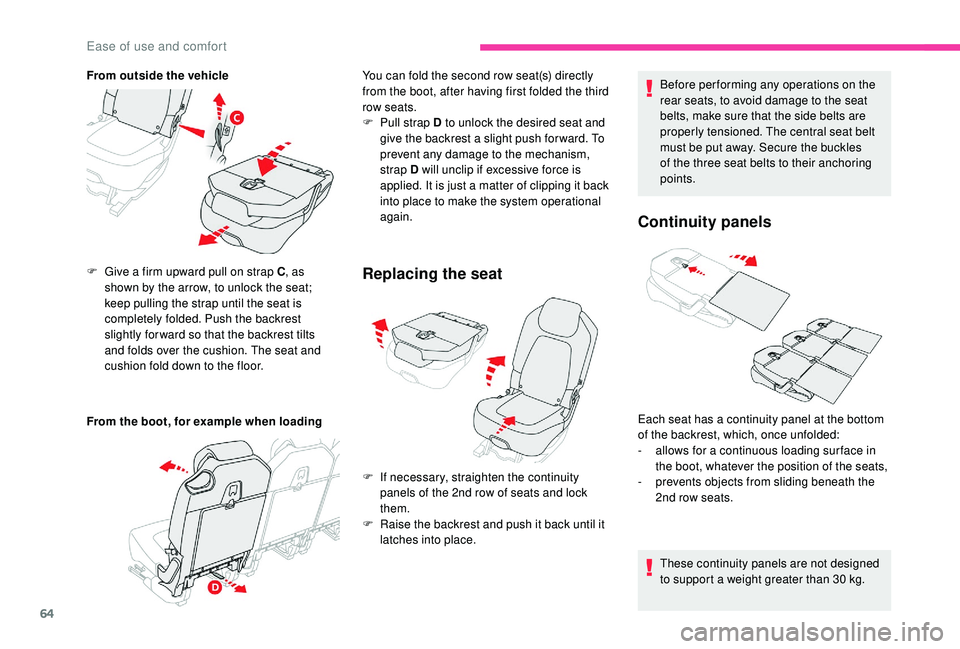
From outside the vehicle
From the boot, for example when loading F
G
ive a firm upward pull on strap C , as
shown by the arrow, to unlock the seat;
keep pulling the strap until the seat is
completely folded. Push the backrest
slightly for ward so that the backrest tilts
and folds over the cushion. The seat and
cushion fold down to the floor.
Replacing the seat
F If necessary, straighten the continuity panels of the 2nd row of seats and lock
them.
F
R
aise the backrest and push it back until it
latches into place. Before per forming any operations on the
rear seats, to avoid damage to the seat
belts, make sure that the side belts are
properly tensioned. The central seat belt
must be put away. Secure the buckles
of the three seat belts to their anchoring
points.
Continuity panels
You can fold the second row seat(s) directly
from the boot, after having first folded the third
row seats.
F
P
ull strap D to unlock the desired seat and
give the backrest a
slight push for ward. To
prevent any damage to the mechanism,
strap D will unclip if excessive force is
applied. It is just a
matter of clipping it back
into place to make the system operational
again.
Each seat has a
continuity panel at the bottom
of the backrest, which, once unfolded:
-
a
llows for a continuous loading sur face in
the boot, whatever the position of the seats,
-
p
revents objects from sliding beneath the
2nd row seats.
These continuity panels are not designed
to support a
weight greater than 30 kg.
Ease of use and comfort