light CITROEN C4 PICASSO 2017 Workshop Manual
[x] Cancel search | Manufacturer: CITROEN, Model Year: 2017, Model line: C4 PICASSO, Model: CITROEN C4 PICASSO 2017Pages: 316, PDF Size: 10.36 MB
Page 147 of 316

145
The speed limit units (mph or km/h)
depend on the country you are driving in.
This should be taken into account in order
to obser ve the speed limit.
For the system to operate correctly when
you change country, the units for speed in
the instrument panel must be those for the
country you are driving in.
The automatic reading of road signs is
a driving assistance system and does not
always display speed limits correctly.
The speed limit signs present on the road
always take priority over the display by the
system.
The system cannot in any circumstances
replace the need for vigilance on the part
of the driver.
The driver must observe the driving
regulations and must adapt the speed of
the vehicle to suit the weather and traffic.
The system may not display the speed
limit if it does not detect a
speed limit sign
within a
preset period.
The system is designed to detect signs
that conform to the Vienna Convention on
road signs. To maintain correct operation of the
system: regularly clean the area in front of
the camera.
The internal sur face of the windscreen can
also become misted around the camera.
In humid and cold weather, demist the
windscreen regularly.
Activation/Deactivation
Activation and deactivation of the system is
done in the touch screen's Driving
menu.
Select the " Vehicle settings " tab, then
" Security "/ "Safety " and "Recommended
speed display ".
Displays in the instrument panel
1.Detected speed limit indication.
or
2. Indication of the end of the speed limit. The system is active but is not detecting speed
limit information.
On detection of speed limit information, the
system displays the value.
Operating limits
The legislation on speed limits is specific to
each country.
The system does not take account of reduced
speed limits in the following cases:
-
p
oor weather (rain, snow),
-
a
tmospheric pollution,
-
w
hen towing,
-
d
riving with a space-saver type spare wheel
or snow chains fitted,
-
p
uncture repair using the temporary repair
kit,
-
y
oung drivers, etc.
The following situations may interfere with
the operation of the system or prevent it from
working:
-
p
oor visibility (inadequate street lighting,
falling snow, rain, fog),
6
Driving
Page 167 of 316

165
Clean the front bumper regularly.
If the front bumper is to be repainted or
retouched, contact a CITROËN dealer
or a
qualified workshop. Certain types of
paint could inter fere with the operation of
the radar.
Malfunction
If the cruise control
malfunctions, dashes are
displayed instead of the
cruise control speed setting.
If this warning lamp comes
on, accompanied by an
alert message and an
audible signal, this confirms
a
malfunction.
The adaptive cruise control deactivates
automatically if the use of a "space-saver"
type spare wheel is detected or if there is
a
malfunction on the lateral brake lamps or
trailer brake lamps (for approved trailers).
The following situations may interfere with
the operation of the system or prevent it
from working:
-
p
oor visibility (inadequate street
lighting, falling snow, heavy rain, dense
f o g , e t c .),
-
d
azzle (headlamps of an oncoming
vehicle, low sun, reflections on a
damp
road, leaving a
tunnel, alternating
shade and light, etc.),
-
c
amera or radar masked (mud, frost,
snow, condensation, etc.).
In these situations, detection performance
may be reduced.
The message "SYSTEM INACTIVE:
Reduced visibility". is displayed to indicate
that the function is in standby. Have the system checked by a
CITROËN
dealer or a
qualified workshop.
Active Safety Brake with
Collision Risk Alert and
Intelligent emergency
braking assistance
The system allows:
- t he driver to be warned that their vehicle is
at risk of collision with the vehicle in front,
-
a c
ollision to be prevented, or its severity to
be limited, by reducing the vehicle's speed.
This system is a
driving aid that includes three
functions:
-
C
ollision Risk Alert (alert if there is a risk of
collision),
-
I
ntelligent emergency braking assistance,
-
A
ctive Safety Brake (automatic emergency
b r ak ing).
6
Driving
Page 168 of 316

166
The vehicle has a camera located at the top of
t he windscreen, and, depending on the version,
a radar located in the front bumper.
This system is designed to assist the
driver and improve road safety.
It is the driver's responsibility to
continuously monitor the state of the
traffic, observing the driving regulations.
This system does not replace the need for
vigilance on the part of the driver.
As soon as the system detects a
potential
obstacle, it prepares the braking circuit in
case automatic braking is needed. This
may cause a
slight noise and a slight
sensation of deceleration.
Deactivation/Activation
By default, the system is automatically
activated at every engine start.
The system can be deactivated or activated via
the vehicle settings menu.
Deactivation of the system is
signalled by the illumination of this
indicator lamp, accompanied by the
display of a
message.
Operating conditions and
limits
The ESC system must not be faulty.
The ASR must not be deactivated.
All passenger seat belts must be fastened.
Driving at a steady speed on roads with few
bends is required. The following situations may interfere with
the operation of the system or prevent it
from working:
-
p
oor visibility (inadequate street
lighting, falling snow, heavy rain, dense
f o g , e t c .),
-
d
azzle (headlamps of an oncoming
vehicle, low sun, reflections on a damp
road, leaving a tunnel, alternating
shade and light, etc.),
-
c
amera or radar obstructed (mud, frost,
snow, condensation, etc.).
On versions with camera alone, this
message indicates to you that the camera
is obstructed: " Driving aids camera:
visibility limited, see user guide ".
In these situations, detection performance
may be reduced.
Driving
Page 171 of 316
169
The driver can maintain control of the
vehicle at any time by sharply turning
the steering wheel and/or pressing the
accelerator pedal.
Operation of the function may be felt by
slight vibration in the brake pedal.
If the vehicle comes to a complete stop,
the automatic braking is maintained for
1
to 2 seconds.
Malfunction
In the event of a fault with the
s ystem, you are alerted by the
illumination of this warning lamp,
accompanied by the display of
a
message and an audible signal.
Lane Departure Warning
System
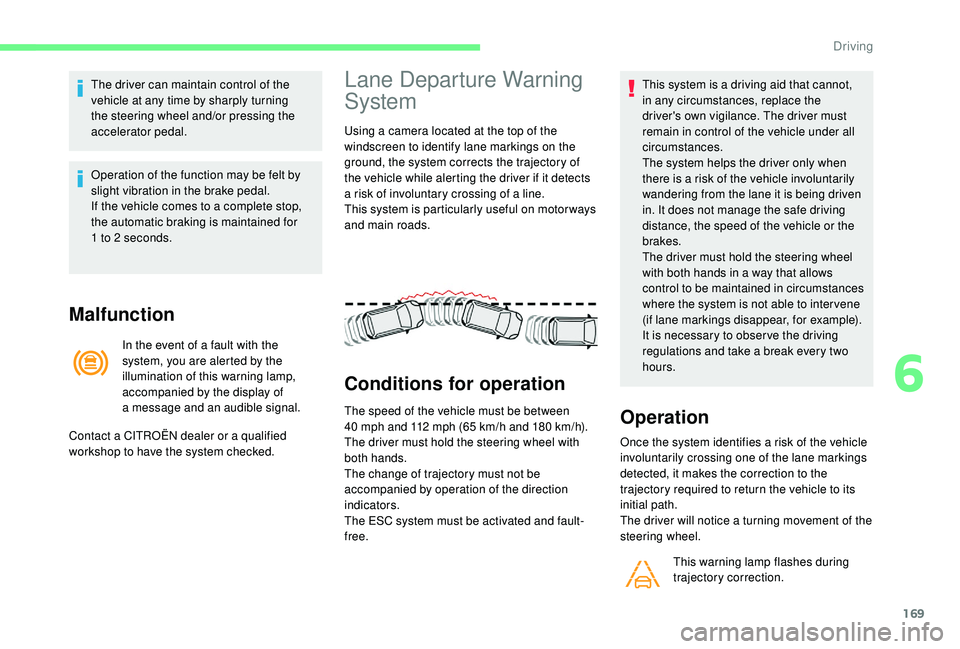
Using a camera located at the top of the
w indscreen to identify lane markings on the
ground, the system corrects the trajectory of
the vehicle while alerting the driver if it detects
a
risk of involuntary crossing of a line.
This system is particularly useful on motor ways
and main roads.
Conditions for operation
The speed of the vehicle must be between
40 mph and 112 mph (65 km/h and 180 km/h).
The driver must hold the steering wheel with
both hands.
The change of trajectory must not be
accompanied by operation of the direction
indicators.
The ESC system must be activated and fault-
free. This system is a
driving aid that cannot,
in any circumstances, replace the
driver's own vigilance. The driver must
remain in control of the vehicle under all
circumstances.
The system helps the driver only when
there is a risk of the vehicle involuntarily
wandering from the lane it is being driven
in. It does not manage the safe driving
distance, the speed of the vehicle or the
brakes.
The driver must hold the steering wheel
with both hands in a way that allows
control to be maintained in circumstances
where the system is not able to inter vene
(if lane markings disappear, for example).
It is necessary to obser ve the driving
regulations and take a break every two
hours.Operation
Once the system identifies a risk of the vehicle
i nvoluntarily crossing one of the lane markings
detected, it makes the correction to the
trajectory required to return the vehicle to its
initial path.
The driver will notice a
turning movement of the
steering wheel.
This warning lamp flashes during
trajectory correction.
Contact a
CITROËN dealer or a
qualified
workshop to have the system checked.
6
Driving
Page 174 of 316
172
Deactivation of the system is recommended in
the following situations:
-
d
riving on a road sur face in poor condition,
-
p
oor weather conditions,
-
d
riving on slippery sur faces (ice).
Activation/Deactivation
Activation and deactivation of the system is
done in the Driving menu of the touch screen.
Select the " Driving functions " then the "Lane
assist " tab.
The system state remains in memory when the
ignition is switched off.
Malfunction
Operating limits
The system goes into standby automatically in
the following cases:
-
E
SC deactivated or operation triggered,
-
s
peed below 40 mph (65 km/h) or greater
than 112
mph (180 km/h),
-
c
onnected electrically to a
trailer,
-
u
se of the "space-saver" spare
wheel detected (as detection is not
immediate, deactivation of the system is
recommended),
-
d
ynamic driving style detected, pressure on
the brake or accelerator pedal,
-
d
riving where there are no lane markings,
-
a
ctivation of the direction indicators,
-
c
rossing the inside line on a bend,
-
d
riving in a tight corner,
-
i
nactivity by the driver detected during
correction. The following situations may interfere with
the operation of the system or prevent it
working:
-
c
onditions of poor visibility (inadequate
street lighting, snowfall, rain, fog),
-
d
azzle (headlamps of an oncoming
vehicle, low sun, reflections on a
damp
road, leaving a
tunnel, alternating
shade and light),
-
w
indscreen area located in front of the
camera: dirty, misted, frost-covered,
snow-covered, damaged or covered by
a
s t i c ke r,
-
l
ane markings worn, hidden (snow,
mud) or multiple (roadworks, etc.),
-
r
unning close to the vehicle in front
(the lane markings may not be
detected),
-
r
oads that are narrow, winding, etc.
Risk of undesirable operation
The system is not intended for driving in the
following situations:
-
d
riving on a speed circuit,
-
d
riving with a trailer,
-
d
riving on a rolling stand,
-
d
riving on unstable sur faces.
In the event of a
fault with the system, you are
alerted by the illumination of these warning
lamps in the instrument panel, accompanied by
the display of a
message and an audible signal.
Have the system checked by a
CITROËN
dealer or a
qualified workshop.
Driving
Page 175 of 316

173
Blind Spot Detection
This system warns the driver of the presence
of another vehicle in the blind spots of their
vehicle (areas hidden from the driver's field
of vision), as soon as this presents a potential
danger.
A fixed warning lamp appears in the door mirror
on the side in question:
-
i
mmediately, when being overtaken,
-
a
fter a delay of about one second, when
overtaking a
vehicle slowly. This driving aid system is designed to
improve safety when driving and is in no
circumstances a
substitute for the use
of the interior rear view mirror and door
mirrors. It is the driver's responsibility to
constantly check the traffic, to assess the
relative distances and speeds of other
vehicles and to predict their movements
before deciding whether to change lane.
This system is a driving aid that cannot, in
any circumstances, replace the need for
vigilance on the part of the driver.
Activation/Deactivation
The function is activated and
deactivated in the Driving menu of
the touch screen.
When the function is activated,
this indicator lamp comes on in the
instrument panel.
The state of the system stays in memory when
switching off the ignition.
The system is automatically deactivated
when towing with a
towing device
approved by CITROËN.
Operation
Sensors fitted in the front and rear bumpers
monitor the blind spots.
The alert is given by an orange warning lamp
coming on in the relevant door mirror, as soon
as a
vehicle – car, lorry, cycle – is detected.
The following conditions must be met for this:
-
a
ll vehicles are moving in the same direction
and in adjacent lanes,
-
t
he speed of the vehicle must be between
7
and 87 mph (12 and 140 km/h),
-
y
ou overtake a vehicle with a speed
difference of less than 6
mph (10 km/h),
-
a v
ehicle overtakes you with a speed
difference of less than 16
mph (25 km/h),
-
t
he traffic is flowing normally,
-
ov
ertaking a vehicle over a certain period
of time and the vehicle being overtaken
remains in the blind spot,
-
y
ou are driving on a straight or slightly
curved road,
-
y
our vehicle is not pulling a trailer, a
caravan, etc.
6
Driving
Page 178 of 316

176
Using a camera placed at the top
o f the windscreen, the system
assesses the driver's level of
vigilance by identifying variations
in trajectory compared to the lane
markings.
This system is particularly suited to fast roads
(speed higher than 40
mph (65 km/h)).
When the system interprets the behaviour of
the vehicle as indicating a
certain fatigue or
inattention threshold on the part of the driver, it
triggers the first level of alert.
The driver is then alerted by the message
" Ta k e c a r e ! ", accompanied by an audible
signal. After three first level alerts, the system triggers
a
new alert with the message "
Take a break!
",
accompanied by a more pronounced audible
signal.
In certain driving conditions (poor road
sur face or strong winds), the system may
give alerts independent of the driver's
level of vigilance.
The following situations may interfere with
the operation of the system or prevent it
working:
-
p
oor visibility (inadequate lighting of
the roadway, falling snow, heavy rain,
dense fog, etc.),
-
d
azzle (headlamps of an oncoming
vehicle, low sun, reflections on a
damp
road, leaving a
tunnel, alternating
shade and light, etc.),
-
w
indscreen area located in front of the
camera dirty, misted up, frost-covered,
snow-covered, damaged or covered by
a
s t i c ke r,
-
l
ane markings absent, worn, hidden
(snow, mud) or multiple (roadworks,
e t c .),
-
c
lose to the vehicle ahead (lane
markings not detected),
-
r
oads that are narrow, winding, etc.Clean the windscreen regularly,
particularly the area in front of the camera.
The internal sur face of the windscreen can
also become misted around the camera.
In humid and cold weather, demist the
windscreen regularly.
Do not allow snow to accumulate on the
bonnet or roof of the vehicle as this could
conceal the detection camera.
Clean the front bumper, especially around
the radar, removing mud, snow, etc.
Parking sensors
Using sensors located in the bumper, this
function warns of the proximity of obstacles
(e.g. pedestrian, vehicle, tree, barrier) entering
their field of detection.
Driving
Page 180 of 316

178
The rear parking sensors system will
be deactivated automatically if a trailer
or bicycle carrier is connected to
a
towing device installed in line with the
manufacturer's recommendations.
In this case, the outline of a
trailer is
displayed at the rear of the image of the
vehicle.
The parking sensors are deactivated while the
Park Assist system is measuring a
space.
For more information on the Park Assist , refer
to the corresponding section.
Operating limits
- A front or rear impact to the vehicle can distort the settings of the sensors, which is
not always detected by the system: distance
measurements may be incorrect.
-
T
he tilting of the vehicle if the boot is
very loaded can affect the distance
measurements.
-
T
he sensors may be affected by poor
weather conditions (heavy rain, thick fog,
snowfall, etc.).
Operating fault
If the system fails, when reverse
gear is engaged this warning lamp
flashes for a
few seconds before
lighting up continuously, together
with the Service warning lamp.
A message appears, accompanied by an
audible signal.
Contact a
CITROËN dealer or a qualified
workshop. In bad or wintry weather, ensure that the
sensors are not covered by mud, ice or
snow.
When reverse gear is engaged, an audible
signal (long beep) indicates that the
sensors may be dirty.
Certain sound sources (motorcycle,
lorry, pneumatic drill, etc.) may trigger
the audible signals of the parking sensor
system.
High pressure jet wash
When washing your vehicle, direct the
lance at least 30
cm away from the
sensors.
-
C
ertain obstacles located in the sensors'
blind spots may not be detected or no
longer be detected during the manoeuvre.
-
S
ounds such as those emitted by noisy
vehicles and machinery (e.g. lorries,
pneumatic drills, etc.) may inter fere with the
vehicle's sensors.
-
C
ertain materials (fabrics) absorb sound
waves: pedestrians may not be detected.
-
A
ccumulated snow or dead leaves on the
road sur face can inter fere with the vehicle's
sensors.
Reversing camera
The reversing camera is activated automatically
when reverse gear is engaged.
Driving
Page 182 of 316

180
This system is a visual aid that cannot in
a ny circumstances replace the need for
vigilance on the part of the driver.
The images provided by the camera(s)
may be distorted by the relief. The
presence of areas in shadow, bright
sunlight, or poor lighting conditions may
make the image dark and reduce contrast.
Forward vision
The camera situated on the front bumper is
activated and the views of the area to the
front left and the area to the front right of your
vehicle appear simultaneously in the instrument
panel.
Rear vision
The camera situated on the tailgate is activated
and the view of the area behind your vehicle is
displayed in the instrument panel and behaves
as a
reversing camera, regardless of the
position of the gear selector.
The blue outline represents the width of
your vehicle (without mirrors): its orientation
depends on the position of the steering wheel.
The red line represents the distance of 30 cm)
from the rear bumper and the two green lines
the distances of 1 m and 2 m respectively from
the rear bumper.
The rear vision is displayed automatically
when reverse gear is engaged, regardless
of the state of the system.
Vision 360
The cameras situated on the front and rear
bumpers as well as those below the door
mirrors activate and a view from above of your
vehicle in its close environment is generated
and is displayed in the instrument panel.
Opening a door or the tailgate will disrupt the
3 60 and rear views.
Installation of the very cold climate screen will
alter the image transmitted by the front camera.
Driving
Page 192 of 316
190
Fuel
Fuel tank capacity: approximately 57 litres
(petrol) or 55 litres (Diesel).
Low fuel level
When the low fuel level is reached,
this warning lamp in the instrument
panel comes on, accompanied by
an audible warning, a message and
the last bar of the fuel gauge lights
up orange.
When it first comes on there remains
approximately 6
litres of fuel in the tank.
Until sufficient fuel has been added, this
warning lamp appears every time the ignition
is switched on, accompanied by an audible
warning and a
message. This audible warning
and this message are repeated with increasing
frequency as the fuel level drops towards " 0".
Refuel as soon as possible to avoid running
out.
Refilling
A self-adhesive label on the inner face of the
filler flap reminds you of the type of fuel to use,
depending on your engine.
Additions of fuel must be of at least 5
litres, in
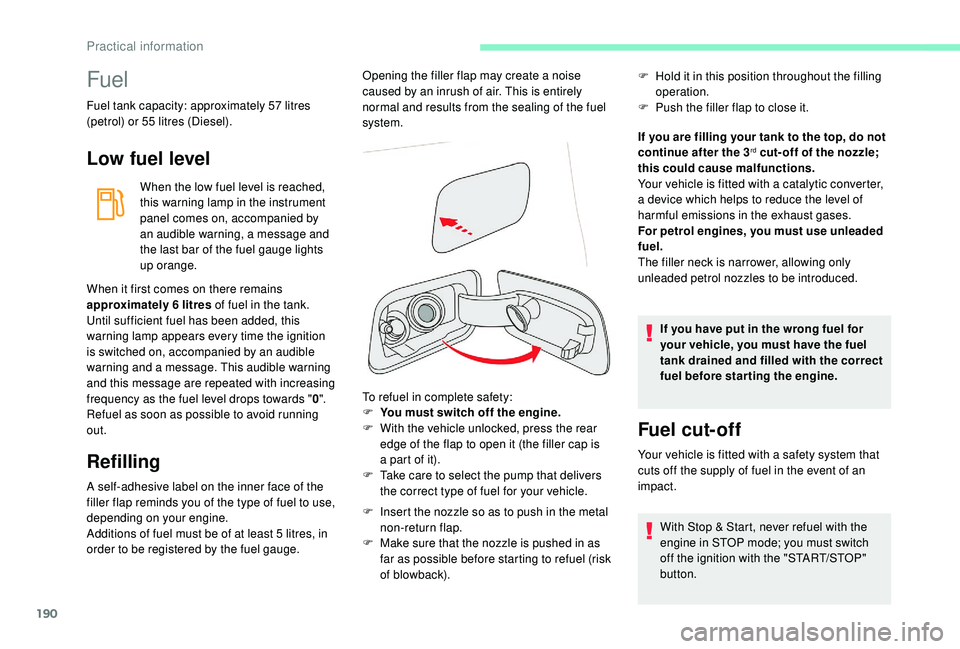
order to be registered by the fuel gauge. To refuel in complete safety:
F
Y
ou must switch off the engine.
F
W
ith the vehicle unlocked, press the rear
edge of the flap to open it (the filler cap is
a part of it).
F T ake care to select the pump that delivers
the correct type of fuel for your vehicle.
F
I
nsert the nozzle so as to push in the metal
non-return flap.
F
M
ake sure that the nozzle is pushed in as
far as possible before starting to refuel (risk
of blowback). If you are filling your tank to the top, do not
continue after the 3
rd cut- off of the nozzle;
this could cause malfunctions.
Your vehicle is fitted with a
catalytic converter,
a device which helps to reduce the level of
harmful emissions in the exhaust gases.
For petrol engines, you must use unleaded
fuel.
The filler neck is narrower, allowing only
unleaded petrol nozzles to be introduced.
If you have put in the wrong fuel for
your vehicle, you must have the fuel
tank drained and filled with the correct
fuel before star ting the engine.
Fuel cut- of f
Your vehicle is fitted with a safety system that
c uts off the supply of fuel in the event of an
impact.
Opening the filler flap may create a
noise
caused by an inrush of air. This is entirely
normal and results from the sealing of the fuel
system. F
H
old it in this position throughout the filling
operation.
F
P
ush the filler flap to close it.
With Stop & Start, never refuel with the
engine in STOP mode; you must switch
off the ignition with the "START/STOP"
button.
Practical information