steering wheel Citroen C4 PICASSO RHD 2014.5 1.G Owner's Manual
[x] Cancel search | Manufacturer: CITROEN, Model Year: 2014.5, Model line: C4 PICASSO RHD, Model: Citroen C4 PICASSO RHD 2014.5 1.GPages: 428, PDF Size: 10.03 MB
Page 9 of 428
7
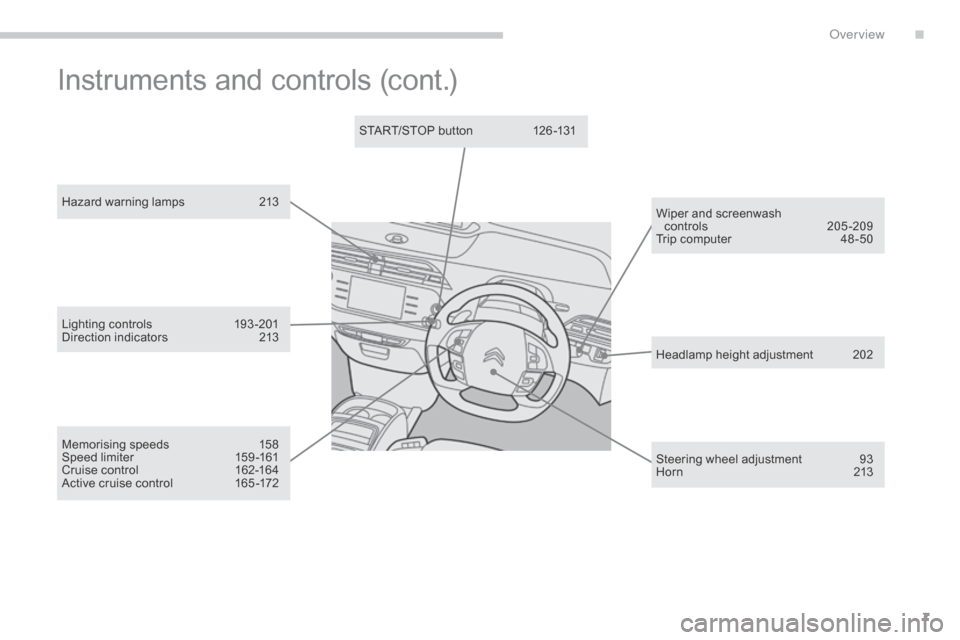
Hazard warning lamps 213
Memorising speeds
1
58
Speed
limiter
1
59 -161
Cruise
control
1
62-164
Active
cruise control
1
65 -172 Headlamp
height adjustment
2
02
Steering
wheel adjustment
9
3
H or n
2
13
START/STOP
button
1
26 -131
Wiper and screenwash
controls
20
5-209
Trip
computer
4
8 -50
Lighting
c
ontrols
1
93-201
Direction
indicators
2
13
Instruments and controls (cont.)
.
over view
Page 26 of 428
24
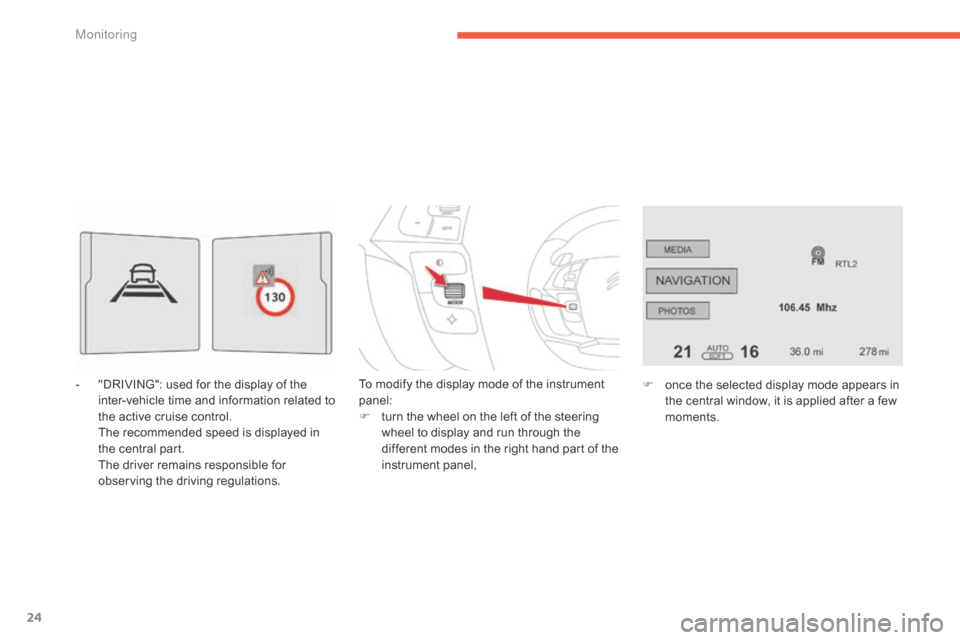
- "DRIVING": used for the display of the i
nter-vehicle time and information related to
t
he active cruise control.
T
he recommended speed is displayed in
t
he central part.
T
he driver remains responsible for
o
bserving the driving regulations. To
modify the display mode of the instrument pan
el:
F
t
urn the wheel on the left of the steering
w
heel to display and run through the
d
ifferent modes in the right hand part of the
in
strument
pan
el,F
o nce the selected display mode appears in
t
he central window, it is applied after a few
m
oments.
M
Page 95 of 428

93
Steering wheel adjustment
F When stationary , pull the control lever to
release the adjustment mechanism.
F
A
djust the height and reach to suit your
d
riving position.
F
P
ush the control lever to lock the
a
djustment
m
echa
as a s
afety precaution, these
operations
should only be carried out
w
ith the vehicle stationary.
Child surveillance mirror
A child surveillance mirror is fitted above the rear view mirror. This allows you to monitor the
v
ehicle’s rear passengers, or it can facilitate
c
onversation between the front and rear
p
assengers without the need to move the rear
v
iew mirror.
I
t can be folded away to eliminate dazzle.
3
Comfort
Page 110 of 428

108
Front fittings
1. Sun visor.
2. C ard holder.
3.
G
love box.
4.
C
entral
s
torage.
I
t contains the power and audio sockets.
5.
R
aised console with closed storage, low
c
onsole or removable console.
6.
C
up holder.
7.
D
oor pockets.
8.
S
torage below the steering wheel.
(
Handbook pack).
Comfort
Page 116 of 428
114
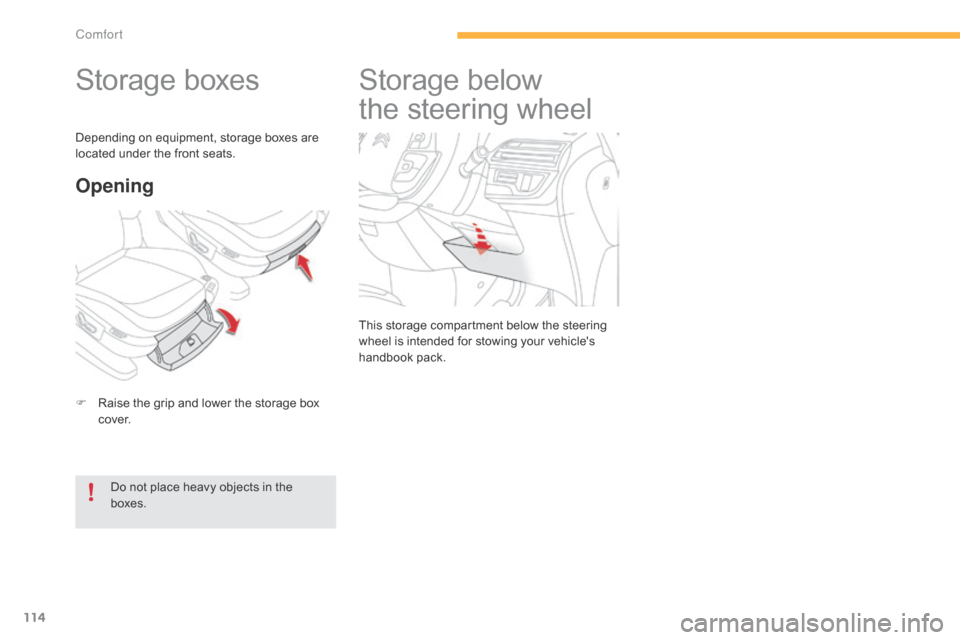
Storage boxes
F Raise the grip and lower the storage box c
ove r.
Opening
Do not place heavy objects in the boxes.
Depending
on equipment, storage boxes are
l
ocated under the front seats.
Storage belo
w
t
he steering wheel
This storage compartment below the steering w
heel is intended for stowing your vehicle's
han
dbook
pa
ck.
Comfort
Page 128 of 428

126
Starting-switching off the engine with the electronic key
F Place the gear selector lever at N for
vehicles with an electronic gearbox, P or N
for
vehicles with an automatic gearbox or
n
eutral with a manual gearbox.
F
I
nsert the electronic key in the reader.
F
P
ress the brake pedal for vehicles with
a
n electronic or automatic gearbox, or
f
ully declutch for vehicles with a manual
g
earbox.
Starting the engine
For Diesel vehicles , in
temperatures below zero the
e
ngine
will not start until the preheater
w
arning
lamp has gone off.
If
this
warning lamp comes on after
p
ressing "START/STOP", you should
h
old
the
brake or clutch pedal down
u
ntil
the
warning lamp goes off and
d
o
not
press the START/STOP button
ag
ain.
If
one
of
the starting conditions is not
m
et,
a
reminder message appears in
t
he
instrument panel screen. In some
c
ircumstances, it is necessary to turn
t
he
steering wheel slightly while pressing
t
he
"START/STOP" button to assist
u
nlocking of the steering; a message
w
arns
you when this is needed.
F
br
iefly press the "
START/STOP"
button.
T
he
steering
column
unlocks
and
t
he
engine
starts
more
or
less
i
mmediately
(see
the
advice
for
D
iesel
v
ersions).
Driving
Page 130 of 428

128
Starting-switching off the engine with the "Keyless Entry
a
nd Starting" system
F Place the gear selector lever at N for
vehicles with an electronic gearbox, P or N
with
an automatic gearbox, or neutral with
a m
anual
g
earbox.
F
W
ith the electronic key inside the vehicle
(
it is not necessary to put it in the reader),
p
ress the brake pedal for vehicles with
a
n electronic or automatic gearbox, or
f
ully declutch for vehicles with a manual
g
earbox. For Diesel vehicles
, in
temperatures below zero the
e
ngine will not start until the
p
reheater warning lamp has
g
one off.
If
this warning lamp comes on
a
fter pressing "START/STOP",
y
ou should hold the brake or
c
lutch pedal down until the
w
arning lamp goes off and do
n
ot press the START/STOP
bu
tton
ag
ain.
Starting the engine
If one of the starting conditions is not met, a reminder message appears in t
he instrument panel screen. In some
c
ircumstances, it is necessary to turn
t
he steering wheel slightly while pressing
t
he "START/STOP" button to assist
u
nlocking of the steering; a message
w
arns you when this is needed.
F
b
r
iefly press the "
START/STOP"
button.
T
he steering column unlocks
a
nd the engine starts more or
l
ess instantly (see the advice for
D
iesel
v
ersions).
The presence of the "Keyless Entry and
S
tarting" system electronic key in the
r
ecognition zone is essential.
For
safety reasons, do not leave this
z
one with the vehicle running. If
the electronic key is not detected in
t
he zone, a message is displayed. Move
t
he electronic key into the zone so that
t
he engine can be started.
Driving
Page 148 of 428

146
+. Control paddle for changing up, to the right o
f the steering wheel.
F
P
ull the " +"
paddle towards you to change
u
p.
-.
C
ontrol paddle for changing down, to the
l
eft of the steering wheel.
F
P
ull the " -"
paddle towards you to change
d
own.
Steering mounted control paddles
The steering mounted control paddles cannot be used to select neutral or to
s
elect or come out of reverse. When
you move the gear selector, the symbol
c
orresponding to its position is displayed in the
in
strument
pan
el.
P.
Pa
rk.
R.
R
everse.
N.
N
eutral.
D.
D
rive (automatic for ward drive).
1 to 6.
G
ears engaged in manual operation.
-.
I
nvalid value in manual operation.
Displays in the instrument panelMoving off
F With
your foot on the brake pedal, select p
osition P or N .
F
S
tart the engine.
If P
is displayed in the instrument panel,
a
lthough the gear selector is in another
p
osition, place the gear selector in
p
osition P to be able to start the engine.
F
W
ith the engine running, press the brake
ped
al.
F
S
elect automated mode (position D),
manual
mode (position M) or reverse
(position R ).
If
you do not press the
b
rake pedal to come out of
p
osition P,
this warning lamp
O
ther wise, there is an audible signal
a
ccompanied by a message.
or
symbol appears in the instrument
p
anel, accompanied by the message
"
Place automatic gearbox in position P",
flashing
of P in the instrument panel
a
nd an audible signal.
Driving
Page 161 of 428
159
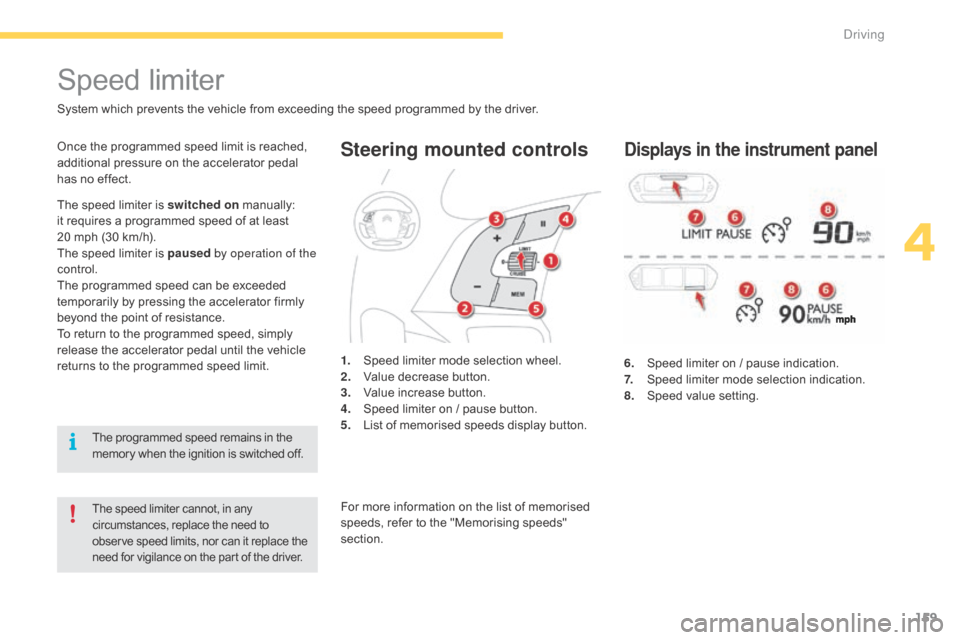
Steering mounted controls
6. Speed limiter on / pause indication.
7. S peed limiter mode selection indication.
8.
S
peed value setting.
Speed limiter
System which prevents the vehicle from exceeding the speed programmed by the driver.
The speed limiter cannot, in any circumstances, replace the need to o
bserve speed limits, nor can it replace the
n
eed for vigilance on the part of the driver.
Once the programmed speed limit is reached, additional pressure on the accelerator pedal
h
as no effect.
1.
S
peed limiter mode selection wheel.
2.
V
alue decrease button.
3.
V
alue increase button.
4.
S
peed limiter on / pause button.
5.
L
ist of memorised speeds display button.Displays in the instrument panel
The speed limiter is switched on manually: i
t requires a programmed speed of at least
2
0 mph (30 km/h).
The
speed limiter is paused by operation of the
control.
The
programmed speed can be exceeded
t
emporarily by pressing the accelerator firmly
b
eyond the point of resistance.
To
return to the programmed speed, simply
r
elease the accelerator pedal until the vehicle
r
eturns to the programmed speed limit.
The
programmed speed remains in the
m
emory when the ignition is switched off.For
more information on the list of memorised
s
peeds, refer to the "Memorising speeds"
s
ection.
4
Driving
Page 164 of 428

162
Steering mounted controls
6. Cruise control pause / resume indication.
7. C ruise control mode selection indication.
8.
S
peed value setting.
Cruise control
System which automatically maintains the speed of the vehicle at the value programmed by the driver, without any action on the accelerator pedal.
The cruise control system cannot, in any circumstances, replace the need to observe speed limits, nor can it replace the need for vigilance on the part of the driver.
Y ou are advised to keep your feet near the pedals at all times.
The cruise control is switched on manually: it r
equires a minimum vehicle speed of 25 mph
(
40 km/h) and engagement of:
-
f
ourth gear or higher on a manual gearbox,
-
s
econd gear or higher in manual mode on
a
n electronic or automatic gearbox,
-
p
osition A on an electronic gearbox or D on
an
automatic gearbox. 1.
C
ruise control mode selection wheel.
2.
D
ecrease speed setting or set the current
s
peed as the cruise setting.
3.
I
ncrease speed setting or set the current
s
peed as the cruise setting.
4.
C
ruise control pause / resume button.
5.
M
emorised speeds display button.Displays in the instrument panel
Switching off the ignition cancels any programmed speed value.
The cruise control is paused
manually or
b
y
pressing the brake or clutch pedal or
o
n
triggering of the ESP system for safety
r
easons.
It
is
possible to exceed the programmed speed
t
emporarily by pressing the accelerator pedal.
To
return to the programmed speed, simply
r
elease the accelerator pedal until the
p
rogrammed cruise speed is reached again.
For more information on the list of memorised s
peeds, refer to "Memorising speeds" section.
Driving