steering Citroen C4 RHD 2012 2.G User Guide
[x] Cancel search | Manufacturer: CITROEN, Model Year: 2012, Model line: C4 RHD, Model: Citroen C4 RHD 2012 2.GPages: 324, PDF Size: 28.17 MB
Page 59 of 324
2
MULTIFUNCTION SCREENS
57
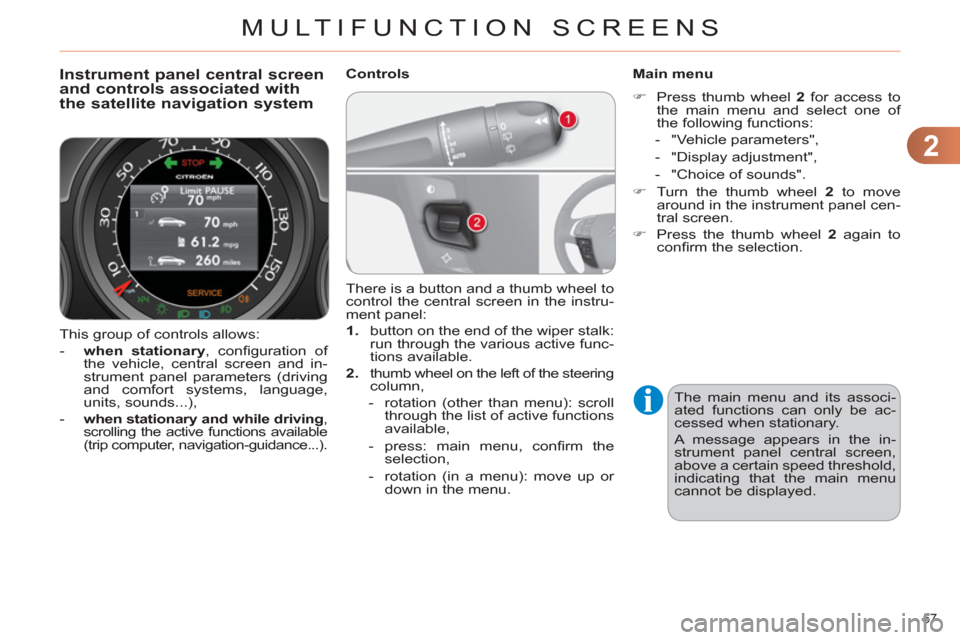
This group of controls allows:
- when stationary
, confi guration of
the vehicle, central screen and in-
strument panel parameters (driving
and comfort systems, language,
units, sounds...),
- when stationary and while driving
,
scrolling the active functions available
(trip computer, navigation-guidance...).
Instrument panel central screen
and controls associated with
the satellite navigation system
Controls
Main menu
)
Press thumb wheel 2
for access to
the main menu and select one of
the following functions:
- "Vehicle parameters",
- "Display adjustment",
- "Choice of sounds".
)
Turn the thumb wheel 2
to move
around in the instrument panel cen-
tral screen.
)
Press the thumb wheel 2
again to
confi rm the selection.
There is a button and a thumb wheel to
control the central screen in the instru-
ment panel:
1.
button on the end of the wiper stalk:
run through the various active func-
tions available.
2.
thumb wheel on the left of the steering
column,
- rotation (other than menu): scroll
through the list of active functions
available,
- press: main menu, confi rm the
selection,
- rotation (in a menu): move up or
down in the menu.
The main menu and its associ-
ated functions can only be ac-
cessed when stationary.
A message appears in the in-
strument panel central screen,
above a certain speed threshold,
indicating that the main menu
cannot be displayed.
Page 63 of 324
2
MULTIFUNCTION SCREENS
61
Central instrument panel screen
associated with the satellite
navigation system
- Display of instantaneous informa-
tion with:
●
the range,
●
the current fuel consumption,
●
Stop & Start time counter,
- Display of trip "1"
with:
●
the distance travelled,
●
the average fuel consumption,
●
the average speed,
for the fi rst trip.
- Display of trip "2"
with:
●
the distance travelled,
●
the average fuel consumption,
●
the average speed,
for the second trip.
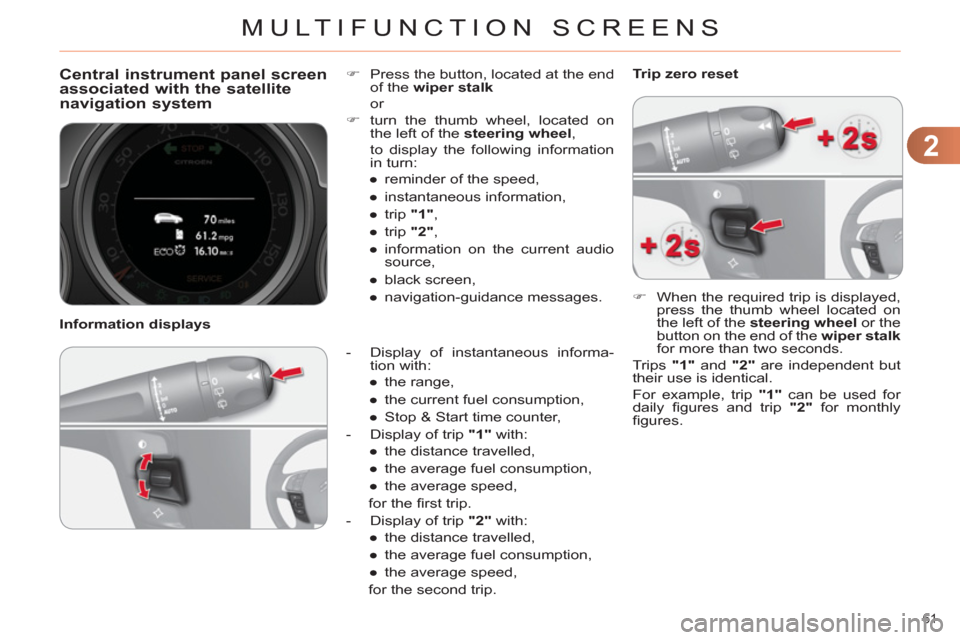
)
Press the button, located at the end
of the wiper stalk
or
)
turn the thumb wheel, located on
the left of the steering wheel
,
to display the following information
in turn:
●
reminder of the speed,
●
instantaneous information,
●
trip "1"
,
●
trip "2"
,
●
information on the current audio
source,
●
black screen,
●
navigation-guidance messages.
Information displays
)
When the required trip is displayed,
press the thumb wheel located on
the left of the steering wheel
or the
button on the end of the wiper stalk
for more than two seconds.
Trips "1"
and "2"
are independent but
their use is identical.
For example, trip "1"
can be used for
daily fi gures and trip "2"
for monthly
fi gures.
Trip zero reset
Page 80 of 324
3
COMFORT
78
Automatic day/night model
By means of a sensor, which measures
the light from the rear of the vehicle,
this system automatically and progres-
sively changes between the day and
night uses.
In order to ensure optimum vis-
ibility during your manoeuvres,
the mirror lightens automatically
when reverse gear is engaged.
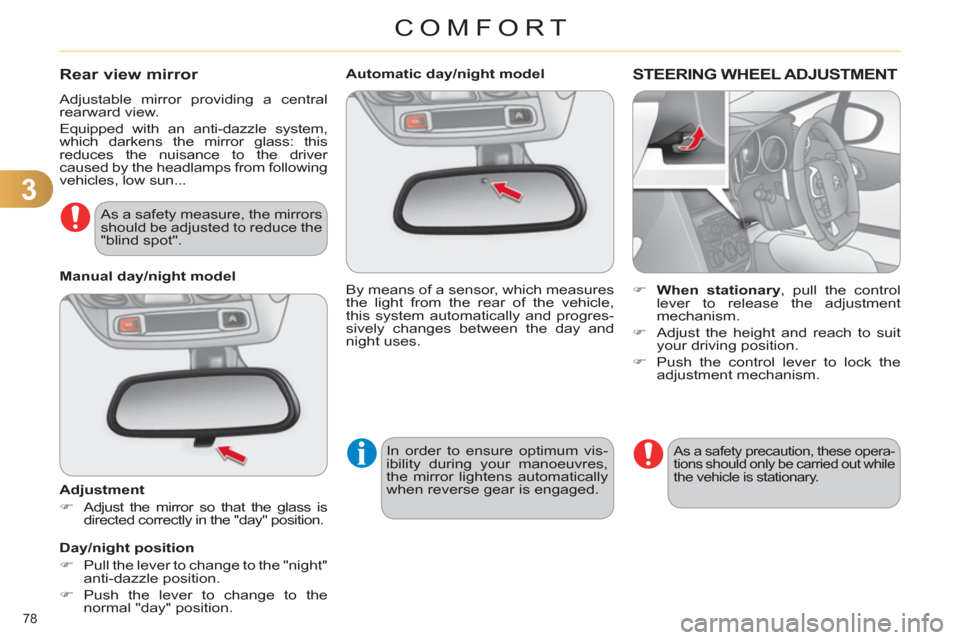
STEERING WHEEL ADJUSTMENT
)
When stationary
, pull the control
lever to release the adjustment
mechanism.
)
Adjust the height and reach to suit
your driving position.
)
Push the control lever to lock the
adjustment mechanism.
As a safety precaution, these opera-
tions should only be carried out while
the vehicle is stationary.
Rear view mirror
Adjustable mirror providing a central
rearward view.
Equipped with an anti-dazzle system,
which darkens the mirror glass: this
reduces the nuisance to the driver
caused by the headlamps from following
vehicles, low sun...
Manual day/night model
Adjustment
)
Adjust the mirror so that the glass is
directed correctly in the "day" position.
Day/night position
)
Pull the lever to change to the "night"
anti-dazzle position.
)
Push the lever to change to the
normal "day" position.
As a safety measure, the mirrors
should be adjusted to reduce the
"blind spot".
Page 106 of 324
5
VISIBILITY
104
CORNERING LIGHTING
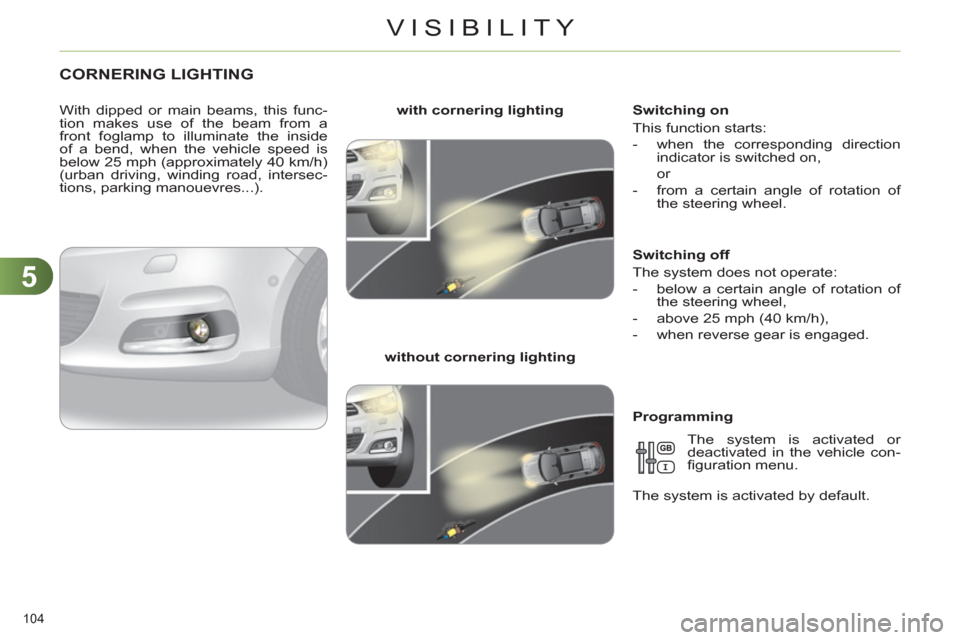
With dipped or main beams, this func-
tion makes use of the beam from a
front foglamp to illuminate the inside
of a bend, when the vehicle speed is
below 25 mph (approximately 40 km/h)
(urban driving, winding road, intersec-
tions, parking manouevres...).
with cornering lighting
without cornering lighting
Switching on
This function starts:
- when the corresponding direction
indicator is switched on,
or
- from a certain angle of rotation of
the steering wheel.
Switching off
The system does not operate:
- below a certain angle of rotation of
the steering wheel,
- above 25 mph (40 km/h),
- when reverse gear is engaged.
Programming
The system is activated or
deactivated in the vehicle con-
fi guration menu.
The system is activated by default.
Page 114 of 324
6
FITTINGS
112
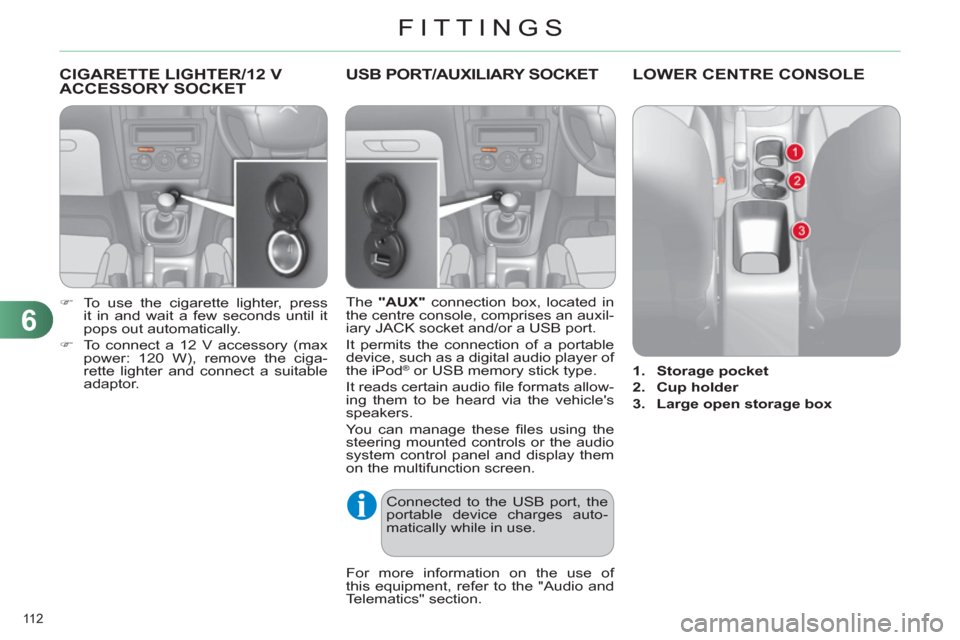
CIGARETTE LIGHTER/12 V
ACCESSORY SOCKET
)
To use the cigarette lighter, press
it in and wait a few seconds until it
pops out automatically.
)
To connect a 12 V accessory (max
power: 120 W), remove the ciga-
rette lighter and connect a suitable
adaptor.
USB PORT/AUXILIARY SOCKET
The "AUX"
connection box, located in
the centre console, comprises an auxil-
iary JACK socket and/or a USB port.
It permits the connection of a portable
device, such as a digital audio player of
the iPod
® or USB memory stick type.
It reads certain audio fi le formats allow-
ing them to be heard via the vehicle's
speakers.
You can manage these fi les using the
steering mounted controls or the audio
system control panel and display them
on the multifunction screen.
For more information on the use of
this equipment, refer to the "Audio and
Telematics" section.
Connected to the USB port, the
portable device charges auto-
matically while in use.
LOWER CENTRE CONSOLE
1.
Storage pocket
2.
Cup holder
3.
Large open storage box
Page 132 of 324
8
SAFETY
130
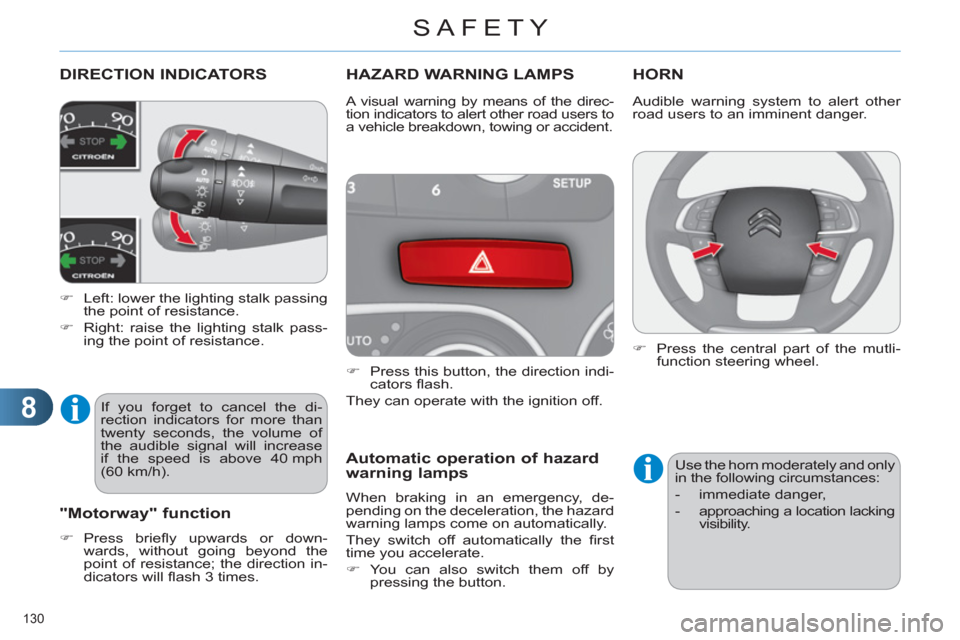
DIRECTION INDICATORS
)
Left: lower the lighting stalk passing
the point of resistance.
)
Right: raise the lighting stalk pass-
ing the point of resistance.
HAZARD WARNING LAMPS
)
Press this button, the direction indi-
cators fl ash.
They can operate with the ignition off.
Automatic operation of hazard
warning lamps
When braking in an emergency, de-
pending on the deceleration, the hazard
warning lamps come on automatically.
They switch off automatically the fi rst
time you accelerate.
)
You can also switch them off by
pressing the button.
HORN
A visual warning by means of the direc-
tion indicators to alert other road users to
a vehicle breakdown, towing or accident.
"Motorway" function
)
Press briefl y upwards or down-
wards, without going beyond the
point of resistance; the direction in-
dicators will fl ash 3 times.
If you forget to cancel the di-
rection indicators for more than
twenty seconds, the volume of
the audible signal will increase
if the speed is above 40 mph
(60 km/h). Audible warning system to alert other
road users to an imminent danger.
)
Press the central part of the mutli-
function steering wheel.
Use the horn moderately and only
in the following circumstances:
- immediate danger,
- approaching a location lacking
visibility.
Page 133 of 324
8
SAFETY
131
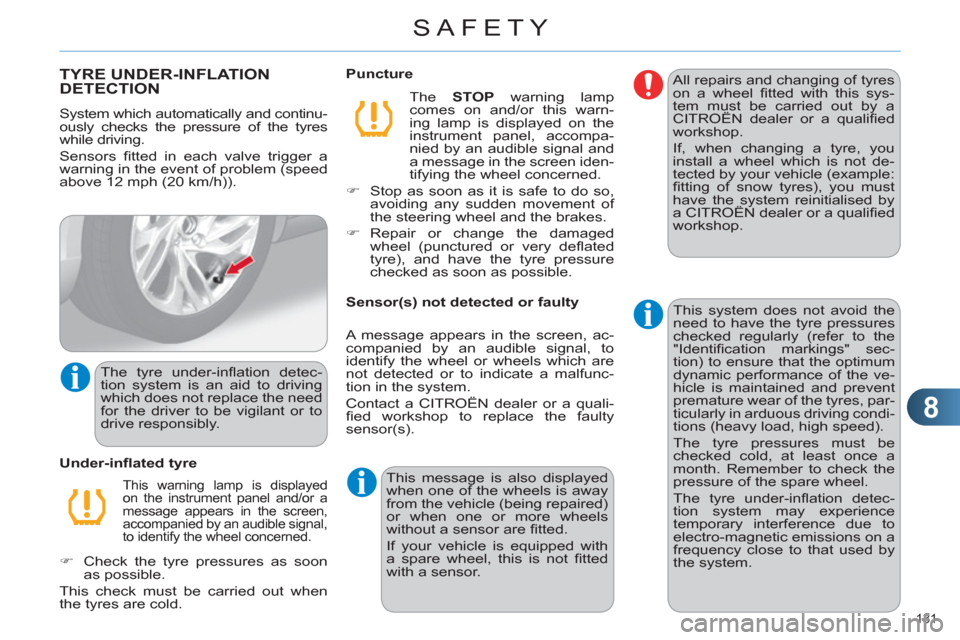
TYRE UNDER-INFLATION
DETECTION
System which automatically and continu-
ously checks the pressure of the tyres
while driving.
Sensors fi tted in each valve trigger a
warning in the event of problem (speed
above 12 mph (20 km/h)).
This warning lamp is displayed
on the instrument panel and/or a
message appears in the screen,
accompanied by an audible signal,
to identify the wheel concerned.
Under-infl ated tyre
The STOP
warning lamp
comes on and/or this warn-
ing lamp is displayed on the
instrument panel, accompa-
nied by an audible signal and
a message in the screen iden-
tifying the wheel concerned.
)
Stop as soon as it is safe to do so,
avoiding any sudden movement of
the steering wheel and the brakes.
)
Repair or change the damaged
wheel (punctured or very defl ated
tyre), and have the tyre pressure
checked as soon as possible.
Puncture
Sensor(s) not detected or faulty
A message appears in the screen, ac-
companied by an audible signal, to
identify the wheel or wheels which are
not detected or to indicate a malfunc-
tion in the system.
Contact a CITROËN dealer or a quali-
fi ed workshop to replace the faulty
sensor(s).
This message is also displayed
when one of the wheels is away
from the vehicle (being repaired)
or when one or more wheels
without a sensor are fi tted.
If your vehicle is equipped with
a spare wheel, this is not fi tted
with a sensor. All repairs and changing of tyres
on a wheel fi tted with this sys-
tem must be carried out by a
CITROËN dealer or a qualifi ed
workshop.
If, when changing a tyre, you
install a wheel which is not de-
tected by your vehicle (example:
fi tting of snow tyres), you must
have the system reinitialised by
a CITROËN dealer or a qualifi ed
workshop.
The tyre under-infl ation detec-
tion system is an aid to driving
which does not replace the need
for the driver to be vigilant or to
drive responsibly. This system does not avoid the
need to have the tyre pressures
checked regularly (refer to the
"Identifi cation markings" sec-
tion) to ensure that the optimum
dynamic performance of the ve-
hicle is maintained and prevent
premature wear of the tyres, par-
ticularly in arduous driving condi-
tions (heavy load, high speed).
The tyre pressures must be
checked cold, at least once a
month. Remember to check the
pressure of the spare wheel.
The tyre under-infl ation detec-
tion system may experience
temporary interference due to
electro-magnetic emissions on a
frequency close to that used by
the system.
)
Check the tyre pressures as soon
as possible.
This check must be carried out when
the tyres are cold.
Page 135 of 324
8
SAFETY
133
TRAJECTORY CONTROL
SYSTEMS (ESP)
Anti-slip regulation (ASR) and
electronic stability control
(ESC)
The anti-slip regulation (also known as
traction control) optimises traction to pre-
vent skidding of the wheels, by acting on
the brakes of the driving wheels and on
the engine.
The electronic stability control acts on
the brake of one or more wheels and
on the engine to keep the vehicle on the
trajectory required by the driver, within
the limits of the laws of physics.
Activation
These systems are activated automati-
cally each time the vehicle is started.
They come into operation in the event
of a grip or trajectory problem.
This is indicated by fl ashing of
this warning lamp in the instru-
ment panel.
Intelligent traction control
system ("Snow motion")
Your vehicle has a system to help driving
on snow: intelligent traction control.
This system detects situations of diffi -
cult surface adhesion that could make it
diffi cult to move off or make progress on
deep fresh snow or compacted snow.
In these situations, the intelligent trac-
tion control
limits the amount of wheel
slip to provide the best traction and tra-
jectory control for your vehicle.
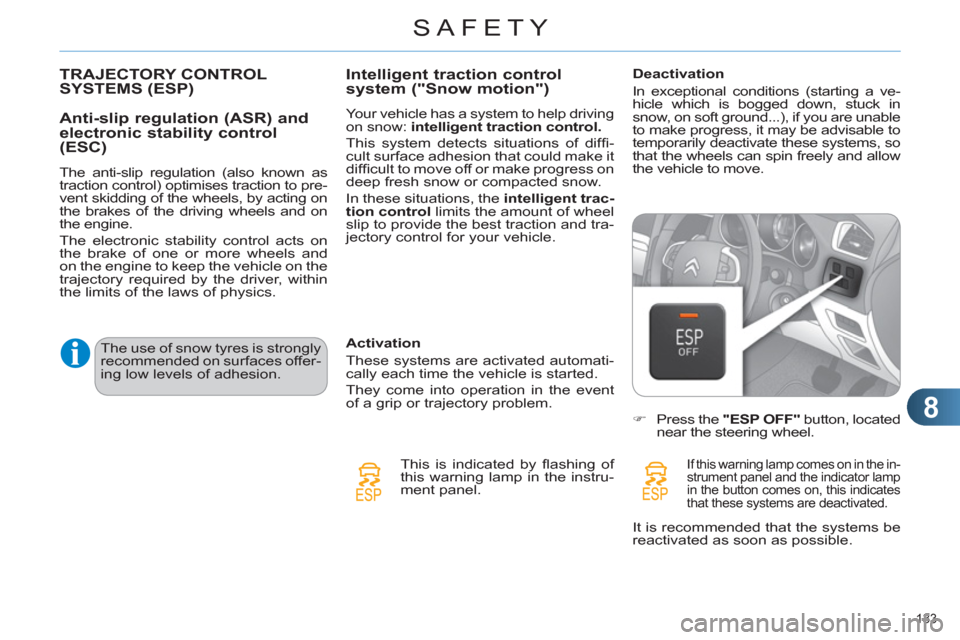
Deactivation
In exceptional conditions (starting a ve-
hicle which is bogged down, stuck in
snow, on soft ground...), if you are unable
to make progress, it may be advisable to
temporarily deactivate these systems, so
that the wheels can spin freely and allow
the vehicle to move.
)
Press the "ESP OFF"
button, located
near the steering wheel.
If this warning lamp comes on in the in-
strument panel and the indicator lamp
in the button comes on, this indicates
that these systems are deactivated.
The use of snow tyres is strongly
recommended on surfaces offer-
ing low levels of adhesion.
It is recommended that the systems be
reactivated as soon as possible.
Page 140 of 324
8
SAFETY
138
AIRBAGS
System designed to maximise the safety
of the occupants (with the exception of
the rear centre passenger) in the event
of violent collisions. It supplements the
action of the force-limiting seat belts
(with the exception of the rear centre
passenger).
If a collision occurs, the electronic de-
tectors record and analyse the front
and side impacts sustained in the im-
pact detection zones:
- in the case of a serious impact, the
airbags are triggered instantly and
protect the occupants of the vehicle
(with the exception of the rear cen-
tre passenger); immediately after the
impact, the airbags defl ate rapidly so
that they do not hinder visibility or the
exit of the occupants,
- in the case of a minor or rear impact
or in certain roll-over conditions, the
airbags will not be triggered; the
seat belt alone is suffi cient to pro-
vide optimum protection in these
situations.
The airbags do not operate when
the ignition is switched off.
This equipment will only deploy
once. If a second impact occurs
(during the same or a subse-
quent accident), the airbag will
not be triggered again.
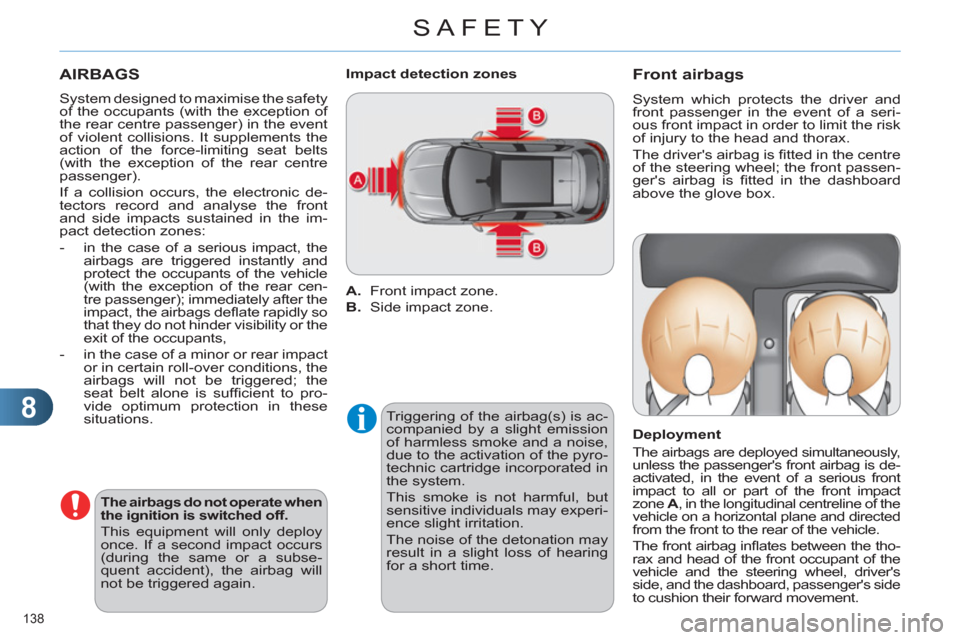
A.
Front impact zone.
B.
Side impact zone.
Impact detection zones
Triggering of the airbag(s) is ac-
companied by a slight emission
of harmless smoke and a noise,
due to the activation of the pyro-
technic cartridge incorporated in
the system.
This smoke is not harmful, but
sensitive individuals may experi-
ence slight irritation.
The noise of the detonation may
result in a slight loss of hearing
for a short time.
Front airbags
System which protects the driver and
front passenger in the event of a seri-
ous front impact in order to limit the risk
of injury to the head and thorax.
The driver's airbag is fi tted in the centre
of the steering wheel; the front passen-
ger's airbag is fi tted in the dashboard
above the glove box.
Deployment
The airbags are deployed simultaneously,
unless the passenger's front airbag is de-
activated, in the event of a serious front
impact to all or part of the front impact
zone A
, in the longitudinal centreline of the
vehicle on a horizontal plane and directed
from the front to the rear of the vehicle.
The front airbag infl ates between the tho-
rax and head of the front occupant of the
vehicle and the steering wheel, driver's
side, and the dashboard, passenger's side
to cushion their forward movement.
Page 143 of 324
8
SAFETY
141
For the airbags to be fully
effective, observe the
following safety rules:
Sit in a normal upright position.
Wear a correctly adjusted seat
belt.
Do not leave anything between
the occupants and the airbags
(a child, pet, object...). This could
hamper the operation of the air-
bags or injure the occupants.
After an accident or if the ve-
hicle has been stolen or broken
into, have the airbag systems
checked.
All work on the airbag system must
be carried out by a CITROËN
dealer or a qualifi ed workshop.
Even if all of the precautions men-
tioned are observed, a risk of in-
jury or of minor burns to the head,
chest or arms when an airbag is
deployed cannot be ruled out.
The bag infl ates almost instantly
(within a few milliseconds) then
defl ates within the same time dis-
charging the hot gas via openings
provided for this purpose.
Front airbags
Do not drive holding the steering wheel by its spokes or resting your hands on
the centre part of the wheel.
Passengers must not place their feet on the dashboard.
If possible, do not smoke as deployment of the airbags can cause burns or the
risk of injury from a cigarette or pipe.
Never remove or pierce the steering wheel or hit it violently.
Lateral airbags
Use only approved covers on the seats, compatible with the deployment the lateral
airbags. For information on the range of seat covers suitable for your vehicle, you
can contact a CITROËN dealer (see "Practical information - § Accessories").
Do not fi x or attach anything to the seat backs (clothing...). This could cause
injury to the chest or arms if the lateral airbag is deployed.
Do not sit with the upper part of the body any nearer to the door than necessary.
Curtain airbags
Do not fi x or attach anything to the roof. This could cause injury to the head if the
curtain airbag is deployed.
If fi tted on your vehicle, do not remove the grab handles installed on the roof, they
play a part in securing the curtain airbags.