steering Citroen C4 RHD 2012 2.G Owner's Guide
[x] Cancel search | Manufacturer: CITROEN, Model Year: 2012, Model line: C4 RHD, Model: Citroen C4 RHD 2012 2.GPages: 324, PDF Size: 28.17 MB
Page 153 of 324
9
DRIVING
151
6-SPEED ELECTRONIC
GEARBOX SYSTEM
Six-speed electronic gearbox system
which offers a choice between the com-
fort of fully automatic operation or the
pleasure of manual gear changing.
There are two driving modes:
- automated
mode for automatic
control of the gears by the gearbox,
without any action on the part of the
driver
- manual
mode for sequential gear
changing by the driver using the
steering mounted paddles.
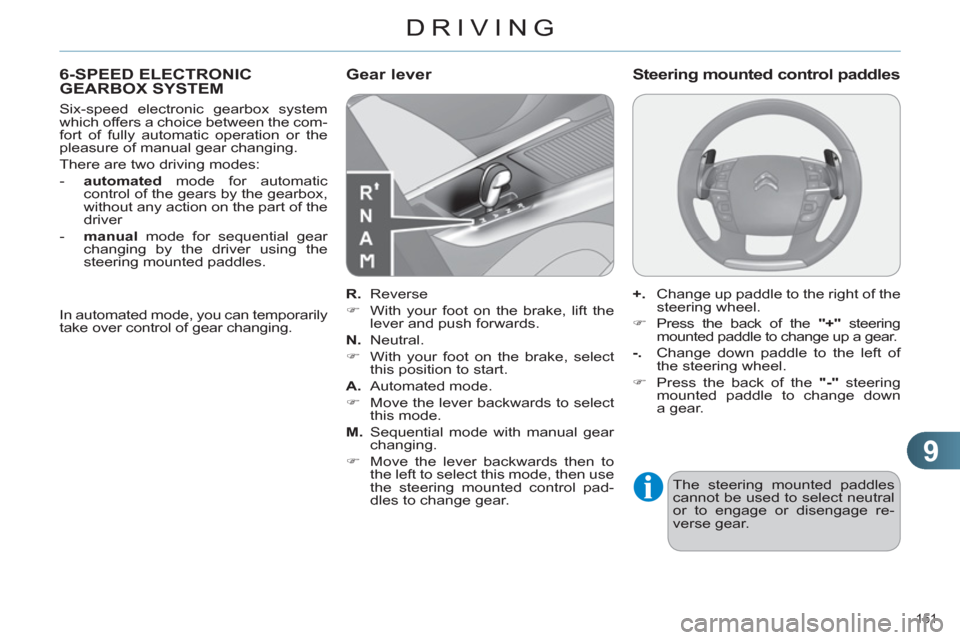
R.
Reverse
)
With your foot on the brake, lift the
lever and push forwards.
N.
Neutral.
)
With your foot on the brake, select
this position to start.
A.
Automated mode.
)
Move the lever backwards to select
this mode.
M.
Sequential mode with manual gear
changing.
)
Move the lever backwards then to
the left to select this mode, then use
the steering mounted control pad-
dles to change gear.
Gear lever
+.
Change up paddle to the right of the
steering wheel.
)
Press the back of the "+"
steering
mounted paddle to change up a gear.
-.
Change down paddle to the left of
the steering wheel.
)
Press the back of the "-"
steering
mounted paddle to change down
a gear.
Steering mounted control paddles
The steering mounted paddles
cannot be used to select neutral
or to engage or disengage re-
verse gear.
In automated mode, you can temporarily
take over control of gear changing.
Page 155 of 324
9
DRIVING
153
You can change mode at any
time by moving the gear lever
from A
to M
or the other way
round.
At very low speed, if reverse gear is re-
quested, this will only be acted on when
the vehicle is immobilised. The Foot on
brake
warning lamp may come on in
the instrument panel to prompt you to
brake.
At high speed, if reverse gear is re-
quested, the N
indicator fl ashes and the
gearbox goes into neutral. To engage a
gear again, put the gear lever in posi-
tion A
or M
.
When immobilising the vehicle,
with the engine running, you
must place the gear lever in neu-
tral N
.
Before carrying out any work in
the engine compartment, ensure
that the gear lever is in neutral N
and that the parking brake is ap-
plied.
Whatever the circumstances, you
must manually apply the parking
brake when parking, unless the
parking brake is programmed in
automatic mode.
Reverse
To engage reverse gear R
, the vehicle
must be immobilised with your foot on
the brake pedal.
)
Select position R
.
Operating fault
With the ignition on, the fl ashing of
AUTO
, accompanied by an audible sig-
nal and a message in the screen, indi-
cates a malfunction of the gearbox.
Have it checked by a CITROËN dealer
or a qualifi ed workshop.
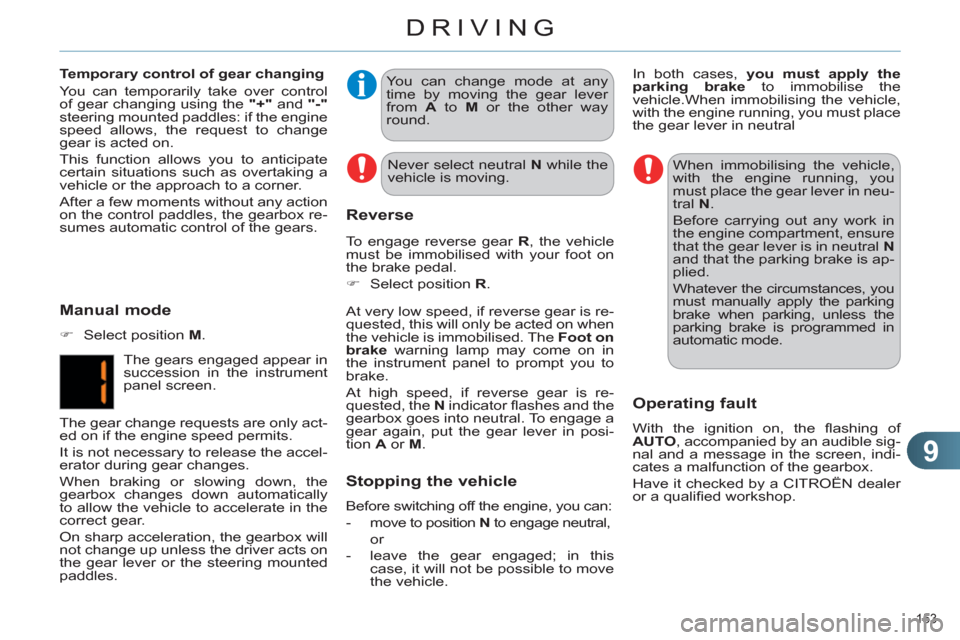
Manual mode
)
Select position M
.
The gears engaged appear in
succession in the instrument
panel screen.
The gear change requests are only act-
ed on if the engine speed permits.
It is not necessary to release the accel-
erator during gear changes.
When braking or slowing down, the
gearbox changes down automatically
to allow the vehicle to accelerate in the
correct gear.
On sharp acceleration, the gearbox will
not change up unless the driver acts on
the gear lever or the steering mounted
paddles.
Temporary control of gear changing
You can temporarily take over control
of gear changing using the "+"
and "-"
steering mounted paddles: if the engine
speed allows, the request to change
gear is acted on.
This function allows you to anticipate
certain situations such as overtaking a
vehicle or the approach to a corner.
After a few moments without any action
on the control paddles, the gearbox re-
sumes automatic control of the gears.
Never select neutral N
while the
vehicle is moving.
In both cases, you must apply the
parking brake
to immobilise the
vehicle. When immobilising the vehicle,
with the engine running, you must place
the gear lever in neutral
Stopping the vehicle
Before switching off the engine, you can:
- move to position N
to engage neutral,
or
- leave the gear engaged; in this
case, it will not be possible to move
the vehicle.
Page 160 of 324
9
DRIVING
158
STOP & START
The Stop & Start system puts the en-
gine temporarily into standby - STOP
mode - during stops in the traffi c (red
lights, traffi c jams, or other...). The en-
gine restarts automatically - START
mode - as soon as you want to move
off. The restart takes place instantly,
quickly and silently.
Perfect for urban use, the Stop & Start
system reduces fuel consumption and
exhaust emissions as well as the noise
level when stationary.
Operation
Going into engine STOP mode
The "ECO"
warning lamp comes on
in the instrument panel and the en-
gine goes into standby automatically:
- with a manual gearbox
, at speeds
below 12 mph (20 km/h), when you
put the gear lever into neutral and
release the clutch pedal, If your vehicle is fi tted with
the system, a time counter
calculates the sum of the
periods in STOP mode dur-
ing a journey. It resets itself to zero ev-
ery time the ignition is switched on with
the key.
- with the 6-speed electronic gear-
box system
, at a speed below
5 mph (8 km/h), when you press the
brake pedal or put the gear lever
into position N
. With the electronic gearbox sys-
tem, for your comfort during park-
ing maoeuvres, STOP mode is
not available for a few seconds
after coming out of reverse gear.
STOP mode does not affect the
functionality of the vehicle, such
as braking, power steering, for
example.
Special cases: STOP mode
unavailable
STOP mode is not invoked when:
- the driver's door is open,
- the driver's seat belt is not fas-
tened,
- the vehicle has not exceeded 6 mph
(10 km/h) since the last engine start
using the key,
- the electric parking brake is applied
or being applied,
- the engine is needed to maintain a
comfortable temperature in the pas-
senger compartment,
- demisting is active,
- some special conditions (battery
charge, engine temperature, brak-
ing assistance, ambient tempera-
ture...) where the engine is needed
to assure control of a system.
In this case, the "ECO"
warning
lamp fl ashes for a few seconds,
then goes off. Never refuel with the engine in
STOP mode; you must switch off
the ignition with the key.
This operation is perfectly normal.
Page 166 of 324
9
DRIVING
164
MEMORISING SPEEDS
This memorisation of speeds applies
to both the speed limiter and the cruise
control.
You can memorise up to 5 speeds in
the system. By default, a few speeds
are already memorised.
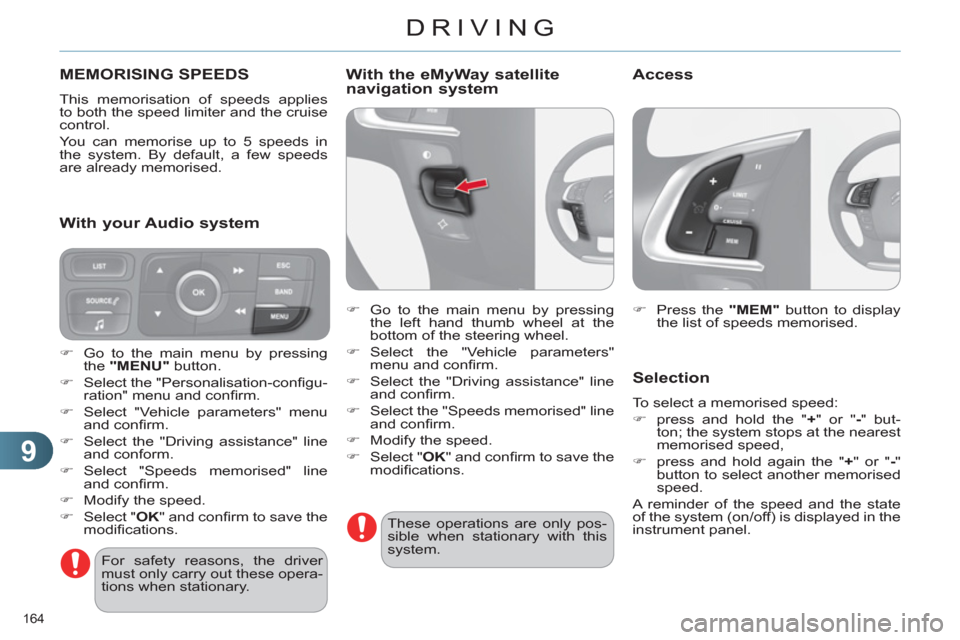
)
Press the "MEM"
button to display
the list of speeds memorised.
Selection
To select a memorised speed:
)
press and hold the " +
" or " -
" but-
ton; the system stops at the nearest
memorised speed,
)
press and hold again the " +
" or " -
"
button to select another memorised
speed.
A reminder of the speed and the state
of the system (on/off) is displayed in the
instrument panel.
For safety reasons, the driver
must only carry out these opera-
tions when stationary.
)
Go to the main menu by pressing
the "MENU"
button.
)
Select the "Personalisation-confi gu-
ration" menu and confi rm.
)
Select "Vehicle parameters" menu
and confi rm.
)
Select the "Driving assistance" line
and conform.
)
Select "Speeds memorised" line
and confi rm.
)
Modify the speed.
)
Select " OK
" and confi rm to save the
modifi cations.
With your Audio system
With the eMyWay satellite
navigation system
)
Go to the main menu by pressing
the left hand thumb wheel at the
bottom of the steering wheel.
)
Select the "Vehicle parameters"
menu and confi rm.
)
Select the "Driving assistance" line
and confi rm.
)
Select the "Speeds memorised" line
and confi rm.
)
Modify the speed.
)
Select " OK
" and confi rm to save the
modifi cations.
These operations are only pos-
sible when stationary with this
system.
Access
Page 167 of 324
9
DRIVING
165
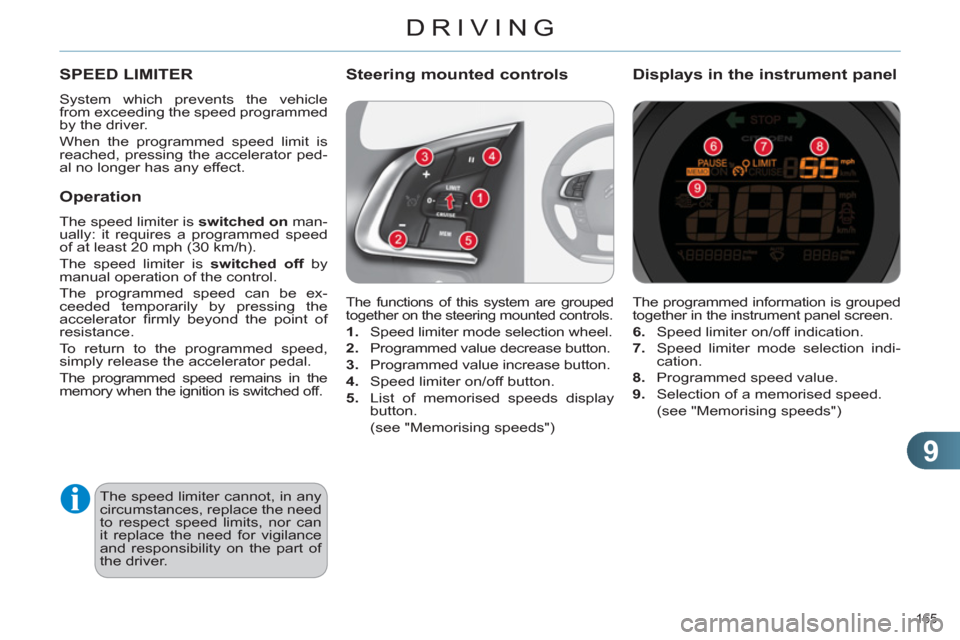
The programmed information is grouped
together in the instrument panel screen.
6.
Speed limiter on/off indication.
7.
Speed limiter mode selection indi-
cation.
8.
Programmed speed value.
9.
Selection of a memorised speed.
(see "Memorising speeds")
Displays in the instrument panel
SPEED LIMITER
System which prevents the vehicle
from exceeding the speed programmed
by the driver.
When the programmed speed limit is
reached, pressing the accelerator ped-
al no longer has any effect.
The speed limiter cannot, in any
circumstances, replace the need
to respect speed limits, nor can
it replace the need for vigilance
and responsibility on the part of
the driver.
The functions of this system are grouped
together on the steering mounted controls.
1.
Speed limiter mode selection wheel.
2.
Programmed value decrease button.
3.
Programmed value increase button.
4.
Speed limiter on/off button.
5.
List of memorised speeds display
button.
(see "Memorising speeds")
Steering mounted controls
Operation
The speed limiter is switched on
man-
ually: it requires a programmed speed
of at least 20 mph (30 km/h).
The speed limiter is switched off
by
manual operation of the control.
The programmed speed can be ex-
ceeded temporarily by pressing the
accelerator fi rmly beyond the point of
resistance.
To return to the programmed speed,
simply release the accelerator pedal.
The programmed speed remains in the
memory when the ignition is switched off.
Page 169 of 324
9
DRIVING
167
The cruise control system can-
not, in any circumstances, re-
place the need to respect speed
limits, nor can it replace the need
for vigilance and responsibility
on the part of the driver.
You are advised to keep your
feet near the pedals at all times.
CRUISE CONTROL
System which automatically maintains
the speed of the vehicle at the value
programmed by the driver, without any
action on the accelerator pedal.
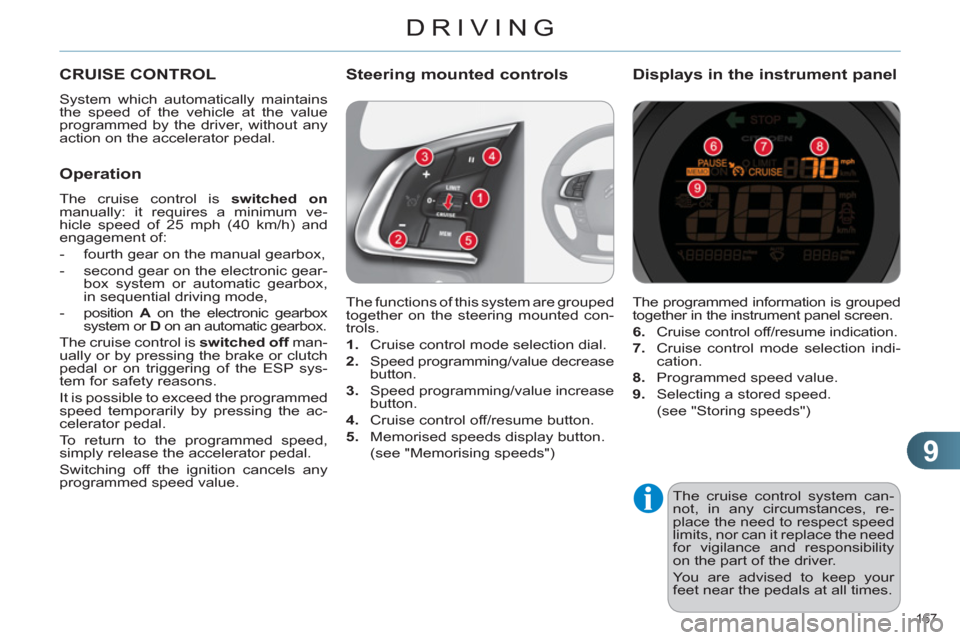
The functions of this system are grouped
together on the steering mounted con-
trols.
1.
Cruise control mode selection dial.
2.
Speed programming/value decrease
button.
3.
Speed programming/value increase
button.
4.
Cruise control off/resume button.
5.
Memorised speeds display button.
(see "Memorising speeds")
Steering mounted controls
The programmed information is grouped
together in the instrument panel screen.
6.
Cruise control off/resume indication.
7.
Cruise control mode selection indi-
cation.
8.
Programmed speed value.
9.
Selecting a stored speed.
(see "Storing speeds")
Displays in the instrument panel
Operation
The cruise control is switched on
manually: it requires a minimum ve-
hicle speed of 25 mph (40 km/h) and
engagement of:
- fourth gear on the manual gearbox,
- second gear on the electronic gear-
box system or automatic gearbox,
in sequential driving mode,
-
position A
on the electronic gearbox
system or D
on an automatic gearbox.
The cruise control is switched off
man-
ually or by pressing the brake or clutch
pedal or on triggering of the ESP sys-
tem for safety reasons.
It is possible to exceed the programmed
speed temporarily by pressing the ac-
celerator pedal.
To return to the programmed speed,
simply release the accelerator pedal.
Switching off the ignition cancels any
programmed speed value.
Page 178 of 324
10
CHECKS
176
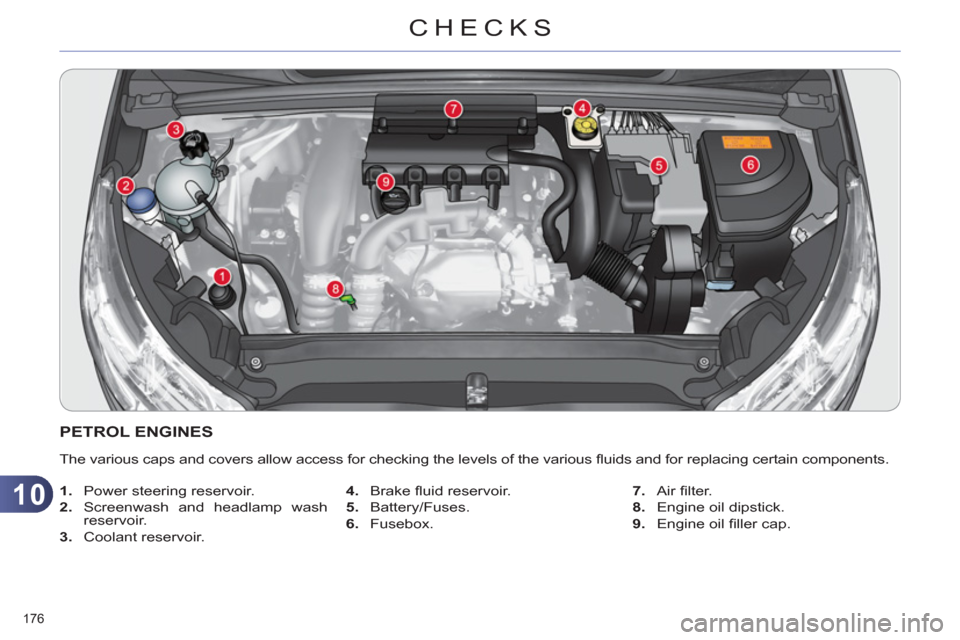
PETROL ENGINES
The various caps and covers allow access for checking the levels of the various fl uids and for replacing certain components.
1.
Power steering reservoir.
2.
Screenwash and headlamp wash
reservoir.
3.
Coolant reservoir.
4.
Brake fl uid reservoir.
5.
Battery/Fuses.
6.
Fusebox.
7.
Air fi lter.
8.
Engine oil dipstick.
9.
Engine oil fi ller cap.
Page 179 of 324
10
CHECKS
177
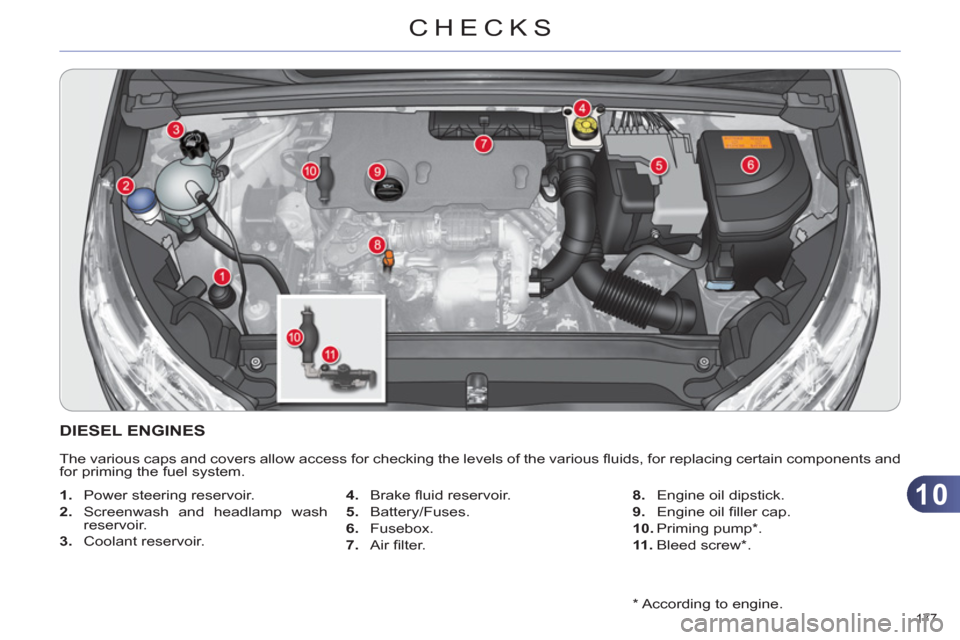
*
According to engine.
DIESEL ENGINES
The various caps and covers allow access for checking the levels of the various fl uids, for replacing certain components and
for priming the fuel system.
1.
Power steering reservoir.
2.
Screenwash and headlamp wash
reservoir.
3.
Coolant reservoir.
4.
Brake fl uid reservoir.
5.
Battery/Fuses.
6.
Fusebox.
7.
Air fi lter.
8.
Engine oil dipstick.
9.
Engine oil fi ller cap.
10.
Priming pump * .
11 .
Bleed screw * .
Page 180 of 324
10
CHECKS
178
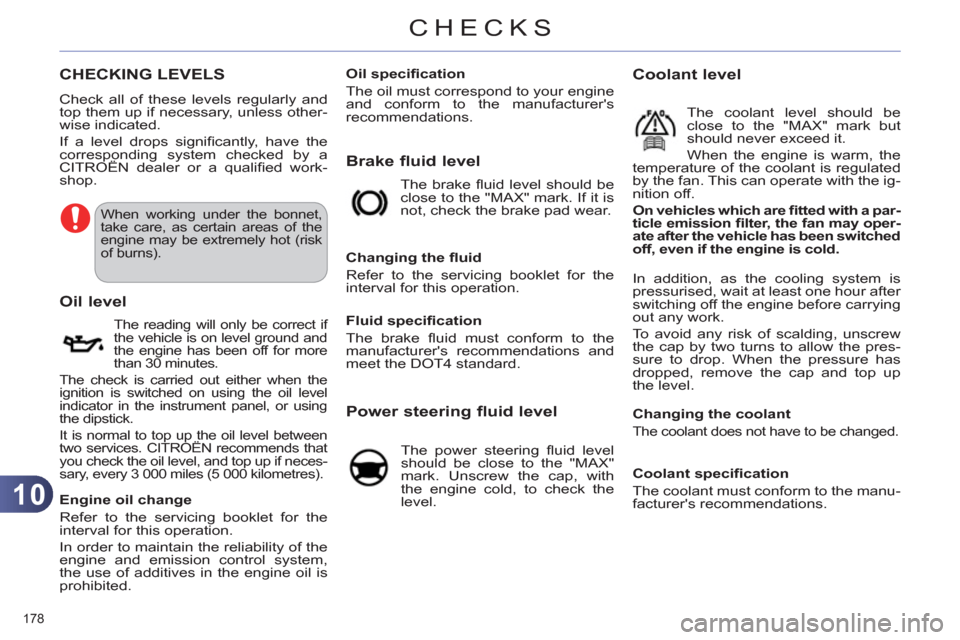
CHECKING LEVELS
Check all of these levels regularly and
top them up if necessary, unless other-
wise indicated.
If a level drops signifi cantly, have the
corresponding system checked by a
CITROËN dealer or a qualifi ed work-
shop.
When working under the bonnet,
take care, as certain areas of the
engine may be extremely hot (risk
of burns).
The reading will only be correct if
the vehicle is on level ground and
the engine has been off for more
than 30 minutes.
The check is carried out either when the
ignition is switched on using the oil level
indicator in the instrument panel, or using
the dipstick.
It is normal to top up the oil level between
two services. CITROËN recommends that
you check the oil level, and top up if neces-
sary, every 3 000 miles (5 000 kilometres).
Oil level
Engine oil change
Refer to the servicing booklet for the
interval for this operation.
In order to maintain the reliability of the
engine and emission control system,
the use of additives in the engine oil is
prohibited.
Oil specifi cation
The oil must correspond to your engine
and conform to the manufacturer's
recommendations.
Brake fluid level
The brake fl uid level should be
close to the "MAX" mark. If it is
not, check the brake pad wear.
Changing the fl uid
Refer to the servicing booklet for the
interval for this operation.
Fluid specifi cation
The brake fl uid must conform to the
manufacturer's recommendations and
meet the DOT4 standard.
Power steering fluid level
The power steering fl uid level
should be close to the "MAX"
mark. Unscrew the cap, with
the engine cold, to check the
level.
Coolant level
The coolant level should be
close to the "MAX" mark but
should never exceed it.
When the engine is warm, the
temperature of the coolant is regulated
by the fan. This can operate with the ig-
nition off.
On vehicles which are fi tted with a par-
ticle emission fi lter, the fan may oper-
ate after the vehicle has been switched
off, even if the engine is cold.
In addition, as the cooling system is
pressurised, wait at least one hour after
switching off the engine before carrying
out any work.
To avoid any risk of scalding, unscrew
the cap by two turns to allow the pres-
sure to drop. When the pressure has
dropped, remove the cap and top up
the level.
Changing the coolant
The coolant does not have to be changed.
Coolant specifi cation
The coolant must conform to the manu-
facturer's recommendations.
Page 184 of 324
11
PRACTICAL INFORMATION
182
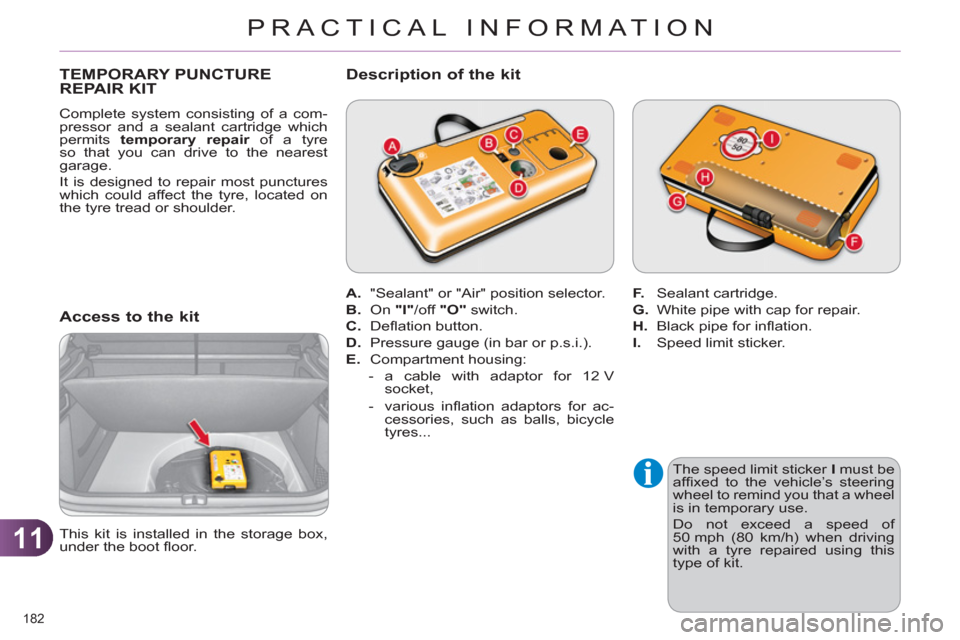
TEMPORARY PUNCTURE
REPAIR KIT
Complete system consisting of a com-
pressor and a sealant cartridge which
permits temporary repair
of a tyre
so that you can drive to the nearest
garage.
It is designed to repair most punctures
which could affect the tyre, located on
the tyre tread or shoulder.
Access to the kit
The speed limit sticker I
must be
affi xed to the vehicle’s steering
wheel to remind you that a wheel
is in temporary use.
Do not exceed a speed of
50 mph (80 km/h) when driving
with a tyre repaired using this
type of kit.
This kit is installed in the storage box,
under the boot fl oor.
A.
"Sealant" or "Air" position selector.
B.
On "I"
/off "O"
switch.
C.
Defl ation button.
D.
Pressure gauge (in bar or p.s.i.).
E.
Compartment housing:
- a cable with adaptor for 12 V
socket,
- various infl ation adaptors for ac-
cessories, such as balls, bicycle
tyres...
Description of the kit
F.
Sealant cartridge.
G.
White pipe with cap for repair.
H.
Black pipe for infl ation.
I.
Speed limit sticker.