bluetooth Citroen C4 RHD 2012 2.G Owner's Guide
[x] Cancel search | Manufacturer: CITROEN, Model Year: 2012, Model line: C4 RHD, Model: Citroen C4 RHD 2012 2.GPages: 324, PDF Size: 28.17 MB
Page 293 of 324
291
05
1
2
5
3
4
6
USING THE TELEPHONE
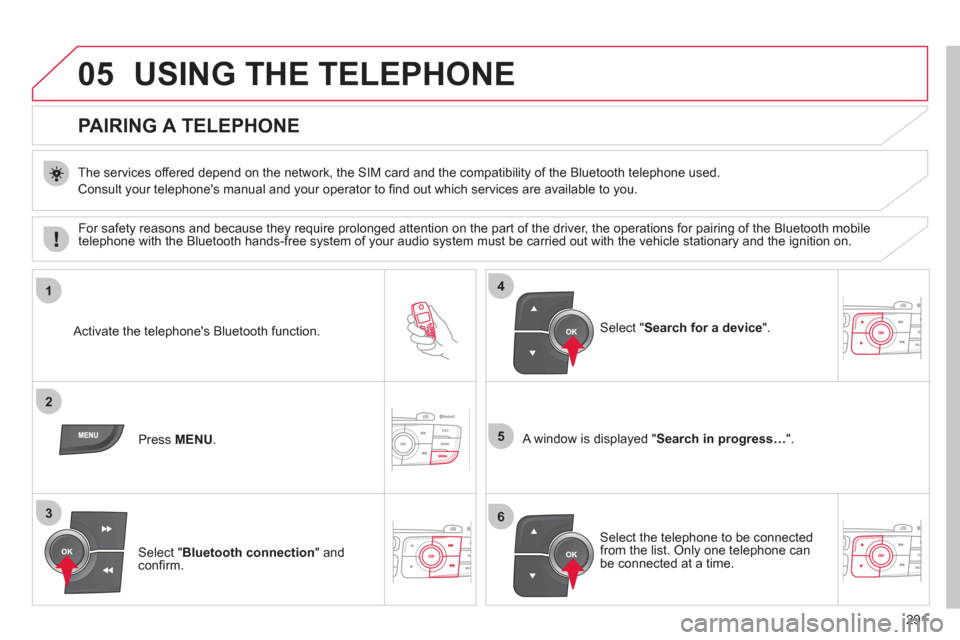
PAIRING A TELEPHONE
The services offered depend on the network, the SIM card and the compatibility of the Bluetooth telephone used.
Consult your telephone's manual and your operator to fi nd out which services are available to you.
Activate the telephone's Bluetooth function.
Press MENU
.
A window is displayed " Search in progress…
".
Select the telephone to be connected
from the list. Only one telephone can
be connected at a time.
Select " Search for a device
".
For safety reasons and because they require prolonged attention on the part of the driver, the operations for pairing of the Bluetooth mobile
telephone with the Bluetooth hands-free system of your audio system must be carried out with the vehicle stationary and the ignition on.
Select " Bluetooth connection
" and
confi rm.
Page 294 of 324
292
05
7
8
Saisir code authentification
01
OK Del23456789 _
9
10
USING THE TELEPHONE
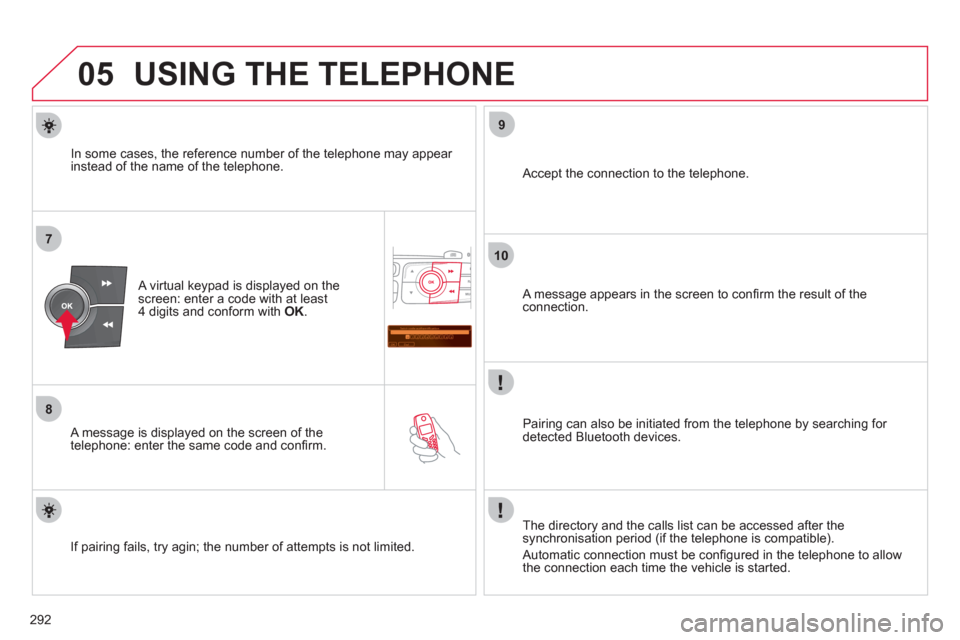
A virtual keypad is displayed on the
screen: enter a code with at least
4 digits and conform with OK
.
A message is displayed on the screen of the
telephone: enter the same code and confi rm.
A message appears in the screen to confi rm the result of the
connection.
Pairing can also be initiated from the telephone by searching for
detected Bluetooth devices.
Accept the connection to the telephone.
If pairing fails, try agin; the number of attempts is not limited.
The directory and the calls list can be accessed after the
synchronisation period (if the telephone is compatible).
Automatic connection must be confi gured in the telephone to allow
the connection each time the vehicle is started.
In some cases, the reference number of the telephone may appear
instead of the name of the telephone.
Page 295 of 324
293
05
1
2
4
3
USING THE TELEPHONE
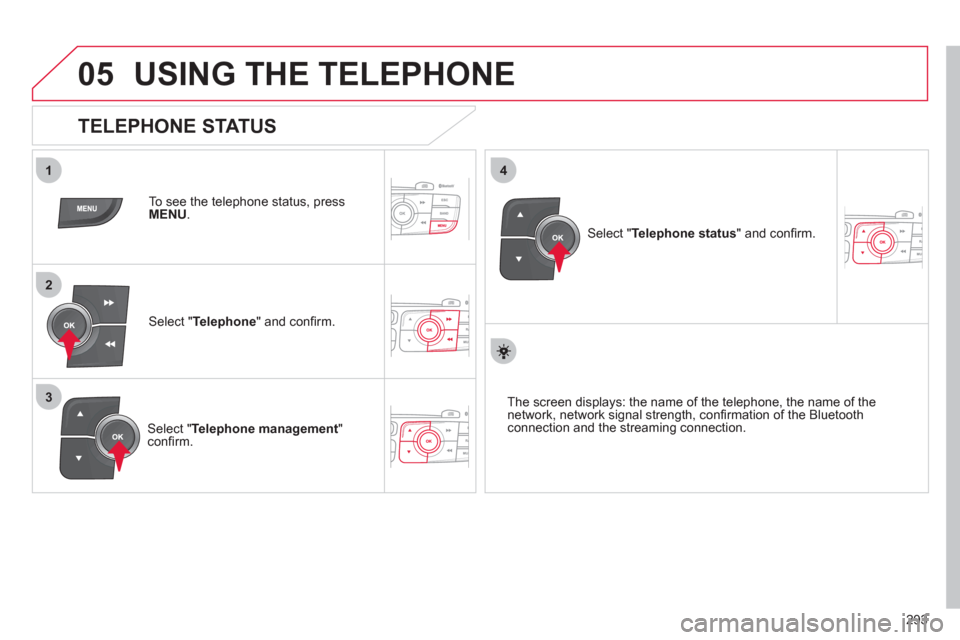
To see the telephone status, press
MENU
.
Select " Telephone
" and confi rm.
Select " Telephone management
"
confi rm.
Select " Telephone status
" and confi rm.
TELEPHONE STATUS
The screen displays: the name of the telephone, the name of the
network, network signal strength, confi rmation of the Bluetooth
connection and the streaming connection.
Page 296 of 324
294
1
2
3
4
05
5
USING THE TELEPHONE
The telephone connection automatically includes hands-free
operation and audio streaming.
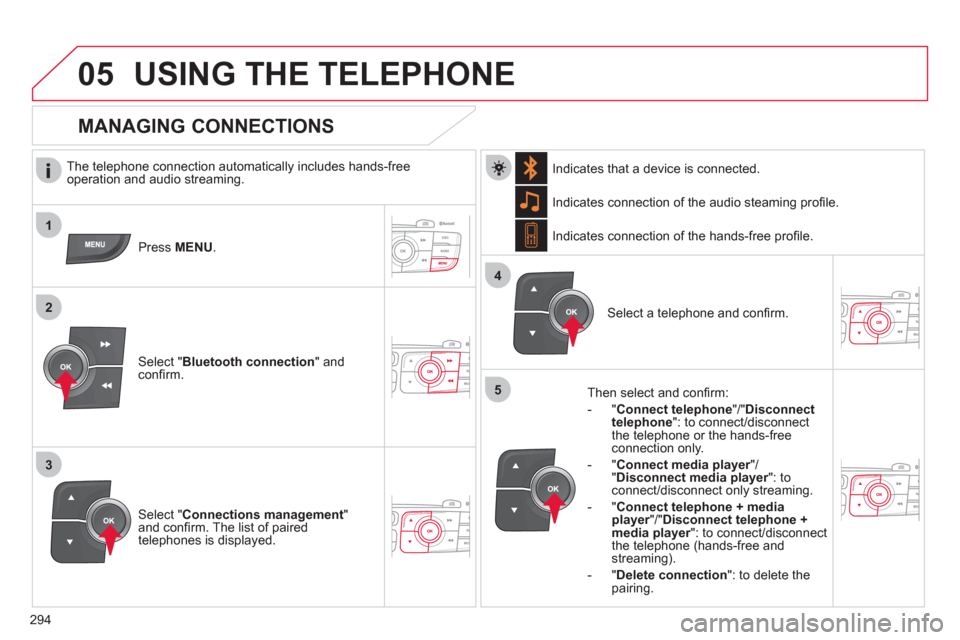
Press MENU
.
Select " Bluetooth connection
" and
confi rm. Indicates connection of the audio steaming profi le.
MANAGING CONNECTIONS
Select " Connections management
"
and confi rm. The list of paired
telephones is displayed.
Select a telephone and confi rm. Indicates connection of the hands-free profi le.
Then select and confi rm:
- " Connect telephone
"/" Disconnect
telephone
": to connect/disconnect
the telephone or the hands-free
connection only.
- " Connect media player
"/
" Disconnect media player
": to
connect/disconnect only streaming.
- " Connect telephone + media
player
"/" Disconnect telephone +
media player
": to connect/disconnect
the telephone (hands-free and
streaming).
- " Delete connection
": to delete the
pairing.
Indicates that a device is connected.
Page 299 of 324
297
1
2a2c
2b
05USING THE TELEPHONE
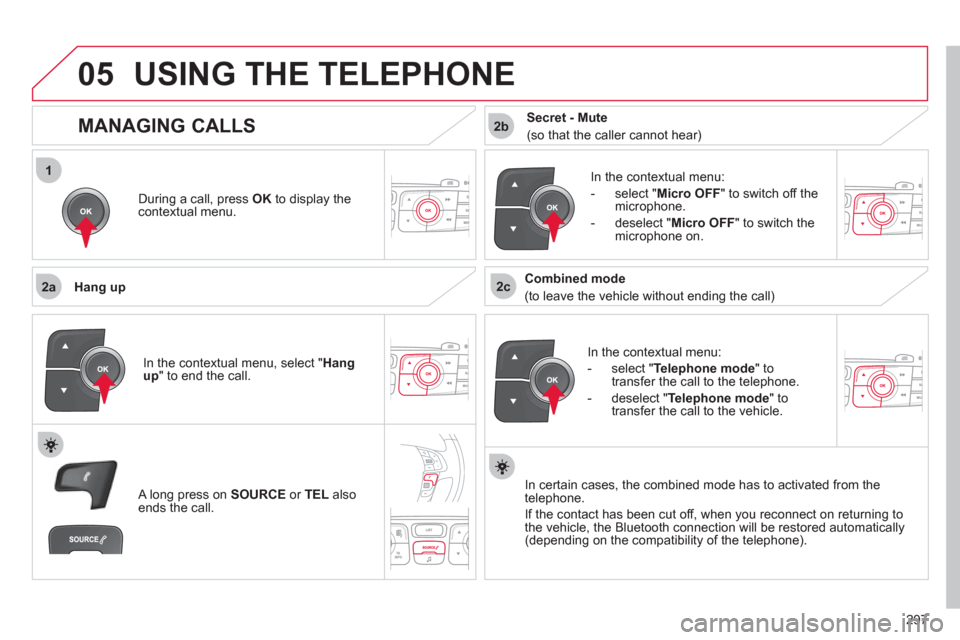
During a call, press OK
to display the
contextual menu.
Hang up
In the contextual menu:
- select " Telephone mode
" to
transfer the call to the telephone.
- deselect " Telephone mode
" to
transfer the call to the vehicle.
In the contextual menu:
- select " Micro OFF
" to switch off the
microphone.
- deselect " Micro OFF
" to switch the
microphone on.
In certain cases, the combined mode has to activated from the
telephone.
If the contact has been cut off, when you reconnect on returning to
the vehicle, the Bluetooth connection will be restored automatically
(depending on the compatibility of the telephone).
MANAGING CALLS
A long press on SOURCE
or TEL
also
ends the call. In the contextual menu, select " Hang
up
" to end the call.
Secret - Mute
(so that the caller cannot hear)
Combined mode
(to leave the vehicle without ending the call)
Page 301 of 324
299
2
3
1
05USING THE TELEPHONE
DIRECTORY
The telephone directory is sent to the system, depending on the
compatibility of the telephone.
The directory is provisional and depends on the Bluetooth
connection.
Contacts imported from the telephone to the audio system directory
are saved in a permanent directory visible to all, whatever the
telephone connected.
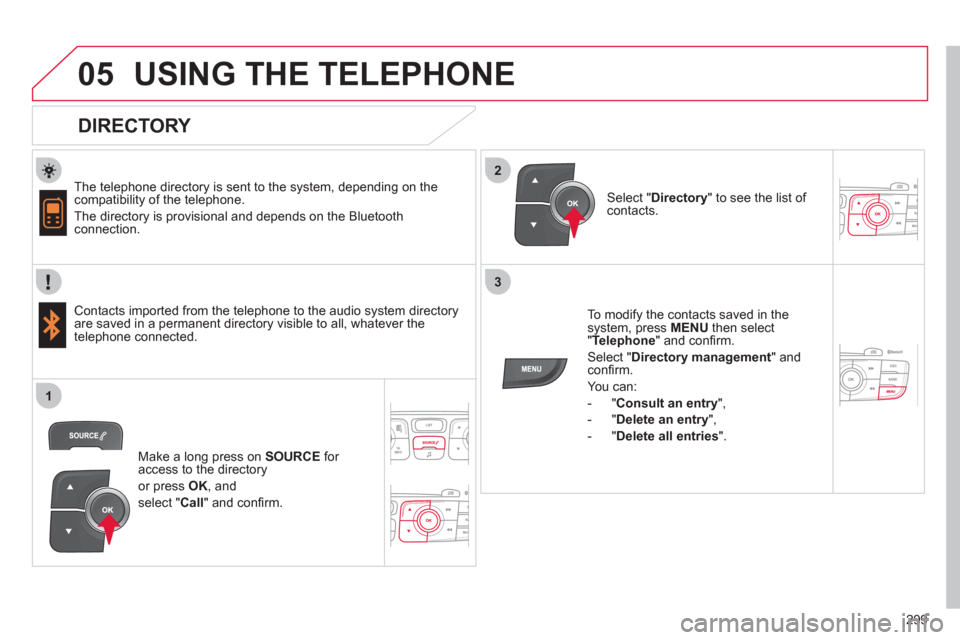
To modify the contacts saved in the
system, press MENU
then select
" Telephone
" and confi rm.
Select " Directory management
" and
confi rm.
You can:
- " Consult an entry
",
- " Delete an entry
",
- " Delete all entries
".
Select " Directory
" to see the list of
contacts.
Make a long press on SOURCE
for
access to the directory
or press OK
, and
select " Call
" and confi rm.
Page 307 of 324
305
09SCREEN MENU MAP
Trip computer
Vehicle diagnosis *
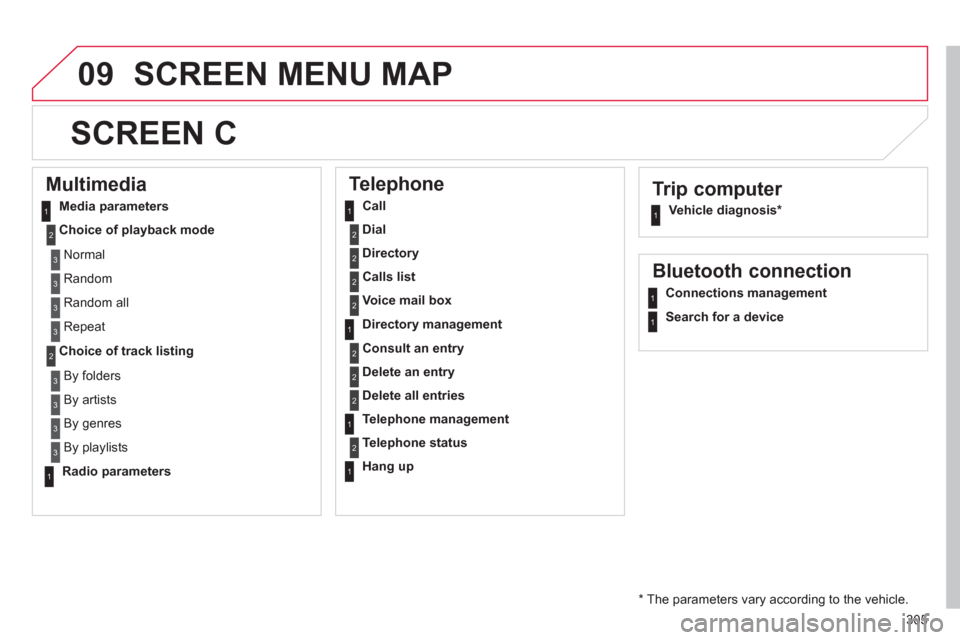
SCREEN C
Multimedia
Media parameters
Choice of playback mode
Choice of track listing
Telephone
Call
Dial
Directory
Calls list
Voice mail box
Directory management
Consult an entry
Delete an entry
Delete all entries
Telephone management
Telephone status
Hang up
Bluetooth connection
Connections management
Search for a device
Normal
Random
Random all
Repeat
By folders
By artists
By genres
By playlists
Radio parameters
* The parameters vary according to the vehicle.
11
2
2
1
2
2
2
2
1
2
2
2
1
2
1
1
1
3
3
3
3
3
3
3
3
1
Page 311 of 324
309
FREQUENTLY ASKED QUESTIONS
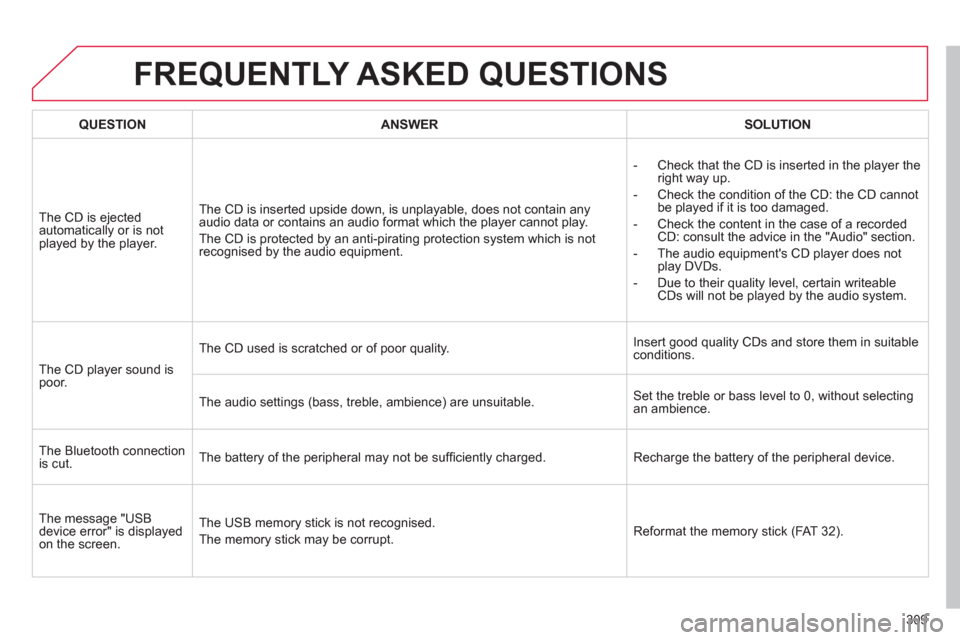
QUESTION
ANSWER
SOLUTION
The CD is ejected
automatically or is not
played by the player. The CD is inserted upside down, is unplayable, does not contain any
audio data or contains an audio format which the player cannot play.
The CD is protected by an anti-pirating protection system which is not
recognised by the audio equipment.
- Check that the CD is inserted in the player the
right way up.
- Check the condition of the CD: the CD cannot
be played if it is too damaged.
- Check the content in the case of a recorded
CD: consult the advice in the "Audio" section.
- The audio equipment's CD player does not
play DVDs.
- Due to their quality level, certain writeable
CDs will not be played by the audio system.
The CD player sound is
poor.
The CD used is scratched or of poor quality. Insert good quality CDs and store them in suitable
conditions.
The audio settings (bass, treble, ambience) are unsuitable. Set the treble or bass level to 0, without selecting
an ambience.
The Bluetooth connection
is cut. The battery of the peripheral may not be suffi ciently charged. Recharge the battery of the peripheral device.
The message "USB
device error" is displayed
on the screen. The USB memory stick is not recognised.
The memory stick may be corrupt. Reformat the memory stick (FAT 32).
Page 317 of 324
315
ALPHABETICAL INDEX
A ABS and EBFD systems ............132
Accessories ................................209
Accessory socket,
12 V ................... 112, 113, 115, 119
Adjusting headlamps ..................102
Adjusting head restraints ..............73
Adjusting seat belt height ...135, 136
Adjusting the steering wheel ........78
Airbags, curtain ..................140, 141
Airbags, front ......................138, 141
Airbags, lateral ...................140, 141
Air conditioning .............................26
Air conditioning, digital ...........64, 67
Air conditioning, manual .........64, 65
Air fi lter .......................................180
Air fl ow .........................................26
Air vents .......................................63
Alarm ............................................86
Anti-lock braking system
(ABS) ........................................132
Anti-pinch .....................................90
Anti-theft .......................................81
Armrest, front ..................... 114, 115
Armrest, rear .............................. 117
Ashtray, portable ........................ 111
Assistance call ...................134, 224
Audible warning ..........................130
Audio streaming
(Bluetooth) ........................264, 290
Audio system ..................51, 53, 277
Automatic illumination
of headlamps ......................97, 100
Automatic operation of hazard
warning lamps ..........................130
Automatic rain sensitive
windscreen wipers ............105, 106
Auxiliary socket .......... 112, 265, 289B Battery ................................180, 201
Battery, charging ........................201
Battery, remote control ...........82, 83
Black panel ...................................49
Blind spot sensors ......................161
Bluetooth (hands-free) .......248, 291
Bluetooth (telephone) .................248
Bonnet ........................................174
Bonnet stay ................................174
Boot ..............................................89
Boot lamp ...........................109, 120
Brake discs .................................181
Brake lamps ...............................195
Brake pads .................................181
Brakes ........................................181
Braking assistance system .........132
C Capacity, fuel tank ........................93
CD ..............................................284
CD MP3 ..............................285, 286
Central locking .......................80, 84
Centre console ........................... 113
Changing a bulb .................191, 195
Changing a fuse .........................197
Changing a wheel ......................187
Changing a wiper blade .....107, 203
Changing the date ..............267, 302
Changing the remote
control battery ............................82
Changing the time ........48, 267, 302
CHECK ...................................31, 47
Checking levels ..................178, 179
Checking the engine oil level .......44
Checking tyre pressures
(using the kit) ............................182
Checks ...............176, 177, 180, 181
Child lock ....................................129C Children ......................124, 127, 128
Child seats ................ 121, 123-125
Cigar lighter ................................ 112
Clock ............................................48
Closing the boot .....................80, 89
Closing the doors ...................80, 88
Cold climate screen ....................204
Commandes au volant .......228, 279
Connectors, audio ...... 112, 287, 289
Coolant level ..............................178
Courtesy lamps ..................101, 108
Courtesy mirror .......................... 111
Cruise control .....................164, 167
Cup holder .................................. 113
D Date (setting) ..............................267
Daytime
running lamps .............97, 191, 193
Deactivating the passenger
airbag .......................................138
Deadlocking .................................80
Defrosting .....................................70
Diesel additive level ...................179
Dimensions ................................220
Dipped beam ................96, 191, 193
Dipstick .................................44, 178
Directional lighting ..............103, 104
Direction
indicators ....99, 130, 191, 192, 195
Doors ............................................88
Doors, rear .................................129
Doors emergency control .............85
Door trays ................................... 110
Dynamic
emergency braking ...........142, 145