warning Citroen C4 RHD 2016 2.G Owner's Guide
[x] Cancel search | Manufacturer: CITROEN, Model Year: 2016, Model line: C4 RHD, Model: Citroen C4 RHD 2016 2.GPages: 472, PDF Size: 13.96 MB
Page 385 of 472
383
Under floor storage .......................................11 9
U nder-inflation
(d
etection)
.................................................. 18
9
Unlocking
.................................................
56,
6
2
Unlocking
f
rom
t
he
i
nside
..................................................... 69
U
nlocking
t
he
b
oot
......................................... 56
Unl
ocking
th
e
d
oors
................................................
56,
6
2
Updating
r
isk
a
reas
...................................... 295
U
pdating
t
he
d
ate
............................... 41
,
4
6,
5
0
Updating
t
he
t
ime
............................... 41
,
4
6,
5
0
UREA
.....................................................
33,
2
28
USB
..............................................
103,
3
08,
3
60
U
Ventilation ....................................89, 9 0, 9 2, 9 6
Voice r ecognition ................................. 325
, 329W
heel, spare
........................................ 24
0,
24
1
Window
c
ontrols
............................................
75
Wi
per
b
lades
(
changing)
...........................................13
4,
2
17
Wiper, rear .................................................... 13 5
Wipers
.............................................27
,
1
32,
1
33
Wipers,
a
utomatic
r
ain sensitive
......................................
132
,
13 3
V
Warning and indicator lamps ....................
16 - 28
Warning l amp, D iesel e ngine
p
re-heater
.................................................... 26
W
arning
lamp
s
.......................................... 16 -
24
Warning
l
amp,
S
CR
e
missions
c
ontrol
s
ystem
............................................. 24
Wa
rning
l
amp,
S
ervice................................... 19
Weights
................................................
268,
2
71
W
.
Alphabetical index
Page 395 of 472
08-15
Labels are fitted in various areas of your vehicle. They carry safety warnings as well as vehicle identification information. Do not remove them: they form an integral
part of your vehicle.
Automobiles
CITROËN declares, by application of the provisions of the European regulation (Directive 2000/53) relating to End of Life V
ehicles,
that it achieves the objectives set by this regulation and that recycled materials are used in the manufacture of the products that it sells.
Reproduction
or translation of all or part of this document is prohibited without written authorisation from Automobiles CITROËN. We draw your attention to the following points:
-
The fitting of electrical equipment or accessories not listed by CITROËN may cause faults and failures with the electrical system of your vehicle. Contact a CITROËN dealer for information on the range of recommended accessories.
-
As a safety measure, access to the diagnostic socket, used for the vehicle's electronic systems, is reserved strictly for CITROËN dealers or qualified workshops, equipped with the special diagnostic tool required (risk of malfunctions of the vehicle's electronic systems that could cause breakdowns or serious accidents). The manufacturer cannot be held responsible if this advice is not followed.
-
Any modification or adaptation not intended or authorised by Automobiles CITROËN or carried out without meeting the technical requirements defined by the manufacturer would lead to the suspension of the legal and contractual warranties. Printed in the EU
Anglais
For
any work on your vehicle, use a qualified workshop that has the technical information, competence and equipment required, which a CITROËN dealer is able to provide.
Page 398 of 472
C4-2-additif_en_Chap00b_bienvenue_ed02-2015
Safety warning. Additional information. Contribution towards protecting nature.
Welcome
This document contains the latest updates to the handbook for your vehic\
le.
This information completes or cancels and replaces the information in th\
e handbook.
First refer to the handbook for your vehicle.
Key
Page 401 of 472

8
In the event of a breakdown5
C4-2-additif_en_Chap08_en-cas-de-panne_ed02-2015
Temporary puncture repair kit
This kit consists of a compressor and a sealant cartridge. It allows the temporary repair of a tyre. temporary repair of a tyre. temporary repair You are then able to go to the nearest garage.
The vehicle's electric system allows the connection of the compressor for long enough to inflate a tyre after a puncture repair.
Tyre under-infl ation detection
If the vehicle is fitted with tyre under-inflation detection, the under-inflation warning lamp will remain on after the wheel has been repaired until the
system is reinitialised by a CITROËN dealer or a qualified workshop. It is designed to repair most punctures which could affect the tyre, located on the tyre tread or shoulder. Its compressor can be used to check and adjust the pressure of the tyre.
Access to the kit
Only the 12 V socket at the front of the vehicle allows the connection of the compressor for long enough to repair or inflate a tyre. The other 12 V sockets in the vehicle are not suited to the use of the compressor.
This kit is installed in the storage box, under the boot floor.
Page 426 of 472
18
ADD_C42_EVO_EN
Risk areas / Danger zone
alert settings
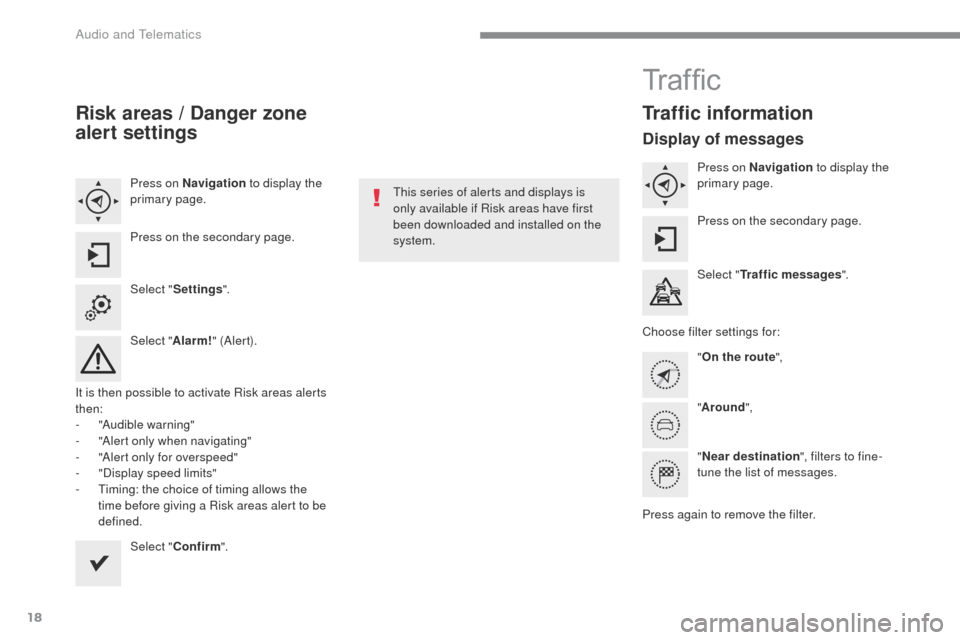
Press on Navigation to display the
primary page.
Press on the secondary page.
Select " Settings ".
Select " Alarm!" (Aler t).
It is then possible to activate Risk areas alerts
then:
-
"
Audible warning"
-
"
Alert only when navigating"
-
"
Alert only for overspeed"
-
"
Display speed limits"
-
T
iming: the choice of timing allows the
time before giving a Risk areas alert to be
defined.
Select " Confirm ". This series of alerts and displays is
only available if Risk areas have first
been downloaded and installed on the
system.
Tr a f fi c
Traffic information
Display of messages
Press on Navigation
to display the
primary page.
Press on the secondary page.
Select " Traffic messages ".
Choose filter settings for: "On the route ",
" Around ",
" Near destination ", filters to fine-
tune the list of messages.
Press again to remove the filter.
Audio and Telematics
Page 464 of 472
56
ADD_C42_EVO_EN
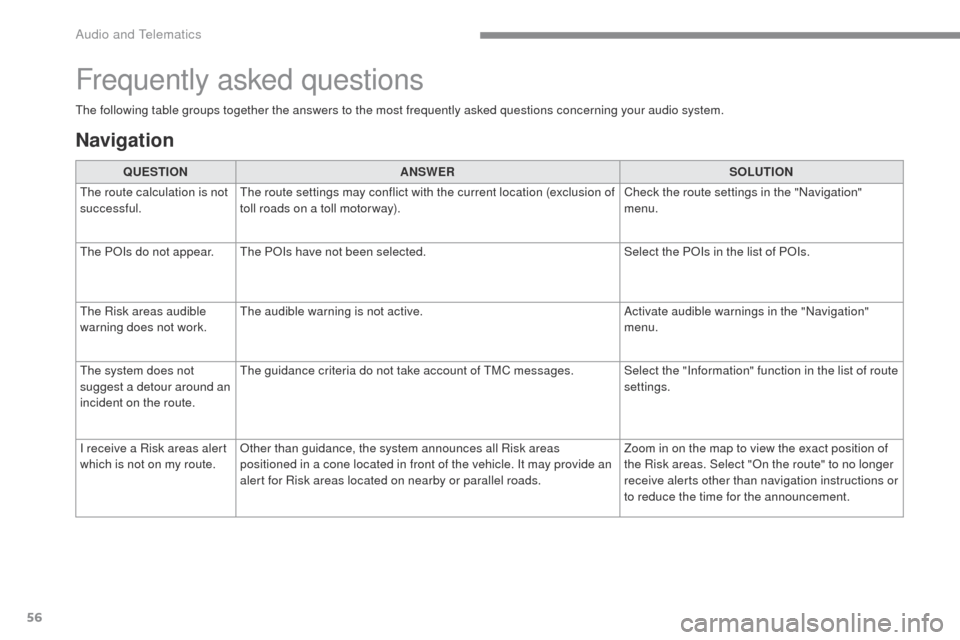
The following table groups together the answers to the most frequently asked questions concerning your audio system.
Frequently asked questions
Navigation
QUESTIONANSWER SOLUTION
The route calculation is not
successful. The route settings may conflict with the current location (exclusion of
toll roads on a toll motor way). Check the route settings in the "Navigation"
menu.
The POIs do not appear. The POIs have not been selected. Select the POIs in the list of POIs.
The Risk areas audible
warning does not work. The audible warning is not active.
Activate audible warnings in the "Navigation"
menu.
The system does not
suggest a detour around an
incident on the route. The guidance criteria do not take account of TMC messages. Select the "Information" function in the list of route
settings.
I receive a Risk areas alert
which is not on my route. Other than guidance, the system announces all Risk areas
positioned in a cone located in front of the vehicle. It may provide an
alert for Risk areas located on nearby or parallel roads. Zoom in on the map to view the exact position of
the Risk areas. Select "On the route" to no longer
receive alerts other than navigation instructions or
to reduce the time for the announcement.
Audio and Telematics