phone Citroen C5 2008.5 (RD/TD) / 2.G User Guide
[x] Cancel search | Manufacturer: CITROEN, Model Year: 2008.5, Model line: C5, Model: Citroen C5 2008.5 (RD/TD) / 2.GPages: 306, PDF Size: 18.9 MB
Page 224 of 306
2
01
2
ABC 3
DEF
5
JKL
4
GHI 6
MNO
8
TUV
7
PQRS 9
WXYZ
0
* #
1
RADIO MEDIA
NAV ESC TRAFFIC
SETUP
ADDR BOOK
1
10
2
3
4
612
9
7
8
115
TU
PQRS
0
*
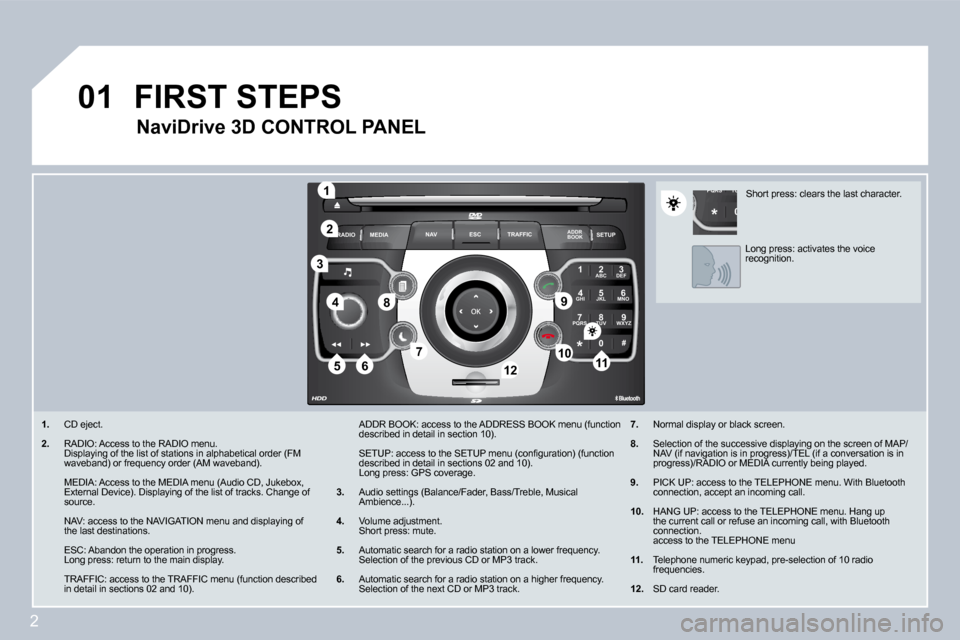
1. CD eject.
2. RADIO: Access to the RADIO menu. Displaying of the list of stations in alphabetical order (FM waveband) or frequency order (AM waveband).
MEDIA: Access to the MEDIA menu (Audio CD, Jukebox , External Device). Displaying of the list of tracks. Change of source.
NAV: access to the NAVIGATION menu and displaying of the last destinations.
ESC: Abandon the operation in progress. Long press: return to the main display.
TRAFFIC: access to the TRAFFIC menu (function desc ribed in detail in sections 02 and 10).
ADDR BOOK: access to the ADDRESS BOOK menu (functi on described in detail in section 10).
SETUP: access to the SETUP menu (confi guration) (function described in detail in sections 02 and 10). Long press: GPS coverage.
3. Audio settings (Balance/Fader, Bass/Treble, Musical Ambience...).
4. Volume adjustment. Short press: mute.
5. Automatic search for a radio station on a lower frequency. Selection of the previous CD or MP3 track.
6. Automatic search for a radio station on a higher f requency. Selection of the next CD or MP3 track.
FIRST STEPS
NaviDrive 3D CONTROL PANEL
7. Normal display or black screen.
8. Selection of the successive displaying on the scre en of MAP/NAV (if navigation is in progress)/TEL (if a conversation is in progress)/RADIO or MEDIA currently being played.
9. PICK UP: access to the TELEPHONE menu. With Blueto oth connection, accept an incoming call.
10. HANG UP: access to the TELEPHONE menu. Hang up the current call or refuse an incoming call, with Bluetooth connection. access to the TELEPHONE menu
11. Telephone numeric keypad, pre-selection of 10 radi o frequencies.
12. SD card reader.
Short press: clears the last character.
Long press: activates the voice recognition.
Page 226 of 306
4
02
SETUP
MEDIA
TRAFFIC
GENERAL OPERATION
For a detailed global view of the menus available, refer to the "Display fl ow charts" section of this handbook.
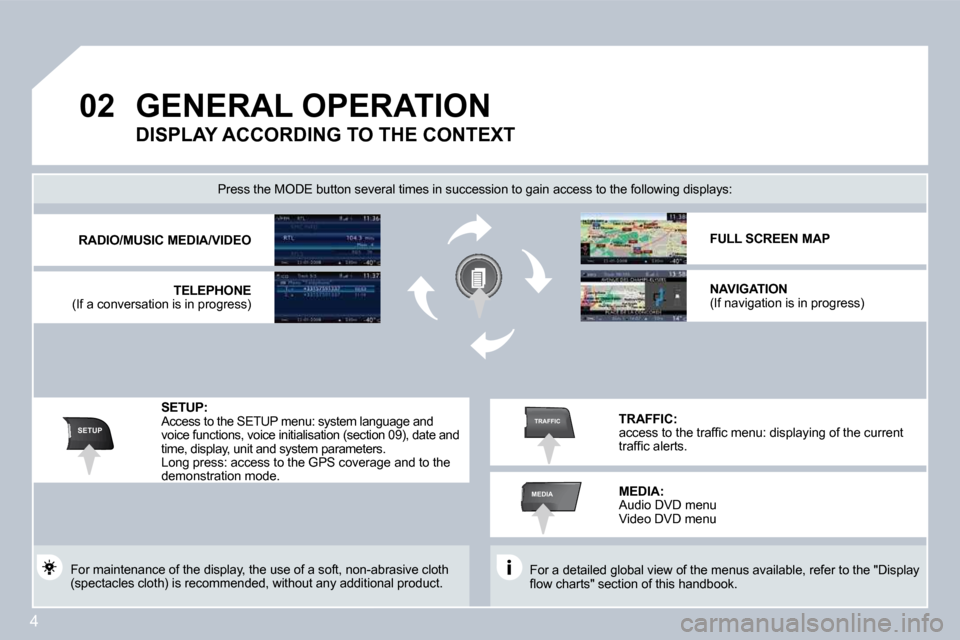
Press the MODE button several times in succession to gain access to the following displays:
For maintenance of the display, the use of a soft, non-abrasive cloth (spectacles cloth) is recommended, without any addi tional product.
RADIO/MUSIC MEDIA/VIDEO
TELEPHONE (If a conversation is in progress)
FULL SCREEN MAP
NAVIGATION (If navigation is in progress)
SETUP: Access to the SETUP menu: system language and voice functions, voice initialisation (section 09), date and time, display, unit and system parameters. Long press: access to the GPS coverage and to the demonstration mode.
TRAFFIC: access to the traffi c menu: displaying of the curre nt traffi c alerts.
DISPLAY ACCORDING TO THE CONTEXT
MEDIA: Audio DVD menu Video DVD menu
Page 244 of 306
22
07
1
2
CHOOSING BETWEEN THE BLUETOOTH
TELEPHONE/INTERNAL TELEPHONE
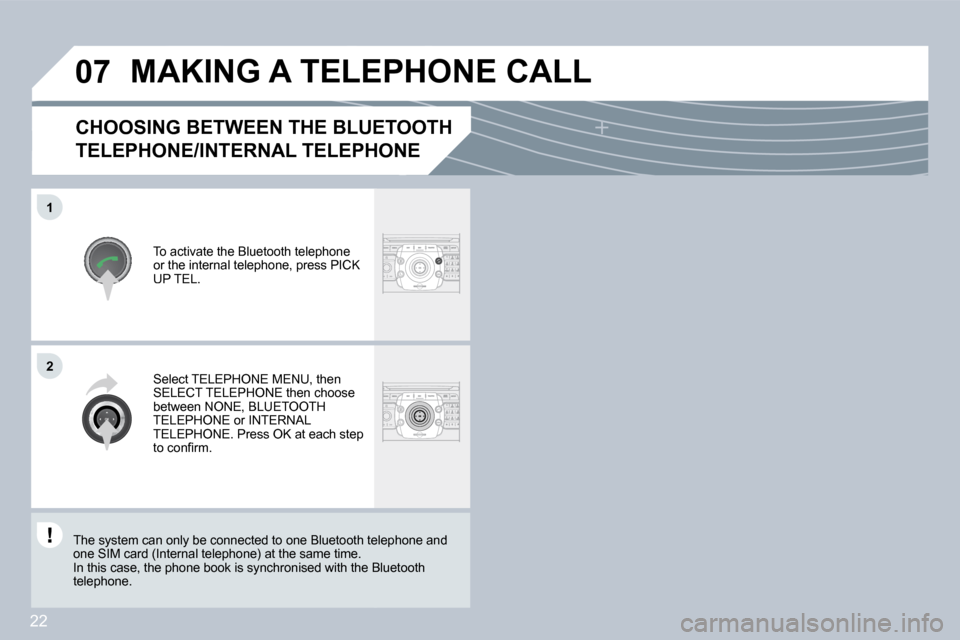
To activate the Bluetooth telephone or the internal telephone, press PICK UP TEL.
MAKING A TELEPHONE CALL
Select TELEPHONE MENU, then SELECT TELEPHONE then choose between NONE, BLUETOOTH TELEPHONE or INTERNAL TELEPHONE. Press OK at each step to confi rm.
The system can only be connected to one Bluetooth teleth telephone and one SIM card (Internal telephone) at the same time. In this case, the phone book is synchronised with the Blthe Bluetooth telephone.
Page 245 of 306
23
07
1
3
5
4
2
1
The services available via the telephone depend on the network, the SIM card and the compatibility of the Bluetooth equipment used. Refer to your telephone's manual and your operator to check which services you have access to. A list of mobile telephones which offer the best range of services is available from dealers.
MAKING A TELEPHONE CALL
CONNECTING A BLUETOOTH
TELEPHONE
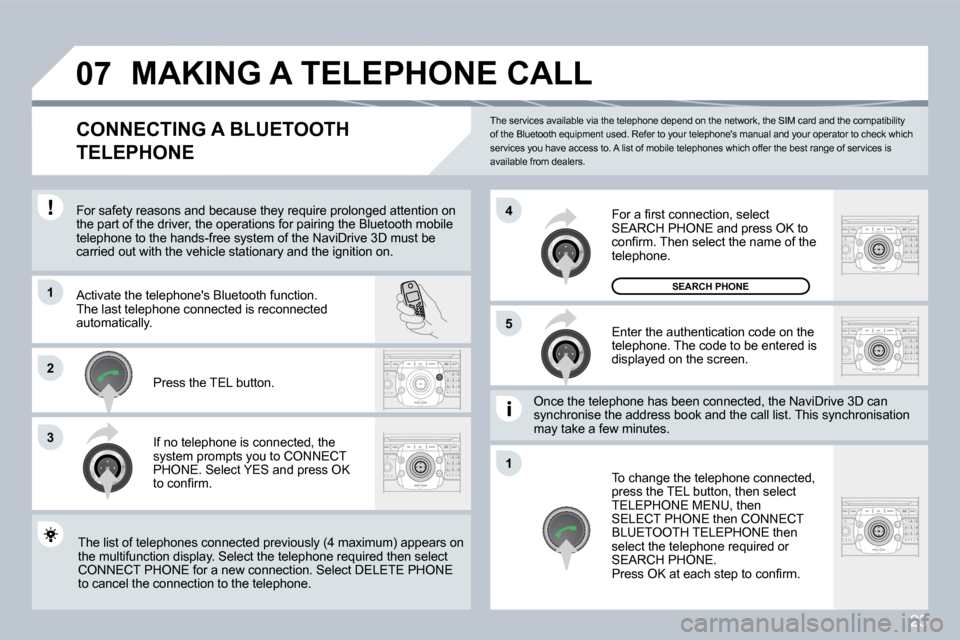
For safety reasons and because they require prolon gedonged attention on the part of the driver, the operations for pairing the Blue Bluetooth mobile telephone to the hands-free system of the NaviDrive 3Dive 3D must be carried out with the vehicle stationary and the ignition onition on.
Activate the telephone's Bluetooth function. The last telephone connected is reconnected automatically.
If no telephone is connected, the system prompts you to CONNECT PHONE. Select YES and press OK to confi rm.
Enter the authentication code on the telephone. The code to be entered is displayed on the screen.
To change the telephone connected, press the TEL button, then select TELEPHONE MENU, then SELECT PHONE then CONNECT BLUETOOTH TELEPHONE then select the telephone required or SEARCH PHONE. Press OK at each step to confi rm.
Once the telephone has been connected, the NaviDri veiDrive 3D can synchronise the address book and the call list. This syncis synchronisation may take a few minutes.
The list of telephones connected previously (4 max imumximum) appears on the multifunction display. Select the telephone required uired then select CONNECT PHONE for a new connection. Select DELE DELETE PHONE to cancel the connection to the telephone.
Press the TEL button.
For a fi rst connection, select SEARCH PHONE and press OK to confi rm. Then select the name of the telephone.
SEARCH PHONE
Page 246 of 306
24
2
ABC 3
DEF
5
JKL
4
GHI 6
MNO
8
TUV
7
PQRS 9
WXYZ
0
* #
1
07
1
22
33
11
22
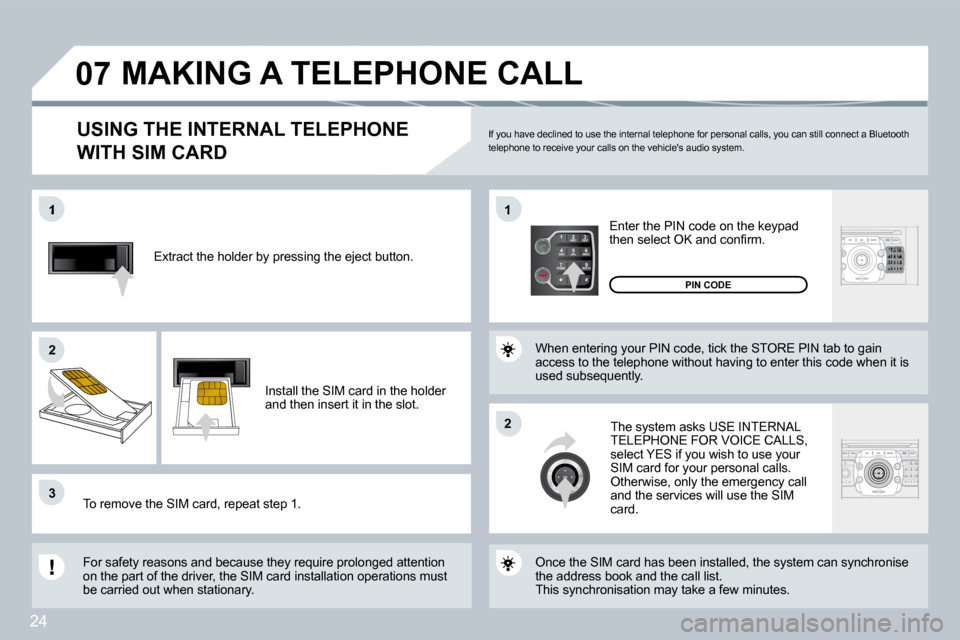
Extract the holder by pressing the eject button.
Install the SIM card in the holder and then insert it in the slot.
To remove the SIM card, repeat step 1.
For safety reasons and because they require prolon
ged attention on the part of the driver, the SIM card installation operations must be carried out when stationary.
Enter the PIN code on the keypad then select OK and confi rm.
The system asks USE INTERNAL TELEPHONE FOR VOICE CALLS, select YES if you wish to use your SIM card for your personal calls. Otherwise, only the emergency call and the services will use the SIM card.
PIN CODE
When entering your PIN code, tick the STORE PIN ta b to gain access to the telephone without having to enter this code when it is used subsequently.
USING THE INTERNAL TELEPHONE
WITH SIM CARD
MAKING A TELEPHONE CALL
Once the SIM card has been installed, the system c an synchronise the address book and the call list. This synchronisation may take a few minutes.
If you have declined to use the internal telephone for personal calls, you can still connect a Bluet ooth telephone to receive your calls on the vehicle's au dio system.
Page 247 of 306
25
3
11
2
3
2
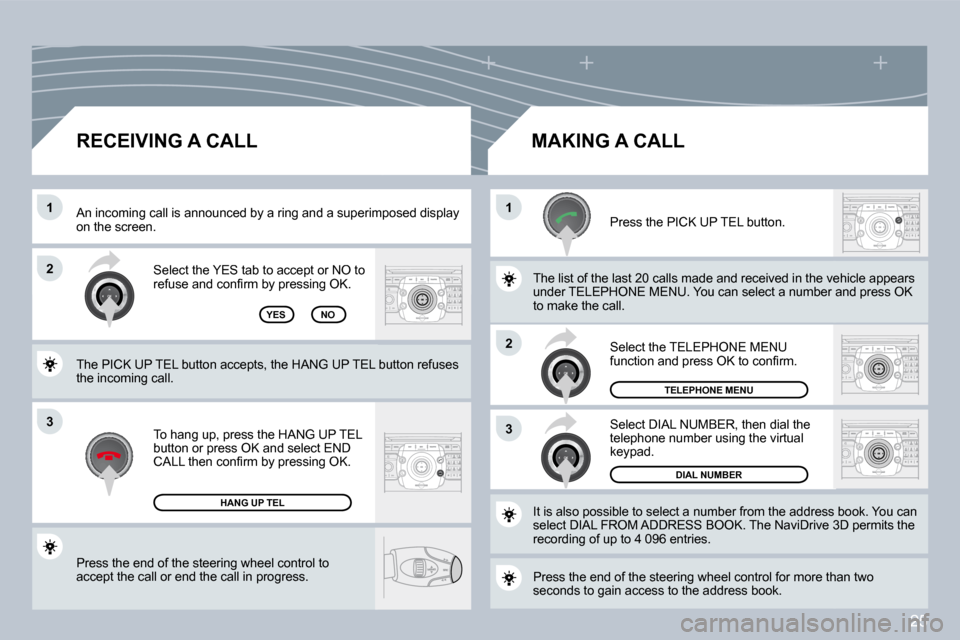
Press the end of the steering wheel control to accept the call or end the call in progress.
Select the YES tab to accept or NO to refuse and confi rm by pressing OK.
RECEIVING A CALL MAKING A CALL
An incoming call is announced by a ring and a superimpperimposed display on the screen.
YES
To hang up, press the HANG UP TEL button or press OK and select END CALL then confi rm by pressing OK.
HANG UP TEL
Press the PICK UP TEL button.
Press the end of the steering wheel control for more thare than two seconds to gain access to the address book.
It is also possible to select a number from the address bress book. You can select DIAL FROM ADDRESS BOOK. The NaviDrive 3Drive 3D permits the recording of up to 4 096 entries.
Select DIAL NUMBER, then dial the telephone number using the virtual keypad.
Select the TELEPHONE MENU function and press OK to confi rm.
DIAL NUMBER
TELEPHONE MENU
The list of the last 20 calls made and received in the vehhe vehicle appears under TELEPHONE MENU. You can select a number aber and press OK to make the call. NO
The PICK UP TEL button accepts, the HANG UP TEL bu tton refuses the incoming call.
Page 248 of 306
26
SOS
* On condition that the CITROËN Emergency contract has been signed. This is free and of unlimited duration. Consult a CITROËN dealer. * On condition that the CITROËN Emergency cont ract has been signct has b
EMERGENCY CALL
EXCEPT NaviDrive 3D CONTROL PANEL
CITROËN ASSISTANCE
CUSTOMER CONTACT CENTRE
* These services and options are subject to conditions and availability.
CONSULTING THE SERVICES
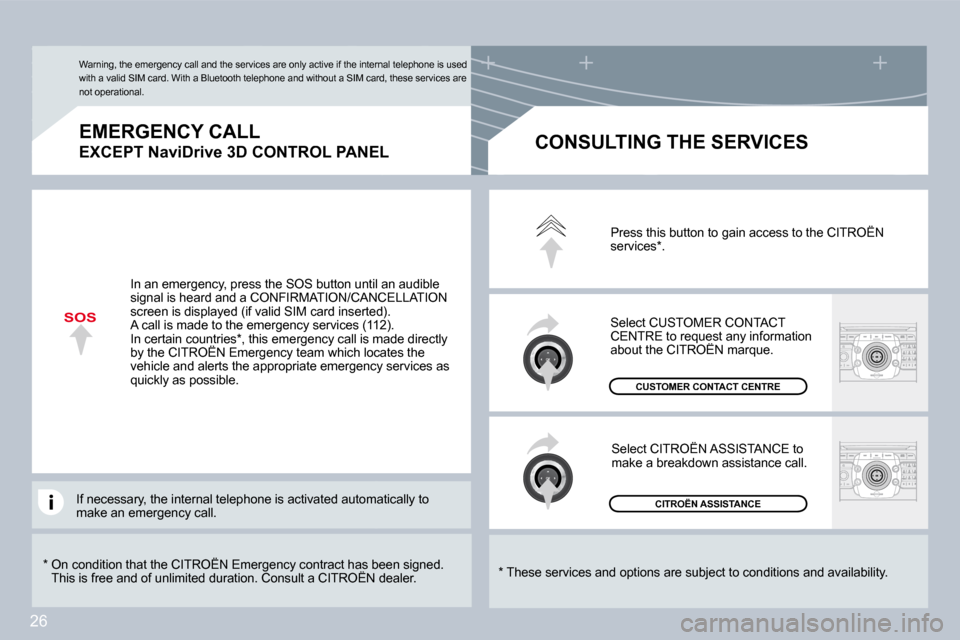
Press this button to gain access to the CITROËN services * .
Select CUSTOMER CONTACT CENTRE to request any information about the CITROËN marque. CENTRE to request any informequest
Select CITROËN ASSISTANCE to make a breakdown assistance call.
In an emergency, press the SOS button until an aud ible signal is heard and a CONFIRMATION/CANCELLATION screen is displayed (if valid SIM card inserted). A call is made to the emergency services (112). In certain countries * , this emergency call is made directly by the CITROËN Emergency team which locates the In certain countries * , this emergency call is made direccountri
vehicle and alerts the appropriate emergency servic es as quickly as possible.
Warning, the emergency call and the services are only active if the internal telephone is used with a valid SIM card. With a Bluetooth telephone a nd without a SIM card, these services are not operational.
If necessary, the internal telephone is activated automatomatically to make an emergency call.
Page 250 of 306
28
LISTMENU
1
2
09
4
3
5
6
7
8
9
10
11
VOICE COMMANDS AND STEERING WHEEL CONTROLS
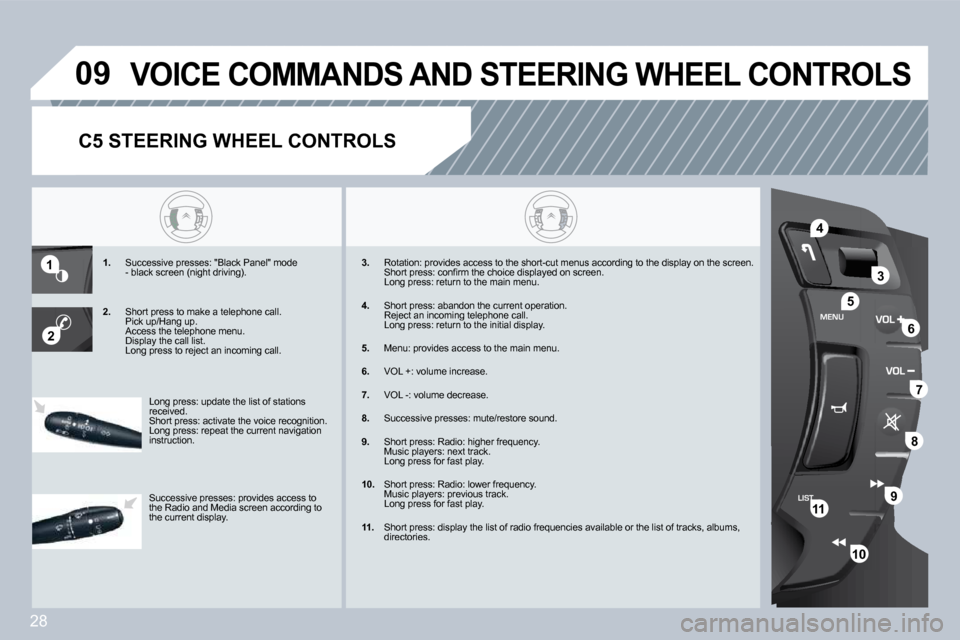
1. Successive presses: "Black Panel" mode - black screen (night driving).
2. Short press to make a telephone call. Pick up/Hang up. Access the telephone menu. Display the call list. Long press to reject an incoming call.
3. Rotation: provides access to the short-cut menus a
ccording to the display on the screen. Short press: confi rm the choice displayed on scree n. Long press: return to the main menu.
4. Short press: abandon the current operation. Reject an incoming telephone call. Long press: return to the initial display.
5. Menu: provides access to the main menu.
6. VOL +: volume increase.
7. VOL -: volume decrease.
8. Successive presses: mute/restore sound.
9. Short press: Radio: higher frequency. Music players: next track. Long press for fast play.
10. Short press: Radio: lower frequency. Music players: previous track. Long press for fast play.
11. Short press: display the list of radio frequencies available or the list of tracks, albums, directories.
Long press: update the list of stations received. Short press: activate the voice recognition. Long press: repeat the current navigation instruction.
Successive presses: provides access to the Radio and Media screen according to the current display.
C5 STEERING WHEEL CONTROLS
Page 251 of 306
29
SETUP
TU
PQRS
0
*
11
22
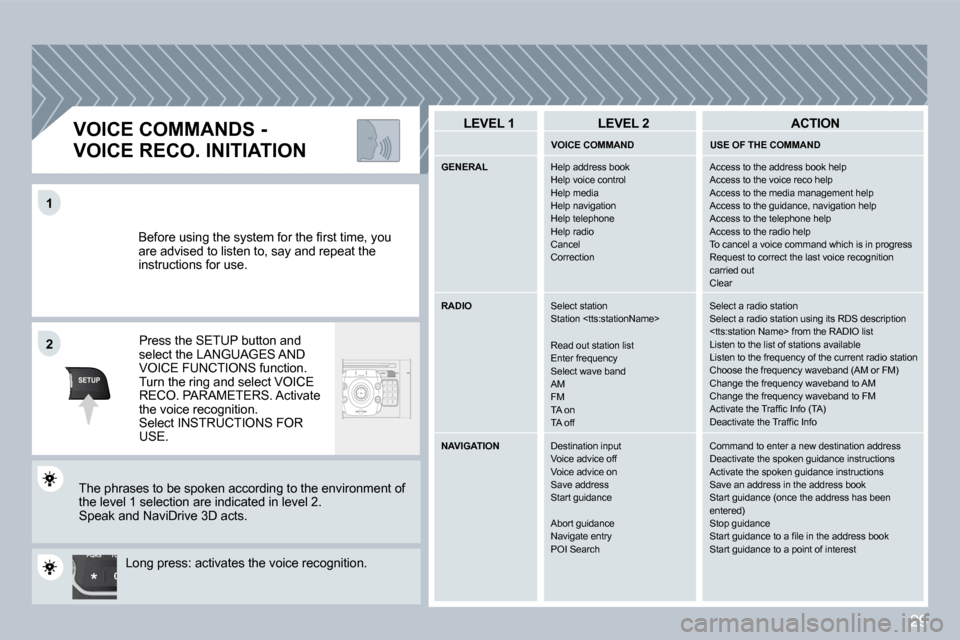
Before using the system for the fi rst time, you are advised to listen to, say and repeat the instructions for use.
Press the SETUP button and select the LANGUAGES AND VOICE FUNCTIONS function. Turn the ring and select VOICE RECO. PARAMETERS. Activate the voice recognition. Select INSTRUCTIONS FOR USE.
VOICE COMMANDS -
VOICE RECO. INITIATION
The phrases to be spoken according to the environm ent of the level 1 selection are indicated in level 2. Speak and NaviDrive 3D acts.
Long press: activates the voice recognition.
LEVEL 1 LEVEL 2 ACTION
VOICE COMMAND USE OF THE COMMAND
GENERAL Help address book Help voice controlHelp mediaHelp navigationHelp telephoneHelp radioCancelCorrection
Access to the address book help Access to the voice reco help Access to the media management help Access to the guidance, navigation help Access to the telephone help Access to the radio help To cancel a voice command which is in progress Request to correct the last voice recognition carried out Clear
RADIO Select stationStation
Read out station list Enter frequencySelect wave band AM FM TA onTA off
Select a radio station Select a radio station using its RDS description
NAVIGATION Destination inputVoice advice offVoice advice onSave address Start guidance
Abort guidanceNavigate entry POI Search
Command to enter a new destination address Deactivate the spoken guidance instructions Activate the spoken guidance instructions Save an address in the address book Start guidance (once the address has been entered) Stop guidance Start guidance to a fi le in the address book Start guidance to a point of interest
Page 252 of 306
30
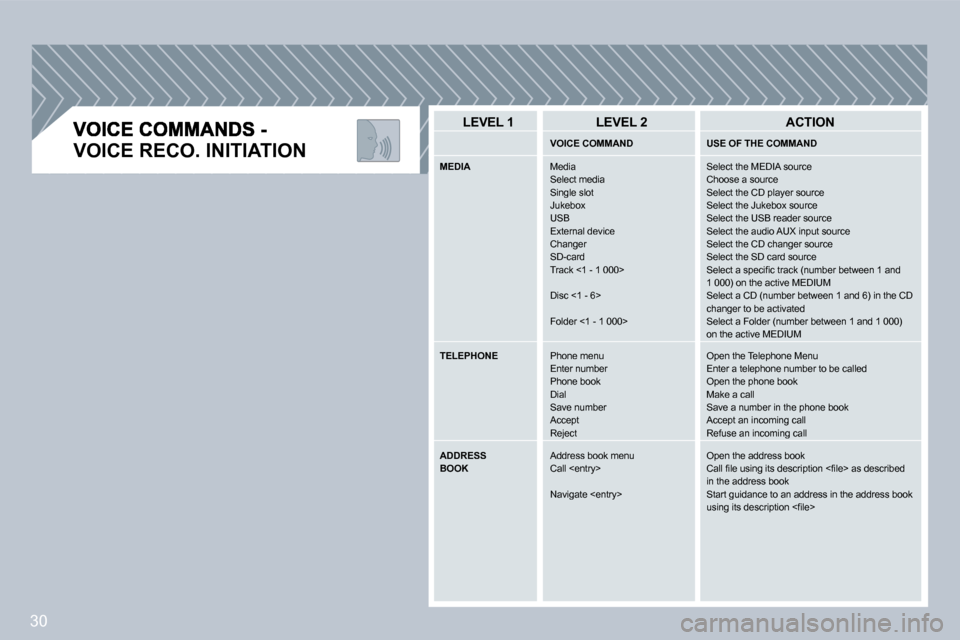
VOICE RECO. INITIATION
LEVEL 1 LEVEL 2 ACTION
VOICE COMMAND USE OF THE COMMAND
MEDIA Media Select mediaSingle slot Jukebox USB External device Changer SD-card Track <1 - 1 000>
Disc <1 - 6>
Folder <1 - 1 000>
Select the MEDIA source Choose a source Select the CD player source Select the Jukebox source Select the USB reader source Select the audio AUX input source Select the CD changer source Select the SD card source Select a specifi c track (number between 1 and 1 000) on the active MEDIUM Select a CD (number between 1 and 6) in the CD changer to be activated Select a Folder (number between 1 and 1 000) on the active MEDIUM
TELEPHONE Phone menuEnter numberPhone bookDial Save number Accept Reject
Open the Telephone Menu Enter a telephone number to be called Open the phone book Make a call Save a number in the phone book Accept an incoming call Refuse an incoming call
ADDRESS BOOK Address book menuCall
Navigate
Open the address book Call fi le using its description <fi le> as described in the address book Start guidance to an address in the address book using its description <fi le>