instrument panel Citroen C5 2014.5 (RD/TD) / 2.G User Guide
[x] Cancel search | Manufacturer: CITROEN, Model Year: 2014.5, Model line: C5, Model: Citroen C5 2014.5 (RD/TD) / 2.GPages: 344, PDF Size: 12.9 MB
Page 26 of 344
24
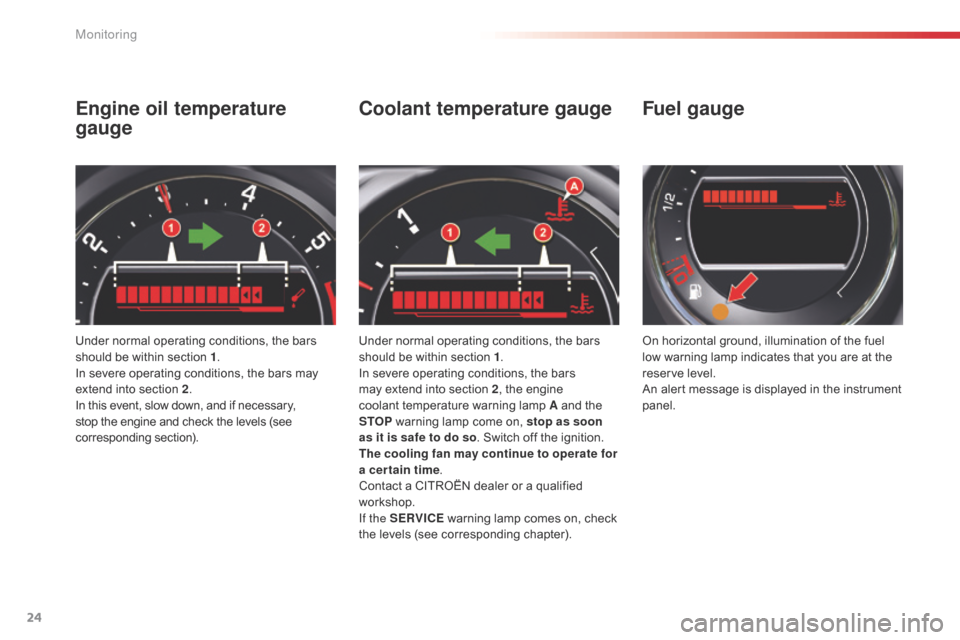
Engine oil temperature
gauge
Under normal operating conditions, the bars
should be within section 1.
In severe operating conditions, the bars may
extend into section 2 .
In this event, slow down, and if necessary,
stop the engine and check the levels (see
corresponding section).
Coolant temperature gauge
Under normal operating conditions, the bars
should be within section 1 .
In severe operating conditions, the bars
may extend into section 2 , the engine
coolant temperature warning lamp A and the
STOP
warning lamp come on, stop as soon
as it is safe to do so . Switch off the ignition.
The cooling fan may continue to operate for
a cer tain time .
Contact a CITROËN dealer or a qualified
workshop.
If the SERVICE warning lamp comes on, check
the levels (see corresponding chapter). On horizontal ground, illumination of the fuel
low warning lamp indicates that you are at the
reser ve level.
An alert message is displayed in the instrument
panel.
Fuel gauge
Monitoring
Page 41 of 344

39
Remote control key
System which permits central unlocking or locking of the vehicle using the lock or from a distance. It is also used to open the boot, locate and start
the vehicle, as well as providing protection against theft.
Unfolding / Folding the key
Complete unlocking using the
remote control
Unlocking the vehicle
F Press the open padlock to unlock the vehicle.
Complete unlocking using
the key
F Turn the key in the driver's door lock
towards the front of the vehicle to unlock it.
Selective unlocking using the
remote control
F Press the open padlock once to unlock the driver's door only.
Each unlocking is confirmed by rapid flashing
of the direction indicators for approximately two
seconds and by switching on of the courtesy
lamp.
According to version, the exterior mirrors unfold
at the same time as the first unlocking action.
The complete or selective unlocking parameter
is set via the instrument panel screen
configuration menu (see "Monitoring" section).
Complete unlocking is activated by default. F
P
ress the open padlock again to unlock the
other doors and the boot.
Selective unlocking is not possible
using the key.
Unlocking is confirmed by rapid flashing of
the direction indicators for approximately two
seconds and lighting of the courtesy lamp
(if the function is activated).
According to version, the door mirrors unfold at
the same time.
F
First press this button to unfold / fold the key.
2
Access
Page 50 of 344

48
Reinitialisation
If a window does not rise automatically, its
operation must be reinitialised:
F
p
ull the control until the window stops,
F
r
elease the control and pull it again until
the window closes fully,
F
c
ontinue to hold the control for
approximately one second after the window
has closed,
F
p
ress the control to lower the window
automatically to the low position,
F
w
hen the window has reached the low
position, press the control again for
approximately one second.
The safety anti-pinch function is not
operational during these operations.
Deactivation of the rear
electric window and door
controls
F For the safety of your children, press control 5 to deactivate the rear electric
window controls regardless of their
position.
Indicator lamp on, the rear controls are
deactivated.
Indicator lamp off, the rear controls are
activated.
A message in the instrument panel screen
informs you of the activation / deactivation of
the control. Any other status of the indicator lamp indicates
a fault with the electric child lock.
Have it checked by a CITROËN dealer or a
qualified workshop.
Always remove the key from the ignition
when leaving the vehicle, even for a
short time.
If an obstacle is encountered during
operation of the electric windows, you
must reverse the movement of the
window. To do this, press the control
concerned.
When the driver operates the controls
for the passengers' electric windows,
they must ensure that no one is
preventing correct closing of the
windows.
The driver must ensure that the
passengers use the electric windows
c o r r e c t l y.
Be particularly aware of children when
operating the windows.
This control also deactivates the interior
controls for the rear doors (refer to the "Child
safety - Electric child lock" section).
Access
Page 52 of 344

50
Unlocking
F Press button A again to unlock the vehicle.
The red indicator lamp on the button switches
of f.
Automatic central locking
Locking
When the speed exceeds 6 mph (10 km/h), the
doors and the boot lock automatically.
If one of the doors is open, the automatic
central locking does not take place.
If the boot is open, the automatic central
locking of the doors is active.
Unlocking
F Above 6 mph (10 km/h), press button A to unlock the doors and the boot temporarily.
Activation
F Press button A for more than two seconds.
A confirmation message appears on the
instrument panel screen, accompanied by an
audible signal.
Deactivation
F Press button A again for more than two seconds.
A confirmation message appears on the
instrument panel screen, accompanied by an
audible signal.
If the vehicle is locked or deadlocked
from the outside, the red indicator lamp
flashes and button A is inactive.
F
I
n this case, use the remote control
or the key to unlock the vehicle. System which provides full automatic locking
or unlocking of the doors and the boot while
driving.
You can activate or deactivate this function.
Access
Page 63 of 344

61
Storing driving positions
System which stores the settings of the driver's
seat. Up to two positions can be stored using
the buttons on the side of the driver's seat.
When storing a driving position, the air
conditioning settings are also memorised.
Storing a position
Using buttons M / 1 / 2
F Switch on the ignition.
F A djust your seat.
F
P
ress button M , then press button 1 or 2
within four seconds.
A
n audible signal confirms that the settings
have been stored.
Storing a new position cancels the previous
position.
Welcome function
The welcome function assists entry and leaving
the vehicle.
After switching off the ignition and opening
the driver’s door, the seat moves back
automatically and then stays in this position,
ready for the next entry to the vehicle.
When switching on the ignition, the seat moves
for ward to the memorised driving position.
When moving the seat, take care that no
person or object hinders the automatic
movement of the seat.
This function is deactivated by default. You may
activate or deactivate this function using the
"Main Menu" on the instrument panel screen.
To do so, select " Vehicle parameters/Comfort /
Driver welcome".
To adjust the air conditioning, refer to
the "Air conditioning" section.For your safety, avoid storing a driving
position while driving.
Recalling a stored position
Ignition on or engine running
F briefly press button 1 or 2 to recall the
corresponding position.
A
n audible signal indicates the end of the
adjustment.
When the ignition is on, after a few consecutive
position recalls, the function will be deactivated
until the engine is started, to prevent
discharging of the battery.
3
Ease of use and comfort
Page 86 of 344

84
Interior mood lightingYour vehicle is equipped with interior mood lighting for the centre console and the door handles.
Central consoleLighting for door opening
controls
Operation
These lamps are activated with the automatic
illumination of headlamps, when the ambient
light is poor. They are deactivated when the
instrument panel is off.
The intensity of the lighting varies along with
that of the instrument panel.
F
P
ress buttons A to increase or reduce the
intensity of the lighting. This is located on the front and rear interior
door opening controls.
The rear door opening controls lighting is
deactivated if the child lock is on.
The lamps are located on the roof console,
near the front interior lamp. They illuminate the
central console.
Ease of use and comfort
Page 100 of 344
98
Starting the engine
Wait until this warning lamp goes off in the
instrument panel then operate the starter
motor by turning the key to position 3
without pressing the accelerator pedal,
until the engine starts. Once the engine is
running, release the key.
With the parking brake applied and the gearbox
in neutral or position N or P:
F
d
epress the clutch pedal fully (manual
gearbox),
or
F
p
ress the brake pedal firmly (electronic or
automatic gearbox),
F
i
nsert the key into the ignition switch; the
system recognises the code,
F
u
nlock the steering column by simultaneously
turning the steering and the key.
F
W
ith a petrol engine, operate the starter
motor by turning the key to position 3
without pressing the accelerator pedal,
until the engine starts. Once the engine is
running, release the key. Never leave the engine running in
an enclosed area without adequate
ventilation: internal combustion
engines emit toxic exhaust gases,
such as carbon monoxide. Danger of
intoxication and death.
In very severe wintry conditions
(temperatures below -23°C), to ensure
the correct operation and durability of
the mechanical components of your
vehicle, engine and gearbox, it is
necessary to leave the engine running
for 4 minutes before moving off.
In wintry conditions, the warning lamp
can stay on for a longer period. When
the engine is hot, the warning lamp
does not come on.
In certain cases, you may have to apply
more force to the steering (wheels on
full lock, for example). F
W ith a Diesel engine, turn the key to
position 2 , ignition on, to operate the
engine pre-heating system.
If the engine does not start straight
away, switch off the ignition. Wait a
few moments before operating the
starter motor again. If the engine does
not start after several attempts, do not
keep trying: you risk damaging the
starter motor or the engine. Contact
a CITROËN dealer or a qualified
workshop. In temperate conditions, do not leave
the engine at idle to warm up but move
off straight away and drive at moderate
speed.
Driving
Page 103 of 344

101
Electric parking brake
The electric parking brake combines 2 operating
modes:
Automatic operation
Application with the engine off
With the vehicle stationary, the parking brake
is automatically applied when the engine is
switched off.
The application of the parking brake is
confirmed by:
Application with the engine running
With the engine running and the vehicle
stationary, in order to immobilise the vehicle
you need to manually apply the parking brake
by pulling the control lever A .
The application of the parking brake is
confirmed by:
-
w
arning lamp P in the control
lever A coming on,
-
d
isplay of a message "Parking brake on" in
the instrument panel screen. -
w
arning lamp P in the control
lever A coming on,
-
d
isplay of a message "Parking brake on" in
the instrument panel screen.
-
t
his warning lamp in the
instrument panel coming on, -
t
his warning lamp in the
instrument panel coming on,
Before leaving the vehicle, check that
warning lamp P and the warning lamp
in the instrument panel are on fixed
(not
f
lashing).
Never leave a child alone inside the
vehicle with the ignition on, as they
could release the parking brake.
Before leaving the vehicle, check that
warning lamp P and the warning lamp in the
instrument panel are on fixed (not flashing).
- AUTOMATIC A
utomatic application when the engine
stops and automatic release on use of
the accelerator (automatic operation by
default),
-
M
ANUAL
M
anual application / release of the parking
brake is always possible by pulling control
lever A while pressing the brake pedal. When the driver’s door is opened, a beep is
heard and a message displayed if the parking
brake has not been applied.
The noise of operation will confirm to you the
application/ release of your electric parking
brake.
4
Driving
Page 104 of 344

102
Release
The electric parking brake releases
automatically and progressively when you
press the accelerator:
F
w
ith a manual gearbox (first gear or
reverse gear engaged) , press down fully
on the clutch pedal then press on the
accelerator pedal and move off.
F
w
ith an automatic gearbox , accelerate
with the selector in position D , M or R.
Full release of the parking brake is
confirmed
by:
-
w
arning lamp P in the control
lever A going off,
-
d
isplay of a message "Parking brake off " in
the instrument panel screen.
Activation / Deactivation of
the automatic functions
Depending on the country of sale, automatic
application when switching off the engine
and automatic release when moving
off can be deactivated. The activation /
deactivation is done in the instrument panel
screen configuration menu. Select " Vehicle
parameters / Comfort / Auto parking brake".
de
activation of these functions is
signalled by this warning lamp in the
instrument panel.
-
t
his warning lamp in the
instrument panel going off, In some special circumstances, with
the engine not running, (towing, icy
conditions...) the automatic parking
brake can be released manually, with
the key in the running position.
If the configuration menu does not have
the option to activate / deactivate the
automatic functions, this can be done
by a CITROËN dealer or a qualified
workshop.
With the automatic functions deactivated, the
parking brake must be applied and released
manually.
When stationary, with the engine
running, do not press the accelerator
pedal unnecessarily (particularly when
starting the engine, including in neutral),
as you may release the parking brake.
Do not place any object (packet of
cigarettes, telephone...) between the
gear lever and the electric parking
brake control.
Driving
Page 105 of 344

103
Manual operation
Application
With the vehicle stationary, to apply the parking
brake whether the engine is running or off, pull
the control lever A .
The application of the parking brake is
confirmed by:
-
w
arning lamp P in the control
lever A coming on,
-
d
isplay of a message "Parking brake on" in
the instrument panel screen. -
t
his warning lamp in the
instrument panel coming on,
When the driver’s door is opened with the
engine running, a message is displayed
accompanied by an audible signal if the
parking brake has not been applied.
Manual application / release of the parking
brake is always possible.
Release
With the ignition on or the engine running, to
release the parking brake, press on the brake
pedal,
push then release control lever A.
The full application of the parking brake is
confirmed by: -
w
arning lamp P in the control
lever A going off,
-
d
isplay of a message "Parking brake
released" in the instrument panel screen. -
t
his warning lamp in the
instrument panel going off,
When stationary, with the engine running, do
not press the accelerator pedal unnecessarily,
as you may release the parking brake.
If you push control lever A without pressing
the brake pedal, the parking brake will not be
released and the message "Foot on brake" will
be displayed in the instrument panel.
4
Driving