battery Citroen C5 2017 (RD/TD) / 2.G Owner's Guide
[x] Cancel search | Manufacturer: CITROEN, Model Year: 2017, Model line: C5, Model: Citroen C5 2017 (RD/TD) / 2.GPages: 348, PDF Size: 10.72 MB
Page 237 of 348
235
C5_en_Chap08_en-cas-de-panne_ed01-2016
12 V battery
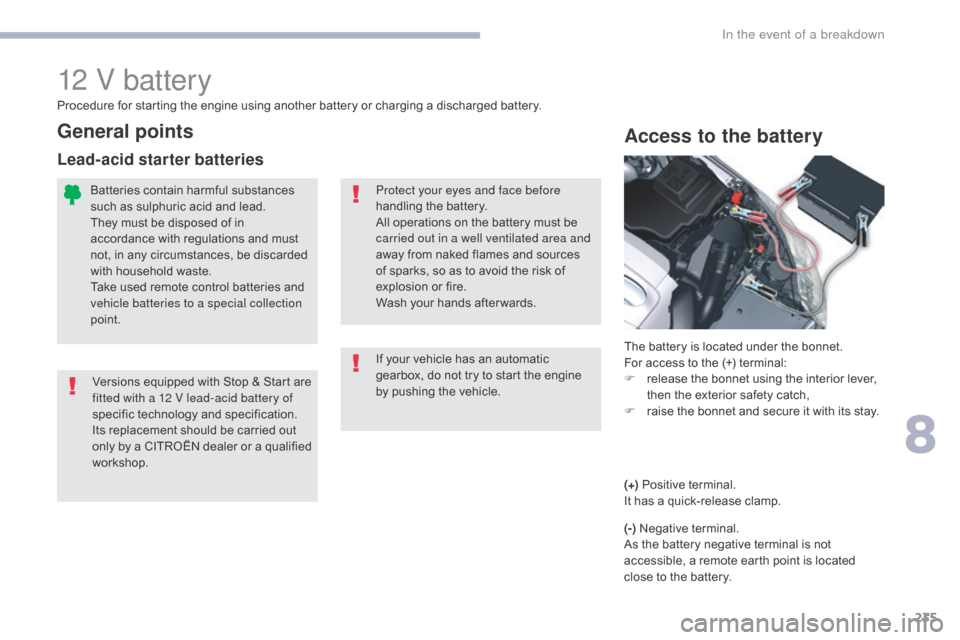
Access to the battery
The battery is located under the bonnet.
For access to the (+) terminal:
F
r
elease the bonnet using the interior lever,
then the exterior safety catch,
F
r
aise the bonnet and secure it with its stay.
Protect your eyes and face before
handling the battery.
All operations on the battery must be
carried out in a well ventilated area and
away from naked flames and sources
of sparks, so as to avoid the risk of
explosion or fire.
Wash your hands after wards.
If your vehicle has an automatic
gearbox, do not try to start the engine
by pushing the vehicle.
Versions equipped with Stop & Start are
fitted with a 12 V lead-acid battery of
specific technology and specification.
Its replacement should be carried out
only by a CITROËN dealer or a qualified
workshop.
Procedure for starting the engine using another battery or charging a discharged battery.
General points
Batteries contain harmful substances
such as sulphuric acid and lead.
They must be disposed of in
accordance with regulations and must
not, in any circumstances, be discarded
with household waste.
Take used remote control batteries and
vehicle batteries to a special collection
point.
Lead-acid starter batteries
(+)
Positive terminal.
It has a quick-release clamp.
(-) Negative terminal.
As the battery negative terminal is not
accessible, a remote earth point is located
close to the battery.
8
In the event of a breakdown
Page 238 of 348
236
C5_en_Chap08_en-cas-de-panne_ed01-2016
Starting using another battery
When your vehicle's battery is discharged, the
engine can be started using a slave battery
(external or on another vehicle) and jump lead
cables or a battery booster.F
S tart the engine of the vehicle with the
good battery and leave it running for a few
minutes.
F
O
perate the starter on the broken down
vehicle and let the engine run.
I
f the engine does not start straight away,
switch off the ignition and wait a few
moments before trying again.
Never try to start the engine by
connecting a battery charger.
Never use a 24 V or higher battery
b o o s t e r.
First check that the slave battery has a
nominal voltage of 12 V and a capacity
at least equal to that of the discharged
battery.
The two vehicles must not be in contact
with each other.
Switch off the electrical consumers on
both vehicles (audio system, wipers,
lighting, ...).
Ensure that the jump lead cables do
not pass close to moving parts of the
engine (cooling fan, belts, ...).
Do not disconnect the (+) terminal when
the engine is running. Some functions, including Stop & Start,
are not available if the battery is not
sufficiently charged.
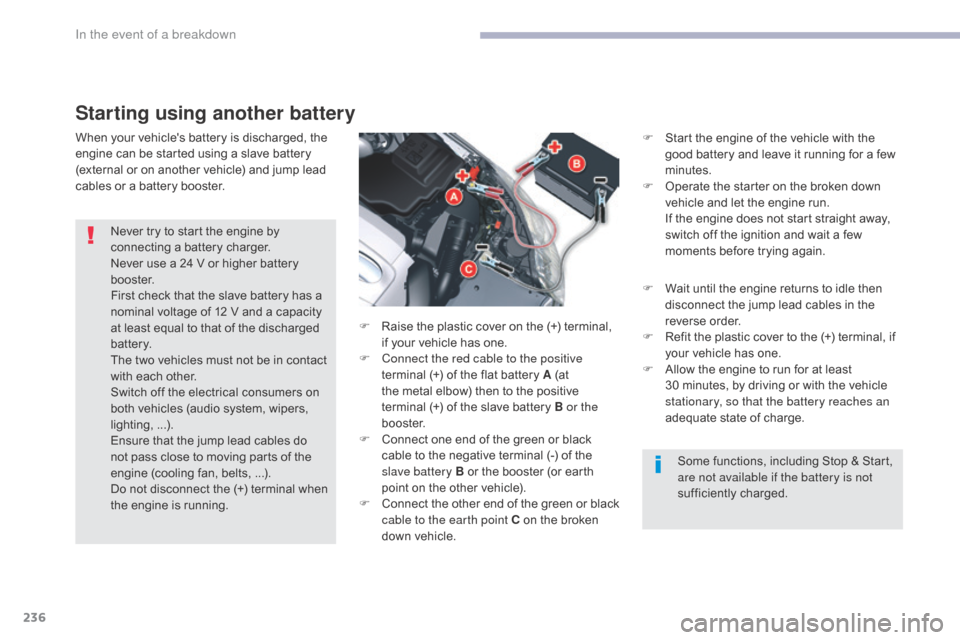
F
R
aise the plastic cover on the (+) terminal,
if your vehicle has one.
F
C
onnect the red cable to the positive
terminal (+) of the flat battery A (at
the metal elbow) then to the positive
terminal
(+) of the slave battery B or the
b o o s t e r.
F
C
onnect one end of the green or black
cable to the negative terminal (-) of the
slave battery B or the booster (or earth
point on the other vehicle).
F
C
onnect the other end of the green or black
cable to the earth point C on the broken
down vehicle. F
W
ait until the engine returns to idle then
disconnect the jump lead cables in the
reverse order.
F
R
efit the plastic cover to the (+) terminal, if
your vehicle has one.
F
A
llow the engine to run for at least
30
minutes, by driving or with the vehicle
stationary, so that the battery reaches an
adequate state of charge.
In the event of a breakdown
Page 239 of 348
237
C5_en_Chap08_en-cas-de-panne_ed01-2016
Charging the battery using a battery charger
For optimum service life of the battery, it is
essential to maintain an adequate state of
charge.
In some circumstances it may be necessary to
charge the battery:
-
i
f you use your vehicle essentially for short
journeys,
-
i
f the vehicle is to be taken off the road for
several weeks.
Contact a CITROËN dealer or a qualified
workshop.
If you envisage charging your vehicle's
battery yourself, use only a charger
compatible with lead-acid batteries of a
nominal voltage of 12 V.
Never try to charge a frozen battery.
If the battery has been frozen, have
it checked by a CITROËN dealer or a
qualified workshop, who will check that
the internal components have not been
damaged and the casing is not cracked,
which could cause a leak of toxic and
corrosive acid.
It is not necessary to disconnect the
battery. Follow the instructions for use provided
by the manufacturer of the charger.
Never reverse polarities.
If this label is present, it is essential
to use only a 12 V charger, to avoid
causing irreversible damage to the
electrical components related to the
Stop & Start system. F
S
witch off the ignition.
F
S
witch off all electrical consumers (audio
system, lighting, wipers, ...).
F
S
witch off the charger B before connecting
the cables to the battery, so as to avoid any
dangerous sparks.
F
E
nsure that the charger cables are in good
condition.
F
R
aise the plastic cover, if your vehicle has
one, on the (+) terminal.
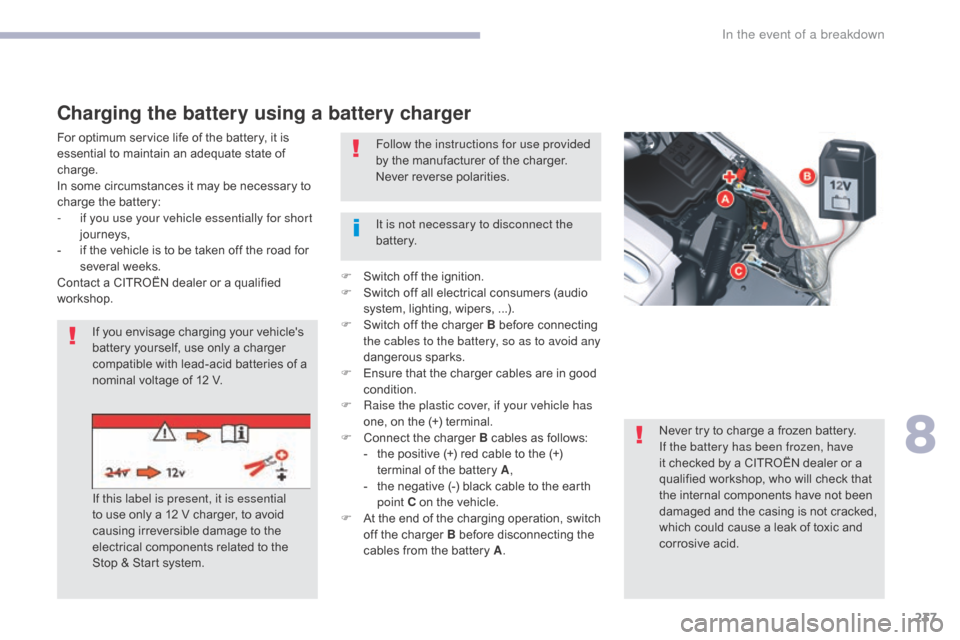
F
C
onnect the charger B cables as follows:
-
t
he positive (+) red cable to the (+)
terminal of the battery A ,
-
t
he negative (-) black cable to the earth
point C on the vehicle.
F
A
t the end of the charging operation, switch
off the charger B before disconnecting the
cables from the battery A .
8
In the event of a breakdown
Page 240 of 348
238
C5_en_Chap08_en-cas-de-panne_ed01-2016
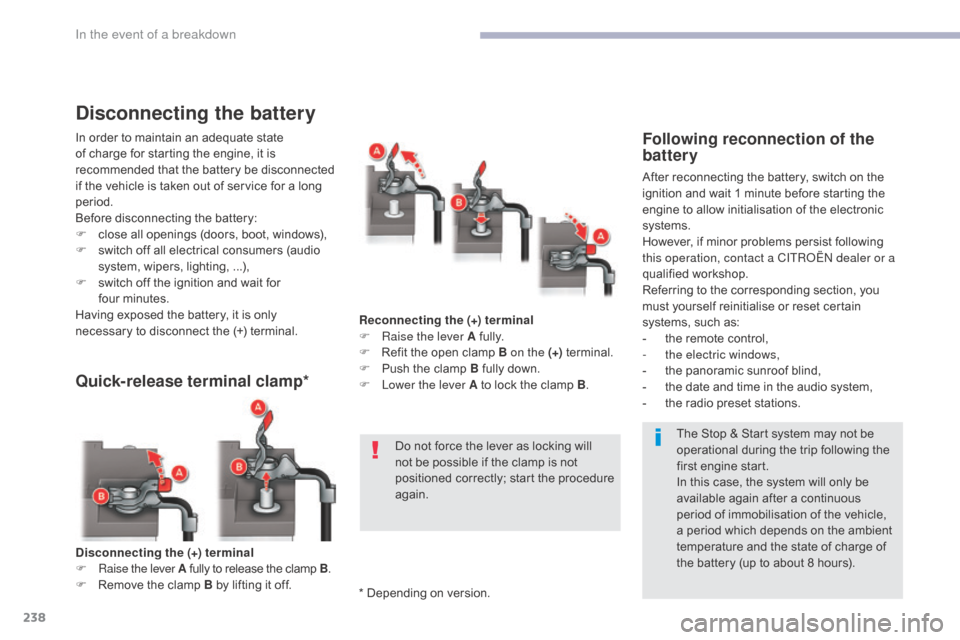
Disconnecting the (+) terminal
F Ra ise the lever A fully to release the clamp B .
F
R
emove the clamp B by lifting it off.
Quick-release terminal clamp*
Reconnecting the (+) terminal
F Ra ise the lever A fully.
F
R
efit the open clamp B on the (+) terminal.
F
P
ush the clamp B fully down.
F
L
ower the lever A to lock the clamp B .
Do not force the lever as locking will
not be possible if the clamp is not
positioned correctly; start the procedure
again.
Disconnecting the battery
In order to maintain an adequate state
of charge for starting the engine, it is
recommended that the battery be disconnected
if the vehicle is taken out of service for a long
period.
Before disconnecting the battery:
F
c
lose all openings (doors, boot, windows),
F
s
witch off all electrical consumers (audio
system, wipers, lighting, ...),
F
s
witch off the ignition and wait for
four
m
inutes.
Having exposed the battery, it is only
necessary to disconnect the (+) terminal.Following reconnection of the
battery
After reconnecting the battery, switch on the
ignition and wait 1 minute before starting the
engine to allow initialisation of the electronic
systems.
However, if minor problems persist following
this operation, contact a CITROËN dealer or a
qualified workshop.
Referring to the corresponding section, you
must yourself reinitialise or reset certain
systems, such as:
-
t
he remote control,
-
t
he electric windows,
-
t
he panoramic sunroof blind,
-
t
he date and time in the audio system,
-
t
he radio preset stations.The Stop & Start system may not be
operational during the trip following the
first engine start.
In this case, the system will only be
available again after a continuous
period of immobilisation of the vehicle,
a period which depends on the ambient
temperature and the state of charge of
the battery (up to about 8 hours).
* Depending on version.
In the event of a breakdown
Page 253 of 348
251
C5_en_Chap10a_BTA_ed01-2016
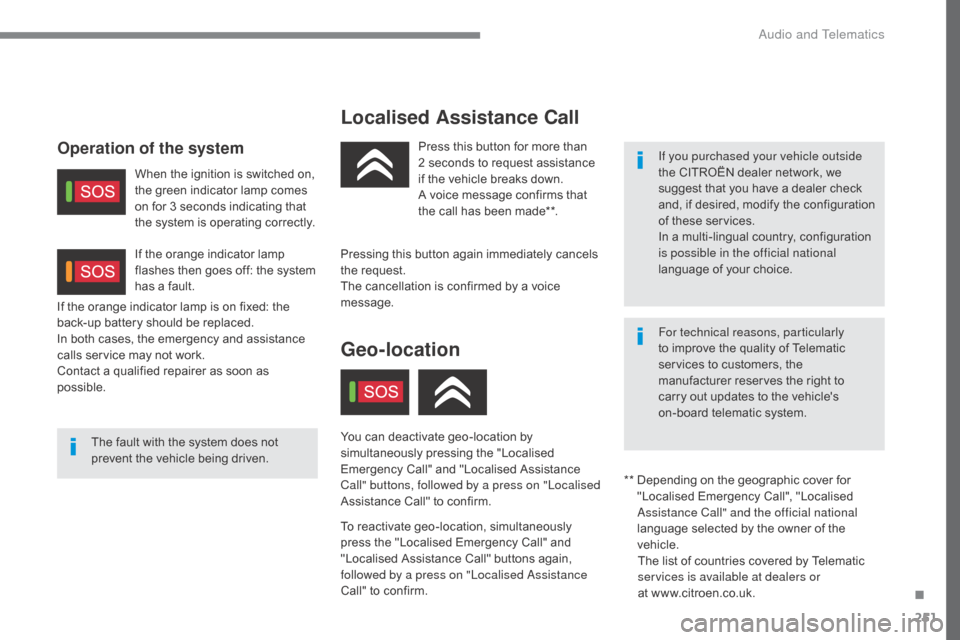
Localised Assistance Call
The fault with the system does not
prevent the vehicle being driven.Press this button for more than
2
seconds to request assistance
if the vehicle breaks down.
A voice message confirms that
the call has been made**.
Pressing this button again immediately cancels
the request.
The cancellation is confirmed by a voice
message.
Geo-location
You can deactivate geo-location by
simultaneously pressing the "Localised
Emergency Call" and "Localised Assistance
Call" buttons, followed by a press on "Localised
Assistance Call" to confirm.
To reactivate geo-location, simultaneously
press the "Localised Emergency Call" and
"Localised Assistance Call" buttons again,
followed by a press on "Localised Assistance
Call" to confirm.
If the orange indicator lamp is on fixed: the
back-up battery should be replaced.
In both cases, the emergency and assistance
calls service may not work.
Contact a qualified repairer as soon as
possible.
Operation of the system
When the ignition is switched on,
the green indicator lamp comes
on for 3 seconds indicating that
the system is operating correctly.
If the orange indicator lamp
flashes then goes off: the system
has a fault.
If you purchased your vehicle outside
the CITROËN dealer network, we
suggest that you have a dealer check
and, if desired, modify the configuration
of these services.
In a multi-lingual country, configuration
is possible in the official national
language of your choice.
For technical reasons, particularly
to improve the quality of Telematic
services to customers, the
manufacturer reserves the right to
carry out updates to the vehicle's
on-board telematic system.
**
D
epending on the geographic cover for
"Localised Emergency Call", "Localised
Assistance Call" and the official national
language selected by the owner of the
vehicle. The list of countries covered by Telematic
services is available at dealers or
at www.citroen.co.uk.
.
Audio and Telematics
Page 313 of 348
311
C5_en_Chap10b_SMEGplus_ed01-2016
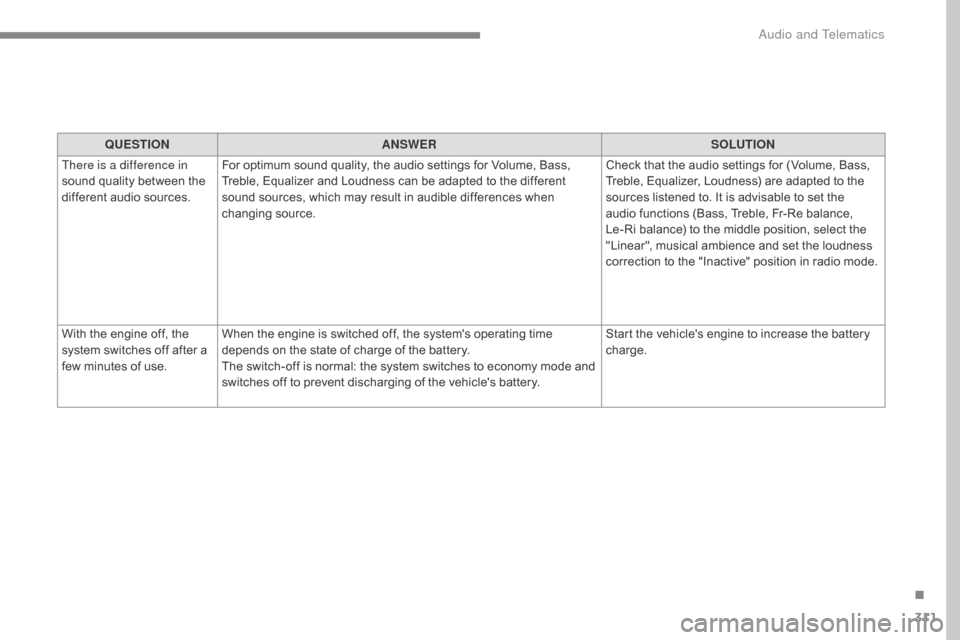
QUESTIONANSWER SOLUTION
There is a difference in
sound quality between the
different audio sources. For optimum sound quality, the audio settings for Volume, Bass,
Treble, Equalizer and Loudness can be adapted to the different
sound sources, which may result in audible differences when
changing source. Check that the audio settings for (Volume, Bass,
Treble, Equalizer, Loudness) are adapted to the
sources listened to. It is advisable to set the
audio functions (Bass, Treble, Fr-Re balance,
Le-Ri balance) to the middle position, select the
"Linear", musical ambience and set the loudness
correction to the "Inactive" position in radio mode.
With the engine off, the
system switches off after a
few minutes of use. When the engine is switched off, the system's operating time
depends on the state of charge of the battery.
The switch-off is normal: the system switches to economy mode and
switches off to prevent discharging of the vehicle's battery. Start the vehicle's engine to increase the battery
charge.
.
Audio and Telematics
Page 317 of 348
315
C5_en_Chap10c_RD45_ed01-2016
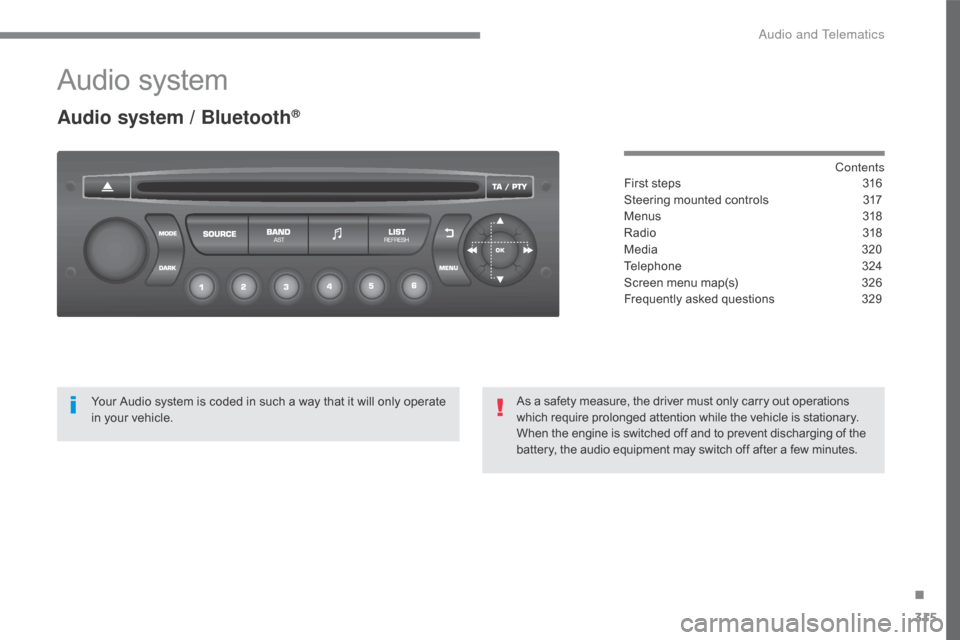
Audio system
Audio system / Bluetooth®
Contents
First steps
3 16
Steering mounted controls
3
17
Menus
3
18
Radio
3
18
Media
32
0
Telephone
3
24
Screen menu map(s)
3
26
Frequently asked questions
3
29
Your Audio system is coded in such a way that it will only operate
in your vehicle. As a safety measure, the driver must only carry out operations
which require prolonged attention while the vehicle is stationary.
When the engine is switched off and to prevent discharging of the
battery, the audio equipment may switch off after a few minutes.
.
Audio and Telematics
Page 331 of 348
329
C5_en_Chap10c_RD45_ed01-2016
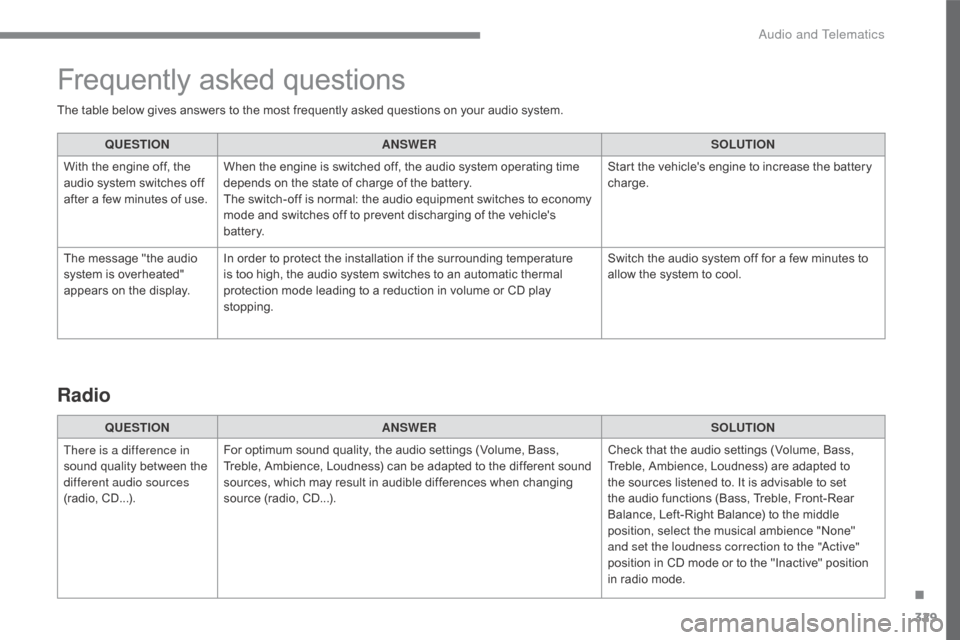
The table below gives answers to the most frequently asked questions on your audio system.QUESTION ANSWER SOLUTION
With the engine off, the
audio system switches off
after a few minutes of use. When the engine is switched off, the audio system operating time
depends on the state of charge of the battery.
The switch-off is normal: the audio equipment switches to economy
mode and switches off to prevent discharging of the vehicle's
battery. Start the vehicle's engine to increase the battery
charge.
The message "the audio
system is overheated"
appears on the display. In order to protect the installation if the surrounding temperature
is too high, the audio system switches to an automatic thermal
protection mode leading to a reduction in volume or CD play
stopping. Switch the audio system off for a few minutes to
allow the system to cool.
Frequently asked questions
QUESTION
ANSWER SOLUTION
There is a difference in
sound quality between the
different audio sources
(radio, CD...). For optimum sound quality, the audio settings (Volume, Bass,
Treble, Ambience, Loudness) can be adapted to the different sound
sources, which may result in audible differences when changing
source (radio, CD...). Check that the audio settings (Volume, Bass,
Treble, Ambience, Loudness) are adapted to
the sources listened to. It is advisable to set
the audio functions (Bass, Treble, Front-Rear
Balance, Left-Right Balance) to the middle
position, select the musical ambience "None"
and set the loudness correction to the "Active"
position in CD mode or to the "Inactive" position
in radio mode.
Radio
.
Audio and Telematics
Page 333 of 348
331
C5_en_Chap10c_RD45_ed01-2016
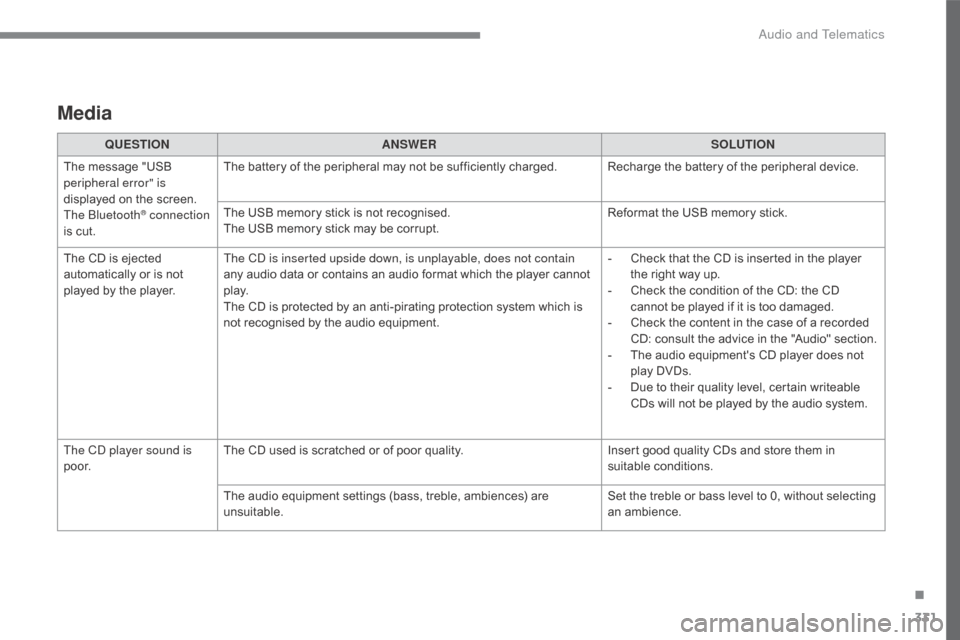
Media
QUESTIONANSWER SOLUTION
The message "USB
peripheral error" is
displayed on the screen.
The Bluetooth
® connection
is cut. The battery of the peripheral may not be sufficiently charged. Recharge the battery of the peripheral device.
The USB memory stick is not recognised.
The USB memory stick may be corrupt.
Reformat the USB memory stick.
The CD is ejected
automatically or is not
played by the player. The CD is inserted upside down, is unplayable, does not contain
any audio data or contains an audio format which the player cannot
p l ay.
The CD is protected by an anti-pirating protection system which is
not recognised by the audio equipment. -
C
heck that the CD is inserted in the player
the right way up.
-
C
heck the condition of the CD: the CD
cannot be played if it is too damaged.
-
C
heck the content in the case of a recorded
CD: consult the advice in the "Audio" section.
-
T
he audio equipment's CD player does not
play DVDs.
-
D
ue to their quality level, certain writeable
CDs will not be played by the audio system.
The CD player sound is
p o o r. The CD used is scratched or of poor quality.
Insert good quality CDs and store them in
suitable conditions.
The audio equipment settings (bass, treble, ambiences) are
unsuitable. Set the treble or bass level to 0, without selecting
an ambience.
.
Audio and Telematics
Page 335 of 348
333
C5_en_Chap11_index-alpha_ed01-2016
Accessories ..................................................14 4
AdBlue® additive ......................3 2, 195, 196, 200
Adjusting headlamps .................................... 13
7
Adjusting head restraints
..........................6
0, 68
Adjusting seat
........................................... 6
0, 61
Adjusting the air distribution
...........................72
A
djusting the air flow
....................................... 72
A
djusting the date
........................................... 43
A
djusting the height and reach
of the steering wheel
.................................... 65
A
djusting the seat belt height
.......................1
51
Adjusting the temperature
.............................. 72
A
djusting the time
........................................... 43
A
dvice on driving
..............................
...... 91, 180
Airbag, knee
.................................................. 15
7
Airbags
...............
............................................. 35
Airbags, curtain
..................................... 15
6, 15 8
Airbags, front................................................. 15 8
Airbags, lateral
...................................... 15
6, 15 8
Air conditioning
...............................
................12
Air conditioning, automatic
............................. 71
A
ir conditioning, digital
................................... 72
A
ir conditioning, manual
................................. 71
A
ir vents
..............................
............................70
Alarm
............................................................... 49
A
nti-lock braking system (ABS)
....................14
7
Anti-pinch
.................................................. 5
2, 79
Anti-slip regulation (ASR)..............
....... 1
48, 150
Anti-theft
..............................
...........................92
Armrest, front
.................................................. 83
A
rmrest, rear
................................................... 84
A
ssistance call
...............................
....... 146, 250
A
B
C
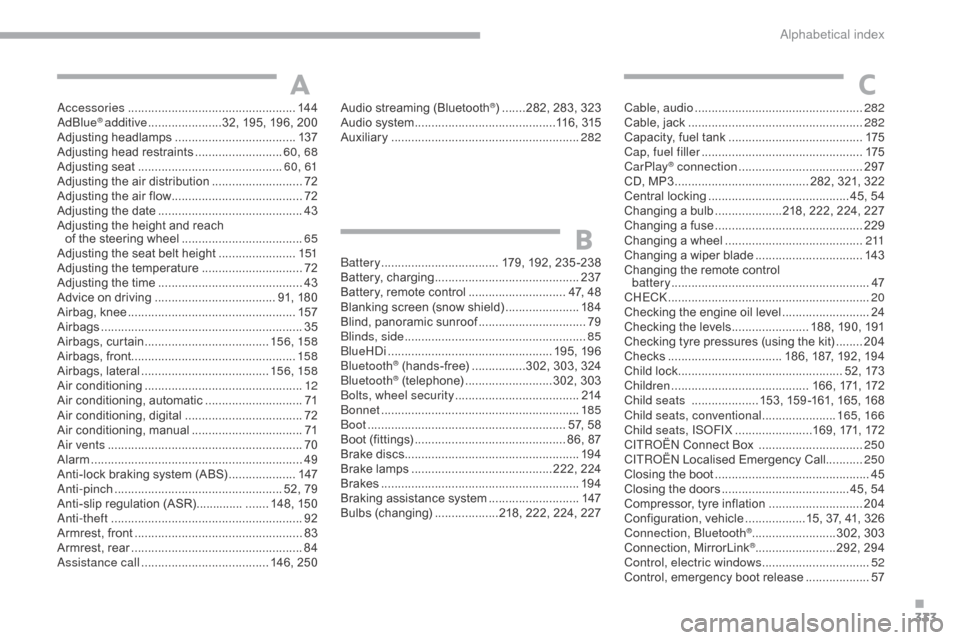
Battery ............................... .... 179, 192, 235 -238
Battery, charging ............................... ............237
Battery, remote control
............................. 4
7, 48
Blanking screen (snow shield)
......................18
4
Blind, panoramic sunroof
................................79
B
linds, side
...................................................... 85
Bl
ueHDi
...............................
..................195, 19 6
Bluetooth
® (hands-free) ................3 02, 303, 324
Bluetooth® (telephone) ..........................3 02, 303
Bolts, wheel security ..................................... 2
14
Bonnet
...............
............................................ 185
Boot
........
................................................... 57, 58
Boot (fittings)
...............................
.............. 86, 87
Brake discs
.................................................... 19
4
Brake lamps
...............................
...........222, 224
Brakes
........................................................... 19
4
Braking assistance system
........................... 14
7
Bulbs (changing)
...................2
18, 222, 224, 227
Audio streaming (Bluetooth
®) .......282, 283, 323
Audio system
............................... ...........116, 315
Auxiliary
........................................................ 28
2Cable, audio ..................................................
28 2
Cable, jack .............................. ......................282
Capacity, fuel tank
..............................
..........175
Cap, fuel filler
................................................17
5
CarPlay
® connection ..................................... 2 97
CD, MP3 ........................................ 2 82, 321, 322
Central locking
.......................................... 4
5, 54
Changing a bulb
....................2
18, 222, 224, 227
Changing a fuse
............................................ 2
29
Changing a wheel
...............................
..........2 11
Changing a wiper blade
................................ 14
3
Changing the remote control battery
........................................................... 47
C
HECK
................
............................................ 20
Checking the engine oil level
..........................24
C
hecking the levels
....................... 1
88, 190, 191
Checking tyre pressures (using the kit)
........20
4
Checks
...............
................... 186, 187, 192, 194
Child lock
...............................
.................. 52, 173
Children
...............................
.......... 166, 171, 172
Child seats
.................... 1
53, 159 -161, 165, 168
Child seats, conventional
...................... 16
5, 166
Child seats, ISOFIX
.......................1
69, 171, 172
C
ITROËN
C
onnect Box
............................... 25
0
C
ITROËN
L
ocalised Emergency Call........... 250
Closing the boot
...............................
...............45
Closing the doors
...............................
....... 45, 54
Compressor, tyre inflation
............................ 20
4
Configuration, vehicle
..................1
5, 37, 41, 326
Connection, Bluetooth
® .........................3 02, 303
Connection, MirrorLink® ........................2 92, 294
Control, electric windows ................................ 52
C
ontrol, emergency boot release
................... 57
.
Alphabetical index