trailer CITROEN C5 AIRCROSS 2017 User Guide
[x] Cancel search | Manufacturer: CITROEN, Model Year: 2017, Model line: C5 AIRCROSS, Model: CITROEN C5 AIRCROSS 2017Pages: 292, PDF Size: 8.59 MB
Page 165 of 292
163
Status of the
functionIndicator
lampDisplay and/
or associated
message
Comments
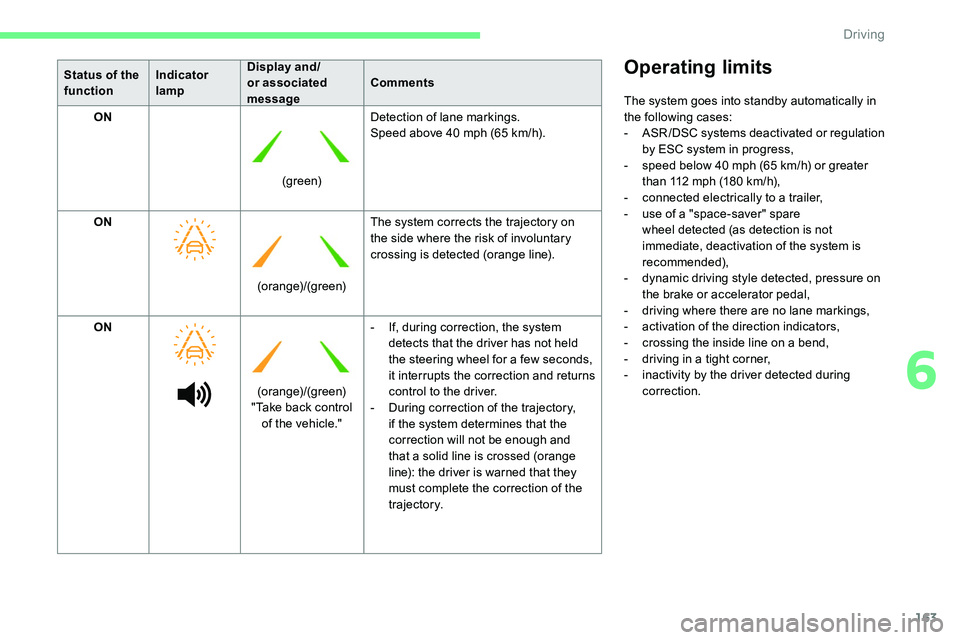
ON
(green)Detection of lane markings.
Speed above 40
mph (65 km/h).
ON (orange)/(green)The system corrects the trajectory on
the side where the risk of involuntary
crossing is detected (orange line).
ON (orange)/(green)
"Take back control of the vehicle." -
I
f, during correction, the system
detects that the driver has not held
the steering wheel for a
few seconds,
it interrupts the correction and returns
control to the driver.
-
D
uring correction of the trajectory,
if the system determines that the
correction will not be enough and
that a
solid line is crossed (orange
line): the driver is warned that they
must complete the correction of the
trajectory.Operating limits
The system goes into standby automatically in
the following cases:
-
A
SR /DSC systems deactivated or regulation
by ESC system in progress,
-
s
peed below 40 mph (65 km/h) or greater
than 112
mph (180 km/h),
-
c
onnected electrically to a
trailer,
-
u
se of a "space-saver" spare
wheel detected (as detection is not
immediate, deactivation of the system is
recommended),
-
d
ynamic driving style detected, pressure on
the brake or accelerator pedal,
-
d
riving where there are no lane markings,
-
a
ctivation of the direction indicators,
-
c
rossing the inside line on a bend,
-
d
riving in a tight corner,
-
i
nactivity by the driver detected during
correction.
6
Driving
Page 166 of 292
164
The following situations may interfere with
the operation of the system or prevent it
from working:
-
c
onditions of poor visibility (inadequate
street lighting, snowfall, rain, fog),
-
d
azzle (headlamps of an oncoming
vehicle, low sun, reflections on a
damp
road, leaving a
tunnel, alternating
shade and light),
-
w
indscreen area located in front of the
camera: dirty, misted, frost-covered,
snow-covered, damaged or covered by
a
s t i c ke r,
-
l
ane markings worn, hidden (snow,
mud) or multiple (roadworks, etc.),
-
r
unning close to the vehicle in front
(the lane markings may not be
detected),
-
r
oads that are narrow, winding,
-
i
nsufficient contrast (shade, for
example) between the road and the
edges of the road.
Risk of undesirable operation
Deactivation of the system is recommended in
the following situations:
-
d
riving on a road sur face in poor condition,
-
u
nfavourable climatic conditions,
-
d
riving on slippery sur faces (ice).
Deactivation/Activation
The system is activated every time the ignition
is switched on.
F
T
o deactivate the system, press this button. Deactivation is signalled by the
lighting of the indicator lamp in
the button and this warning lamp on
the instrument panel.
Reactivation is by another press, the indicator
lamp in the button and the warning lamp switch
of f.
MalfunctionThe system is not intended for driving in the
following situations:
-
d
riving on a speed circuit,
-
d
riving with a trailer,
-
d
riving on a rolling stand,
-
d
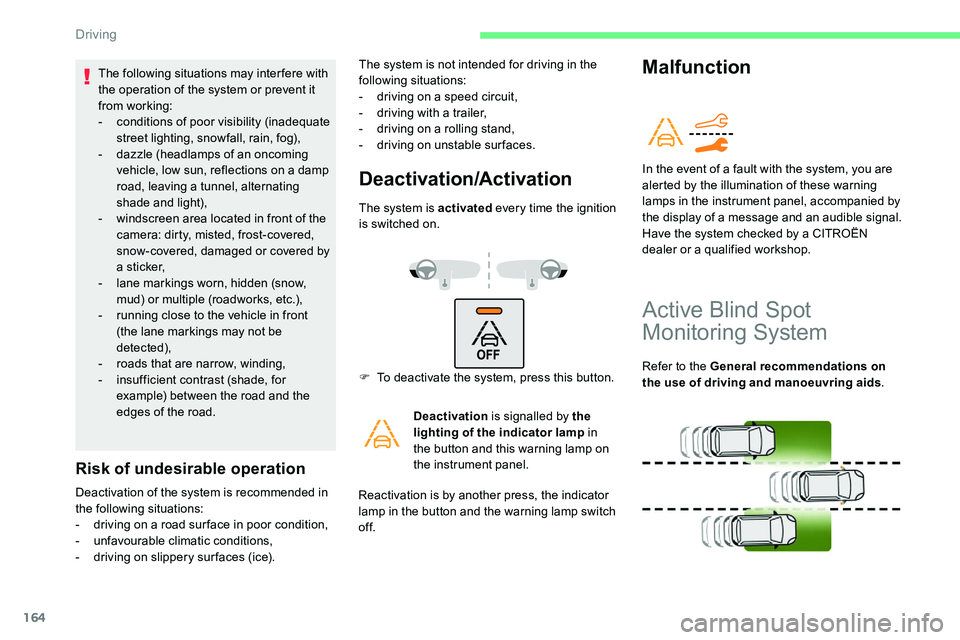
riving on unstable sur faces. In the event of a
fault with the system, you are
alerted by the illumination of these warning
lamps in the instrument panel, accompanied by
the display of a
message and an audible signal.
Have the system checked by a
CITROËN
dealer or a
qualified workshop.
Active Blind Spot
Monitoring System
Refer to the General recommendations on
the use of driving and manoeuvring aids.
Driving
Page 167 of 292

165
This system warns the driver of the presence
of another vehicle in the blind spots of their
vehicle (areas hidden from the driver's field
of vision), as soon as this presents a potential
danger.
A fixed warning lamp appears in the door mirror
on the side in question:
-
i
mmediately, when being overtaken,
-
a
fter a delay of about one second, when
overtaking a
vehicle slowly.
In addition to the fixed warning lamp in the door
mirror on the side in question, a correction of
trajectory will be felt if you attempt to cross
a
lane marking with the direction indicator
activated, to help you avoid a
collision.This driving aid system is designed to
improve safety when driving and is in no
circumstances a
substitute for the use
of the interior rear view mirror and door
mirrors. It is the driver's responsibility to
constantly check the traffic, to assess the
relative distances and speeds of other
vehicles and to anticipate their movements
before deciding whether to change lane.
Activation/Deactivation
The function is activated and
deactivated in the Driving/Vehicle
menu of the touch screen.
The state of the system stays in the memory
when switching off the ignition.
The system is automatically deactivated
when towing with a
towing device
approved by CITROËN.
Operation
The alert is given by an orange warning lamp
coming on in the relevant door mirror, as soon
as a
vehicle – car, lorry, bicycle – is detected.
A correction of trajectory will be felt if you
attempt to cross a
lane marking with the
direction indicator flashing.
The following conditions must be met for this:
-
a
ll vehicles are moving in the same direction
and in adjacent lanes,
-
t
he speed of the vehicle must be between
7
and 87 mph (12 and 140 km/h) for the
alert and between 40
and 87 mph (65 and
140
km/h) for a correction of trajectory,
-
t
he system must be activated to trigger
a
change of trajectory,
-
y
ou overtake a vehicle with a speed
difference of less than 6
mph (10 km/h),
-
a v
ehicle overtakes you with a speed
difference of less than 16
mph (25 km/h),
-
t
he traffic is flowing normally,
-
ov
ertaking a vehicle over a certain period
of time and the vehicle being overtaken
remains in the blind spot,
-
y
ou are driving on a straight or slightly
curved road,
-
y
our vehicle is not towing a trailer, a
caravan, etc.
Sensors fitted in the front and rear bumpers
monitor the blind spots.
6
Driving
Page 170 of 292

168
The sound emitted by the speaker (front or
rear) locates the obstacle in relation to the
vehicle, in front or behind.
Deactivation/Activation
The function is deactivated and
activated in the Driving/Vehicle
menu of the touch screen.
The state of the system stays in the memory
when the ignition is switched off.
The rear parking sensors system will
be deactivated automatically if a
trailer
or bicycle carrier is connected to
a
towing device installed in line with the
manufacturer's recommendations.
In this case, the outline of a
trailer is
displayed at the rear of the image of the
vehicle. The parking sensors are deactivated while the
Park Assist system is measuring a
space.
For more information on the Park Assist , refer
to the corresponding section.
Operating limits
The tilting of the vehicle if the boot is very
loaded can affect the distance measurements.
Malfunction
If a malfunction occurs, when
s hifting to reverse, one of these
warning lamps comes on in the
instrument panel, accompanied by
the display of a
message and an
audible signal (short beep).
If the malfunction occurs while the
parking sensors are being used, it
causes the function to deactivate.
Contact a
CITROËN dealer or a qualified
workshop to have the system checked.
Top Rear Vision – Top
360
Vision
Refer to the General recommendations on
the use of driving and manoeuvring aids .
With the engine running, these systems allow
views of your vehicle's close surroundings to
be displayed on the touch screen using one
camera for Top Rear Vision and two cameras
for Top 360
Vision.
Driving
Page 173 of 292
171
180° viewTop 360 Vision
The vehicle has a camera at the front, fitted
i n the grille, and a camera at the rear, located
close to the number plate lamps.
Using these cameras, the system displays
the vehicle's near surroundings on the touch
screen, offering views from the rear of the
vehicle (rear vision), when reverse gear is
engaged and views from the front of the vehicle
(front vision), when the gearbox is in neutral or
a
gear is engaged.
Rear vision
If a trailer or a bicycle carrier is fitted to
t he towball, the area behind the vehicle on
the view from above goes dark.
The surroundings are reconstructed by the
front camera only.
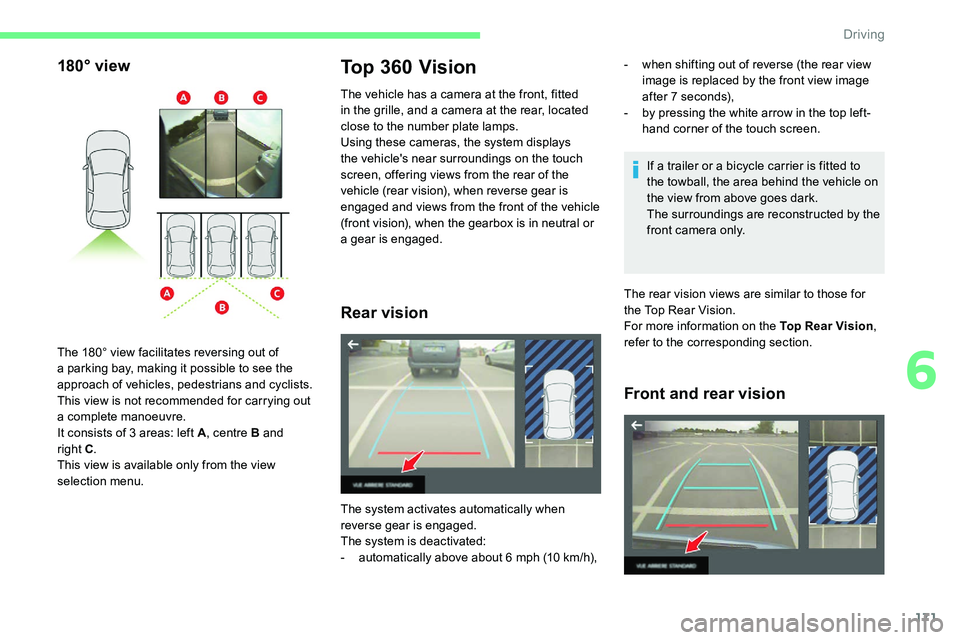
The 180° view facilitates reversing out of
a
parking bay, making it possible to see the
approach of vehicles, pedestrians and cyclists.
This view is not recommended for carrying out
a
complete manoeuvre.
It consists of 3
areas: left A , centre B and
right C .
This view is available only from the view
selection menu.
The system activates automatically when
reverse gear is engaged.
The system is deactivated:
-
a
utomatically above about 6
mph (10
km/h), -
w
hen shifting out of reverse (the rear view
image is replaced by the front view image
after 7
seconds),
-
b
y pressing the white arrow in the top left-
hand corner of the touch screen.
The rear vision views are similar to those for
the Top Rear Vision.
For more information on the Top Rear Vision,
refer to the corresponding section.
Front and rear vision
6
Driving
Page 180 of 292
178
Deactivation
The system is deactivated by pressing the
control.
The system is deactivated automatically:
-
o
n switching off the ignition,
-
i
f the engine stalls,
-
I
f the driver's seat belt is not fastened,
-
i
f no manoeuvre is per formed within
5
minutes of selecting the type of
manoeuvre,
-
a
fter a prolonged stop of the vehicle during
a
manoeuvre,
-
i
f the wheel anti-slip regulation (ASR) is
triggered,
-
i
f the speed of the vehicle exceeds the
stated limit,
-
w
hen the driver interrupts movement of the
steering wheel,
-
a
fter 4 manoeuvre cycles,
-
o
n opening the driver's door,
-
i
f one of the front wheels encounters an
obstacle.
The indicator lamp in the instrument panel goes
off and a
message is displayed, accompanied
by an audible signal.
The driver should then take back the vehicle's
steering.
If the system is deactivated during
a
manoeuvre, the driver should reactivate
it to repeat the measurement.
Deactivation
The system is switched off automatically:
- w hen towing a trailer, connected electrically,
-
i
f the driver's door is opened,
-
i
f the speed of the vehicle is above 43 mph
(70
km/h).
To switch the system off for a
prolonged period,
contact a
CITROËN dealer or a qualified
workshop.
Malfunctions
When the function is not activated,
this warning lamp temporarily
flashing (vehicle with digital
instrument panel) and/or an audible
signal indicate a
s
ystem malfunction.
If the fault occurs during the use of the system,
the warning lamp goes off.
In the event of a
fault, have the system checked
by a
CITROËN dealer or a qualified workshop.
In the event of a
fault with the
power steering, this warning lamp
is displayed in the instrument
panel, accompanied by a
warning
message. You must stop as soon as it is safe to do so.
Contact a
CITROËN dealer or a qualified
workshop.
Driving
Page 184 of 292
182
Obser ve the maximum authorised towable
weight, indicated on your vehicle's
registration certificate, the manufacturer's
label as well as in the Technical data
section of this guide.
Complying with the maximum
authorised nose weight (towball)
also includes the use of accessories
(bicycle carriers, tow boxes, etc.).
Obser ve the legislation in force in the
country in which you are driving.
Vehicle equipped with motorised tailgate
with " Hands-Free Tailgate Access "
function
To avoid unwanted opening of the tailgate
when using the towing device:
-
d
eactivate the "Hands-Free Tailgate
Access" function in advance in your
vehicle's configuration menu,
-
o
r remove the electronic key from the
recognition zone, with the tailgate closed.
Towing device
Load distribution
F Distribute the load in the trailer so that the
heaviest items are as close as possible to
the axle and the nose weight approaches the
maximum permitted without exceeding it.
Air density decreases with altitude, thus
reducing engine performance. The maximum
towed load must be reduced by 10% for every
1,000
metres of altitude. Use towing devices and their genuine
harnesses approved by CITROËN. It
is recommended that the installation
be per formed by a
CITROËN dealer or
a
qualified workshop.
If the towing device is not fitted by
a CITROËN dealer, it must still be
fitted in accordance with the vehicle
manufacturer's instructions.
Important: for versions equipped with
the motorised tailgate with Hands-Free
Tailgate Access function, if a
towing
device other than a
genuine CITROËN
one is installed, it is essential to visit
a
CITROËN dealer or a qualified
workshop to recalibrate the detection
system: risk of "Hands-Free Tailgate
Access" function failure.
Certain driving or manoeuvring aid
functions are automatically disabled if an
approved towing system is used.
Practical information
Page 185 of 292
183
Towing device with
quickly detachable towball
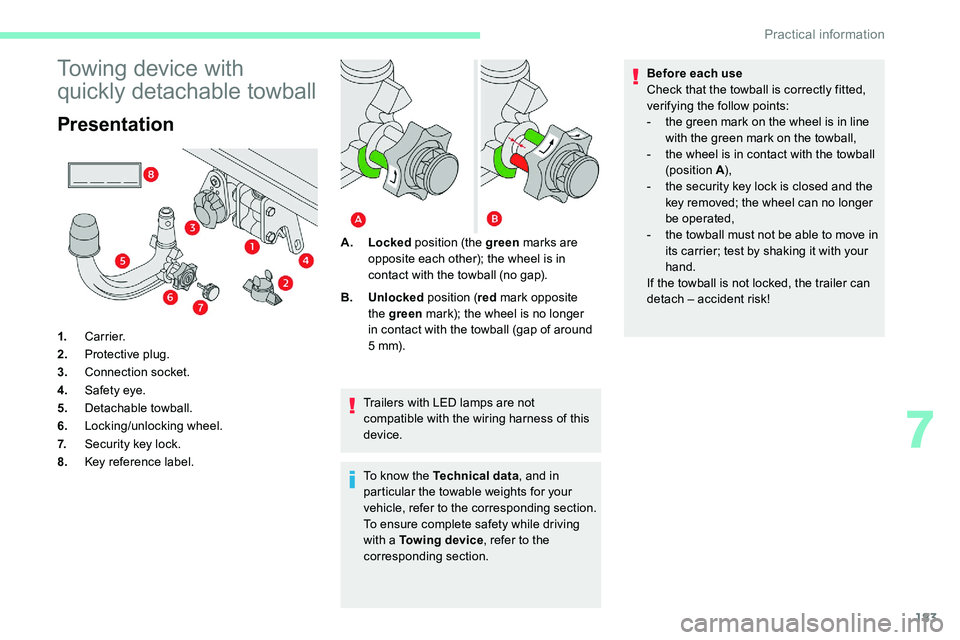
Presentation
1.Carrier.
2. Protective plug.
3. Connection socket.
4. Safety eye.
5. Detachable towball.
6. Locking/unlocking wheel.
7. Security key lock.
8. Key reference label. Trailers with LED lamps are not
compatible with the wiring harness of this
device.
To know the Technical data
, and in
particular the towable weights for your
vehicle, refer to the corresponding section.
To ensure complete safety while driving
with a
Towing device, refer to the
corresponding section.
A.
Locked position (the green marks are
opposite each other); the wheel is in
contact with the towball (no gap).
B. Unlocked position (red mark opposite
the green mark); the wheel is no longer
in contact with the towball (gap of around
5 m m).Before each use
Check that the towball is correctly fitted,
verifying the follow points:
-
t
he green mark on the wheel is in line
with the green mark on the towball,
-
t
he wheel is in contact with the towball
(position A ),
-
t
he security key lock is closed and the
key removed; the wheel can no longer
be operated,
-
t
he towball must not be able to move in
its carrier; test by shaking it with your
hand.
If the towball is not locked, the trailer can
detach – accident risk!
7
Practical information
Page 186 of 292
184
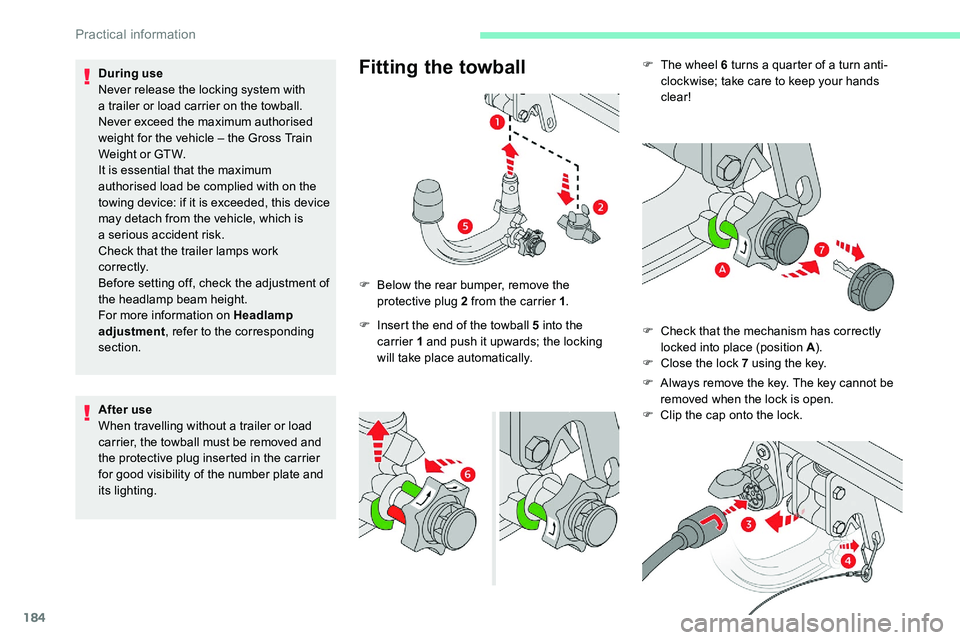
F The wheel 6 turns a quarter of a turn anti-
clockwise; take care to keep your hands
clear!
F
C
heck that the mechanism has correctly
locked into place (position A ).
F
C
lose the lock 7 using the key.
F
A
lways remove the key. The key cannot be
removed when the lock is open.
F
C
lip the cap onto the lock.
During use
Never release the locking system with
a
trailer or load carrier on the towball.
Never exceed the maximum authorised
weight for the vehicle – the Gross Train
Weight or GTW.
It is essential that the maximum
authorised load be complied with on the
towing device: if it is exceeded, this device
may detach from the vehicle, which is
a
serious accident risk.
Check that the trailer lamps work
c o r r e c t l y.
Before setting off, check the adjustment of
the headlamp beam height.
For more information on Headlamp
adjustment , refer to the corresponding
section.
After use
When travelling without a
trailer or load
carrier, the towball must be removed and
the protective plug inserted in the carrier
for good visibility of the number plate and
its lighting.Fitting the towball
F Insert the end of the towball 5 into the
carrier 1 and push it upwards; the locking
will take place automatically.
F
B
elow the rear bumper, remove the
protective plug 2 from the carrier 1
.
Practical information
Page 187 of 292
185
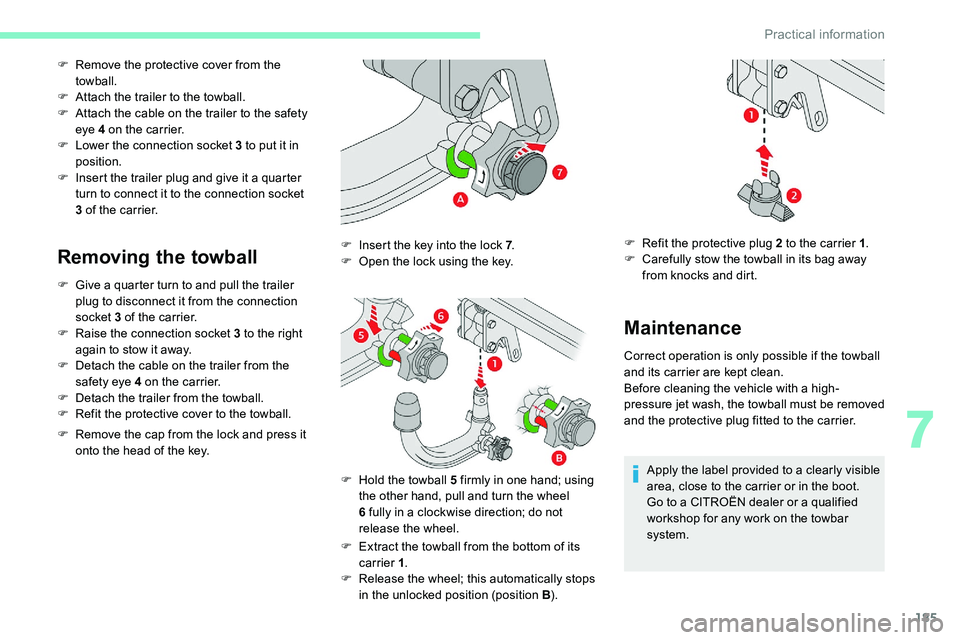
F Remove the protective cover from the towball.
F
A
ttach the trailer to the towball.
F
A
ttach the cable on the trailer to the safety
eye 4
on the carrier.
F
L
ower the connection socket 3 to put it in
position.
F
I
nsert the trailer plug and give it a quarter
turn to connect it to the connection socket
3
of the carrier.
Removing the towball
F Give a quarter turn to and pull the trailer
plug to disconnect it from the connection
socket 3
of the carrier.
F
R
aise the connection socket 3 to the right
again to stow it away.
F
D
etach the cable on the trailer from the
safety eye 4
on the carrier.
F
D
etach the trailer from the towball.
F
R
efit the protective cover to the towball.
F
R
emove the cap from the lock and press it
onto the head of the key.
F
E
xtract the towball from the bottom of its
carrier 1 .
F
R
elease the wheel; this automatically stops
in the unlocked position (position B ).
F
I
nsert the key into the lock 7
.
F
O
pen the lock using the key.
F
H
old the towball 5 firmly in one hand; using
the other hand, pull and turn the wheel
6
fully in a clockwise direction; do not
release the wheel.
Maintenance
Correct operation is only possible if the towball
and its carrier are kept clean.
Before cleaning the vehicle with a
high-
pressure jet wash, the towball must be removed
and the protective plug fitted to the carrier.
Apply the label provided to a
clearly visible
area, close to the carrier or in the boot.
Go to a
CITROËN dealer or a qualified
workshop for any work on the towbar
system.
F
R
efit the protective plug 2 to the carrier 1
.
F
C
arefully stow the towball in its bag away
from knocks and dirt.
7
Practical information