button start CITROEN C5 AIRCROSS 2021 Owner's Manual
[x] Cancel search | Manufacturer: CITROEN, Model Year: 2021, Model line: C5 AIRCROSS, Model: CITROEN C5 AIRCROSS 2021Pages: 292, PDF Size: 8.59 MB
Page 70 of 292

68
Front demist – defrost
Automatic visibility
programme
The automatic visibility programme allows the
windscreen and side windows to be demisted
or defrosted as quickly as possible.F
P
ress this button to activate/
deactivate the function.
When the indicator lamp is on, the function is
activated.
The system automatically manages the air
conditioning (depending on version), air
flow and air intake, and provides optimum
distribution towards the windscreen and side
windows.
The system allows the manual modification of
air flow without causing automatic deactivation
of the automatic visibility programme.
With Stop & Start, when demisting –
defrosting has been activated, STOP
mode is not available. In wintry conditions, remove all snow or
ice on the camera on the windscreen
before moving off.
Other wise, this can affect the function
of the equipment associated with the
camera.
Heated windscreen
In cold weather, this system heats the bottom of
the windscreen, as well as the areas alongside
the windscreen pillars.
Without changing the settings for the air
conditioning system, it allows faster release
of the windscreen wiper blades when they
are frozen to the windscreen and helps avoid
the accumulation of snow resulting from the
operation of the windscreen wipers.
Switching on/off
F With the engine running, press this button to
activate/deactivate the function (confirmed
by the illumination/extinction of the indicator
lamp).
The function is active as soon as the outside
temperature drops below 0°C. It is deactivated
automatically each time the engine is switched
of f.
Rear screen demist –
defrost
On/Off
F Press this button to demist /defrost the rear screen and, depending
on version, the door mirrors
(confirmed by the illumination/
extinction of the indicator lamp).
Demisting/defrosting switches off automatically
to prevent an excessive consumption of
current.
Ease of use and comfort
Page 71 of 292

69
Switch off the demisting/defrosting of the
rear screen and door mirrors as soon as
possible to reduce fuel consumption.
Rear screen demisting – defrosting can
only be operated when the engine is
running.
Additional Heating/
Ventilation
Heating
This is an additional and separate system
which heats the passenger compartment and
improves defrosting performance. This indicator lamp is lit while the
system is programmed or set in
operation remotely via the remote
control.
It flashes during the whole duration
of the heating and goes off at the end
of the heating cycle or when stopped
using the remote control.
Ventilation
This system allows ventilation of the passenger
compartment with exterior air to improve the
temperature experienced on entering the
vehicle in summer.
Programming
You can programme the heating or ventilation
to come on using the second page of the "
Air
conditioning " menu of the touch screen.
F
P
ress the "Air conditioning "
menu.
F
P
ress the " OPTIONS " tab.
F
P
ress "Temperature
programming ". F
P
ress the "
Parameters " tab to select
" Heating " mode to heat the engine and
passenger compartment or " Ventilation"
mode to ventilate the passenger
compartment.
F
P
ress the " Status" tab to activate/deactivate
the system. F
T
hen programme/preset the activation time
for each selection.
F
P
ress "
OK" to confirm.
Long range remote control
This enables you to switch the heating in
the passenger compartment on or off from
a
distance.
The range of the remote control is about
0.6
miles (1 km) in open country.
Switching on
F Pressing and holding this button starts the heating immediately
(confirmed by the temporary
illumination of the green indicator
lamp).
3
Ease of use and comfort
Page 72 of 292

70
Changing the battery
If the indicator lamp in the remote control
becomes orange, the state of charge of the
battery is low.
If the indicator lamp is not on, the battery is
discharged.
F
U
se a coin to unscrew the cap and replace
the battery. Do not throw remote control batteries
away as they contain metals which are
harmful to the environment. Take them
to an approved collection point.
The maximum heating period is about
45 minutes depending on the climatic
conditions.
The additional heating system is powered
by the fuel in the vehicle's fuel tank.
Before use, ensure that there is enough
fuel in the tank.
If the tank level is on reser ve, the system
cannot be used.
The ventilation is activated provided that
the battery is sufficiently charged.
The heating is activated provided that:
-
t
he battery is sufficiently charged,
-
t
he fuel level is adequate,
-
t
he engine has been started since the
previous heating cycle. To avoid the risks of poisoning or
asphyxia, the programmable heating must
not be used, even for short periods, in
a
closed environment such as a garage or
workshop which is not equipped with an
exhaust gas extraction system.
Do not park the vehicle on a
flammable
sur face (dry grass, dead leaves, paper,
etc.) – risk of fire!
Glazed sur faces such as the rear screen
or windscreen can become very hot in
places.
Never put objects on these sur faces;
never touch these sur faces – risk of burns! Always switch off the additional heating
while refuelling – risk of fire or explosion!
The indicator lamp in the remote control
flashes for about 2 seconds if the vehicle
has not received the signal.
You should then move to a different
location and repeat the command.
Switching off
F Pressing and holding this button stops the heating immediately
(confirmed by the temporary
illumination of the red indicator
lamp).
Ease of use and comfort
Page 122 of 292

120
Starting/Switching off the
engine with Keyless Entry
and Starting
The electronic key must be present in the
passenger compartment.
If it is not detected, a message is
displayed.
Move the electronic key so that the engine
can be started or stopped.
If there is still a problem, refer to the "Key
not detected – Back-up starting or Back-
up switch-off " section.
Starting the engine
F Press the " START/STOP" button while
maintaining pressure on the pedal until the
engine starts.
For Diesel engines , when the temperature is
below zero and/or the engine is cold, starting
will only occur once the preheater warning
lamp is off.
F
Y
ou should keep the pedal fully depressed
and not press the " START/STOP" button
again until the engine is running.
If one of the starting conditions is not met, a
message is displayed.
In some circumstances, you are alerted by
a
message that it is necessary to turn the
steering wheel while pressing the " S TA R T/
STOP " button, to help unlock the steering
column.
With petrol engines , after a
cold start,
preheating the catalytic converter can
cause noticeable engine vibrations for
anything up to 2
minutes while stationary
with the engine running (accelerated idle
speed).Switching off the engine
F Immobilise the vehicle, engine at idle.
F W ith a manual gearbox , ideally put the
gear lever into neutral.
F
W
ith an automatic gearbox , ideally select
mode P or N .
F
P
ress the " START/STOP " button.
In some circumstances, it is necessary to turn
the steering wheel to lock the steering column.
On certain versions with the EAT8
automatic
gearbox, the steering column does not lock, but
the gearbox locks in mode P .
If the vehicle is not immobilised, the
engine will not stop.
Never leave your vehicle with the
electronic key still inside.
Switching off the engine leads to a
loss of
braking assistance.
F
W
ith a
manual gearbox , place the gear
lever in neutral and depress the clutch pedal
fully.
or
F
W
ith an automatic gearbox , select mode P
or N and press the brake pedal. If this warning lamp comes on after
pressing the "
START/STOP " button:
Driving
Page 123 of 292
121
Switching the ignition on
without starting
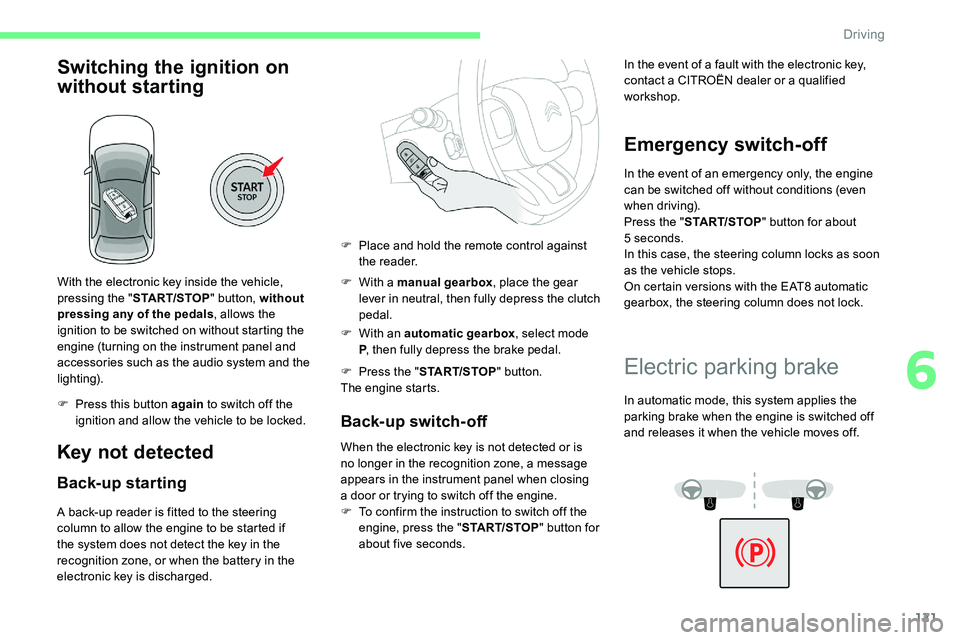
With the electronic key inside the vehicle,
pressing the "START/STOP " button, without
pressing any of the pedals , allows the
ignition to be switched on without starting the
engine (turning on the instrument panel and
accessories such as the audio system and the
lighting).
F
P
ress this button again to switch off the
ignition and allow the vehicle to be locked.
Key not detected
Back-up starting
A back-up reader is fitted to the steering
column to allow the engine to be started if
the system does not detect the key in the
recognition zone, or when the battery in the
electronic key is discharged. F
W
ith a manual gearbox
, place the gear
lever in neutral, then fully depress the clutch
pedal.
F
W
ith an automatic gearbox
, select mode
P , then fully depress the brake pedal.
F
P
ress the "
START/STOP " button.
The engine starts.
Back-up switch-off
When the electronic key is not detected or is
no longer in the recognition zone, a message
appears in the instrument panel when closing
a
door or trying to switch off the engine.
F
T
o confirm the instruction to switch off the
engine, press the " START/STOP" button for
about five seconds.
Emergency switch-off
In the event of an emergency only, the engine
can be switched off without conditions (even
when driving).
Press the " START/STOP " button for about
5
seconds.
In this case, the steering column locks as soon
as the vehicle stops.
On certain versions with the EAT8
automatic
gearbox, the steering column does not lock.
F
P
lace and hold the remote control against
the reader. In the event of a
fault with the electronic key,
contact a CITROËN dealer or a qualified
workshop.
Electric parking brake
In automatic mode, this system applies the
parking brake when the engine is switched off
and releases it when the vehicle moves off.
6
Driving
Page 129 of 292

127
With the engine running and the brakes
released, if R, D or M is selected, the
vehicle moves off, even without pressing
the accelerator pedal.
Never press the accelerator and brake
pedals at the same time – risk of damage
to the gearbox!
In the event of a
battery failure, you
must place the chocks supplied with the
vehicle tools against one of the wheels to
immobilise the vehicle.
Unlocking the gearbox
- From mode P :
F f ully depress the brake pedal,
F
press the Unlock button,
F
w
hile continuing to press the brake pedal
and the Unlock button, select another
mode.
-
F
rom neutral N , at a
speed below 3 mph
(5
km/h):
F
f
ully depress the brake pedal,
F
w
hile continuing to press the brake pedal,
select another mode.
Engaging reverse gear
F Slow down until you come to a stop.
F W ith your foot on the brake pedal, press the
Unlock button.
F
W
hile maintaining the presses, select
mode R .
Manual mode
Switching to the mode:
F
w ith mode D selected in advance,
F
p
ress button M ; the green indicator lamp in
the button comes on.
Exiting the mode:
F
p
ush for wards once to return to D .
or
F
p
ress button M ; the indicator lamp in the
button goes off.
Switching off the ignition
To switch off the ignition, the vehicle must be
stationary.
Changing to free-wheeling
To put the vehicle in free-wheeling mode, with
the engine switched off:
F
w
ith the vehicle stationary and the engine
running, select N ,
F
s
witch off the engine,
F
w
ithin 5 seconds, switch the ignition on
again,
F
w
ith your foot on the brake pedal, push the
selector for ward or back once to confirm N
and manually release the electric parking
brake,
F
s
witch off the ignition.
After this time limit, the gearbox engages mode
P ; it is then necessary to restart the procedure. If you open the driver's door while mode N
is engaged, an audible signal will sound. It
will stop when you close the driver's door
again.
Special aspects of automatic
mode
The gearbox selects the gear that offers
optimum per formance, taking account of the
exterior temperature, the profile of the road, the
load on the vehicle and the style of driving.
For maximum acceleration without touching the
selector, push the accelerator to the floor (kick-
down). The gearbox shifts down automatically
or holds the gear selected until the maximum
engine speed is reached.
The steering mounted controls allow the driver
to temporarily select a
gear, if the road and
engine speed permit.
Special aspects of manual mode
The change from one gear to another takes
place only if the road speed and engine speed
permit.
6
Driving
Page 130 of 292

128
Moving off
From mode P:
F F ully depress the brake pedal.
F
S
tart the engine.
F
M
aintaining pressure on the brake pedal,
press the Unlock button.
F
P
ush once or twice rear ward to select the
automatic mode D , or for ward to engage
reverse R .
From neutral N :
F
F
ully depress the brake pedal.
F
S
tart the engine.
F
M
aintaining pressure on the brake pedal,
push rear ward to select the automatic mode
D , or while pressing the Unlock button push
forward to engage reverse R .
Then, from D or R :
F
R
elease the brake pedal.
F
A
ccelerate progressively to automatically
release the electric parking brake.
The vehicle moves off immediately.
In severe wintry conditions (temperature
below -23°C), it is recommended that the
engine be allowed to run for a
few minutes
before moving off, to ensure the correct
operation and durability of the engine and
gearbox. If your vehicle has an automatic gearbox,
never try to start the engine by pushing
the vehicle.
Stopping the vehicle
Whatever the state of the gearbox when the
ignition is switched off, mode P is engaged
automatically and immediately.
However, in mode N
, mode P will be engaged
after a
duration of 5 seconds (allowing for the
process of putting the vehicle to free-wheeling).
Check that mode P has been engaged and
that the electric parking brake was applied
automatically; if not, apply it manually.
The corresponding indicator lamps
in the selector and the electric
parking brake control lever must
be on, as well as those in the
instrument panel.
Operating faults
Gearbox operating fault
This is signalled by the illumination of
this warning lamp, accompanied by the
display of a message and an audible
signal, when the ignition is switched on.
Go to a CITROËN dealer or a qualified
w orkshop.
Do not drive faster than 62
mph (100 km/h),
keeping to the speed limit.
The gearbox switches to back-up mode: mode
D is locked in third gear, the steering-mounted
control paddles are inoperative, mode M is no
longer available. You may feel a
pronounced
jolt when engaging reverse. This does not
present any risk for the gearbox.
Selector operating fault
Minor malfunction
You are alerted by this warning lamp
lighting up, accompanied by the display
of a
message and an audible signal.
Drive cautiously and go to a CITROËN dealer
o r a qualified workshop.
In certain cases, the selector lamps may not
come on, but the state of the gearbox is still
displayed in the instrument panel.
Major malfunction
You are alerted by the illumination of
this warning lamp.
Driving
Page 131 of 292

129
Stop as soon as it is safe to do so, away
from the traffic, and call a CITROËN
dealer or a
qualified workshop.
When the ignition is switched off, the
gearbox goes into mode P automatically.
Driving mode
1. ECO.
Press this button to activate/deactivate
"ECO " mode (confirmed by the
illumination/extinction of the indicator
lamp).
2.
S P O R T.
Press this button to activate/deactivate
" SPORT " mode (confirmed by the
illumination/extinction of the indicator lamp).
When the message disappears, the selected
mode is activated.
Each mode is independent and they cannot
be activated simultaneously. Activation of
one mode deactivates the other.
" SPORT " mode (depending on version)
With the engine running, when SPORT mode is
activated, the gearbox delays changing up for
a
more dynamic driving style.
Activating SPORT mode is not recommended
in the following situations:
-
A
SR/DSC deactivated,
-
l
ow fuel level reached,
-
l
ow AdBlue level reached.
In mode D , pressing this button activates the
SPORT programme.
" S " appears in the instrument panel.
Pressing this button again deactivates the
function.
Pressing this button has no effect when
towing a
connected trailer.
" ECO " mode
This allows fuel consumption to be reduced.
With the EAT8
gearbox, "free-wheeling" mode
may activate to save fuel. Take your foot fully
off the accelerator pedal to anticipate slowing
down.
SPORT or ECO mode is automatically
deactivated when the ignition is switched
of f.Hill start assist
System which keeps your vehicle immobilised
temporarily (approximately 2 seconds) when
starting on a
gradient, the time it takes to
move your foot from the brake pedal to the
accelerator pedal.
It is only active when:
-
t
he vehicle is completely stationary, with
your foot on the brake pedal,
-
c
ertain slope conditions are met,
-
t
he driver's door is closed.Do not leave the vehicle while it is being
held in the hill start assist phase.
If you need to leave the vehicle with the
engine running, apply the parking brake
manually. Then check that the parking
brake warning lamp is on fixed on the
instrument panel.
The hill start assist function cannot be
deactivated. However, use of the parking
brake to immobilise the vehicle interrupts
its operation.
6
Driving
Page 133 of 292

131
Driving on flooded roads
Before entering into a flooded area, it is
strongly recommended that you deactivate
the Stop & Start system.
For more information on Driving
recommendations , particularly on
flooded roads, refer to the corresponding
section.
Deactivation/Reactivation
The function is activated by default when the
ignition is switched on.
To deactivate/reactivate the function: F
P
ress the button.
A message in the instrument panel confirms
the change of state.
When the function is deactivated, the orange
indicator lamp is lit; if the engine was in
standby, it restarts immediately.
Associated indicator lamps
Function activated.
Function deactivated or malfunction.
Operation
Opening the bonnet
Before doing anything under the bonnet,
deactivate the Stop & Start system to
avoid any risk of injury caused by the
engine restarting automatically.
Main conditions for operation
-
T
he driver's door must be closed.
-
T
he driver's seat belt must be fastened.
-
T
he state of charge of the battery must be
sufficient.
-
T
he temperature of the engine must be
within its nominal operating range.
-
T
he outside temperature must be between
0°C and 35°C.
Putting the engine into standby
(STOP mode)
The engine automatically goes into standby
as soon as the driver indicates the intention of
stopping.
-
W
ith a manual gearbox : at a
speed below
2
mph (3 km/h), with the gear lever in
neutral and the clutch pedal released.
-
W
ith an automatic gearbox :
•
W
ith the gear selector in mode D or M ,
at a
speed below 12 mph (20 km/h) for
BlueHDi 180
S&S versions, or below
2
mph (3 km/h) for PureTech 130/175 S&S
and BlueHDi 130
S&S versions, with the
brake pedal depressed.
•
W
ith the gear selector in mode N , at
a
speed of 0 mph (0 km/h).
•
W
ith the gear selector in mode P and
the brake pedal released, at a
speed of
0
mph (0 km/h).
Time counter
A time counter adds up the time spent in
standby during the journey. It is reset to zero
every time the ignition is switched on.
6
Driving
Page 137 of 292
135
Driving and manoeuvring aids cannot, in
any circumstances, replace the need for
vigilance on the part of the driver.
The driver must comply with the Highway
Code, must remain in control of the
vehicle in all circumstances and must be
able to retake control of it at all times. The
driver must adapt the speed to climactic
conditions, traffic and the state of the
road.
It is the driver's responsibility to constantly
check the traffic, to assess the relative
distances and speeds of other vehicles
and to anticipate their movements before
indicating and changing lane.
The systems cannot exceed the limits of
the laws of physics.
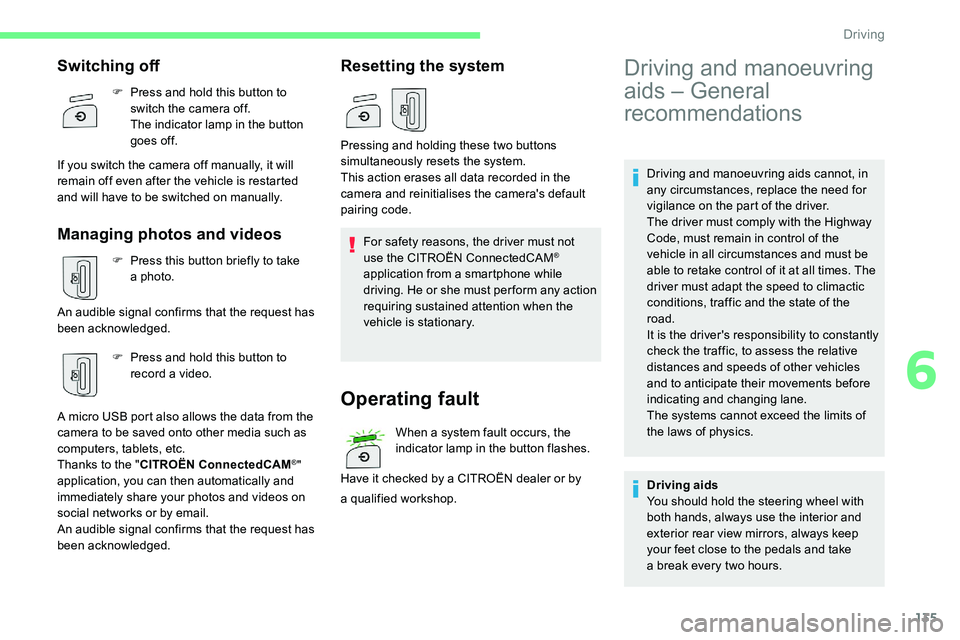
Switching off
F Press and hold this button to switch the camera off.
The indicator lamp in the button
goes off.
If you switch the camera off manually, it will
remain off even after the vehicle is restarted
and will have to be switched on manually.
Managing photos and videos
F Press this button briefly to take a photo.
An audible signal confirms that the request has
been acknowledged. F
P
ress and hold this button to
record a
video.
A micro USB port also allows the data from the
camera to be saved onto other media such as
computers, tablets, etc.
Thanks to the " CITROËN ConnectedCAM
®"
application, you can then automatically and
immediately share your photos and videos on
social networks or by email.
An audible signal confirms that the request has
been acknowledged.
Resetting the system
For safety reasons, the driver must not
use the CITROËN ConnectedCAM®
application from a
smartphone while
driving. He or she must per form any action
requiring sustained attention when the
vehicle is stationary.
Operating fault
When a system fault occurs, the
in dicator lamp in the button flashes.
Have it checked by a
CITROËN dealer or by
Pressing and holding these two buttons
simultaneously resets the system.
This action erases all data recorded in the
camera and reinitialises the camera's default
pairing code.
a
qualified workshop.
Driving and manoeuvring
aids – General
recommendations
Driving aids
You should hold the steering wheel with
both hands, always use the interior and
exterior rear view mirrors, always keep
your feet close to the pedals and take
a
break every two hours.
6
Driving