steering Citroen C5 RHD 2012 (RD/TD) / 2.G Service Manual
[x] Cancel search | Manufacturer: CITROEN, Model Year: 2012, Model line: C5 RHD, Model: Citroen C5 RHD 2012 (RD/TD) / 2.GPages: 340, PDF Size: 39.41 MB
Page 277 of 340
02
LISTMENU
1
2
4
3
5
6
7
8
9
10
11
275
STEERING MOUNTED CONTROLS
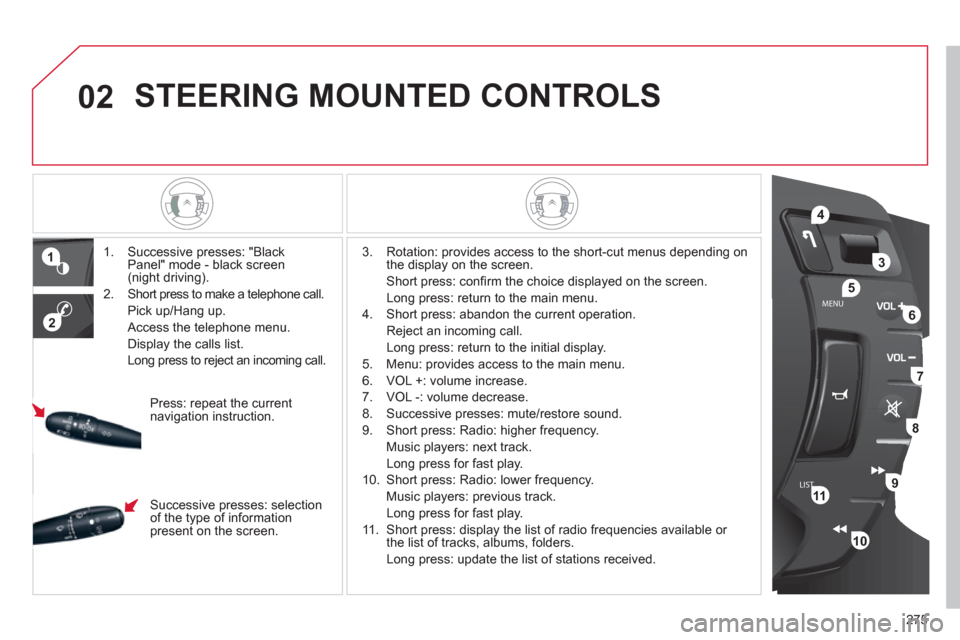
1. Successive presses: "Black
Panel" mode - black screen
(night driving).
2. Short press to make a telephone call.
Pick up/Hang up.
Access the telephone menu.
Display the calls list.
Long press to reject an incoming call.
3. Rotation: provides access to the short-cut menus depending on
the display on the screen.
Short press: confi rm the choice displayed on the screen.
Long press: return to the main menu.
4. Short press: abandon the current operation.
Reject an incoming call.
Long press: return to the initial display.
5. Menu: provides access to the main menu.
6. VOL +: volume increase.
7. VOL -: volume decrease.
8. Successive presses: mute/restore sound.
9. Short press: Radio: higher frequency.
Music players: next track.
Long press for fast play.
10. Short press: Radio: lower frequency.
Music players: previous track.
Long press for fast play.
11. Short press: display the list of radio frequencies available or
the list of tracks, albums, folders.
Long press: update the list of stations received.
Press: repeat the current
navigation instruction.
Successive presses: selection
of the type of information
present on the screen.
Page 296 of 340
08
1
3 2
2 1
294
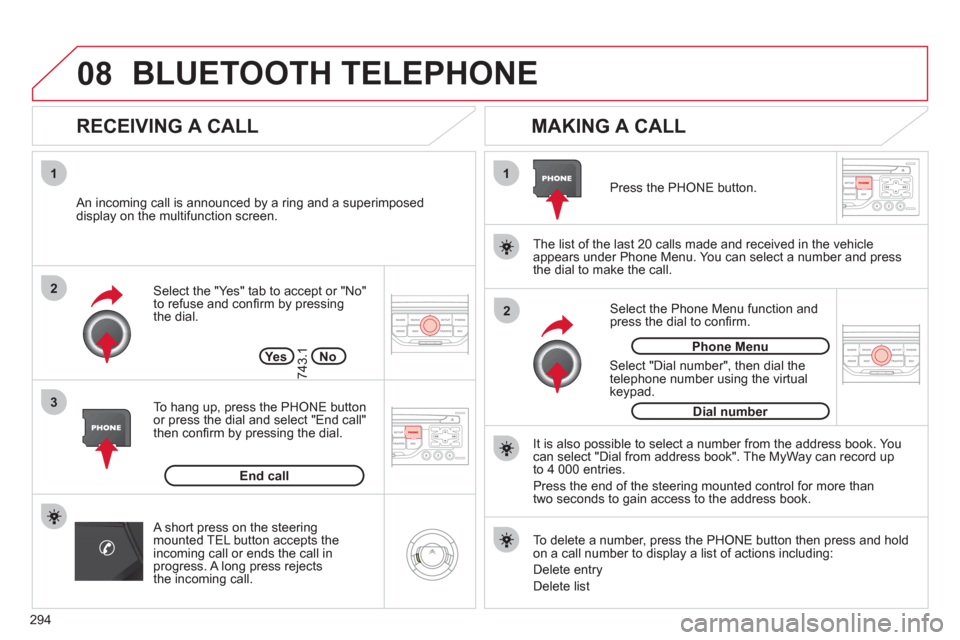
Select the "Yes" tab to accept or "No"
to refuse and confi rm by pressing
the dial.
RECEIVING A CALL
MAKING A CALL
An incoming call is announced by a ring and a superimposed
display on the multifunction screen.
Ye s
To hang up, press the PHONE button
or press the dial and select "End call"
then confi rm by pressing the dial.
End call
Press the PHONE button.
Select "Dial number", then dial the
telephone number using the virtual
keypad.
Select the Phone Menu function and
press the dial to confi rm.
The list of the last 20 calls made and received in the vehicle
appears under Phone Menu. You can select a number and press
the dial to make the call.
No
743.1
It is also possible to select a number from the address book. You
can select "Dial from address book". The MyWay can record up
to 4 000 entries.
Press the end of the steering mounted control for more than
two seconds to gain access to the address book.
Phone Menu
Dial number
To delete a number, press the PHONE button then press and hold
on a call number to display a list of actions including:
Delete entry
Delete list
BLUETOOTH TELEPHONE
A short press on the steering
mounted TEL button accepts the
incoming call or ends the call in
progress. A long press rejects
the incoming call.
Page 307 of 340

305
AUDIO SYSTEM
Your Audio system is coded in such a way that it will
only operate in your vehicle. If it is to be installed in
another vehicle, contact your CITROËN dealer for
confi guration of the system.
For safety reasons, the driver must carry out operations
which require prolonged attention while the vehicle is
stationary.
When the engine is switched off and to prevent
discharging of the battery, the audio equipment may
switch off after a few minutes.
AUDIO SYSTEM/BLUETOOTH
01 First steps
02 Steering mounted controls
03 Main menu
04 Audio
05 USB Box
06 Bluetooth functions
07 Configuration
08 Trip computer
09 Screen menu map
Frequently asked questions p.
p.
p.
p.
p.
p.
p.
p.
p.
p. 306
307
308
309
312
315
317
318
319
323
CONTENTS
Page 309 of 340

307
02
LISTMENU
1
2
4
3
5
6
7
8
9
9
10
STEERING MOUNTED CONTROLS
1. Activation/deactivation of the
Black Panel mode (night driving).
3. Access to the short-cut menus depending on the display
on the screen.
Confi rmation of the function selected from a menu.
Rotation:
Selection of the previous/next stored RADIO station.
Selection of the previous/next CD or MP3 directory.
4. Abandon the current operation.
Reject an incoming call.
Long press: return to the main display.
5. Access to the main menu.
6. Volume increase.
7. Volume decrease.
8. Mute.
9. RADIO: automatic search for a lower/higher frequency.
CD/MP3:
selection of the previous/next track.
continuous press: fast forward/rewind play.
10. RADIO: display the list of stations available.
Long press: update the list of radio stations.
CD/MP3:
display the list of CD and folder tracks.
2. Pick up an incoming call/end a call
which is in progress.
Open the telephone menu and
display the calls list.
Long press: reject an incoming
call.
Page 314 of 340

312
05
1
2
3
1
USB BOX
The system puts together playlists (temporary memory) created
over a period which depends on the capacity of the USB device.
The other sources are available during this time.
The playlists are updated each time the ignition is switched off or
each time a USB memory stick is connected.
When connecting for the fi rst time, the classifi cation suggested
is by folder. When you reconnect, the classifi cation selected
previously is retained.
Connect the memory stick to the port, directly or
using a lead. If the audio equipment is switched
on, the USB source is detected as soon as it
is connected. Play begins automatically after a
delay which depends on the capacity of the USB
memory stick.
The fi le formats recognised are .mp3 (mpeg1
layer 3 only), .wma (standard 9 only, 128 kbits/sec
compression), .wav and .ogg.
The playlists types accepted are m3u, .pls, .wpl.
This unit consists of a USB port and an auxiliary
Jack socket * . The audio fi les are transmitted
from portable equipment such as a digital player
or a USB memory stick to your Audio system to
be listened to via the vehicle's speakers.
USB memory stick (1.1, 1.2 and 2.0) or iPod
®
of
generation 5 or later:
- USB memory sticks should be formatted
FAT or FAT 32 (NTFS not supported),
- the iPod
®
lead is essential,
- navigation through the fi le database is by
means of the steering mounted controls,
- the iPod
®
software should be regularly
updated for the best connection.
Other iPod
®
players of earlier generations and
players using the MTP protocol * :
- play via Jack-Jack lead only (not supplied),
- navigation through the fi le database is from
the portable device.
The list of compatible equipment and the compression rates supported
are available from CITROËN dealers.
USING THE USB BOX
CONNECTING A USB MEMORY STICK
*
According to vehicle.
Page 318 of 340

316
06
1
2
1
2
1
2
3
RECEIVING A CALL
An incoming call is announced by a ring and a superimposed
display on the multifunction screen.
Initiate the pairing between the telephone and
the vehicle. This pairing can be initiated from
the vehicle's telephone function menu or via the
telephone's keypad. See steps 1 to 10 on the
previous pages. During the pairing phase, the vehicle
must be stationary with the key in the ignition.
Select the telephone to be connected from the telephone function menu.
The audio system connects to a newly paired telephone automatically.
Select the YES tab on the display
using the buttons and confi rm by
pressing OK.
Press the steering mounted control OK to accept
the call.
From the Bluetooth telephone function Audio menu, select Manage
the telephone call then Call, Call list or Directory.
Press the end of the steering mounted control for
more than two seconds to gain access to your
directory.
Or
To dial a number, use your telephone's keypad,
with the vehicle stationary.
MAKING A CALL
BLUETOOTH AUDIO STREAMING
Wireless transmission of the telephone's music fi les via the audio
equipment. The telephone must be able to manage the appropriate
bluetooth profi les (Profi les A2DP/AVRCP).
*
In certain cases, playing of the Audio fi les must be initiated from
the keypad.
**
If the telephone supports the function.
Activate the streaming source by
pressing the SOURCE button * . The
tracks to be played can be controlled
as usual via the buttons on the
Radio control panel and the steering
mounted controls ** . The contextual
information can be displayed on
the screen.
BLUETOOTH FUNCTIONS
Page 330 of 340
328
VISUAL SEARCH
INSTRUMENTS AND CONTROLS
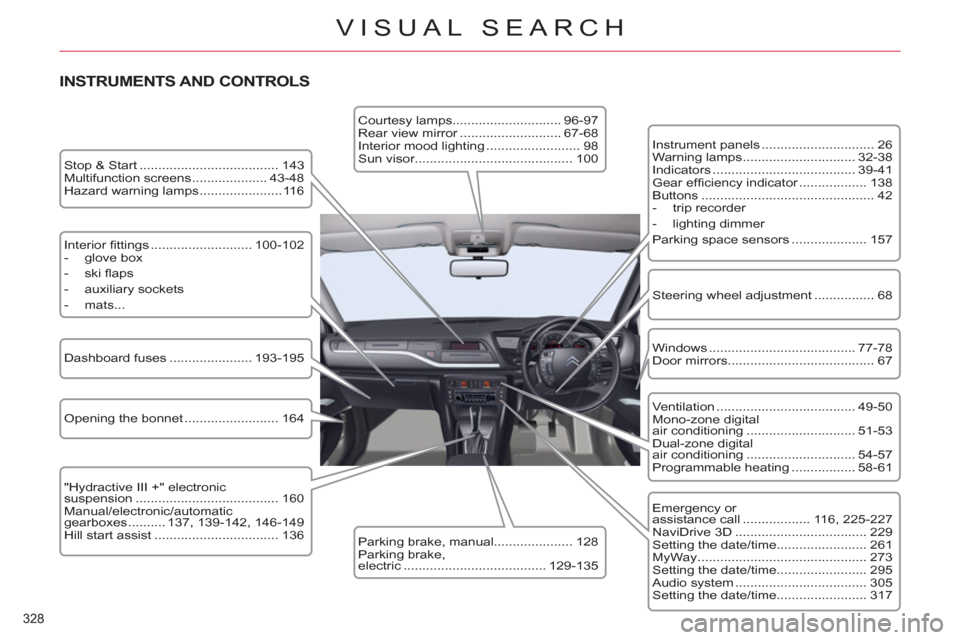
Instrument panels .............................. 26
Warning lamps .............................. 32-38
Indicators ...................................... 39-41
Gear effi ciency indicator .................. 138
Buttons .............................................. 42
- trip recorder
- lighting dimmer
Parking space sensors .................... 157
Windows ....................................... 77-78
Door mirrors ....................................... 67
Opening the bonnet ......................... 164 Dashboard fuses ...................... 193-195
" Hydractive III +" electronic
suspension ...................................... 160
Manual/electronic/automatic
gearboxes .......... 137, 139-142, 146-149
Hill start assist ................................. 136
Courtesy lamps............................. 96-97
Rear view mirror ........................... 67-68
Interior mood lighting ......................... 98
Sun visor.......................................... 100
Parking brake, manual..................... 128
Parking brake,
electric ...................................... 129-135 Stop & Start ..................................... 143
Multifunction screens .................... 43-48
Hazard warning lamps ......................116
Ventilation ..................................... 49-50
Mono-zone digital
air conditioning ............................. 51-53
Dual-zone digital
air conditioning ............................. 54-57
Programmable heating ................. 58-61
Emergency or
assistance call .................. 116, 225-227
NaviDrive 3D ................................... 229
Setting the date/time........................ 261
MyWay ............................................. 273
Setting the date/time........................ 295
Audio system ................................... 305
Setting the date/time........................ 317
Steering wheel adjustment ................ 68 Interior fi ttings ........................... 100-102
- glove box
- ski fl aps
- auxiliary sockets
- mats...
Page 331 of 340
329
VISUAL SEARCH
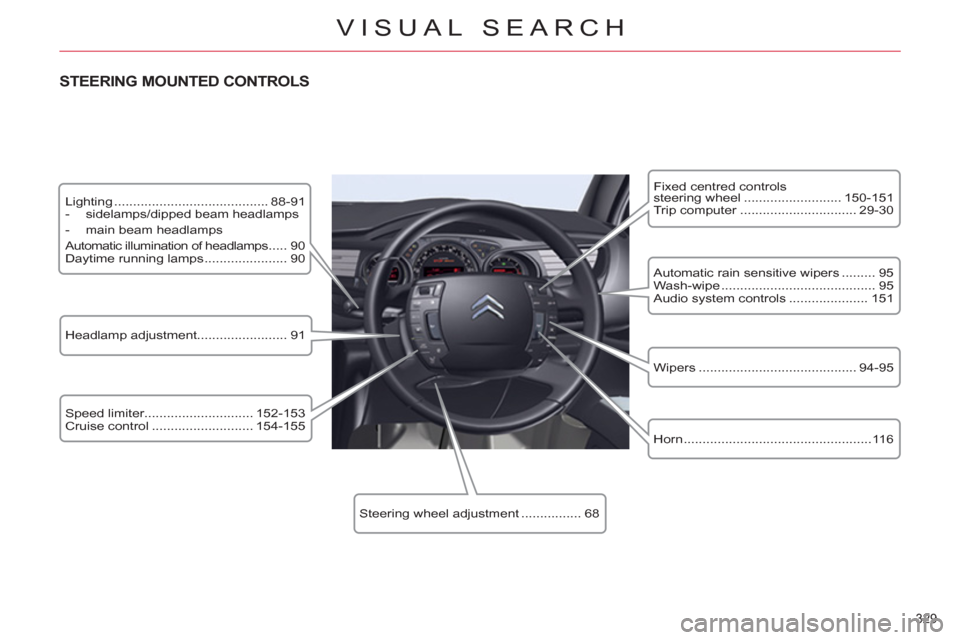
Lighting ......................................... 88-91
- sidelamps/dipped beam headlamps
- main beam headlamps
Automatic illumination of headlamps ..... 90
Daytime running lamps ...................... 90
STEERING MOUNTED CONTROLS
Speed limiter............................. 152-153
Cruise control ........................... 154-155 Automatic rain sensitive wipers ......... 95
Wash-wipe ......................................... 95
Audio system controls ..................... 151
Fixed centred controls
steering wheel .......................... 150-151
Trip computer ............................... 29-30
Headlamp adjustment........................ 91
Steering wheel adjustment ................ 68
Wipers .......................................... 94-95
Horn ..................................................116
Page 332 of 340
330
VISUAL SEARCH
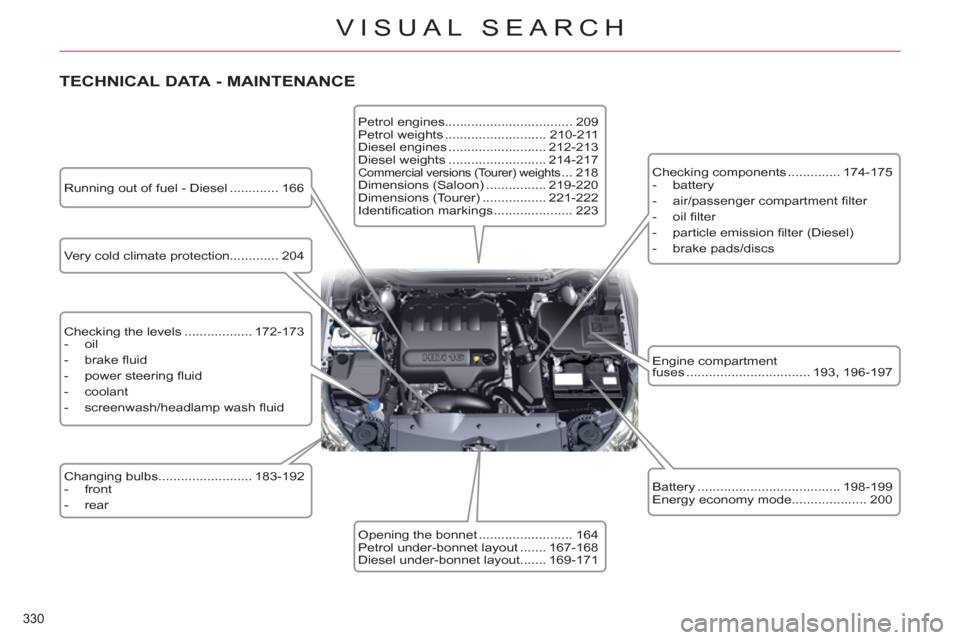
TECHNICAL DATA - MAINTENANCE
Very cold climate protection............. 204
Checking the levels .................. 172-173
- oil
- brake fl uid
- power steering fl uid
- coolant
- screenwash/headlamp wash fl uid
Changing bulbs......................... 183-192
- front
- rear Petrol engines.................................. 209
Petrol weights ........................... 210-211
Diesel engines .......................... 212-213
Diesel weights .......................... 214-217
Commercial versions (Tourer) weights ... 218
Dimensions (Saloon) ................ 219-220
Dimensions (Tourer) ................. 221-222
Identifi cation markings ..................... 223 Checking components .............. 174-175
- battery
- air/passenger compartment fi lter
- oil fi lter
- particle emission fi lter (Diesel)
- brake pads/discs
Engine compartment
fuses ................................. 193, 196-197
Battery ...................................... 198-199
Energy economy mode.................... 200
Opening the bonnet ......................... 164
Petrol under-bonnet layout ....... 167-168
Diesel under-bonnet layout....... 169-171 Running out of fuel - Diesel ............. 166
Page 333 of 340
331
ALPHABETICAL INDEX
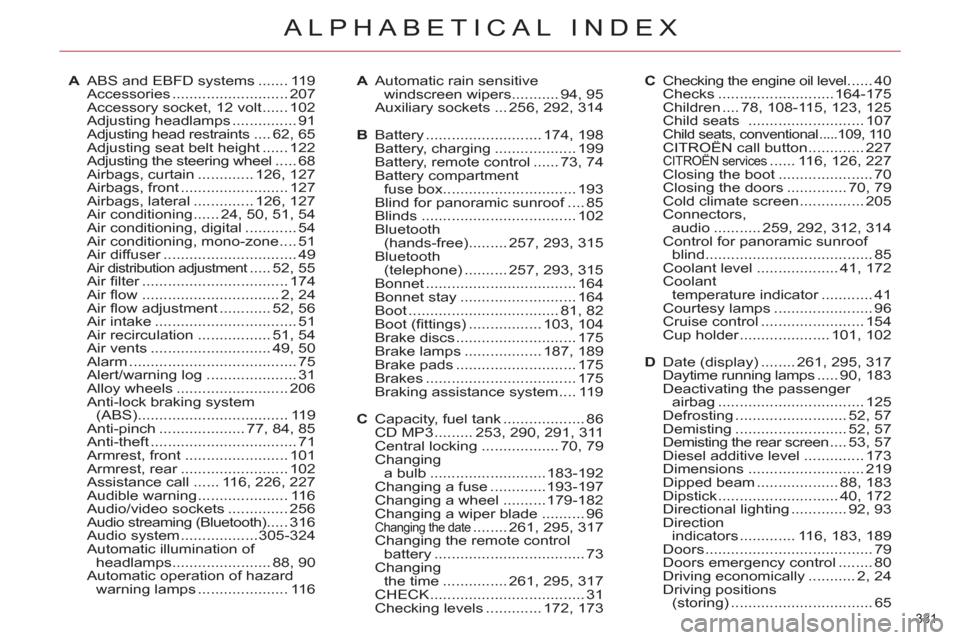
A ABS and EBFD systems ....... 119
Accessories ........................... 207
Accessory socket, 12 volt ...... 102
Adjusting headlamps ............... 91
Adjusting head restraints .... 62, 65
Adjusting seat belt height ...... 122
Adjusting the steering wheel ..... 68
Airbags, curtain ............. 126, 127
Airbags, front ......................... 127
Airbags, lateral .............. 126, 127
Air conditioning ...... 24, 50, 51, 54
Air conditioning, digital ............ 54
Air conditioning, mono-zone .... 51
Air diffuser ............................... 49
Air distribution adjustment ..... 52, 55
Air fi lter .................................. 174
Air fl ow ................................ 2, 24
Air fl ow adjustment ............ 52, 56
Air intake ................................. 51
Air recirculation ................. 51, 54
Air vents ............................ 49, 50
Alarm ....................................... 75
Alert/warning log ..................... 31
Alloy wheels .......................... 206
Anti-lock braking system
(ABS) ................................... 119
Anti-pinch .................... 77, 84, 85
Anti-theft .................................. 71
Armrest, front ........................ 101
Armrest, rear ......................... 102
Assistance call ...... 116, 226, 227
Audible warning ..................... 116
Audio/video sockets .............. 256
Audio streaming (Bluetooth) ..... 316
Audio system .................. 305-324
Automatic illumination of
headlamps ....................... 88, 90
Automatic operation of hazard
warning lamps ..................... 116A Automatic rain sensitive
windscreen wipers ........... 94, 95
Auxiliary sockets ... 256, 292, 314
B Battery ........................... 174, 198
Battery, charging ................... 199
Battery, remote control ...... 73, 74
Battery compartment
fuse box ............................... 193
Blind for panoramic sunroof .... 85
Blinds .................................... 102
Bluetooth
(hands-free) ......... 257, 293, 315
Bluetooth
(telephone) .......... 257, 293, 315
Bonnet ................................... 164
Bonnet stay ........................... 164
Boot ................................... 81, 82
Boot (fi ttings) ................. 103, 104
Brake discs ............................ 175
Brake lamps .................. 187, 189
Brake pads ............................ 175
Brakes ................................... 175
Braking assistance system .... 119
C Capacity, fuel tank ................... 86
CD MP3 ......... 253, 290, 291, 311
Central locking .................. 70, 79
Changing
a bulb ........................... 183-192
Changing a fuse ............. 193-197
Changing a wheel .......... 179-182
Changing a wiper blade .......... 96
Changing the date ........ 261, 295, 317
Changing the remote control
battery ................................... 73
Changing
the time ............... 261, 295, 317
CHECK .................................... 31
Checking levels ............. 172, 173C Checking the engine oil level ...... 40
Checks ........................... 164-175
Children .... 78, 108-115, 123, 125
Child seats ........................... 107
Child seats, conventional .....109, 110 CITROËN call button ............. 227
CITROËN services ...... 116, 126, 227
Closing the boot ...................... 70
Closing the doors .............. 70, 79
Cold climate screen ............... 205
Connectors,
audio ........... 259, 292, 312, 314
Control for panoramic sunroof
blind ....................................... 85
Coolant level ................... 41, 172
Coolant
temperature indicator ............ 41
Courtesy lamps ....................... 96
Cruise control ........................ 154
Cup holder ..................... 101, 102
D Date (display) ........ 261, 295, 317
Daytime running lamps ..... 90, 183
Deactivating the passenger
airbag .................................. 125
Defrosting .......................... 52, 57
Demisting .......................... 52, 57
Demisting the rear screen .... 53, 57
Diesel additive level .............. 173
Dimensions ........................... 219
Dipped beam ................... 88, 183
Dipstick ............................ 40, 172
Directional lighting ............. 92, 93
Direction
indicators ............. 116, 183, 189
Doors ....................................... 79
Doors emergency control ........ 80
Driving economically ........... 2, 24
Driving positions
(storing) ................................. 65