air conditioning Citroen C6 2007 1.G User Guide
[x] Cancel search | Manufacturer: CITROEN, Model Year: 2007, Model line: C6, Model: Citroen C6 2007 1.GPages: 216, PDF Size: 7.57 MB
Page 88 of 216

90
III
5
6
7
A U T O M A T I C A I R C O N D I T I O N I N G
5. FRONT DEMISTING - DEICING
Press button 5 for rapid clear windows. The warning lamp comes on. This system controls the air condi-tioning, the air fl ow and the entry of air from outside. It sends the ventilation towards the windscreen and side windows.
A press on the 1 button returns you to “AUTO” mode.
6. REAR DEMISTING - DEICING
Press button 6, with the engine running, to start a rapid deicing or demisting of the rear screen and rear view mirrors. The warning lamp comes on.
This mode stops automatically as a function of the out-side temperature. It can be paused by pressing again on button 6 or by stopping the engine.
In the latter case, demisting will resume when the engine is switched on again.Note: The heated rear screen operates independently of the automatic air conditioning.
7. AIR RECIRCULATION – ENTRY OF AIR FROM OUTSIDE
Press successively on button 7 to select air entry mode. The corresponding warning lamp lights up:Recirculation of air inside the cabinThis mode is for excluding unpleasant odours or smoke coming from outside. It should be cancelled as soon as possible to re-allow fresh air into the cabin and thus prevent misting.
Entry of air from outside“AUTO” mode is deactivated.
Note: To return to “AUTOTo return to “To return to “” mode, press button 7 for 7a third time, or button 1.
Page 89 of 216

91
III
A U T O M A T I C A I R C O N D I T I O N I N G
To activate/deactivate the air conditioning system
Press on the control “CLIM” to go into the “air condition-ing” mode. Then press button “OK” or on the control to bring up the “Air Conditioning menu” on the multifunc-tion screen.
This menu allows you:To deactivate the air conditioning: “Cut aircon (A/C OFF)”.Press button “OK”, or on the control, to validate the offer to activate or deactivate the air conditioning.
The symbol “A/C OFF” displays on the multifunction screen in the case of deactivation.
Note:Your temperature adjustment value may not be ourreached and you risk having the windows misted up.You can cancel deactivation of the air conditioning, ouby pressing the control 1 “AUTO “ “”.
Page 90 of 216

92
III
A
B
C
D
AUTOMATIC OPERATION
Activation
When you press button A, the automatic mode automatically and simultaneously controls the air fl ow and air distribution for the rear air conditioning.
The warning lamp on button Alights up.
It is recommended to keep both air vents open.
Deactivation
A press on any of the buttons B, C or D, deactivates the automatic operation of the rear air condition-ing.
The warning lamp on button Agoes out.
Remark: If the air conditioning in the front of the cabin is stopped (function deactivated in the “Air conditioning” menu or via the con-trol 4 for adjusting the air fl ow), then the rear automatic air condi-tioning is not available.
ADJUSTING THE AIR FLOW
If you press buttons B or D you increase or decrease the fl ow for the rear air conditioning.
The number of diode(s) lit up, composing the symbol for air fl ow (helix, situated between buttons Band D) expresses its power level.
To deactivate the air fl ow and air distribution for the rear air condi-tioning, press successively on but-ton D so that all the diodes go out.
DISTRIBUTION TO FOOT-WELLS/HEADS
Successive presses on button Cwill modify the distribution of the air fl ow.
Three directions are available:Passengers' heads.
Passenger footwells.PassengerPassengers' heads and foot-wells.
The arrow lit up indicates the dis-tribution of air chosen manually. In “AUTO” mode, no arrow lights up.
ADJUSTMENT OF THE FLOW OF AIR INTO THE STORAGE UNDER THE FRONT CEN-TRAL ARMREST
If you choose a maximum fl ow of air in the rear by pressing Band distribution towards passen-gers' heads by pressing C, having closed the rear air vents, you will obtain a maximum fl ow of air into the storage beneath the armrest.
Page 140 of 216
143
V
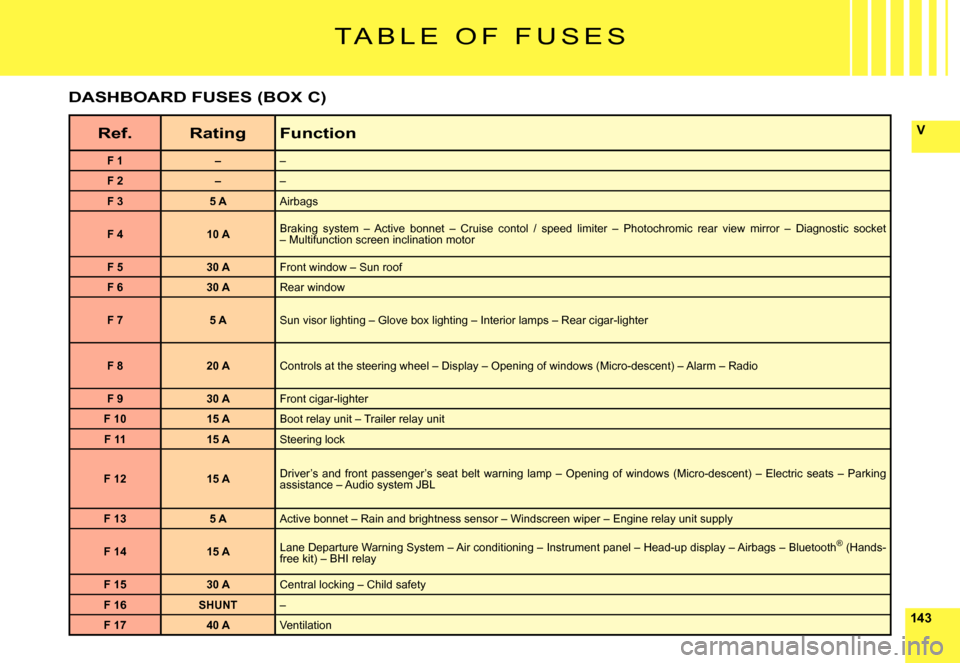
T A B L E O F F U S E S
Ref.RatingFunction
F 1––
F 2––
F 35 AAirbags
F 410 ABraking system – Active bonnet – Cruise contol / speed limiter – Photochromic rear view mirror – Diagnostic socket – Multifunction screen inclination motor
F 530 AFront window – Sun roof
F 630 ARear window
F 75 ASun visor lighting – Glove box lighting – Interior lamps – Rear cigar-lighter
F 820 AControls at the steering wheel – Display – Opening of windows (Micro-descent) – Alarm – Radio
F 930 AFront cigar-lighter
F 1015 ABoot relay unit – Trailer relay unit
F 1115 ASteering lock
F 1215 ADriver’s and front passenger’s seat belt warning lamp – Openi ng of windows (Micro-descent) – Electric seats – Parking assistance – Audio system JBL
F 135 AActive bonnet – Rain and brightness sensor – Windscreen wiper – Engine relay unit supply
F 1415 ALane Departure Warning System – Air conditioning – Instrument pa nel – Head-up display – Airbags – Bluetooth® (Hands-®free kit) – BHI relay
F 1530 ACentral locking – Child safety
F 16SHUNT–
F 1740 AVentilation
DASHBOARD FUSES (BOX C)
Page 168 of 216

88
L I S T A N D S T R U C T U R E O F V O I C E
C O M M A N D S
HOW TO ACCESS THE LIST OF VOICE COMMANDS ?
Press on the end of the lighting control stalk to sta rt voice recognition.
CD playerDetail page 33
CD player
RandomDetail page 36ListTrack number1-20Previous trackNext trackScanDetail page 36
FolderRepeatNextPreviousJukeboxDetail page 38
Jukebox
RandomDetail page 36ListTrack number1-20Previous trackNext trackScanDetail page 36
FolderRepeatNextPreviousCD changerDetail page 42
CD changer
Disc number1- 6Detail page 42Previous discNext discRandomDetail page 36ListTrack number1-20Detail page 42Previous trackDetail page 42Next trackDetail page 42RepeatScanDetail page 36
Display
AudioDetail page 35NavigatorDetail page 12Trip computerAir conditioning TelephoneDetail page 45
Telephone
Voice mailDetail page 45Redial
Adress book“Pre-recorded label”Detail page 45
Call“Pre-recorded label”Detail page 47
MessageDisplayDetail page 48ReadDetail page 48
Navigator
StopDetail page 12
Adress book“Pre-recorded label”Detail page 13
Restar tDetail page 12
ShowDestinationDetail page 21VehicleDetail page 21Zoom outDetail page 22Zoom inDetail page 22Guide to“Pre-recorded label”
Traf fi c InfoDisplayDetail page 21ReadDetail page 21RadioDetail page 28
Radio
AutostoreDetail page 29ListDetail page 29Memor y1- 6Detail page 28PreviousDetail page 28NextDetail page 28
At any time, you can voice “Help” or “What can I say” t o display the list of voice commands that are available.
Page 169 of 216
99
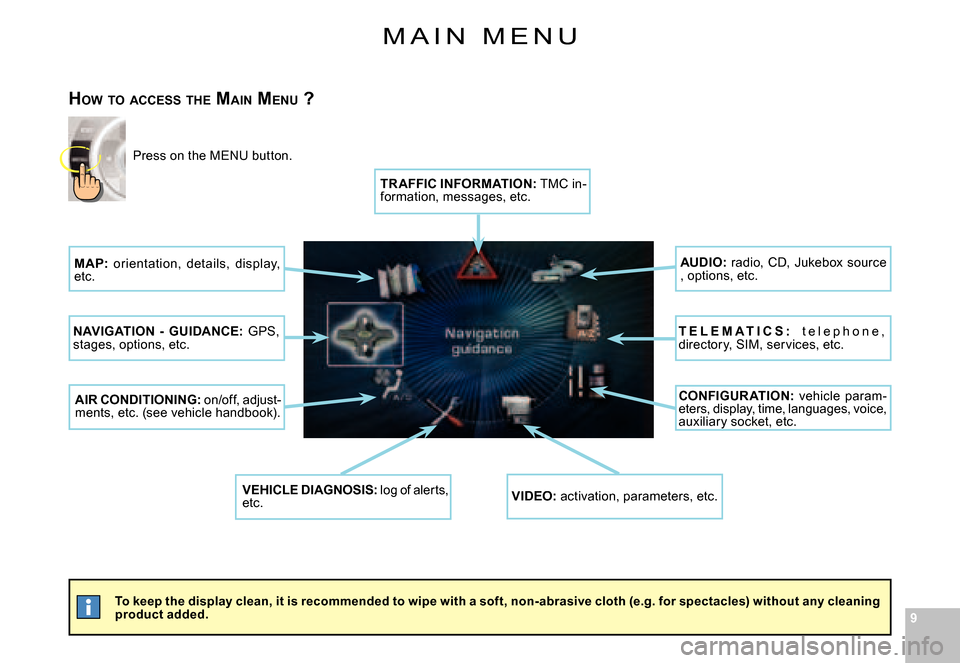
M A I N M E N U
To keep the display clean, it is recommended to wipe with a soft, non-abrasive cloth (e.g. for spectacles) without any cleaning product added.
HOW TO ACCESS THE MAIN MENU ?
Press on the MENU button.
MAP: orientation, details, display, etc.
NAVIGATION - GUIDANCE: GPS, stages, options, etc.
AIR CONDITIONING: on/off, adjust-ments, etc. (see vehicle handbook).
VEHICLE DIAGNOSIS: log of alerts, etc.VIDEO: activation, parameters, etc.
CONFIGUR ATION: vehicle param-eters, display, time, languages, voice, auxiliary socket, etc.
T E L E M A T I C S : t e l e p h o n e , directory, SIM, services, etc.
AUDIO: radio, CD, Jukebox source , options, etc.
TR AFFIC INFORMATION: TMC in-formation, messages, etc.