audio Citroen C6 2007 1.G User Guide
[x] Cancel search | Manufacturer: CITROEN, Model Year: 2007, Model line: C6, Model: Citroen C6 2007 1.GPages: 216, PDF Size: 7.57 MB
Page 121 of 216

123
IV
MP3 CDS
The MP3 format (MPEG 1,2 & 2,5 Audio Layer 3) is an audio com-pression standard that permits recording of 10 times as many musical fi les on one CD.
Your radio only plays back fi les which have the extension “.mp3”. Other types of fi les (.wav, .mpg4, .ogg, midi...) cannot be played back.
When you insert an MP3 CD, the radio searches all the musical tracks. Playback may require some tens of seconds before starting.
Playback of the MP3 CD is opti-mised if the level of the cover is limited to 2.
Burning format
Some cut CDs cannot be read by your equipment (quality, speed of recording, etc.).
When you burn a CD-R or CD-RW, select the burning standard ISO 9660 level 1,2 or Joliet. Playback of other formats may not occur cor-rectly.
Use the Joliet standard to burn multi-session CDs.
On a given CD, always use the same burning standard.
To obtain the best possible acous-tic quality, select the lowest burn-ing speed.
It can handle transmission speeds of 8 to 320 kbits/s and playback of 22,05 to 44,1 kHz.
C D S O U R C E
MP3 CD PLAYER
Your Audio CD system may be MP3 compatible.
As you insert a CD recorded in MP3 format, playback starts of the fi rst song of the fi rst CD-cover.
You can select a particular track by using buttons N or K and CD-cov-ers using buttons J or M.
TO SELECT A TRACK
To display the list of CD-covers, press on button G.
Use buttons J or M to select the CD-cover you wish to listen to.
To open a CD-cover, press L.
Use buttons N or K to select the track you wish to listen to.
Validate with a press on L.
MENU
This menu is for activation/deacti-vation of three options:Playback of the fi rst 7 seconds (approx.) of each track of the CD.
Repetition of the current CD-cover.Random playback of CD-cover tracks by CD-cover.
This can be accessed in two ways:Either by pressing button EitherOand proceeding as for Scan-ning of RDS stations – the sub-menu for Audio Preferences.
Or, provided you are in CD source, by pressing onbutton L. You can then access the Audio menu.Note: The CD changer (if there is one) is not MP3 compatible.
Page 124 of 216

126
IV
MAIN MENU
Press on the Menu button O to access to Main menu, then select the “Telephone” icon using but-tons J ou M), then validate the selection via button L.
You have access:To the Directory.
To Confi guration.To Communication Manage-ment.
You access your choices via (Jou M), then you validate them with a press on L.
This main menu can also be accessed by pressing button Ethen button L.
FOLDER
This menu lets you open:The telephone Directory of the telephone that is connected.
The Calls List.
Telephone directory
The starting of a telephone call can be done independently of the telephone or of the audio system, thanks to the directory.
The directory is displayed. Select the number via J or M, then vali-date with a press on L.
Page 125 of 216

127
IV
B L U E T O O T H®
VOICE RECOGNITION
A short press on the end of the con-trol stalk 7 starts telephone voice recognition.
Voice recognition allows you to make a call to a number for which you have recorded a label on the mobile telephone that is twinned and connected.
Remark:
It is possible to stop the call, pro-vided the dialling has not yet com-menced, with a short press on the end of the lighting control stalk 7.
Remarks:While you are on a call, the audio source currently being listened to is paused.
Some ring tones on your mobile telephone may not be recog-nised by the Bluetooth®not be recog-not be recog- system ®
on your vehicle. A different ring tone will be chosen by the sys-tem.
Page 127 of 216

129
IV
F R E Q U E N T L Y - A S K E D Q U E S T I O N S
QUESTIONANSWERSOLUTION
There is a discrepancy in sound quality between the different audio sources (radio, CD, CD changer etc.).
To achieve an optimum listening quality, the audio adjustments (Volume, Bass, Treble, Ambiance, Loudness) can be ad apted to each of the dif ferent sound sources, which can produce audible shif ts when you change the source (radio, C D, CD changer etc.).
Check that the audio adjustments ( Volume, Bass, Treble, Ambiance, Loudness) are adapted to your pre-ferences for each of the sources being listened to.
The CD immediately ejects.The CD is the wrong way up, is unplayable, does not cont ain audio data or contains an audio format that the radio cannot play back.
Check that you have inserted the CD the right way up in the CD player.
Check the condition of the CD: the CD cannot be played back if it is too damaged.
Check the contents if it is a burnt CD: refer to the advice given in the chapter on Audio System.
For reasons of poor quality, some burnt CDs will not be played back by the audio system.
The CD changer does not play back DVDs.
The CD changer does not play back MP3 CDs.
The CD player sound is downgra-ded.The CD is scratched or of poor quality.Inser t only CDs of good qualit y and keep them in good condition.
The pre-set stations do not work (no sound, 87,5 Mhz is displayed, etc.).The waveband selected is not the correct one.Press on the button BND to retrieve the wave band (AM, FM1, FM2, FMAST) where the stations have been memorised.
The table below brings together the answers to the que stions that are the most frequently asked.
Page 128 of 216

130
IV
QUESTIONANSWERSOLUTION
Traf fi c Announcements (TA) is dis-played. I do not receive any traf fi c i n f o r m a t i o n o r p u b l i c a n n o u n c e -ments.
The particular radio station is not in the regional t raffi c infor-mation network.Change to a radio station that does broadcast traffi c information.
The rec eption qualit y of the radio station being listened to gradually deteriorates.
The vehicle is too distant from the transmitter, or no transmitter is present in the geographical area you are passing through.
Activate the RDS function to allow the system to check whether a more power ful transmitter is to be found in the geographical area.
The environment (hills, high buildings, tunnels, underground car parks, etc.) is blocking reception, even in RDS mode.This phenomenon is normal and does not imply anythi ng wrong with the radio.
The aerial is absent or has been damaged (for example a fter going through a car wash or in an underground car park).Have the aerial checked by a CITROËN dealer.
When the engine is not running, the radio stops after a few minutes.
When the engine is switched off, the working time for the radio depends on the battery charge. The interruption is normal.: the radio goes into economy mode, cutting off in order to save the vehicle’s battery.
You have to star t the engine so as to increase the battery charge.
The message “the audio system is ove-rheating” appears on the screen.
In order to protect the audio equipment in excessive ambient temperatures, the radio goes into an automatic thermi c pro-tection mode which results in a reduction in sound volume or stopping of the CD player.
Switch off the audio system for a few minutes in order to allow the system to cool down.
F R E Q U E N T L Y - A S K E D Q U E S T I O N S
Page 140 of 216
143
V
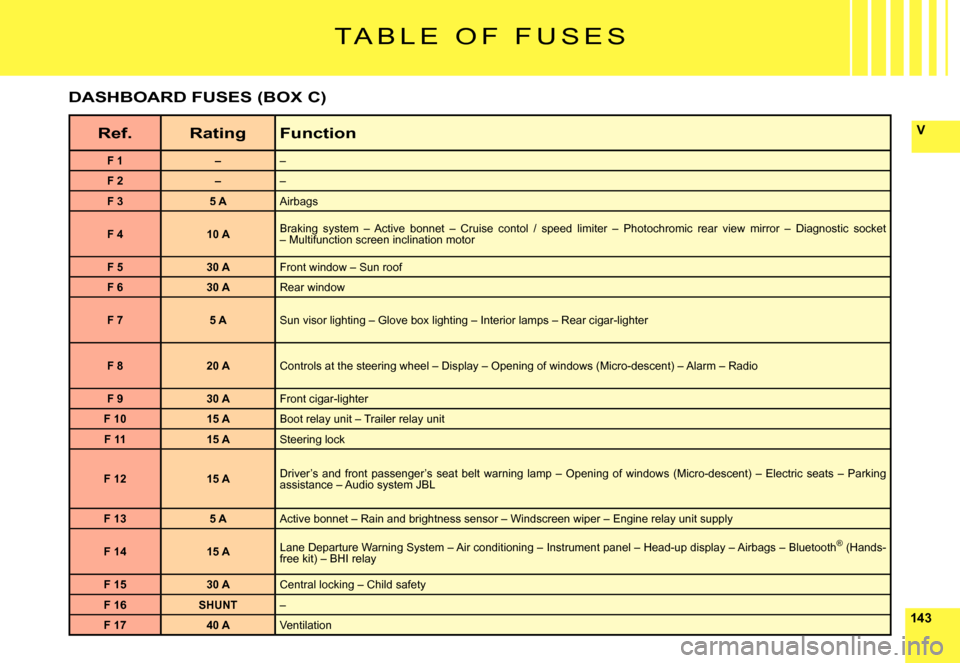
T A B L E O F F U S E S
Ref.RatingFunction
F 1––
F 2––
F 35 AAirbags
F 410 ABraking system – Active bonnet – Cruise contol / speed limiter – Photochromic rear view mirror – Diagnostic socket – Multifunction screen inclination motor
F 530 AFront window – Sun roof
F 630 ARear window
F 75 ASun visor lighting – Glove box lighting – Interior lamps – Rear cigar-lighter
F 820 AControls at the steering wheel – Display – Opening of windows (Micro-descent) – Alarm – Radio
F 930 AFront cigar-lighter
F 1015 ABoot relay unit – Trailer relay unit
F 1115 ASteering lock
F 1215 ADriver’s and front passenger’s seat belt warning lamp – Openi ng of windows (Micro-descent) – Electric seats – Parking assistance – Audio system JBL
F 135 AActive bonnet – Rain and brightness sensor – Windscreen wiper – Engine relay unit supply
F 1415 ALane Departure Warning System – Air conditioning – Instrument pa nel – Head-up display – Airbags – Bluetooth® (Hands-®free kit) – BHI relay
F 1530 ACentral locking – Child safety
F 16SHUNT–
F 1740 AVentilation
DASHBOARD FUSES (BOX C)
Page 163 of 216
33
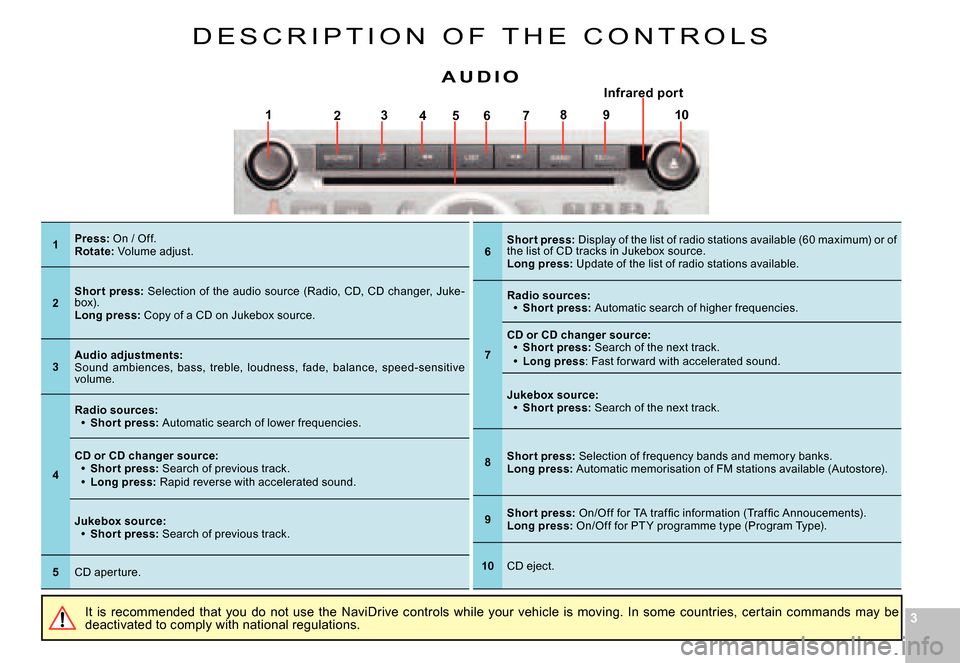
17564328910
D E S C R I P T I O N O F T H E C O N T R O L S
It is recommended that you do not use the NaviDrive controls while your vehicle is moving. In some countries, certain commands may be deactivated to comply with national regulations.
A U D I OInfrared por trared p
1Press: On / Off.Rotate: Volume adjust.
2Shor t press: Selection of the audio source (Radio, CD, CD changer, Juke-box).Long press: Copy of a CD on Jukebox source.
3Audio adjustments:Sound ambiences, bass, treble, loudness, fade, bala nce, speed-sensitive volume.
4
Radio sources:Shor t press: Automatic search of lower frequencies.
Page 168 of 216

88
L I S T A N D S T R U C T U R E O F V O I C E
C O M M A N D S
HOW TO ACCESS THE LIST OF VOICE COMMANDS ?
Press on the end of the lighting control stalk to sta rt voice recognition.
CD playerDetail page 33
CD player
RandomDetail page 36ListTrack number1-20Previous trackNext trackScanDetail page 36
FolderRepeatNextPreviousJukeboxDetail page 38
Jukebox
RandomDetail page 36ListTrack number1-20Previous trackNext trackScanDetail page 36
FolderRepeatNextPreviousCD changerDetail page 42
CD changer
Disc number1- 6Detail page 42Previous discNext discRandomDetail page 36ListTrack number1-20Detail page 42Previous trackDetail page 42Next trackDetail page 42RepeatScanDetail page 36
Display
AudioDetail page 35NavigatorDetail page 12Trip computerAir conditioning TelephoneDetail page 45
Telephone
Voice mailDetail page 45Redial
Adress book“Pre-recorded label”Detail page 45
Call“Pre-recorded label”Detail page 47
MessageDisplayDetail page 48ReadDetail page 48
Navigator
StopDetail page 12
Adress book“Pre-recorded label”Detail page 13
Restar tDetail page 12
ShowDestinationDetail page 21VehicleDetail page 21Zoom outDetail page 22Zoom inDetail page 22Guide to“Pre-recorded label”
Traf fi c InfoDisplayDetail page 21ReadDetail page 21RadioDetail page 28
Radio
AutostoreDetail page 29ListDetail page 29Memor y1- 6Detail page 28PreviousDetail page 28NextDetail page 28
At any time, you can voice “Help” or “What can I say” t o display the list of voice commands that are available.
Page 169 of 216
99
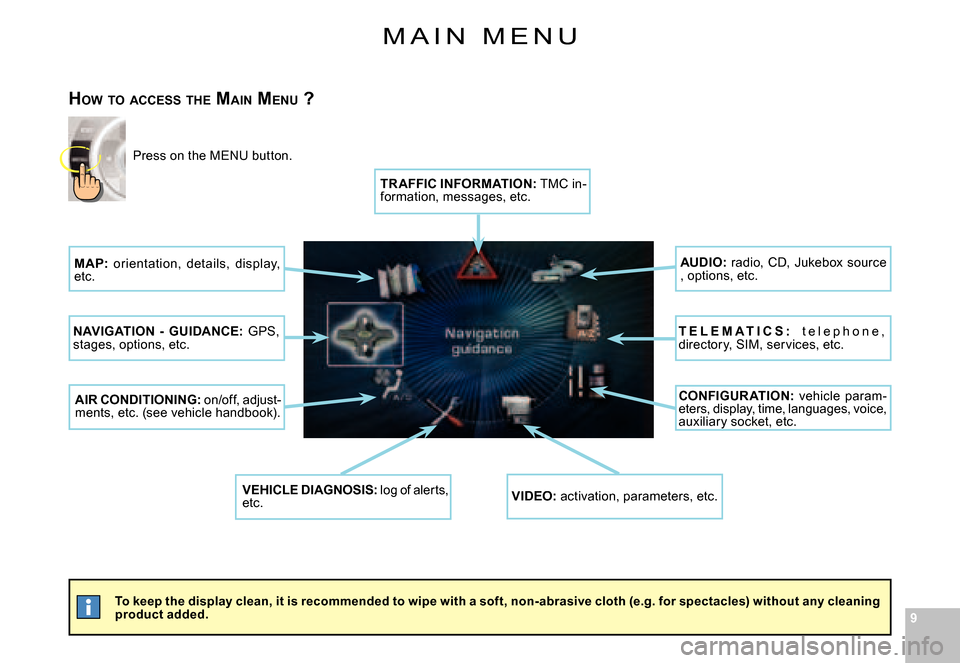
M A I N M E N U
To keep the display clean, it is recommended to wipe with a soft, non-abrasive cloth (e.g. for spectacles) without any cleaning product added.
HOW TO ACCESS THE MAIN MENU ?
Press on the MENU button.
MAP: orientation, details, display, etc.
NAVIGATION - GUIDANCE: GPS, stages, options, etc.
AIR CONDITIONING: on/off, adjust-ments, etc. (see vehicle handbook).
VEHICLE DIAGNOSIS: log of alerts, etc.VIDEO: activation, parameters, etc.
CONFIGUR ATION: vehicle param-eters, display, time, languages, voice, auxiliary socket, etc.
T E L E M A T I C S : t e l e p h o n e , directory, SIM, services, etc.
AUDIO: radio, CD, Jukebox source , options, etc.
TR AFFIC INFORMATION: TMC in-formation, messages, etc.
Page 186 of 216
262626
IV
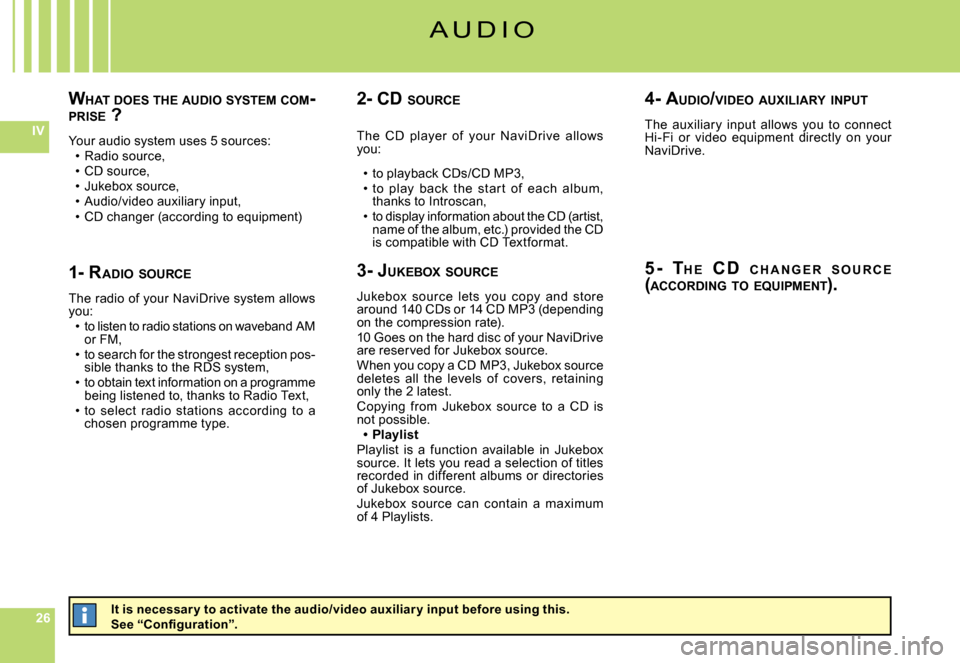
WHAT DOES THE AUDIO SYSTEM COM -PRISE ?
Your audio system uses 5 sources:Radio source,CD source,Jukebox source,Audio/video auxiliary input,CD changer (according to equipment)