light Citroen C6 2007 1.G Service Manual
[x] Cancel search | Manufacturer: CITROEN, Model Year: 2007, Model line: C6, Model: Citroen C6 2007 1.GPages: 216, PDF Size: 7.57 MB
Page 102 of 216
104
III221
2
2
I N T E R I O R L I G H T I N G
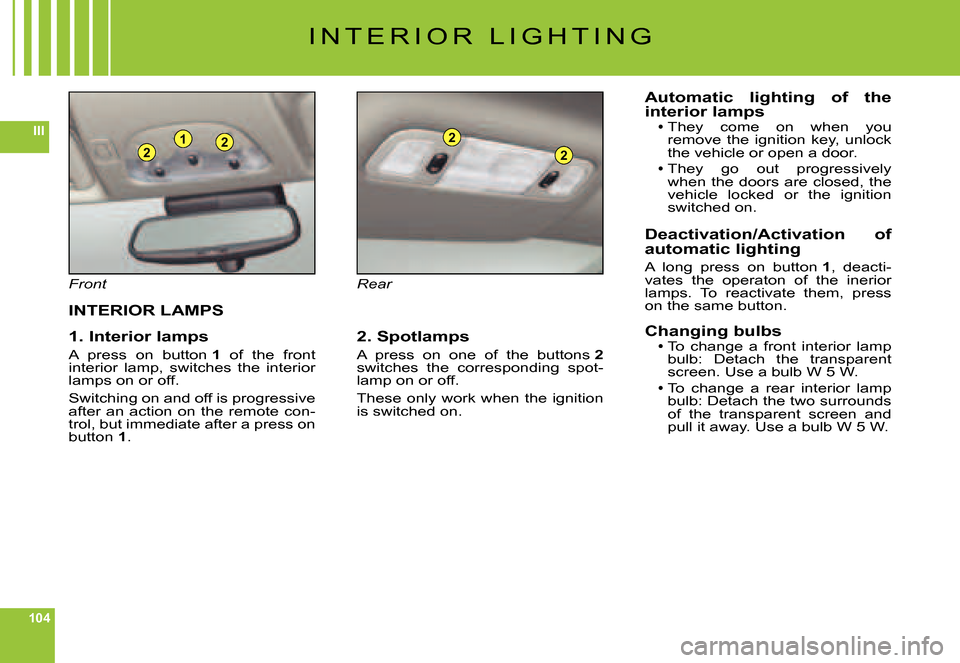
Front
INTERIOR LAMPS
1. Interior lamps
A press on button 1 of the front interior lamp, switches the interior lamps on or off.
Switching on and off is progressive after an action on the remote con-trol, but immediate after a press on button 1.
Rear
2. Spotlamps
A press on one of the buttons 2switches the corresponding spot-lamp on or off.
These only work when the ignition is switched on.
Automatic lighting of the interior lampsThey come on when you remove the ignition key, unlock the vehicle or open a door.
They go out progressively when the doors are closed, the vehicle locked or the ignition switched on.
Deactivation/Activation of automatic lighting
A long press on button 1, deacti-vates the operaton of the inerior lamps. To reactivate them, press on the same button.
Changing bulbsTo change a front interior lamp bulb: Detach the transparent screen. Use a bulb W 5 W.To change a rear interior lamp bulb: Detach the two surrounds of the transparent screen and pull it away. Use a bulb W 5 W.
Page 103 of 216
105
III
C
D
I N T E R I O R L I G H T I N G
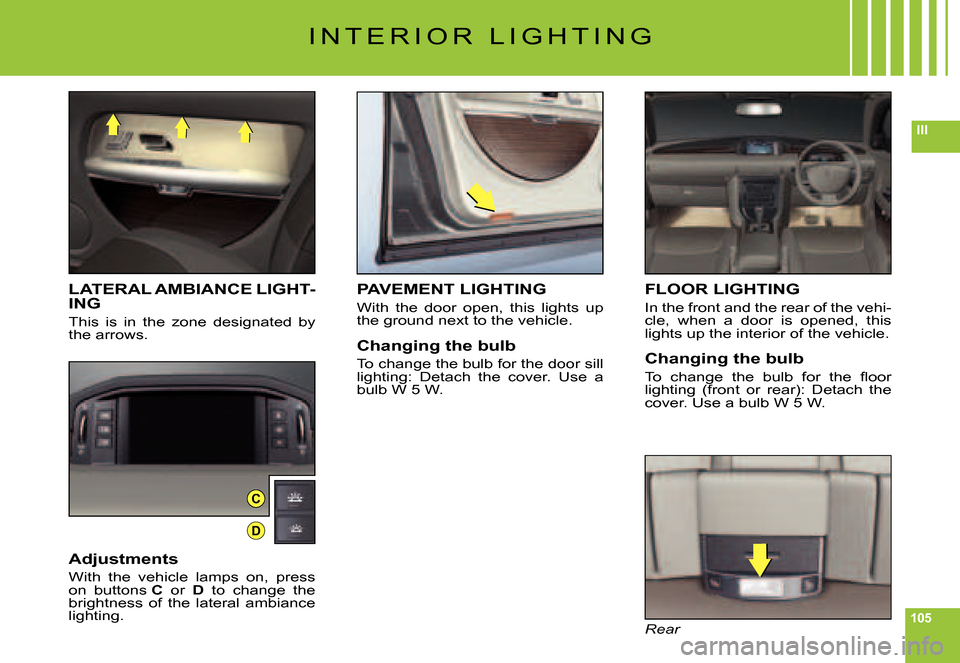
LATERAL AMBIANCE LIGHT-ING
This is in the zone designated by the arrows.
Adjustments
With the vehicle lamps on, press on buttons C or D to change the brightness of the lateral ambiance lighting.
FLOOR LIGHTING
In the front and the rear of the vehi-cle, when a door is opened, this lights up the interior of the vehicle.
Changing the bulb
To change the bulb for the fl oor lighting (front or rear): Detach the cover. Use a bulb W 5 W.
Rear
PAVEMENT LIGHTING
With the door open, this lights up the ground next to the vehicle.
Changing the bulb
To change the bulb for the door sill lighting: Detach the cover. Use a bulb W 5 W.
Page 106 of 216

108
III
I N T E R I O R C O M F O R T
CIGAR-LIGHTER
Front cigar-lighter
The front cigar-lighter is on the central console.
Rear cigar-lighter
The two rear cigar-lighters are on the central console below the air vents.
Operation
The cigar lighter operates when the ignition is on.
Push in and wait a few moments. The cigar lighter will release auto-matically: gradually emerging for easy removal.Note: The cigar lighter makes use of the 12 V accessory socket.
Driver's fl oor mat
If taking out the fl oor mat on the driver's side, slide the seat rear-wards as far as it will go and remove the fi xings.
When refi tting, position the fl oor mat correctly on the pins, then attach the fi xings. Check that it is securely retained.
To avoid your feet becoming jammed under the pedals:Use only a fl oor mat that is suited to the fi xings, already present in the vehicle.
The use of these fi xings is essential.
Never fi t more than one fl oor Nevermat superimposed.
Page 125 of 216

127
IV
B L U E T O O T H®
VOICE RECOGNITION
A short press on the end of the con-trol stalk 7 starts telephone voice recognition.
Voice recognition allows you to make a call to a number for which you have recorded a label on the mobile telephone that is twinned and connected.
Remark:
It is possible to stop the call, pro-vided the dialling has not yet com-menced, with a short press on the end of the lighting control stalk 7.
Remarks:While you are on a call, the audio source currently being listened to is paused.
Some ring tones on your mobile telephone may not be recog-nised by the Bluetooth®not be recog-not be recog- system ®
on your vehicle. A different ring tone will be chosen by the sys-tem.
Page 137 of 216

140
V
BC
A
1 2 V B A T T E R Y
STARTING THE ENGINE WITH AN ASSISTING BATTERY
If the battery is discharged, it is possible to use either a separate emergency battery or a battery on another vehicle.
If you use the battery on another vehicle, stop the engine on the latter. The two vehicles must not come into direct contact with each other.
Check that the assisting battery has suffi cient voltage (12 V).
Connect the cables according to the order indicated in orderthe diagram.
A Pole “+” on the vehicle being assisted (under the red cover).B Assisting battery.C Pole “–” on the assisted vehicle (under the bonnet).
Check that the leads are well secured (risk of sparks).
Start the engine of the assisting vehicle.Let the engine run for around 1 minute at a slightly accelerated idle.
Operate the starter on the vehicle being assisted.
It is essential to follow the indicated sequence cor-rectly.
Never approach with a fl ame or create sparks in the vicinity of the battery (explosive gas).
The battery contains dilute sulphuric acid which is hig hly corrosive.
When handling batteries, always protect your face and es pecially your eyes.
In the event of any contact with the skin, rinse immediatel y with copious amounts of fresh water.
ADVICE
Do not touch the leads during the operation.
Do not lean over the batteries.
Disconnect the cables in reverse order, making sure they do not touch together.
Page 140 of 216
143
V
T A B L E O F F U S E S
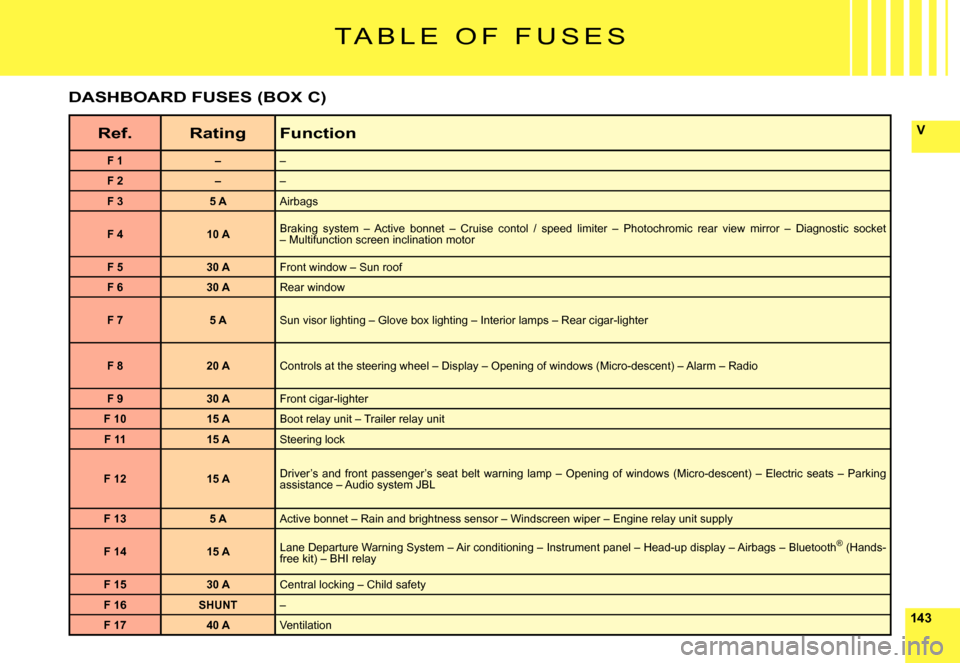
Ref.RatingFunction
F 1––
F 2––
F 35 AAirbags
F 410 ABraking system – Active bonnet – Cruise contol / speed limiter – Photochromic rear view mirror – Diagnostic socket – Multifunction screen inclination motor
F 530 AFront window – Sun roof
F 630 ARear window
F 75 ASun visor lighting – Glove box lighting – Interior lamps – Rear cigar-lighter
F 820 AControls at the steering wheel – Display – Opening of windows (Micro-descent) – Alarm – Radio
F 930 AFront cigar-lighter
F 1015 ABoot relay unit – Trailer relay unit
F 1115 ASteering lock
F 1215 ADriver’s and front passenger’s seat belt warning lamp – Openi ng of windows (Micro-descent) – Electric seats – Parking assistance – Audio system JBL
F 135 AActive bonnet – Rain and brightness sensor – Windscreen wiper – Engine relay unit supply
F 1415 ALane Departure Warning System – Air conditioning – Instrument pa nel – Head-up display – Airbags – Bluetooth® (Hands-®free kit) – BHI relay
F 1530 ACentral locking – Child safety
F 16SHUNT–
F 1740 AVentilation
DASHBOARD FUSES (BOX C)
Page 143 of 216
146
V
53 41 2
G36G37 G38 G39 G40
F U S E S I N T H E B O O T
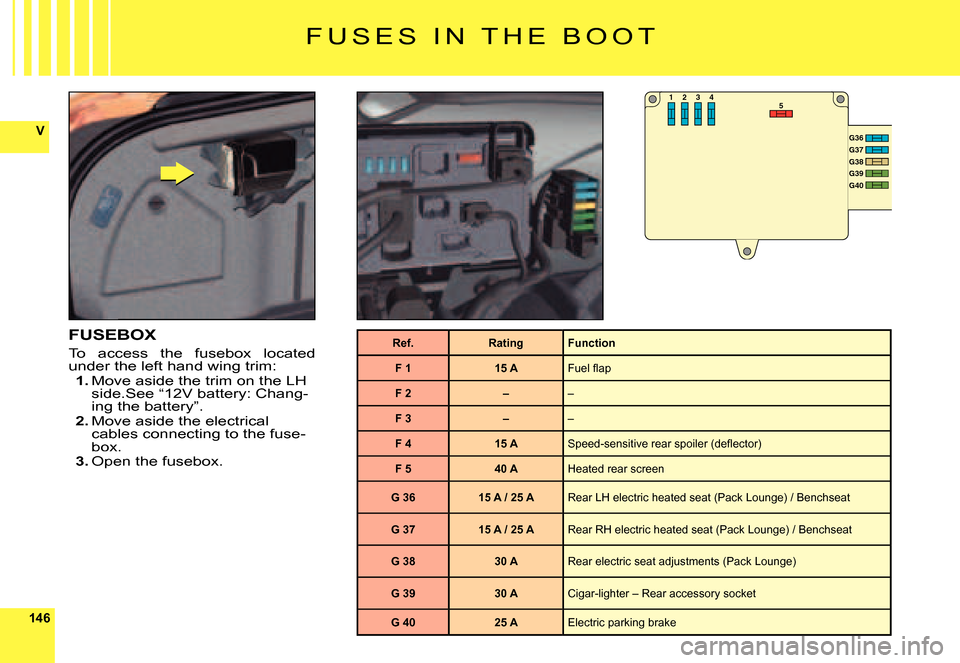
FUSEBOX
To access the fusebox located under the left hand wing trim:1. Move aside the trim on the LH side.See “12V battery: Chang-ing the battery”.2. Move aside the electrical cables connecting to the fuse-box.3. Open the fusebox.
Ref.RatingFunction
F 115 AFuel fl ap
F 2––
F 3––
F 415 ASpeed-sensitive rear spoiler (defl ector)
F 540 AHeated rear screen
G 3615 A / 25 ARear LH electric heated seat (Pack Lounge) / Benchseat
G 3715 A / 25 ARear RH electric heated seat (Pack Lounge) / Benchseat
G 3830 ARear electric seat adjustments (Pack Lounge)
G 3930 ACigar-lighter – Rear accessory socket
G 4025 AElectric parking brake
Page 146 of 216
149
VI
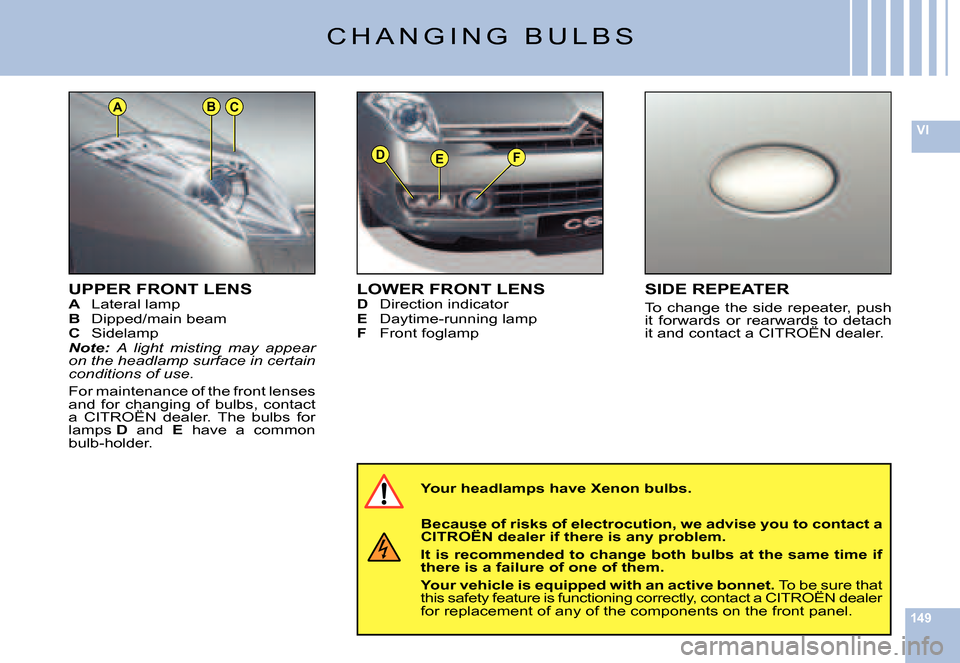
DEF
ACB
UPPER FRONT LENSA Lateral lampB Dipped/main beamC SidelampNote: A light misting may appear on the headlamp surface in certain conditions of use.
For maintenance of the front lenses and for changing of bulbs, contact a CITROËN dealer. The bulbs for and for changing of bulbs, contact for changing
lamps D and E have a common bulb-holder.
C H A N G I N G B U L B S
Your headlamps have Xenon bulbs.
Because of risks of electrocution, we advise you to contact a CITROËN dealer if there is any problem.Because of risks of electrocution, we advise Because
It is recommended to change both bulbs at the same time i f there is a failure of one of them.
Your vehicle is equipped with an active bonnet. To be sure that this safety feature is functioning correctly, contact a CITROËN dealer Your vehicle is equipped with an active bonnet.
for replacement of any of the components on the front panel.
LOWER FRONT LENSD Direction indicatorE Daytime-running lampF Front foglamp
SIDE REPEATER
To change the side repeater, push it forwards or rearwards to detach it and contact a CITROËN dealer.
Page 168 of 216

88
L I S T A N D S T R U C T U R E O F V O I C E
C O M M A N D S
HOW TO ACCESS THE LIST OF VOICE COMMANDS ?
Press on the end of the lighting control stalk to sta rt voice recognition.
CD playerDetail page 33
CD player
RandomDetail page 36ListTrack number1-20Previous trackNext trackScanDetail page 36
FolderRepeatNextPreviousJukeboxDetail page 38
Jukebox
RandomDetail page 36ListTrack number1-20Previous trackNext trackScanDetail page 36
FolderRepeatNextPreviousCD changerDetail page 42
CD changer
Disc number1- 6Detail page 42Previous discNext discRandomDetail page 36ListTrack number1-20Detail page 42Previous trackDetail page 42Next trackDetail page 42RepeatScanDetail page 36
Display
AudioDetail page 35NavigatorDetail page 12Trip computerAir conditioning TelephoneDetail page 45
Telephone
Voice mailDetail page 45Redial
Adress book“Pre-recorded label”Detail page 45
Call“Pre-recorded label”Detail page 47
MessageDisplayDetail page 48ReadDetail page 48
Navigator
StopDetail page 12
Adress book“Pre-recorded label”Detail page 13
Restar tDetail page 12
ShowDestinationDetail page 21VehicleDetail page 21Zoom outDetail page 22Zoom inDetail page 22Guide to“Pre-recorded label”
Traf fi c InfoDisplayDetail page 21ReadDetail page 21RadioDetail page 28
Radio
AutostoreDetail page 29ListDetail page 29Memor y1- 6Detail page 28PreviousDetail page 28NextDetail page 28
At any time, you can voice “Help” or “What can I say” t o display the list of voice commands that are available.
Page 171 of 216
111111
Ij
e
abc
fgh
d
i
N A V I G A T I O N / G U I D A N C E
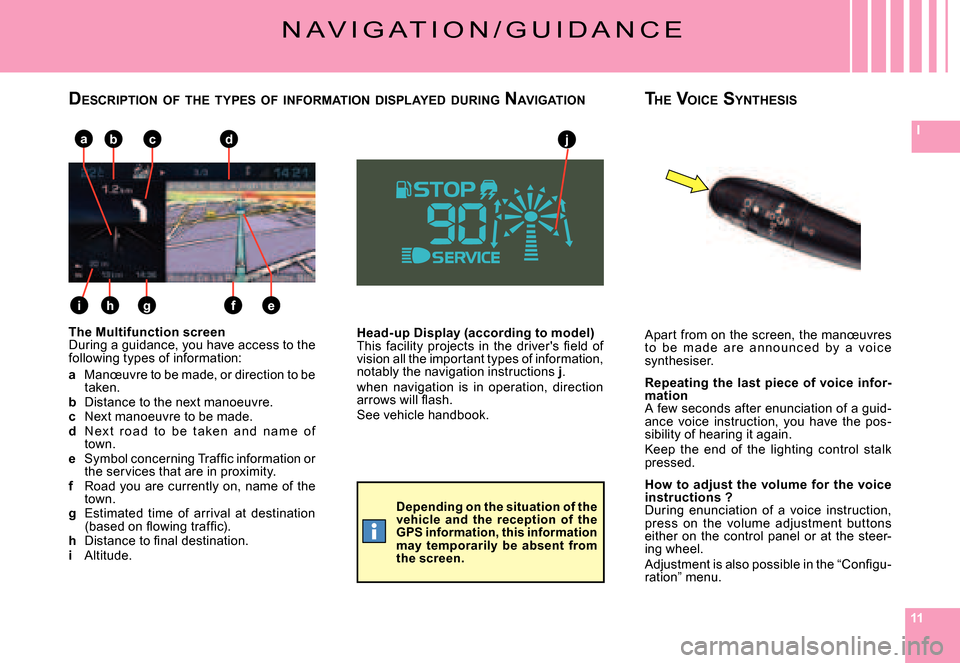
Head-up Display (according to model)This facility projects in the driver's fi eld of vision all the important types of information, notably the navigation instructions j.when navigation is in operation, direction arrows will fl ash.See vehicle handbook.
The Multifunction screenDuring a guidance, you have access to the following types of information:
a Manœuvre to be made, or direction to be taken.b Distance to the next manoeuvre.c Next manoeuvre to be made.d N ex t r o a d t o b e t a ke n a n d n a m e o f town.e Symbol concerning Traffi c information or the services that are in proximity.f Road you are currently on, name of the town.g Estimated time of arrival at destination (based on fl owing traffi c).h Distance to fi nal destination.i Altitude.
Apart from on the screen, the manœuvres t o b e m a d e a r e a n n o u n c e d by a vo i c e synthesiser.
Repeating the last piece of voice infor-mationA few seconds after enunciation of a guid-ance voice instruction, you have the pos-sibility of hearing it again.Keep the end of the lighting control stalk pressed.
How to adjust the volume for the voice instructions ?During enunciation of a voice instruction, press on the volume adjustment but tons either on the control panel or at the steer-ing wheel.Adjustment is also possible in the “Confi gu-ration” menu.
DESCRIPTION OF THE TYPES OF INFORMATION DISPLAYED DURING NAVIGATIONTHE VOICE SYNTHESIS
Depending on the situation of the vehicle and the reception of the GPS information, this information may temporarily be absent from the screen.