display Citroen C6 DAG 2007 1.G Owner's Guide
[x] Cancel search | Manufacturer: CITROEN, Model Year: 2007, Model line: C6 DAG, Model: Citroen C6 DAG 2007 1.GPages: 216, PDF Size: 7.61 MB
Page 53 of 216
56
II
CB
DG
FE
A
H E A D - U P D I S P L A Y
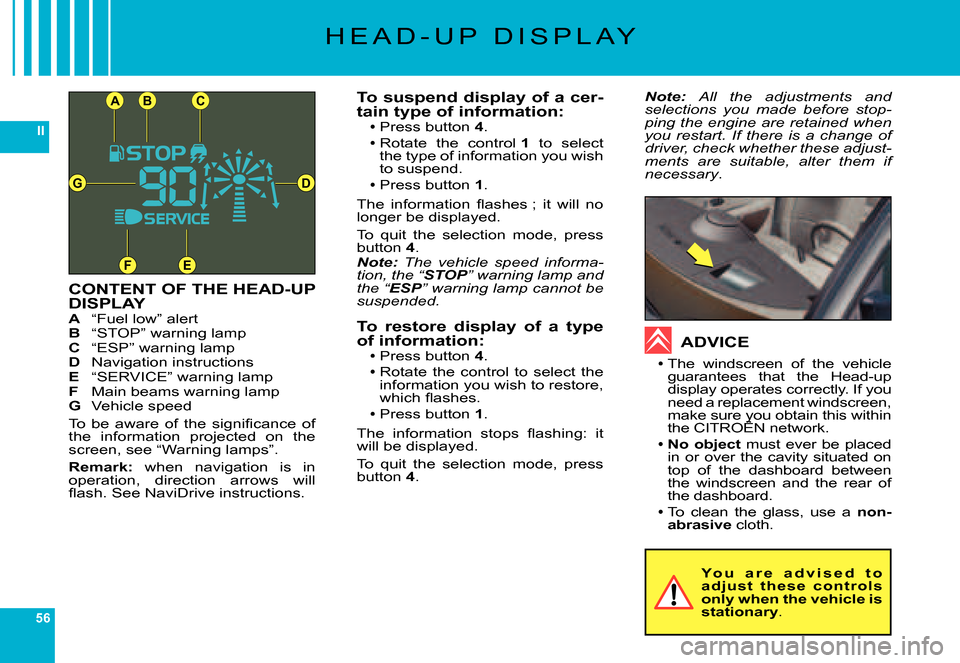
CONTENT OF THE HEAD-UP DISPLAYA “Fuel low” alertB “STOP” warning lampC “ESP” warning lampD Navigation instructionsE “SERVICE” warning lampF Main beams warning lampG Vehicle speed
To be aware of the signifi cance of the information projected on the screen, see “Warning lamps”.
Remark: when navigation is in operation, direction arrows will fl ash. See NaviDrive instructions.
To suspend display of a cer-tain type of information:Press button 4.
Rotate the control 1 to select the type of information you wish to suspend.Press button 1.
The information fl ashes ; it will no longer be displayed.
To quit the selection mode, press button 4.Note: The vehicle speed informa-tion, the “STOPthe “the “” warning lamp and the “ESPthe “the “” warning lamp cannot be suspended.
To restore display of a type of information:Press button 4.Rotate the control to select the information you wish to restore, which fl ashes.
Press button 1.
The information stops fl ashing: it will be displayed.
To quit the selection mode, press button 4.
Page 54 of 216
57
II
C
A
B
BB
B1432D
M U L T I F U N C T I O N D I S P L A Y S
C O L O U R S C R E E N C
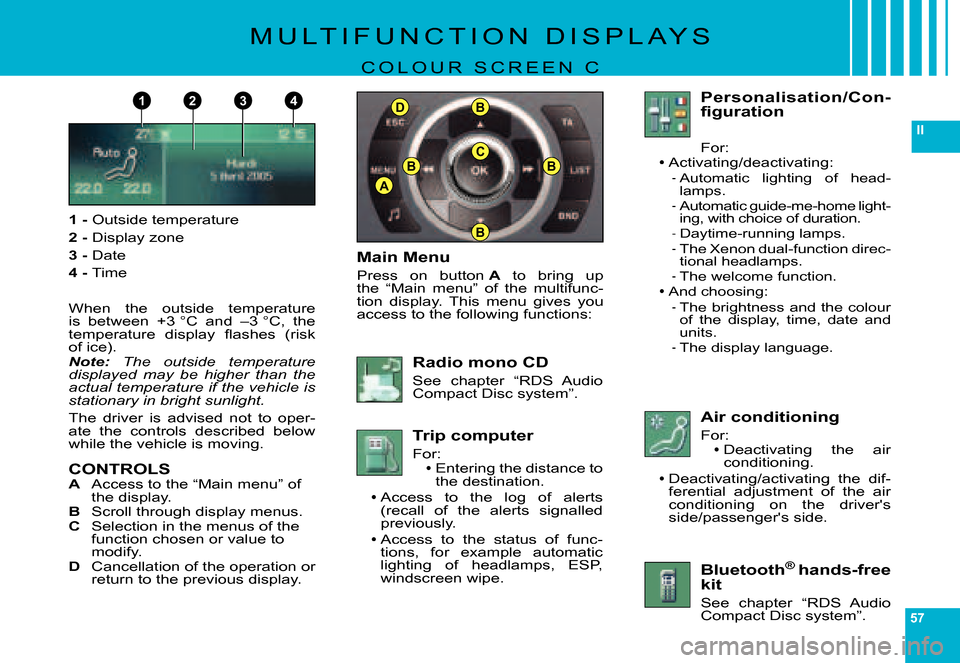
1 - Outside temperature
2 - Display zone
3 - Date
4 - Time
When the outside temperature is between +3 °C and –3 °C, the temperature display fl ashes (risk of ice).Note: The outside temperature displayed may be higher than the actual temperature if the vehicle is stationary in bright sunlight.
The driver is advised not to oper-ate the controls described below while the vehicle is moving.
CONTROLSA Access to the “Main menu” of the display.B Scroll through display menus.C Selection in the menus of the function chosen or value to modify.D Cancellation of the operation or return to the previous display.
Main Menu
Press on button A to bring up the “Main menu” of the multifunc-tion display. This menu gives you access to the following functions:
Radio mono CD
See chapter “RDS Audio Compact Disc system”.
Trip computer
For:Entering the distance to the destination.Access to the log of alerts (recall of the alerts signalled previously.
Access to the status of func-tions, for example automatic lighting of headlamps, ESP, windscreen wipe.
Page 55 of 216
58
II
C
A
B
BB
BD
M U L T I F U N C T I O N D I S P L A Y S
C O L O U R S C R E E N C
TRIP COMPUTER
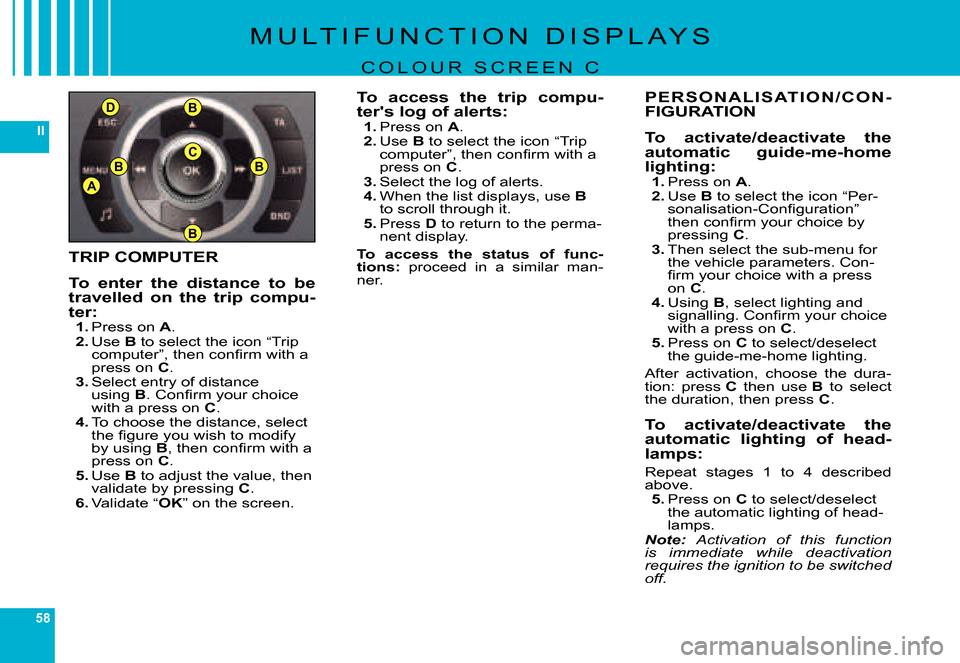
To enter the distance to be travelled on the trip compu-ter:1. Press on A.2. Use B to select the icon “Trip computer”, then confi rm with a press on C.3. Select entry of distance using B. Confi rm your choice with a press on C.4. To choose the distance, select the fi gure you wish to modify by using B, then confi rm with a press on C.5. Use B to adjust the value, then validate by pressing C.6. Validate “OK” on the screen.
To access the trip compu-ter's log of alerts:1. Press on A.2. Use B to select the icon “Trip computer”, then confi rm with a press on C.3. Select the log of alerts.4. When the list displays, use Bto scroll through it.5. Press D to return to the perma-nent display.
To access the status of func-tions: proceed in a similar man-ner.
P E R S O N A L I S AT I O N / C O N -FIGURATION
To activate/deactivate the automatic guide-me-home lighting:1. Press on A.2. Use B to select the icon “Per-sonalisation-Confi guration” then confi rm your choice by pressing C.3. Then select the sub-menu for the vehicle parameters. Con-fi rm your choice with a press on C.4. Using B, select lighting and signalling. Confi rm your choice with a press on C.5. Press on C to select/deselect the guide-me-home lighting.
After activation, choose the dura-tion: press C then use B to select the duration, then press C.
To activate/deactivate the automatic lighting of head-lamps:
Repeat stages 1 to 4 described above.5. Press on C to select/deselect the automatic lighting of head-lamps.Note: Activation of this function is immediate while deactivation requires the ignition to be switched off.
Page 56 of 216
59
II
M U L T I F U N C T I O N D I S P L A Y S
C O L O U R S C R E E N C
To activate/deactivate the daytime-running lamps:
Repeat stages 1 to 4 described above.5. Press on C to select/deselect daytime-running lamps.
If you activate the daytime-running lamps, they come on provided the signalling control stalk is in posi-tion 0 and the headlamps are off.
If the daytime-running lamps are active, the sidelamps will also be on (depending on country specifi -cation).
To activate/deactivate the Xenon dual-function direc-tional headlamps:
Repeat stages 1 to 3 described above.4. Press B to select the driv-ing assistance. Confi rm your choice with a press on C.5. Press on C to select/deselect the Xenon dual-function direc-tional headlamps.
To activer/deactivate the wel-come function
Repeat stages 1 to 3 described above.4. Press B to select the driv-ing assistance. Confi rm your choice with a press on C.5. Press on C to select/deselect welcome function.
To adjust the display brightness:1. Press on A.2. Use B to select the icon “Per-sonalisation-Confi guration” then confi rm your choice by pressing C.3. Select the display confi gura-tion with a press on B. Confi rm your choice with a press on C.4. Select the brightness adjust-ment. Confi rm your choice with a press on C.5. Select with a press on B, then validate by pressing C, the normal or alternative display mode.To adjust the brightness, select the symbols “+” or “–” and con-fi rm your adjustment by press-ing C.
6. Validate “OK” on the screen.
To choose the display colour:proceed in a similar manner.
To adjust the date and the time:1. Press on A.2. Use B to select the icon “Per-sonalisation-Confi guration” then confi rm your choice by pressing C.3. Select the display confi gura-tion with a press on B. Confi rm your choice with a press on C.4. Select the adustment for the date and the time, by press-ing B, then confi rm with a press on C.5. Press B to select the values you wish to modify. Confi rm your choice with a press on C.6. Do your adjustments with B, then validate each adjustment choice with a press on C.7. Validate “OK” on the screen.
Page 58 of 216
61
II
124
35
C
A
B
BB
BD
M U L T I F U N C T I O N D I S P L A Y S
N A V I D R I V E C O L O U R D I S P L A Y
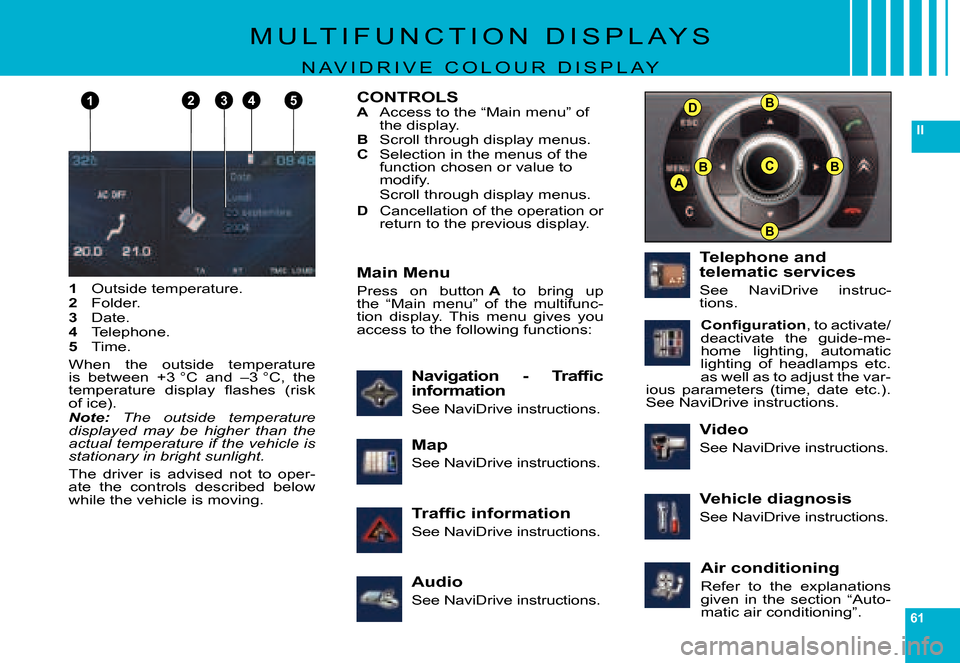
1 Outside temperature.2 Folder.3 Date.4 Telephone.5 Time.
When the outside temperature is between +3 °C and –3 °C, the temperature display fl ashes (risk of ice).Note: The outside temperature displayed may be higher than the actual temperature if the vehicle is stationary in bright sunlight.
The driver is advised not to oper-ate the controls described below while the vehicle is moving.
CONTROLSA Access to the “Main menu” of the display.B Scroll through display menus.C Selection in the menus of the function chosen or value to modify.Scroll through display menus.
D Cancellation of the operation or return to the previous display.
Air conditioning
Refer to the explanations given in the section “Auto-matic air conditioning”.
Traffi c information
See NaviDrive instructions.
Navigation - Traffi c information
See NaviDrive instructions.
Audio
See NaviDrive instructions.
Main Menu
Press on button A to bring up the “Main menu” of the multifunc-tion display. This menu gives you access to the following functions:
Telephone and telematic services
See NaviDrive instruc-tions.
Confi guration, to activate/deactivate the guide-me-home lighting, automatic lighting of headlamps etc. as well as to adjust the var-ious parameters (time, date etc.). See NaviDrive instructions.
Map
See NaviDrive instructions.
Video
See NaviDrive instructions.
Vehicle diagnosis
See NaviDrive instructions.
Page 59 of 216
62
II
T R I P C O M P U T E R
OPERATION
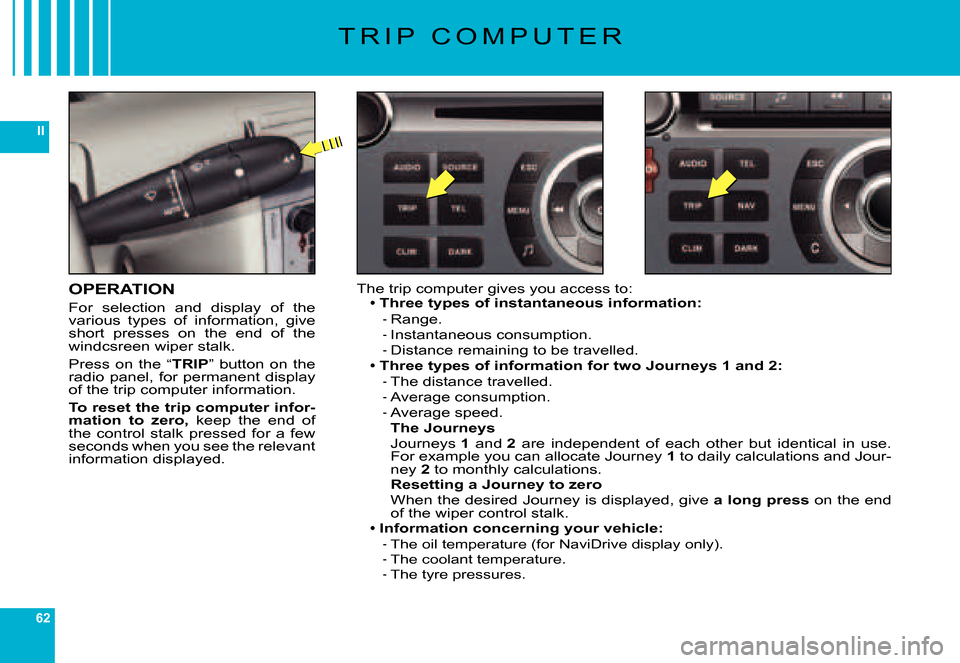
For selection and display of the various types of information, give short presses on the end of the windcsreen wiper stalk.
Press on the “TRIP” button on the radio panel, for permanent display of the trip computer information.
To reset the trip computer infor-mation to zero, keep the end of the control stalk pressed for a few seconds when you see the relevant information displayed.
The trip computer gives you access to:Three types of instantaneous information:
Range.Instantaneous consumption.Distance remaining to be travelled.Three types of information for two Journeys 1 and 2:The distance travelled.Average consumption.Average speed.The JourneysJourneys 1 and 2 are independent of each other but identical in use. For example you can allocate Journey 1 to daily calculations and Jour-ney 2 to monthly calculations.Resetting a Journey to zeroWhen the desired Journey is displayed, give a long press on the end of the wiper control stalk.Information concerning your vehicle:The oil temperature (for NaviDrive display only).The coolant temperature.The tyre pressures.
Page 60 of 216
63
II
T R I P C O M P U T E R
Colour screen CNaviDrive colour display
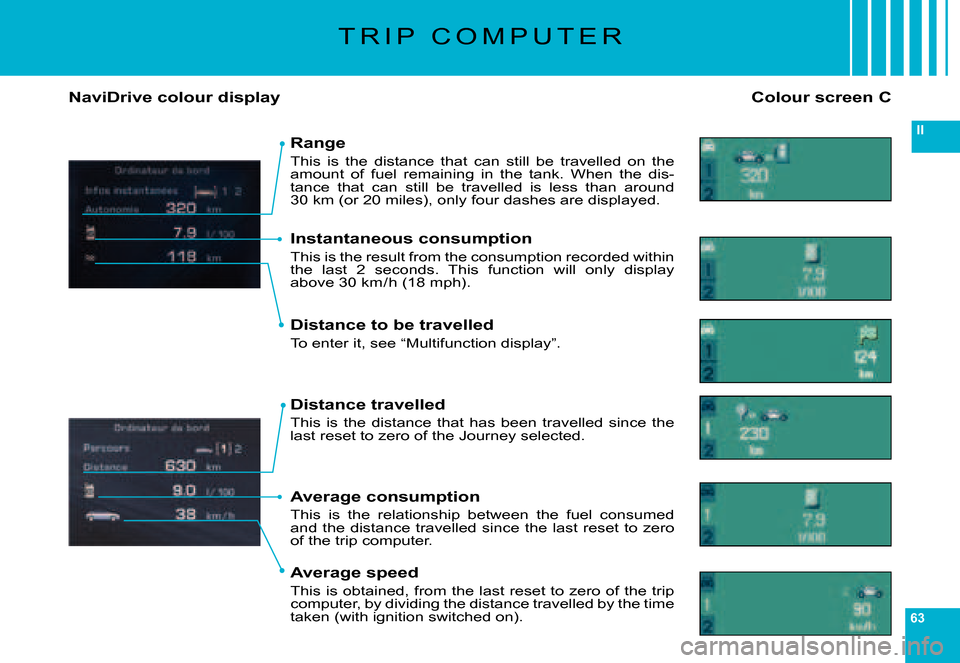
Range
This is the distance that can still be travelled on the amount of fuel remaining in the tank. When the dis-tance that can still be travelled is less than around 30 km (or 20 miles), only four dashes are displayed.
Instantaneous consumption
This is the result from the consumption recorded within the last 2 seconds. This function will only display above 30 km / h (18 mph).
Distance to be travelled
To enter it, see “Multifunction display”.
Distance travelled
This is the distance that has been travelled since the last reset to zero of the Journey selected.
Average consumption
This is the relationship between the fuel consumed and the distance travelled since the last reset to zero of the trip computer.
Average speed
This is obtained, from the last reset to zero of the trip computer, by dividing the distance travelled by the time taken (with ignition switched on).
Page 61 of 216
64
II
T R I P C O M P U T E R
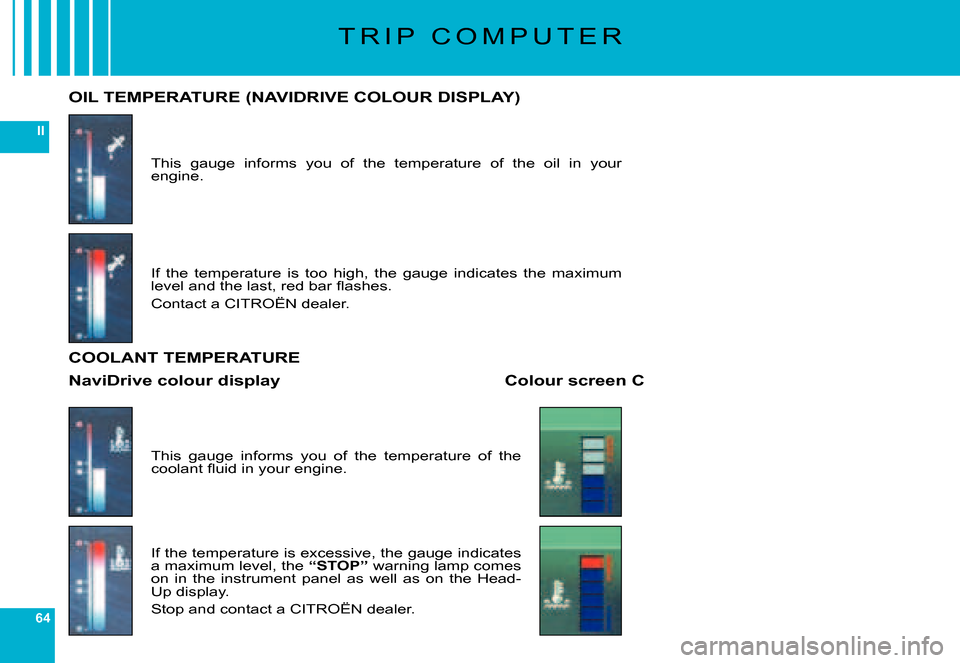
This gauge informs you of the temperature of the oil in your engine.
OIL TEMPERATURE (NAVIDRIVE COLOUR DISPLAY)
If the temperature is too high, the gauge indicates the maximum level and the last, red bar fl ashes.
Contact a CITROËN dealer.
This gauge informs you of the temperature of the coolant fl uid in your engine.
If the temperature is excessive, the gauge indicates a maximum level, the “STOP” warning lamp comes on in the instrument panel as well as on the Head-Up display.
Stop and contact a CITROËN dealer.
COOLANT TEMPERATURE
Colour screen CNaviDrive colour display
Page 62 of 216

65
II
T R I P C O M P U T E R
TYRE DEFLATION DETECTION
This function warns you of tyres that are defl ated or punctured, by means of sensors that continuously monitor the status of the vehicle's wheels, giving you this information on the screen (press the end of the wiper control stalk or on the “TRIP” button for a permanent display).
Colour screen CNaviDrive colour display
Display of tyres in good condition
Status from the sensors in the course of initialisation
Page 63 of 216
66
II
T R I P C O M P U T E R
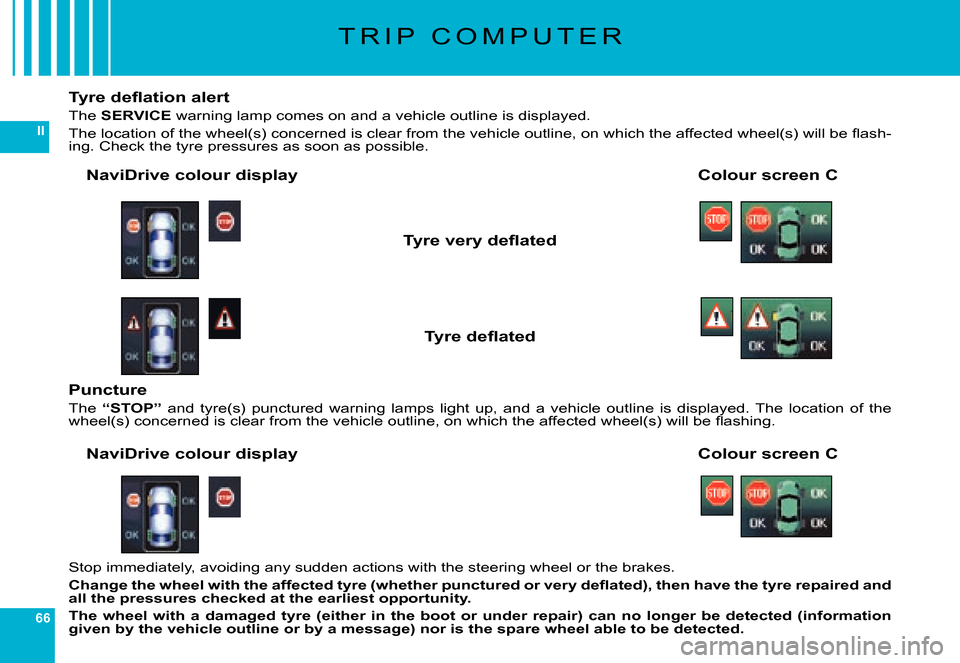
Tyre defl ation alert
The SERVICE warning lamp comes on and a vehicle outline is displayed.
The location of the wheel(s) concerned is clear from the vehicle outline, on which the affected wheel(s) will be fl ash-ing. Check the tyre pressures as soon as possible.
Colour screen CNaviDrive colour display
Tyre very defl ated
Tyre defl ated
Stop immediately, avoiding any sudden actions with the steering wheel or the brakes.
Change the wheel with the affected tyre (whether punctured or very defl ated), then have the tyre repaired and all the pressures checked at the earliest opportunity.
The wheel with a damaged tyre (either in the boot or under repair) can no longer be detected (information given by the vehicle outline or by a message) nor is the spare wheel able to be detected.
Puncture
The “STOP” and tyre(s) punctured warning lamps light up, and a vehicle ou tline is displayed. The location of the wheel(s) concerned is clear from the vehicle outline, on which the affected wheel(s) will be fl ashing.
Colour screen CNaviDrive colour display