lock Citroen C8 2013 1.G User Guide
[x] Cancel search | Manufacturer: CITROEN, Model Year: 2013, Model line: C8, Model: Citroen C8 2013 1.GPages: 234, PDF Size: 8.86 MB
Page 29 of 234
Instruments and controls
READY TO GO
2
27
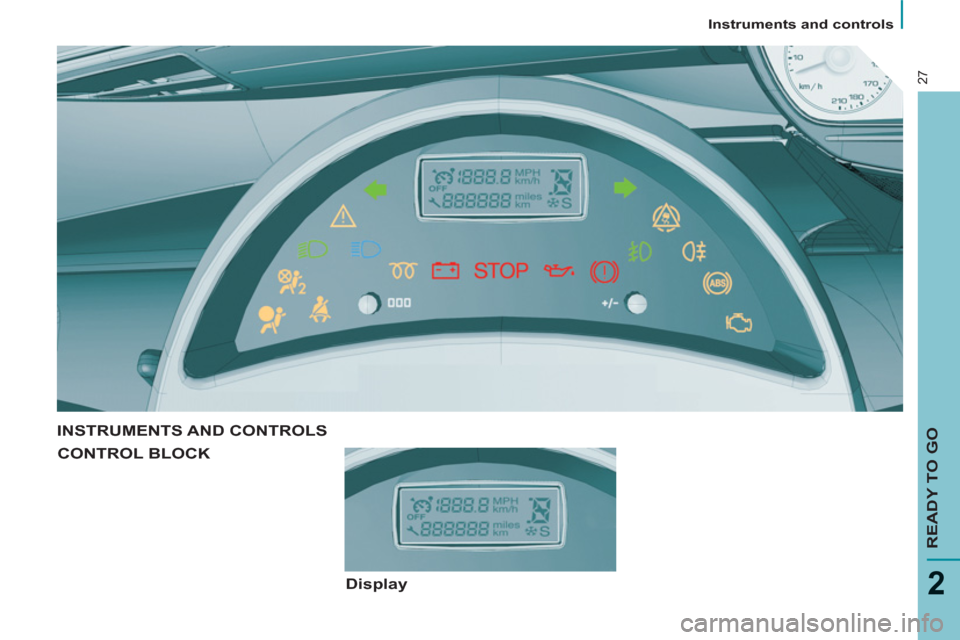
INSTRUMENTS AND CONTROLS
CONTROL BLOCK
Display
Page 33 of 234
Instruments and controls
READY TO GO
2
31
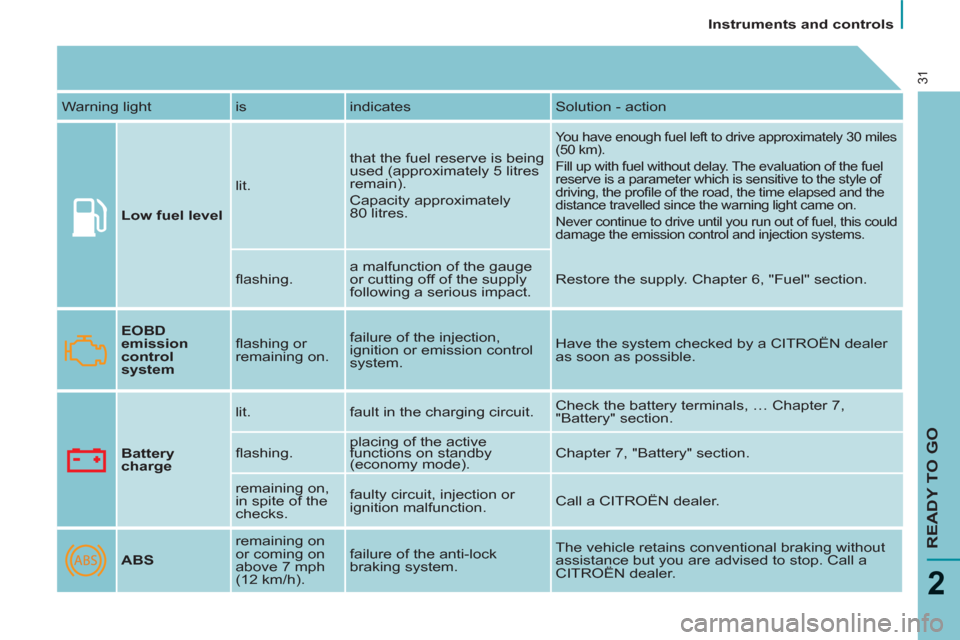
Warning light is indicates Solution - action
Low fuel level
lit. that the fuel reserve is being
used (approximately 5 litres
remain).
Capacity approximately
80 litres.
You have enough fuel left to drive approximately 30 miles
(50 km).
Fill up with fuel without delay. The evaluation of the fuel
reserve is a parameter which is sensitive to the style of
driving, the profi le of the road, the time elapsed and the
distance travelled since the warning light came on.
Never continue to drive until you run out of fuel, this could
damage the emission control and injection systems.
fl ashing. a malfunction of the gauge
or cutting off of the supply
following a serious impact. Restore the supply. Chapter 6, "Fuel" section.
EOBD
emission
control
system
fl ashing or
remaining on. failure of the injection,
ignition or emission control
system. Have the system checked by a CITROËN dealer
as soon as possible.
Battery
charge
lit. fault in the charging circuit. Check the battery terminals, … Chapter 7,
"Battery" section.
fl ashing. placing of the active
functions on standby
(economy mode). Chapter 7, "Battery" section.
remaining on,
in spite of the
checks. faulty circuit, injection or
ignition malfunction. Call a CITROËN dealer.
ABS
remaining on
or coming on
above 7 mph
(12 km/h). failure of the anti-lock
braking system. The vehicle retains conventional braking without
assistance but you are advised to stop. Call a
CITROËN dealer.
Page 36 of 234
Instruments and controls
34
In the event of a breakdown and in
order to avoid any risk of scalding,
unscrew the cap two turns to allow
the pressure to drop.
When the pressure has dropped,
remove the cap and top up the level.
Contact a CITROËN dealer .
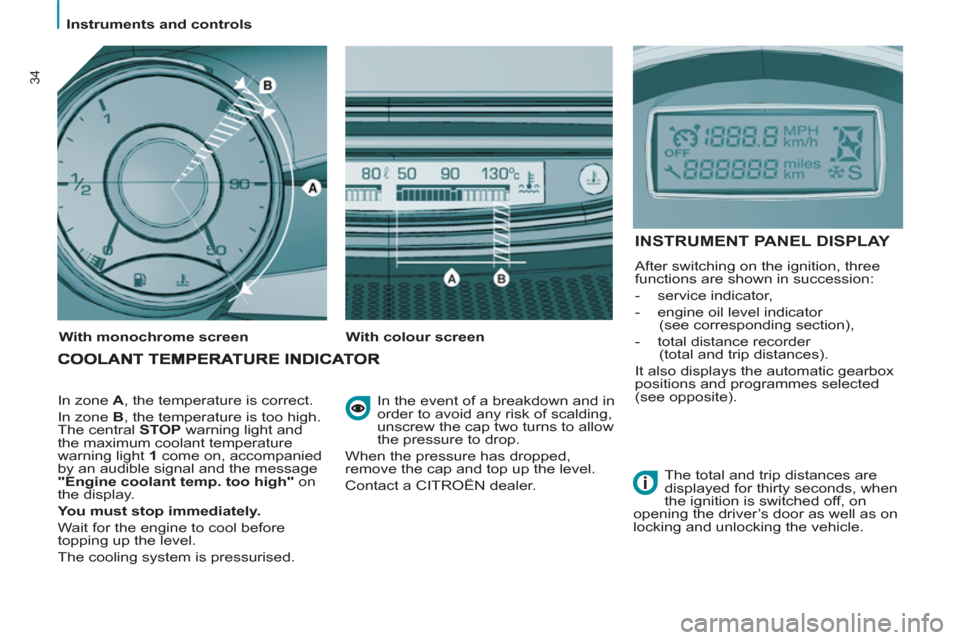
In zone A
, the temperature is correct.
In zone B
, the temperature is too high.
The central STOP
warning light and
the maximum coolant temperature
warning light 1
come on, accompanied
by an audible signal and the message
"Engine coolant temp. too high"
on
the display.
You must stop immediately.
Wait for the engine to cool before
topping up the level.
The cooling system is pressurised.
With monochrome screen
With colour screen
INSTRUMENT PANEL DISPLAY
After switching on the ignition, three
functions are shown in succession:
- service indicator,
- engine oil level indicator
(see corresponding section),
- total distance recorder
(total and trip distances).
It also displays the automatic gearbox
positions and programmes selected
(see opposite).
The total and trip distances are
displayed for thirty seconds, when
the ignition is switched off, on
opening the driver’s door as well as on
locking and unlocking the vehicle.
Page 37 of 234
Instruments and controls
READY TO GO
2
35
Service indicator
The display, located in the control
block, informs you when the next
service will be due in accordance
with the "Manufacturer's" servicing
schedule indicated in the servicing
booklet. This information is determined
in relation to the distance travelled
since the previous service.
A few seconds after the ignition is
switched on, the oil level is displayed,
then the total distance recorder
resumes normal operation showing the
total and trip distances.
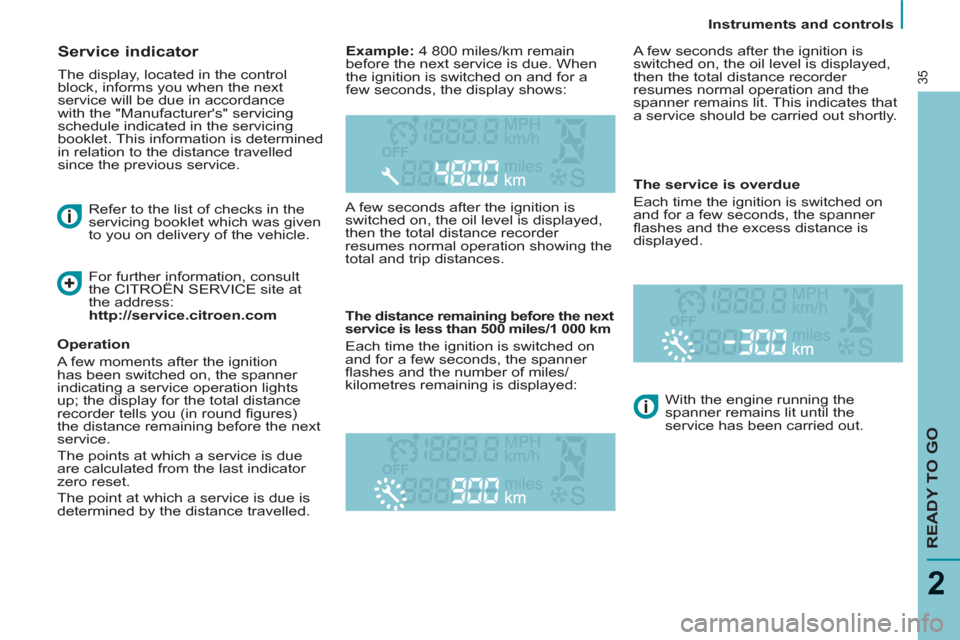
The distance remaining before the next
service is less than 500 miles/1 000 km
Each time the ignition is switched on
and for a few seconds, the spanner
fl ashes and the number of miles/
kilometres remaining is displayed: A few seconds after the ignition is
switched on, the oil level is displayed,
then the total distance recorder
resumes normal operation and the
spanner remains lit. This indicates that
a service should be carried out shortly.
The service is overdue
Each time the ignition is switched on
and for a few seconds, the spanner
fl ashes and the excess distance is
displayed.
With the engine running the
spanner remains lit until the
service has been carried out.
Example:
4 800 miles/km remain
before the next service is due. When
the ignition is switched on and for a
few seconds, the display shows:
Refer to the list of checks in the
servicing booklet which was given
to you on delivery of the vehicle.
Operation
A few moments after the ignition
has been switched on, the spanner
indicating a service operation lights
up; the display for the total distance
recorder tells you (in round fi gures)
the distance remaining before the next
service.
The points at which a service is due
are calculated from the last indicator
zero reset.
The point at which a service is due is
determined by the distance travelled.
For further information, consult
the CITROËN SERVICE site at
the address:
http://service.citroen.com
Page 38 of 234
Instruments and controls
36
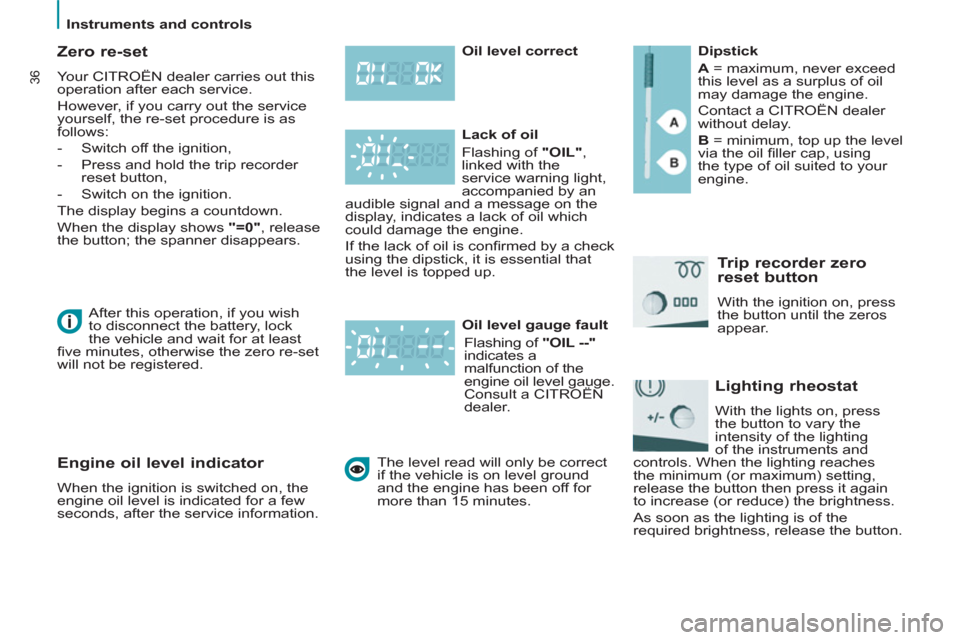
Zero re-set
Your CITROËN dealer carries out this
operation after each service.
However, if you carry out the service
yourself, the re-set procedure is as
follows:
- Switch off the ignition,
- Press and hold the trip recorder
reset button,
- Switch on the ignition.
The display begins a countdown.
When the display shows " =
0 "
, release
the button; the spanner disappears.
Engine oil level indicator
When the ignition is switched on, the
engine oil level is indicated for a few
seconds, after the service information.
Oil level correct
Lack of oil
Flashing of "OIL"
,
linked with the
service warning light,
accompanied by an
audible signal and a message on the
display, indicates a lack of oil which
could damage the engine.
If the lack of oil is confi rmed by a check
using the dipstick, it is essential that
the level is topped up.
Oil level gauge fault
Flashing of "OIL --"
indicates a
malfunction of the
engine oil level gauge.
Consult a CITROËN
dealer.
Dipstick
A
= maximum, never exceed
this level as a surplus of oil
may damage the engine.
Contact a CITROËN dealer
without delay.
B
= minimum, top up the level
via the oil fi ller cap, using
the type of oil suited to your
engine.
Trip recorder zero
reset button
With the ignition on, press
the button until the zeros
appear.
Lighting rheostat
With the lights on, press
the button to vary the
intensity of the lighting
of the instruments and
controls. When the lighting reaches
the minimum (or maximum) setting,
release the button then press it again
to increase (or reduce) the brightness.
As soon as the lighting is of the
required brightness, release the button.
The level read will only be correct
if the vehicle is on level ground
and the engine has been off for
more than 15 minutes. After this operation, if you wish
to disconnect the battery, lock
the vehicle and wait for at least
fi ve minutes, otherwise the zero re-set
will not be registered.
Page 42 of 234
Gearbox and stearing wheel
40
Good practice
Never select position N
when the
vehicle is moving.
Never select positions P
or R
unless
the vehicle is stationary.
Never change between positions to
optimise braking on a slippery surface.
There is a risk of damage to the
gearbox:
- if you press the accelerator and
brake pedals at the same time,
- if you force the lever from position P
to another position in the event of a
battery failure.
When the engine is at idle, brakes
not applied, if position R
, D
or M
is
selected the vehicle moves even
without the accelerator being pressed.
For this reason, do not leave children
unsupervised inside the vehicle,
with the engine running
.
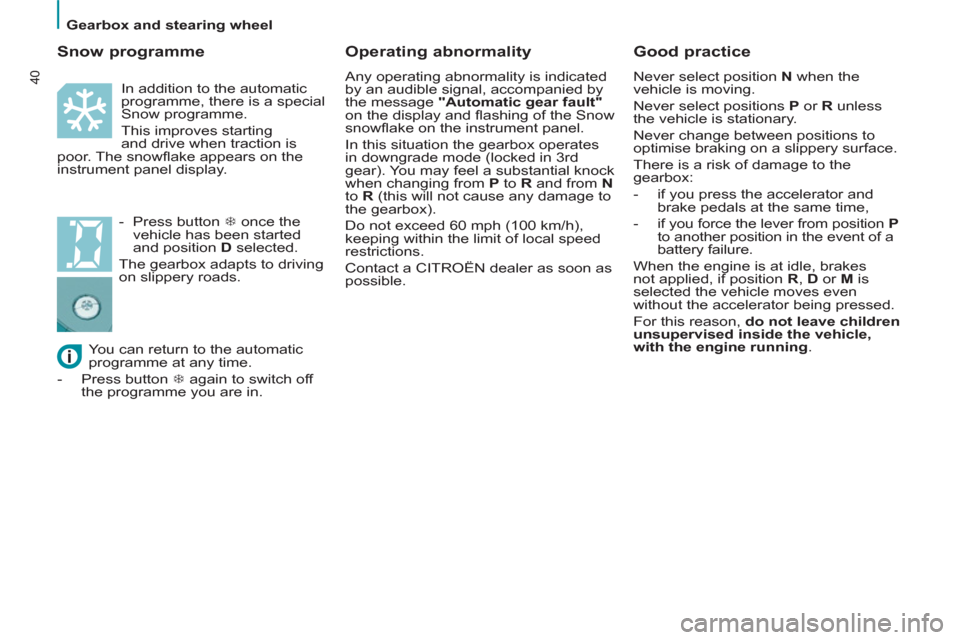
Operating abnormality
Any operating abnormality is indicated
by an audible signal, accompanied by
the message "Automatic gear fault"
on the display and fl ashing of the Snow
snowfl ake on the instrument panel.
In this situation the gearbox operates
in downgrade mode (locked in 3rd
gear). You may feel a substantial knock
when changing from P
to R
and from N
to R
(this will not cause any damage to
the gearbox).
Do not exceed 60 mph (100 km/h),
keeping within the limit of local speed
restrictions.
Contact a CITROËN dealer as soon as
possible.
You can return to the automatic
programme at any time.
- Press button
7 again to switch off
the programme you are in.
Snow programme
In addition to the automatic
programme, there is a special
Snow programme.
This improves starting
and drive when traction is
poor. The snowfl ake appears on the
instrument panel display.
- Press button
7 once the
vehicle has been started
and position D
selected.
The gearbox adapts to driving
on slippery roads.
Page 43 of 234
Gearbox and stearing wheel
READY TO GO
41
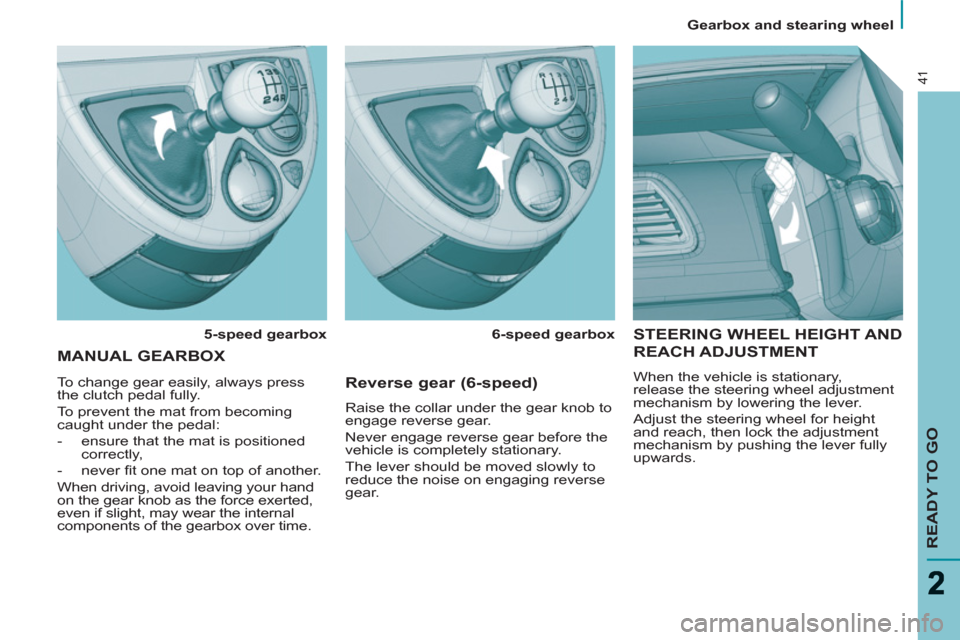
STEERING WHEEL HEIGHT AND
REACH ADJUSTMENT
When the vehicle is stationary,
release the steering wheel adjustment
mechanism by lowering the lever.
Adjust the steering wheel for height
and reach, then lock the adjustment
mechanism by pushing the lever fully
upwards.
MANUAL GEARBOX
5-speed gearbox
6-speed gearbox
To change gear easily, always press
the clutch pedal fully.
To prevent the mat from becoming
caught under the pedal:
- ensure that the mat is positioned
correctly,
- never fi t one mat on top of another.
When driving, avoid leaving your hand
on the gear knob as the force exerted,
even if slight, may wear the internal
components of the gearbox over time.
Reverse gear (6-speed)
Raise the collar under the gear knob to
engage reverse gear.
Never engage reverse gear before the
vehicle is completely stationary.
The lever should be moved slowly to
reduce the noise on engaging reverse
gear.
Page 44 of 234
42
Starting and stopping
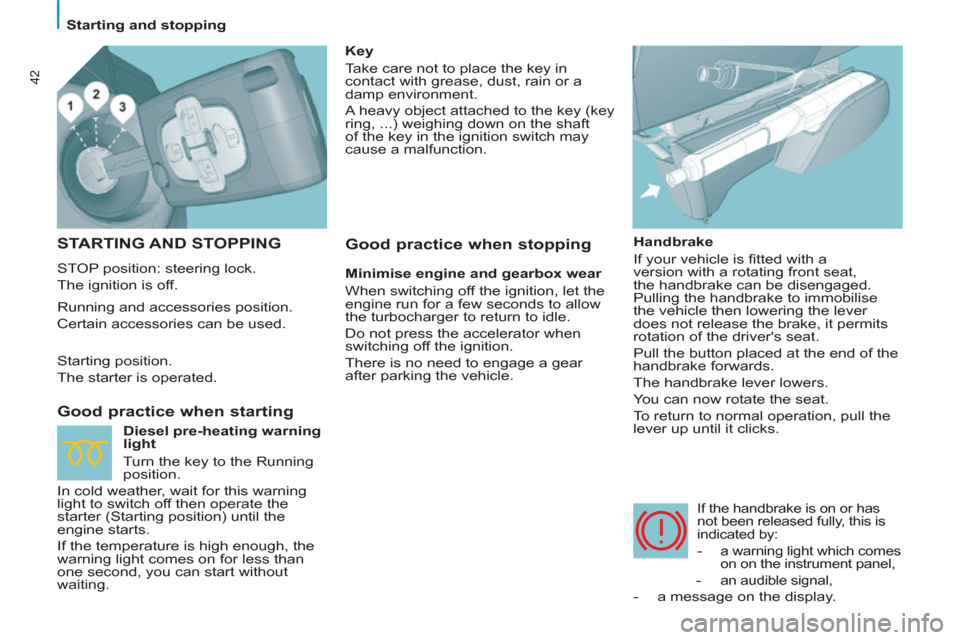
STARTING AND STOPPING
STOP position: steering lock.
The ignition is off.
Good practice when starting
Handbrake
If your vehicle is fi tted with a
version with a rotating front seat,
the handbrake can be disengaged.
Pulling the handbrake to immobilise
the vehicle then lowering the lever
does not release the brake, it permits
rotation of the driver's seat.
Pull the button placed at the end of the
handbrake forwards.
The handbrake lever lowers.
You can now rotate the seat.
To return to normal operation, pull the
lever up until it clicks.
If the handbrake is on or has
not been released fully, this is
indicated by:
- a warning light which comes
on on the instrument panel,
- an audible signal,
- a message on the display.
Key
Take care not to place the key in
contact with grease, dust, rain or a
damp environment.
A heavy object attached to the key (key
ring, ...) weighing down on the shaft
of the key in the ignition switch may
cause a malfunction.
Running and accessories position.
Certain accessories can be used.
Starting position.
The starter is operated.
Diesel pre-heating warning
light
Turn the key to the Running
position.
In cold weather, wait for this warning
light to switch off then operate the
starter (Starting position) until the
engine starts.
If the temperature is high enough, the
warning light comes on for less than
one second, you can start without
waiting.
Good practice when stopping
Minimise engine and gearbox wear
When switching off the ignition, let the
engine run for a few seconds to allow
the turbocharger to return to idle.
Do not press the accelerator when
switching off the ignition.
There is no need to engage a gear
after parking the vehicle.
Page 47 of 234
Steering wheel controls
EASE OF USE and COMFORT
3
45
Automatic "Follow-Me-Home"
lighting
With the ignition off, when you leave
your vehicle with the automatic
switching on of the lights function
activated
, the side lights and dipped
headlamps remain on for the selected
duration.
To deactivate or activate this
function, go to the display
confi guration menu.
The duration of the timed period must
also be set (15, 30, 60 seconds), via
the display confi guration menu.
Carry out these operations when the
vehicle is stationary.
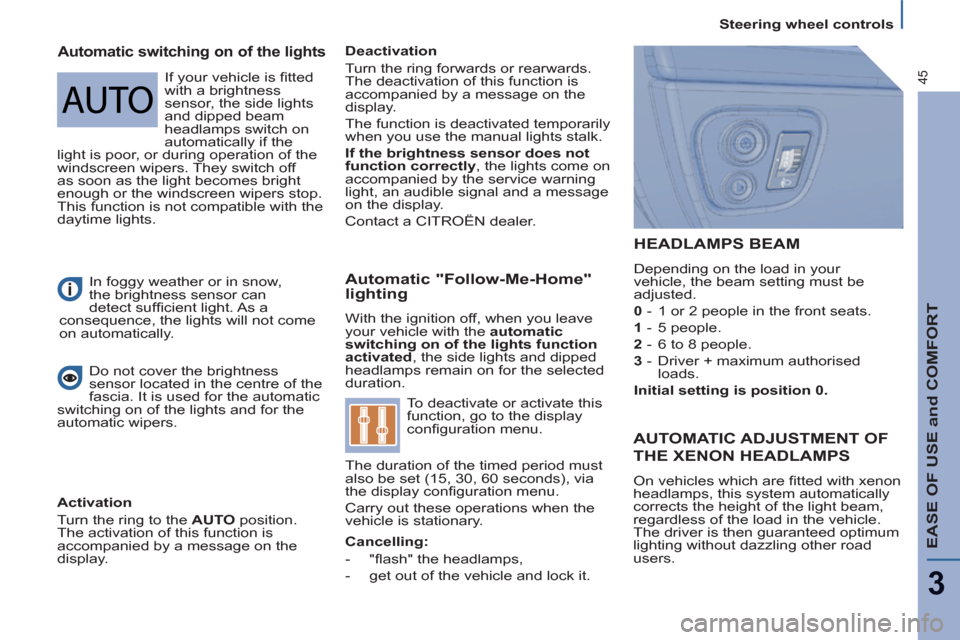
HEADLAMPS BEAM
Depending on the load in your
vehicle, the beam setting must be
adjusted.
0
- 1 or 2 people in the front seats.
1
- 5 people.
2
- 6 to 8 people.
3
- Driver + maximum authorised
loads.
Initial setting is position 0.
In foggy weather or in snow,
the brightness sensor can
detect suffi cient light. As a
consequence, the lights will not come
on automatically.
Automatic switching on of the lights
Deactivation
Turn the ring forwards or rearwards.
The deactivation of this function is
accompanied by a message on the
display.
The function is deactivated temporarily
when you use the manual lights stalk.
If the brightness sensor does not
function correctly
, the lights come on
accompanied by the service warning
light, an audible signal and a message
on the display.
Contact a CITROËN dealer .
Do not cover the brightness
sensor located in the centre of the
fascia. It is used for the automatic
switching on of the lights and for the
automatic wipers.
Activation
Turn the ring to the AUTO
position.
The activation of this function is
accompanied by a message on the
display.
AUTOMATIC ADJUSTMENT OF
THE XENON HEADLAMPS
On vehicles which are fi tted with xenon
headlamps, this system automatically
corrects the height of the light beam,
regardless of the load in the vehicle.
The driver is then guaranteed optimum
lighting without dazzling other road
users.
Cancelling:
-
"fl ash" the headlamps,
-
get out of the vehicle and lock it.
If your vehicle is fi tted
with a brightness
sensor, the side lights
and dipped beam
headlamps switch on
automatically if the
light is poor, or during operation of the
windscreen wipers. They switch off
as soon as the light becomes bright
enough or the windscreen wipers stop.
This function is not compatible with the
daytime lights.
Page 67 of 234
EASE OF USE and COMFORT
3
65
Seats
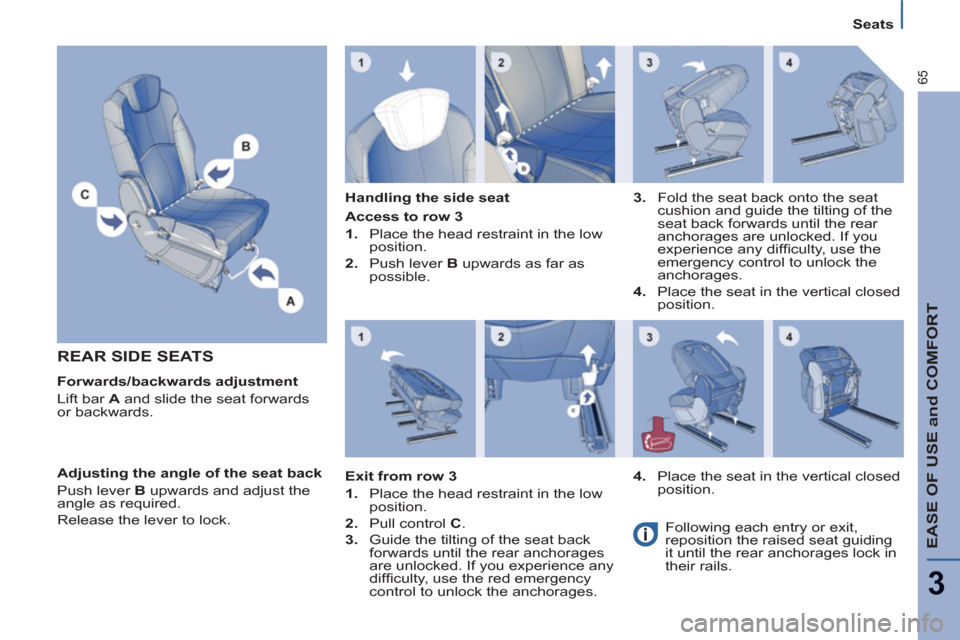
REAR SIDE SEATS
Forwards/backwards adjustment
Lift bar A
and slide the seat forwards
or backwards.
Handling the side seat
Adjusting the angle of the seat back
Push lever B
upwards and adjust the
angle as required.
Release the lever to lock.
Access to row 3
1.
Place the head restraint in the low
position.
2.
Push lever B
upwards as far as
possible.
Exit from row 3
1.
Place the head restraint in the low
position.
2.
Pull control C
.
3.
Guide the tilting of the seat back
forwards until the rear anchorages
are unlocked. If you experience any
diffi culty, use the red emergency
control to unlock the anchorages.
4.
Place the seat in the vertical closed
position.
Following each entry or exit,
reposition the raised seat guiding
it until the rear anchorages lock in
their rails.
3.
Fold the seat back onto the seat
cushion and guide the tilting of the
seat back forwards until the rear
anchorages are unlocked. If you
experience any diffi culty, use the
emergency control to unlock the
anchorages.
4.
Place the seat in the vertical closed
position.