lock Citroen C8 2013 1.G Owner's Guide
[x] Cancel search | Manufacturer: CITROEN, Model Year: 2013, Model line: C8, Model: Citroen C8 2013 1.GPages: 234, PDF Size: 8.86 MB
Page 68 of 234
66
Seats
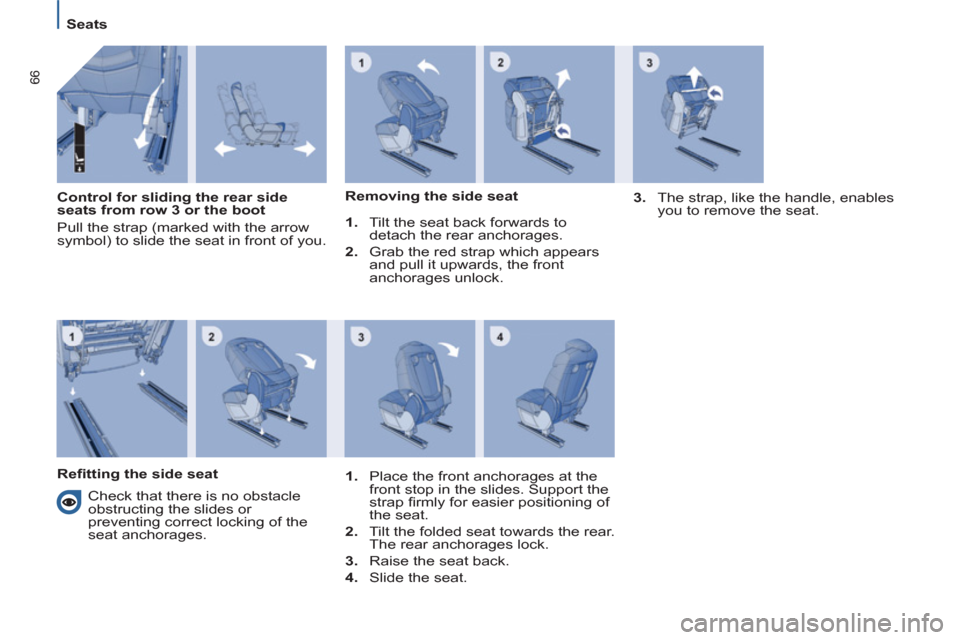
Control for sliding the rear side
seats from row 3 or the boot
Pull the strap (marked with the arrow
symbol) to slide the seat in front of you.
Removing the side seat
1.
Tilt the seat back forwards to
detach the rear anchorages.
2.
Grab the red strap which appears
and pull it upwards, the front
anchorages unlock
.
3.
The strap, like the handle, enables
you to remove the seat.
Refi tting the side seat
Check that there is no obstacle
obstructing the slides or
preventing correct locking of the
seat anchorages.
1.
Place the front anchorages at the
front stop in the slides. Support the
strap fi rmly for easier positioning of
the seat.
2.
Tilt the folded seat towards the rear.
The rear anchorages lock.
3.
Raise the seat back.
4.
Slide the seat
.
Page 69 of 234
EASE OF USE and COMFORT
3
67
Seats
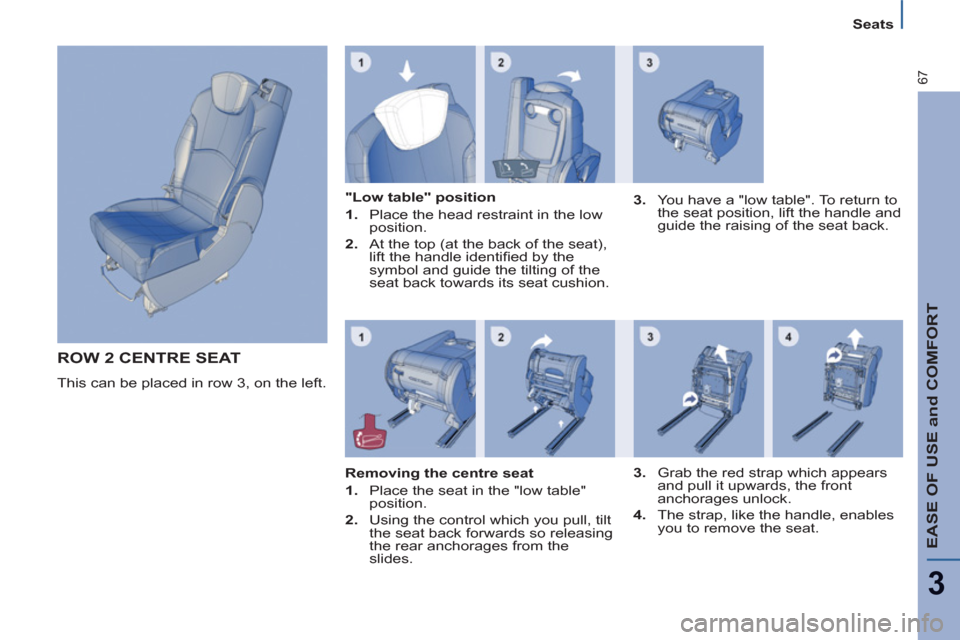
ROW 2 CENTRE SEAT
This can be placed in row 3, on the left.
"Low table" position
1.
Place the head restraint in the low
position.
2.
At the top (at the back of the seat),
lift the handle identifi ed by the
symbol and guide the tilting of the
seat back towards its seat cushion.
3.
You have a "low table". To return to
the seat position, lift the handle and
guide the raising of the seat back.
Removing the centre seat
1.
Place the seat in the "low table"
position.
2.
Using the control which you pull, tilt
the seat back forwards so releasing
the rear anchorages from the
slides.
3.
Grab the red strap which appears
and pull it upwards, the front
anchorages unlock
.
4.
The strap, like the handle, enables
you to remove the seat.
Page 70 of 234
68
Seats
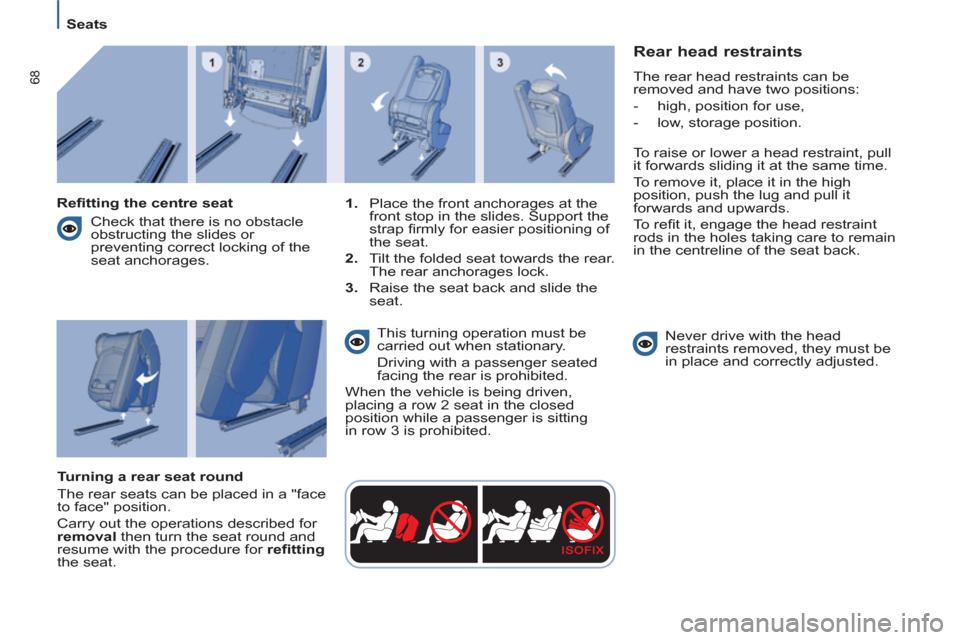
Rear head restraints
The rear head restraints can be
removed and have two positions:
- high, position for use,
- low, storage position.
To raise or lower a head restraint, pull
it forwards sliding it at the same time.
To remove it, place it in the high
position, push the lug and pull it
forwards and upwards.
To refi t it, engage the head restraint
rods in the holes taking care to remain
in the centreline of the seat back.
Never drive with the head
restraints removed, they must be
in place and correctly adjusted.
Refi tting the centre seat
1.
Place the front anchorages at the
front stop in the slides. Support the
strap fi rmly for easier positioning of
the seat.
2.
Tilt the folded seat towards the rear.
The rear anchorages lock.
3.
Raise the seat back and slide the
seat.
Turning a rear seat round
The rear seats can be placed in a "face
to face" position.
Carry out the operations described for
removal
then turn the seat round and
resume with the procedure for refi tting
the seat
. This turning operation must be
carried out when stationary.
Driving with a passenger seated
facing the rear is prohibited.
When the vehicle is being driven,
placing a row 2 seat in the closed
position while a passenger is sitting
in row 3 is prohibited.
Check that there is no obstacle
obstructing the slides or
preventing correct locking of the
seat anchorages.
Page 71 of 234
EASE OF USE and COMFORT
3
69
Seats
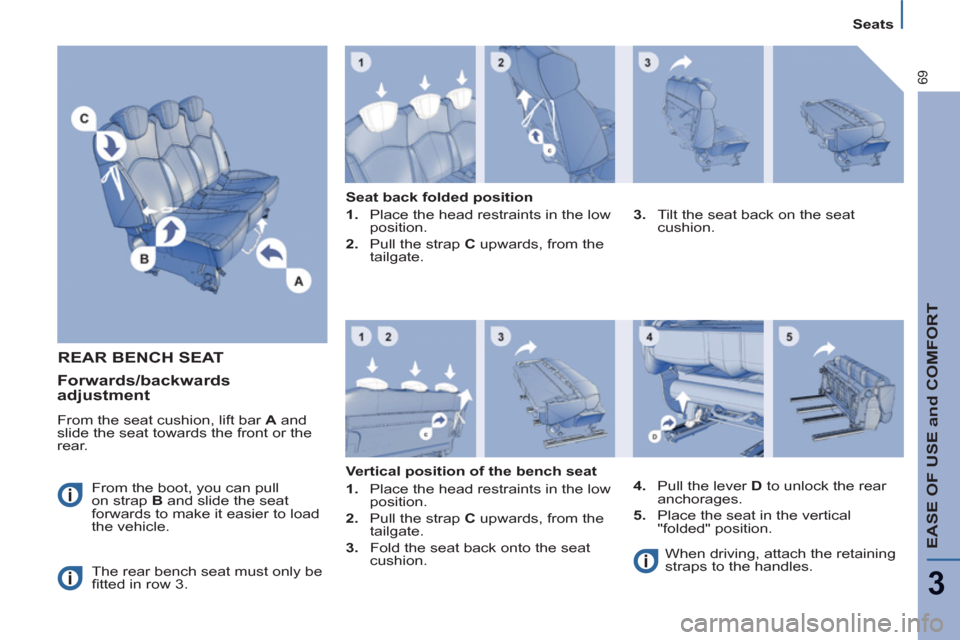
REAR BENCH SEAT
From the boot, you can pull
on strap B
and slide the seat
forwards to make it easier to load
the vehicle.
The rear bench seat must only be
fi tted in row 3.
Seat back folded position
1.
Place the head restraints in the low
position.
2.
Pull the strap C
upwards, from the
tailgate.
3.
Tilt the seat back on the seat
cushion.
Vertical position of the bench seat
1.
Place the head restraints in the low
position.
2.
Pull the strap C
upwards, from the
tailgate.
3.
Fold the seat back onto the seat
cushion.
4.
Pull the lever D
to unlock the rear
anchorages.
5.
Place the seat in the vertical
"folded" position.
When driving, attach the retaining
straps to the handles.
Forwards/backwards
adjustment
From the seat cushion, lift bar A
and
slide the seat towards the front or the
rear.
Page 72 of 234
70
Seats
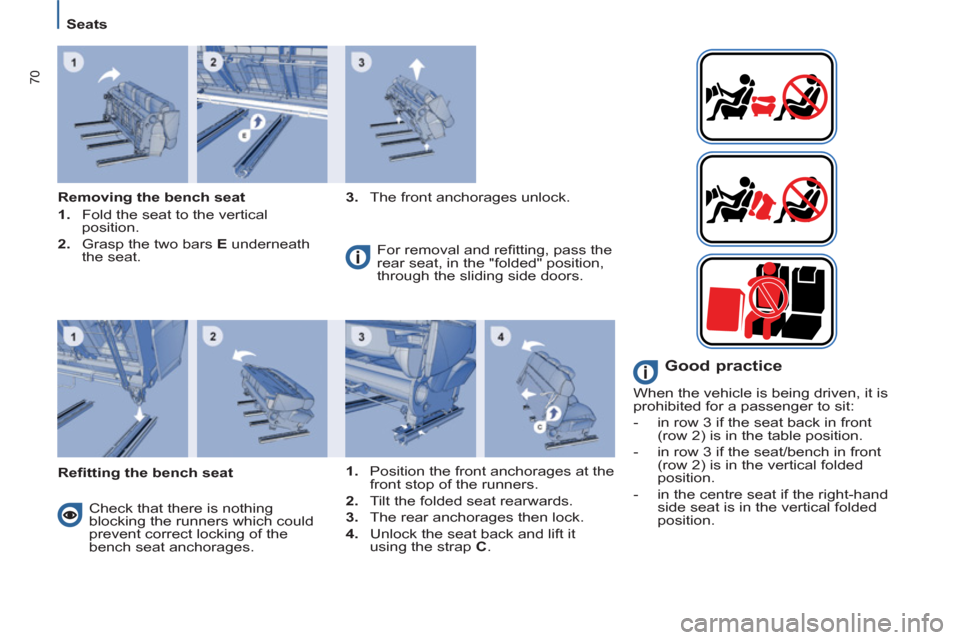
Removing the bench seat
1.
Fold the seat to the vertical
position.
2.
Grasp the two bars E
underneath
the seat.
3.
The front anchorages unlock.
Refi tting the bench seat For removal and refi tting, pass the
rear seat, in the "folded" position,
through the sliding side doors.
Check that there is nothing
blocking the runners which could
prevent correct locking of the
bench seat anchorages.
1.
Position the front anchorages at the
front stop of the runners.
2.
Tilt the folded seat rearwards.
3.
The rear anchorages then lock.
4.
Unlock the seat back and lift it
using the strap C
.
Good practice
When the vehicle is being driven, it is
prohibited for a passenger to sit:
- in row 3 if the seat back in front
(row 2) is in the table position.
- in row 3 if the seat/bench in front
(row 2) is in the vertical folded
position.
- in the centre seat if the right-hand
side seat is in the vertical folded
position.
Page 79 of 234
EASE OF USE and COMFORT
3
77
Practical information
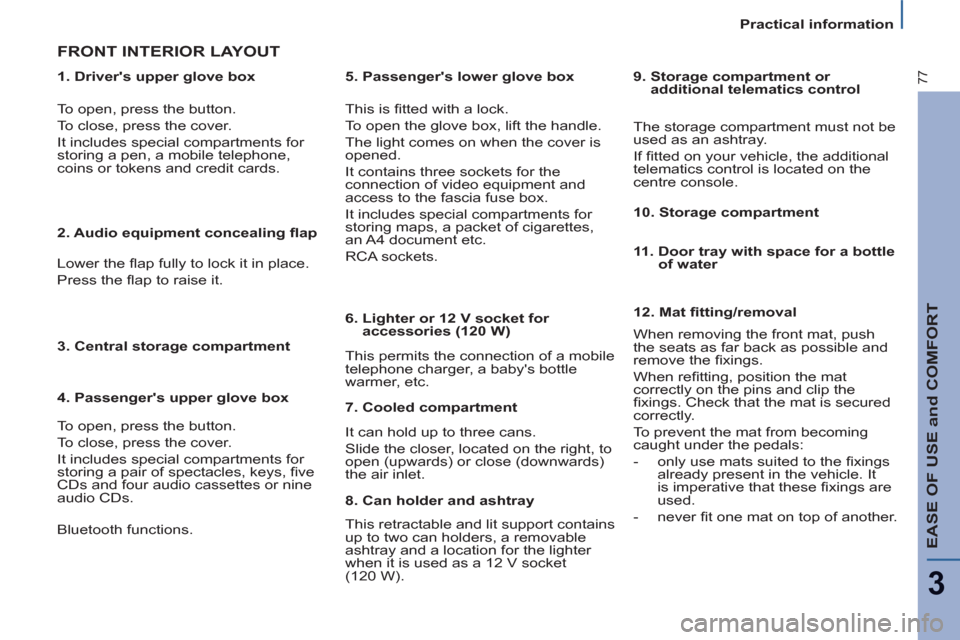
1. Driver's upper glove box
FRONT INTERIOR LAYOUT
This is fi tted with a lock.
To open the glove box, lift the handle.
The light comes on when the cover is
opened.
It contains three sockets for the
connection of video equipment and
access to the fascia fuse box.
It includes special compartments for
storing maps, a packet of cigarettes,
an A4 document etc.
RCA sockets.
This permits the connection of a mobile
telephone charger, a baby's bottle
warmer, etc.
To open, press the button.
To close, press the cover.
It includes special compartments for
storing a pen, a mobile telephone,
coins or tokens and credit cards.
2. Audio equipment concealing fl ap
Lower the fl ap fully to lock it in place.
Press the fl ap to raise it.
3. Central storage compartment
4. Passenger's upper glove box
To open, press the button.
To close, press the cover.
It includes special compartments for
storing a pair of spectacles, keys, fi ve
CDs and four audio cassettes or nine
audio CDs.
5. Passenger's lower glove box
6. Lighter or 12 V socket for
accessories (120 W)
12. Mat fi tting/removal
When removing the front mat, push
the seats as far back as possible and
remove the fi xings.
When refi tting, position the mat
correctly on the pins and clip the
fi xings.
Check that the mat is secured
correctly.
To prevent the mat from becoming
caught under the pedals:
- only use mats suited to the fi xings
already present in the vehicle.
It
is imperative that these fi xings are
used.
- never fi t one mat on top of another.
7. Cooled compartment
It can hold up to three cans.
Slide the closer, located on the right, to
open (upwards) or close (downwards)
the air inlet.
8. Can holder and ashtray
This retractable and lit support contains
up to two can holders, a removable
ashtray and a location for the lighter
when it is used as a 12 V socket
(120 W).
9. Storage compartment or
additional telematics control
The storage compartment must not be
used as an ashtray.
If fi tted on your vehicle, the additional
telematics control is located on the
centre console.
10. Storage compartment
11. Door tray with space for a bottle
of water
Bluetooth functions.
Page 82 of 234
80
Practical information
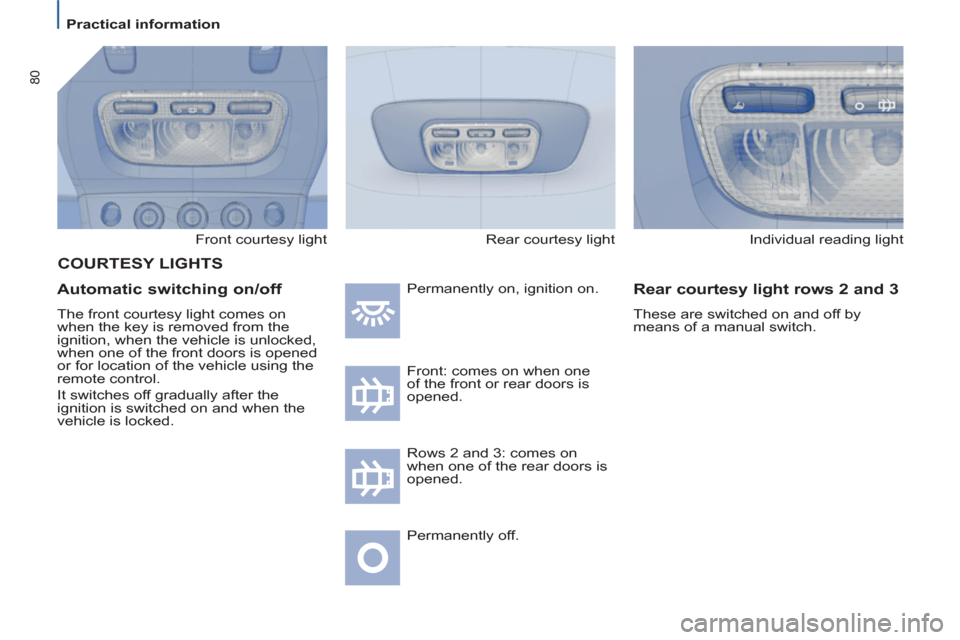
Front courtesy light
Automatic switching on/off
The front courtesy light comes on
when the key is removed from the
ignition, when the vehicle is unlocked,
when one of the front doors is opened
or for location of the vehicle using the
remote control.
It switches off gradually after the
ignition is switched on and when the
vehicle is locked. Permanently on, ignition on.
Front: comes on when one
of the front or rear doors is
opened.
Permanently off.
Individual reading light
Rear courtesy light rows 2 and 3
These are switched on and off by
means of a manual switch.
COURTESY LIGHTS
Rows 2 and 3: comes on
when one of the rear doors is
opened. Rear courtesy light
Page 84 of 234
82
Mirrors and windows
Manual rear view mirror
The rear view mirror has two positions:
- day (normal),
- night (anti-dazzle).
To change from one to the other, push
or pull the lever on the lower edge of
the mirror.
Automatic day/night interior
mirror
This automatically and gradually
changes between the day and night
positions. To prevent dazzling,
the glass of the mirror darkens
automatically depending on the
intensity of the light from behind.
It clears as the light (headlamps of
following vehicles, sunlight) decreases,
ensuring maximum visibility.
Special feature
To ensure maximum visibility during
manoeuvres, the mirror clears
automatically when reverse gear is
engaged.
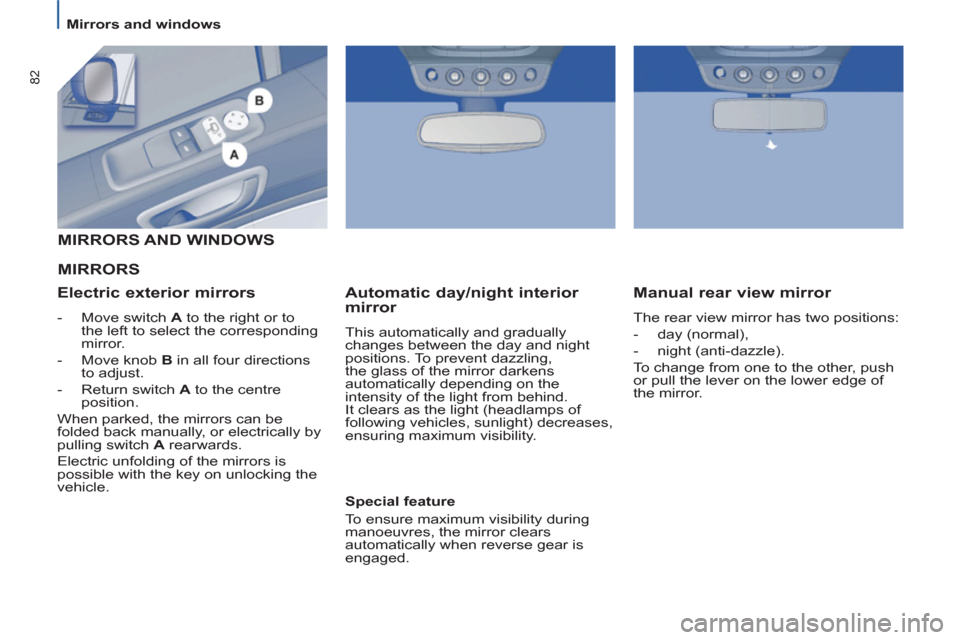
MIRRORS
MIRRORS AND WINDOWS
Electric exterior mirrors
-
Move switch A
to the right or to
the left to select the corresponding
mirror.
-
Move knob B
in all four directions
to adjust.
-
Return switch A
to the centre
position
.
When parked, the mirrors can be
folded back manually, or electrically by
pulling switch A
rearwards.
Electric unfolding of the mirrors is
possible with the key on unlocking the
vehicle.
Page 86 of 234
84
Mirrors and windows
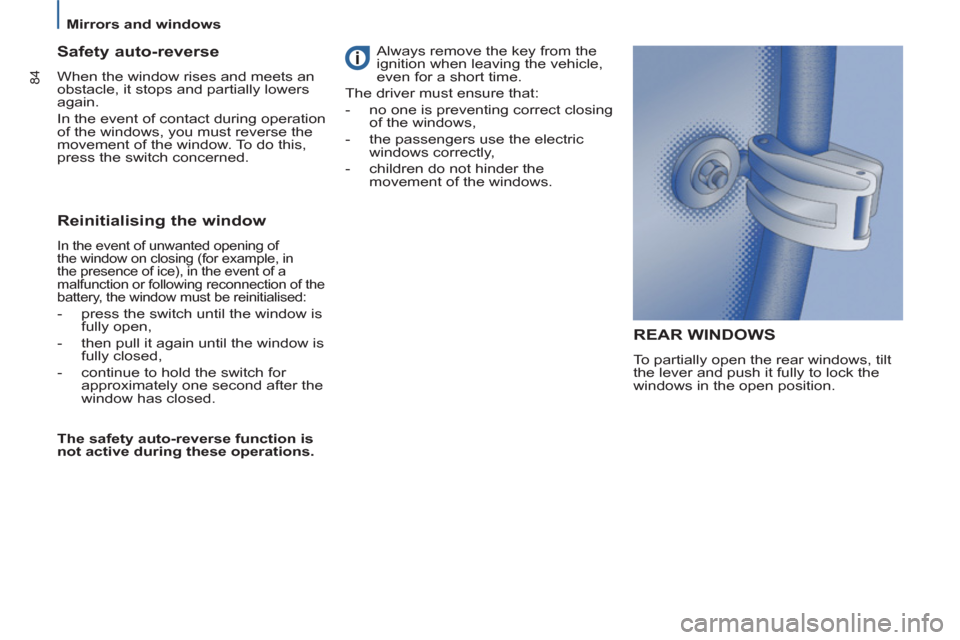
REAR WINDOWS
To partially open the rear windows, tilt
the lever and push it fully to lock the
windows in the open position.
Safety auto-reverse
When the window rises and meets an
obstacle, it stops and partially lowers
again.
In the event of contact during operation
of the windows, you must reverse the
movement of the window. To do this,
press the switch concerned.
Reinitialising the window
In the event of unwanted opening of
the window on closing (for example, in
the presence of ice), in the event of a
malfunction or following reconnection of the
battery, the window must be reinitialised:
- press the switch until the window is
fully open,
- then pull it again until the window is
fully closed,
- continue to hold the switch for
approximately one second after the
window has closed.
The safety auto-reverse function is
not active during these operations. Always remove the key from the
ignition when leaving the vehicle,
even for a short time.
The driver must ensure that:
- no one is preventing correct closing
of the windows,
- the passengers use the electric
windows correctly,
- children do not hinder the
movement of the windows.
Page 89 of 234
SAFETY
87
4
Parking sensors
FRONT AND/OR REAR
PARKING ASSISTANCE
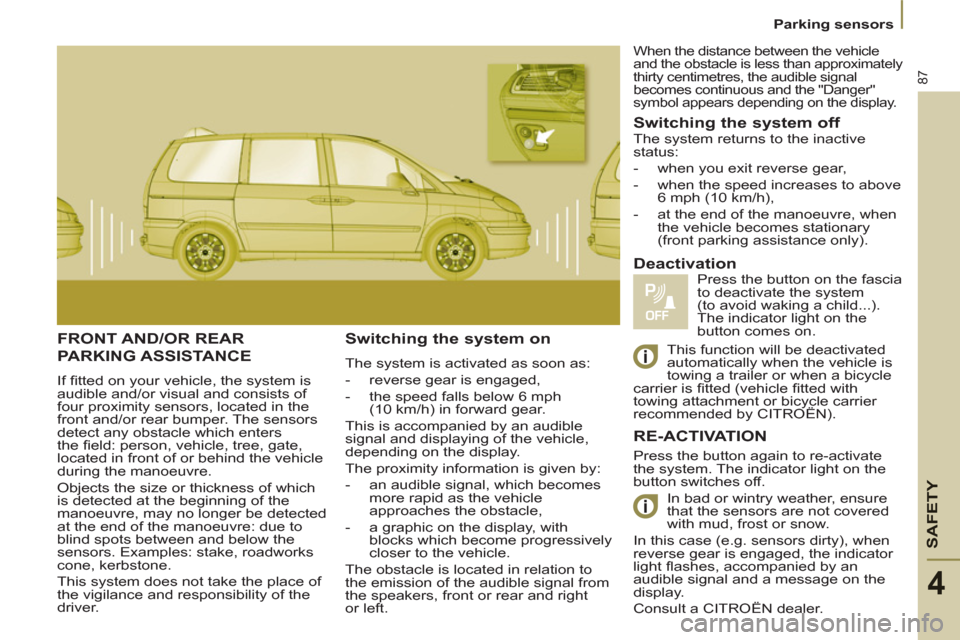
If fi tted on your vehicle, the system is
audible and/or visual and consists of
four proximity sensors, located in the
front and/or rear bumper. The sensors
detect any obstacle which enters
the fi eld: person, vehicle, tree, gate,
located in front of or behind the vehicle
during the manoeuvre.
Objects the size or thickness of which
is detected at the beginning of the
manoeuvre, may no longer be detected
at the end of the manoeuvre: due to
blind spots between and below the
sensors. Examples: stake, roadworks
cone, kerbstone.
This system does not take the place of
the vigilance and responsibility of the
driver.
Switching the system on
The system is activated as soon as:
- reverse gear is engaged,
- the speed falls below 6 mph
(10 km/h) in forward gear.
This is accompanied by an audible
signal and displaying of the vehicle,
depending on the display.
The proximity information is given by:
- an audible signal, which becomes
more rapid as the vehicle
approaches the obstacle,
- a graphic on the display, with
blocks which become progressively
closer to the vehicle.
The obstacle is located in relation to
the emission of the audible signal from
the speakers, front or rear and right
or left.
Switching the system off
Press the button again to re-activate
the system. The indicator light on the
button switches off.
In bad or wintry weather, ensure
that the sensors are not covered
with mud, frost or snow.
In this case (e.g. sensors dirty), when
reverse gear is engaged, the indicator
light fl ashes, accompanied by an
audible signal and a message on the
display.
Consult a CITROËN dealer.
Deactivation
Press the button on the fascia
to deactivate the system
(to avoid waking a child...).
The indicator light on the
button comes on. The system returns to the inactive
status:
- when you exit reverse gear,
- when the speed increases to above
6 mph (10 km/h),
- at the end of the manoeuvre, when
the vehicle becomes stationary
(front parking assistance only).
RE-ACTIVATION
When the distance between the vehicle
and the obstacle is less than approximately
thirty centimetres, the audible signal
becomes continuous and the "Danger"
symbol appears depending on the display.
This function will be deactivated
automatically when the vehicle is
towing a trailer or when a bicycle
carrier is fi tted (vehicle fi tted with
towing attachment or bicycle carrier
recommended by CITROËN).