display Citroen C8 2013 1.G Owner's Guide
[x] Cancel search | Manufacturer: CITROEN, Model Year: 2013, Model line: C8, Model: Citroen C8 2013 1.GPages: 234, PDF Size: 8.86 MB
Page 53 of 234

Steering wheel controls
EASE OF USE and COMFORT
3
51
SPEED LIMITER "LIMIT"
To resume use of the limiter, simply
reduce the pressure on the accelerator
pedal gradually and return to a speed
below that programmed.
If the vehicle is fi tted with a speed
limiter and cruise control (according
to the country in which the vehicle is
sold and the engine), these functions
cannot be activated at the same time
.
The operating actions can be carried
out when stationary, with the engine
running, or with the vehicle moving.
Function selected,
displaying of the
"Speed Limiter"
symbol.
Function deactivated,
last programmed
speed - OFF
(example at 65 mph
(107 km/h)).
Function activated
(example at 65 mph
(107 km/h)).
Vehicle speed above
(example at 70 mph
(118 km/h)),
the programmed
speed is displayed
fl ashing.
Operating fault
detected,
OFF -
the dashes fl ash. This speed limiter shows the function
selection status on the instrument
panel and displays the programmed
speed:
"This is the selected speed which the
driver does not wish to exceed".
This selection is made with the engine
running while stationary or with the
vehicle moving. The minimum speed
which can be programmed is 20 mph
(30 km/h).
The speed of the vehicle responds
to the pressure of the driver's foot as
far as the accelerator pedal point of
resistance which indicates that the
programmed speed has been reached.
However, pressing the pedal beyond
this point of resistance to the fl oor
permits exceeding of the programmed
speed.
Page 54 of 234

Steering mounted controls
52
Selecting the function
- Place the dial in the LIMIT
position.
The limiter is selected but is not yet
active. The display indicates the
last programmed speed.
Programming a speed
A speed can be programmed without
activating the limiter but with the
engine running.
To memorise a speed higher than the
previous one:
- press the Set +
button.
A brief press increases the speed by
1 mph (km/h).
A maintained press increases the
speed in steps of 5 mph (km/h).
Activation/Deactivation (off)
Pressing this button once activates
the limiter, pressing the button again
deactivates it (OFF).
To memorise a speed lower than the
previous one:
- press the Set -
button.
A brief press decreases the speed by
1 mph (km/h).
A maintained press decreases the
speed in steps of 5 mph (km/h).
Page 58 of 234

56
Ventilation
Do not cover the sunshine sensor
located in the centre of the fascia.
This is used to regulate the air
conditioning. Located on the centre console, the
control panel is to the right of the gear
lever.
1 - AUTO mode
This is the normal air
conditioning operating mode.
Refer to the beginning of the
"Ventilation" section of chapter 6.
The driver and front passenger can
each adjust the air temperature to suit
their requirements.
They can also activate or disarm the
rear ventilation adjustment controls.
For your comfort, the settings selected
when the ignition is switched off will be
retained when it is switched on again, if the
temperature in the passenger compartment
has not changed signifi cantly; otherwise,
operation will resume in automatic mode.
- Press the "AUTO"
button.
Depending on the comfort temperature
selected, the system controls the air
distribution, fl ow and intake so that the
passenger compartment is comfortable
and has an adequate circulation of air.
You do not have to make any further
adjustments.
When the engine is cold, in order
to prevent a rush of cold air, the
ventilation will reach its optimum level
progressively.
The "AUTO"
symbol is displayed.
Page 59 of 234

EASE OF USE and COMFORT
3
57
Ventilation
2 - Driver's temperature
adjustment
4 - Adjustment of the air
distribution
Pressing the corresponding
button(s) 4
allows you to
position the air fl ow towards:
- the windscreen,
- the side vents and the
central vents,
- the side vents, the central
vents and the footwells,
- the windscreen and the
footwells,
- the footwells.
The indicator light corresponding to the
position selected 4
comes on.
5 - Adjustment
of the rear ventilation
("REAR" version)
To permit adjustment of the
ventilation to the rear passengers,
press the REAR
button.
The rear ventilation symbol is displayed.
3 - Passenger's temperature
adjustment
The required value is displayed
(from 14 to 28: comfort value = 21).
The maximum difference between the
value displayed for the driver and for the
passenger may not be greater than 5.
If you use these manual adjustments,
the AUTO symbol switches off.
Press the corresponding "+"
and "-"
buttons to adjust.
To make the driver and passenger
setting the same:
- air conditioning with "MONO"
version, press the MONO
button.
- air conditioning with "REAR"
version, press the +
button for more
than two seconds.
On entering the vehicle, the
interior temperature may be
considerably lower (or higher)
than is comfortable. It is not necessary
to change the value displayed in order
to quickly obtain the desired level of
comfort. The system will operate at
maximum performance to reach the
comfort value set.
MONO Version
Press this button once to
obtain an even temperature
throughout the passenger
compartment. The reference
value is selected by the
driver. Take care not to obstruct
the side vents and the
air outlets on the fl oor. The row 2 side vents air
fl ow adjustment controls
are operational and can
be adjusted.
To deactivate the rear
ventilation controls,
press the REAR
button
again.
The rear ventilation
symbol switches off.
Page 60 of 234
58
Ventilation
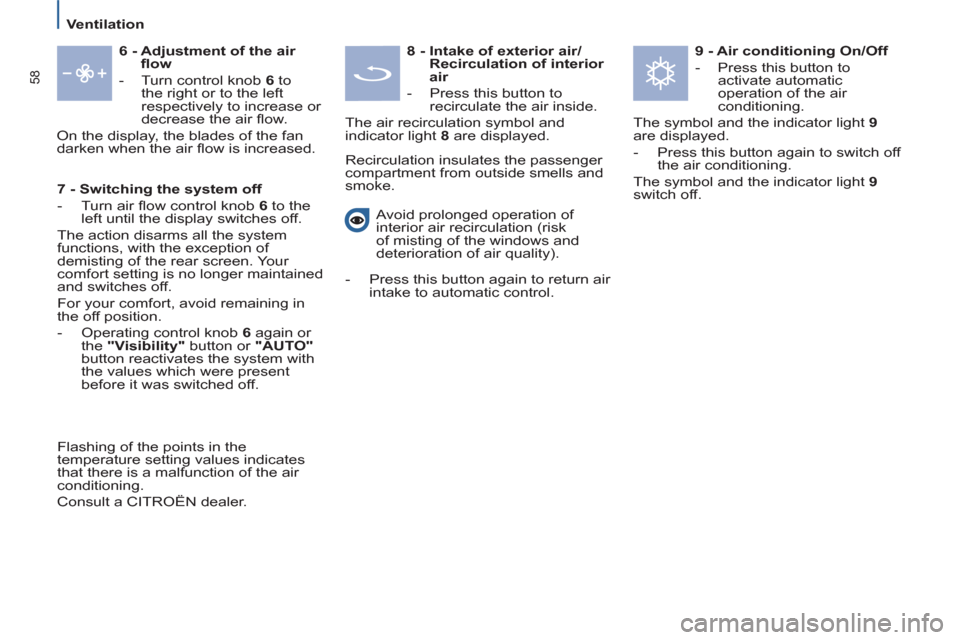
6 - Adjustment of the air
fl ow
- Turn control knob 6
to
the right or to the left
respectively to increase or
decrease the air fl ow.
On the display, the blades of the fan
darken when the air fl ow is increased.
8 - Intake of exterior air/
Recirculation of interior
air
- Press this button to
recirculate the air inside.
The air recirculation symbol and
indicator light 8
are displayed.
Recirculation insulates the passenger
compartment from outside smells and
smoke.
9 - Air conditioning On/Off
- Press this button to
activate automatic
operation of the air
conditioning.
The symbol and the indicator light 9
are displayed.
- Press this button again to switch off
the air conditioning.
The symbol and the indicator light 9
switch off.
Avoid prolonged operation of
interior air recirculation (risk
of misting of the windows and
deterioration of air quality).
- Press this button again to return air
intake to automatic control.
7 - Switching the system off
- Turn air fl ow control knob 6
to the
left until the display switches off.
The action disarms all the system
functions, with the exception of
demisting of the rear screen. Your
comfort setting is no longer maintained
and switches off.
For your comfort, avoid remaining in
the off position.
- Operating control knob 6
again or
the "Visibility"
button or "AUTO"
button reactivates the system with
the values which were present
before it was switched off.
Flashing of the points in the
temperature setting values indicates
that there is a malfunction of the air
conditioning.
Consult a CITROËN dealer.
Page 88 of 234
86
Driving safely
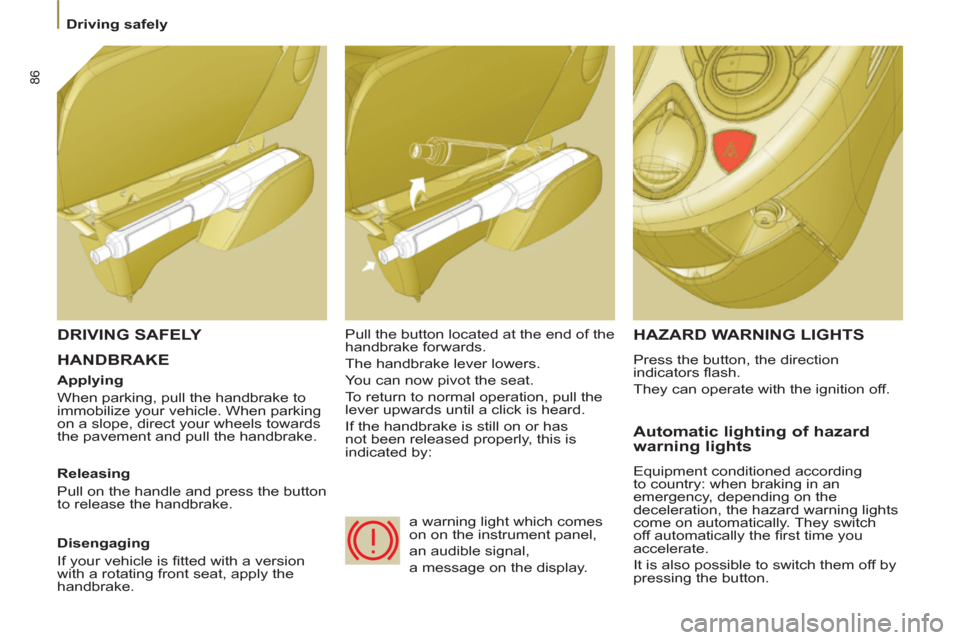
HANDBRAKE
HAZARD WARNING LIGHTS
Press the button, the direction
indicators fl ash.
They can operate with the ignition off.
Automatic lighting of hazard
warning lights
Equipment conditioned according
to country: when braking in an
emergency, depending on the
deceleration, the hazard warning lights
come on automatically. They switch
off automatically the fi rst time you
accelerate.
It is also possible to switch them off by
pressing the button.
DRIVING SAFELY
Applying
When parking, pull the handbrake to
immobilize your vehicle. When parking
on a slope, direct your wheels towards
the pavement and pull the handbrake.
Releasing
Pull on the handle and press the button
to release the handbrake. Pull the button located at the end of the
handbrake forwards.
The handbrake lever lowers.
You can now pivot the seat.
To return to normal operation, pull the
lever upwards until a click is heard.
If the handbrake is still on or has
not been released properly, this is
indicated by:
Disengaging
If your vehicle is fi tted with a version
with a rotating front seat, apply the
handbrake. a warning light which comes
on on the instrument panel,
an audible signal,
a message on the display.
Page 89 of 234
SAFETY
87
4
Parking sensors
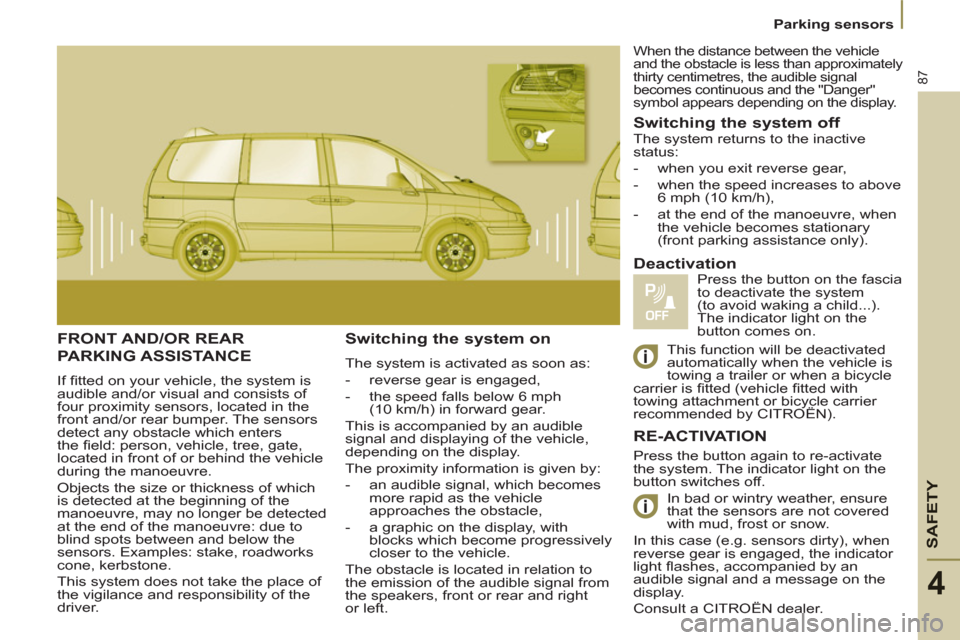
FRONT AND/OR REAR
PARKING ASSISTANCE
If fi tted on your vehicle, the system is
audible and/or visual and consists of
four proximity sensors, located in the
front and/or rear bumper. The sensors
detect any obstacle which enters
the fi eld: person, vehicle, tree, gate,
located in front of or behind the vehicle
during the manoeuvre.
Objects the size or thickness of which
is detected at the beginning of the
manoeuvre, may no longer be detected
at the end of the manoeuvre: due to
blind spots between and below the
sensors. Examples: stake, roadworks
cone, kerbstone.
This system does not take the place of
the vigilance and responsibility of the
driver.
Switching the system on
The system is activated as soon as:
- reverse gear is engaged,
- the speed falls below 6 mph
(10 km/h) in forward gear.
This is accompanied by an audible
signal and displaying of the vehicle,
depending on the display.
The proximity information is given by:
- an audible signal, which becomes
more rapid as the vehicle
approaches the obstacle,
- a graphic on the display, with
blocks which become progressively
closer to the vehicle.
The obstacle is located in relation to
the emission of the audible signal from
the speakers, front or rear and right
or left.
Switching the system off
Press the button again to re-activate
the system. The indicator light on the
button switches off.
In bad or wintry weather, ensure
that the sensors are not covered
with mud, frost or snow.
In this case (e.g. sensors dirty), when
reverse gear is engaged, the indicator
light fl ashes, accompanied by an
audible signal and a message on the
display.
Consult a CITROËN dealer.
Deactivation
Press the button on the fascia
to deactivate the system
(to avoid waking a child...).
The indicator light on the
button comes on. The system returns to the inactive
status:
- when you exit reverse gear,
- when the speed increases to above
6 mph (10 km/h),
- at the end of the manoeuvre, when
the vehicle becomes stationary
(front parking assistance only).
RE-ACTIVATION
When the distance between the vehicle
and the obstacle is less than approximately
thirty centimetres, the audible signal
becomes continuous and the "Danger"
symbol appears depending on the display.
This function will be deactivated
automatically when the vehicle is
towing a trailer or when a bicycle
carrier is fi tted (vehicle fi tted with
towing attachment or bicycle carrier
recommended by CITROËN).
Page 91 of 234
SAFETY
89
4
Driving safely
TRACTION CONTROL (ASR)
AND DYNAMIC STABILITY
CONTROL
(ESP)
Activation of the ASR and ESP
systems
When the ignition is on, the ASR and
ESP systems are always active.
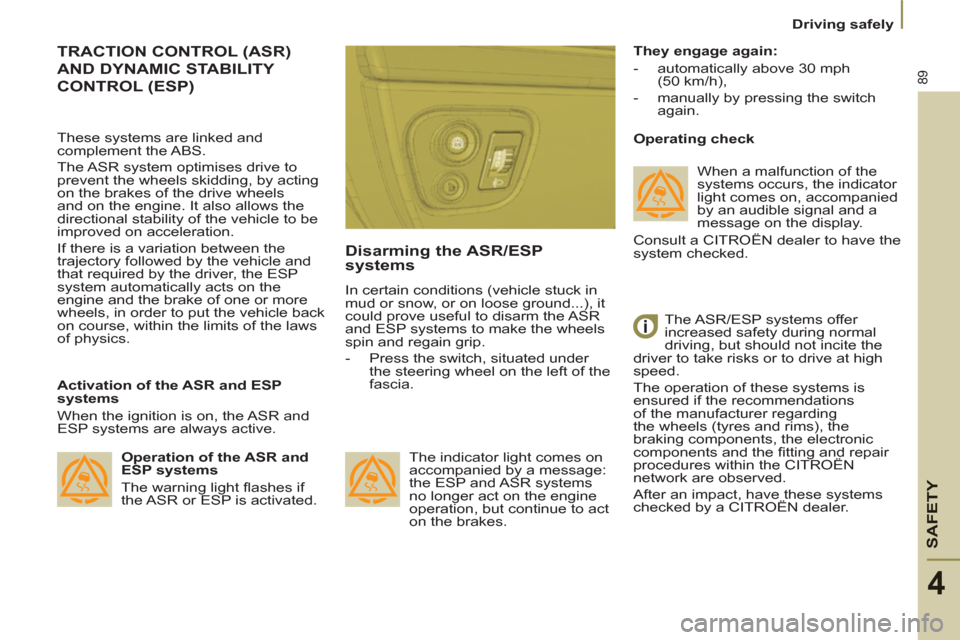
Disarming the ASR/ESP
systems
In certain conditions (vehicle stuck in
mud or snow, or on loose ground...), it
could prove useful to disarm the ASR
and ESP systems to make the wheels
spin and regain grip.
-
Press the switch, situated under
the steering wheel on the left of the
fascia.
The indicator light comes on
accompanied by a message:
the ESP and ASR systems
no longer act on the engine
operation, but continue to act
on the brakes.
Operating check
The ASR/ESP systems offer
increased safety during normal
driving, but should not incite the
driver to take risks or to drive at high
speed.
The operation of these systems is
ensured if the recommendations
of the manufacturer regarding
the wheels (tyres and rims), the
braking components, the electronic
components and the fi tting and repair
procedures within the CITROËN
network are observed.
After an impact, have these systems
checked by a CITROËN dealer .
They engage again:
-
automatically above 30 mph
(50 km/h),
- manually by pressing the switch
again.
Operation of the ASR and
ESP systems
The warning light fl ashes if
the ASR or ESP is activated.
These systems are linked and
complement the ABS.
The ASR system optimises drive to
prevent the wheels skidding, by acting
on the brakes of the drive wheels
and on the engine. It also allows the
directional stability of the vehicle to be
improved on acceleration.
If there is a variation between the
trajectory followed by the vehicle and
that required by the driver, the ESP
system automatically acts on the
engine and the brake of one or more
wheels, in order to put the vehicle back
on course, within the limits of the laws
of physics. When a malfunction of the
systems occurs, the indicator
light comes on, accompanied
by an audible signal and a
message on the display.
Consult a CITROËN dealer to have the
system checked.
Page 92 of 234

90
Driving safely
TYRE UNDER-INFLATION
DETECTION
Sensors check the tyre pressure during
driving, and trigger a warning in the
event of a malfunction (speed greater
than approx.15 mph [25 km/h]) or
puncture.
An outline representing one or more
wheels fl ashing indicates the location
of the wheel or wheels concerned.
Flat tyre
The SERVICE warning light
comes on, accompanied
by the message "Tyre(s)
defl ated"
, an outline on the display,
and an audible signal.
Check the tyre pressure as soon as
possible. If the damaged tyre is temporarily
stored in the boot, it will again emit
this message to remind you of the
necessity of having it repaired. This will
prevent another warning of the same
type being displayed.
Sensor(s) not detected
The SERVICE warning light
comes on, accompanied
by the message "X tyre
pressure sensor(s) missing"
, an
outline on the display and an audible
signal.
Under-infl ation detection is absent
from one (or several) tyre(s). Consult a
CITROËN dealer to replace the faulty
sensor(s). This message is also displayed
when one of the tyres is away
from the vehicle (being repaired)
or when a wheel without a sensor is
fi tted.
All repairs and changing of
tyres on a wheel fi tted with this
system must be carried out by a
CITROËN dealer.
The tyre under-infl ation detection
system is a driving aid which does
not take the place of
the
vigilance or
the responsibility of the driver.
This system does not remove the
need to have the tyre pressure
checked regularly (including the spare
wheel), to ensure that the dynamic
performance of the vehicle remains at
its best and to avoid premature wear
of the tyres, in particular in the case
of arduous driving (heavy load, high
speed).
The system may temporarily be
disturbed by radio broadcasts on a
frequency close to it.
Puncture
The STOP warning light
comes on, accompanied
by the message
"Punctured tyre(s)"
, an outline on the
display and an audible signal.
Stop immediately, avoiding any sudden
movement of the steering wheel and
the brakes.
Change the damaged (punctured or
very defl ated) tyre, and have the tyre
pressure checked as soon as possible.
Refer to the "Changing a wheel"
section of chapter 7.
Page 93 of 234
SAFETY
91
Seat belts
4
FRONT AND REAR SIDE
SEAT BELTS
The front seats and the rear side seats
of row 2 are fi tted with pre-tensioners
and force limiters. The lap strap must be positioned as
low as possible on the pelvis. The
chest strap must pass over the hollow
of the shoulder.
Check that the seat belt is fastened
correctly by pulling the strap. The force-limiting device reduces the
pressure of the seat belt against the
chest of the occupant, so increasing
his protection.
A bag placed on the front
passenger seat or a pet sitting on
this seat may trigger the lighting of
this warning light.
SEAT BELTS
Front seat belt warning light
If the driver and/or front
passenger has/have not
fastened his/their seat belt, this
warning light comes on.
Then, at a speed in excess of
approximately 15 mph (25 km/h), it fl ashes
accompanied by an audible signal of
increasing volume (for approximately
90 seconds) and a message on the display.
Row 2 rear side seat belts
For your comfort, if you are not using
the seat belt, slide the seat belt loop to
the upper stop to prevent the tongue
from vibrating.
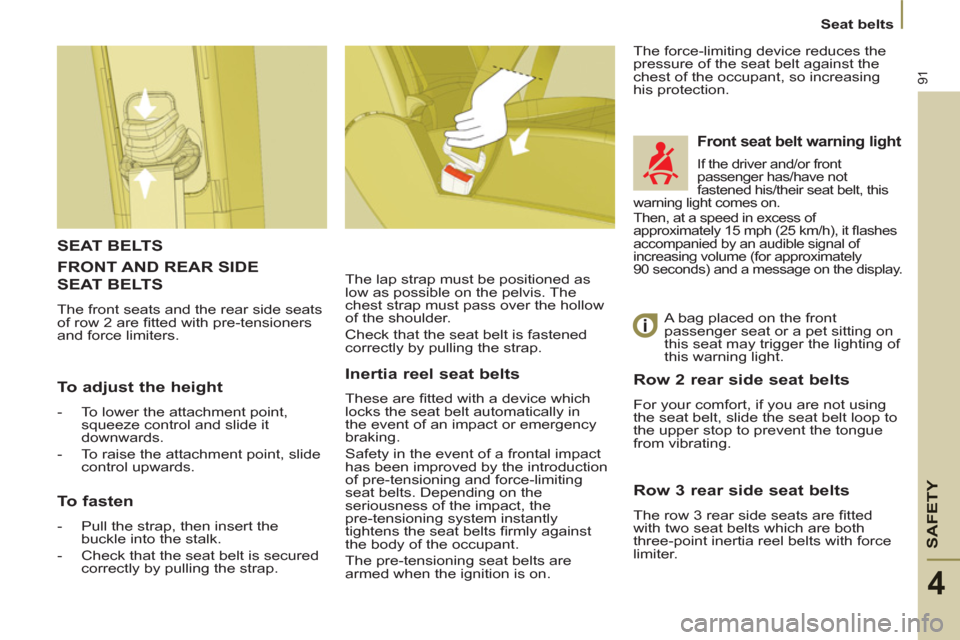
To adjust the height
-
To lower the attachment point,
squeeze control and slide it
downwards.
- To raise the attachment point, slide
control upwards.
To fasten
-
Pull the strap, then insert the
buckle into the stalk.
- Check that the seat belt is secured
correctly by pulling the strap.
Inertia reel seat belts
These are fi tted with a device which
locks the seat belt automatically in
the event of an impact or emergency
braking.
Safety in the event of a frontal impact
has been improved by the introduction
of pre-tensioning and force-limiting
seat belts. Depending on the
seriousness of the impact, the
pre-tensioning system instantly
tightens the seat belts fi rmly against
the body of the occupant.
The pre-tensioning seat belts are
armed when the ignition is on.
Row 3 rear side seat belts
The row 3 rear side seats are fi tted
with two seat belts which are both
three-point inertia reel belts with force
limiter.