display Citroen C8 2013 1.G Workshop Manual
[x] Cancel search | Manufacturer: CITROEN, Model Year: 2013, Model line: C8, Model: Citroen C8 2013 1.GPages: 234, PDF Size: 8.86 MB
Page 156 of 234
9.16
05NAVIGATION - GUIDANCE
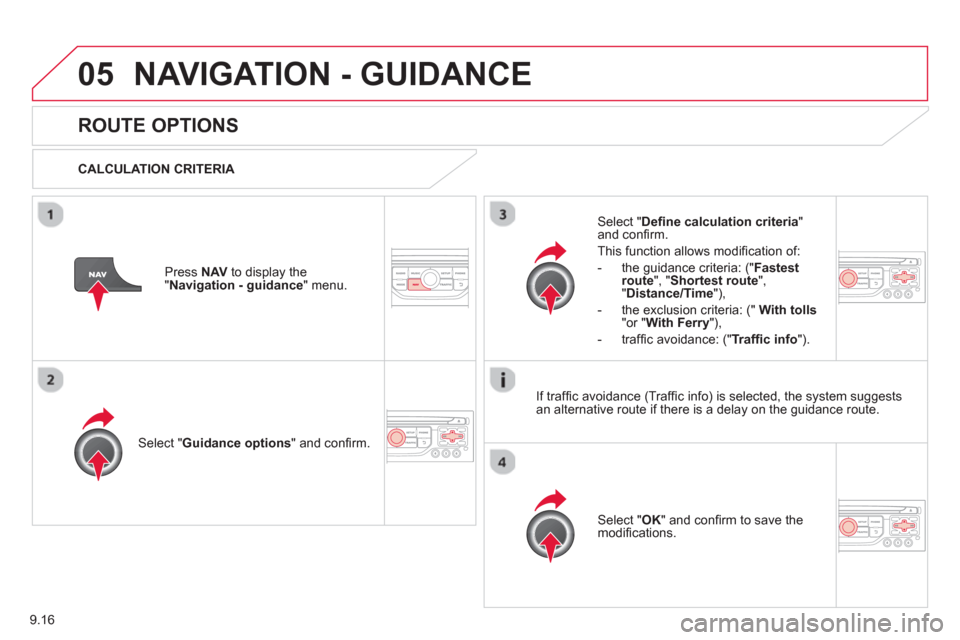
ROUTE OPTIONS
CALCULATION CRITERIA
Select " Guidance options
" and confi rm.
Select " OK
" and confi rm to save themodifi cations.
Select " Defi ne calculation criteria"and confi rm.
Thi
s function allows modifi cation of:
- the
guidance criteria: (" Fastest
route", " Shortest route", "Distance/Time "),
- the exclusion criteria:
(" With tolls"or "With Ferry"),
- traffi c avoidance:
(" Traffi c info
").
Press NAV
to display the"Navigation - guidance" menu.
I
f traffi c avoidance (Traffi c info) is selected, the system suggests
an alternative route if there is a delay on the guidance route.
Page 157 of 234
9.17
05NAVIGATION - GUIDANCE
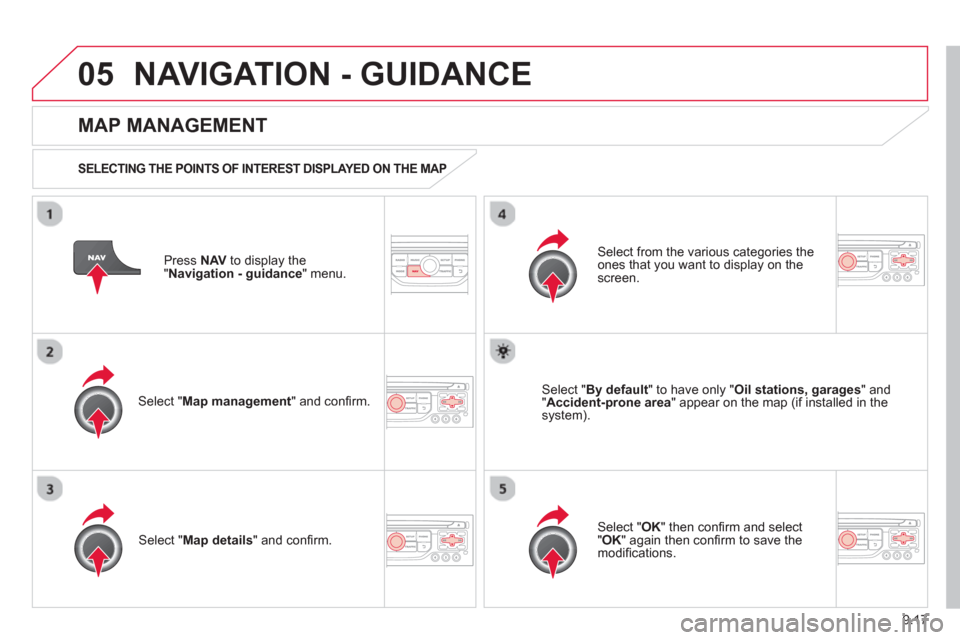
Press NAV
to display the
"Navigation - guidance" menu.
MAP MANAGEMENT
SELECTING THE POINTS OF INTEREST DISPLAYED ON THE MAP
Select " Map management
" and confi rm.
Select from the various categories the
ones that you want to display on thescreen.
Select "Map details" and confi rm.
Select " By default" to have only "Oil stations, garages" and"Accident-prone area
" appear on the map (if installed in the
system).
Select " OK
" then confi rm and select "OK" again then confi rm to save the
modifi cations.
Page 158 of 234
9.18
05NAVIGATION - GUIDANCE
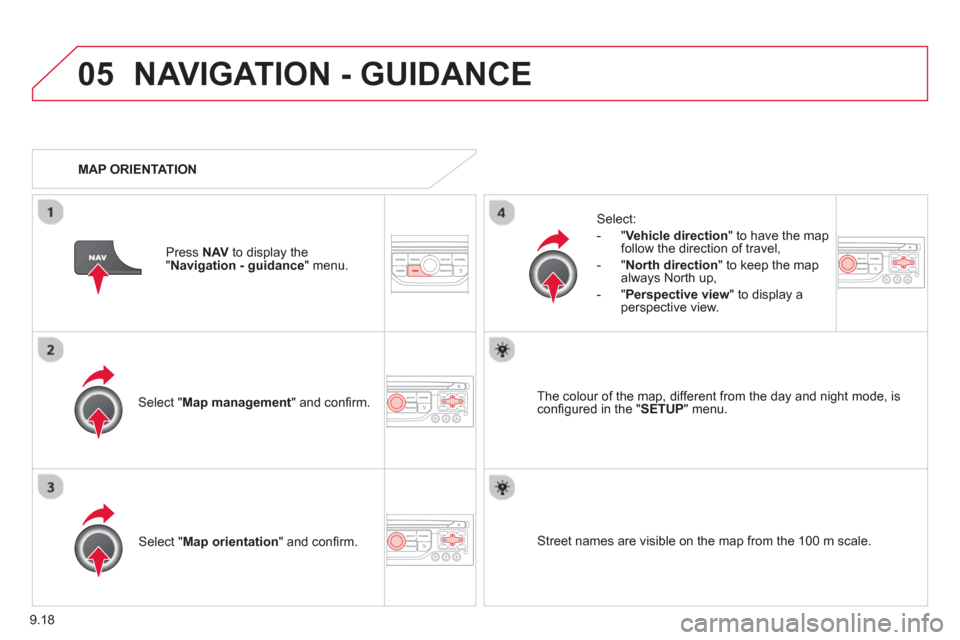
Select " Map management " and confi rm.
Select:
-
"Vehicle direction" to have the map follow the direction of travel,
- "North direction" to keep the map
alwa
ys North up,
-"Perspective view
" to displa
y aperspective view.
Select "Map orientation
" and confi rm. The colour o
f the map, different from the day and night mode, is confi gured in the " SETUP" menu.
MAP ORIENTATION
Pr
ess NAV
to display the
" Navigation - guidance" menu.
Street names are visible on the map from the 100 m scale.
Page 159 of 234
9.19
05
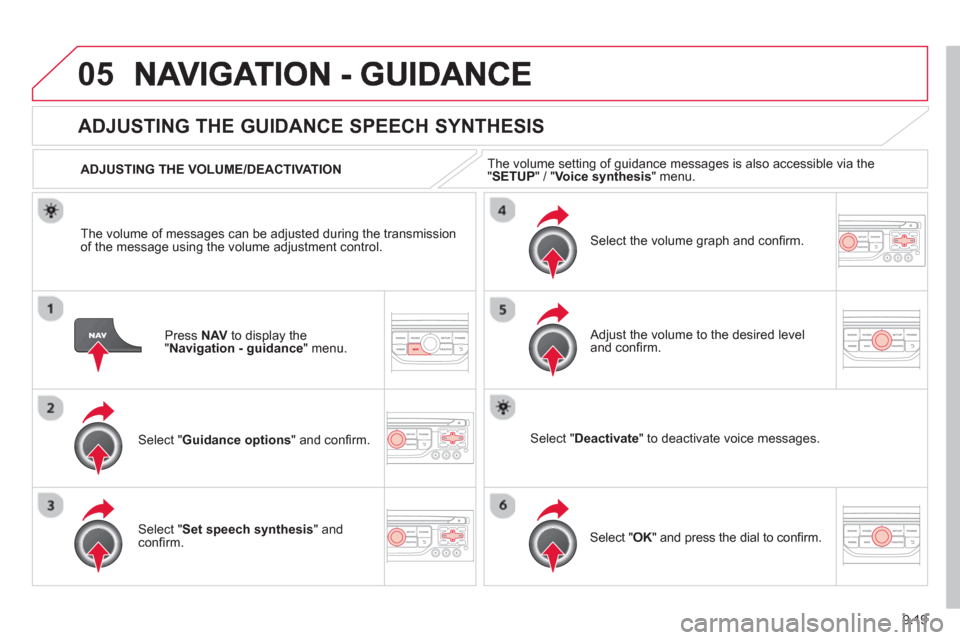
Press NAV to display the"Navigation - guidance" menu.
ADJUSTING THE GUIDANCE SPEECH SYNTHESIS
Select " Guidance options
" and confi rm.
ADJUSTING THE VOLUME/DEACTIVATION
Select " Set speech synthesis" andconfi rm.
Select the volume graph and confi rm.
Select "Deactivate " to deactivate voice messages.
Select " OK
" and press the dial to confi rm.K
Adjust the volume to the desired level and confi rm.
The volume o
f messages can be adjusted during the transmissionof the message using the volume adjustment control.The volume settin
g of guidance messages is also accessible via the "SETUP" / " Voice synthesis " menu.
Page 160 of 234
9.20
05NAVIGATION - GUIDANCE
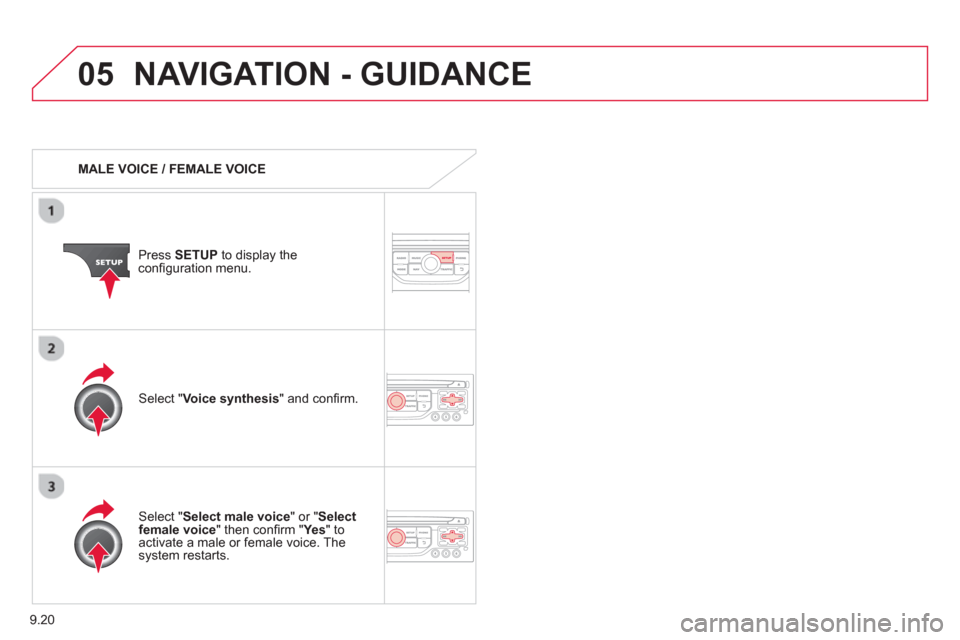
MALE VOICE / FEMALE VOICE
Press SETUP
to display theconfi guration menu.
Select "Select male voice
" or "Selectfemale voice" then confi rm " Ye s
" to activate a male or female voice. Thesystem restarts.
Select "Voice synthesis
" and confi rm.
Page 162 of 234
9.22
06TRAFFIC INFORMATION
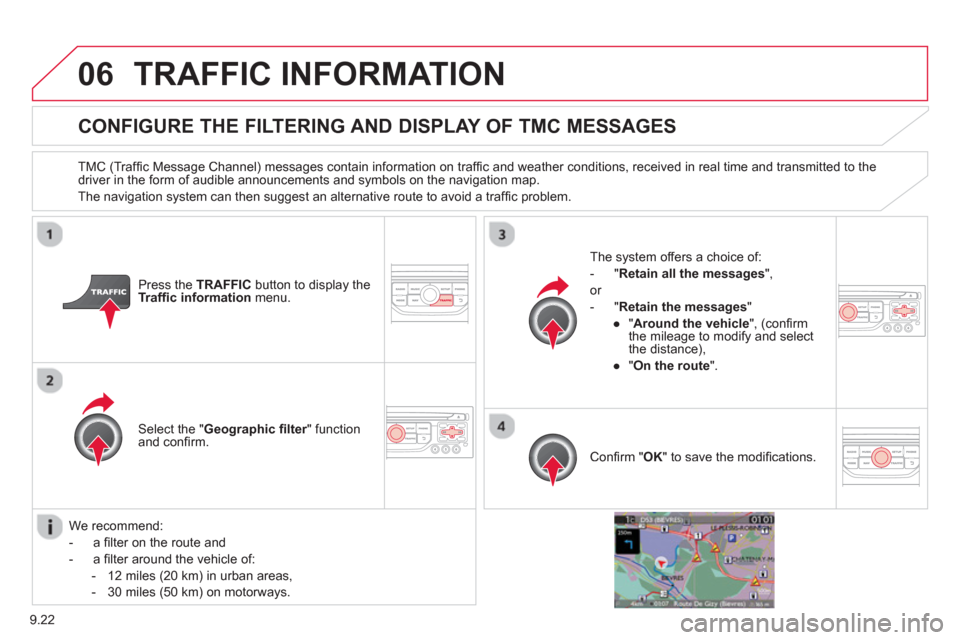
CONFIGURE THE FILTERING AND DISPLAY OF TMC MESSAGES
TMC (Traffi c Message Channel) messages contain information on traffi c and weather conditions, received in real time and transmitted to the
driver in the form of audible announcements and symbols on the navigation map.
The navi
gation system can then suggest an alternative route to avoid a traffi c problem.
Pr
ess the TRAFFICbutton to display the Traffi c informationmenu.
Select the "Geographic fi lter" function rand confi rm. The s
ystem offers a choice of:
- " Retain all the messa
ges",
or
-"Retain the messa
ges"
●
"Around the vehicle ", (confi rm
the mileage to modify and select
the distance),
●
" On the rout
e".
Confi rm " OK
" to save the modifi cations.
We recommend:
-
a fi lter on the route and
-
a fi lter around the vehicle of:
- 12 miles
(20 km) in urban areas,
- 30 miles
(50 km) on motorways.
Page 163 of 234

9.23
06TRAFFIC INFORMATION
PRINCIPAL TMC SYMBOLS
Red and yellow triangle: traffi c information, for example:
Black and blue trian
gle: general information, for example:
RECEIVING TA MESSAGES
The TA (Traffi c Announcement) function gives priority to TA alert messages. To operate, this function needs good reception of a radio station transmitting this type of message. When a traffi c report
is transmitted, the current audio source (Radio, CD, USB, ...) isinterrupted automatically to play the TA message. Normal playbackof the audio source resumes at the end of the transmission of themessage.
Pr
ess RADIO
to display the "FM / AMband " menu.
Select " Guidance options
" then confi rm.
A
ctivate or deactivate " TA
" then confi rm.
The volume settin
g for TA messages can be adjusted only during the
transmission of this type of alert.
Activate or deactivate the function at any time by pressing the button.
Durin
g a message, press the button to interrupt it.
Page 165 of 234
9.25
07 USING THE TELEPHONE
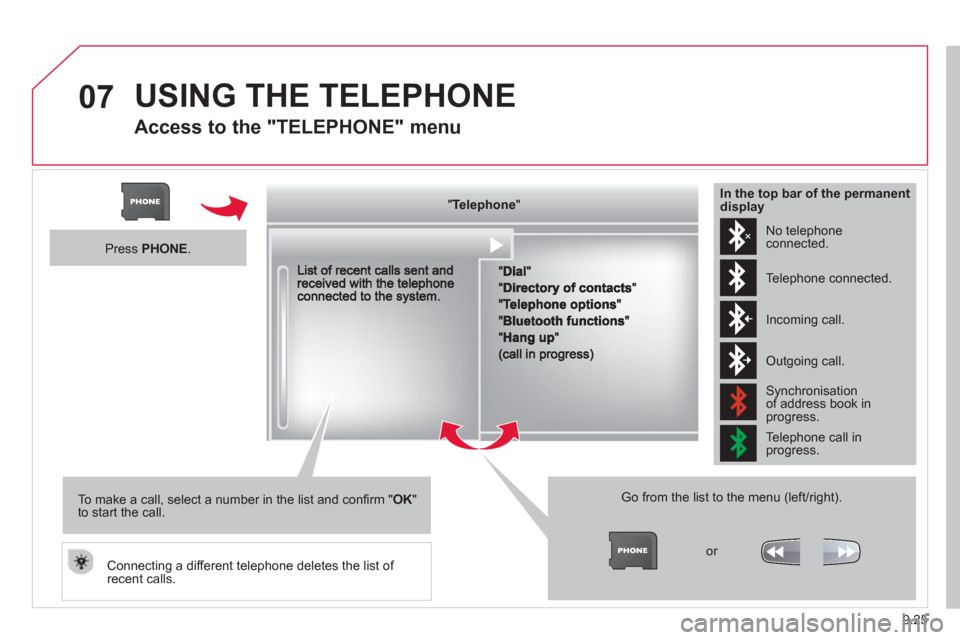
Access to the "TELEPHONE" menu
"""""""ppppeepoeTelephoneTelephoneTelephoneTelephoneTelephoneTelephoneTelephoneTelephoneTelephoneTelephoneTelephoneTelephoneTelephoneTelephoneTl hTl hTl hTl h"""""""
Go from the list to the menu (left/right).
or
Press PHONE .
To make a call, select a number in the list and confi rm "OK"to start the call.
Connecting a different telephone deletes the list of recent calls.
No telephoneconnected.
Telephone connected.
Incoming call.
Outgoing call.
Synchronisation of address book in progress.
Telephone call in progress.
In the top bar of the permanentdisplay
Page 166 of 234
9.26
07
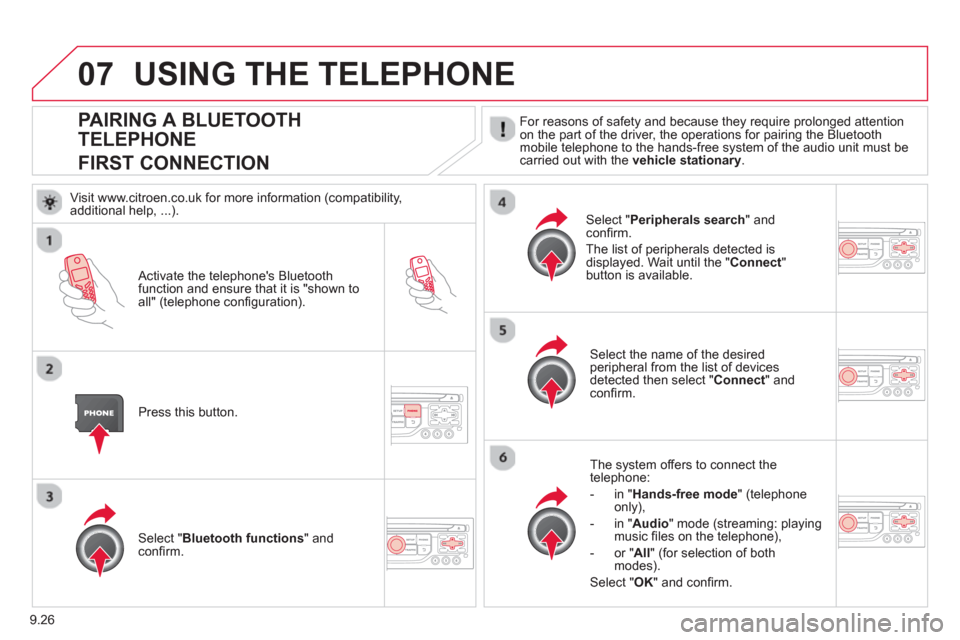
PAIRING A BLUETOOTH
TELEPHONE
FIRST CONNECTION
For reasons of safety and because they require prolonged attention
on the part of the driver, the operations for pairing the Bluetoothmobile telephone to the hands-free system of the audio unit must be carried out with the vehicle stationary.
Activate the telephone's Bluetoothfunction and ensure that it is "shown to all" (telephone confi guration).
Pr
ess this button.
Select the name of the desired
peripheral from the list of devices detected then select "Connect
" and confi rm.
The s
ystem offers to connect the
telephone:
-
in"Hands-free mode" (telephoneonly),
-
in "Audio" mode (streaming: playingmusic fi les on the telephone),
-
or "All
" (for selection of both
modes).
Select " OK
" and confi rm.
Select " Bluetooth functions " and confi rm.
Select "Peripherals search" andconfi rm.
The list of peripherals detected is
displayed. Wait until the " Connect"button is available.
USING THE TELEPHONE
Visit www.citroen.co.uk for more information (compatibility,
additional help, ...).
Page 168 of 234
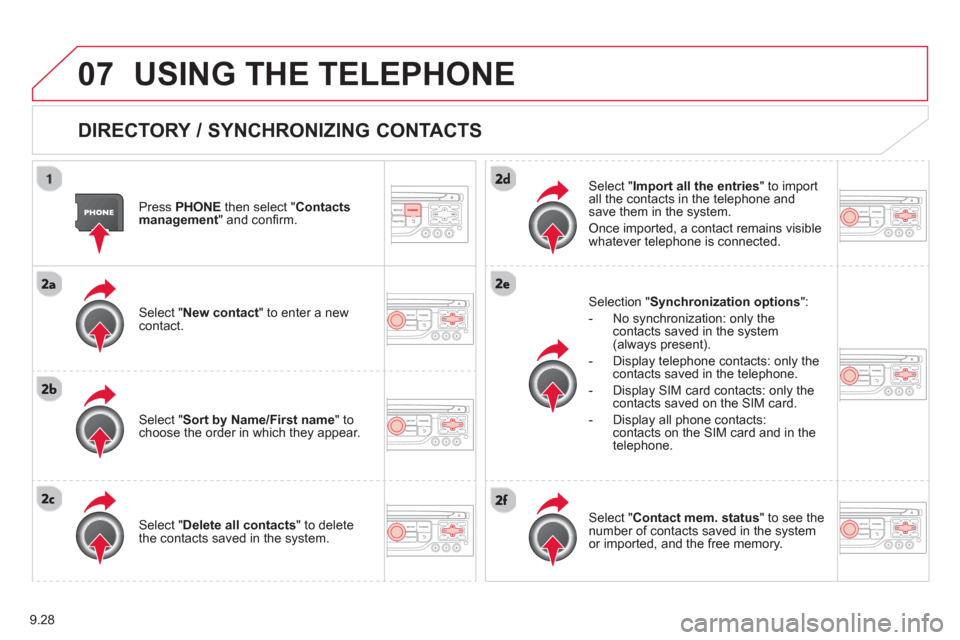
9.28
07USING THE TELEPHONE
DIRECTORY / SYNCHRONIZING CONTACTS
Press PHONE
then select "
Contacts
management " and confi rm.
Select "New contact
" to enter a new contact.
Select "Sort by Name/First name" tochoose the order in which they appear.
Select "Delete all contacts" to delete
the contacts saved in the system.
Selection "Synchronization options":
- No synchronization: only the contacts saved in the system (always present).
- Display telephone contacts: only the
contacts saved in the telephone.
- Displa
y SIM card contacts: only thecontacts saved on the SIM card.
- Displa
y all phone contacts: contacts on the SIM card and in the
telephone.
Select "Import all the entries" to import
all the contacts in the telephone and
save them in the system.
Once imported, a contact remains visible
whatever telephone is connected.
Select "Contact mem. status" to see thenumber of contacts saved in the systemor imported, and the free memory.