warning Citroen C8 2013 1.G Owner's Guide
[x] Cancel search | Manufacturer: CITROEN, Model Year: 2013, Model line: C8, Model: Citroen C8 2013 1.GPages: 234, PDF Size: 8.86 MB
Page 116 of 234
11 4
Levels
Cooling system
Only use the fl uid recommended by the
manufacturer.
Otherwise, you risk seriously damaging
your engine.
When the engine is warm, the
temperature of the coolant is controlled
by the engine fan. As this fan can
operate with the ignition key removed
and because the cooling system is
pressurised, wait for at least one hour
after the engine has stopped before
carrying out any work.
Slacken the cap by 1/4 of a turn to
release the pressure to prevent any
risk of scalding. When the pressure
has dropped, remove the cap and top
up the level with coolant.
If fl uid has to be added frequently,
this indicates a failure which must be
checked by a CITROËN dealer as
soon as possible.
Power steering fluid level
The vehicle must be parked on level
ground with the engine cold. Unscrew
the cap integrated with the gauge and
check the level which must be between
the MIN and MAX marks. During regeneration of the particle
emission fi lter, relay noise may be
heard under the fascia.
If the message is still displayed and
the service warning light remains on,
contact a CITROËN dealer.
Diesel additive level (Diesel with
particle emission filter)
When this occurs with the engine running,
this is due to the start of saturation of
the particle emission fi lter (exceptionally
prolonged urban driving conditions: low
speed, long traffi c jams, ...).
In order to regenerate the fi lter, you are
advised to drive at a speed of more than
40 mph (60 km/h) as soon as possible,
when traffi c conditions permit, for at
least fi ve minutes (until the message
disappears and the service warning light
is switched off).
Topping up
The level must be between the MIN
and MAX marks on the expansion
bottle. If more than 1 litre of fl uid is
required to top up the level, have the
system checked by a CITROËN dealer.
Windscreen wash and headlamp
wash level
For best quality cleaning and for your
safety, we would advise that you use
products of the CITROËN range.
To avoid ice forming, do not use water.
Topping up
It is imperative that this additive is
topped up by a CITROËN dealer
without delay.
Used oil
Avoid prolonged contact of used oil
with the skin.
Brake fl uid is harmful to health and
very corrosive.
Do not dispose of used oil, brake
fl uid or coolant into drains or onto
the ground but into the containers
dedicated to this use at CITROËN
dealerships. The minimum level of this
additive is indicated by
lighting of the service warning
light, accompanied by an
audible signal and a message
on the display.
Page 119 of 234
11 7
QUICK HELP
7
Changing a wheel
CHANGING A WHEEL
1. PARKING THE VEHICLE
- If possible, park the vehicle on
level, stable and non-slippery
ground.
- It is imperative that you ensure
that the occupants get out of the
vehicle and wait in a safe location.
Depending on the country of
sale and for your own safety, use
the safety jackets and warning
triangles.
- Apply the handbrake, switch off the
ignition and engage fi rst or reverse
gear (position P
for the automatic
gearbox).
- If possible, place a chock under the
wheel diagonally opposite the one
to be changed.
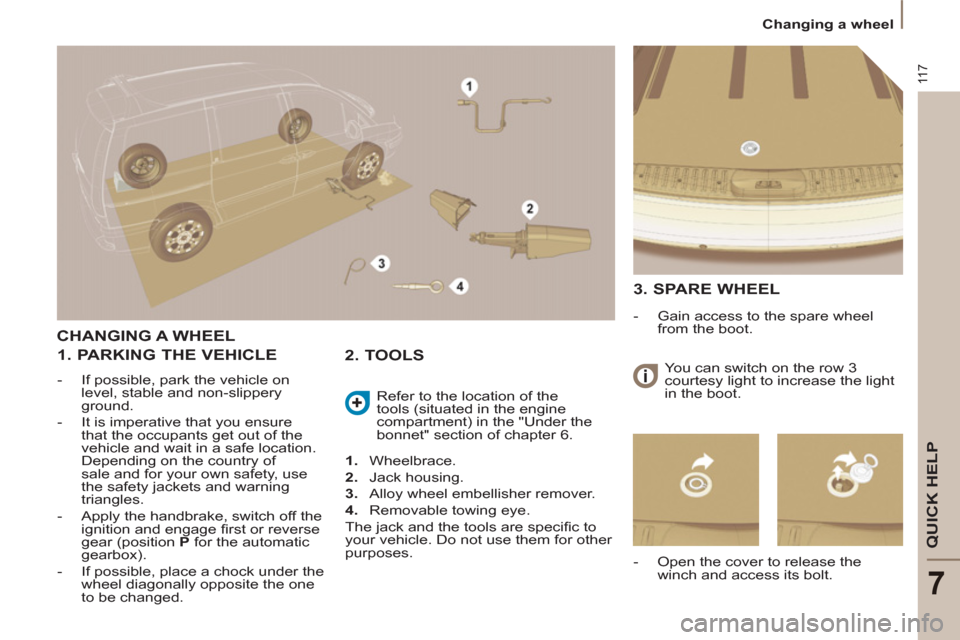
1.
Wheelbrace.
2.
Jack housing.
3.
Alloy wheel embellisher remover.
4.
Removable towing eye.
The jack and the tools are specifi c to
your vehicle. Do not use them for other
purposes. Refer to the location of the
tools (situated in the engine
compartment) in the "Under the
bonnet" section of chapter 6.
2. TOOLS
3. SPARE WHEEL
- Gain access to the spare wheel
from the boot.
- Open the cover to release the
winch and access its bolt. You can switch on the row 3
courtesy light to increase the light
in the boot.
Page 123 of 234
121
QUICK HELP
7
Changing a bulb
CHANGING A BULB
Handle the bulbs with a dry cloth.
Make access easier on the right-
hand side by removing the wash-wipe
pipe and the fuse box cover.
High pressure washing: when using
this type of washing on stubborn dirt,
do not persist on the headlamps, the
lights and their surrounds to avoid
damaging their coating and their seal.
2 - Main beam headlamps
H7-55 W or xenon bulb.
- Turn the protective cover
corresponding to the faulty bulb
a quarter of a turn to the left and
remove it.
- Disconnect the connector.
- Press the end of the securing clip
to free it. Change the bulb.
When fi tting the new bulb, ensure that
the direction notches are positioned
correctly and the securing clip is fi xed
properly.
- Reconnect the connector.
- Refi t the protective cover, then turn
it a quarter of a turn to the right.
3 - Fog lamps
H1-55 W.
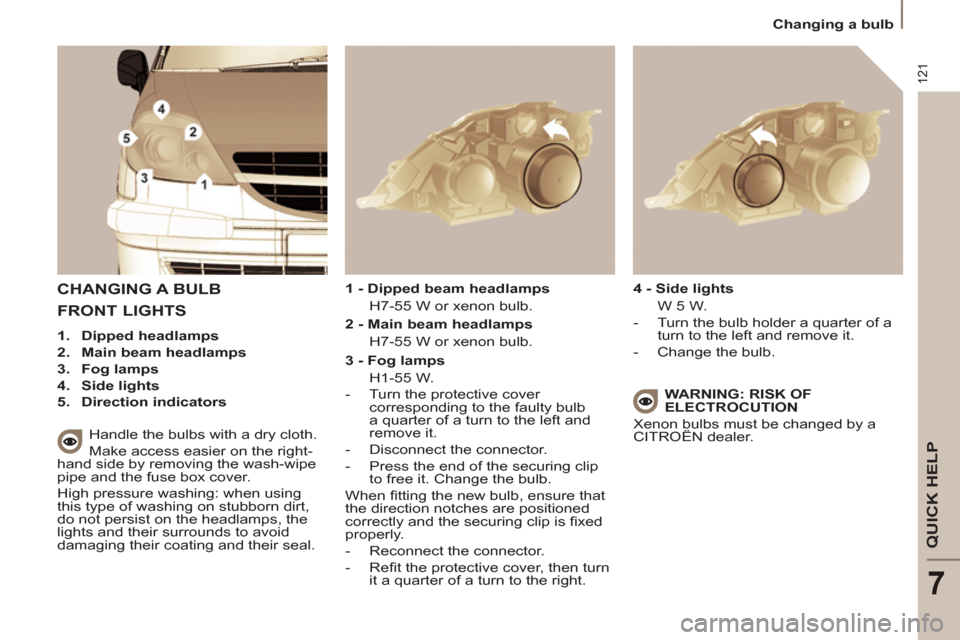
FRONT LIGHTS
1.
Dipped headlamps
2.
Main beam headlamps
3.
Fog lamps
4.
Side lights
5.
Direction indicators
1 - Dipped beam headlamps
H7-55 W or xenon bulb.
4 - Side lights
W 5 W.
- Turn the bulb holder a quarter of a
turn to the left and remove it.
- Change the bulb.
WARNING: RISK OF
ELECTROCUTION
Xenon bulbs must be changed by a
CITROËN dealer.
Page 127 of 234
125
QUICK HELP
7
Changing a fuse
INSTRUMENT PANEL FUSES
- Open the lower glove box on the right-hand side.
- Pull the handle to open the cover and access the fuses.
N°
Rating
(Amps)
Functions
1
15
Rear wiper.
2
-
Not used.
3
5
Airbag control unit.
4
10
Steering wheel angle sensor, Diagnostic socket, ESP sensor, Manual air conditioning, Clutch
switch, Headlamp beam height, Particle emission fi lter pump, Electrochromatic interior mirror.
5
30
Electric mirrors, Passenger's electric window motor, Sunroof row 1.
6
30
Front electric windows supply.
7
5
Courtesy lamps, Glove box lamp, Courtesy mirror lamps, Entertainment screen lamps row 2.
8
20
Multifunction display, Anti-theft alarm siren, Audio equipment, Compact disc changer, Audio/
telephone, Diesel additive control unit, Tyre under-infl ation detection control unit, Sliding doors
module control unit.
9
30
Cigarette lighter.
10
15
Steering wheel switching, Trailer fusebox.
11
15
Diagnostic socket, Ignition switch, Automatic gearbox (4-speed).
12
15
Driver's seat memory unit, Passenger's electric seat, Airbag control unit, Parking sensors control
unit, Sliding side door buttons, Hands-free kit, Automatic gearbox (6-speed).
13
5
Engine fuse box, Trailer fusebox.
14
15
Rain sensor, Automatic air conditioning, Instrument panel, Sunroofs, Odometer warning lamps
unit, Audio-telematics control.
15
30
Passenger's lock locking.
16
30
Locking/unlocking of the doors.
17
40
Heated rear screen.
Page 154 of 234
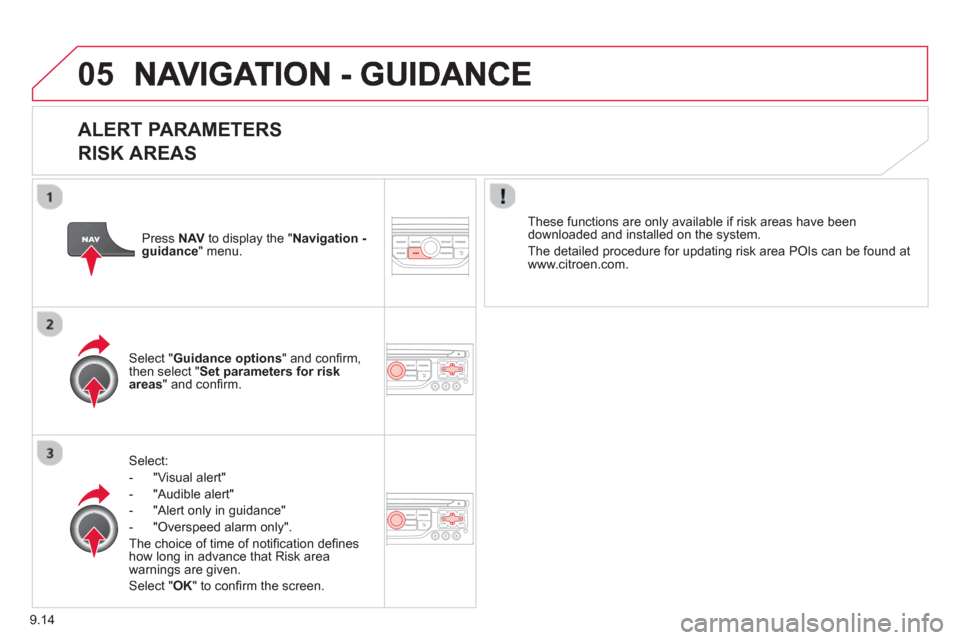
9.14
05
ALERT PARAMETERS
RISK AREAS
Select:
- "Vi
sual alert"
- "A
udible alert"
-
"Alert only in guidance"
- "
Overspeed alarm only".
Th
e choice of time of notifi cation defi nes how long in advance that Risk area
warnings are given.
Select " OK
" to confi rm the screen.
Select " Guidance options
" and confi rm,
then select "Set parameters for riskareas
" and confi rm.
These
functions are only available if risk areas have been
downloaded and installed on the system.
The detailed procedure for updatin
g risk area POIs can be found at
www.citroen.com.
Press NAVto display the " Navigation -guidance" menu.
Page 194 of 234
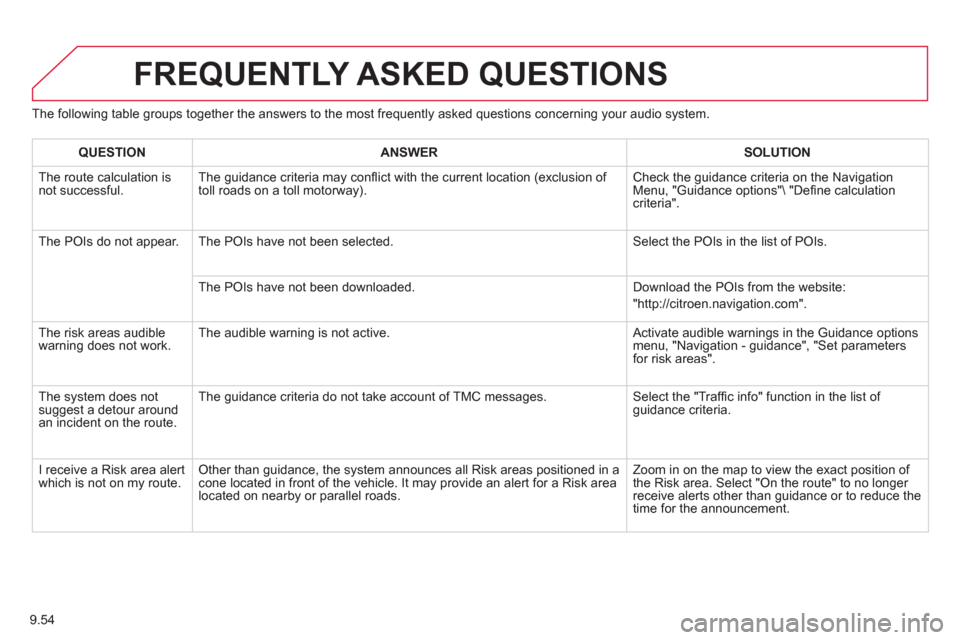
9.54
The following table groups together the answers to the most frequently asked questions concerning your audio system.
FREQUENTLY ASKED QUESTIONS
QUESTIONANSWER SOLUTION
The route calculation is not successful. The guidance criteria may confl ict with the current location (exclusion of
toll roads on a toll motorway). Check the guidance criteria on the Navigation Menu, "Guidance options" "Defi ne calculation criteria".
The P
OIs do not appear. The POIs have not been selected. Select the POIs in the list of POIs.
Th
e POIs have not been downloaded. Download the POIs from the website:
"http://citroen.navigation.com".
The risk areas audiblewarning does not work. The audible warning is not active. Activate audible warnings in the Guidance options menu, "Navigation - guidance", "Set parameters for risk areas".
The s
ystem does notsuggest a detour around an incident on the route. The
guidance criteria do not take account of TMC messages. Select the "Traffi c info" function in the list of guidance criteria.
I receive a Risk area alert
which is not on my route. Other than guidance, the system announces all Risk areas positioned in a cone located in front of the vehicle. It may provide an alert for a Risk area located on nearby or parallel roads. Zoom in on the map to view the exact position o
f
the Risk area. Select "On the route" to no longer receive alerts other than guidance or to reduce the
time for the announcement.
Page 225 of 234
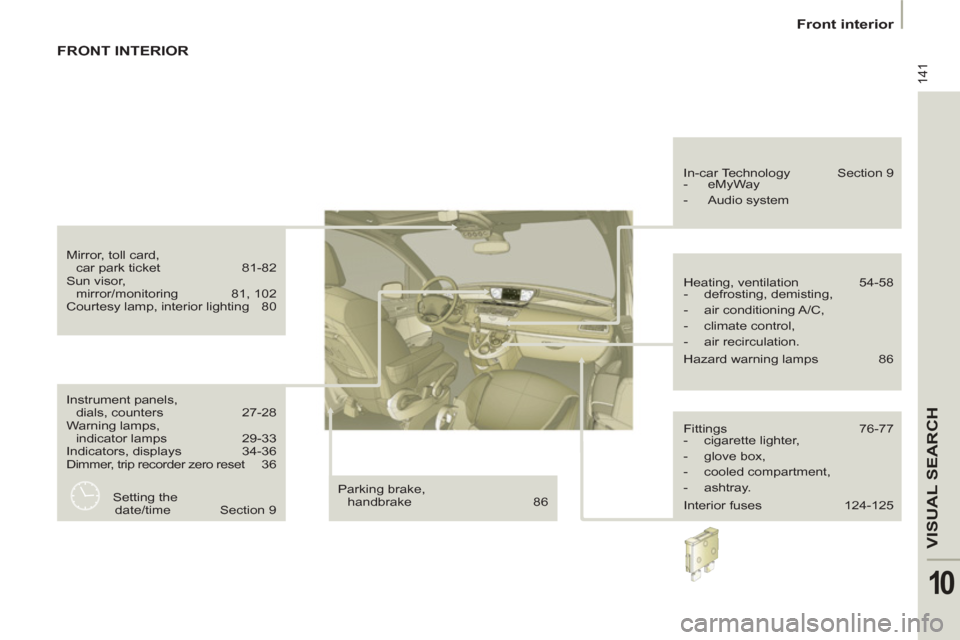
141
VISUAL SEARC
H
10
Front interior
Instrument panels,
dials, counters 27-28
Warning lamps,
indicator lamps 29-33
Indicators, displays 34-36
Dimmer, trip recorder zero reset 36
Parking brake,
handbrake 86 Heating, ventilation 54-58
- defrosting, demisting,
- air conditioning A/C,
- climate control,
- air recirculation.
Hazard warning lamps 86 In-car Technology Section 9
- eMyWay
- Audio system
Fittings 76-77
- cigarette lighter,
- glove box,
- cooled compartment,
- ashtray.
Interior fuses 124-125
Mirror, toll card,
car park ticket 81-82
Sun visor,
mirror/monitoring 81, 102
Courtesy lamp, interior lighting 80
Setting the
date/time Section 9
FRONT INTERIOR