Speed limit CITROEN DISPATCH SPACETOURER 2020 Handbook (in English)
[x] Cancel search | Manufacturer: CITROEN, Model Year: 2020, Model line: DISPATCH SPACETOURER, Model: CITROEN DISPATCH SPACETOURER 2020Pages: 324, PDF Size: 10.89 MB
Page 5 of 324
3
.
.
Driving recommendations 138
Starting/switching off the engine 1 40
Parking brake
1
44
Hill start assist
1
44
5-speed manual gearbox
1
45
6-speed manual gearbox
1
45
Gear efficiency indicator
1
46
Automatic gearbox
1
46
Electronic gearbox
1
50
Stop & Start
1
52
Tyre under-inflation detection
1
54
Driving and manoeuvring aids -
General recommendations
1
56
Head-up display
1
58
Memorising speeds
1
59
Speed Limit recognition
and recommendation
1
60
Speed limiter
1
62
Cruise control - particular
recommendations
164
Cruise control
1
65
Adaptive Cruise Control
1
67
Active Safety Brake with Distance Alert and
Intelligent emergency braking assistance
1
71
Lane departure warning system
1
74
Fatigue detection system
1
75
Blind Spot Detection
1
76
Parking sensors
1
78
Reversing camera, interior mirror
1
80
Top Rear Vision
1
80Compatibility of fuels 1
85
Refuelling 185
Diesel misfuel prevention
1
87
Snow chains
1
87
Towing device
1
88
Energy economy mode
1
89
Roof bars/Roof rack
1
89
Bonnet
19 0
Engine
191
Checking levels
1
91
Checks
19
4
AdBlue
® (BlueHDi) 1 96
Advice on care 1 99
Warning triangle
2
00
Running out of fuel (Diesel)
2
00
Tool box
2
01
Temporary puncture repair kit
2
02
Spare wheel
20
6
Changing a bulb
2
11
Changing a fuse
2
17
12
V battery
2
19
Towing
222Engine technical data and towed loads
2
24
Dimensions
228
Identification markings
2
31
Driving
Practical information
In the event of a breakdown Technical data
Alphabetical index
Access to additional videos
bit.ly/helpPSA
Audio equipment and telematics
Bluetooth audio system
CITROËN Connect Radio
CITROËN Connect Nav
.
Contents
Page 7 of 324
5
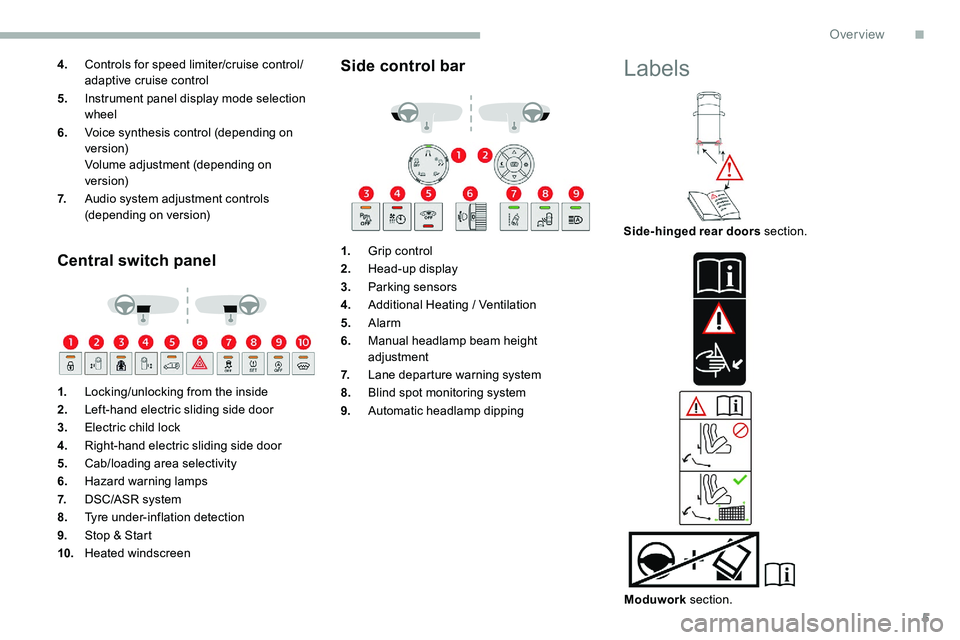
4.Controls for speed limiter/cruise control/
adaptive cruise control
5. Instrument panel display mode selection
wheel
6. Voice synthesis control (depending on
ve r s i o n)
Volume adjustment (depending on
ve r s i o n)
7. Audio system adjustment controls
(depending on version)
Central switch panel
1.Locking/unlocking from the inside
2. Left-hand electric sliding side door
3. Electric child lock
4. Right-hand electric sliding side door
5. Cab/loading area selectivity
6. Hazard warning lamps
7. DSC/ASR system
8. Tyre under-inflation detection
9. Stop & Start
10. Heated windscreen
Side control bar
1.Grip control
2. Head-up display
3. Parking sensors
4. Additional Heating
/ Ventilation
5. Alarm
6. Manual headlamp beam height
adjustment
7. Lane departure warning system
8. Blind spot monitoring system
9. Automatic headlamp dipping
Labels
Side-hinged rear doors section.
Moduwork section.
.
Over view
Page 11 of 324
9
Instrument panel
Speedometer
Analogue speedometer (mph or km/h).
Indicators with LCD text or
matrix instrument panel
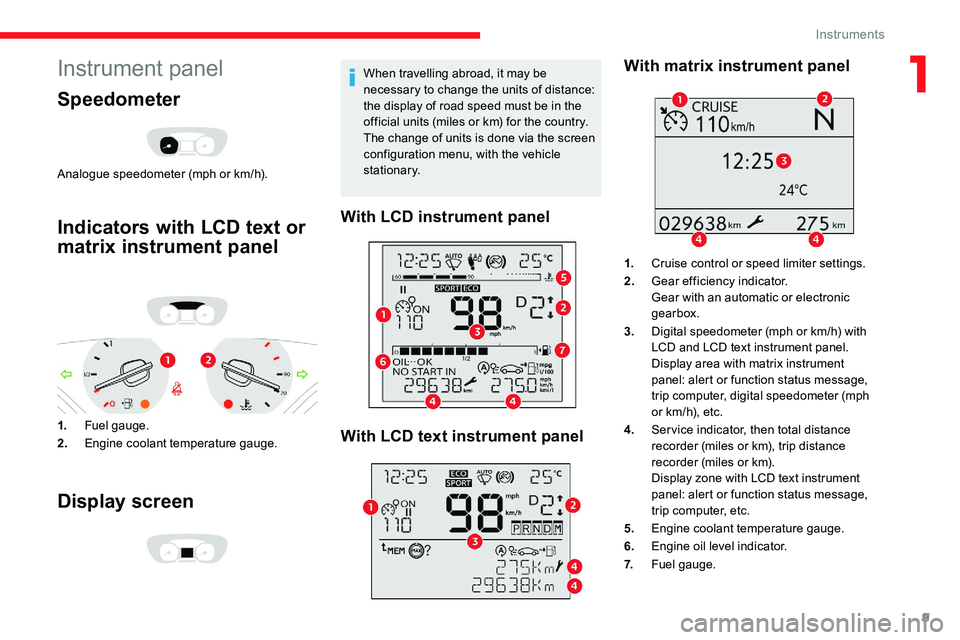
1.Fuel gauge.
2. Engine coolant temperature gauge.
Display screen
When travelling abroad, it may be
necessary to change the units of distance:
the display of road speed must be in the
official units (miles or
km) for the country.
The change of units is done via the screen
configuration menu, with the vehicle
stationary.
With LCD instrument panel
With LCD text instrument panel With matrix instrument panel
1.
Cruise control or speed limiter settings.
2. Gear efficiency indicator.
Gear with an automatic or electronic
gearbox.
3. Digital speedometer (mph or
km/h) with
LCD and LCD text instrument panel.
Display area with matrix instrument
panel: alert or function status message,
trip computer, digital speedometer (mph
or
km/h), etc.
4. Ser vice indicator, then total distance
recorder (miles or
km), trip distance
recorder (miles or
km).
Display zone with LCD text instrument
panel: alert or function status message,
trip computer, etc.
5. Engine coolant temperature gauge.
6. Engine oil level indicator.
7. Fuel gauge.
1
Instruments
Page 77 of 324

75
Never put your hand underneath the
bench seat to guide it downwards, as you
could get your fingers trapped.
Ensure there are no objects or feet
beneath the bench seat or obstructing
the anchorage system, preventing the
assembly from being correctly locked.
Do not attach anything to the cab fixing
structure.
Do not exceed the number of passengers
indicated on the registration certificate.
In the rear, the load space is intended for
carrying goods only.
It is recommended to place goods or
heavy objects as far for wards as possible
in the load space (towards the cab) and
secure them by means of straps using the
stowing rings on the floor.
The rear seat belt frames are not designed
to secure the load being carried.Interior fittings
Mats
Fitting
When fitting the mat for the first time, on the
driver's side, use only the fixings provided in
the wallet attached.
Removing/refitting
F To remove it on the driver's side, move the seat fully back and turn the fixings by a
quarter turn. F
T
o refit it, position the mat and refit the
fixings by turning them by a quarter turn.
To avoid any risk of jamming the pedals:
-
o
nly use mats which are suited to the
fixings already present in the vehicle ;
these fixings must be used,
-
n
ever fit one mat on top of another.
The use of mats not approved by
CITROËN may inter fere with access to
the pedals and hinder the operation of the
cruise control/speed limiter.
The mats approved by CITROËN have two
fixings located below the seat.
In rows 2 and 3
3
Ease of use and comfort
Page 112 of 324
110
Emergency braking assistance
(EBA)
In an emergency, this system enables you to
reach the optimum braking pressure more
quickly and therefore reduce the stopping
distance.
It is triggered in relation to the speed at which
the brake pedal is pressed. This is felt by a
reduction in the resistance of the pedal and an
increase in braking efficiency.
Anti-slip regulation (ASR)
This system optimises traction in order to
avoid wheel slip by acting on the brakes of
the driving wheels and on the engine. It also
improves the directional stability of the vehicle
on acceleration.
Dynamic stability control (DSC)
If there is a difference between the path
followed by the vehicle and that required by the
driver, this system monitors each wheel and
automatically acts on the brake of one or more
wheels and on the engine to return the vehicle
to the required path, within the limits of the laws
of physics.
Intelligent traction control
If you vehicle has this function, it features a
system to help driving on snow: intelligent
traction control.
This system detects situations of difficult
sur face grip that could make it difficult to move
off or make progress on deep fresh snow or
compacted snow.
In these situations, the intelligent traction
control limits the amount of wheel spin to
provide the best traction and trajectory control
for your vehicle.
The use of snow tyres is strongly
recommended on sur faces offering low
levels of grip.
Anti-lock braking system
(ABS) and electronic brake
force distribution (EBFD)
The fixed illumination of this warning
lamp signals that there is a fault with
the ABS. Illumination of this warning lamp,
coupled with the STOP
and ABS
warning lamps, accompanied by
the display of a message and an
audible signal, signals that there is a
fault with the electronic brake force
distribution (EBFD).
Normal operation of the ABS may make
itself felt by slight vibrations of the brake
pedal.
When braking in an emergency, press
very firmly and maintain this pressure.
When changing wheels (tyres and rims),
ensure that these are approved for your
vehicle.
After an impact, have these systems
checked by a CITROËN dealer or a
qualified workshop.
The vehicle retains conventional braking. Drive
carefully at moderate speed.
Contact a CITROËN dealer or a qualified
workshop as soon as possible. You must stop as soon as it is safe to do so.
Call a CITROËN dealer or a qualified
workshop.
Safety
Page 145 of 324

143
With Keyless Entry and Starting
F Immobilise the vehicle.
F
W
ith the remote control in the recognition
zone, press the " START/STOP" button.
The engine stops and the steering column
locks. If the vehicle is not immobilised, the
engine will not stop.
To avoid any risk of jamming the pedals:
-
o
nly use mats which are suited to the
fixings already present in the vehicle
;
these fixings must be used,
-
n
ever place one mat on top of another.
The use of mats not approved by
CITROËN may inter fere with access to
the pedals and hinder the operation of the
cruise control
/ speed limiter.
The mats approved by CITROËN have two
fixings located below the seat.
Special case with Keyless
Entry and Starting
Switching the ignition on without
starting
With the Keyless Entry and Starting
electronic key inside the vehicle,
pressing the " START/STOP " button,
without pressing any of the
pedals , allows the ignition to be
switched on.
F
P
ress this button again to switch off the
ignition and allow the vehicle to be locked.
Back-up starting
Should your vehicle not detect the electronic
key in the recognition zone, because the
remote control battery is flat, a back-up reader
is provided to the left behind the steering
wheel, to allow starting.
F
W
ith a manual gearbox , place the gear
lever in the neutral position, fully depress
the clutch pedal and keep the pedal down
until the engine starts. F
W
ith an automatic gearbox
, place the
selector in position P then fully depress the
brake pedal.
F
W
ith an electronic gearbox
, place the
selector in position N then fully depress the
brake pedal.
F
T
hen press the "
START/STOP" button.
The engine starts.
Remote control not recognised
If the remote control is no longer in the
recognition zone, a message appears in the
instrument panel when closing a door or trying
to switch off the engine.
F
T
o confirm switching off the engine, press
and hold the " START/STOP " button for
about 3
seconds, then contact a CITROËN
dealer or a qualified workshop.
Forced switch-off
In the event of an emergency only and with
the vehicle stationary, you can switch off the
engine.
F
T
o do this, press the “ S TA R T/
STOP ” button for about 3
seconds.
In this case, the steering column locks as soon
as the vehicle stops.
F
P
lace and hold the remote control against
the reader, then:
6
Driving
Page 158 of 324

156
Without audio system
F Press this button for about 3 seconds then release it, an audible signal confirms the
reinitialisation.
With audio system or touch
screen
The reinitialisation is carried out via
the vehicle configuration menu.
Malfunction
In this case, under-inflation monitoring of the
tyres is no longer assured.
Have the system checked by a CITROËN
dealer or a qualified workshop. The illumination of these warning lamps
indicates a fault with the system.
Driving and manoeuvring
aids - General
recommendations
Driving and manoeuvring aids cannot, in
any circumstances, replace the need for
vigilance on the part of the driver.
The driver must comply with the Highway
Code, must remain in control of the
vehicle in all circumstances and must be
able to retake control of it at all times. The
driver must adapt the speed to climactic
conditions, traffic and the state of the
road.
It is the driver's responsibility to constantly
check the traffic, to assess the relative
distances and speeds of other vehicles
and to anticipate their movements before
indicating and changing lane.
The systems cannot exceed the limits of
the laws of physics.
Driving aids
You should hold the steering wheel with
both hands, always use the interior and
exterior rear view mirrors, always keep the
feet close to the pedals and take a break
every two hours. Manoeuvring aids
The driver must always check the
surroundings of the vehicle before and
during the whole manoeuvre, in particular
using the mirrors.
Radar
The operation of the radar as well as the
associated functions may be impaired
through the accumulation of dirt (mud,
frost, etc.), in certain difficult weather
conditions (very heavy rain, snow) or if the
bumper is damaged.
If the front bumper is to be repainted,
contact a CITROËN dealer or a qualified
workshop
; certain types of paint could
inter fere with the operation of the radar.
Driving
Page 160 of 324
158
Maintenance
Clean the bumpers and door mirrors and
the field of vision of the cameras regularly.
When washing your vehicle at high
pressure, direct the spray from at least
30 cm away from the radar, sensors and
cameras.
Mats
The use of mats not approved by
CITROËN may inter fere with the operation
of the speed limiter or cruise control.
To avoid any risk of jamming the pedals:
F
e
nsure that the mat is secured
c o r r e c t l y,
F
n
ever fit one mat on top of another.
Units of speed
Ensure that the units of speed displayed
on the instrument panel (mph or
km/h) are
those for the country you are driving in.
If this is not the case, when the vehicle is
stationary, set the display to the required
units of speed so that it complies with
what is authorised locally.
In case of doubt, contact a CITROËN
dealer or a qualified workshop.Head-up display
System which projects various information onto
a smoked blade in the driver's field of vision so
that they do not have to take their eyes off the
road.
Displays during operation
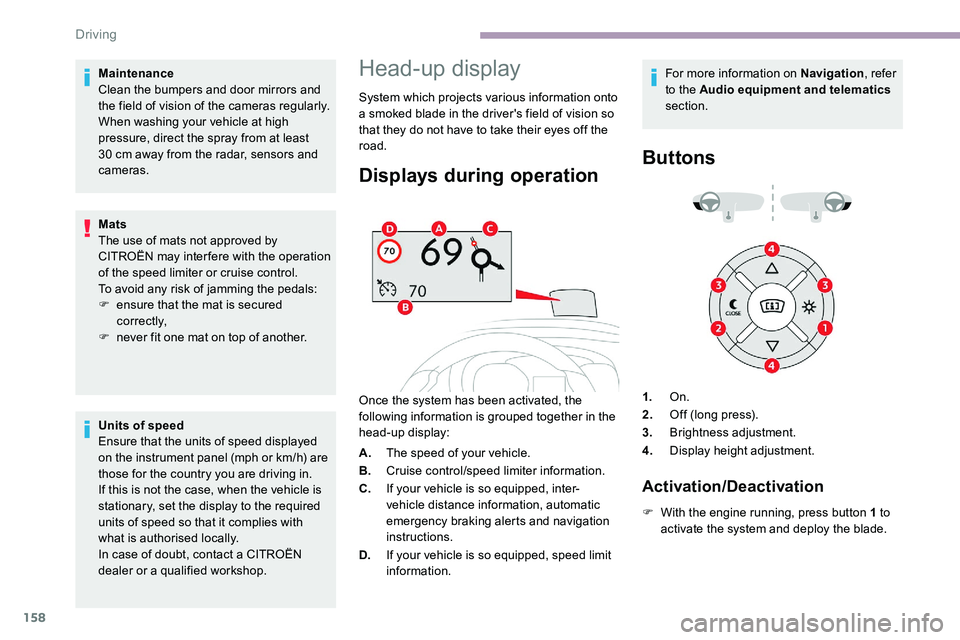
Once the system has been activated, the
following information is grouped together in the
head-up display: For more information on Navigation
, refer
to the Audio equipment and telematics
section.
Buttons
A. The speed of your vehicle.
B. Cruise control/speed limiter information.
C. If your vehicle is so equipped, inter-
vehicle distance information, automatic
emergency braking alerts and navigation
instructions.
D. If your vehicle is so equipped, speed limit
information. 1.
On.
2. Off (long press).
3. Brightness adjustment.
4. Display height adjustment.
Activation/Deactivation
F With the engine running, press button 1 to
activate the system and deploy the blade.
Driving
Page 161 of 324

159
Height adjustment
F With the engine running, adjust the display to the desired height using buttons 4 :
-
u
p to move the display up,
-
d
own to move the display down.
Brightness adjustment
F With the engine running, adjust the brightness of the information display using
button 3 :
-
t
he "sun" to increase the brightness,
-
t
he "moon" to decrease the brightness. When stationary or while driving, no
objects should be placed around the
blade (or in its recess) so as to not impede
deployment of the blade and its correct
operation.
In certain extreme weather conditions
(rain and/or snow, bright sunshine, etc.)
the head-up display may not be legible or
may suffer temporary interference.
Some sunglasses may hamper reading of
the information.
To clean the blade, use a clean, soft cloth
(such as a spectacles cloth or microfibre
cloth). Do not use a dry or abrasive cloth
or detergent or solvent products as these
could scratch the blade or damage the
anti-reflection coating.
This system operates when the engine is
running, and the settings are stored when
the ignition is switched off.
Memorising speeds
This function allows speed settings to
be stored that will then be offered for
configuration of two systems: speed limiter
or cruise control.
Programming
The speed thresholds can be set in
the vehicle configuration menu using
the touch screen.
F
S
elect the system for which you want to
memorise new speed settings:
•
sp
eed limiter
or •
c
ruise control.
F
P
ress and hold button 2 to deactivate the
system and retract the blade.
The activated/deactivated state is saved and
restored on restarting the engine. You can memorise up to six speed settings for
each system.
6
Driving
Page 162 of 324
160
F Enter the new value using the numerical keypad and confirm.
F
C
onfirm to record the changes and quit the
menu.
Memorised speeds are recalled
by pressing this button.
F
P
ress the button corresponding to the
speed setting you want to change.
Speed Limit recognition
and recommendation
Refer to the General recommendations on
the use of driving and manoeuvring aids .
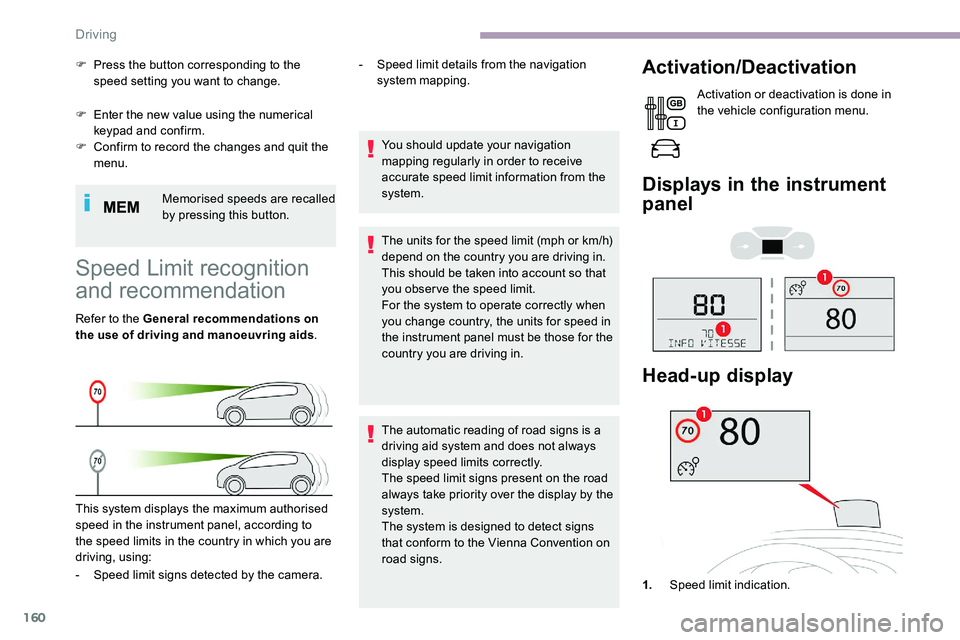
This system displays the maximum authorised
speed in the instrument panel, according to
the speed limits in the country in which you are
driving, using: -
S
peed limit details from the navigation
system mapping.
You should update your navigation
mapping regularly in order to receive
accurate speed limit information from the
system.
The units for the speed limit (mph or km/h)
depend on the country you are driving in.
This should be taken into account so that
you obser ve the speed limit.
For the system to operate correctly when
you change country, the units for speed in
the instrument panel must be those for the
country you are driving in.
The automatic reading of road signs is a
driving aid system and does not always
display speed limits correctly.
The speed limit signs present on the road
always take priority over the display by the
system.
The system is designed to detect signs
that conform to the Vienna Convention on
road signs.
Activation/Deactivation
Activation or deactivation is done in
the vehicle configuration menu.
Displays in the instrument
panel
- Speed limit signs detected by the camera. 1.Speed limit indication.
Head-up display
Driving