navigation Citroen DS3 2011 1.G User Guide
[x] Cancel search | Manufacturer: CITROEN, Model Year: 2011, Model line: DS3, Model: Citroen DS3 2011 1.GPages: 324, PDF Size: 25.11 MB
Page 256 of 324
04
7
8
9
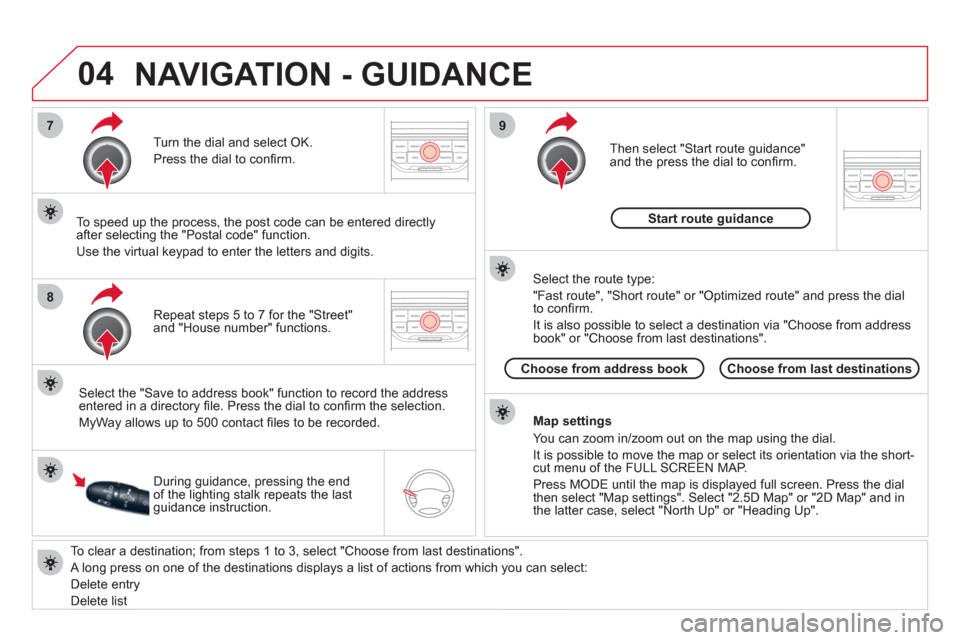
To clear a destination; from steps 1 to 3, select "Choose from last destinations".
A long press on one of the destinations displays a list of actions from which you can select:
Delete entry
Delete list
Repeat steps 5 to 7 for the "Street"
and "House number" functions.
Turn the dial and select OK.
Press the dial to confi rm.
Select the "Save to address book" function to record the address
entered in a directory fi le. Press the dial to confi rm the selection.
MyWay allows up to 500 contact fi les to be recorded.
To speed up the process, the post code can be entered directly
after selecting the "Postal code" function.
Use the virtual keypad to enter the letters and digits.
Then select "Start route guidance"
and the press the dial to confi rm.
During guidance, pressing the end
of the lighting stalk repeats the last
guidance instruction.
Map settings
You can zoom in/zoom out on the map using the dial.
It is possible to move the map or select its orientation via the short-
cut menu of the FULL SCREEN MAP.
Press MODE until the map is displayed full screen. Press the dial
then select "Map settings". Select "2.5D Map" or "2D Map" and in
the latter case, select "North Up" or "Heading Up".
Select the route type:
"Fast route", "Short route" or "Optimized route" and press the dial
to confi rm.
It is also possible to select a destination via "Choose from address
book" or "Choose from last destinations".
Choose from last destinations
Choose from address book
Start route guidance
NAVIGATION - GUIDANCE
Page 257 of 324
04
1
2
3
5
4
255
NAVIGATION - GUIDANCE
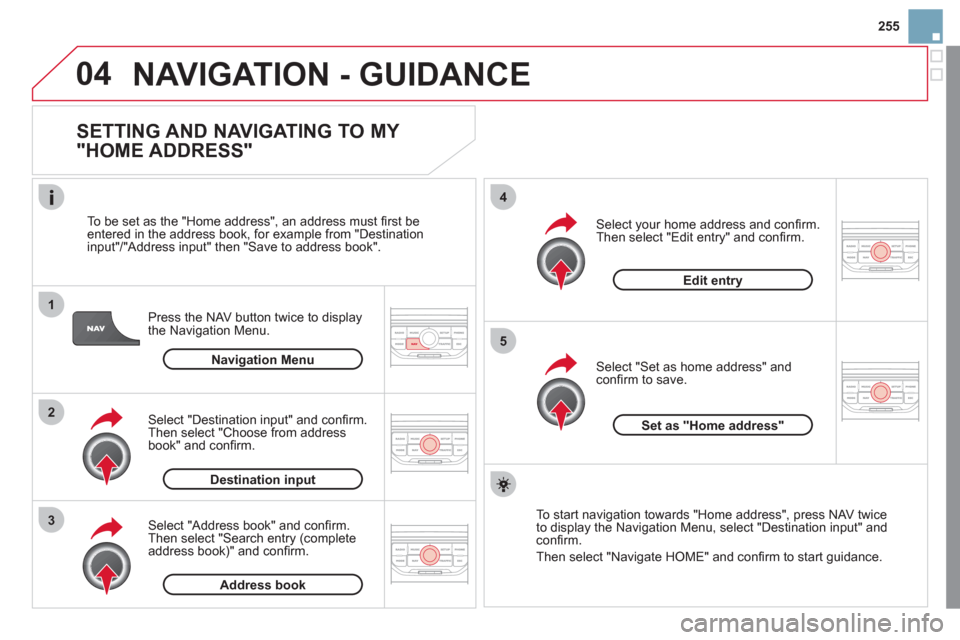
SETTING AND NAVIGATING TO MY
"HOME ADDRESS"
Press the NAV button twice to display
the Navigation Menu.
To be set as the "Home address", an address must fi rst be
entered in the address book, for example from "Destination
input"/"Address input" then "Save to address book".
Select "Address book" and confi rm.
Then select "Search entry (complete
address book)" and confi rm.
Select "Destination input" and confi rm.
Then select "Choose from address
book" and confi rm.
Select "Set as home address" and
confi rm to save.
Select your home address and confi rm.
Then select "Edit entry" and confi rm.
To start navigation towards "Home address", press NAV twice
to display the Navigation Menu, select "Destination input" and
confi rm.
Then select "Navigate HOME" and confi rm to start guidance.
Navigation Menu
Destination input
Address book
Edit entry
Set as "Home address"
Page 258 of 324
04
4
3
2
1
7
6
5
NAVIGATION - GUIDANCE
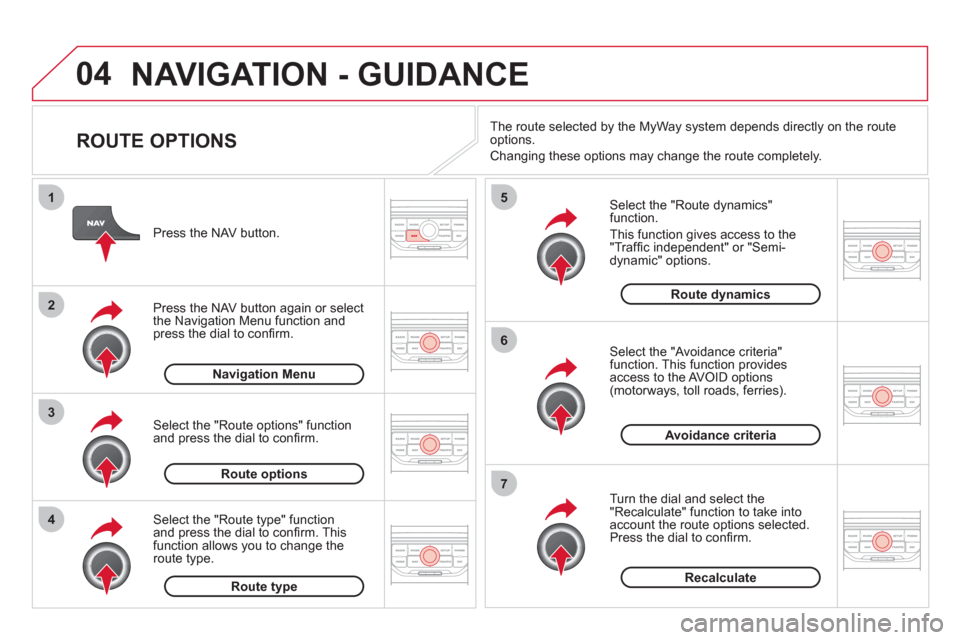
ROUTE OPTIONS
Select the "Route dynamics"
function.
This function gives access to the
"Traffi c independent" or "Semi-
dynamic" options.
Select the "Avoidance criteria"
function. This function provides
access to the AVOID options
(motorways, toll roads, ferries).
Turn the dial and select the
"Recalculate" function to take into
account the route options selected.
Press the dial to confi rm.
Press the NAV button.
Press the NAV button again or select
the Navigation Menu function and
press the dial to confi rm.
Select the "Route type" function
and press the dial to confi rm. This
function allows you to change the
route type.
Select the "Route options" function
and press the dial to confi rm.
Recalculate
Avoidance criteria
Route dynamics
Route type
Route options
Navigation Menu
The route selected by the MyWay system depends directly on the route
options.
Changing these options may change the route completely.
Page 259 of 324
04
7
6
5
4
3
2
1
257
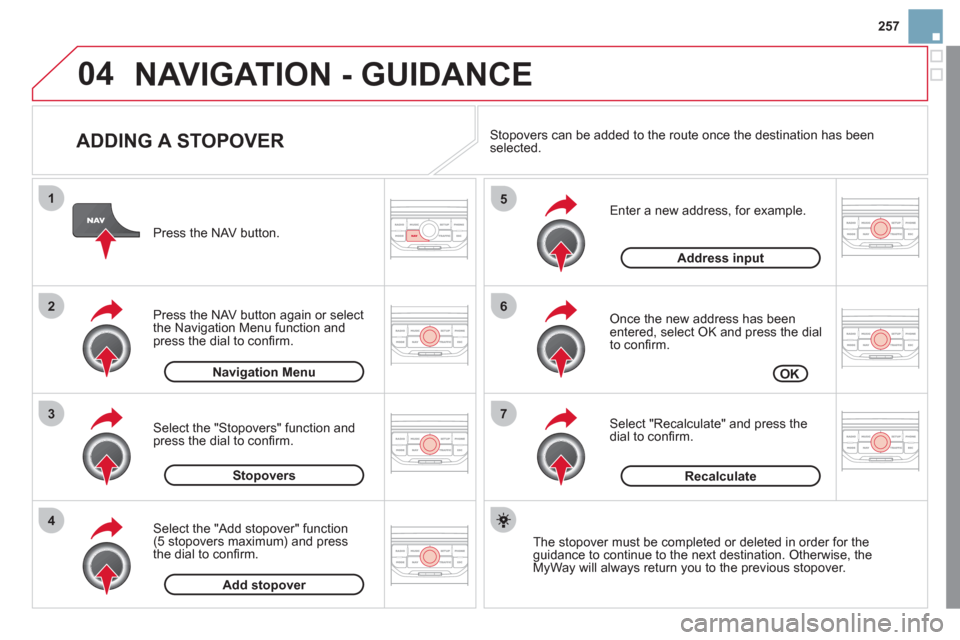
ADDING A STOPOVER
Enter a new address, for example.
Once the new address has been
entered, select OK and press the dial
to confi rm.
Select "Recalculate" and press the
dial to confi rm.
Press the NAV button.
Press the NAV button again or select
the Navigation Menu function and
press the dial to confi rm.
Select the "Add stopover" function
(5 stopovers maximum) and press
the dial to confi rm.
Select the "Stopovers" function and
press the dial to confi rm.
OK
Address input
Add stopover
Stopovers
Navigation Menu
Recalculate
The stopover must be completed or deleted in order for the
guidance to continue to the next destination. Otherwise, the
MyWay will always return you to the previous stopover.
Stopovers can be added to the route once the destination has been
selected.
NAVIGATION - GUIDANCE
Page 260 of 324
04
8
6
7
4
3
5
2
1
NAVIGATION - GUIDANCE
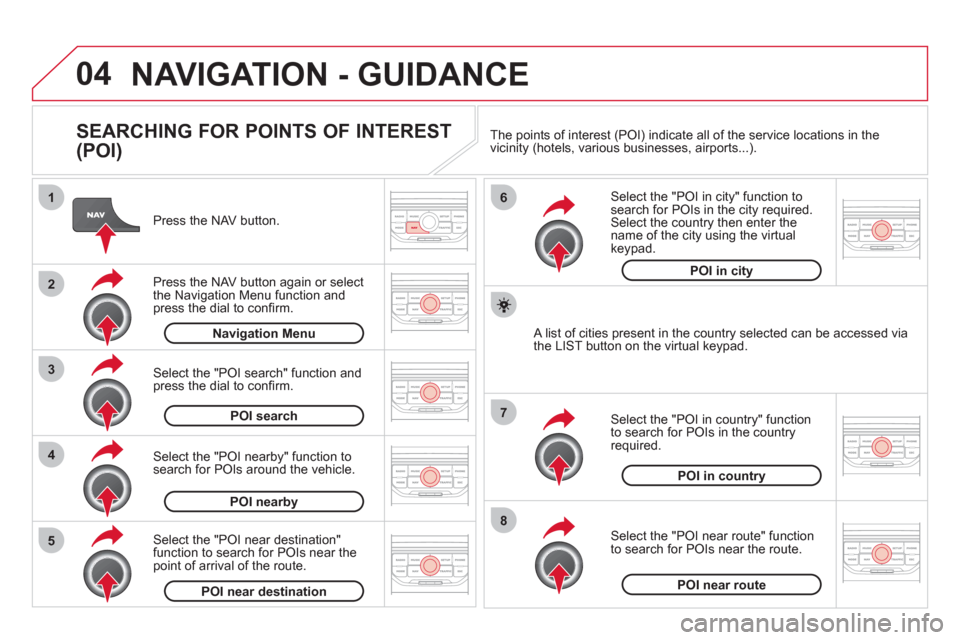
SEARCHING FOR POINTS OF INTEREST
(POI)
Press the NAV button.
Press the NAV button again or select
the Navigation Menu function and
press the dial to confi rm.
Select the "POI nearby" function to
search for POIs around the vehicle.
Select the "POI search" function and
press the dial to confi rm.
Navigation Menu
POI search
POI nearby
Select the "POI in city" function to
search for POIs in the city required.
Select the country then enter the
name of the city using the virtual
keypad.
Select the "POI near route" function
to search for POIs near the route.
Select the "POI in country" function
to search for POIs in the country
required.
Select the "POI near destination"
function to search for POIs near the
point of arrival of the route.
POI near destination
POI near route
POI in country
POI in city
A list of cities present in the country selected can be accessed via
the LIST button on the virtual keypad. The points of interest (POI) indicate all of the service locations in the
vicinity (hotels, various businesses, airports...).
Page 261 of 324
04
259
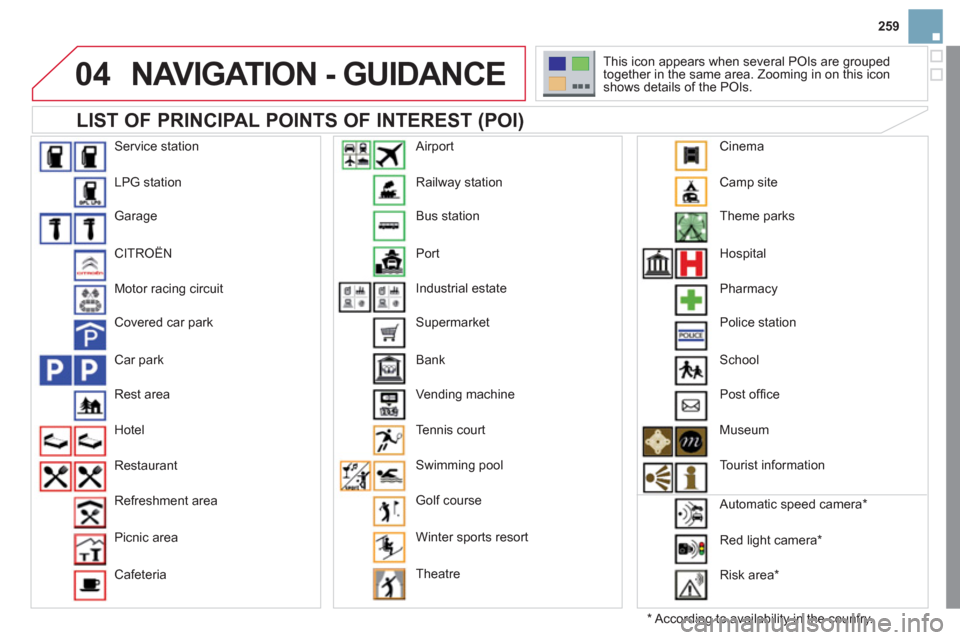
LIST OF PRINCIPAL POINTS OF INTEREST (POI)
NAVIGATION - GUIDANCE
*
According to availability in the country. This icon appears when several POIs are grouped
together in the same area. Zooming in on this icon
shows details of the POIs.
Service station
LPG station
Garage
CITROËN
Motor racing circuit
Covered car park
Car park
Rest area
Hotel
Restaurant
Refreshment area
Picnic area
Cafeteria Railway station
Bus station
Port
Industrial estate
Supermarket
Bank
Vending machine
Tennis court
Swimming pool
Golf course
Winter sports resort
Theatre
Airport
Camp site
Theme parks
Hospital
Pharmacy
Police station
School
Post offi ce
Museum
Tourist information
Automatic speed camera *
Red light camera *
Risk area *
Cinema
Page 262 of 324
04
5
6
3 2 1
4
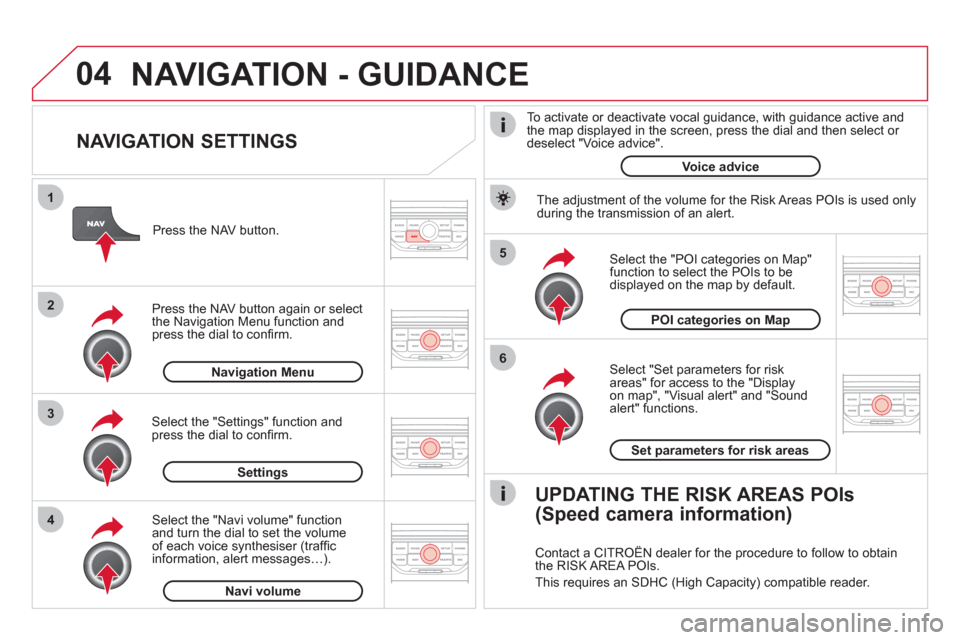
NAVIGATION SETTINGS
Select "Set parameters for risk
areas" for access to the "Display
on map", "Visual alert" and "Sound
alert" functions.
Select the "POI categories on Map"
function to select the POIs to be
displayed on the map by default.
Press the NAV button.
Press the NAV button again or select
the Navigation Menu function and
press the dial to confi rm.
Select the "Settings" function and
press the dial to confi rm.
POI categories on Map
Settings
Set parameters for risk areas
Navigation Menu
NAVIGATION - GUIDANCE
Select the "Navi volume" function
and turn the dial to set the volume
of each voice synthesiser (traffi c
information, alert messages…).
Navi volume
The adjustment of the volume for the Risk Areas POIs is used only
during the transmission of an alert.
UPDATING THE RISK AREAS POIs
(Speed camera information)
Contact a CITROËN dealer for the procedure to follow to obtain
the RISK AREA POIs.
This requires an SDHC (High Capacity) compatible reader.
To activate or deactivate vocal guidance, with guidance active and
the map displayed in the screen, press the dial and then select or
deselect "Voice advice".
Voice advice
Page 263 of 324
05
2 1
3
4
5
261
TRAFFIC INFORMATION
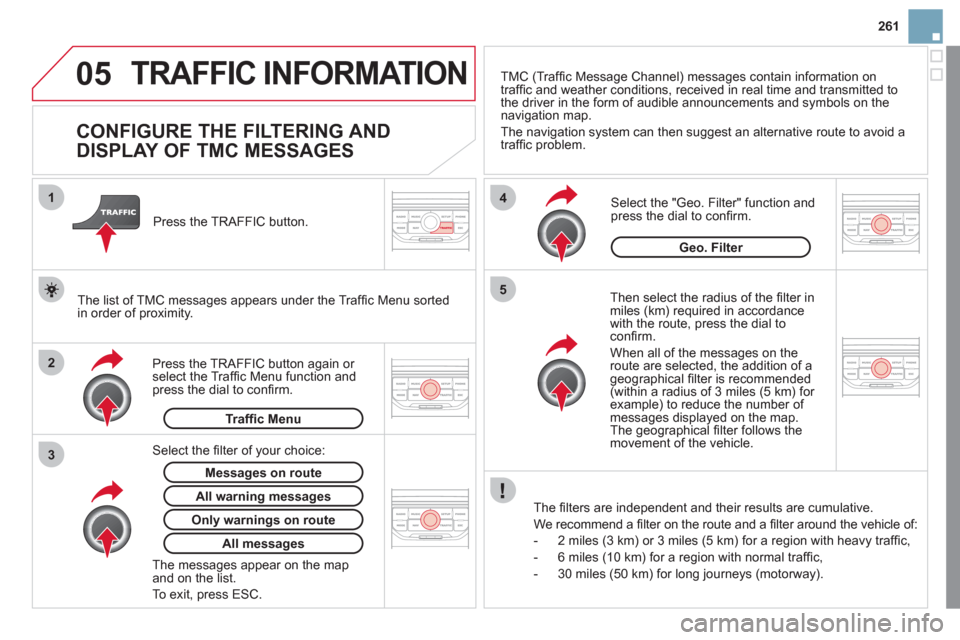
CONFIGURE THE FILTERING AND
DISPLAY OF TMC MESSAGES
Then select the radius of the fi lter in
miles (km) required in accordance
with the route, press the dial to
confi rm.
When all of the messages on the
route are selected, the addition of a
geographical fi lter is recommended
(within a radius of 3 miles (5 km) for
example) to reduce the number of
messages displayed on the map.
The geographical fi lter follows the
movement of the vehicle.
The fi lters are independent and their results are cumulative.
We recommend a fi lter on the route and a fi lter around the vehicle of:
- 2 miles (3 km) or 3 miles (5 km) for a region with heavy traffi c,
- 6 miles (10 km) for a region with normal traffi c,
- 30 miles (50 km) for long journeys (motorway).
Press the TRAFFIC button again or
select the Traffi c Menu function and
press the dial to confi rm.
Press the TRAFFIC button.
TMC (Traffi c Message Channel) messages contain information on
traffi c and weather conditions, received in real time and transmitted to
the driver in the form of audible announcements and symbols on the
navigation map.
The navigation system can then suggest an alternative route to avoid a
traffi c problem.
Select the "Geo. Filter" function and
press the dial to confi rm.
Messages on route
The list of TMC messages appears under the Traffi c Menu sorted
in order of proximity.
All warning messages
Traffi c Menu
Select the fi lter of your choice:
Only warnings on route
All messages
The messages appear on the map
and on the list.
To exit, press ESC.
Geo. Filter
Page 273 of 324
10
1
271
TRIP COMPUTER/VEHICLE PARAMETERS
TRIP COMPUTER
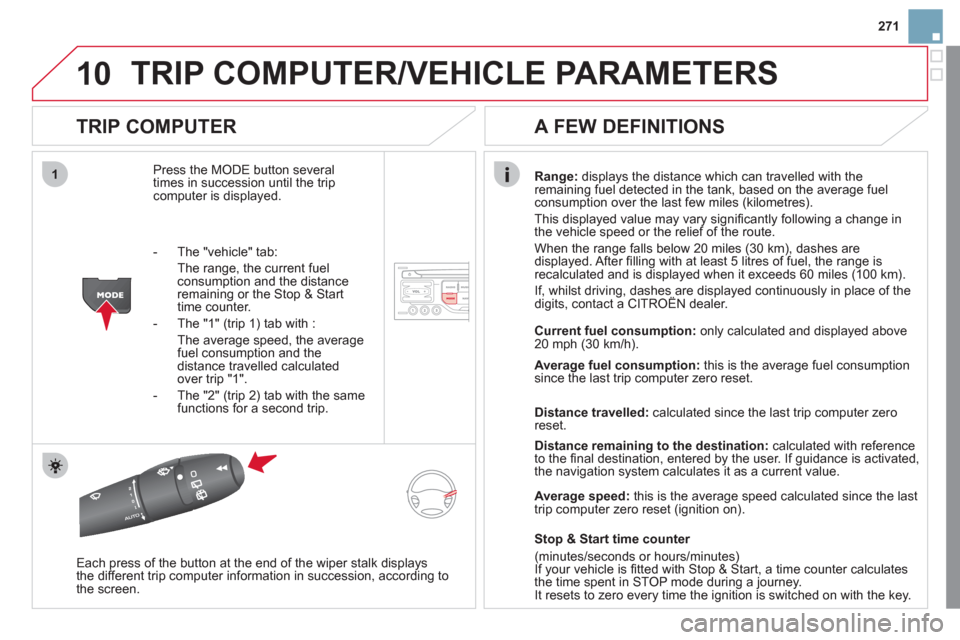
Press the MODE button several
times in succession until the trip
computer is displayed.
Range:
displays the distance which can travelled with the
remaining fuel detected in the tank, based on the average fuel
consumption over the last few miles (kilometres).
This displayed value may vary signifi cantly following a change in
the vehicle speed or the relief of the route.
When the range falls below 20 miles (30 km), dashes are
displayed. After fi lling with at least 5 litres of fuel, the range is
recalculated and is displayed when it exceeds 60 miles (100 km).
If, whilst driving, dashes are displayed continuously in place of the
digits, contact a CITROËN dealer.
Each press of the button at the end of the wiper stalk displays
the different trip computer information in succession, according to
the screen.
A FEW DEFINITIONS
- The "vehicle" tab:
The range, the current fuel
consumption and the distance
remaining or the Stop & Start
time counter.
- The "1" (trip 1) tab with :
The average speed, the average
fuel consumption and the
distance travelled calculated
over trip "1".
- The "2" (trip 2) tab with the same
functions for a second trip.
Current fuel consumption:
only calculated and displayed above
20 mph (30 km/h).
Average fuel consumption:
this is the average fuel consumption
since the last trip computer zero reset.
Distance travelled:
calculated since the last trip computer zero
reset.
Distance remaining to the destination:
calculated with reference
to the fi nal destination, entered by the user. If guidance is activated,
the navigation system calculates it as a current value.
Average speed:
this is the average speed calculated since the last
trip computer zero reset (ignition on).
Stop & Start time counter
(minutes/seconds or hours/minutes)
If your vehicle is fi tted with Stop & Start, a time counter calculates
the time spent in STOP mode during a journey.
It resets to zero every time the ignition is switched on with the key.
Page 275 of 324

273
Abort guidance/Resume guidance
Destination input Geo position
Map
Stopovers
Add stopover
Navigate HOME
Choose from address book
Rearrange route
Choose from last destinations
Replace stopover
Delete stopover
Recalculate
Fast route
Short route
Optimized route
POI search
POI nearby
Route options
Route type
Short route Fast route
"Navigation" Menu
City
Street
Enter new address
Country
Navigate HOME
City district
House number Start route guidance
Postal code
Save to address book
Intersection
Address input
POI near destination
POI in city
POI in country
POI near route
Choose from address book
3
3
Choose from last destinations
TMC station information
Loudness
Speed dependent volume
Reset sound settings
3
3
3
1
2
4
4
4
4
4
4
4
4
4
4
4
3
2
3
3
2
3
4
4
4
4
3
3
3
3
4
4
4
2
4
2
3
3
3
3
3
3
4
Classic
Jazz
Rock/Pop
Techno
Vocal 4
4
4
4
4