navigation Citroen DS3 2011 1.G Owner's Guide
[x] Cancel search | Manufacturer: CITROEN, Model Year: 2011, Model line: DS3, Model: Citroen DS3 2011 1.GPages: 324, PDF Size: 25.11 MB
Page 280 of 324
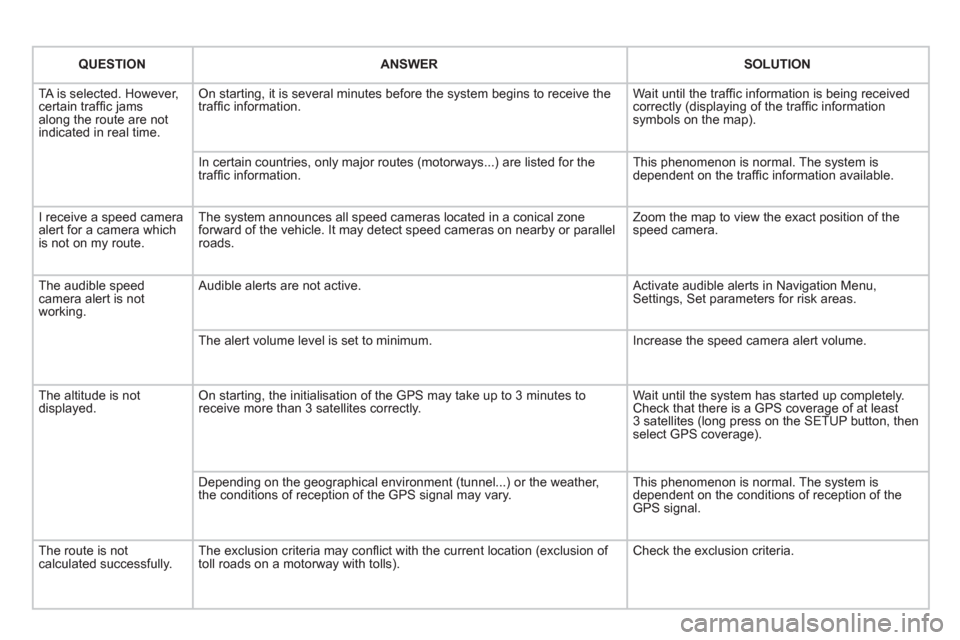
QUESTION
ANSWER
SOLUTION
TA is selected. However,
certain traffi c jams
along the route are not
indicated in real time. On starting, it is several minutes before the system begins to receive the
traffi c information. Wait until the traffi c information is being received
correctly (displaying of the traffi c information
symbols on the map).
In certain countries, only major routes (motorways...) are listed for the
traffi c information. This phenomenon is normal. The system is
dependent on the traffi c information available.
I receive a speed camera
alert for a camera which
is not on my route. The system announces all speed cameras located in a conical zone
forward of the vehicle. It may detect speed cameras on nearby or parallel
roads. Zoom the map to view the exact position of the
speed camera.
The audible speed
camera alert is not
working. Audible alerts are not active. Activate audible alerts in Navigation Menu,
Settings, Set parameters for risk areas.
The alert volume level is set to minimum. Increase the speed camera alert volume.
The altitude is not
displayed. On starting, the initialisation of the GPS may take up to 3 minutes to
receive more than 3 satellites correctly. Wait until the system has started up completely.
Check that there is a GPS coverage of at least
3 satellites (long press on the SETUP button, then
select GPS coverage).
Depending on the geographical environment (tunnel...) or the weather,
the conditions of reception of the GPS signal may vary. This phenomenon is normal. The system is
dependent on the conditions of reception of the
GPS signal.
The route is not
calculated successfully. The exclusion criteria may confl ict with the current location (exclusion of
toll roads on a motorway with tolls). Check the exclusion criteria.
Page 290 of 324
05
1
1
2
3
USB BOX
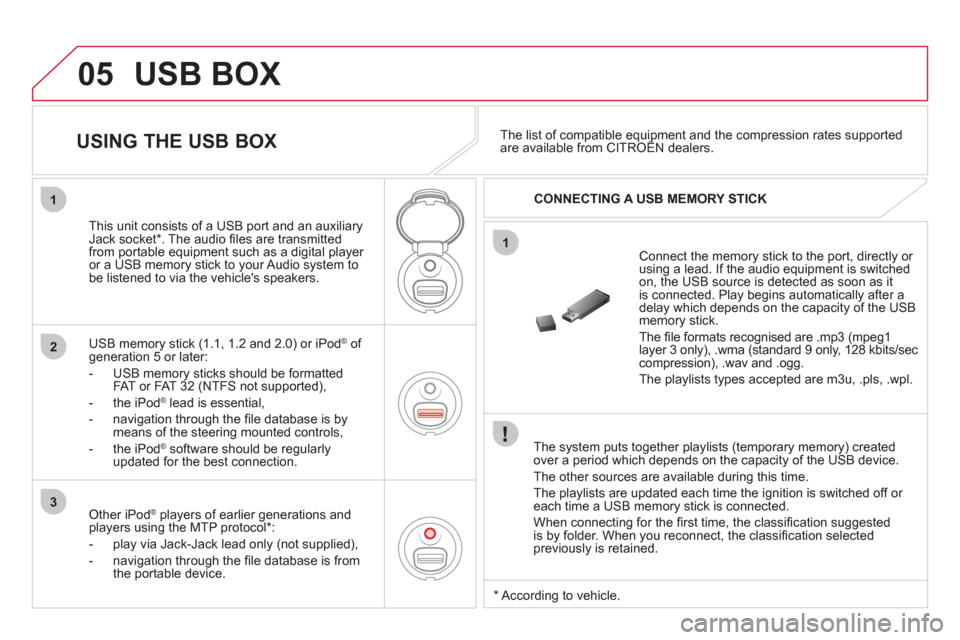
The system puts together playlists (temporary memory) created
over a period which depends on the capacity of the USB device.
The other sources are available during this time.
The playlists are updated each time the ignition is switched off or
each time a USB memory stick is connected.
When connecting for the fi rst time, the classifi cation suggested
is by folder. When you reconnect, the classifi cation selected
previously is retained.
Connect the memory stick to the port, directly or
using a lead. If the audio equipment is switched
on, the USB source is detected as soon as it
is connected. Play begins automatically after a
delay which depends on the capacity of the USB
memory stick.
The fi le formats recognised are .mp3 (mpeg1
layer 3 only), .wma (standard 9 only, 128 kbits/sec
compression), .wav and .ogg.
The playlists types accepted are m3u, .pls, .wpl.
This unit consists of a USB port and an auxiliary
Jack socket * . The audio fi les are transmitted
from portable equipment such as a digital player
or a USB memory stick to your Audio system to
be listened to via the vehicle's speakers.
USB memory stick (1.1, 1.2 and 2.0) or iPod
®
of
generation 5 or later:
- USB memory sticks should be formatted
FAT or FAT 32 (NTFS not supported),
- the iPod
®
lead is essential,
- navigation through the fi le database is by
means of the steering mounted controls,
- the iPod
®
software should be regularly
updated for the best connection.
The list of compatible equipment and the compression rates supported
are available from CITROËN dealers.
USING THE USB BOX
CONNECTING A USB MEMORY STICK
Other iPod
®
players of earlier generations and
players using the MTP protocol * :
- play via Jack-Jack lead only (not supplied),
- navigation through the fi le database is from
the portable device.
*
According to vehicle.
Page 291 of 324
05
42
3
1
5
289
USB BOX
USING THE USB PORT
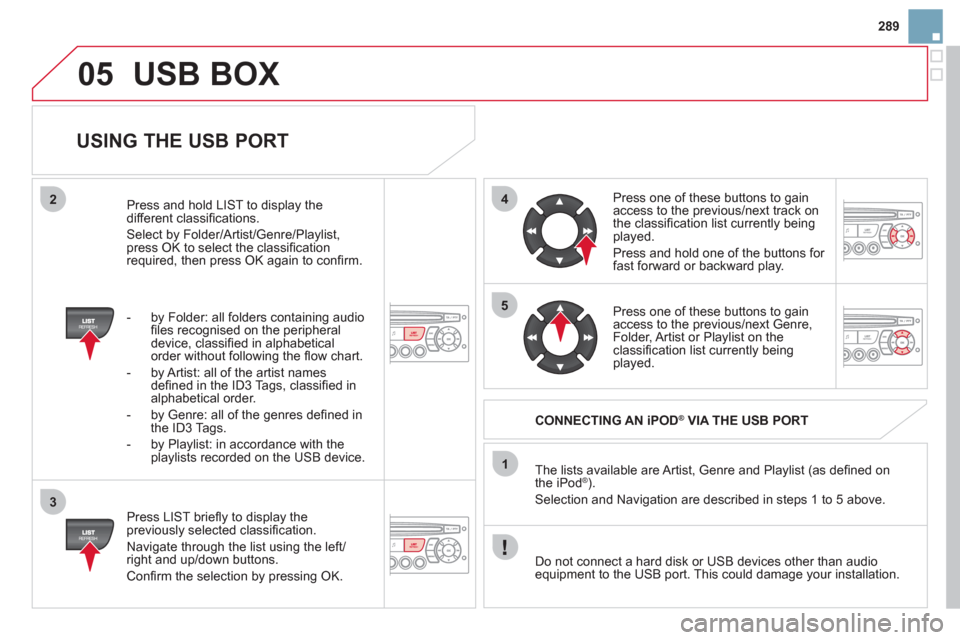
Press LIST briefl y to display the
previously selected classifi cation.
Navigate through the list using the left/
right and up/down buttons.
Confi rm the selection by pressing OK. The lists available are Artist, Genre and Playlist (as defi ned on
the iPod
® ).
Selection and Navigation are described in steps 1 to 5 above.
Do not connect a hard disk or USB devices other than audio
equipment to the USB port. This could damage your installation.
CONNECTING AN iPOD
®
VIA THE USB PORT
Press one of these buttons to gain
access to the previous/next track on
the classifi cation list currently being
played.
Press and hold one of the buttons for
fast forward or backward play.
Press one of these buttons to gain
access to the previous/next Genre,
Folder, Artist or Playlist on the
classifi cation list currently being
played.
Press and hold LIST to display the
different classifi cations.
Select by Folder/Artist/Genre/Playlist,
press OK to select the classifi cation
required, then press OK again to confi rm.
- by Folder: all folders containing audio
fi les recognised on the peripheral
device, classifi ed in alphabetical
order without following the fl ow chart.
- by Artist: all of the artist names
defi ned in the ID3 Tags, classifi ed in
alphabetical order.
- by Genre: all of the genres defi ned in
the ID3 Tags.
- by Playlist: in accordance with the
playlists recorded on the USB device.
Page 297 of 324
11
08
295
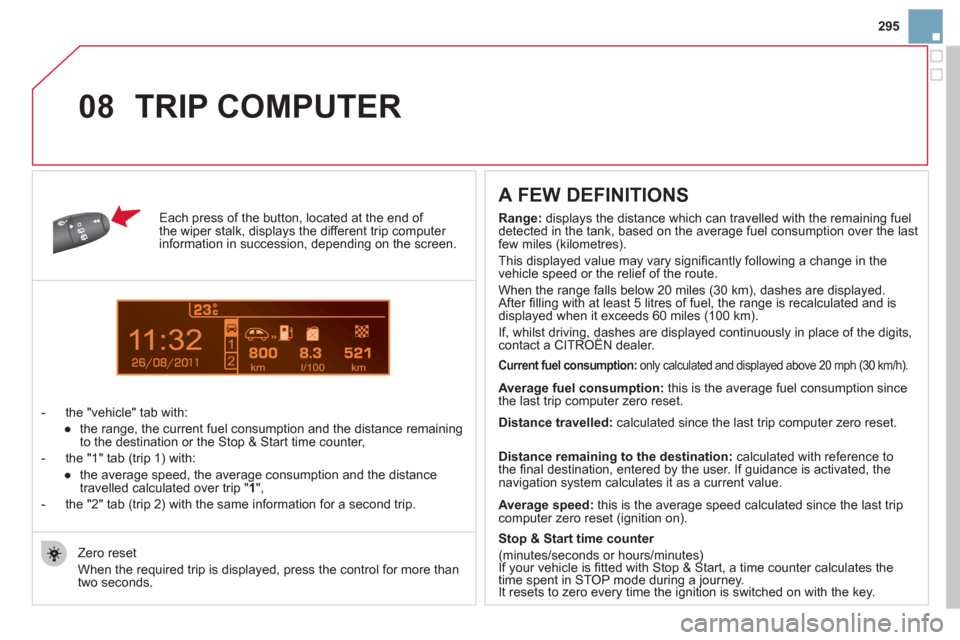
Each press of the button, located at the end of
the wiper stalk, displays the different trip computer
information in succession, depending on the screen.
- the "vehicle " tab with:
●
the range, the current fuel consumption and the distance remaining
to the destination or the Stop & Start time counter,
- the "1" tab (trip 1) with:
●
the average speed, the average consumption and the distance
travelled calculated over trip " 1
",
- the "2" tab (trip 2) with the same information for a second trip.
A FEW DEFINITIONS
Zero reset
When the required trip is displayed, press the control for more than
two seconds.
TRIP COMPUTER
Range:
displays the distance which can travelled with the remaining fuel
detected in the tank, based on the average fuel consumption over the last
few miles (kilometres).
This displayed value may vary signifi cantly following a change in the
vehicle speed or the relief of the route.
When the range falls below 20 miles (30 km), dashes are displayed.
After fi lling with at least 5 litres of fuel, the range is recalculated and is
displayed when it exceeds 60 miles (100 km).
If, whilst driving, dashes are displayed continuously in place of the digits,
contact a CITROËN dealer.
Current fuel consumption:
only calculated and displayed above 20 mph (30 km/h).
Average fuel consumption:
this is the average fuel consumption since
the last trip computer zero reset.
Average speed:
this is the average speed calculated since the last trip
computer zero reset (ignition on).
Distance travelled:
calculated since the last trip computer zero reset.
Distance remaining to the destination:
calculated with reference to
the fi nal destination, entered by the user. If guidance is activated, the
navigation system calculates it as a current value.
Stop & Start time counter
(minutes/seconds or hours/minutes)
If your vehicle is fi tted with Stop & Start, a time counter calculates the
time spent in STOP mode during a journey.
It resets to zero every time the ignition is switched on with the key.
Page 314 of 324
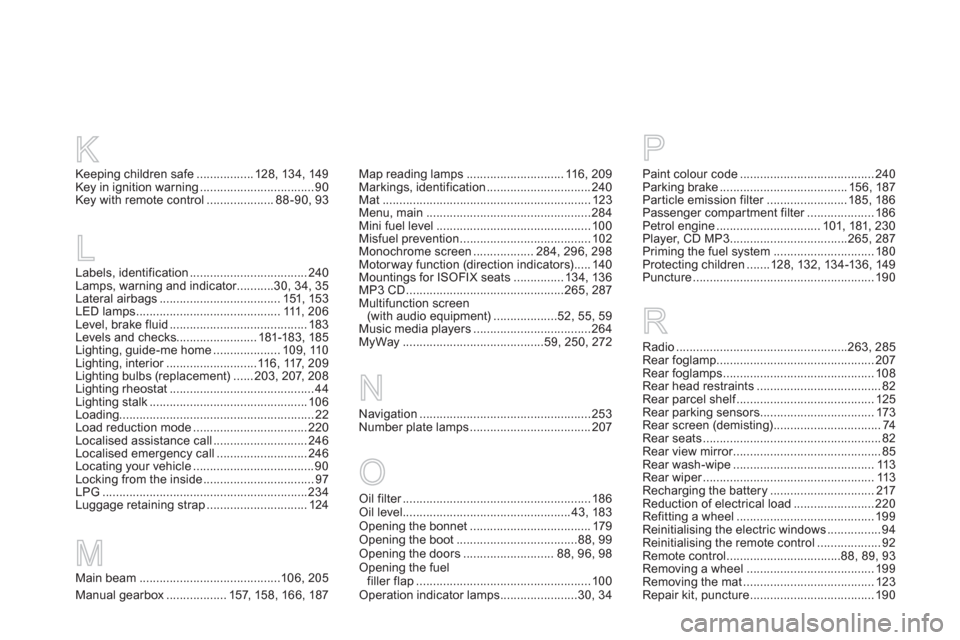
Map reading lamps ............................. 116, 209
Markings, identification ............................... 240
Mat .............................................................. 123
Menu, main .................................................284
Mini fuel level .............................................. 100
Misfuel prevention ....................................... 102
Monochrome screen .................. 284, 296, 298
Motorway function (direction indicators) ..... 140
Mountings for ISOFIX seats ............... 134, 136
MP3 CD ...............................................265, 287
Multifunction screen
(with audio equipment) ...................52, 55, 59
Music media players ...................................264
MyWay ..........................................59, 250, 272
R
Navigation ................................................... 253
Number plate lamps .................................... 207
NP
Paint colour code ........................................ 240
Parking brake ...................................... 156, 187
Par ticle emission filter ........................ 185, 186
Passenger compar tment filter .................... 186
Petrol engine ............................... 101, 181, 230
Player, CD MP3 ...................................265, 287
Priming the fuel system .............................. 180
Protecting children .......128, 132, 134-136, 149
Puncture ...................................................... 190
Radio ...................................................263, 285
Rear foglamp ............................................... 207
Rear foglamps ............................................. 108
Rear head restraints ..................................... 82
Rear parcel shelf ......................................... 125
Rear parking sensors .................................. 173
Rear screen (demisting) ................................ 74
Rear seats ..................................................... 82
Rear view mirror ............................................ 85
Rear wash-wipe .......................................... 113
Rear wiper ................................................... 113
Recharging the battery ............................... 217
Reduction of electrical load ........................ 220
Refitting a wheel ......................................... 199
Reinitialising the electric windows ................ 94
Reinitialising the remote control ................... 92
Remote control ..................................88, 89, 93
Removing a wheel ...................................... 199
Removing the mat ....................................... 123
Repair kit, puncture ..................................... 190 Keeping children safe ................. 128, 134, 149
Key in ignition warning .................................. 90
Key with remote control .................... 88 -90, 93
LLabels, identification ................................... 240
Lamps, warning and indicator ...........30, 34, 35
Lateral airbags .................................... 151, 153
LED lamps ........................................... 111, 206
Level, brake fluid ......................................... 183
Levels and checks........................ 181-183, 185
Lighting, guide-me home .................... 109, 110
Lighting, interior ...........................116, 117, 209
Lighting bulbs (replacement) ...... 203, 207, 208
Lighting rheostat ........................................... 44
Lighting stalk ............................................... 106
Loading.......................................................... 22
Load reduction mode .................................. 220
Localised assistance call ............................ 246
Localised emergency call ........................... 246
Locating your vehicle .................................... 90
Locking from the inside ................................. 97
LPG .............................................................234
Luggage retaining strap .............................. 124
K
Main beam ..........................................106, 205
Manual gearbox .................. 157, 158, 166, 187M
Oil filter ........................................................ 186
Oil level .................................................. 43, 183
Opening the bonnet .................................... 179
Opening the boot ....................................88, 99
Opening the doors ........................... 88, 96, 98
Opening the fuel
filler flap .................................................... 100
Operation indicator lamps .......................30, 34
O
Page 315 of 324
313Alphabetical index
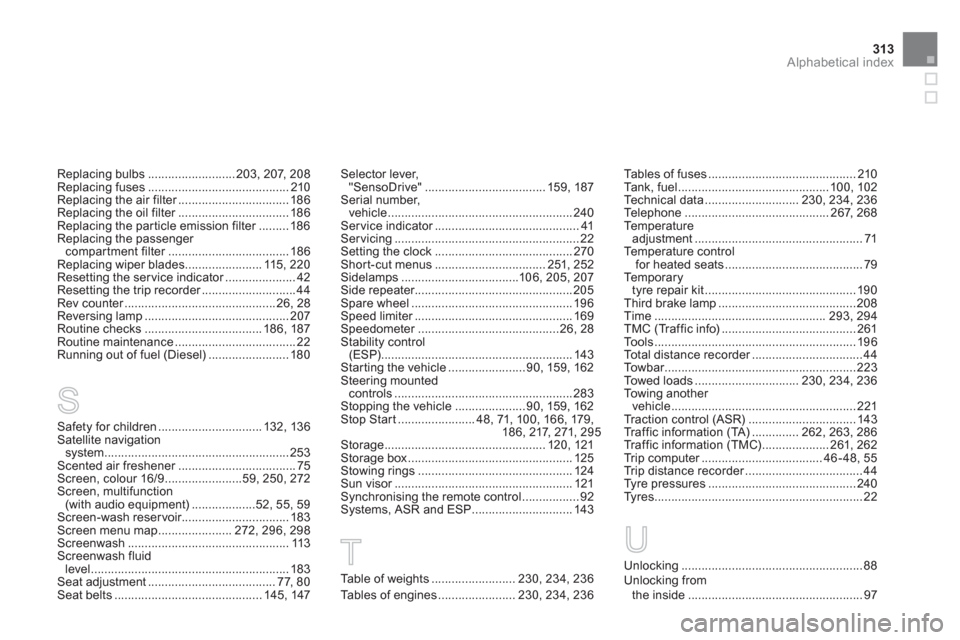
Replacing bulbs .......................... 203, 207, 208
Replacing fuses .......................................... 210
Replacing the air filter ................................. 186
Replacing the oil filter ................................. 186
Replacing the particle emission filter ......... 186
Replacing the passenger
compar tment filter .................................... 186
Replacing wiper blades ....................... 115, 220
Resetting the ser vice indicator ..................... 42
Resetting the trip recorder ............................ 44
Rev counter ............................................. 26, 28
Reversing lamp ........................................... 207
Routine checks ................................... 186, 187
Routine maintenance .................................... 22
Running out of fuel (Diesel) ........................ 180
Safety for children ............................... 132, 136
Satellite navigation
system ....................................................... 253
Scented air freshener ................................... 75
Screen, colour 16/9 .......................59, 250, 272
Screen, multifunction
(with audio equipment) ...................52, 55, 59
Screen-wash reser voir................................ 183
Screen menu map ...................... 272, 296, 298
Screenwash ................................................ 113
Screenwash fluid
level ........................................................... 183
Seat adjustment ...................................... 77, 80
Seat belts ............................................ 145, 147
S
Selector lever,
"SensoDrive" .................................... 159, 187
Serial number,
vehicle ....................................................... 240
Ser vice indicator ........................................... 41
Ser vicing ....................................................... 22
Setting the clock ......................................... 270
Shor t-cut menus ................................. 251, 252
Sidelamps ...................................106, 205, 207
Side repeater............................................... 205
Spare wheel ................................................ 196
Speed limiter ............................................... 169
Speedometer .......................................... 26, 28
Stability control
(ESP)......................................................... 143
Star ting the vehicle ....................... 90, 159, 162
Steering mounted
controls ..................................................... 283
Stopping the vehicle ..................... 90, 159, 162
Stop Star t ....................... 48, 71, 100, 166, 179,
18 6, 217, 271, 295
Storage ................................................ 120, 121
Storage box ................................................. 125
Stowing rings .............................................. 124
Sun visor ..................................................... 121
Synchronising the remote control ................. 92
Systems, ASR and ESP .............................. 143
Table of weights ......................... 230, 234, 236
Tables of engines ....................... 230, 234, 236Tables of fuses ............................................ 210
Tank, fuel ............................................. 100, 102
Technical data ............................ 230, 234, 236
Telephone ........................................... 267, 268
Te m p e r a t u r e
adjustment .................................................. 71
Temperature control
for heated seats ......................................... 79
Te m p o r a r y
tyre repair kit ............................................. 190
Third brake lamp ......................................... 208
Time ................................................... 293, 294
TMC (Traffic info) ........................................ 261
Tools ............................................................ 196
Total distance recorder ................................. 44
To w b a r ......................................................... 223
Towed loads ............................... 230, 234, 236
Towing another
vehicle ....................................................... 221
Traction control (ASR) ................................ 143
Traffic information (TA) .............. 262, 263, 286
Traffic information (TMC) .................... 261, 262
Trip computer .................................... 46 - 48, 55
Trip distance recorder ................................... 44
Tyre pressures ............................................ 240
Ty r e s .............................................................. 22
TUnlocking ...................................................... 88
Unlocking from
the inside .................................................... 97
U