warning light Citroen DS3 2014 1.G Owner's Manual
[x] Cancel search | Manufacturer: CITROEN, Model Year: 2014, Model line: DS3, Model: Citroen DS3 2014 1.GPages: 376, PDF Size: 12.55 MB
Page 20 of 376
DS3_en_Chap01_controle-de-marche_ed01-2014
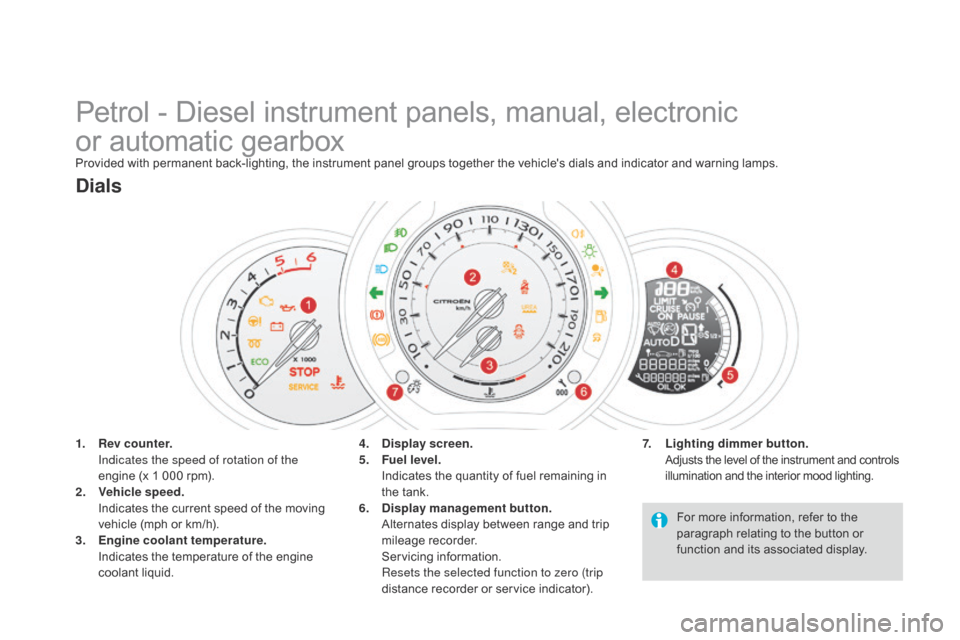
Petrol - Diesel instrument panels, manual, electronic
o r automatic gearbox
Provided with permanent back-lighting, the instrument panel groups together the vehicle's dials and indicator and warning lamps.
1.
R
ev counter.
I
ndicates the speed of rotation of the
engine
(x 1 000 rpm).
2.
V
ehicle speed.
I
ndicates the current speed of the moving
v
ehicle (mph or km/h).
3.
E
ngine coolant temperature.
I
ndicates the temperature of the engine
c
oolant
li
quid.
dials
7. Lighting dimmer button. Adjusts the level of the instrument and controls i
llumination and the interior mood lighting.4. display screen.
5. F uel level.
I
ndicates the quantity of fuel remaining in
t
he tank.
6.
di
splay management button.
A
lternates display between range and trip
mil
eage
re
corder.
S
ervicing
in
formation.
R
esets the selected function to zero (trip
distance
recorder or service indicator).For
more information, refer to the
p
aragraph relating to the button or
f
unction and its associated display.
Page 22 of 376
DS3_en_Chap01_controle-de-marche_ed01-2014
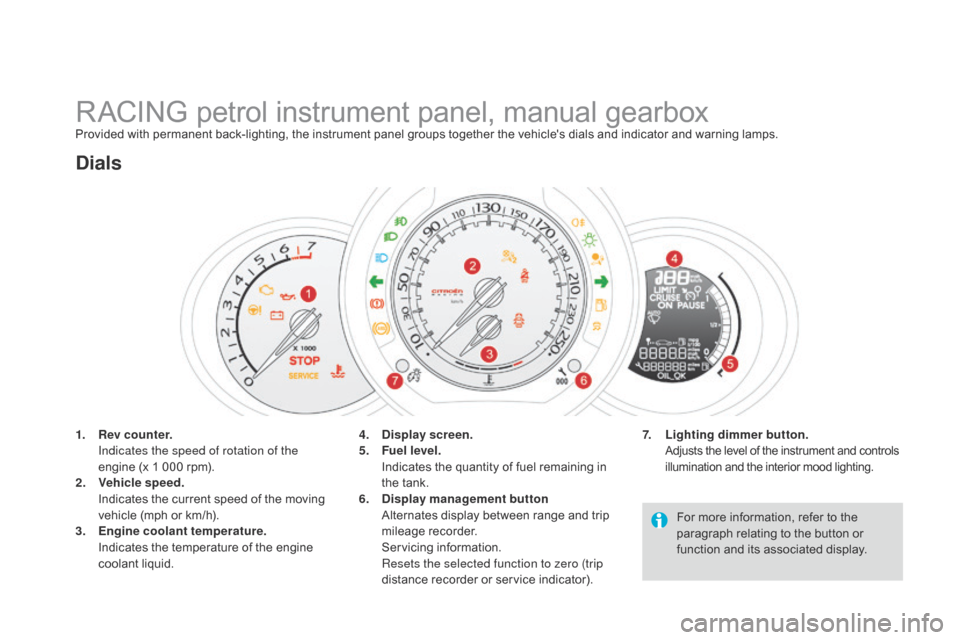
RACING petrol instrument panel, manual gearboxProvided with permanent back-lighting, the instrument panel groups together the vehicle's dials and indicator and warning lamps.
1.
R
ev counter.
I
ndicates the speed of rotation of the
engine
(x 1 000 rpm).
2.
V
ehicle speed.
I
ndicates the current speed of the moving
v
ehicle (mph or km/h).
3.
E
ngine coolant temperature.
I
ndicates the temperature of the engine
c
oolant
li
quid.
dials
7. Lighting dimmer button. Adjusts the level of the instrument and controls i
llumination and the interior mood lighting.4. display screen.
5. F uel level.
I
ndicates the quantity of fuel remaining in
t
he tank.
6.
di
splay management button
A
lternates display between range and trip
mil
eage
re
corder.
S
ervicing
in
formation.
R
esets the selected function to zero (trip
distance
recorder or service indicator).For
more information, refer to the
p
aragraph relating to the button or
f
unction and its associated display.
Page 24 of 376
DS3_en_Chap01_controle-de-marche_ed01-2014
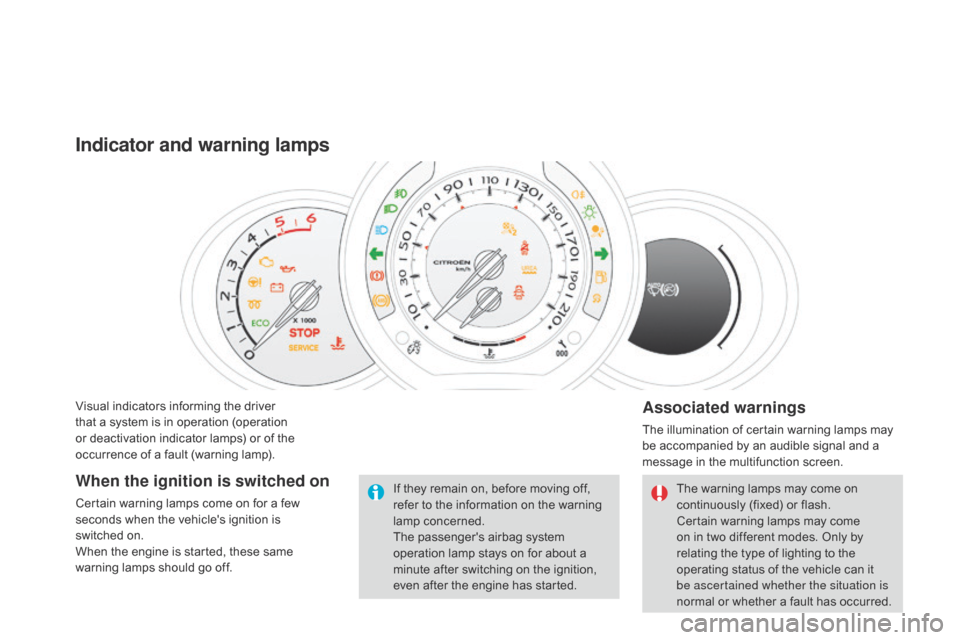
Visual indicators informing the driver that a system is in operation (operation
o
r deactivation indicator lamps) or of the
o
ccurrence of a fault (warning lamp).
Indicator and warning lamps
Associated warnings
The illumination of certain warning lamps may be accompanied by an audible signal and a
m
essage in the multifunction screen.
The
warning lamps may come on
c
ontinuously (fixed) or flash.
Certain
warning lamps may come
o
n in two different modes. Only by
r
elating the type of lighting to the
o
perating status of the vehicle can it
b
e ascertained whether the situation is
normal
or whether a fault has occurred.
If
they
remain
on,
before
moving
off,
r
efer
to
the
information
on
the
warning
lam
p
c
oncerned.
The
passenger's
airbag
system
o
peration
lamp
stays
on
for
about
a
m
inute
after
switching
on
the
ignition,
e
ven
after
the
engine
has
started.
When the ignition is switched on
Certain warning lamps come on for a few s econds when the vehicle's ignition is
switched
on.
When
the engine is started, these same
w
arning lamps should go off.
Page 25 of 376
23
DS3_en_Chap01_controle-de-marche_ed01-2014
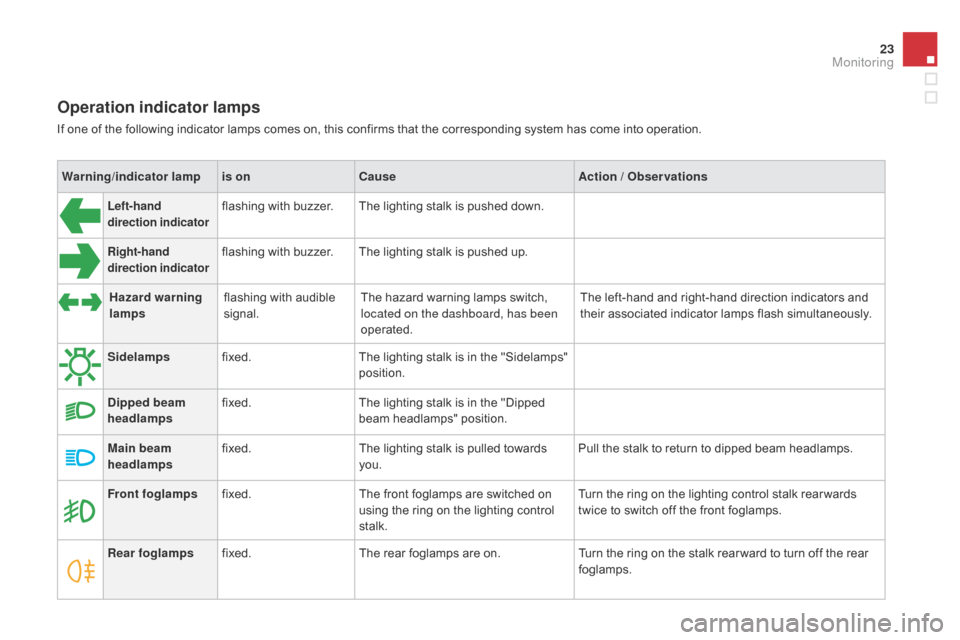
Operation indicator lamps
If one of the following indicator lamps comes on, this confirms that the corresponding system has come into operation.
W arning /indicator lampis on
cau
seAction / Observations
Left-hand
direction indicatorflashing with buzzer.The lighting stalk is pushed down.
Right-hand
direction indicatorflashing with buzzer.The lighting stalk is pushed up.
Sidelamps fixed. The
lighting stalk is in the "Sidelamps"
p
osition.
di
pped beam
headlamps fixed.
The
lighting stalk is in the "Dipped
b
eam headlamps" position.
Main beam
headlamps fixed.
The
lighting stalk is pulled towards
yo
u. Pull
the stalk to return to dipped beam headlamps.
Front foglamps fixed. The
front foglamps are switched on
u
sing the ring on the lighting control
st
alk. Turn
the ring on the lighting control stalk rear wards
t
wice to switch off the front foglamps.
Rear foglamps fixed. The
rear foglamps are on.Turn
the ring on the stalk rear ward to turn off the rear
fo
glamps.
Hazard warning
lamps
flashing
with audible
s
ignal. The
hazard warning lamps switch,
l
ocated on the dashboard, has been
operated. The
left-hand and right-hand direction indicators and
t
heir associated indicator lamps flash simultaneously.
Monitoring
Page 26 of 376
DS3_en_Chap01_controle-de-marche_ed01-2014
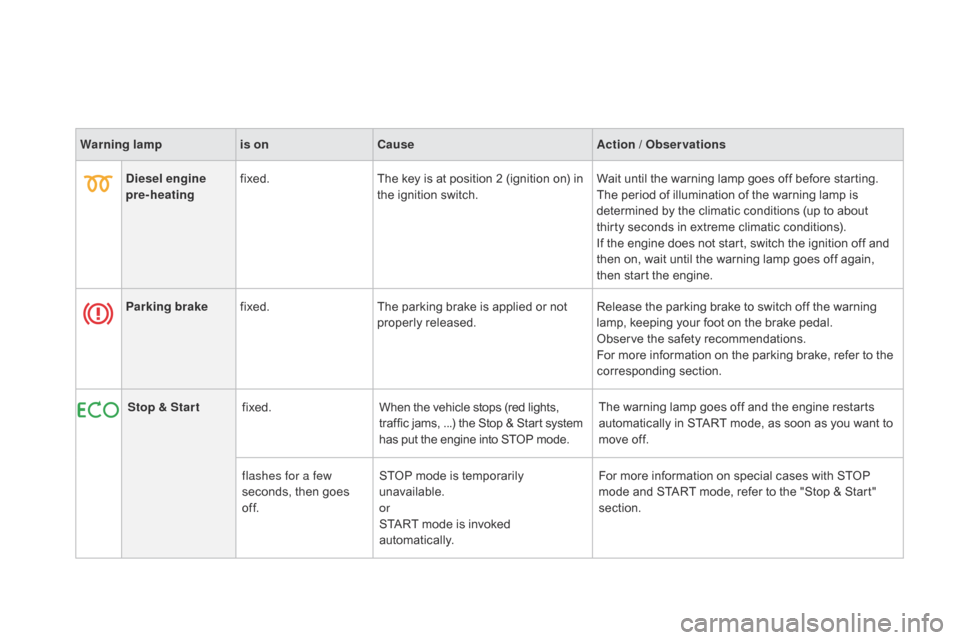
Warning lampis oncau seAction / Observations
di
esel engine
pre-heating fixed.
The
key is at position 2 (ignition on) in
t
he ignition switch.Wait
until the warning lamp goes off before starting.
The
period of illumination of the warning lamp is
d
etermined by the climatic conditions (up to about
t
hirty seconds in extreme climatic conditions).
If
the engine does not start, switch the ignition off and
t
hen on, wait until the warning lamp goes off again,
t
hen start the engine.
Parking brake fixed. The
parking brake is applied or not
p
roperly
r
eleased.Release
the parking brake to switch off the warning
l
amp, keeping your foot on the brake pedal.
Observe
the safety recommendations.
For
more information on the parking brake, refer to the
c
orresponding
s
ection.
Stop & Star t fixed. When
the vehicle stops (red lights,
t
raffic jams, ...) the Stop & Start system
h
as put the engine into STOP mode.The
warning lamp goes off and the engine restarts
a
utomatically in START mode, as soon as you want to
m
ove off.
flashes for a few
seconds,
then goes
o
f f.STOP
mode is temporarily
u
navailable.
or
START
mode is invoked
au
tomatically.For
more information on special cases with STOP
m
ode and START mode, refer to the "Stop & Start"
s
ection.
Page 66 of 376
DS3_en_Chap03_ouvertures_ed01-2014
Following disconnection of the vehicle battery, replacement of the remote control battery or
i
n the event of a remote control malfunction,
y
ou can no longer unlock, lock or locate
y
our vehicle.
F
F
irst of all, use the key in the lock to unlock
o
r lock your vehicle.
F
T
hen, reinitialise the remote control.
If
the problem persists, contact a CITROËN
d
ealer as soon as possible.
Remote control problem
Reinitialisation
F Switch off the ignition.
F T urn the key to position 2 (Ignition).
F
P
ress the closed padlock immediately for a
f
ew seconds.
F
S
witch off the ignition and remove the key
f
rom the ignition switch.
The
remote control is fully operational again.
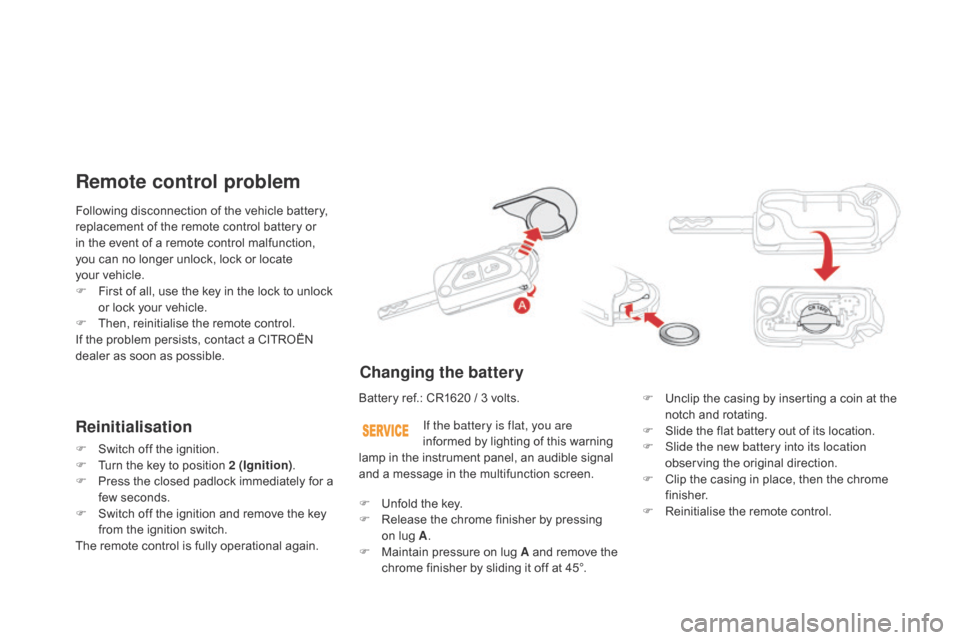
changing the battery
Battery ref.: CR1620 / 3 volts.F U nclip the casing by inserting a coin at the
n
otch and rotating.
F
S
lide the flat battery out of its location.
F
S
lide the new battery into its location
observing
the original direction.
F
C
lip the casing in place, then the chrome
f
inisher.
F
R
einitialise the remote control.
If the battery is flat, you are
informed
by lighting of this warning
l
amp in the instrument panel, an audible signal
a
nd a message in the multifunction screen.
F
U
nfold the key.
F
R
elease the chrome finisher by pressing
on
lug A.
F
M
aintain pressure on lug A and remove the
c
hrome finisher by sliding it off at 45°.
Page 105 of 376
103
DS3_en_Chap05_amenagement_ed01
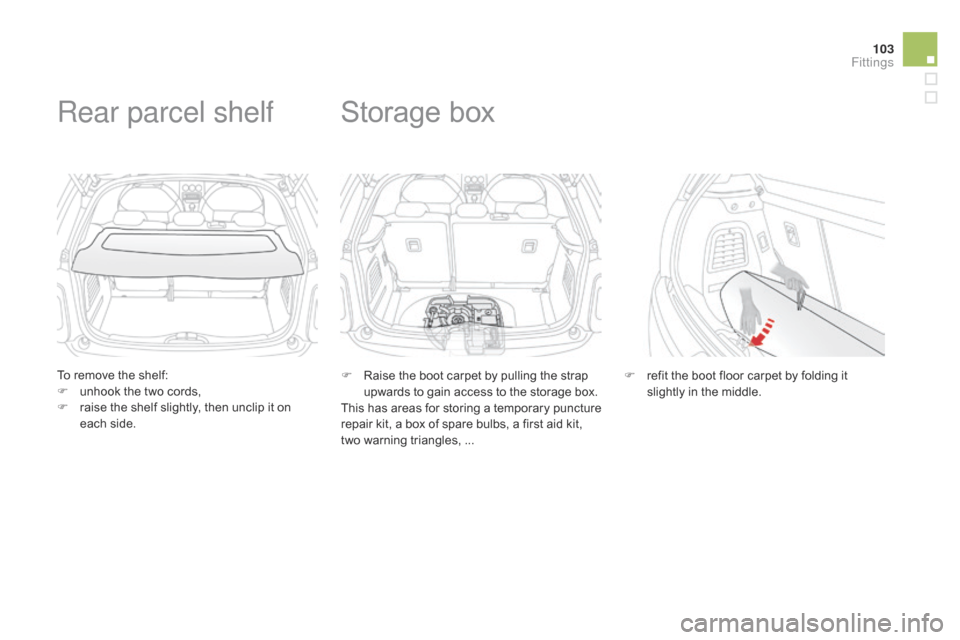
To remove the shelf:
F u nhook the two cords,
F
r
aise the shelf slightly, then unclip it on
e
ach side.
Rear parcel shelf
F Raise the boot carpet by pulling the strap u
pwards to gain access to the storage box.
This
has areas for storing a temporary puncture
r
epair kit, a box of spare bulbs, a first aid kit,
t
wo warning triangles, ...
Storage box
F refit the boot floor carpet by folding it s
lightly in the middle.
Fittings
Page 118 of 376
DS3_en_Chap06_conduite_ed01-2014
There is a risk of damage to the gearbox:
- i f you press the accelerator and
brake
pedals at the same time,
-
i
f you force the movement of the
g
ear lever from the P position to
another position when the battery
is
flat.
To
reduce fuel consumption when at
a
prolonged standstill with the engine
r
unning (traffic jam...), put the gear lever in
t
he N
position and apply the parking brake.
If the lever is not in position P
,
when the driver's door is opened or
approximately
45
seconds
after
the
i
gnition
is
switched
off,
a
warning
m
essage
appears
in
the
screen.
F
R
eturn the lever to position P ;
the
m
essage
d
isappears.
When
driving
on
flooded
roads
or
when
c
rossing
a
ford,
proceed
at
walking
p
ace.
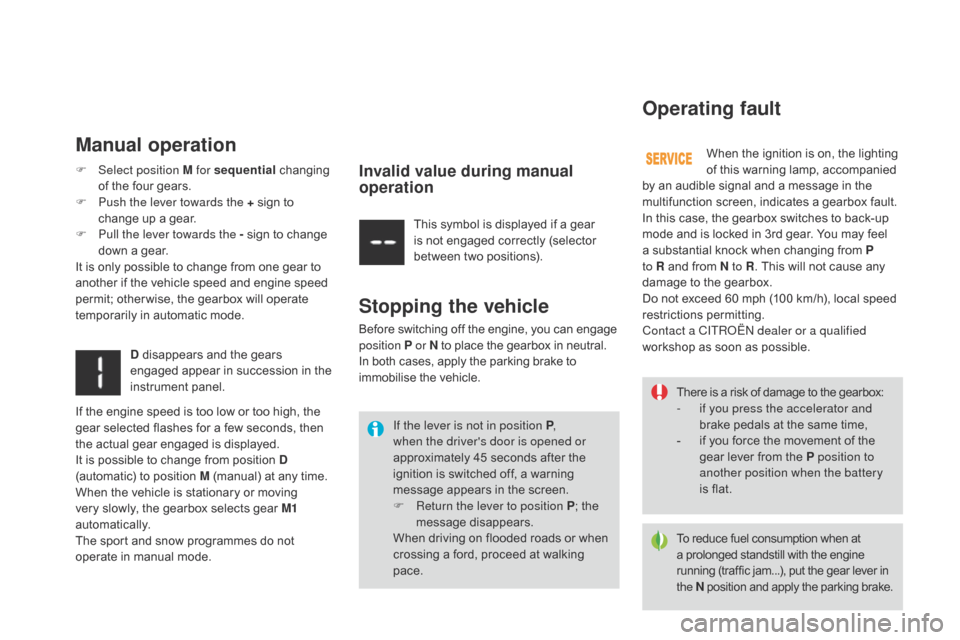
Operating fault
Manual operation
When the ignition is on, the lighting o f this warning lamp, accompanied
b
y
an
audible signal and a message in the
m
ultifunction screen, indicates a gearbox fault.
In
this
case, the gearbox switches to back-up
m
ode
and
is locked in 3rd gear. You may feel
a
substantial knock when changing from P
to R
and
from N to R .
This will not cause any
d
amage
to
the gearbox.
Do
not
exceed 60 mph (100 km/h), local speed
r
estrictions
p
ermitting.
Contact a CITR
oË
N dealer or a qualified
workshop
as soon as possible.
F
Sel
ect position M for sequential
c
hanging
o
f
the
four
gears.
F
P
ush the lever towards the +
sign
to
c
hange
up
a
gear.
F
P
ull the lever towards the -
sign
to
change
d
own
a
gear.
It
is
only
possible
to
change
from
one
gear
to
a
nother
if
the
vehicle
speed
and
engine
speed
p
ermit;
other wise,
the
gearbox
will
operate
t
emporarily
in
automatic
mode. This
symbol
is
displayed
if
a
gear
i
s
not
engaged
correctly
(selector
b
etween
two
positions).
d
disappears
and
the
gears
e
ngaged
appear
in
succession
in
the
in
strument
pan
el.
Stopping the vehicle
Before switching off the engine, you can engage p osition P or N
to place the gearbox in neutral.
In
both cases, apply the parking brake to
i
mmobilise the vehicle.
Invalid value during manual
operation
If the engine speed is too low or too high, the gear selected flashes for a few seconds, then
t
he actual gear engaged is displayed.
It
is possible to change from position d
(automatic)
to position M (manual) at any time.
When
the vehicle is stationary or moving
v
ery slowly, the gearbox selects gear M1
automatically.
The
sport and snow programmes do not
o
perate in manual mode.
Page 120 of 376
DS3_en_Chap06_conduite_ed01-2014
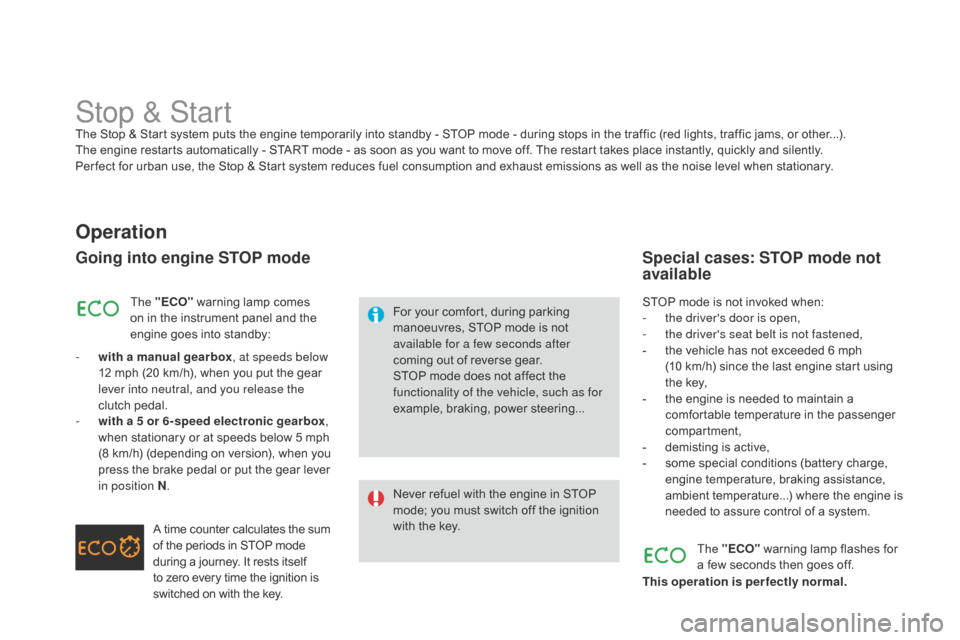
Stop & StartThe Stop & Start system puts the engine temporarily into standby - STOP mode - during stops in the traffic (red lights, traffic jams, or other...). The engine restarts automatically - START mode - as soon as you want to move off. The restart takes place instantly, quickly and silently.
Per fect
for urban use, the Stop & Start system reduces fuel consumption and exhaust emissions as well as the noise level when stationary.
Operation
Going into engine STOP mode
For your comfort, during parking manoeuvres, STOP mode is not
a
vailable for a few seconds after
coming
out of reverse gear.
STOP
mode does not affect the
f
unctionality of the vehicle, such as for
example,
braking, power steering...
Never
refuel with the engine in STOP
m
ode; you must switch off the ignition
w
ith the key.
The "E
cO
"
warning
lamp
comes
o
n
in
the
instrument
panel
and
the
e
ngine
goes
into
standby:
-
w
ith a manual gearbox , at speeds below
12
mph
(20
km/h),
when
you
put
the
gear
l
ever into neutral, and you release the
clutch
pedal.
-
w
ith a 5 or 6-speed electronic gearbox ,
when
stationary
or
at
speeds
below
5
mph
(
8
km/h)
(depending
on
version),
when
you
p
ress
the
brake
pedal
or
put
the
gear
lever
i
n position N .
A
time
counter
calculates
the
sum
o
f
the
periods
in
STOP
mode
d
uring
a
journey.
It
rests
itself
t
o
zero
every
time
the
ignition
is
s
witched
on
with
the
key. STOP
mode is not invoked when:
- t he driver's door is open,
-
t
he driver's seat belt is not fastened,
-
t
he vehicle has not exceeded 6 mph
(10
km/h) since the last engine start using
t
he key,
-
t
he engine is needed to maintain a
c
omfortable temperature in the passenger
c
ompartment,
-
d
emisting is active,
-
s
ome special conditions (battery charge,
e
ngine temperature, braking assistance,
a
mbient temperature...) where the engine is
n
eeded to assure control of a system.
Special cases: STOP mode not
available
The "EcO" warning lamp flashes for a
few seconds then goes off.
This operation is perfectly normal.
Page 136 of 376
DS3_en_Chap07_visibilite_ed01-2014
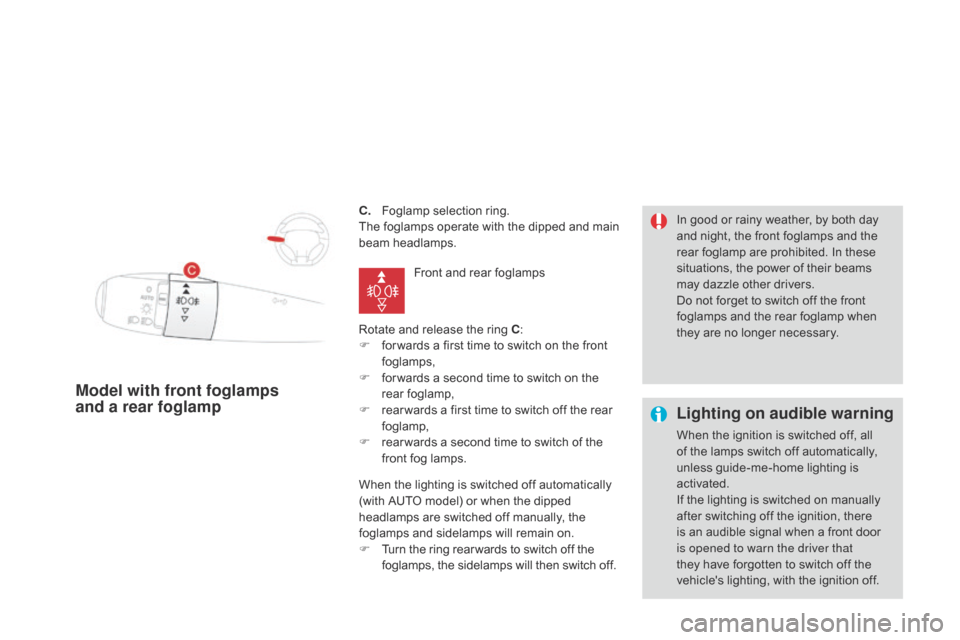
c. Foglamp selection ring.
The foglamps operate with the dipped and main
b
eam
h
eadlamps.
Rotate
and release the ring c
:
F
f
or wards a first time to switch on the front
fo
glamps,
F
f
or wards a second time to switch on the
r
ear
fo
glamp,
F
r
ear wards a first time to switch off the rear
fo
glamp,
F
r
ear wards a second time to switch of the
f
ront fog lamps.
Model with front foglamps
and a rear foglamp Lighting on audible warning
When the ignition is switched off, all o
f the lamps switch off automatically,
u
nless guide-me-home lighting is
a
ctivated.
If
the lighting is switched on manually
a
fter switching off the ignition, there
i
s an audible signal when a front door
i
s opened to warn the driver that
they
have forgotten to switch off the
v
ehicle's lighting, with the ignition off.
In
good or rainy weather, by both day
a
nd night, the front foglamps and the
r
ear foglamp are prohibited. In these
s
ituations, the power of their beams
m
ay dazzle other drivers.
Do not forget to switch off the front
f
oglamps and the rear foglamp when
t
hey are no longer necessary.
Front
and
rear
foglamps
When
the
lighting
is
switched
off
automatically
(
with
AUTO
model)
or
when
the
dipped
h
eadlamps
are
switched
off
manually,
the
f
oglamps
and
sidelamps
will
remain
on.
F
T
urn
the
ring
rear wards
to
switch
off
the
f
oglamps,
the
sidelamps
will
then
switch
off.