window Citroen DS3 2014 1.G Owner's Manual
[x] Cancel search | Manufacturer: CITROEN, Model Year: 2014, Model line: DS3, Model: Citroen DS3 2014 1.GPages: 376, PDF Size: 12.55 MB
Page 13 of 376
11
DS3_en_Chap00b_vue-ensemble_ed01-2014
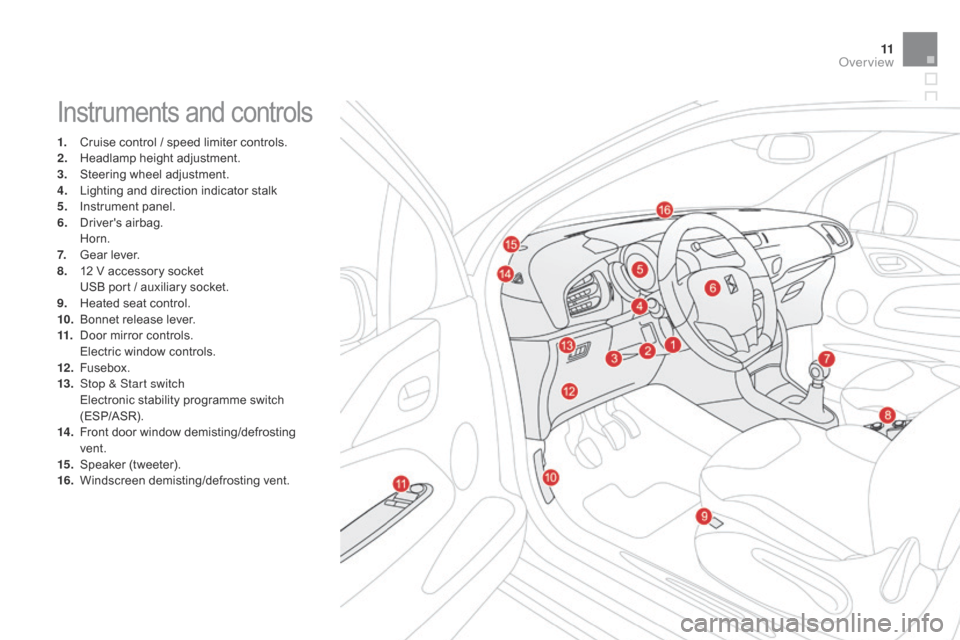
Instruments and controls
1. Cruise control / speed limiter controls.
2. H eadlamp height adjustment.
3.
S
teering wheel adjustment.
4.
L
ighting and direction indicator stalk
5.
I
nstrument panel.
6.
D
river's
ai
rbag.
H
orn.
7.
G
ear lever.
8.
1
2 V accessory socket
U
SB port / auxiliary socket.
9.
H
eated seat control.
10.
B
onnet release lever.
11.
D
oor mirror controls.
E
lectric window controls.
12 .
F
usebox.
13.
S
top & Start switch
E
lectronic stability programme switch
(
ESP/ASR).
14 .
F
ront door window demisting/defrosting
ve
nt.
15.
S
peaker
(
tweeter).
16.
W
indscreen
d
emisting/defrosting
v
ent.
Over view
Page 16 of 376
DS3_en_Chap00c_eco-conduite_ed01-2014
Before moving off, if the passenger compartment is too warm, ventilate it by opening the windows and air vents before using the air conditioning.
Above
30 mph (50 km/h), close the windows and leave the air vents
ope
n.
Remember
to make use of equipment that can help keep the
t
emperature in the passenger compartment down (sunroof and window
b
linds...).
Switch
off the air conditioning, unless it has automatic regulation, as
s
oon as the desired temperature is attained.
Switch
off the demisting and defrosting controls, if not automatic.
Switch
off the heated seat as soon as possible.
Switch
off the headlamps and front foglamps when the level of light
d
oes not require their use.
Avoid
running the engine before moving off, particularly in winter; your
v
ehicle will warm up much faster while driving.
Eco-driving
Eco-driving is a range of everyday practices that allow the motorist to optimise their fuel consumption and CO2 emissions.
Optimise the use of your gearbox
With a manual gearbox, move off gently and change up without waiting. During acceleration change up early.
With
an automatic or electronic gearbox, give preference to automatic
m
ode and avoid pressing the accelerator pedal heavily or suddenly.
The
gear shift indicator invites you engage the most suitable gear: as
s
oon as the indication is displayed in the instrument panel, follow it
s
traight away.
For
vehicles fitted with an electronic or automatic gearbox, this
i
ndicator appears only in manual mode.
drive smoothly
Maintain a safe distance between vehicles, use engine braking rather than the brake pedal, and press the accelerator progressively. These
p
ractices contribute towards a reduction in fuel consumption and CO
2
emissions
and
also
helps
reduce
the
background
traffic
noise.
control the use of your electrical
equipment
If your vehicle has cruise control, make use of the system at speeds a bove 25 mph (40 km/h) when the traffic is flowing well.As
a passenger, if you avoid connecting your multimedia devices
(
film, music, video game...), you will contribute towards limiting the c
onsumption of electrical energy, and so of fuel.
Disconnect your portable devices before leaving the vehicle.
Page 60 of 376
DS3_en_Chap03_ouvertures_ed01-2014
access
This section describes the functions of the remote control key, electric windows, central locking of doors and boot and access to the fuel filler.
Page 68 of 376
DS3_en_Chap03_ouvertures_ed01-2014
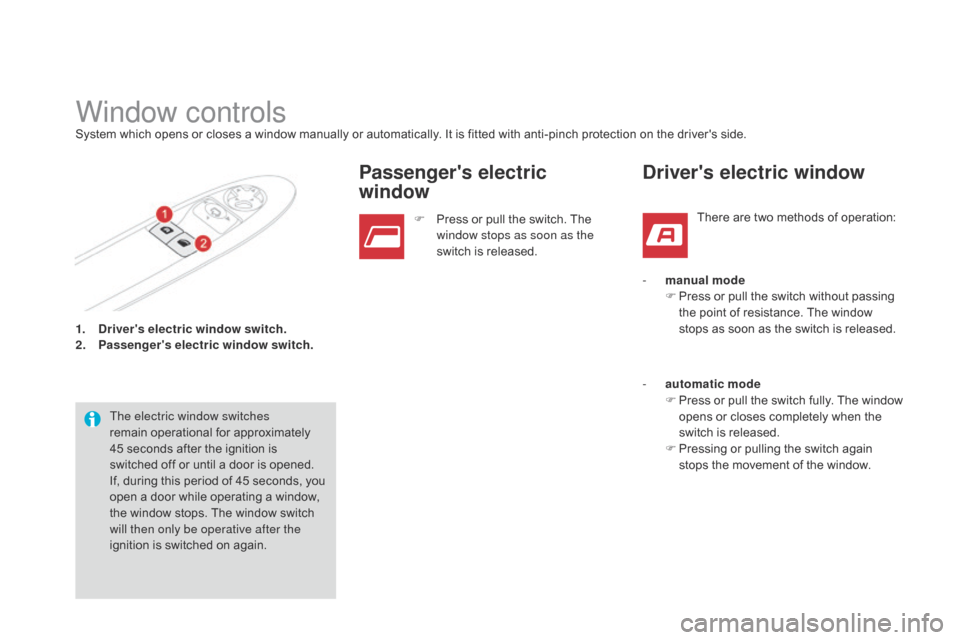
1. driver's electric window switch.
2. P
assenger's electric window switch.
Window controlsSystem which opens or closes a window manually or automatically. It is fitted with anti-pinch protection on the driver's side.
T he electric window switches
remain
operational for approximately
4
5 seconds after the ignition is
s
witched off or until a door is opened.
If,
during this period of 45 seconds, you
o
pen a door while operating a window,
t
he window stops. The window switch
w
ill then only be operative after the
ignition
is switched on again. F
P
ress or pull the switch. The
w
indow stops as soon as the
switch
is released.
Passenger's electric
window
There are two methods of operation:
driver's electric window
- manual modeF P ress or pull the switch without passing
t
he point of resistance. The window
s
tops as soon as the switch is released.
-
a
utomatic mode
F
P
ress
o
r
p
ull
t
he
s
witch
f
ully.
T
he
w
indow
o
pens or closes completely when the
s
witch is released.
F
P
ressing or pulling the switch again
s
tops the movement of the window.
Page 69 of 376
67
DS3_en_Chap03_ouvertures_ed01-2014
In the event of unwanted opening of the window on closing (for example in the p
resence of frost):
F
p
ress the switch beyond the point
of
resistance and release it; the
w
indow opens completely,
F
t
hen immediately pull the switch
w
ithout going beyond the point of
r
esistance until the window closes
fully,
F
c
ontinue to hold the switch for
approximately
one second after the
w
indow has closed.
The safety anti-pinch function is not
active during these operations.
Safety anti-pinch
on the driver's side, the one-touch front electric
window has a safety anti-pinch function.
When
the window rises and meets an obstacle,
i
t stops and partially lowers again.
Reinitialisation
Always remove t he k ey f rom t he i gnition w
hen leaving the vehicle, even for a
s
hort time.
In
the event of contact during operation
o
f the windows, reverse the movement
o
f the window. To do this, press the
c
orresponding
s
witch.
When the driver operates the
passenger
electric window switch, they
s
hould ensure that no one is preventing
c
orrect closing of the window.
be p
articularly aware of children when
operating
t
he
w
indows.
In
the
event
of
a
malfunction
you
have
to
r
einitialise the operation of the electric
windows:
F
r
elease
the
switch
and
pull
it
again
until
the
w
indow
closes
completely,
F
h
old
the
switch
for
approximately
one
s
econd
after
closing,
F
p
ress the switch to lower the window
automatically.
The safety anti-pinch function is not active
during these operations.
Access
Page 85 of 376
83
DS3_en_Chap04_confort_ed01-2014
Ventilation
Air intake
The air circulating in the passenger compartment is filtered and originates either from the outside via t
he grille located at the base of the windscreen or
f
rom the inside in air recirculation mode.
Air treatment
The incoming air follows various routes depending on the controls selected by the
d
river:
-
d
irect arrival in the passenger
c
ompartment (air intake),
-
p
assage through a heating circuit (heating),
-
p
assage through a cooling circuit (air
c
onditioning).
The
temperature control enables you to obtain
t
he level of comfort required by mixing the air of
t
he various circuits.
The air distribution control enables you to
diffuse
the air in the passenger compartment
c
ombining several air vents.
The air flow control enables you to increase or
reduce
the speed of the ventilation blower.
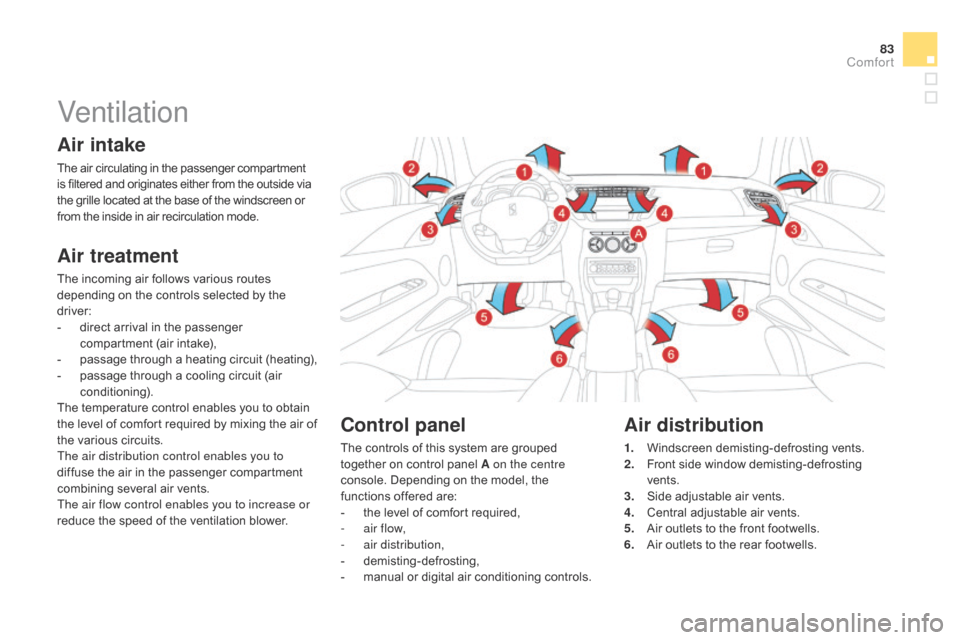
control panel
The controls of this system are grouped together on control panel A on the centre
console.
Depending on the model, the
f
unctions offered are:
-
t
he level of comfort required,
-
a
ir flow,
-
a
ir distribution,
-
d
emisting-defrosting,
-
m
anual or digital air conditioning controls.
Air distribution
1. Windscreen demisting-defrosting v ents.
2. F ront side window demisting-defrosting
ve
nts.
3.
S
ide adjustable air vents.
4.
C
entral adjustable air vents.
5.
A
ir outlets to the front footwells.
6.
A
ir outlets to the rear footwells.
comfort
Page 89 of 376
87
DS3_en_Chap04_confort_ed01-2014
The heating / ventilation or air conditioning systems operates with the engine running, as well as in STOP mode with Stop & Start.
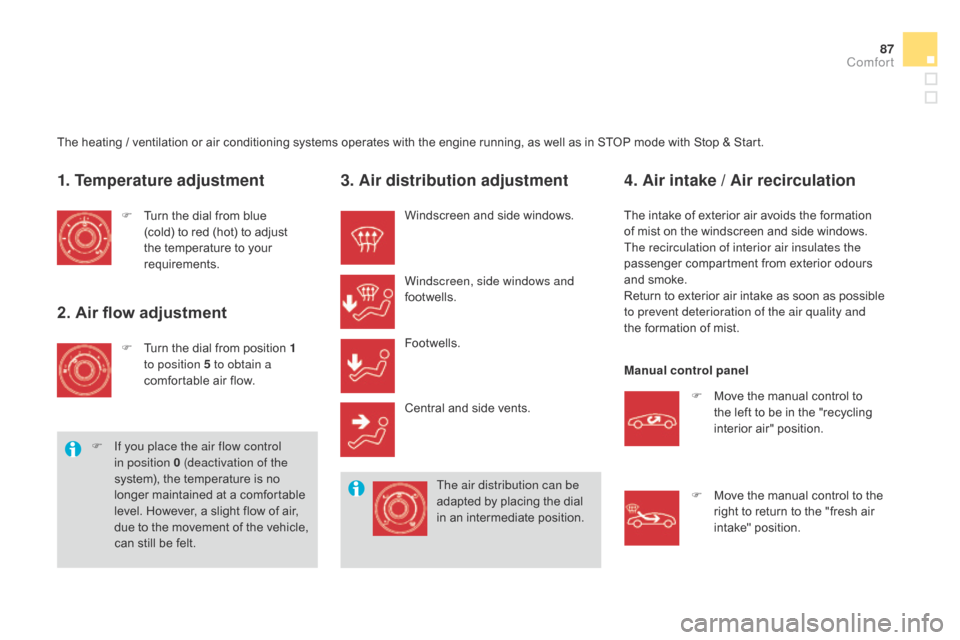
1. Temperature adjustment
F Turn the dial from blue (
cold) to red (hot) to adjust
t
he temperature to your
r
equirements.
2. Air flow adjustment
F Turn the dial from position 1
to position 5 to obtain a
comfortable
air flow.
F
I
f you place the air flow control
in position 0 (deactivation of the
system),
the temperature is no
l
onger maintained at a comfortable
l
evel. However, a slight flow of air,
d
ue
t
o
t
he
m
ovement
o
f
t
he
v
ehicle,
c
an still be felt.
3. Air distribution adjustment
Windscreen and side windows.
W indscreen, side windows and
footwells.
Footwells.
Central
and side vents.
The air distribution can be
adapted
by placing the dial
i
n an intermediate position.
4. Air intake / Air recirculation
The intake of exterior air avoids the formation of mist on the windscreen and side windows.
The recirculation of interior air insulates the
passenger
compartment from exterior odours
a
nd smoke.
Return
to exterior air intake as soon as possible
t
o prevent deterioration of the air quality and
the
formation of mist.
Manual control panel F
M
ove the manual control to
t
he left to be in the "recycling
i
nterior air" position.
F
M
ove the manual control to the
r
ight to return to the "fresh air
i
ntake" position.
comfort
Page 90 of 376
DS3_en_Chap04_confort_ed01-2014
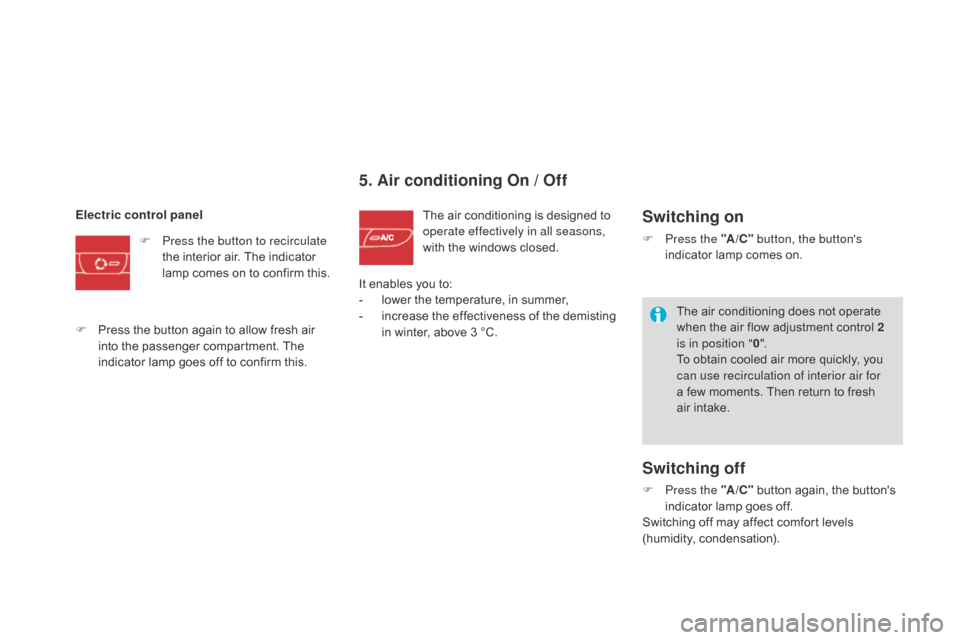
5. Air conditioning On / Off
The air conditioning is designed to operate effectively in all seasons,
with
the windows closed.
Electric control panel
F
P
ress the button to recirculate
the
interior
air.
The
indicator
l
amp
comes
on
to
confirm
this.
F
P
ress
the
button
again
to
allow
fresh
air
i
nto
the
passenger
compartment.
The
i
ndicator
lamp
goes
off
to
confirm
this. It
enables
you to:
-
l
ower
the temperature, in summer,
-
i
ncrease the effectiveness of the demisting
i
n
winter, above 3 °C.Switching on
F Press the "A /c" b utton, the button's
indicator lamp comes on.
Switching off
F Press the "A /c" button again, the button's i
ndicator lamp goes off.
Switching
off may affect comfort levels
(
humidity,
c
ondensation).
The
air conditioning does not operate
w
hen the air flow adjustment control 2
is in position " 0".
To obtain cooled air more quickly, you
c
an use recirculation of interior air for
a few moments. Then return to fresh
a
ir intake.
Page 91 of 376
89
DS3_en_Chap04_confort_ed01-2014
Front demist - defrost
With the heating /
ventilation system
F Put the temperature and air flow controls to t
he dedicated marked position.
F
P
ut the air intake control to the "Exterior air
i
ntake" position
(
manual control to the right or electric
c
ontrol with indicator lamp off).
F
P
ut the air distribution control to the
"Windscreen"
p
osition.
These
markings on the control panel indicate the control positions for rapid demisting or defrosting of the windscreen and side windows.
With the manual air
conditioning system
F Put
the temperature and air flow controls to t
he dedicated marked position.
F
P
ut the air intake control to the "Exterior air
i
ntake" position
(
manual control to the right or electric
c
ontrol with indicator lamp off).
F
P
ut the air distribution control to the
"Windscreen"
p
osition.
F
S
witch on the air conditioning by pressing
t
he "A /
c"
button; the associated green
w
arning lamp comes on. With
Stop & Start, when the demisting,
a
ir conditioning and air flow functions a
re activated, STOP mode is not a
vailable.
comfort
Page 92 of 376

DS3_en_Chap04_confort_ed01-2014
Digital air conditioningThe air conditioning operates when the engine is running, as well as in STOP mode with Stop & Start.
Automatic operation
1. Automatic "comfort" programme
Press the "AUTO" button. T
he "AUTO" symbol is displayed.
We
recommend that you use
t
his mode. It provides optimised
a
utomatic
control of all of the following
f
unctions:
passenger compartment
t
emperature, air flow, air distribution and air
i
ntake,
in
accordance with the comfort value
t
hat
you
have chosen.
This
system is designed to operate effectively
i
n
all
seasons, with the windows closed. For
your comfort, when the engine is
s
witched off, the settings are retained
u
ntil the engine is switched on again.
To prevent too great a distribution of
c
old air when the engine is cold, the air
f
low will only reach its optimum level
g
radually.
2. Temperature adjustment
The value indicated on the display corresponds
to
a level of comfort and not to a temperature in
d
egrees Celsius or Fahrenheit. On
entering the vehicle, if the interior
i
s very cold or hot, there is no need to
change the value displayed in order
t
o reach the required level of comfort.
T
he system corrects the temperature
d
ifference automatically and as quickly
a
s possible.
Press the " 5" and " 6" buttons to
change
this value. A setting around
t
he value 21
enables optimum
c
omfort to be obtained. However,
d
epending on your requirements, a
s
etting between 18 and 24 is usual.
3. Automatic "visibility" programme
The automatic comfort programme m
ay not be sufficient for rapid
d
emisting or defrosting of the
w
indscreen and side windows
(humidity,
several passengers, ice, etc.).
In
this
case, select the automatic visibility
p
rogramme. The button 3 indicator lamp
comes
on.
The
system automatically controls the air
c
onditioning and the flow of air and provides
o
ptimum
air distribution to the windscreen and
s
ide
windows. It deactivates air recirculation 5.
To
exit
this programme, press button 3 again
or "AUTO" ,
the indicator lamp on the button
g
oes
off
and "AUTO"
is displayed.
With
Stop & Start, when demisting has
b
een activated, the STOP mode is not
a
vailable.