lock Citroen DS3 2015 1.G Owner's Guide
[x] Cancel search | Manufacturer: CITROEN, Model Year: 2015, Model line: DS3, Model: Citroen DS3 2015 1.GPages: 415, PDF Size: 11.95 MB
Page 116 of 415

DS3_en_Chap04_conduite_ed01-2015
There is a risk of damage to the gearbox:
- i f you press the accelerator and
brake
pedals at the same time,
-
i
f you force the movement of the
s
elector from the P position to
another position when the battery
is
flat.
To
reduce fuel consumption when at
a
prolonged standstill with the engine
r
unning (traffic jam...), put the selector in
t
he
n
position and apply the parking brake.
If the selector is not in position P
,
when
the
driver's
door
is
opened
or
a
pproximately
45
seconds
after
the
i
gnition
is
switched
off,
a
warning
m
essage
appears
in
the
screen.
F
R
eturn the selector to position P ;
t
he
message
disappears.
When
driving
on
flooded
roads
or
when
c
rossing
a
ford,
proceed
at
walking
p
ace.
Operating fault
Manual operation
When the ignition is on, the lighting o
f this warning lamp, accompanied
b
y
an
audible signal and a message in the
m
ultifunction screen, indicates a gearbox fault.
In
this
case, the gearbox switches to back-up
m
ode
and
is locked in 3rd gear. You may feel
a
substantial knock when changing from P
to R
and
from n to R .
This will not cause any
d
amage
to
the gearbox.
Do
not
exceed 60 mph (100 km/h), local speed
r
estrictions
p
ermitting.
Contact
a
CITROËN dealer or a qualified
w
orkshop
as soon as possible.
F
Sel
ect position M for sequential c
hanging o
f
the
four
gears.
F
P
ush the selector towards the +
sign
to
c
hange
up
a
gear.
F
P
ull the selector towards the -
sign
to
c
hange
down
a
gear.
It
is
only
possible
to
change
from
one
gear
to
a
nother
if
the
vehicle
speed
and
engine
speed
p
ermit;
other wise,
the
gearbox
will
operate
t
emporarily
in
automatic
mode. This
symbol
is
displayed
if
a
gear
i
s
not
engaged
correctly
(selector
b
etween
two
positions).
d
disappears
and
the
gears
e
ngaged
appear
in
succession
in
the
in
strument
pan
el.
Stopping the vehicle
Before switching off the engine, you can engage p osition P or
n
to place the gearbox in neutral.
In
both cases, apply the parking brake to
i
mmobilise the vehicle.
Invalid value during manual
operation
If the engine speed is too low or too high, the gear selected flashes for a few seconds, then
t
he actual gear engaged is displayed.
It
is possible to change from position d
(automatic)
to position M (manual) at any time.
When
the vehicle is stationary or moving
v
ery slowly, the gearbox selects gear M1
automatically.
The
sport and snow programmes do not
o
perate in manual mode.
Page 126 of 415
DS3_en_Chap04_conduite_ed01-2015
Rear parking sensors
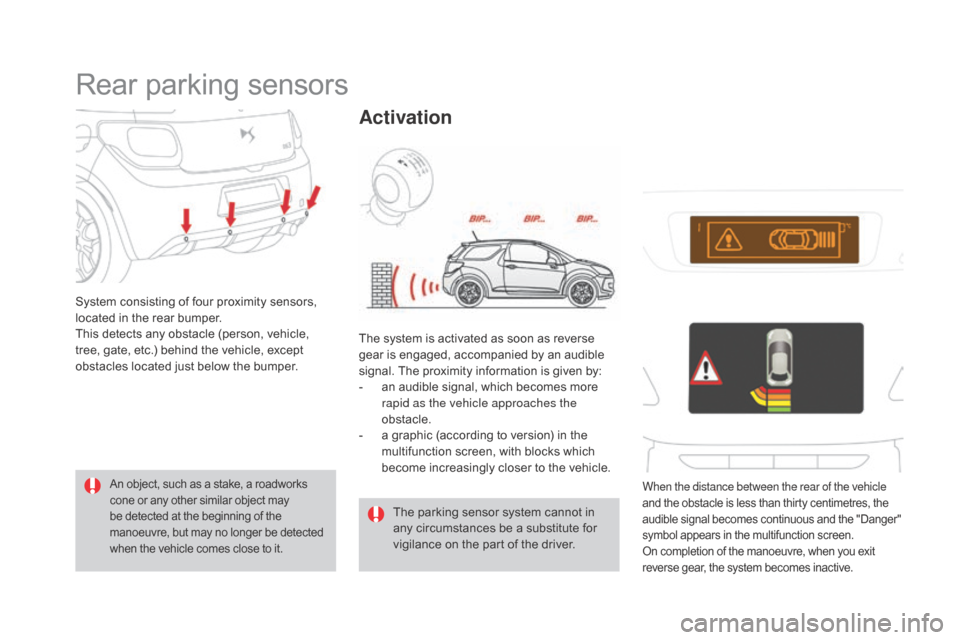
System consisting of four proximity sensors, located in the rear bumper.
This
detects any obstacle (person, vehicle,
t
ree, gate, etc.) behind the vehicle, except
o
bstacles located just below the bumper.
An object, such as a stake, a roadworks cone or any other similar object may b
e detected at the beginning of the
m
anoeuvre, but may no longer be detected
w
hen the vehicle comes close to it.
The parking sensor system cannot in any circumstances be a substitute for
v
igilance on the part of the driver.
The
system is activated as soon as reverse
g
ear
is engaged, accompanied by an audible
s
ignal. The proximity information is given by:
-
a
n audible signal, which becomes more
r
apid as the vehicle approaches the
obstacle.
-
a
graphic (according to version) in the
m
ultifunction screen, with blocks which
b
ecome increasingly closer to the vehicle.
Activation
When the distance between the rear of the vehicle
and
the obstacle is less than thirty centimetres, the a
udible signal becomes continuous and the "Danger"
s
ymbol appears in the multifunction screen.
On
completion of the manoeuvre, when you exit
r
everse gear, the system becomes inactive.
Page 137 of 415

135
DS3_en_Chap05_visibilite_ed01-2015
Travelling abroad
LEd / Xenon front lamps
For motoring in countries that drive on the other s
ide of the road, it is necessary to adjust the
d
ipped beams so as to not dazzle the drivers of
a
pproaching
v
ehicles.
F
R
aise the bonnet for access to the adjuster
(
one adjuster per headlamp).
F
I
nsert a suitable allen key (not supplied)
i
nto the hexagonal head of the adjuster.
F
T
urn the allen key half a turn clockwise.
Headlamp adjustment
To avoid causing a nuisance to other road u
sers, the height of the headlamps should be
a
djusted in relation to the load in the vehicle.
0.
D
river only or driver + front passenger.
-.
I
ntermediate
s
etting.
1.
5
people.
-.
5
people + load in the boot.
2.
D
river only + maximum authorised load in
t
he boot.
This
position is sufficient to avoid causing
d
azzle.
Higher
settings may limit the spread of light
f
rom the headlamps.
The
initial setting is position "0". On
your return, don't forget to
a
djust your headlamps back to their
i
nitial setting, by carrying out these
o
perations in reverse order.
Visibility
Page 142 of 415
DS3_en_Chap05_visibilite_ed01-2015
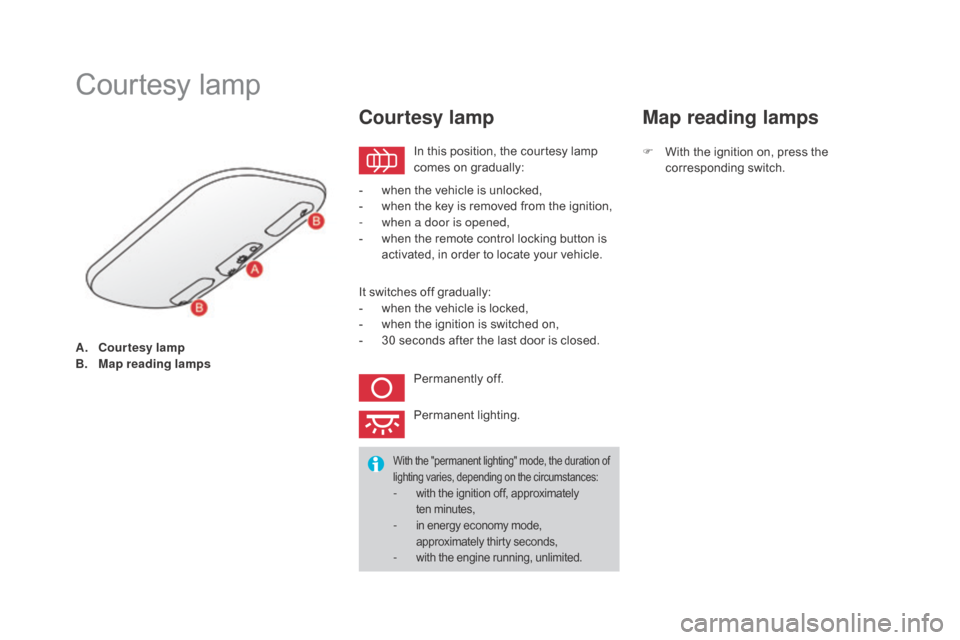
A. Courtesy lamp
B. Map reading lamps
Courtesy lam p
In this position, the courtesy lamp c
omes on gradually:
Courtesy lamp
- when the vehicle is unlocked,
- w hen the key is removed from the ignition,
-
w
hen a door is opened,
-
w
hen the remote control locking button is
a
ctivated, in order to locate your vehicle.
It
switches off gradually:
-
w
hen the vehicle is locked,
-
w
hen the ignition is switched on,
-
3
0 seconds after the last door is closed.
Permanently
off.
Permanent
l
ighting.
With the "permanent lighting" mode, the duration of lighting varies, depending on the circumstances:
- with the ignition off, approximately ten minutes,
- in energy economy mode, a pproximately thirty seconds,
- with the engine running, unlimited.
Map reading lamps
F With the ignition on, press the c
orresponding s witch.
Page 152 of 415
Braking assistance systems
Group of supplementary systems which help you to obtain optimum braking in complete
s
afety in emergency situations:
-
a
nti-lock braking system (ABS),
-
e
lectronic brake force distribution (EBFD),
-
e
mergency braking assistance (EBA).Anti-lock braking system
and electronic brake force
distribution
Linked systems which improve the stability and manoeuvrability of your vehicle when braking,
i
n particular on poor or slippery sur faces.
Activation
The anti-lock braking system comes into operation automatically when there is a risk of
w
heel lock.
Normal
operation of the ABS may make itself
f
elt by slight vibration of the brake pedal.
When
braking in an emergency, press
v
ery firmly without releasing the
p
ressure.
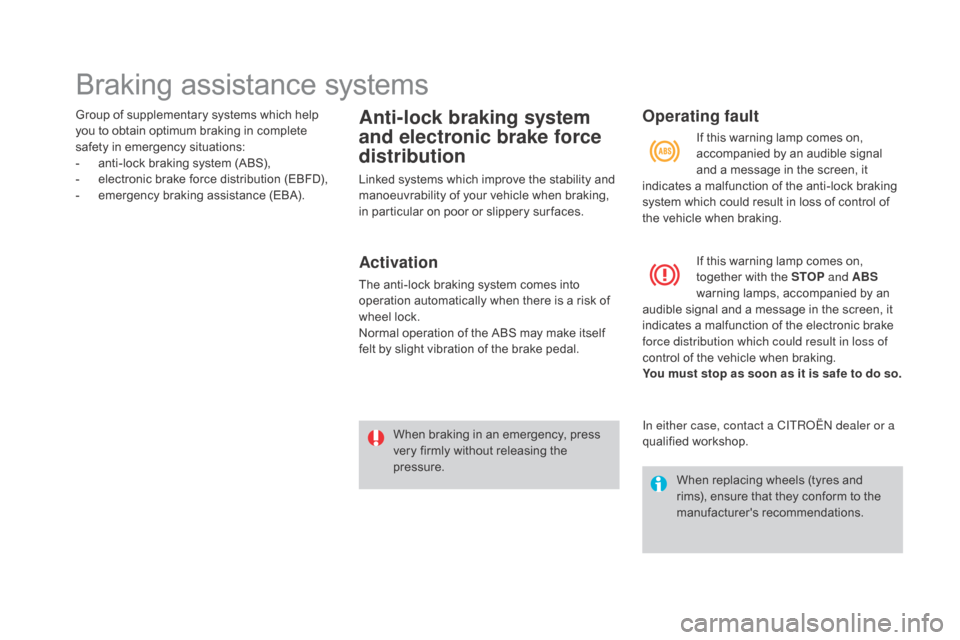
Operating fault
If this warning lamp comes on, together with the STOP and ABS
warning
lamps, accompanied by an
a
udible
signal and a message in the screen, it
i
ndicates
a malfunction of the electronic brake
f
orce distribution which could result in loss of
control
of
the vehicle when braking.
You must stop as soon as it is safe to do so.
When
replacing wheels (tyres and
r
ims), ensure that they conform to the
ma
nufacturer's
r
ecommendations.
If
this warning lamp comes on,
a
ccompanied by an audible signal
a
nd a message in the screen, it
i
ndicates
a malfunction of the anti-lock braking
s
ystem
which could result in loss of control of
t
he
vehicle when braking.
In either case, contact a CITROËN dealer or a
qualified
w
orkshop.
Page 179 of 415
177
DS3_en_Chap07_securite-enfants_ed01-2015
Advice on child seats
The incorrect installation of a child seat in a
vehicle compromises the child's protection
i
n the event of an accident.
Check
that there is no seat belt or seat belt
b
uckle under the child seat as this could
de
stabilise
i
t.
Remember
to fasten the seat belts or the
c
hild seat harness keeping the slack in
relation
to the child's body to a minimum,
even
for short journeys.
To
install a child seat using the vehicle's
s
eat belt, ensure that the belt is well
tightened
on the child seat and that it holds
t
he child seat firmly against the vehicle's
s
eat. If your passenger seat is adjustable,
m
ove it for ward if necessary.
On
the rear seats, always leave enough
s
pace between the front seat and:
-
a
rear ward facing child seat,
-
t
he child's feet when in a for ward facing
c
hild seat.
To
do this, move the front seat for ward and,
i
f necessary, also straighten its backrest.
Children at the front
The legislation on carrying a child on the front passenger seat is specific to each
c
o unt r y.
Refer
to the current legislation in your
c
o unt r y.
Deactivate
the passenger's front airbag
w
hen a rear ward facing child seat is
i
nstalled on the front seat. Other wise the
c
hild risks being seriously injured or killed if
t
he airbag is deployed.
Installation of a booster cushion
The chest part of the seat belt must be positioned on the child's shoulder without
t
ouching the neck.
Ensure that the lap part of the seat belt
passes
correctly over the child's thighs.
CITROËN
recommends the use of a
b
ooster seat which has a back, fitted with a
s
eat belt guide at shoulder level.
As
a safety precaution, do not leave:
-
o
ne or more children alone and
u
nsupervised in a vehicle,
-
a
child or an animal in a vehicle which
i
s exposed to the sun, with the windows
c
losed,
-
k
eys within the reach of children inside
t
he vehicle.
Use
the child lock to prevent any accidental
o
pening of the rear doors or windows.
Avoid
opening the rear windows by more
t
han a third.
To
protect young children from the rays of
t
he sun, fit side blinds on the rear windows.
For
optimum
installation
of
a
for ward
facing
c
hild
seat,
ensure
that
the
back
of
the
child
s
eat
is
as
close
as
possible
to
the
back
of
t
he
vehicle's
seat,
in
contact
if
possible.
You
must
remove
the
head
restraint
before
f
itting
a
child
seat
on
a
passenger
seat.
E
nsure that the head restraint is stowed or
attached
securely
to
prevent
it
from
being
t
hrown around the vehicle in the event of
sharp
braking.
Refit
the
head
restraint
once
t
he
child
seat
has
been
removed.
Child safety
Page 195 of 415

193
DS3_en_Chap08_info-pratiques_ed01-2015
Never store bottles of AdBlue® in
your vehicle.
AdBlue
® freezes at about -11°C and d
eteriorates above 25°C. It is recommended
t
hat bottles be stored in a cool area and
protected
from direct sunlight.
Under these conditions, the additive can be
kept
for
at least a year.
If the additive has frozen, it can be used once it
has
completely thawed out.
Recommendations on storage
Before topping-up, ensure that the vehicle is parked on a flat and level sur face.
In wintry conditions, ensure that the
temperature
of the vehicle is above -11°C.
O
ther wise, by freezing, the AdBlue
® cannot
be
poured
into
its
tank.
Park
your
vehicle in a
w
armer
area
for
a
few
hours
to
allow the top-up
t
o
be
carried
out.
Procedure
F Switch off the ignition and remove the key.
F
F
or access to the AdBlue
® tank, raise the b
oot
carpet
then,
depending on equipment,
l
ift
out
the
spare
wheel
and/or the storage
b
ox.
F
W
ithout
pressing,
turn
the
black cap a
q
uarter
turn
anti-clockwise and lift it off.
F
T
urn the blue cap a 6
th of a turn anti-
clockwise.
F
L
ift
off
the
cap.
Practical information
Page 196 of 415

DS3_en_Chap08_info-pratiques_ed01-2015
Important: if your vehicle's Ad
Blue® tank is completely empty - w
hich
is
confirmed by the alert
m
essages and the impossibility of
s
tarting
the engine, you must add at
l
east
3.8 litres (so two 1.89 litre bottles).If any additive is split or splashed, wash
immediately
with cold water or wipe
w
ith a damp cloth.
If the additive has crystallised, clean it
off using a sponge and hot water.Important:
i
n the event of a top-up after
a breakdown because of a lack of
additive , signalled by the message "Top
u
p emissions additive: Starting prevented",
y
ou must wait around 5 minutes before
s
witching
o
n
t
he
i
gnition,
w
ithout opening
the driver's door, locking the vehicle
or introducing the key into the ignition
switch .
Switch on the ignition, then, after
1
0 seconds, start the engine.
F
O
btain a bottle of AdBlue
®. After first c
hecking
the
use-by
date,
read carefully
t
he instructions on use on the label before
pouring
the
contents
of
the bottle into your
v
ehicle's
Ad
Blue
® tank. N ever dispose of AdBlue
® additive
bottles
in
the
household
waste. Place
t
hem
in
a
special
container provided
t
his
purpose
or
take
them
to your
d
ealer.
F
A
fter
emptying
the
bottle,
wipe
away
any
s
pillage
around
the
tank
filler
using
a
damp
c
loth.
F
R
efit
the
blue
cap
to
the
tank
and
turn
it
a
6
th of a turn clockwise, to its stop.
F
R
efit the black cap and turn it a quarter of
a
turn clockwise without pressing. Ensure
t
hat the indicator on the cap lines up with
the
indicator on the support.
F
D
epending on equipment, return the spare
w
heel and/or the storage box to the bottom
o
f
the boot.
F
R
efit the boot carpet and close the tailgate.
Page 205 of 415

203
DS3_en_Chap08_info-pratiques_ed01-2015
Removing a wheel
Parking the vehicle
Immobilise the vehicle where it does not block traffic: the ground must be
l
evel, stable and not slippery.
Apply
the parking brake, switch off the
i
gnition and engage first gear* to lock
t
he wheels.
If
necessary, place a chock under the
w
heel diagonally opposite the wheel to
be c
hanged.
It
is imperative that you ensure that the
o
ccupants get out of the vehicle and
w
ait where they are safe.
Never
go underneath a vehicle raised
u
sing a jack; use an axle stand.
List of operations
F Remove the chromed bolt cover from each o
f the bolts using the tool 3 (alloy wheels
o
nly).
F
F
it the socket 4 on the wheelbrace 1 to
slacken
the security bolt (if your vehicle is
f
itted with them).
F
S
lacken the other bolts using the
w
heelbrace 1
o
n l y.
*
position R
for
an
electronic
gearbox,
P for an
automatic
gearbox.
Ensure
that
the
jack
is
stable.
If
the
g
round
is
slippery
or
loose,
the
jack
c
ould
slip
or
drop
-
Risk
of
injury!
Take
care
to
position
the
jack
only
at
o
ne
of
the
jacking
points
A or B
under
the
vehicle,
ensuring
that
the
vehicle's
c
ontact area is well centred on the
head
of
the
jack.
Other wise,
there
is
a
r
isk
of
damage
to
the
vehicle
and/or
the
j
ack
might
drop
-
Risk
of
injury!
Practical information
Page 220 of 415
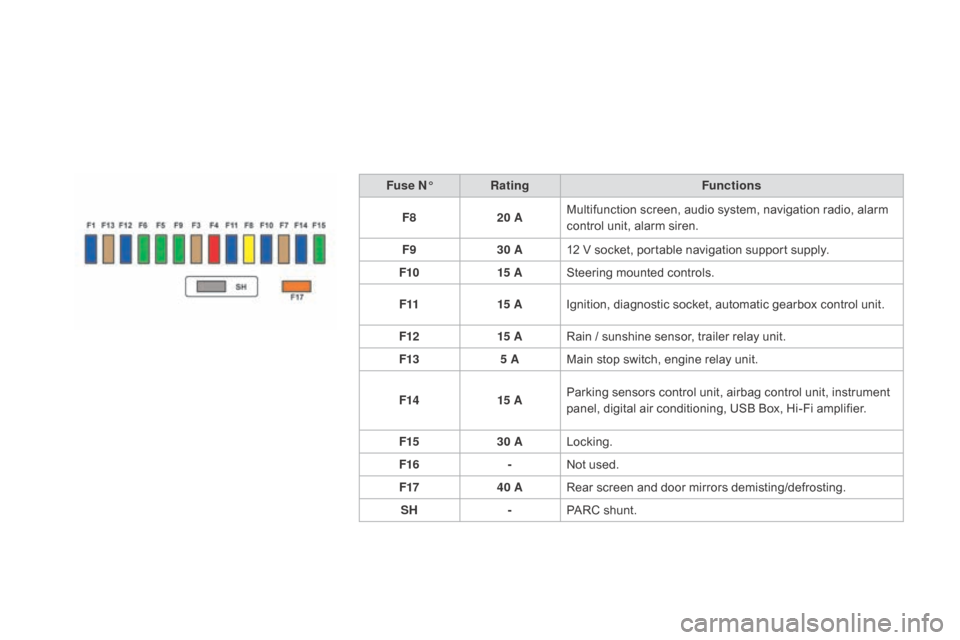
DS3_en_Chap08_info-pratiques_ed01-2015
Fuse n°R ating Functions
F8 20 AMultifunction
screen, audio system, navigation radio, alarm
c
ontrol unit, alarm siren.
F9 30 A12
V socket, portable navigation support supply.
F10 15 ASteering
mounted controls.
F11 15 AIgnition,
diagnostic socket, automatic gearbox control unit.
F12 15 ARain
/ sunshine sensor, trailer relay unit.
F13 5 AMain
stop switch, engine relay unit.
F14 15 AParking
sensors control unit, airbag control unit, instrument
p
anel, digital air conditioning, USB Box, Hi-Fi amplifier.
F15 30 ALocking.
F16 -Not
used.
F17 40 ARear
screen and door mirrors demisting/defrosting.
SH -PARC
shunt.