phone Citroen DS3 2015 1.G Owner's Manual
[x] Cancel search | Manufacturer: CITROEN, Model Year: 2015, Model line: DS3, Model: Citroen DS3 2015 1.GPages: 415, PDF Size: 11.95 MB
Page 47 of 415

45
DS3_en_Chap01_controle-de-marche_ed01-2015
Monochrome screen C
This displays the following information:
- t ime,
-
date,
-
a
mbient temperature (this flashes if there is
a
risk of ice),
-
s
tatus of doors and boot,
-
a
udio sources (radio, CD, USB port /
a
uxiliary socket etc.),
-
t
rip computer,
-
i
nformation or alert messages,
-
s
ettings menus for the screen and vehicle
s
ystems.
displays in the screen
From your Audio system control panel, you can:
F p ress the "MEn U" button to gain access to
t
he main menu ,
F
p
ress the " 5" or " 6" buttons to scroll
through
the items in the screen,
F
p
ress the "MO
dE"
button to change the
p
ermanent application (trip computer,
a
udio
s
ource...),
F
p
ress the " 7" or " 8"
buttons to change a
s
etting value,
F
p
ress the "OK"
button to confirm,
or
F
p
ress the "Back" button to abandon the
operation
in progress.
Controls
F Press the "MEn U" button to gain access t
o the main menu :
-
a
udio functions,
-
t
he trip computer,
-
pe
rsonalisation-configuration,
-
t
elephone (hands-free kit).
F
P
ress the " 5" or " 6" buttons to select the
menu
required, then confirm by pressing
t
he "OK"
button.
Main menu
Monitoring
Page 50 of 415

DS3_en_Chap01_controle-de-marche_ed01-2015
Display configuration
Once this menu has been selected, you can gain access to the following settings:
-
b
rightness-video
s
etting,
-
d
ate and time setting,
-
s
election of units.
Once
the fuel consumption units have
b
een changed to mpg, the information
i
n the screen relating to speed and
d
istance also changes to mph and
mil
es
re
spectively. As
a safety measure, configuration by
t
he driver of the multifunction screen
s
hould only be done when stationary.
Choice of language
Once this menu has been selected, you can change the language used by the screen by
c
hoosing one from a defined list.With
Audio system on, once this menu is s
elected you can configure your Bluetooth h
ands-free system (pairing), view the various
t
elephone directories (list of calls, services...)
a
nd manage your calls (call, hang up, second
c
all, secret mode...).
For
more information on the "Telephone"
f
unction, refer to the "Audio system" section.
"Telephone" Menu
Setting the date and time
F Sel ect the " Set date and time" function
using
the "5 " or " 6"
button.
F
Press "OK"
to confirm the selection.
F
A
djust the settings one by one using
t
he "7 " or " 8"
button then confirm
w
ith "OK".
F
T
hen select the "OK"
box in the screen
a
nd confirm.
Page 51 of 415
49
DS3_en_Chap01_controle-de-marche_ed01-2015
Touch screen tablet
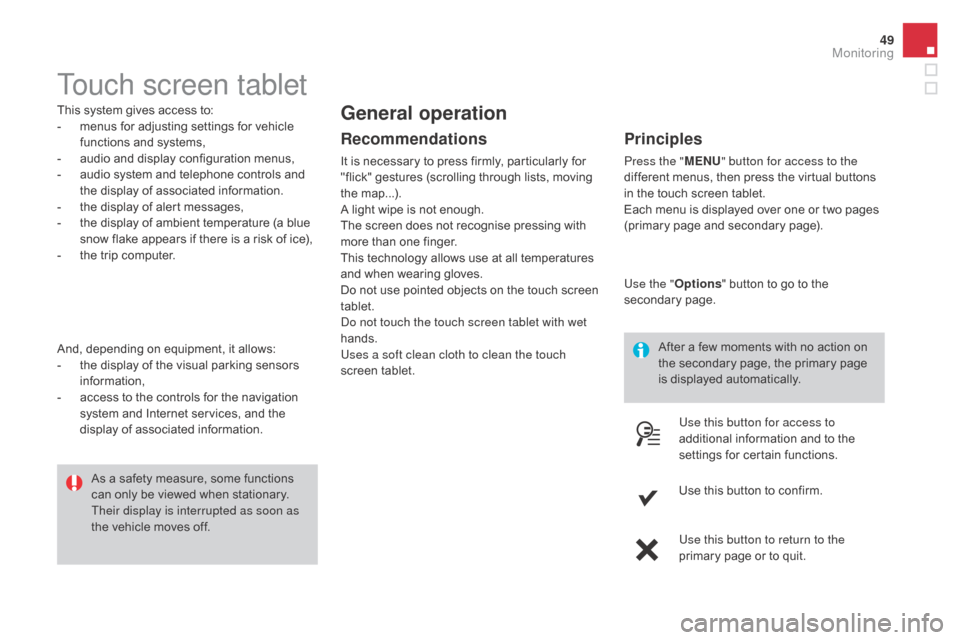
This system gives access to:
- m enus for adjusting settings for vehicle
f
unctions and systems,
-
a
udio and display configuration menus,
-
a
udio system and telephone controls and
t
he display of associated information.
-
t
he display of alert messages,
-
t
he display of ambient temperature (a blue
s
now flake appears if there is a risk of ice),
-
t
he trip computer.
And,
depending on equipment, it allows:
-
t
he display of the visual parking sensors
i
nformation,
-
a
ccess to the controls for the navigation
s
ystem and Internet services, and the
d
isplay of associated information. After
a few moments with no action on
t
he secondary page, the primary page
i
s displayed automatically.
As
a safety measure, some functions
c
an only be viewed when stationary.
T
heir display is interrupted as soon as
the
vehicle moves off.general operation
Recommendations
It is necessary to press firmly, particularly for "flick" gestures (scrolling through lists, moving
t
he
m
ap...).
A
light wipe is not enough.
The
screen does not recognise pressing with
m
ore than one finger.
This
technology allows use at all temperatures
a
nd when wearing gloves.
Do
not use pointed objects on the touch screen
t
ablet.
Do not touch the touch screen tablet with wet
hands.
Uses a soft clean cloth to clean the touch
screen
t
ablet.
Principles
Press the " MEn U" button for access to the
different menus, then press the virtual buttons
i
n the touch screen tablet.
Each
menu is displayed over one or two pages
(
primary page and secondary page).
Use the " Options"
button to go to the
s
econdary
pag
e.
Use this button for access to
additional
information and to the
s
ettings for certain functions.
Use
this button to confirm.
Use this button to return to the
primary
page or to quit.
Monitoring
Page 52 of 415

DS3_en_Chap01_controle-de-marche_ed01-2015
Menus
navigation
Navigation is available depending on
t
he county and/or trim level.
Refer
to the "Audio and telematics"
s
ection.
Radio Media
Refer
tothe "Audio and telematics"
s
ection.
Settings
Allows
configuration of the display
a
nd the system.
Refer
to the corresponding section.
Internet
These services are available
depending
on the county and/or trim
l
evel.
Refer
to the "Audio and telematics"
s
ection. Telephone
Refer
to the "Audio and telematics"
s
ection.
dr
iving
Allows
access
to
the
trip
computer
and,
d
epending on version, the adjustment
o
f settings for certain functions.
Refer
to the corresponding section.1.
V
olume / mute.
Refer
to the "Audio and telematics" section.
Press this button, then select the
desired
m
enu.
Page 96 of 415
DS3_en_Chap03_confort_ed01-2015
Auxiliary socketUSB Player
When it is in use, the portable device
charges a
utomatically.
12 V accessory socket
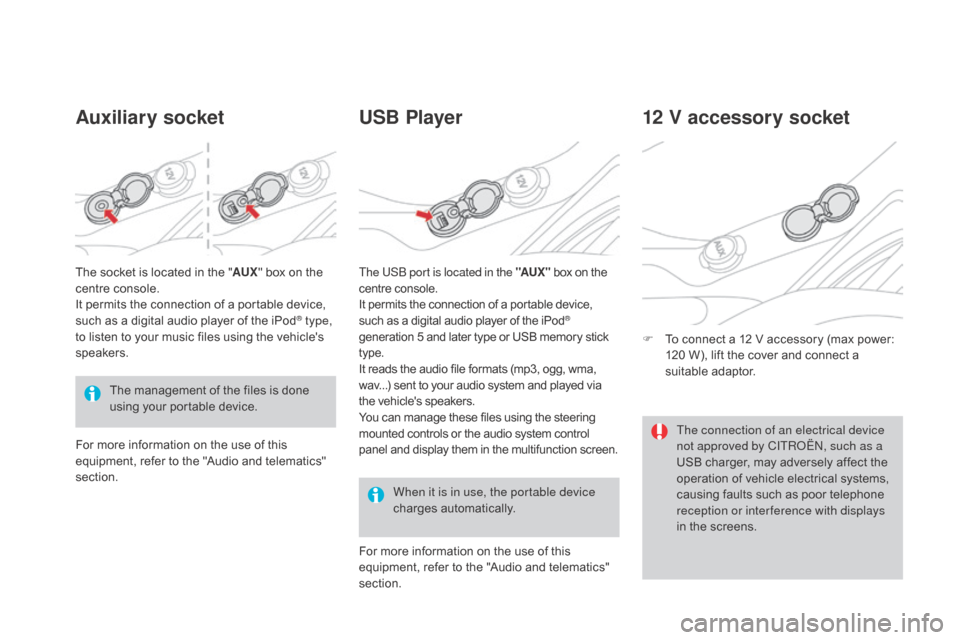
F To connect a 12 V accessory (max power: 1
20 W), lift the cover and connect a
s
uitable
a
daptor.
The
management
of
the
files
is
done
u
sing
your
portable
device.
The
socket
is
located
in
the
"
AUX "
box
on
the
c
entre
console.
It
permits
the
connection
of
a
portable
device,
s
uch
as
a
digital
audio
player
of
the
iPod
® type,
to
listen
to
your
music
files
using
the
vehicle's
s
peakers.
For
more
information
on
the
use
of
this
e
quipment,
refer
to
the
"Audio
and
telematics"
s
ection. For
more information on the use of this
e
quipment, refer to the "Audio and telematics"
s
ection.
The USB port is located in the "AUX "
box on the
c
entre console.
It permits the connection of a portable device,
s
uch as a digital audio player of the iPod®
generation
5
and
later
type
or
USB
memory stick t
ype.
It
reads
the
audio
file
formats
(mp3,
ogg,
wma,
w
av...)
sent
to
your
audio
system
and
played via
t
he
vehicle's
speakers.
You
can
manage
these
files
using
the
steering
m
ounted
controls
or
the
audio
system
control
p
anel
and
display
them
in
the
multifunction screen. The connection of an electrical device
not approved by CITROËN, such as a
USB
charger, may adversely affect the
o
peration of vehicle electrical systems,
c
ausing faults such as poor telephone
r
eception or inter ference with displays
in
the screens.
Page 228 of 415

DS3_en_Chap08_info-pratiques_ed01-2015
Load reduction modeSystem which manages the use of certain functions according to the level of charge
r
emaining in the battery.
When
the vehicle is being driven, the load
r
eduction function temporarily deactivates
c
ertain functions, such as the air conditioning,
t
he heated rear screen...
The deactivated functions are reactivated
automatically
as soon as conditions permit.Energy economy modeSystem which manages the period of use of certain functions to conserve a sufficient level of c
harge in the battery.
After
the engine has stopped, you can still use functions such as the audio equipment, windscreen
w
ipers, dipped beam headlamps, courtesy lamps, etc. for a maximum combined period of
t
hirty minutes. This
period may be greatly reduced if
t
he battery is not fully charged.
A
flat battery prevents the engine from
s
tarting.
If
the telephone is being used at the
s
ame time, it will be interrupted after
10
m
inutes.
Switching to economy mode
Once this period has elapsed, a message appears in the screen indicating that the
v
ehicle has switched to economy mode and the
a
ctive functions are put on standby.
Exiting economy mode
These functions are reactivated automatically the next time the vehicle is driven.
F
I
n order to resume the use of these
f
unctions immediately, start the engine and
l
et it run for a few minutes.
The
time available to you will then be double
t
he period for which the engine is left running.
H
owever, this period will always be between
five
and thirty minutes.
Page 237 of 415
235
DS3_en_Chap08_info-pratiques_ed01-2015
"Multimedia":
hands-free system, audio systems, semi-
i ntegral satellite navigation system, portable
n
avigation systems, mapping updates, driving
a
ssistant system, DVD player, reversing
c
amera, USB Box, speakers, Hi-Fi module,
2
30V socket, telephone/smartphone carrier,
r
ear multimedia carrier... By
visiting a CITROËN dealer, you can also o
btain cleaning and maintenance products (
interior and exterior) - including ecological
p
roducts from the "TECHNATURE" range,
p
roducts for topping up (screenwash fluid...),
t
ouch-up pens and paint aerosols for the exact
c
olour of your vehicle, refills (cartridge for the
t
emporary puncture repair kit...), ...
Installation of radio
communication transmitters
Before installing any after-market radio communication transmitter, you can
c
ontact a CITROËN dealer for the
specification
of transmitters which can
b
e fitted (frequency, maximum power,
a
erial position, specific installation
requirements),
in line with the Vehicle
E
lectromagnetic
C
ompatibility
D
irective (2004/104/EC). The
fitting of electrical equipment
o
r accessories which are not
recommended by CITROËN may result i
n a failure of your vehicle's electronic
s
ystem and excessive electrical
c
onsumption.
Contact a CITROËN dealer
for
information on the range of
r
ecommended equipment and
a
ccessories.
Depending
on the legislation in force in
t
he country, certain safety equipment m
ay be compulsory: high visibility s
afety vests, warning triangles,
b
reathalyzers, spare bulbs, spare
fuses,
fire extinguisher, first aid kit,
m
ud flaps at the rear of the vehicle.
Practical information
Page 271 of 415

269
DS3_en_Chap11c_SMEGplus_ed01-2015
7-inch touch screen tablet
gPS satellite navigation - Multimedia audio - Bluetooth® telephone
Contents
First steps
2 70
Steering
mounted
controls
2
72
Menus
273
Navigation
2
74
Navigation
-
Guidance
2
82
Tr a f fi c
2
8 6
Radio Media
2
88
Radio
294
DAB
(Digital
Audio
Broadcasting)
radio
2
96
Media
298
Settings
3
02
Internet
310
Internet browser
3
11
MirrorLink
® 314
T
elephone
3
16
Frequently
asked questions
3
24
The
system
is
protected
in
such
a
way
that
it
will
only
operate
in
y
our
vehicle. As
a
safety
measure,
the
driver should only carry out operations
w
hich
require
prolonged
attention while the vehicle is stationary.
The
display
of
the
energy
economy mode message signals
t
hat
the
system
is
about
to
go
into standby. Refer to the Energy
ec
onomy
(
mode)
s
ection.
Audio and Telematics
Page 273 of 415
271
DS3_en_Chap11c_SMEGplus_ed01-2015
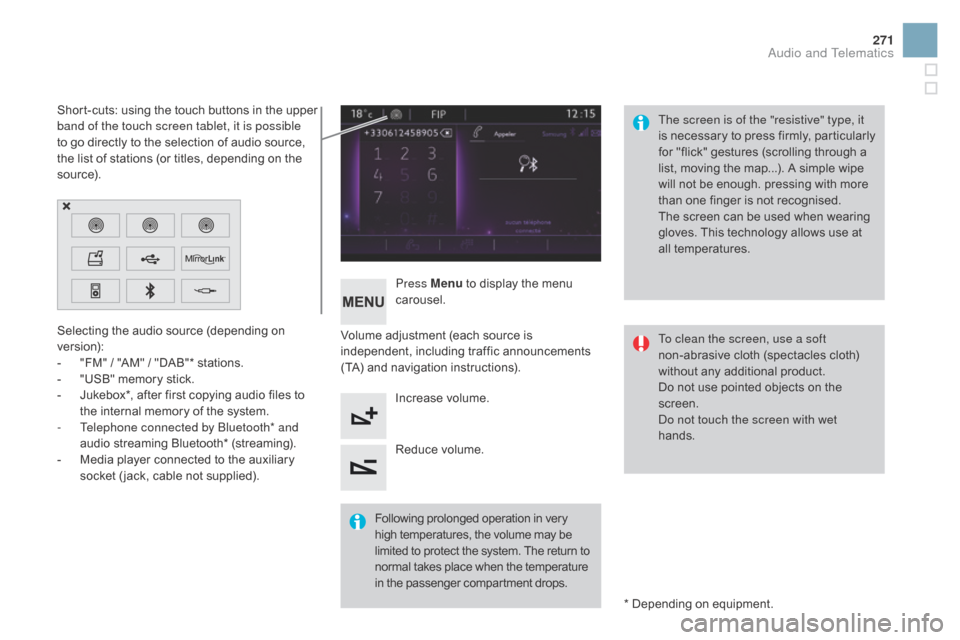
Selecting the audio source (depending on version):
-
"
FM" / "AM" / "DAB"* stations.
-
"
USB" memory stick.
-
J
ukebox*, after first copying audio files to
t
he internal memory of the system.
-
T
elephone connected by Bluetooth* and
audio
streaming Bluetooth* (streaming).
-
M
edia player connected to the auxiliary
s
ocket ( jack, cable not supplied). *
Depending on equipment.
Short-cuts:
using the touch buttons in the upper
b
and of the touch screen tablet, it is possible
to go directly to the selection of audio source,
t
he list of stations (or titles, depending on the
s
o u r c e).
The screen is of the "resistive" type, it
is
n
ecessary
t
o
p
ress
f
irmly,
p
articularly
f
or "flick" gestures (scrolling through a
l
ist, moving the map...). A simple wipe
w
ill not be enough. pressing with more
t
han one finger is not recognised.
The screen can be used when wearing
g
loves. This technology allows use at
a
ll
t
emperatures.
Following
p
rolonged
ope
ration
i
n
v
ery
h
igh temperatures, the volume may be
l
imited to protect the system. The return to
n
ormal takes place when the temperature
i
n the passenger compartment drops.To clean the screen, use a soft
non-abrasive
cloth (spectacles cloth)
w
ithout any additional product.
Do
not use pointed objects on the
sc
reen.
Do not touch the screen with wet
hands.
Volume
adjustment (each source is
i
ndependent,
i
ncluding
t
raffic
a
nnouncements
(
TA) and navigation instructions).
Press Menu
to display the menu
c
arousel.
Increase volume.
Reduce
volume.
Audio and Telematics
Page 274 of 415
DS3_en_Chap11c_SMEGplus_ed01-2015
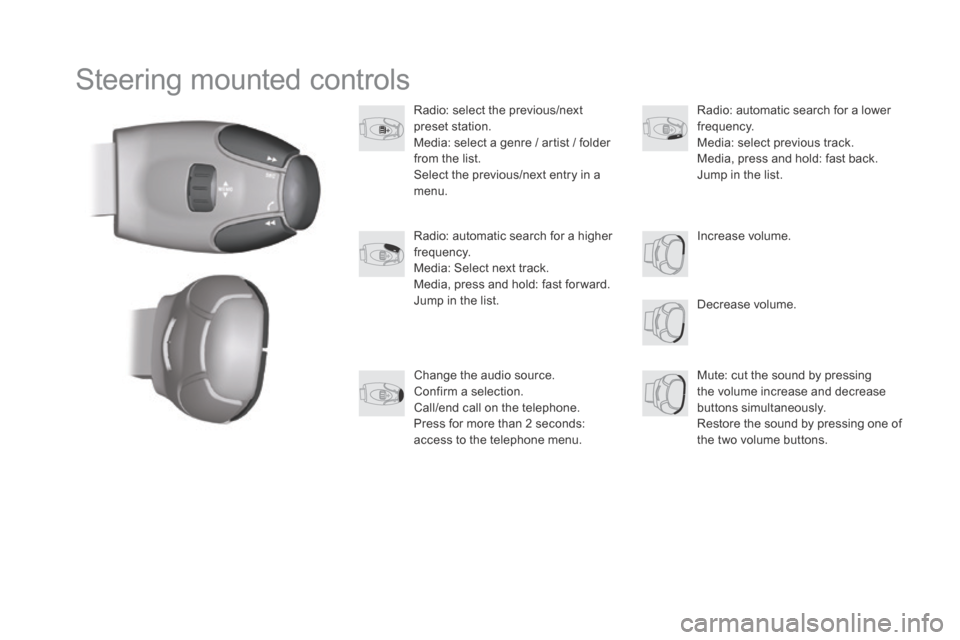
Steering mounted controls
Radio: select the previous/next preset s tation.
Media:
select a genre / artist / folder
f
rom the list.
Select
the previous/next entry in a
m
enu.
Decrease
volume.
Radio:
automatic search for a higher
f
requency.
Media:
Select next track.
Media,
press and hold: fast for ward.
Jump
in the list. Mute:
cut the sound by pressing
t
he volume increase and decrease
bu
ttons
s
imultaneously.
Restore
the sound by pressing one of
t
he two volume buttons.
Radio:
automatic search for a lower f
requency.
Media:
select previous track.
Media,
press and hold: fast back.
Jump
in the list.
Change
the audio source.
Confirm
a selection.
Call/end
call on the telephone.
Press
for more than 2 seconds:
a
ccess to the telephone menu. Increase
volume.