service CITROEN DS3 CABRIO 2013 Handbook (in English)
[x] Cancel search | Manufacturer: CITROEN, Model Year: 2013, Model line: DS3 CABRIO, Model: CITROEN DS3 CABRIO 2013Pages: 421, PDF Size: 12.86 MB
Page 269 of 421
267
04NAVIGATION - GUIDANCE
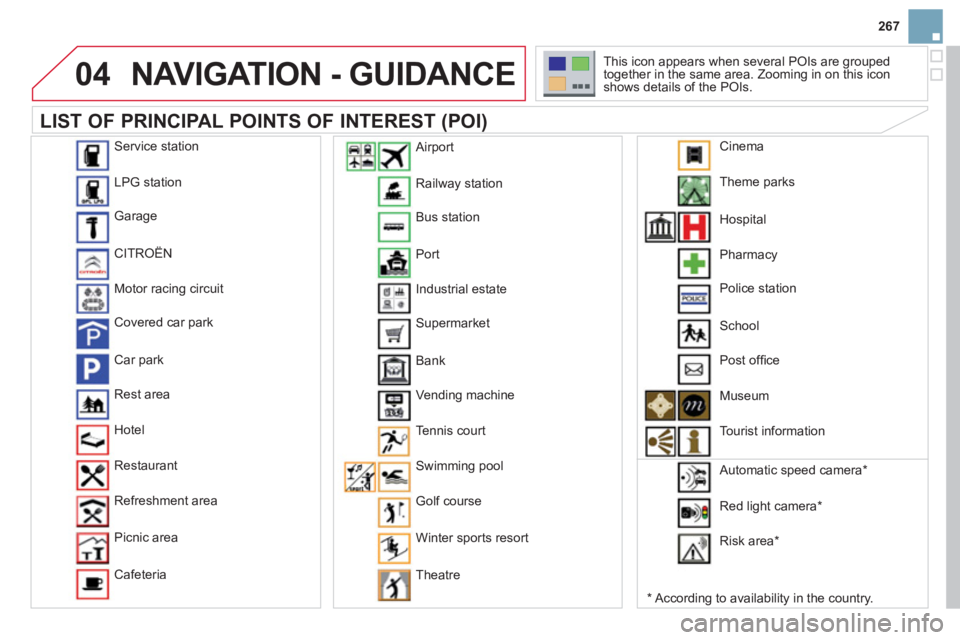
LIST OF PRINCIPAL POINTS OF INTEREST (POI)
*
According to availability in the country. This icon appears when several P
OIs are grouped
together in the same area. Zooming in on this icon
shows details of the POIs.
Service station
LP
G station
Garage
CITRO
ËN
Motor racin
g circuit
Covered car park
Car park
Rest area
H
otel
Restaurant
R
efreshment area
Pi
cnic area
Cafeteria
Railwa
y station
B
us station
Port
Industrial estate
Supermarket
B
ank
Vending machine
T
ennis court
Swimmin
g pool
Golf course
Winter sports resort
Th
eatre
Airport
Theme
parks
Hospital
Pharmac
y
Police station
School
P
ost offi ce
Museum
T
ourist information
Automatic speed camera
*
Red li
ght camera *
Ri
sk area *
Cinema
Page 277 of 421
275
08
1
2
3
4
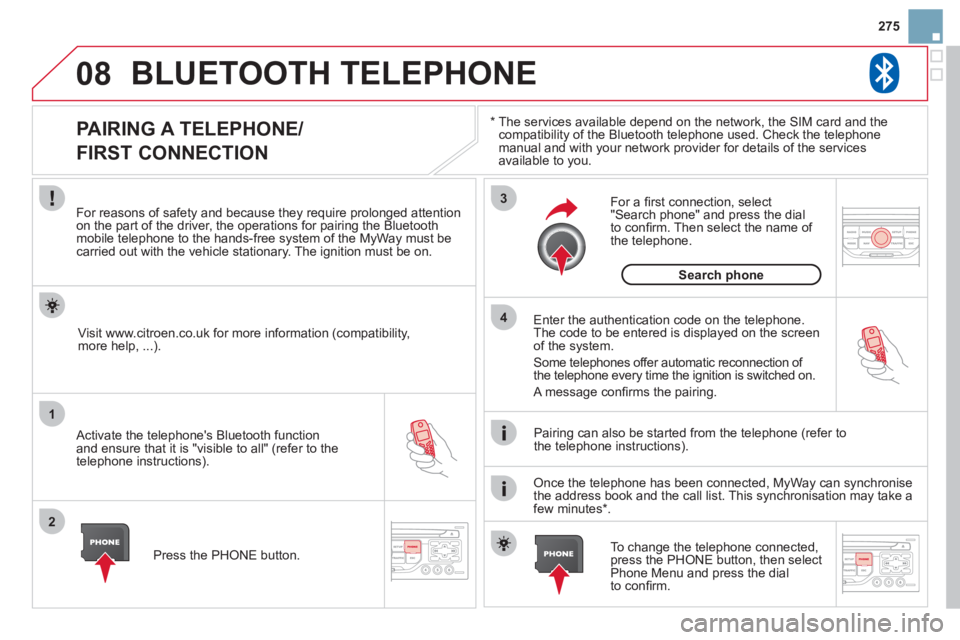
BLUETOOTH TELEPHONE
*
The services available depend on the network, the SIM card and thecompatibility of the Bluetooth telephone used. Check the telephone
manual and with your network provider for details of the servicesavailable to you.
PAIRING A TELEPHONE/
FIRST CONNECTION
For reasons of safety and because they require prolonged attentionon the part of the driver, the operations for pairing the Bluetooth mobile telephone to the hands-free system of the MyWay must be carried out with the vehicle stationary. The ignition must be on.
Activate the telephone's Bluetooth
function
and ensure that it is "visible to all" (refer to the
telephone instructions). Enter the authentication code on the tele
phone.
The code to be entered is displayed on the screen
of the system.
Some telephones offer automatic reconnection o
f
the telephone every time the ignition is switched on.
A messa
ge confi rms the pairing.
To change the telephone connected, press the PHONE button, then select Phone Menu and press the dial
to confi rm.
Once the telephone has been connected, MyWay can synchronise
the address book and the call list. This synchronisation may take a few minutes * . Pairin
g can also be started from the telephone (refer to
the telephone instructions). Visit www.citroen.co.uk
for more information (compatibility,
more help, ...).
Press the PH
ONE button.
For a
fi rst connection, select"Search phone" and press the dial
to confi rm. Then select the name of
the telephone.
Search
phone
Page 278 of 421
08
1
2
2
1
*
The services available depend on the network, the SIM card and the compatibility of the Bluetooth telephone used. Check the telephone manual and with your network provider for details of the services
available to you.
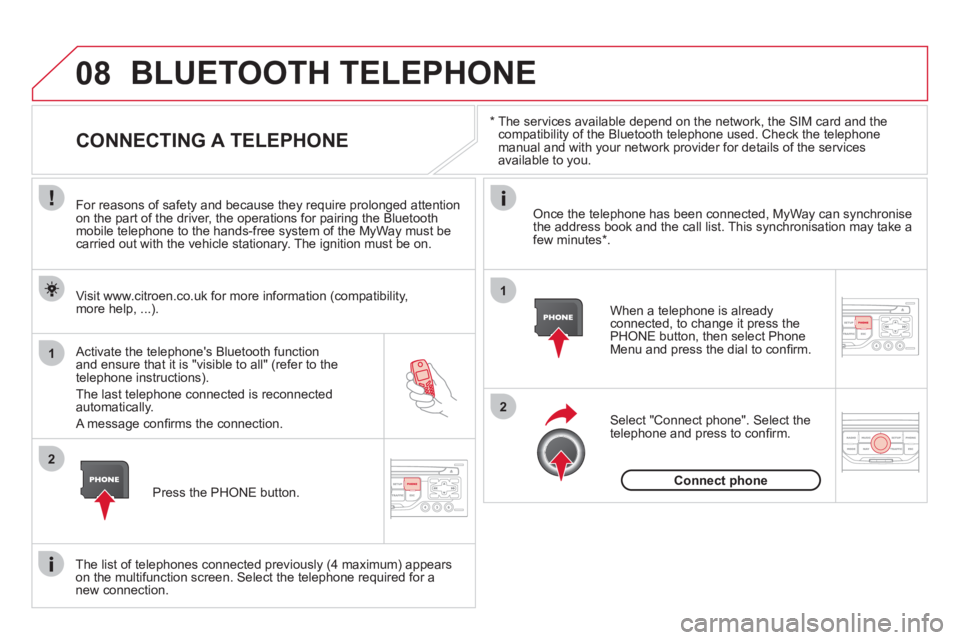
BLUETOOTH TELEPHONE
CONNECTING A TELEPHONE
For reasons of safety and because they require prolonged attention
on the part of the driver, the operations for pairing the Bluetooth
mobile telephone to the hands-free system of the MyWay must becarried out with the vehicle stationary. The ignition must be on.
Activate the tele
phone's Bluetooth function and ensure that it is "visible to all" (refer to the
telephone instructions).
The last telephone connected is reconnected automatically.
A messa
ge confi rms the connection. When a telephone is alread
yconnected, to change it press the
PHONE button, then select PhoneMenu and press the dial to confi rm.
Once the telephone has been connected, MyWay can synchronise
the address book and the call list. This synchronisation may take afew minutes * .
The list o
f telephones connected previously (4 maximum) appearson the multifunction screen. Select the telephone required for a
new connection. Visit www.citroen.co.uk
for more information (compatibility,
more help, ...).
Press the PH
ONE button.Select "Connect
phone". Select the
telephone and press to confi rm.
Connect
phone
Page 299 of 421
297
06
1
2
3
4
5
6
7
8
9
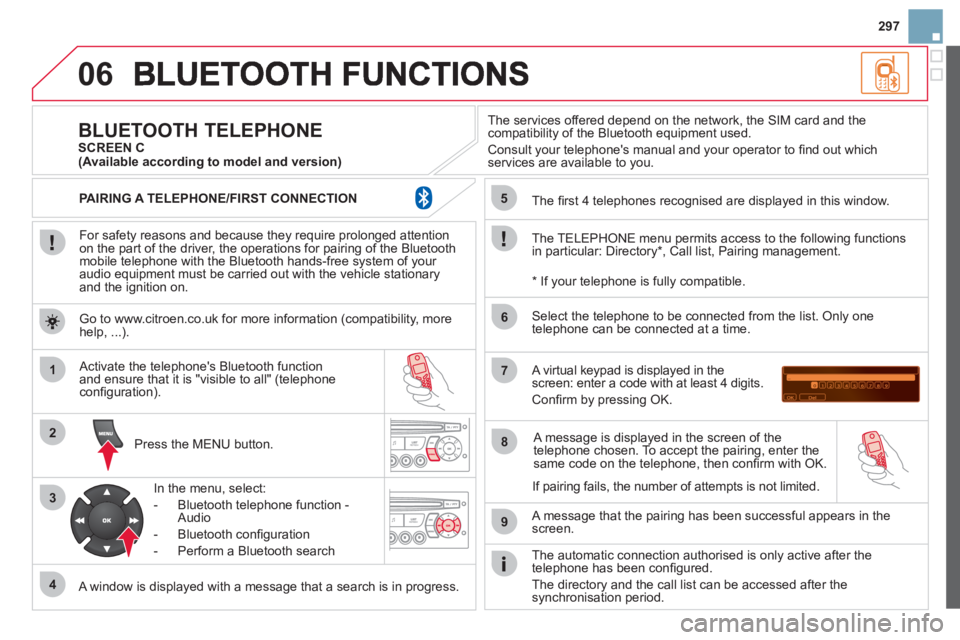
MENU
OK
For safety reasons and because they require prolonged attentionon the part of the driver, the operations for pairing of the Bluetooth mobile telephone with the Bluetooth hands-free system of your
audio equipment must be carried out with the vehicle stationary
and the ignition on.
Pr
ess the MENU button.
A window is displayed with a message that a search is in progress.
Activate the telephone's Bluetooth
function
and ensure that it is "visible to all" (telephone confi guration).
In the menu, select:
- Bluetooth telephone
function -
Audio
- Bluetooth confi
guration
- P
erform a Bluetooth search
The services o
ffered depend on the network, the SIM card and thecompatibility of the Bluetooth equipment used.
Consult your telephone's manual and your operator to fi nd out which
services are available to you.
BLUETOOTH TELEPHONE SCREEN C
The TELEPH
ONE menu permits access to the following functions
in particular: Directory * , Call list, Pairing management.
The
fi rst 4 telephones recognised are displayed in this window.
A virtual ke
ypad is displayed in thescreen: enter a code with at least 4 digits.
Confi rm by pressing OK.
A messa
ge that the pairing has been successful appears in thescreen.
Select the telephone to be connected from the list. Only one
telephone can be connected at a time.
A messa
ge is displayed in the screen of the
telephone chosen. To accept the pairing, enter the same code on the telephone, then confi rm with OK.
The automatic connection authorised is onl
y active after the
telephone has been confi gured.
The directory and the call list can be accessed a
fter thesynchronisation period.
(Available according to model and version)
*
If your telephone is fully compatible.
I
f pairing fails, the number of attempts is not limited. Go to www.citroen.co.uk for more information
(compatibility, more help, ...).
PAIRING A TELEPHONE/FIR
ST CONNECTION
Page 321 of 421

319Alphabetical index
Paint colour code........................................248Paintwork, matt...........................................233Parcel shelf, rear.........................................r131Parking brake......................................162,195Parking sensors, rear..................................r182Particle emission filter........................r193, 194Passenger compartment filter....................r194Player, CD MP3...................................273,293Port, USB...........................128, 280,294, 296Priming the fuel system..............................188Protecting children...............132-142, 15 3, 15 6
Puncture......................................................198
Radio ...................................................271, 291Rear foglamp .......................................114, 215Rear screen (demisting) ................................76Recharging the battery............................... 226Reduction of electrical load........................228Regeneration of the particleemissions filter..........................................r194Reinitialising the electric windows..............101Reinitialising the remote control ...................94Remote control ........................................90-95Removing a wheel......................................207Removing the mat....................................... 129Repair kit, puncture ..................................... 198Replacing bulbs...................................211-217
R
Replacing fuses...................................218-224Replacing the air filter.................................r194Replacing the oil filter.................................r194
Replacing the passenger compartment filter....................................r194
Replacing wiper blades .......................121, 228Resetting the service indicator.....................r44Resetting the trip recorder............................r46Rev counter.............................................r28,30Reversing lamp...........................................215Risk areas (update).....................................268Routine checks...................................194, 195Running out of fuel (Diesel) ........................188
Serial number, vehicle................................248Ser vice indicator...........................................r43Servicing.......................................................24Setting the clock........................278, 300,301Shor t-cut menus .................................259, 260Sidelamps ...................................112,213, 215Side repeater...............................................213Spare wheel................................................204Speed limiter...............................................r178Speedometer..........................................r28, 30Stability control (ESP).................................149Starting the vehicle .......................92, 165,170Steering mounted controls, audio.......257,289Stopping the vehicle .....................92, 165,170Stop & Start.....50,73,106,174, 187, 194,225Storage................................................ 126, 127Storage box.................................................131Stowing rings..............................................130Sun visor.....................................................r127Synchronising the remote control.................94System, navigation ......................................261Systems, ASR and ESP ..............................149
P
Safety for children................132-142, 153, 156Scented air freshener...................................r77Screen, colour 16/9 .......................61, 258, 279Screen, monochrome ................ 290, 302,304Screen, multifunction (with audio equipment)...................54, 57, 61Screen-wash reservoir................................191Screen menu map......................279, 302,304Screenwash ................................................119Screenwash fluid level ................................192Seat, rear bench...........................................84Seat adjustment......................................79, 82Seat belts ............................................151,153Seats, rear.....................................................r84
S
Page 361 of 421
Instruments and controls
A few seconds after the ignition is switched
on, the distance recorder resumes its normaloperation. The spanner remains on.
The distance remaining may be weighted by the time factor, depending on the type of driving.
Therefore, the spanner may also come on if you have exceeded the timeinter val since the last ser vice, indicatedin the servicing and warrantybooklet.
For a few seconds after the i
gnition is switched on, the spanner flashes
to indicate that
the service must be carried out as soon as possible.Example:the ser vice is overdue by 18 0 miles(300 km).
For a few seconds after the ignition is switched
on, the display indicates -180 miles (-300 km).
Anglais
12ECH.A040
Service overdue
Page 375 of 421
12
04
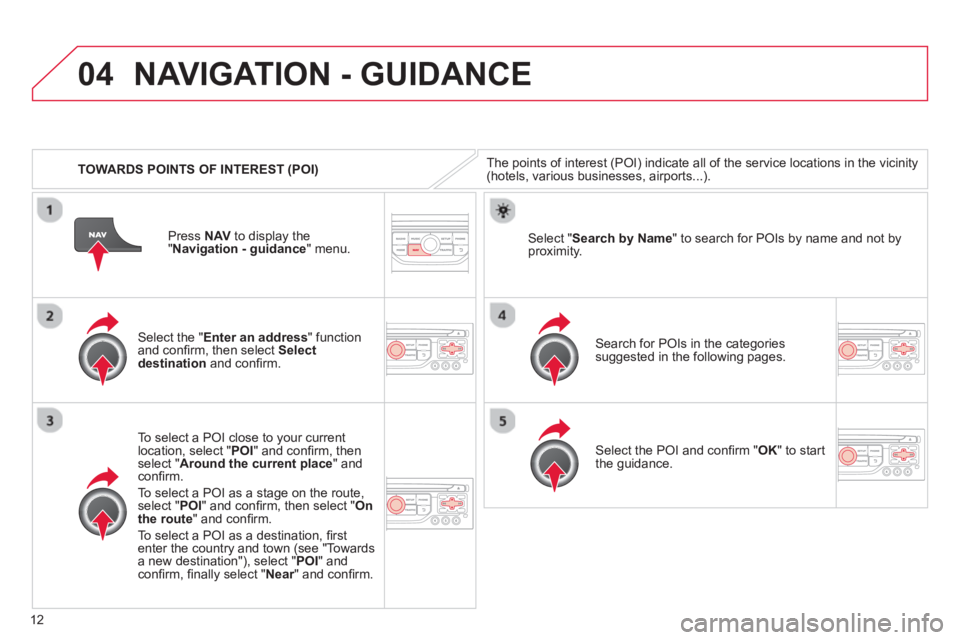
TOWARDS POINTS OF INTEREST (POI)
NAVIGATION - GUIDANCE
The points of interest (POI) indicate all of the service locations in the vicinity(hotels, various businesses, airports...).
Select the " Enter an address
" function
and confi rm, then select Select
destinationand confi rm.
To select a P
OI close to your currentlocation, select "POI" and confi rm, thenselect " Around the current place
" and confi rm.
To select a P
OI as a stage on the route,select " POI" and confi rm, then select " On
the route" and confi rm.
To select a P
OI as a destination, fi rst enter the country and town (see "Towards
a new destination"), select "POI" andconfi rm, fi nally select "Near" and confi rm.r
Search for POIs in the categories
suggested in the following pages.
Select " Search by Name
" to search for POIs by name and not byproximity.
Select the POI and confi rm " OK" to start
the guidance. Pr
ess NAV
to display the
"Navigation - guidance" menu.
Page 389 of 421
26
06
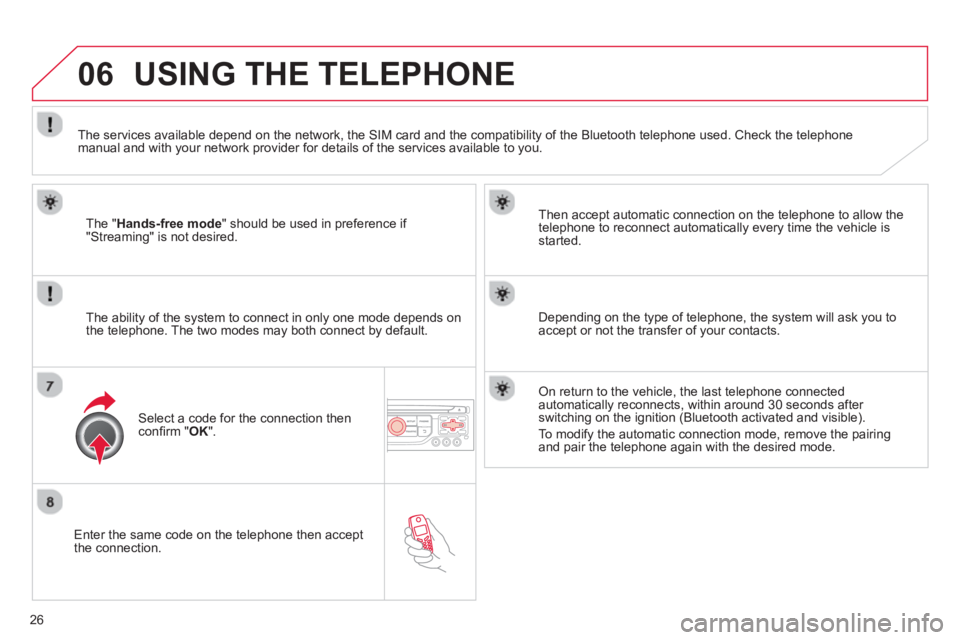
Enter the same code on the telephone then accept
the connection.
Then accept automatic connection on the telephone to allow the
te
lephone to reconnect automatically every time the vehicle is started.
The abilit
y of the system to connect in only one mode depends on
the telephone. The two modes may both connect by default.
USING THE TELEPHONE
The "Hands-free mode
" should be used in preference if "Streaming" is not desired.
The services available depend on the network, the
SIM card and the compatibility of the Bluetooth telephone used. Check the telephone manual and with your network provider for details of the services available to you.
Select a code for the connection thenconfi rm "OK".
Depending on the type of telephone, the system will ask you to
accept or not the transfer of your contacts.
On return to the vehicle, the last telephone connected
automatically reconnects, within around 30 seconds after switching on the ignition (Bluetooth activated and visible).
To modi
fy the automatic connection mode, remove the pairingand pair the telephone again with the desired mode.
Page 395 of 421
32
06 USING THE TELEPHONE
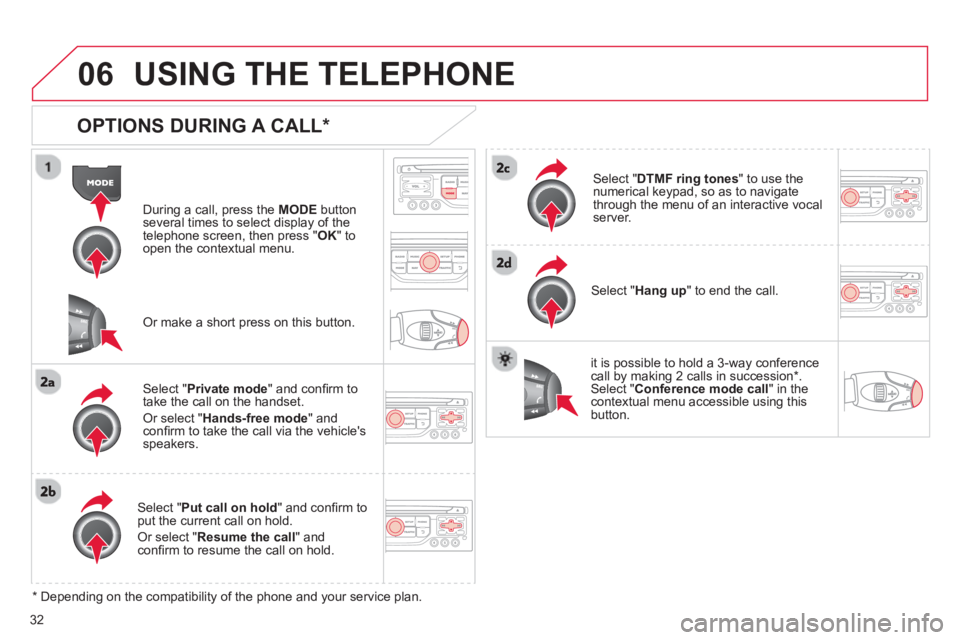
OPTIONS DURING A CALL *
During a call, press the MODE
button
several times to select display of the
telephone screen, then press " OK " to
open the contextual menu.
Select " Private mode
" and confi rm totake the call on the handset.
Or select " Hands-free mode" andconfi rm to take the call via the vehicle's
speakers.
Select " Put call on hold" and confi rm to put the current call on hold.
Or select " Resume the call" andconfi rm to resume the call on hold.
Select " DTMF ring tones
" to use thenumerical keypad, so as to navigate
through the menu of an interactive vocal server.
Select " Hang up " to end the call.
*
Depending on the compatibility of the phone and your service plan.
it is possible to hold a 3-wa
y conferencecall by making 2 calls in succession*. Select "Conferencemode call" in the contextual menu accessible using thisbutton.
Or make a short press on this button.