USB CITROEN DS3 CABRIO DAG 2017 Handbook (in English)
[x] Cancel search | Manufacturer: CITROEN, Model Year: 2017, Model line: DS3 CABRIO DAG, Model: CITROEN DS3 CABRIO DAG 2017Pages: 444, PDF Size: 14.09 MB
Page 345 of 444
343
DS3_en_Chap11d_RD45_ed02-2015
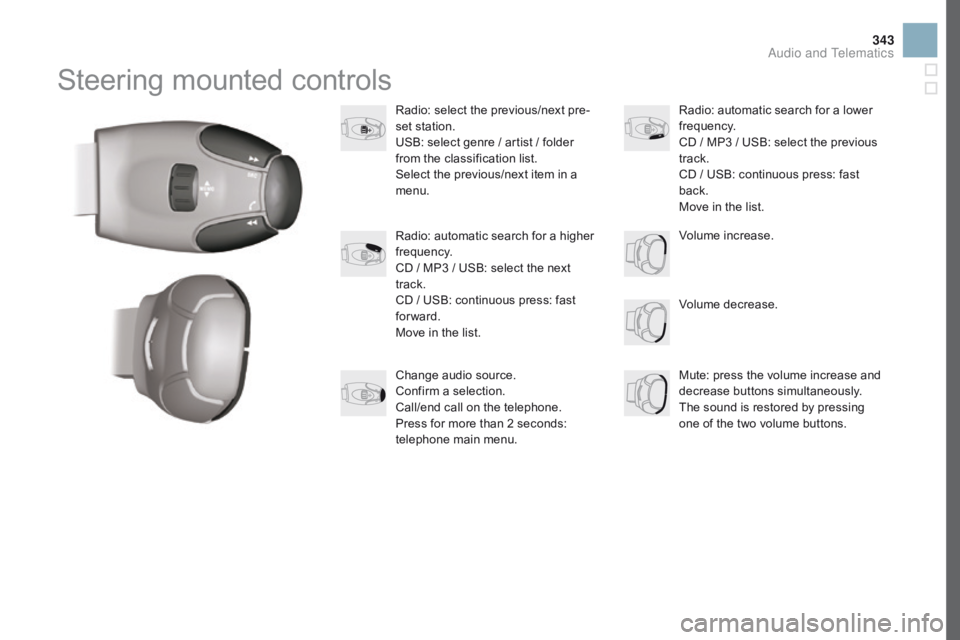
Steering mounted controls
Radio: select the previous/next pre-
se t s tation.
USB:
s
elect
g
enre
/ a
rtist
/ f
older
fr
om
t
he
c
lassification
l
ist.
Select
t
he
p
revious/next
i
tem
i
n
a me
nu.
Volume
d
ecrease.
Radio:
a
utomatic
s
earch
f
or
a h
igher
fre
quency.
CD
/ M
P3
/ U
SB:
s
elect
t
he
n
ext
tr
ack.
CD
/ U
SB:
c
ontinuous
p
ress:
f
ast
for
ward.
Move
i
n
t
he
l
ist. Mute:
p
ress
t
he
v
olume
i
ncrease
a
nd
de
crease
bu
ttons
si
multaneously.
The
s
ound
i
s
r
estored
b
y
p
ressing
on
e
o
f
t
he
t
wo
v
olume
b
uttons.
Radio: a
utomatic s earch f or a l ower fre
quency.
CD
/ M
P3
/ U
SB:
s
elect
t
he
p
revious
tr
ack.
CD
/ U
SB:
c
ontinuous
p
ress:
f
ast
bac
k.
Move
i
n
t
he
l
ist.
Change
a
udio
s
ource.
Confirm
a s
election.
Call/end
c
all
o
n
t
he
t
elephone.
Press
f
or
m
ore
t
han
2 s
econds:
te
lephone
m
ain
m
enu. Volume
i
ncrease.
Audio and Telematics
Page 348 of 444
DS3_en_Chap11d_RD45_ed02-2015
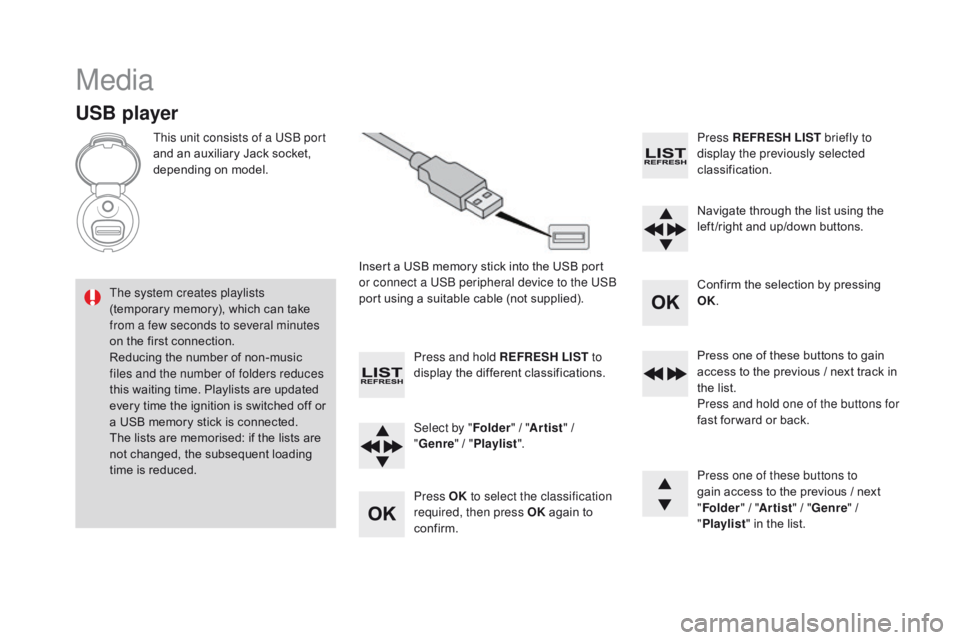
Media
USB player
This unit consists of a USB port
and an a uxiliary J ack s ocket, de
pending
o
n
m
odel.
Insert
a U
SB
m
emory
s
tick
i
nto
t
he
U
SB
p
ort
or c
onnect a USB peripheral device to the USB
port
u
sing
a s
uitable
c
able
(
not
s
upplied).
The system creates playlists
(temporary
m
emory),
w
hich
c
an
t
ake
fr
om a few seconds to several minutes
on
t
he
f
irst
c
onnection.
Reducing
t
he
n
umber
o
f
n
on-music
fi
les and the number of folders reduces
this
w
aiting
t
ime.
P
laylists
a
re
u
pdated
ev
ery
t
ime
t
he
i
gnition
i
s
s
witched
o
ff
o
r
a U
SB
m
emory
s
tick
i
s
c
onnected.
The
l
ists
a
re
m
emorised:
i
f
t
he
l
ists
a
re
no
t
c
hanged,
t
he
s
ubsequent
l
oading
ti
me
i
s
r
educed. Press and hold REFRESH LIST
to
display
t
he
d
ifferent
c
lassifications.
Select by " Folder"
/ "A
rtist"
/ "genre " / "Pla
ylist".
Press OK to select the classification
required, then press OK
a
gain
t
o
co
nfirm.Press REFRESH LIST
briefly to
display the previously selected
classification.
Navigate
t
hrough
t
he
l
ist
u
sing
t
he
le
ft /right
a
nd
u
p/down
b
uttons.
Confirm
t
he
s
election
b
y
p
ressing
OK
.
Press
o
ne
o
f
t
hese
b
uttons
t
o
g
ain
ac
cess
t
o
t
he
p
revious
/ n
ext
t
rack
i
n
th
e
l
ist.
Press and hold one of the buttons for
fast
f
or ward
o
r
b
ack.
Press one of these buttons to
gain
a
ccess
t
o
t
he
p
revious
/ n
ext
"Fol
der"
/ "A
rtist"
/ "genre " / "Pla
ylist"
i
n
t
he
l
ist.
Page 351 of 444
349
DS3_en_Chap11d_RD45_ed02-2015
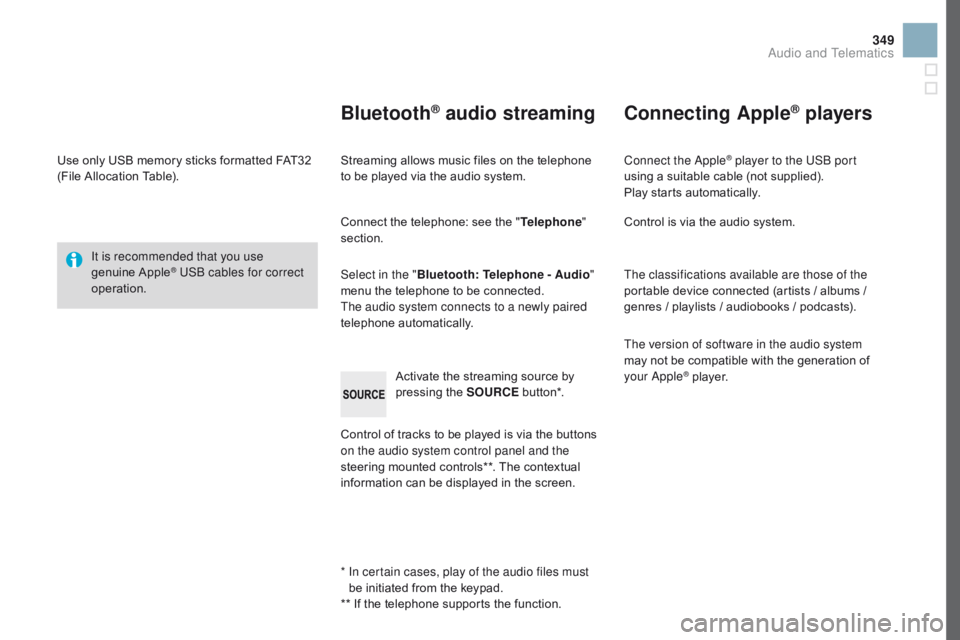
Use only USB memory sticks formatted FAT32 (File A llocation T able).
It is recommended that you use
genuine
Apple® USB cables for correct
operation.
*
In c
ertain cases, play of the audio files must
be
i
nitiated
f
rom
t
he
k
eypad.
**
I
f
t
he
t
elephone
s
upports
t
he
f
unction.
Bluetooth® audio streaming
Streaming allows music files on the telephone to be p layed v ia t he a udio s ystem.
Connect
t
he
t
elephone:
s
ee
t
he
"T
elephone"
section.
Select in the " Bluetooth: Telephone - Audio "
menu
t
he
t
elephone
t
o
b
e
c
onnected.
The audio system connects to a newly paired
telephone
au
tomatically.
Control
o
f
t
racks
t
o
b
e
p
layed
i
s
v
ia
t
he
b
uttons
on t
he audio system control panel and the
steering
m
ounted
c
ontrols**.
T
he
c
ontextual
in
formation
c
an
b
e
d
isplayed
i
n
t
he
s
creen.
Activate
t
he
s
treaming
s
ource
b
y
pr
essing
t
he
S
OURCE
bu
t to n*.
Connecting Apple® players
Connect the Apple® player to the USB port
using a s
uitable c
able ( not s upplied).
Play
s
tarts
a
utomatically.
Control
i
s
v
ia
t
he
a
udio
s
ystem.
The classifications available are those of the
portable
d
evice
c
onnected
(
artists
/ a
lbums
/ ge
nres
/ p
laylists
/ a
udiobooks
/ p
odcasts).
The version of software in the audio system
may
n
ot
b
e
c
ompatible
w
ith
t
he
g
eneration
o
f
yo
ur Apple
® player.
Audio and Telematics
Page 355 of 444
353
DS3_en_Chap11d_RD45_ed02-2015
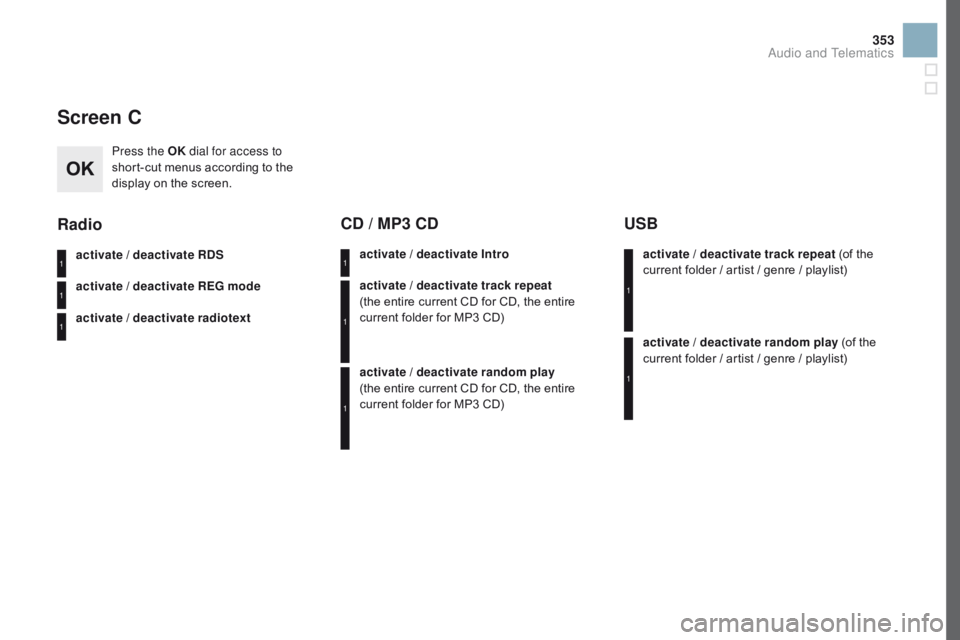
Screen C
Press the OK dial for access to
short-cut m enus a ccording t o t he di
splay
o
n
t
he
s
creen.
activate / deactivate RDS
activate / deactivate RE
g m
ode
activate / deactivate radiotext
Radio
activate / deactivate Intro
CD / MP3 CD
activate / deactivate track repeat
(the entire c urrent C D f or C D, t he e ntire cu
rrent
f
older
f
or
M
P3
C
D)
activate / deactivate random play
(the entire
c
urrent
C
D
f
or
C
D,
t
he
e
ntire
cu
rrent
f
older
f
or
M
P3
C
D) activate / deactivate track repeat (of
t
he
cu
rrent f older / a rtist / g enre / p laylist)
USB
activate / deactivate random play (of the cu
rrent f older / a rtist / g enre / p laylist)
1
1
1
1
1
1
1
1
Audio and Telematics
Page 360 of 444
DS3_en_Chap11d_RD45_ed02-2015
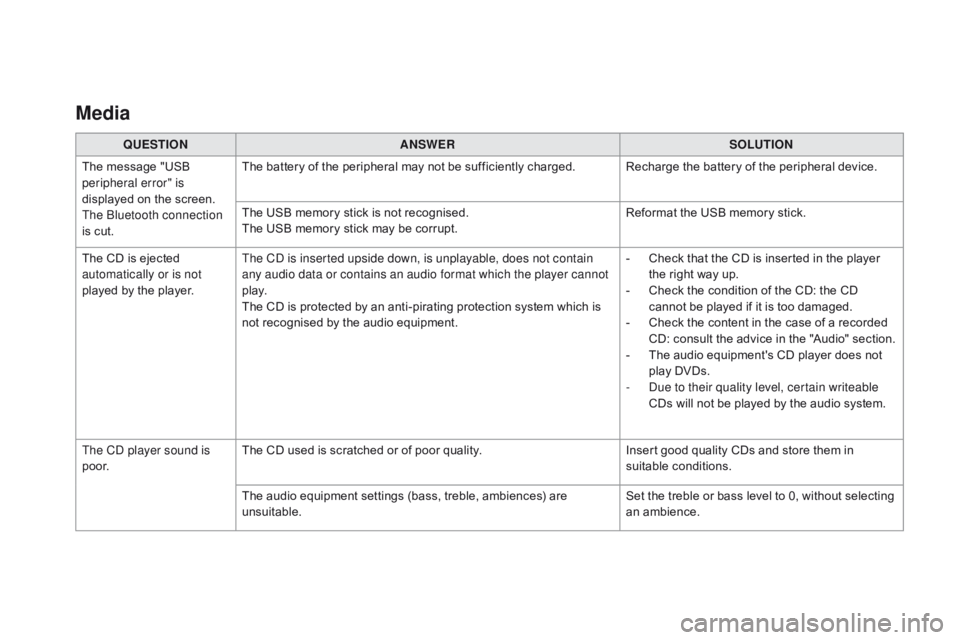
Media
QUESTIOnAnSWERSOLUTIOn
Th
e
m
essage
"
USB
per
ipheral error" is
displayed
o
n
t
he
s
creen.
The Bluetooth connection
is
c
ut. The
b
attery
o
f
t
he
p
eripheral
m
ay
n
ot
b
e
s
ufficiently
c
harged. Recharge
t
he
b
attery
o
f
t
he
p
eripheral
d
evice.
The
U
SB
m
emory
s
tick
i
s
n
ot
r
ecognised.
The
U
SB
m
emory
s
tick
m
ay
b
e
c
orrupt.Reformat
t
he
U
SB
m
emory
s
tick.
The
C
D
i
s
e
jected
au
tomatically or is not
played
b
y
t
he
p
layer. The CD is inserted upside down, is unplayable, does not contain
any audio data or contains an audio format which the player cannot
p l ay.
The
C
D
i
s
p
rotected
b
y
a
n
a
nti-pirating
p
rotection
s
ystem
w
hich
i
s
no
t
r
ecognised
b
y
t
he
a
udio
e
quipment.-
Ch
eck
t
hat
t
he
C
D
i
s
i
nserted
i
n
t
he
p
layer
th
e
r
ight
w
ay
u
p.
-
Ch
eck
t
he
c
ondition
o
f
t
he
C
D:
t
he
C
D
ca
nnot
b
e
p
layed
i
f
i
t
i
s
t
oo
d
amaged.
-
Ch
eck
t
he
c
ontent
i
n
t
he
c
ase
o
f
a r
ecorded
CD
:
c
onsult
t
he
a
dvice
i
n
t
he
"
Audio"
s
ection.
-
Th
e
a
udio
e
quipment's
C
D
p
layer
d
oes
n
ot
pl
ay
D
VDs.
-
Du
e to their quality level, certain writeable
CDs
w
ill
n
ot
b
e
p
layed
b
y
t
he
a
udio
s
ystem.
The CD player sound is
p o o r. The
C
D
u
sed
i
s
s
cratched
o
r
o
f
p
oor
q
uality.Insert
g
ood
q
uality
C
Ds
a
nd
s
tore
t
hem
i
n
suit
able
co
nditions.
The
a
udio
e
quipment
s
ettings
(
bass,
t
reble,
a
mbiences)
a
re
unsui
table. Set
t
he
t
reble
o
r
b
ass
l
evel
t
o
0
,
w
ithout
s
electing
an amb
ience.
Page 370 of 444

DS3_en_Chap12_index-recherche_ed02-2015
Maintenance (advice) .................................... 237
M aintenance, routine ...................................... 14
Ma
p
r
eading
lam
ps
.................................................. 14
4, 219
Markings,
ide
ntification
................................. 266
M
at
.................................................................. 95
M
enu
........................... 27
8, 280, 284, 292, 294,
296, 306, 308, 310, 326, 328
Menu, main
................................................... 3
44
Menus
(
audio)
.............................. 292
, 294, 296
Menus
(
Touch
s
creen
t
ablet)
.................................................. 2
73, 277
Mirror, rear view
.............................................. 80
Mi
rrors, door .................................................... 79
Mirror, vanity
................................................... 93
M
isfuel prevention
......................................... 19
0
Mountings,
Is
ofix
................................... 18
2, 18 4
MP3 CD
......................................................... 3
48
M
Navigation ....................................2 78, 280, 284
Number plate lamps .............................. 216
, 217
N
O
Oil change .....................................................24 8
Oil consumption ............................................ 248
O
Il,
engi
ne
..................................................... 24
8
Opening
t
he
b
onnet
...................................... 245
O
pening
t
he
b
oot
...................................... 6
0, 69
Opening
t
he
d
oors
............................. 60
, 66, 68
Opening
t
he
f
uel
f
iller
f
lap
.............................188
J
ack
......................................................
2
04, 302
Jukebox
(
copy)
..............................................
3
05
Jukebox
(
playing)
..........................................
305
J
ump
s
tarting
................................................
2
28
LLabels, identification .....................................
266
L amp, boot ............................................ 14
5, 219
Lamps, front
.......................................... 212
, 214
Lamps, rear
................................................... 2
16
Lamps, rear, 3D
............................................ 217
L
eather
(c
are)
................................................ 23
8
Level, AdBlue
® additive ................................. 192
L
evel, b
rake f
luid ........................................... 249
L
evel, Diesel additive
............................ 251
, 252
Level,
e
ngine
c
oolant
.............................. 35
, 250
Level,
e
ngine
o
il
...................................... 3
9, 248
Levels
a
nd
c
hecks
................................ 2
4 6 - 2 51
Level, screenwash fluid
................................ 250
Li
ghting,
dashb
oard
........................................ 41
Li
ghting
d
immer
.............................................. 41
L
ighting,
g
uide-me
h
ome
...................... 137
, 13 8
JLighting, interior ............................14 4 , 145, 219
Lighting, mo od .............................................. 14
5
Loading
........................................................... 14
L
oad reduction mode
.................................... 23
1
Localised Assistance Call
.............................................................. 2
70
Locating
y
our
v
ehicle
...................................... 61
Lo
cking
f
rom
t
he inside
...................................................... 67
L
ow fuel level
................................................ 18
8
Luggage
r
etaining
st
rap
.............................................................. 96
Ke
y with remote control
.................... 60
, 63, 101
Kit, hands-free
.............................. 330
, 331, 350
Kit, temporary puncture repair
...................... 19 9
K
P
Pads, brake ...................................................253
P aint colour code .......................................... 266
P
arcel shelf, rear
............................................. 97
Pa
rking
b
rake
........................................ 104
, 253
Parking
s
ensors,
f
ront
................................... 129
P
arking
s
ensors,
r
ear.................................... 128
Petrol
............................................................. 18
9
Player, Apple
® ...................................... 3 04, 349
Player, MP3 CD ..................................... 34
7, 348
Player, USB
.......................................... 30
2, 346
Port, USB
....................................... 94
, 302, 346
Pre-heater, Diesel
........................................... 24
P
ressures, tyres
................................... 203
, 266
Pre-tensioning
s
eat
b
elts
.............................. 163
Page 372 of 444

DS3_en_Chap12_index-recherche_ed02-2015
V
Ventilation .....................................1 4, 81, 82, 84
Voice r ecognition .................................. 31
9, 323
Warning
a
nd
i
ndicator
l
amps
..............22
, 26, 27
Warning
l
amp,
D
iesel
e
ngine
p
re-heater
..................................................... 24
W
arning
lamp
s
................................................ 27
W
arning
l
amp,
S
CR
e
missions
c
ontrol system
.............................................. 34
Wa
rning
l
amp,
S
ervice.................................... 27
Washing
(ad
vice)........................................... 237
Weights
................................................. 2
59, 263
Wheel, spare
................................................. 204
W
indow controls
............................................. 64
Wip
er
bla
des
(c
hanging)
.......................143
, 232
Wiper, rear ..................................................... 141
Wipers
................................................... 140
, 142
Wipers, automatic rain sensitive
....................................... 140
, 142
W
U
Under-inflation (d etection) ............................ 150
U nlocking ........................................................ 60
U
nlocking
f
rom
t
he
i
nside
...............................67
Up
dating
r
isk
a
reas
....................................... 289
U
pdating
t
he
d
ate
............................................ 53
Te
lephone
....................
32
6, 328, 330 -332, 350
Temperature, coolant
...................................... 35
Te
xtured
P
aint
...............................................
237
T
hird
b
rake
l
amp
...........................................
218
T
hree
f
lashes
(
direction
i
ndicators)
..............
148
T
ime
(
setting)
......................................
4
2, 45, 53
TMC
(
Traffic
i
nfo)
..........................................
290
T
o o l s
..............................................................
20
4
Topping-up
t
he
A
dBlue
® additive .................
19 6
T
otal distance recorder ................................... 40
To
uch screen ................................................... 52
Touch screen tablet
........................................ 49
To
uch
s
creen
t
ablet
(
Menus)
.......... 51
, 273, 277
To w b a r
........................................................... 23
5
Towed loads
.......................................... 25
9, 263
Towing
a
nother
v
ehicle
................................. 233
T
raction
c
ontrol
(
ASR)
.................................. 155
T
raffic
i
nformation
(
TA)
......................... 29
1, 3 4 5
Traffic
i
nformation
(
TMC)
.............................. 290
Tr
a i l e r
............................................................ 23
5
Trajectory
c
ontrol
s
ystems
............................ 155
T
rip computer
...................................... 45
, 54-57
Trip distance recorder
..................................... 40
Ty
r e s
................................................................ 14
T
yre under-inflation detection
....................... 3
2, 150, 152, 153, 203 Updating
t
he
t
ime
............................................
53
URE
A
....................................................
19
2, 193
USB
...................................................... 3
02, 348
USB
B
ox
..........................................................
94
U
SB player
......................................................
94