phone CITROEN DS3 CABRIO DAG 2017 Handbook (in English)
[x] Cancel search | Manufacturer: CITROEN, Model Year: 2017, Model line: DS3 CABRIO DAG, Model: CITROEN DS3 CABRIO DAG 2017Pages: 444, PDF Size: 14.09 MB
Page 327 of 444
325
DS3_en_Chap11c_SMEGplus_ed02-2015
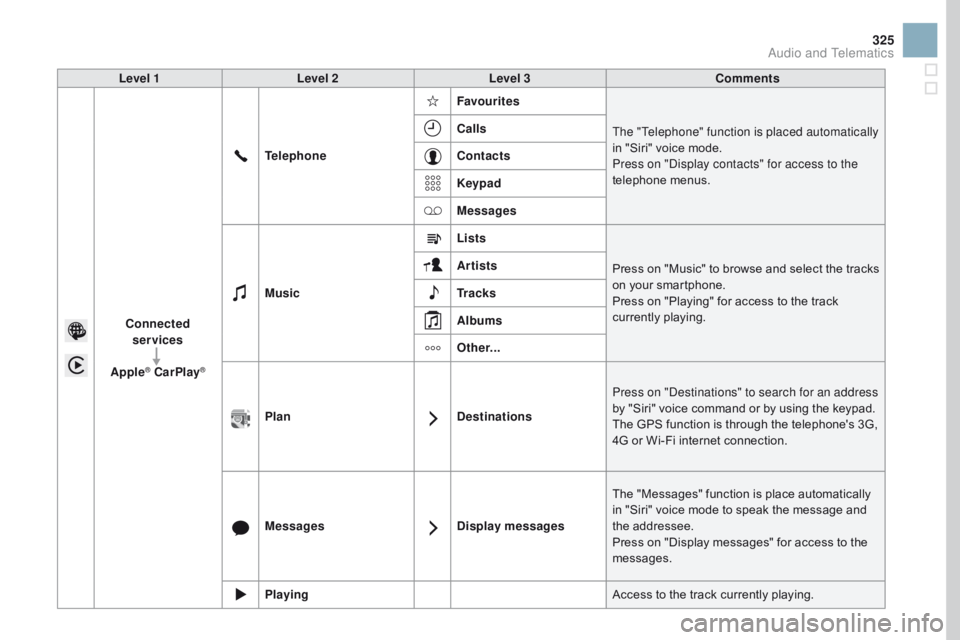
Level 1Level 2 Level 3 Comments
Connected services
Apple
® CarPlay®
Telephone Favourites
The "Telephone" function is placed automatically
in " Siri" v oice m ode.
Press on "Display contacts" for access to the
telephone
men
us.
Calls
Contacts
Keypad
Messages
Music Lists
Press
o
n
"
Music"
t
o
b
rowse
a
nd
s
elect
t
he
t
racks
on y
our
s
martphone.
Press
o
n
"
Playing"
f
or
a
ccess
t
o
t
he
t
rack
cu
rrently
p
laying.
Artists
Tr a c k s
Albums
Other...
Plan DestinationsPress on "Destinations" to search for an address
by
"
Siri"
v
oice
c
ommand
o
r
b
y
u
sing
t
he
k
eypad.
The
G
PS
f
unction
i
s
t
hrough
t
he
t
elephone's
3
G,
4G o
r
W
i-Fi
i
nternet
c
onnection.
Messages Display messagesThe
"
Messages"
f
unction
i
s
p
lace
a
utomatically
in "
Siri"
v
oice
m
ode
t
o
s
peak
t
he
m
essage
a
nd
the add
ressee.
Press
o
n
"
Display
m
essages"
f
or
a
ccess
t
o
t
he
mes
sages.
Playing Access
t
o
t
he
t
rack
c
urrently
p
laying.
Audio and Telematics
Page 328 of 444
4
1
8
14
5
3
9
12
15
6
2
10
16
7
11
13
1718
DS3_en_Chap11c_SMEGplus_ed02-2015
Level 1Level 2Level 3
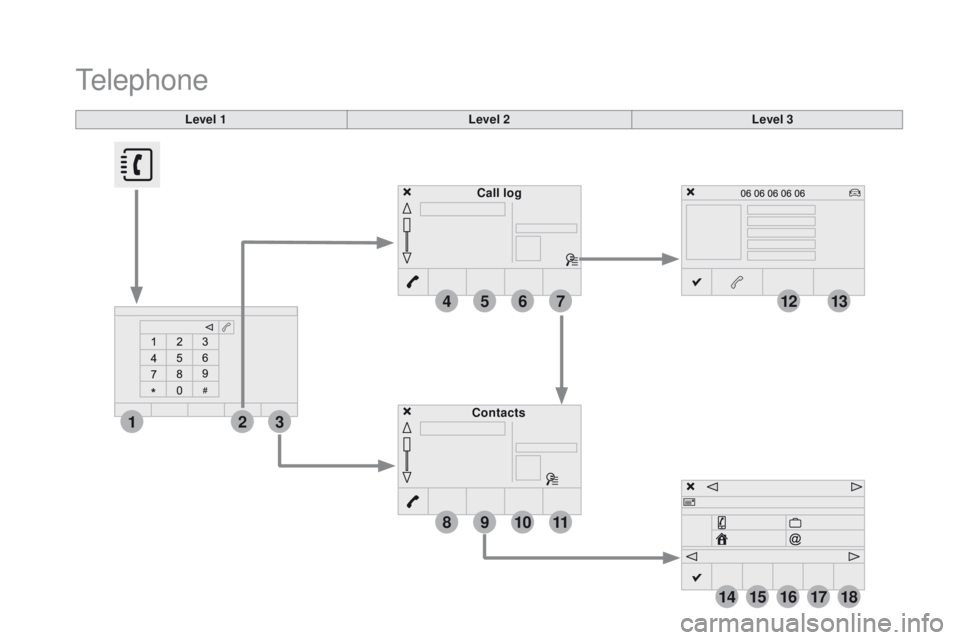
Contacts Call log
Telephone
Page 329 of 444
4
5
6
7
8
12
13
14
15
16
17
18
9
10
11
3
2
327
DS3_en_Chap11c_SMEGplus_ed02-2015
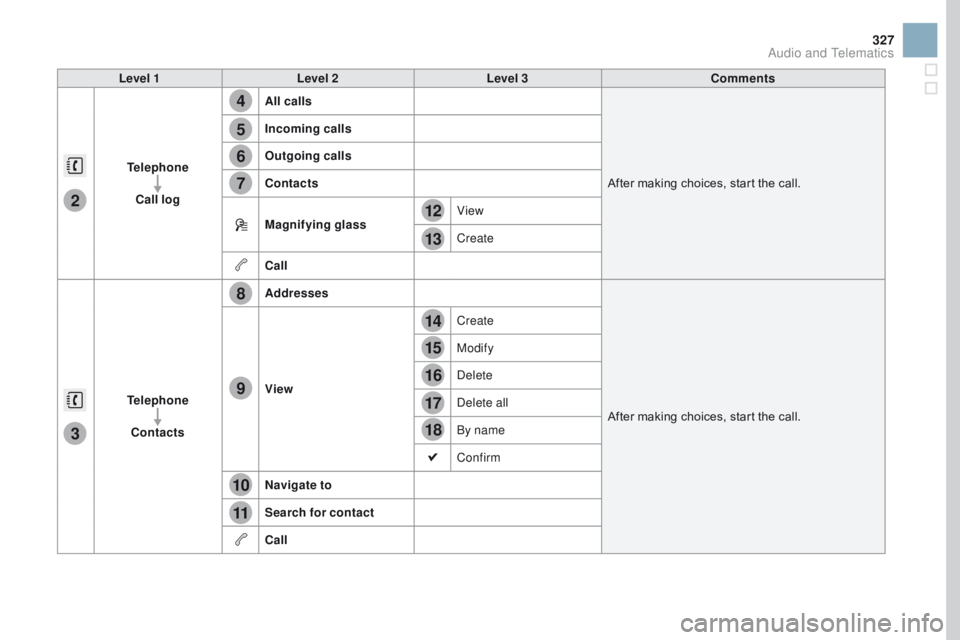
Level 1Level 2 Level 3 Comments
Telephone Call log All calls
After
m
aking
c
hoices,
s
tart
t
he
c
all.
Incoming calls
Outgoing calls
Contacts
Magnifying glass
View
Create
Call
Telephone Contacts Addresses
After
m
aking
c
hoices,
s
tart
t
he
c
all.
View Create
Modify
Delete
Delete all
By name
Confirm
na
vigate to
Search for contact
Call
Audio and Telematics
Page 330 of 444
19
23
20
24
21
25
22
26
1
DS3_en_Chap11c_SMEGplus_ed02-2015
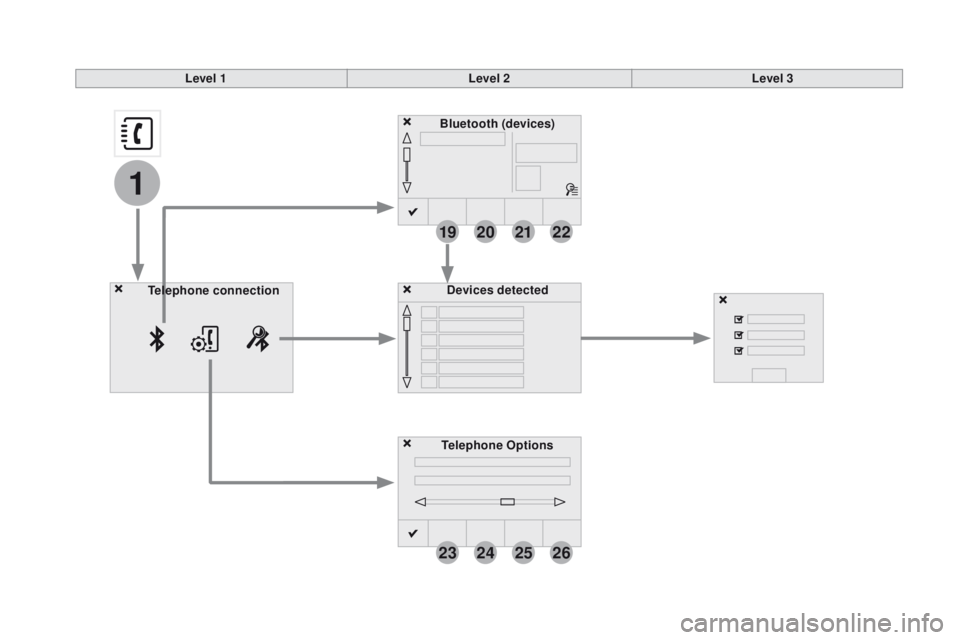
Bluetooth (devices)
Telephone Options Devices detected
Telephone connection
Level 1
Level 2Level 3
Page 331 of 444

1
1
1
19
20
21
22
23
24
25
26
329
DS3_en_Chap11c_SMEGplus_ed02-2015
Level 1Level 2 Level 3 Comments
Telephone
connection
Secondary page Bluetooth
connection Search
Start the search for another peripheral device to
connect.
Connect / Disconnect Start or stop the Bluetooth connection to the
selected
per
ipheral
de
vice.
Update Import the contacts from the selected telephone
to
s
tore
t
hem
i
n
t
he
a
udio
s
ystem.
Delete Delete
t
he
s
elected
t
elephone.
Confirm Save
t
he
s
ettings.
Telephone
conn ection
Secondary page Search for devices Devices detected
Telephone
Start
t
he
s
earch
f
or
p
eripheral
d
evices.
Audio
st
reaming
Internet
Telephone
connection
Secondary page
Telephone Options Put on hold
Cut the microphone temporarily so that the
contact cannot hear your conversation with a
passenger.
Update Import the contacts from the selected telephone
to
s
ave
t
hen
i
n
t
he
a
udio
s
ystem.
Ringtones Choose
t
he
t
elephone
r
ingtone
a
nd
v
olume.
Memory info. Contact
r
ecords
u
sed
a
nd
f
ree,
p
ercentage
o
f
st
orage
s
pace
u
sed
b
y
i
nternal
c
ontacts
a
nd
Blu
etooth
co
ntacts.
Confirm Save
t
he
s
ettings.
Audio and Telematics
Page 332 of 444
1
19
DS3_en_Chap11c_SMEGplus_ed02-2015
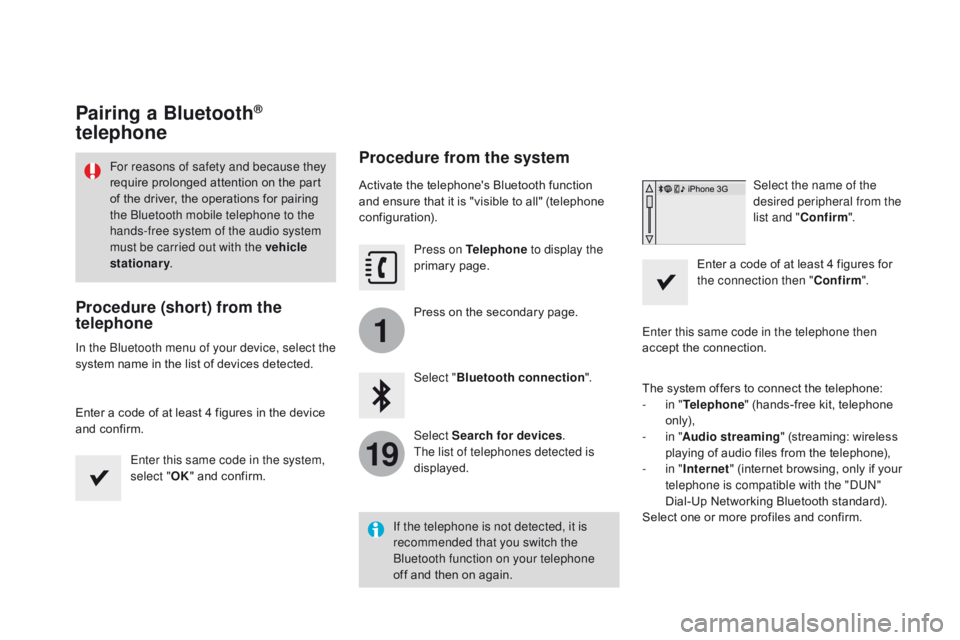
Pairing a Bluetooth®
telephone
Procedure (short) from the
telephone
In the Bluetooth menu of your device, select the
system n
ame i n t he l ist o f d evices d etected.
Enter
a c
ode
o
f
a
t
l
east
4 f
igures
i
n
t
he
d
evice
an
d
c
onfirm.Enter this same code in the system,
select " OK"
a
nd
c
onfirm.
Procedure from the system
Activate the telephone's Bluetooth function and e nsure t hat i t i s " visible t o a ll" ( telephone con
figuration). Press on Telephone to display the
primary
page
.
Press
o
n
t
he
s
econdary
p
age.
Select " Bluetooth connection ".
Select Search for devices .
The list of telephones detected is
displayed. Select the name of the
desired peripheral from the
list and "
Confirm ".
Enter
a c
ode
o
f
a
t
l
east
4 f
igures
f
or
th
e connection then "Confirm".
Enter this same code in the telephone then
accept
t
he
c
onnection.
The
s
ystem
o
ffers
t
o
c
onnect
t
he
t
elephone:
-
in " T
elephone"
(
hands-free
k
it,
t
elephone
on
ly),
-
in " A
udio streaming"
(
streaming:
w
ireless
pl
aying
o
f
a
udio
f
iles
f
rom
t
he
t
elephone),
-
in " In
ternet"
(
internet
b
rowsing,
o
nly
i
f
y
our
te
lephone is compatible with the "DUN"
Dial-Up
N
etworking
B
luetooth
s
tandard).
Select
o
ne
o
r
m
ore
p
rofiles
a
nd
c
onfirm.
If the telephone is not detected, it is
recommended that you switch the
Bluetooth function on your telephone
off
a
nd
t
hen
o
n
a
gain.
For reasons of safety and because they
require p
rolonged a
ttention o
n t
he p
art of t
he d
river, t
he o
perations f
or p
airing th
e Bluetooth mobile telephone to the
hands-free system of the audio system
must be carried out with the vehicle
stationary .
Page 333 of 444
1
19
331
DS3_en_Chap11c_SMEGplus_ed02-2015
The services available depend on
the network, t he S IM c ard a nd t he co
mpatibility of the Bluetooth telephone
used.
C
heck
t
he
t
elephone
m
anual
a
nd
wi
th
y
our
n
etwork
p
rovider
f
or
d
etails
o
f
th
e
s
ervices
a
vailable
t
o
y
ou.
The ability of the system to connect
with only one profile depends on the
telephone.
T
he
t
hree
p
rofiles
m
ay
a
ll
co
nnect
b
y
d
efault.
Visit
w
ww.citroen.co.uk
f
or
m
ore
i
nformation
(c
ompatibility,
a
dditional
h
elp,
.
..).
The
r
ecognised
t
elephone
ap
pears
i
n
t
he
l
ist.
Depending
o
n
y
our
t
elephone,
y
ou
m
ay
b
e
as
ked
t
o
a
ccept
a
utomatic
c
onnection
e
very
ti
me
t
he
i
gnition
i
s
s
witched
o
n.On return to the vehicle, if the last telephone
connected
i
s
p
resent
a
gain,
i
t
i
s
r
econnected
au
tomatically and within around 30 seconds
after
s
witching
o
n
t
he
i
gnition
t
he
p
airing
i
s
do
ne without any action on your part, with
(Bluetooth
ac
tivated).
To modify the automatic connection mode,
select the telephone in the list then select the
desired
pr
ofile.
Depending o
n t he t ype o f t elephone, th
e s ystem w ill a sk y ou t o a ccept o r n ot th
e
t
ransfer
o
f
y
our
c
ontacts.
If not, select " Update".
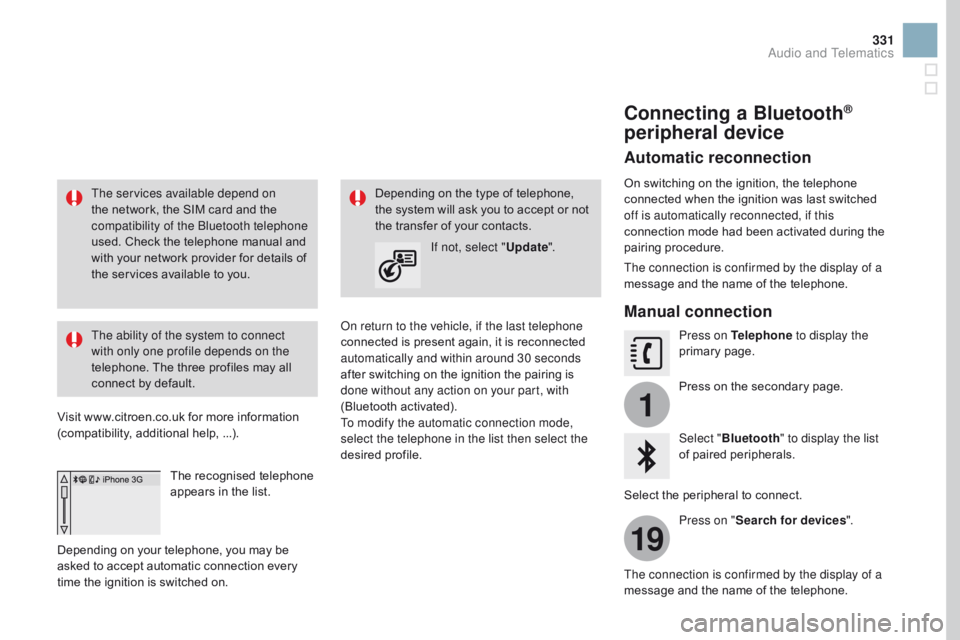
Connecting a Bluetooth®
peripheral device
Automatic reconnection
On switching on the ignition, the telephone co
nnected w hen t he i gnition w as l ast s witched of
f is automatically reconnected, if this
connection
m
ode
h
ad
b
een
a
ctivated
d
uring
t
he
pair
ing
pr
ocedure.
The connection is confirmed by the display of a
message
a
nd
t
he
n
ame
o
f
t
he
t
elephone.
Manual connection
Press on Telephone to display the
primary page .
Press
o
n
t
he
s
econdary
p
age.
Select " Bluetooth " to display the list
of
p
aired
p
eripherals.
Select
t
he
p
eripheral
t
o
c
onnect.
Press on " Search for devices ".
The connection is confirmed by the display of a
message
a
nd
t
he
n
ame
o
f
t
he
t
elephone.
Audio and Telematics
Page 334 of 444
1
19
20
22
DS3_en_Chap11c_SMEGplus_ed02-2015
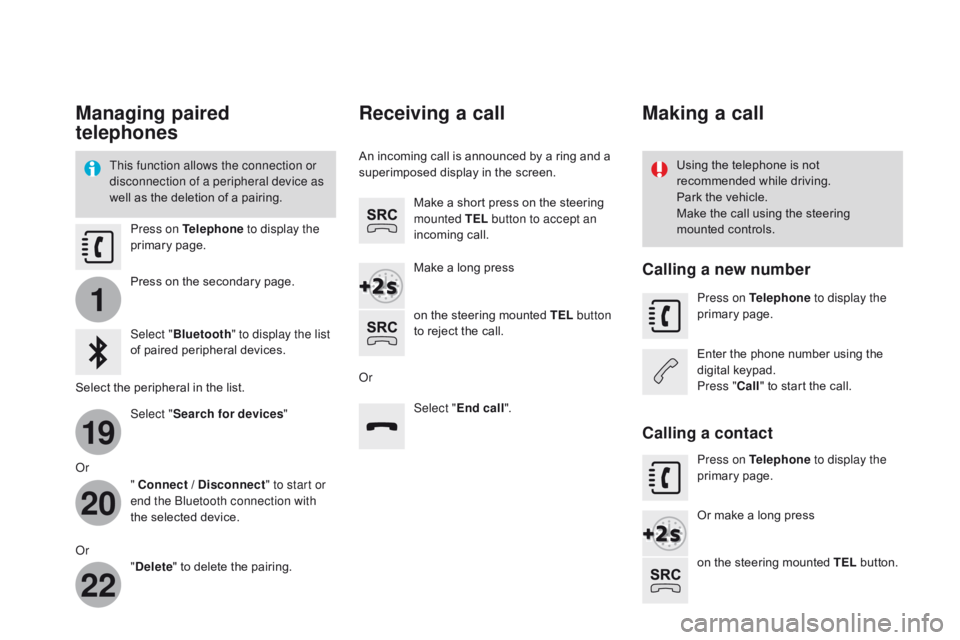
Managing paired
telephones
This function allows the connection or
disconnection of a peripheral device as
well
a
s
t
he
d
eletion
o
f
a p
airing. Using t
he t elephone i s n ot re
commended w hile d riving.
Park
t
he
v
ehicle.
Make
t
he
c
all
u
sing
t
he
s
teering
mo
unted
c
ontrols.
Press on Telephone
to display the
primary
page
.
Press
o
n
t
he
s
econdary
p
age.
Select " Bluetooth " to display the list
of
p
aired
p
eripheral
d
evices.
Select
t
he
p
eripheral
i
n
t
he
l
ist.
Select " Search for devices "
Or " Connect / Disconnect " to start or
end the Bluetooth connection with
the
s
elected
d
evice.
Or "Delete "
t
o
d
elete
t
he
p
airing.
Receiving a call
An incoming call is announced by a ring and a superimposed d isplay i n t he s creen.
Make
a s
hort
p
ress
o
n
t
he
s
teering
mo
unted TEL button to accept an
incoming
cal
l.
Make
a l
ong
p
ress
on
t
he
s
teering
m
ounted
T
EL button
to
r
eject
t
he
c
all.
Or Select "End call".
Making a call
Calling a new number
Press on Telephone to display the
primary page .
Enter
t
he
p
hone
n
umber
u
sing
t
he
di
gital
ke
ypad.
Press " Call"
t
o
s
tart
t
he
c
all.
Calling a contact
Press on Telephone to display the
primary page .
Or
m
ake
a l
ong
p
ress
on
t
he
s
teering
m
ounted
T
EL
b
utton.
Page 335 of 444
3
2
3
9
14
15
16
17
18
333
DS3_en_Chap11c_SMEGplus_ed02-2015
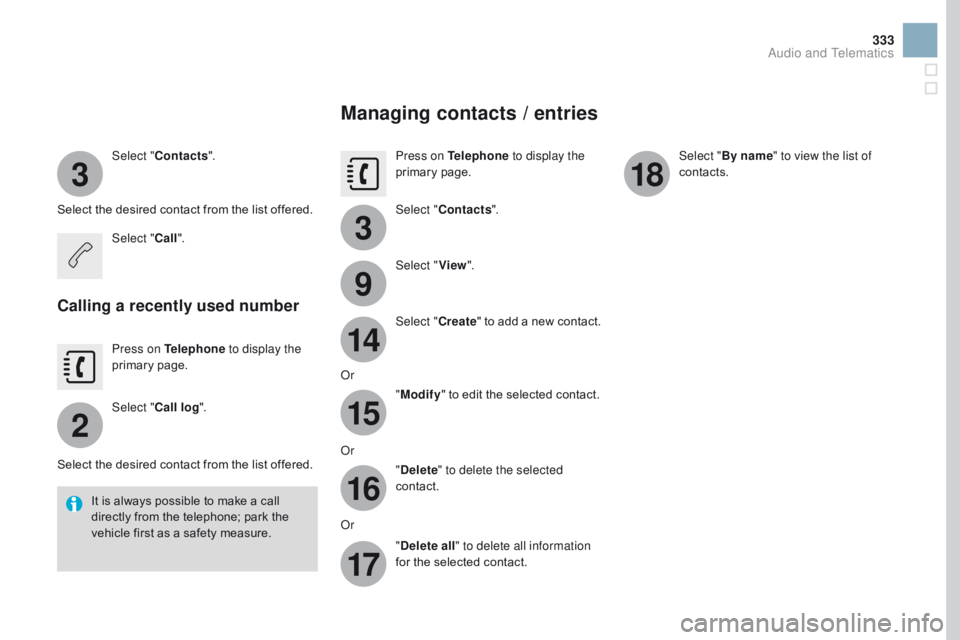
Select "Contacts ".
Select
t
he
d
esired
c
ontact
f
rom
t
he
l
ist
o
ffered.
Select " Call".
Calling a recently used number
Press on Telephone to display the
primary page .
Select " Call log ".
Select
t
he
d
esired
c
ontact
f
rom
t
he
l
ist
o
ffered.
It
i
s
a
lways
p
ossible
t
o
m
ake
a c
all
di
rectly
f
rom
t
he
t
elephone;
p
ark
t
he
ve
hicle
f
irst
a
s
a s
afety
m
easure.
Managing contacts / entries
Press on Telephone to display the
primary page .
Select " Contacts ".
Select " View".
Select " Create"
t
o
a
dd
a n
ew
c
ontact.
Or "Modify "
t
o
e
dit
t
he
s
elected
c
ontact.
Or "Delete " to delete the selected
contact.
Or "Delete all " to delete all information
for
t
he
s
elected
c
ontact. Select "
By name" to view the list of
contacts.
Audio and Telematics
Page 339 of 444
337
DS3_en_Chap11c_SMEGplus_ed02-2015
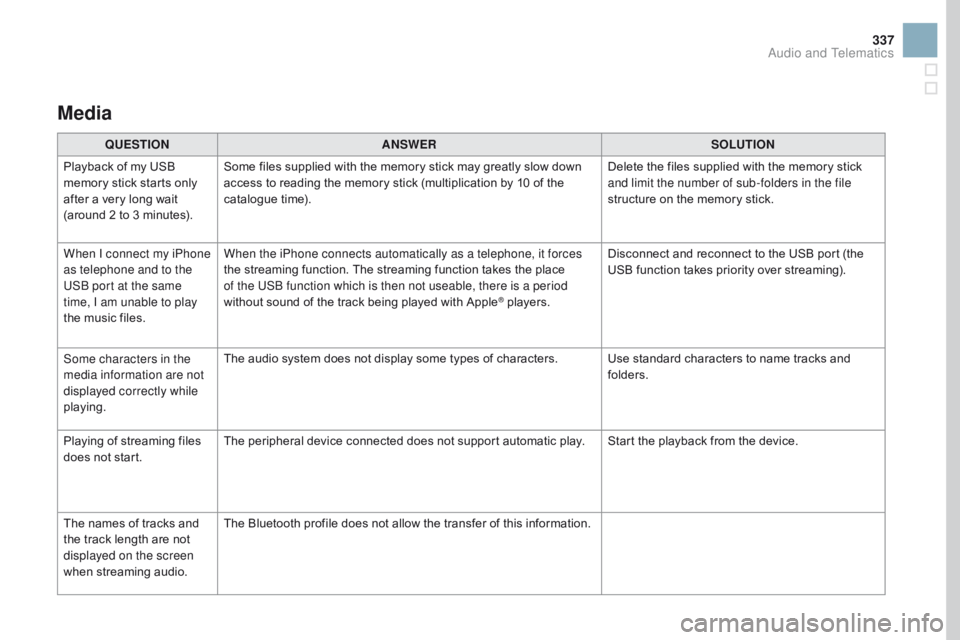
Media
QUESTIOnAnSWERSOLUTIOn
Pl
ayback
o
f
m
y
U
SB
me
mory
s
tick
s
tarts
o
nly
af
ter
a v
ery
l
ong
w
ait
(a
round
2 t
o
3 m
inutes). Some
f
iles
s
upplied
w
ith
t
he
m
emory
s
tick
m
ay
g
reatly
s
low
d
own
ac
cess
t
o
r
eading
t
he
m
emory
s
tick
(
multiplication
b
y
1
0
o
f
t
he
ca
talogue
t
ime). Delete
t
he
f
iles
s
upplied
w
ith
t
he
m
emory
s
tick
an
d limit the number of sub-folders in the file
structure
o
n
t
he
m
emory
s
tick.
When I connect my iPhone
as telephone and to the
USB port at the same
time, I am unable to play
the
m
usic
f
iles. When the iPhone connects automatically as a telephone, it forces
the
s
treaming
f
unction.
T
he
s
treaming
f
unction
t
akes
t
he
p
lace
of t
he USB function which is then not useable, there is a period
without
s
ound
o
f
t
he
t
rack
b
eing
p
layed
w
ith
A
pple
® players.Di sconnect
a
nd
r
econnect
t
o
t
he
U
SB
p
ort
(
the
US
B
f
unction
t
akes
p
riority
o
ver
s
treaming).
Some characters in the
media information are not
displayed correctly while
playing. The
a
udio
s
ystem
d
oes
n
ot
d
isplay
s
ome
t
ypes
o
f
c
haracters. Use
s
tandard
c
haracters
t
o
n
ame
t
racks
a
nd
fo
lders.
Playing
o
f
s
treaming
f
iles
do
es
n
ot
s
tart. The
p
eripheral
d
evice
c
onnected
d
oes
n
ot
s
upport
a
utomatic
p
lay. Start
t
he
p
layback
f
rom
t
he
d
evice.
The
n
ames
o
f
t
racks
a
nd
th
e
t
rack
l
ength
a
re
n
ot
di
splayed on the screen
when
st
reaming
aud
io. The
B
luetooth
p
rofile
d
oes
n
ot
a
llow
t
he
t
ransfer
o
f
t
his
i
nformation.
Audio and Telematics