instrument panel CITROEN DS3 CROSSBACK 2019 User Guide
[x] Cancel search | Manufacturer: CITROEN, Model Year: 2019, Model line: DS3 CROSSBACK, Model: CITROEN DS3 CROSSBACK 2019Pages: 244, PDF Size: 7.7 MB
Page 23 of 244
21
Instruments01
Manual test
This function allows you to check certain
indicators and display the alerts log.
It can be accessed via the "Check" button
in the Driving/Vehicle touch screen menu.
The following information is displayed on the
instrument panel:
–
Ne
xt service due.
–
Tyre pre
ssures.
–
D
riving range associated with the AdBlue and
the SCR system (BlueHDi Diesel).
–
Activ
e alerts.
This information is also displayed
automatically every time the ignition is
switched on.
Total distance recorder
The total distance recorder measures the total
distance travelled by the vehicle since its initial
registration.
With the ignition on, the total distance is
displayed at all times. It remains displayed for
30 seconds after switching off the ignition. It is
displayed when the driver's door is opened, and
when the vehicle is locked or unlocked.
When travelling abroad, you may have to
change the distance units (km or miles):
the road speed must be displayed in the local
country’s official unit (km/h or mph).
The unit is changed via the screen
configuration menu, with the vehicle
stationary.
Lighting dimmer
This system allows the brightness of the
instruments and controls to be adjusted to suit
the ambient light level.
With BLUETOOTH touch screen
audio system
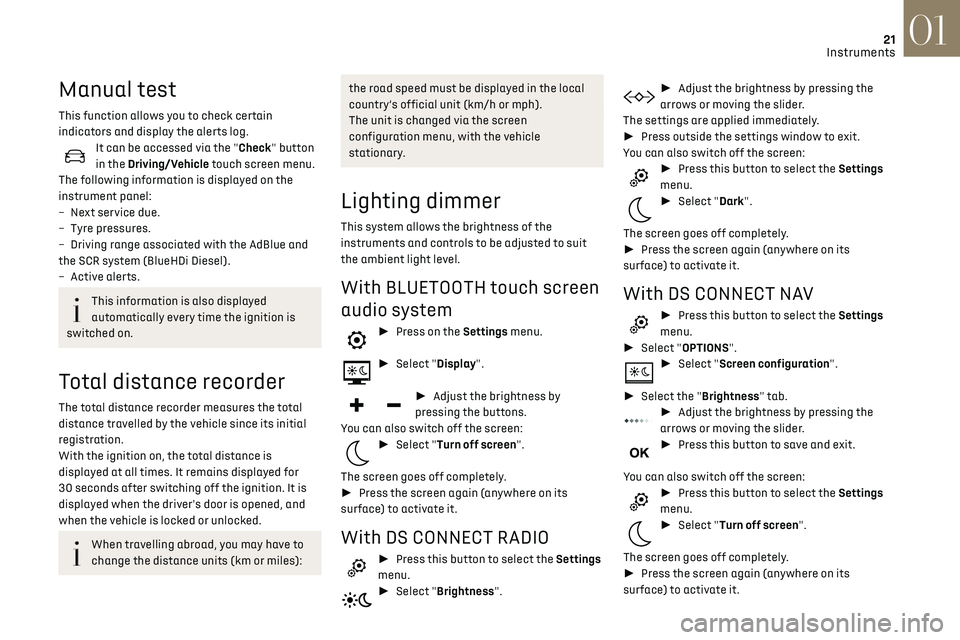
► Press on the Settings menu.
► Select "Display".
► Adjust the brightness by
pressing the buttons.
You can also switch off the screen:
► Select "Turn off screen".
The screen goes off completely.
► Press the screen again (anywhere on its
surface) to activate it.
With DS CONNECT RADIO
► Press this button to select the Settings
menu.
► Select "Brightness".
► Adjust the brightness by pressing the
arrows or moving the slider.
The settings are applied immediately.
► Press outside the settings window to exit.
You can also switch off the screen:
► Press this button to select the Settings
menu.
► Select "Dark".
The screen goes off completely.
► Press the screen again (anywhere on its
surface) to activate it.
With DS CONNECT NAV
► Press this button to select the Settings
menu.
► Select "OPTIONS".
► Select "Screen configuration".
► Select the "Brightness" tab.
► Adjust the brightness by pressing the
arrows or moving the slider.
► Press this button to save and exit.
You can also switch off the screen:
► Press this button to select the Settings
menu.
► Select "Turn off screen".
The screen goes off completely.
► Press the screen again (anywhere on its
surface) to activate it.
Page 24 of 244
22
Instruments01
Trip computer
Information displayed about the current journey
(range, fuel consumption, average speed, etc.).
Data displayed on the
instrument panel
Display of the various tabs
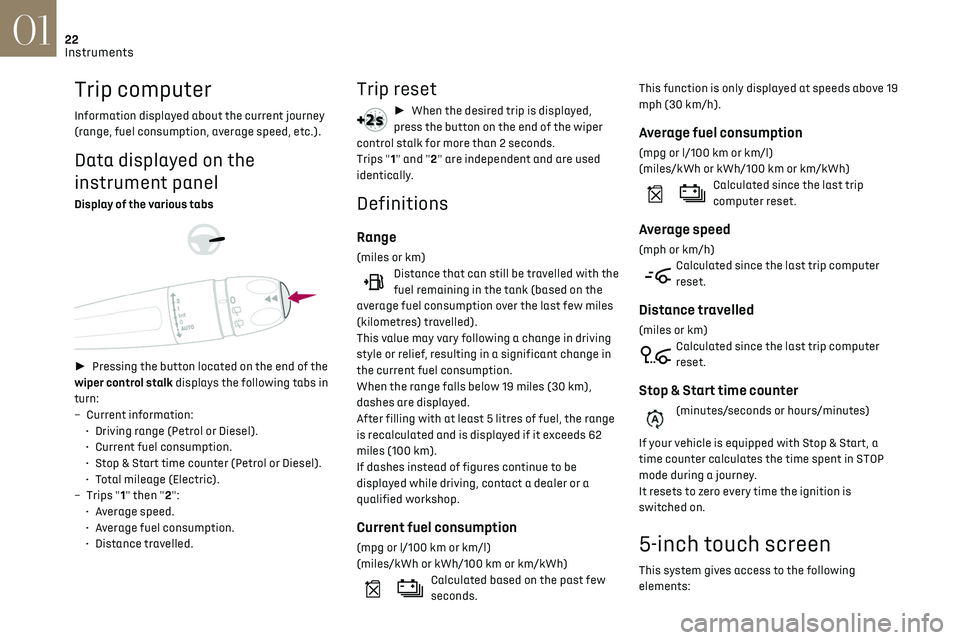
► Pressing the button located on the end of the
wiper control stalk displays the following tabs in
turn:
–
Curren
t information:
•
D
riving range (Petrol or Diesel).
•
Curren
t fuel consumption.
•
St
op & Start time counter (Petrol or Diesel).
•
T
otal mileage (Electric).
–
Trip
s "1" then "2":
•
A
verage speed.
•
A
verage fuel consumption.
•
Dist
ance travelled.
Trip reset
► When the desired trip is displayed,
press the button on the end of the wiper
control stalk for more than 2 seconds.
Trips "1" and "2" are independent and are used
identically.
Definitions
Range
(miles or km)Distance that can still be travelled with the
fuel remaining in the tank (based on the
average fuel consumption over the last few miles
(kilometres) travelled).
This value may vary following a change in driving
style or relief, resulting in a significant change in
the current fuel consumption.
When the range falls below 19 miles (30 km),
dashes are displayed.
After filling with at least 5 litres of fuel, the range
is recalculated and is displayed if it exceeds 62
miles (100 km).
If dashes instead of figures continue to be
displayed while driving, contact a dealer or a
qualified workshop.
Current fuel consumption
(mpg or l/100 km or km/l)
(miles/kWh or kWh/100 km or km/kWh)
Calculated based on the past few
seconds. This function is only displayed at speeds above 19
mph (30 km/h).
Average fuel consumption
(mpg or l/100 km or km/l)
(miles/kWh or kWh/100 km or km/kWh)
Calculated since the last trip
computer reset.
Average speed
(mph or km/h)Calculated since the last trip computer
reset.
Distance travelled
(miles or km)Calculated since the last trip computer
reset.
Stop & Start time counter
(minutes/seconds or hours/minutes)
If your vehicle is equipped with Stop & Start, a
time counter calculates the time spent in STOP
mode during a journey.
It resets to zero every time the ignition is
switched on.
5-inch touch screen
This system gives access to the following
elements:
Page 26 of 244
24
Instruments01
Use a soft, clean cloth to clean the touch screen.
Principles
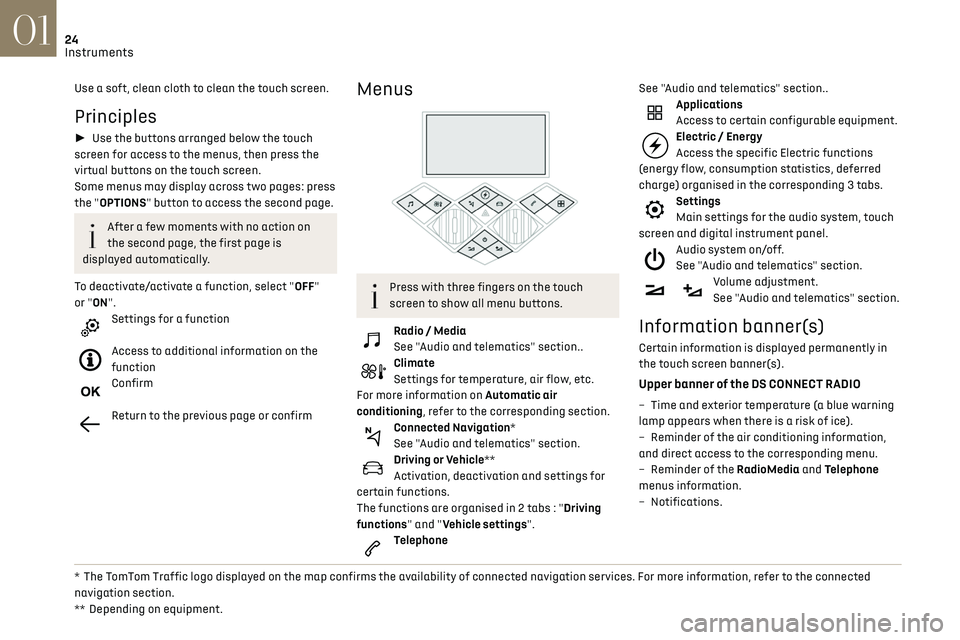
► Use the buttons arranged below the touch
screen for access to the menus, then press the
virtual buttons on the touch screen.
Some menus may display across two pages: press
the "OPTIONS" button to access the second page.
After a few moments with no action on
the second page, the first page is
displayed automatically.
To deactivate/activate a function, select "OFF"
or "ON".
Settings for a function
Access to additional information on the
function
Confirm
Return to the previous page or confirm
* The TomTom Traffic logo displayed on the map confirms the availability of connected navigation services. For more information, refer to the connected
navigation section.
**
Depending on equipmen
t.
Menus
Press with three fingers on the touch
screen to show all menu buttons.
Radio / Media
See "Audio and telematics" section..
Climate
Settings for temperature, air flow, etc.
For more information on Automatic air
conditioning, refer to the corresponding section.
Connected Navigation*
See "Audio and telematics" section.
Driving or Vehicle**
Activation, deactivation and settings for
certain functions.
The functions are organised in 2 tabs : "Driving
functions" and "Vehicle settings".
Telephone See "Audio and telematics" section..
Applications
Access to certain configurable equipment.
Electric / Energy
Access the specific Electric functions
(energy flow, consumption statistics, deferred
charge) organised in the corresponding 3 tabs.
Settings
Main settings for the audio system, touch
screen and digital instrument panel.
Audio system on/off.
See "Audio and telematics" section.
Volume adjustment.
See "Audio and telematics" section.
Information banner(s)
Certain information is displayed permanently in
the touch screen banner(s).
Upper banner of the DS CONNECT RADIO
– Time and e xterior temperature (a blue warning
lamp appears when there is a risk of ice).
–
R
eminder of the air conditioning information,
and direct access to the corresponding menu.
–
R
eminder of the RadioMedia and Telephone
menus information.
–
Notifications.
Page 27 of 244
25
Instruments01
– Access to the Settings of the touch screen and
digital instrument panel (date/time, languages,
units, etc.).
Side banners of the DS CONNECT NAV
– Exterior temperature (a blue warning lamp
appears when there is a risk of ice).
–
Ac
cess to the Settings of the touch screen and
digital instrument panel (date/time, languages,
units, etc.).
–
Notifications.
–
R
eminder of the air conditioning information,
and direct access to the corresponding menu.
–
Ac
cess to the heated seat settings.
–
Time.
Electric / Energy menu
Depending on version, this is accessible either:– directly, by pressing the button near the
touch screen.
– via the Applications menu.
Energy flows
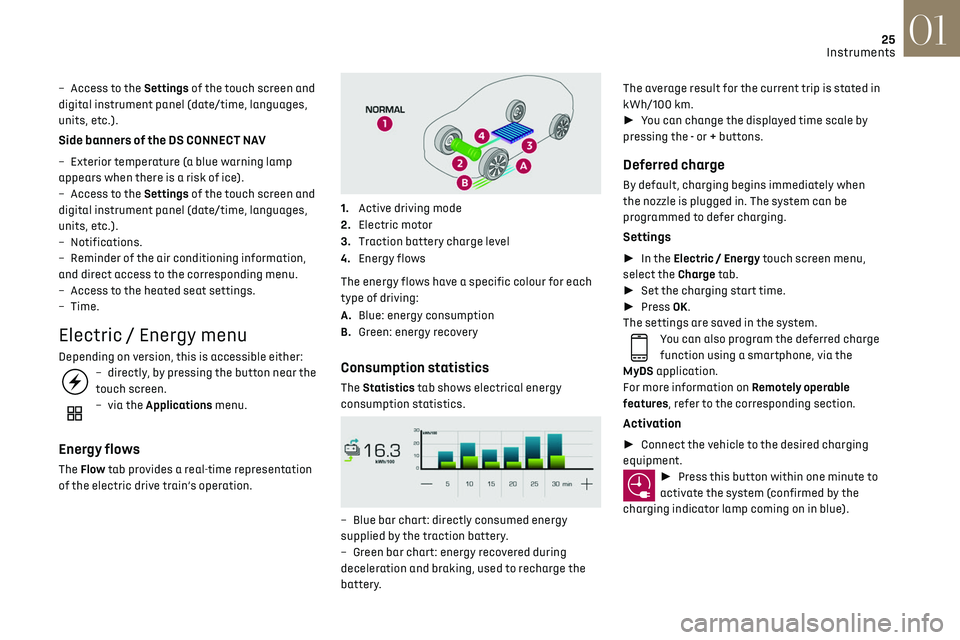
The Flow tab provides a real-time representation
of the electric drive train’s operation.
1.Active driving mode
2. Electric motor
3. Traction battery charge level
4. Energy flows
The energy flows have a specific colour for each
type of driving:
A. Blue: energy consumption
B. Green: energy recovery
Consumption statistics
The Statistics tab shows electrical energy
consumption statistics.
– Blue bar chart: directly c onsumed energy
supplied by the traction battery.
–
G
reen bar chart: energy recovered during
deceleration and braking, used to recharge the
battery. The average result for the current trip is stated in
kWh/100 km.
►
You can change the displayed time scale by
pressing the - or + buttons.
Deferred charge
By default, charging begins immediately when
the nozzle is plugged in. The system can be
programmed to defer charging.
Settings
► In the Electric / Energy touch screen menu,
select the Charge tab.
► Set the charging start time.
► Press OK.
The settings are saved in the system.
You can also program the deferred charge
function using a smartphone, via the
MyDS application.
For more information on Remotely operable
features, refer to the corresponding section.
Activation
► Connect the vehicle to the desired charging
equipment.
► Press this button within one minute to
activate the system (confirmed by the
charging indicator lamp coming on in blue).
Page 34 of 244
32
Access02
► Unclip the cover by inserting a small
screwdriver in the slot and raise the cover.
► Remove the discharged battery from its
housing.
► Insert the new battery, observing the polarity,
and clip the cover onto the housing.
► Reinitialise the remote control.
For more information on Reinitialising the remote
control, refer to the corresponding section.
Do not throw remote control batteries
away, as they contain metals that are
harmful to the environment. Take them to an
approved disposal point.
Reinitialising the remote
control
Following replacement of the battery or in the
event of a fault, it may be necessary to reinitialise
the remote control.
Complete unlocking/locking of
the vehicle with the key
Use this procedure in the following situations:
– R emote control battery discharged.
–
R
emote control malfunction.
–
V
ehicle battery discharged.
–
V
ehicle in an area subject to strong
electromagnetic interference.
In the first case, change the remote control
battery.
In the second case, reinitialise the remote control.
Refer to the corresponding sections.
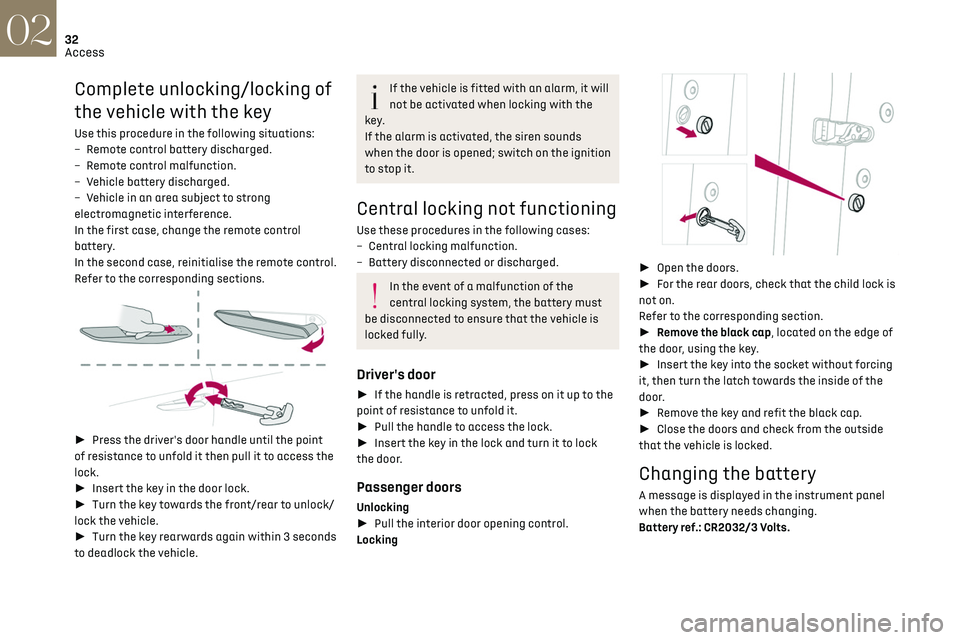
► Press the driver's door handle until the point
of resistance to unfold it then pull it to access the
lock.
► Insert the key in the door lock.
► Turn the key towards the front/rear to unlock/
lock the vehicle.
► Turn the key rearwards again within 3 seconds
to deadlock the vehicle.
If the vehicle is fitted with an alarm, it will
not be activated when locking with the
key.
If the alarm is activated, the siren sounds
when the door is opened; switch on the ignition
to stop it.
Central locking not functioning
Use these procedures in the following cases:
– Cen tral locking malfunction.
–
Ba
ttery disconnected or discharged.
In the event of a malfunction of the
central locking system, the battery must
be disconnected to ensure that the vehicle is
locked fully.
Driver's door
► If the handle is retracted, press on it up to the
point of resistance to unfold it.
► Pull the handle to access the lock.
► Insert the key in the lock and turn it to lock
the door.
Passenger doors
Unlocking
► Pull the interior door opening control.
Locking
► Open the doors.
► For the rear doors, check that the child lock is
not on.
Refer to the corresponding section.
► Remove the black cap, located on the edge of
the door, using the key.
► Insert the key into the socket without forcing
it, then turn the latch towards the inside of the
door.
► Remove the key and refit the black cap.
► Close the doors and check from the outside
that the vehicle is locked.
Changing the battery
A message is displayed in the instrument panel
when the battery needs changing.
Battery ref.: CR2032/3 Volts.
Page 40 of 244
38
Ease of use and comfort03
Correct driving position
For safety reasons, adjustments must
only be made when the vehicle is
stationary.
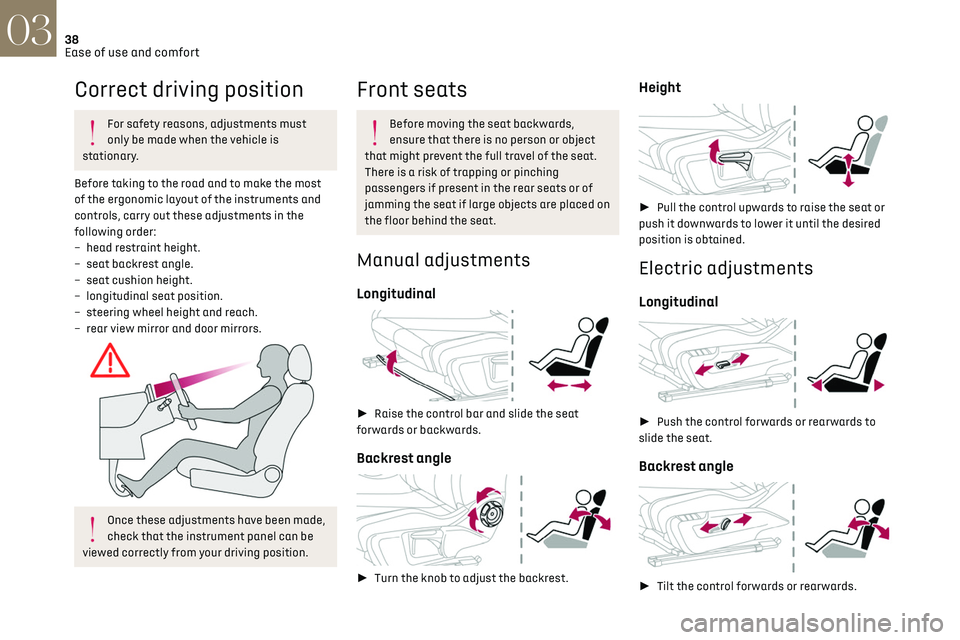
Before taking to the road and to make the most
of the ergonomic layout of the instruments and
controls, carry out these adjustments in the
following order:
–
head re
straint height.
–
sea
t backrest angle.
–
sea
t cushion height.
–
longit
udinal seat position.
–
st
eering wheel height and reach.
–
rear vie
w mirror and door mirrors.
Once these adjustments have been made,
check that the instrument panel can be
viewed correctly from your driving position.
Front seats
Before moving the seat backwards,
ensure that there is no person or object
that might prevent the full travel of the seat.
There is a risk of trapping or pinching
passengers if present in the rear seats or of
jamming the seat if large objects are placed on
the floor behind the seat.
Manual adjustments
Longitudinal
► Raise the control bar and slide the seat
forwards or backwards.
Backrest angle
► Turn the knob to adjust the backrest.
Height
► Pull the control upwards to raise the seat or
push it downwards to lower it until the desired
position is obtained.
Electric adjustments
Longitudinal
► Push the control forwards or rearwards to
slide the seat.
Backrest angle
► Tilt the control forwards or rearwards.
Cushion height and angle
► Tilt the rear of the control upwards or
downwards to obtain the required height and
angle.
Front head restraints
Height adjustment
► Upward: pull the head restraint up to the
desired position; the head restraint can be felt to
click into position.
► Downward: press lug A to lower the head
restraint.
Page 56 of 244
54Lighting and visibility04
Exterior lighting control
stalk
Main lighting
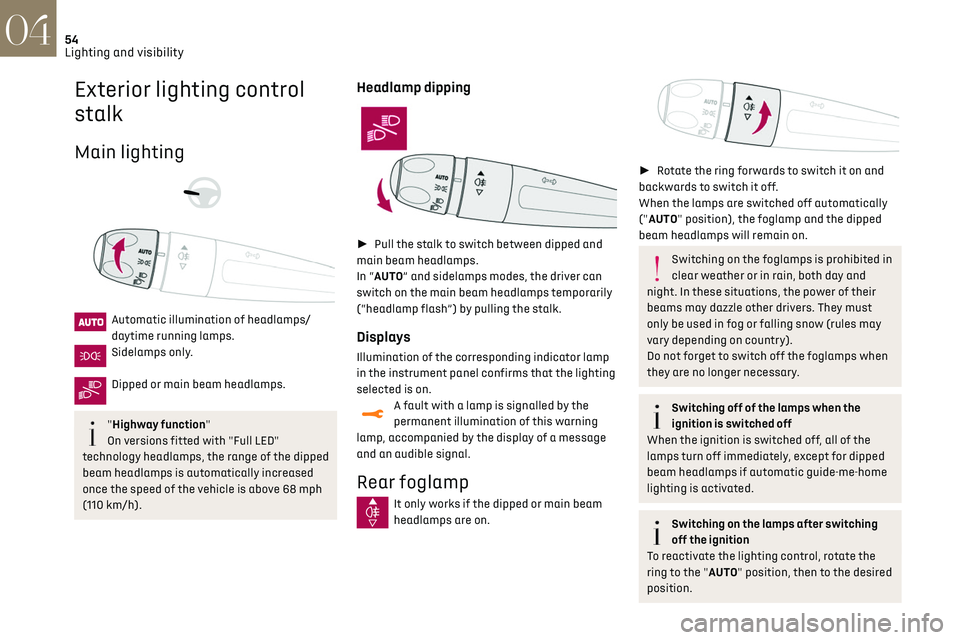
Automatic illumination of headlamps/
daytime running lamps.
Sidelamps only.
Dipped or main beam headlamps.
"Highway function"
On versions fitted with "Full LED"
technology headlamps, the range of the dipped
beam headlamps is automatically increased
once the speed of the vehicle is above 68 mph
(110 km/h).
Headlamp dipping
► Pull the stalk to switch between dipped and
main beam headlamps.
In “AUTO” and sidelamps modes, the driver can
switch on the main beam headlamps temporarily
(“headlamp flash”) by pulling the stalk.
Displays
Illumination of the corresponding indicator lamp
in the instrument panel confirms that the lighting
selected is on.
A fault with a lamp is signalled by the
permanent illumination of this warning
lamp, accompanied by the display of a message
and an audible signal.
Rear foglamp
It only works if the dipped or main beam
headlamps are on.
► Rotate the ring forwards to switch it on and
backwards to switch it off.
When the lamps are switched off automatically
("AUTO" position), the foglamp and the dipped
beam headlamps will remain on.
Switching on the foglamps is prohibited in
clear weather or in rain, both day and
night. In these situations, the power of their
beams may dazzle other drivers. They must
only be used in fog or falling snow (rules may
vary depending on country).
Do not forget to switch off the foglamps when
they are no longer necessary.
Switching off of the lamps when the
ignition is switched off
When the ignition is switched off, all of the
lamps turn off immediately, except for dipped
beam headlamps if automatic guide-me-home
lighting is activated.
Switching on the lamps after switching
off the ignition
To reactivate the lighting control, rotate the
ring to the "AUTO" position, then to the desired
position.
If the driver's door is opened, a temporary
audible signal warns the driver that the lamps
are on.
They will go off automatically after a period
of time that depends on the state of charge of
the battery (entering energy economy mode).
In some weather conditions (e.g. low
temperature or humidity), the presence of
misting on the internal surface of the glass of
the headlamps and rear lamps is normal; it
disappears after the lamps have been on for a
few minutes.
Never look too closely at the luminous
beam of “Full LED” headlamps: risk of
serious eye injury.
Travelling abroad
Vehicles equipped with halogen
headlamps:
If planning to use your vehicle in a country
that drives on the other side of the road, the
headlamp dipped beams must be adjusted to
avoid dazzling oncoming drivers. Contact a
dealer or a qualified workshop.
Daytime running lamps/
sidelamps
The front and rear lamps light up automatically
when the engine starts.
Page 57 of 244
55Lighting and visibility04
If the driver's door is opened, a temporary
audible signal warns the driver that the lamps
are on.
They will go off automatically after a period
of time that depends on the state of charge of
the battery (entering energy economy mode).
In some weather conditions (e.g. low
temperature or humidity), the presence of
misting on the internal surface of the glass of
the headlamps and rear lamps is normal; it
disappears after the lamps have been on for a
few minutes.
Never look too closely at the luminous
beam of “Full LED” headlamps: risk of
serious eye injury.
Travelling abroad
Vehicles equipped with halogen
headlamps:
If planning to use your vehicle in a country
that drives on the other side of the road, the
headlamp dipped beams must be adjusted to
avoid dazzling oncoming drivers. Contact a
dealer or a qualified workshop.
Daytime running lamps/
sidelamps
The front and rear lamps light up automatically
when the engine starts.
They provide the following functions:
– Da ytime running lamps (lighting control stalk at
position "AUTO" with adequate light level).
–
Sidelamp
s (lighting control stalk "AUTO"
position with low light levels or "Sidelamps only”
or "Dipped/main beam headlamps").
The LEDs are brighter when operating as
daytime running lamps.
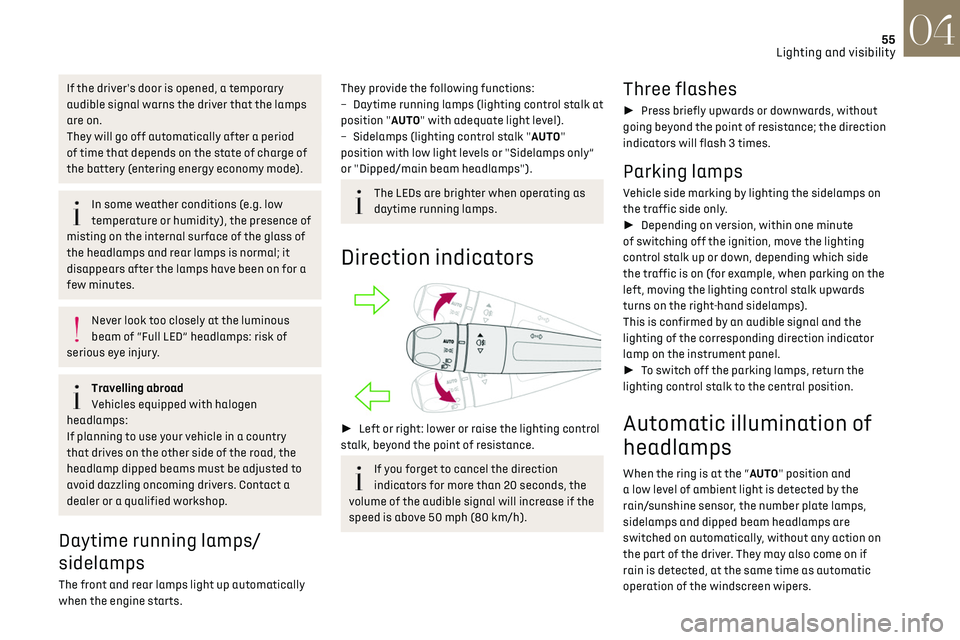
Direction indicators
► Left or right: lower or raise the lighting control
stalk, beyond the point of resistance.
If you forget to cancel the direction
indicators for more than 20 seconds, the
volume of the audible signal will increase if the
speed is above 50 mph (80 km/h).
Three flashes
► Press briefly upwards or downwards, without
going beyond the point of resistance; the direction
indicators will flash 3 times.
Parking lamps
Vehicle side marking by lighting the sidelamps on
the traffic side only.
► Depending on version, within one minute
of switching off the ignition, move the lighting
control stalk up or down, depending which side
the traffic is on (for example, when parking on the
left, moving the lighting control stalk upwards
turns on the right-hand sidelamps).
This is confirmed by an audible signal and the
lighting of the corresponding direction indicator
lamp on the instrument panel.
► To switch off the parking lamps, return the
lighting control stalk to the central position.
Automatic illumination of
headlamps
When the ring is at the “AUTO" position and
a low level of ambient light is detected by the
rain/sunshine sensor, the number plate lamps,
sidelamps and dipped beam headlamps are
switched on automatically, without any action on
the part of the driver. They may also come on if
rain is detected, at the same time as automatic
operation of the windscreen wipers.
Page 58 of 244
56Lighting and visibility04
As soon as the brightness returns to a sufficient
level or after the windscreen wipers are switched
off, the lamps are switched off automatically.
Malfunction
In the event of a malfunction of the rain/
sunshine sensor, the vehicle’s lighting
comes on and this warning lamp is displayed in
the instrument panel, accompanied by an audible
signal and/or the display of a message.
Contact a dealer or a qualified workshop.
Do not cover the rain/sunshine sensor
located at the top centre of the
windscreen behind the interior rear view
mirror; the associated functions would no
longer be controlled.
In fog or snow, the rain/sunshine sensor
may detect sufficient light. In this case,
the lighting will not come on automatically.
Headlamp beam height
adjustment
Manual adjustment of the
halogen headlamps
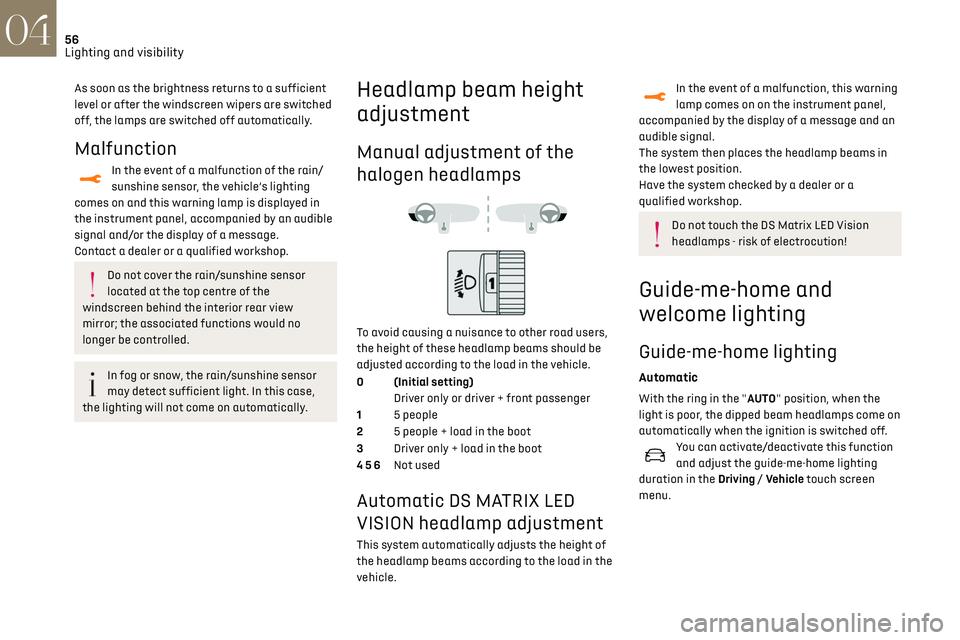
To avoid causing a nuisance to other road users,
the height of these headlamp beams should be
adjusted according to the load in the vehicle.
0 (Initial setting) Driver only or driver + front passenger
1 5 people
2 5 people + load in the boot
3 Driver only + load in the boot
4 5 6 Not used
Automatic DS MATRIX LED
VISION headlamp adjustment
This system automatically adjusts the height of
the headlamp beams according to the load in the
vehicle.
In the event of a malfunction, this warning
lamp comes on on the instrument panel,
accompanied by the display of a message and an
audible signal.
The system then places the headlamp beams in
the lowest position.
Have the system checked by a dealer or a
qualified workshop.
Do not touch the DS Matrix LED Vision
headlamps - risk of electrocution!
Guide-me-home and
welcome lighting
Guide-me-home lighting
Automatic
With the ring in the "AUTO" position, when the
light is poor, the dipped beam headlamps come on
automatically when the ignition is switched off.
You can activate/deactivate this function
and adjust the guide-me-home lighting
duration in the Driving / Vehicle touch screen
menu.
Manual
► With the ignition off, pull the lighting control
stalk toward you ("headlamp flash") to activate/
deactivate the function.
Manual guide-me-home lighting goes off
automatically after a period of time.
Welcome lighting
When the vehicle is unlocked in low light
conditions and the "Automatic illumination of
headlamps" function is activated, this system
automatically switches on:
– On the outside, sidelamps, dipped beam
headlamps and door mirror spotlamps.
– Inside, courtesy lamps and footwell lighting.
Activation / deactivation and adjustment
of the duration of the welcome lighting are
set via the Driving / Vehicle touch screen menu.
Door mirror spotlamps
These spotlamps facilitate access to the vehicle
by lighting the ground near the front doors.
The spotlamps come on automatically:
– when the vehicle is unlocked.
– when a door is opened.
Page 59 of 244
57Lighting and visibility04
Manual
► With the ignition off, pull the lighting control
stalk toward you ("headlamp flash") to activate/
deactivate the function.
Manual guide-me-home lighting goes off
automatically after a period of time.
Welcome lighting
When the vehicle is unlocked in low light
conditions and the "Automatic illumination of
headlamps" function is activated, this system
automatically switches on:
–
O
n the outside, sidelamps, dipped beam
headlamps and door mirror spotlamps.
–
Inside
, courtesy lamps and footwell lighting.
Activation / deactivation and adjustment
of the duration of the welcome lighting are
set via the Driving / Vehicle touch screen menu.
Door mirror spotlamps
These spotlamps facilitate access to the vehicle
by lighting the ground near the front doors.
The spotlamps come on automatically:
–
when the v
ehicle is unlocked.
–
when a door is opened.
– when a reque st to locate the vehicle is received
from the remote control.
They also come on with the welcome lighting and
guide-me-home lighting functions.
They go off automatically after 30 seconds.
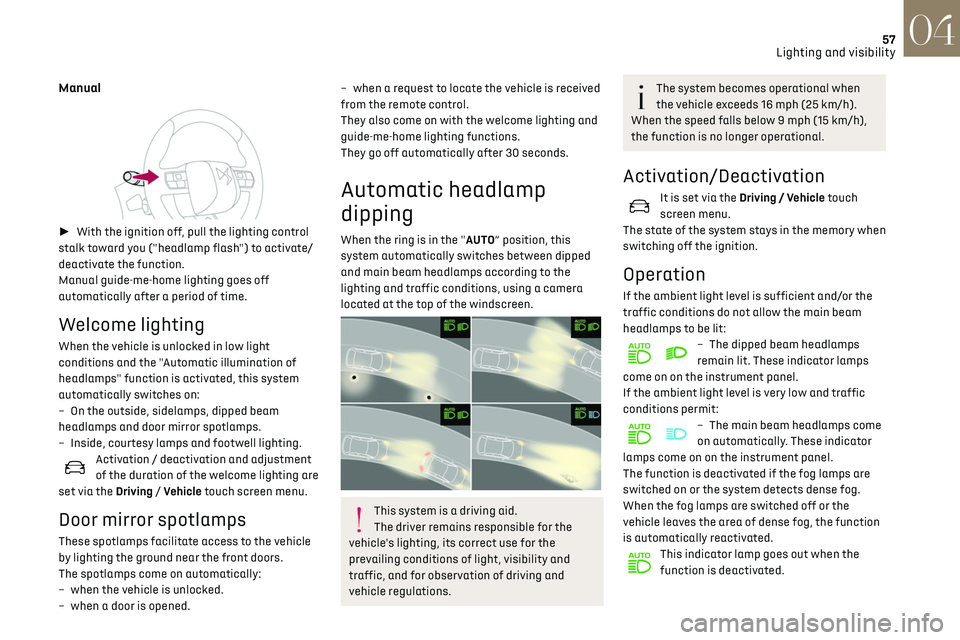
Automatic headlamp
dipping
When the ring is in the "AUTO” position, this
system automatically switches between dipped
and main beam headlamps according to the
lighting and traffic conditions, using a camera
located at the top of the windscreen.
This system is a driving aid.
The driver remains responsible for the
vehicle's lighting, its correct use for the
prevailing conditions of light, visibility and
traffic, and for observation of driving and
vehicle regulations.
The system becomes operational when
the vehicle exceeds 16 mph (25 km/h).
When the speed falls below 9 mph (15 km/h),
the function is no longer operational.
Activation/Deactivation
It is set via the Driving / Vehicle touch
screen menu.
The state of the system stays in the memory when
switching off the ignition.
Operation
If the ambient light level is sufficient and/or the
traffic conditions do not allow the main beam
headlamps to be lit:
– The dipped beam headlamp s
remain lit. These indicator lamps
come on on the instrument panel.
If the ambient light level is very low and traffic
conditions permit:
– The main beam headlamp s come
on automatically. These indicator
lamps come on on the instrument panel.
The function is deactivated if the fog lamps are
switched on or the system detects dense fog.
When the fog lamps are switched off or the
vehicle leaves the area of dense fog, the function
is automatically reactivated.
This indicator lamp goes out when the
function is deactivated.