instrument panel CITROEN DS3 CROSSBACK 2019 Owner's Manual
[x] Cancel search | Manufacturer: CITROEN, Model Year: 2019, Model line: DS3 CROSSBACK, Model: CITROEN DS3 CROSSBACK 2019Pages: 244, PDF Size: 7.7 MB
Page 60 of 244
58Lighting and visibility04
Pause
If the situation requires a change of headlamp
beam, the driver can take over at any time.
► A "headlamp flash" pauses the function:
•
If the "
AUTO" and "Dipped beam" indicator
lamps were on, the system changes to main
beam.
•
If the "
AUTO" and "Main beam"
indicator lamps were on, the system changes
to dipped beam.
To reactivate the system, flash the headlamps
again.
The system may be disrupted or not work
correctly:
–
When visibility c
onditions are poor
(snowfall, heavy rain, etc.).
–
If the windscreen in fron
t of the camera is
dirty, misted or obscured (for example, by a
sticker).
–
If the v
ehicle is facing highly reflective
signs.
When the system detects thick fog, it
temporarily deactivates the function.
The system is not able to detect:
–
R
oad users that do not have their own
lighting, such as pedestrians.
–
V
ehicles whose lighting is obscured (for
example, vehicles driving behind a safety
barrier on a motorway).
–
V
ehicles at the top or bottom of a steep
slope, on winding roads, on crossroads.
Clean the windscreen regularly,
particularly the area in front of the
camera.
The internal surface of the windscreen can
also become misted around the camera.
In humid and cold weather, demist the
windscreen regularly.
Do not allow snow to accumulate on the
bonnet or roof of the vehicle as this could
obstruct the detection camera.
DS MATRIX LED VISION
Available only on versions equipped with Full LED
headlamps with the Matrix Beam function.
This system automatically adapts the main
beam according to the driving conditions, so that
optimum illumination is maintained for the driver,
without causing a nuisance to other road users.
The driver remains responsible for the
vehicle's lighting, its correct use for the
prevailing conditions of light, visibility and
traffic, and for observation of driving and
vehicle regulations.
The system is active from 25 mph
(40 km/h) and deactivates below 12 mph
(20 km/h).
Operation
Using a camera, the system detects the driving
conditions (brightess, lights from oncoming or
followed vehicles, road turns) and adapts the
beams of the main headlamps accordingly.
The modules that make up the main beams
switch on and off gradually, segment by segment,
depending on the driving conditions detected:
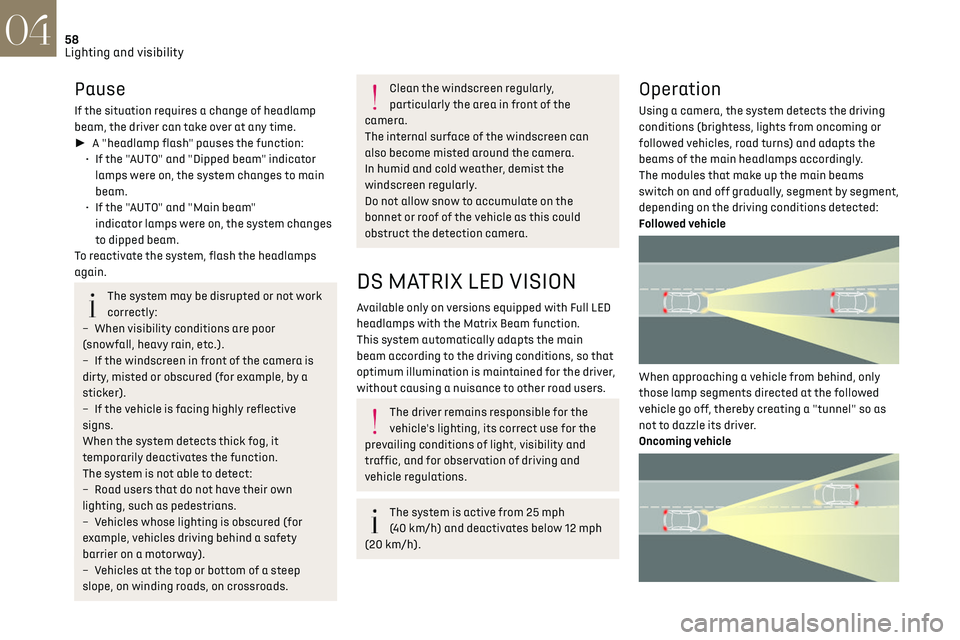
Followed vehicle
When approaching a vehicle from behind, only
those lamp segments directed at the followed
vehicle go off, thereby creating a "tunnel" so as
not to dazzle its driver.
Oncoming vehicle
When an oncoming vehicle approaches, only
those lamp segments directed at this vehicle
go off, thereby creating a "tunnel" during the
duration of the approach.
Nominal main beam lighting is restored as soon
as the vehicle is no longer detected by the system.
Entering an illuminated area
At the entrance to an illuminated area (for
example, a town), the lamp segments are
gradually switched off from the outside to the
inside of the vehicle to switch to the dipped
beams.
Exiting an illuminated area
The lamp segments gradually light up from the
inside to the outside of the vehicle to restore the
main beams.
Activation/Deactivation
► Turn the lighting control stalk ring to the
"AUTO" position.
This indicator lamp comes on in the
instrument panel.
The function can be activated and
deactivated in the Driving / Vehicle touch
screen menu.
When deactivated, the lighting system changes to
"automatic illumination of lamps" mode.
The status of the system remains in the memory
when the ignition is switched off.
Pause
If the situation requires a change of headlamp
beam, the driver can take over at any time.
Page 61 of 244
59
Lighting and visibility04
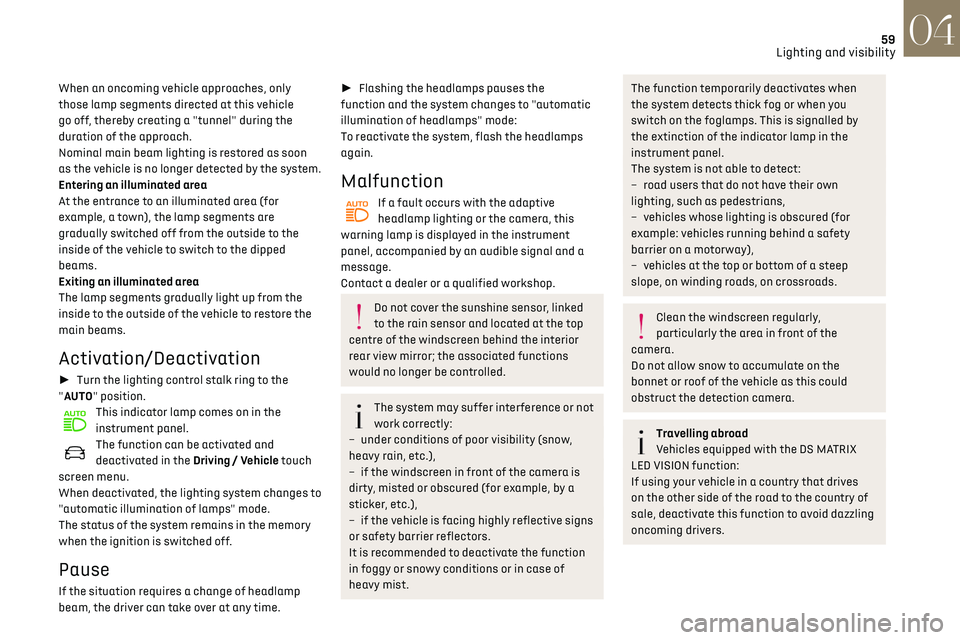
When an oncoming vehicle approaches, only
those lamp segments directed at this vehicle
go off, thereby creating a "tunnel" during the
duration of the approach.
Nominal main beam lighting is restored as soon
as the vehicle is no longer detected by the system.
Entering an illuminated area
At the entrance to an illuminated area (for
example, a town), the lamp segments are
gradually switched off from the outside to the
inside of the vehicle to switch to the dipped
beams.
Exiting an illuminated area
The lamp segments gradually light up from the
inside to the outside of the vehicle to restore the
main beams.
Activation/Deactivation
► Turn the lighting control stalk ring to the
"AUTO" position.
This indicator lamp comes on in the
instrument panel.
The function can be activated and
deactivated in the Driving / Vehicle touch
screen menu.
When deactivated, the lighting system changes to
"automatic illumination of lamps" mode.
The status of the system remains in the memory
when the ignition is switched off.
Pause
If the situation requires a change of headlamp
beam, the driver can take over at any time.
► Flashing the headlamps pauses the
function and the system changes to "automatic
illumination of headlamps" mode:
To reactivate the system, flash the headlamps
again.
Malfunction
If a fault occurs with the adaptive
headlamp lighting or the camera, this
warning lamp is displayed in the instrument
panel, accompanied by an audible signal and a
message.
Contact a dealer or a qualified workshop.
Do not cover the sunshine sensor, linked
to the rain sensor and located at the top
centre of the windscreen behind the interior
rear view mirror; the associated functions
would no longer be controlled.
The system may suffer interference or not
work correctly:
–
under c
onditions of poor visibility (snow,
heavy rain, etc.),
–
if the windscreen in fron
t of the camera is
dirty, misted or obscured (for example, by a
sticker, etc.),
–
if the v
ehicle is facing highly reflective signs
or safety barrier reflectors.
It is recommended to deactivate the function
in foggy or snowy conditions or in case of
heavy mist.
The function temporarily deactivates when
the system detects thick fog or when you
switch on the foglamps. This is signalled by
the extinction of the indicator lamp in the
instrument panel.
The system is not able to detect:
–
road users tha
t do not have their own
lighting, such as pedestrians,
–
v
ehicles whose lighting is obscured (for
example: vehicles running behind a safety
barrier on a motorway),
–
v
ehicles at the top or bottom of a steep
slope, on winding roads, on crossroads.
Clean the windscreen regularly,
particularly the area in front of the
camera.
Do not allow snow to accumulate on the
bonnet or roof of the vehicle as this could
obstruct the detection camera.
Travelling abroad
Vehicles equipped with the DS MATRIX
LED VISION function:
If using your vehicle in a country that drives
on the other side of the road to the country of
sale, deactivate this function to avoid dazzling
oncoming drivers.
Page 64 of 244
62
Lighting and visibility04
Do not apply "Rain X" type water-repellent
products.
► Unclip the worn wiper blade closest to you and
remove it.
► Install the new wiper blade and clip it to the
arm.
► Repeat the procedure for the other wiper
blade.
► Starting with the wiper blade closest to you,
once again hold each arm by the rigid section,
then guide it carefully onto the windscreen.
Removing/refitting at the rear
► Hold the arm by the rigid section and raise it
as far as possible.
► Clean the rear screen using screenwash fluid.
► Unclip the worn wiper blade and remove it.
► Install the new wiper blade and clip it to the
arm.
► Once again hold the arm by the rigid section,
then guide it carefully onto the rear screen.
Automatic windscreen
wipers
In AUTO mode, the windscreen wipers operate
automatically, without any action on the part of
the driver. If rain is detected, the wiping adapts to
the intensity of the rainfall automatically.
Detection of rainfall is by means of a rain/
sunshine sensor at the top centre of the
windscreen, behind the rear view mirror.
Do not cover the rain/sunshine sensor.
When using an automatic car wash,
switch off the automatic wipers and the
ignition.
In winter, wait until the windscreen is
completely clear of ice before activating the
automatic wipers.
Switching on
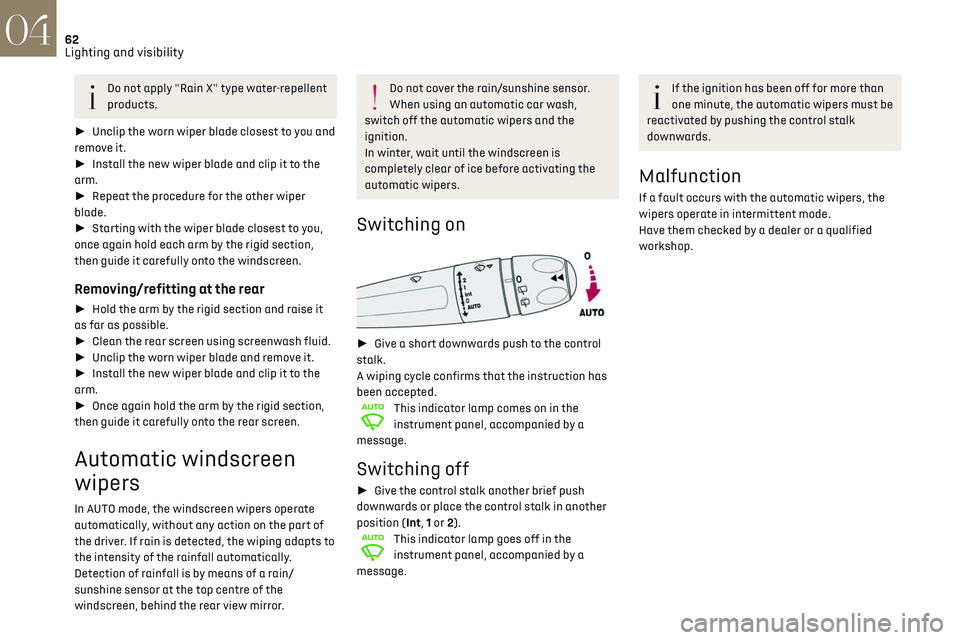
► Give a short downwards push to the control
stalk.
A wiping cycle confirms that the instruction has
been accepted.
This indicator lamp comes on in the
instrument panel, accompanied by a
message.
Switching off
► Give the control stalk another brief push
downwards or place the control stalk in another
position (Int, 1 or 2).
This indicator lamp goes off in the
instrument panel, accompanied by a
message.
If the ignition has been off for more than
one minute, the automatic wipers must be
reactivated by pushing the control stalk
downwards.
Malfunction
If a fault occurs with the automatic wipers, the
wipers operate in intermittent mode.
Have them checked by a dealer or a qualified
workshop.
Page 66 of 244
64Safety05
Horn
► Press the central part of the steering wheel.
Pedestrian horn (Electric)
The pedestrian horn operates once the vehicle is
moving and at speeds of up to 19 mph (30 km/h),
in forward or reverse gear.
Malfunction
In the event of a malfunction, this warning
lamp comes on on the instrument panel.
Contact a dealer or a qualified workshop to have
the system checked.
* In accordance with the general conditions of use of the service, available from dealers and subject to technological and technical limitations.
** In areas c overed by ‘Localised Emergency Call’ and ‘Localised Assistance Call’.
The list of countries covered and telematic services provided is available from dealers or on the website for your country.
Emergency or assistance
call
Localised Emergency Call
(PE112)
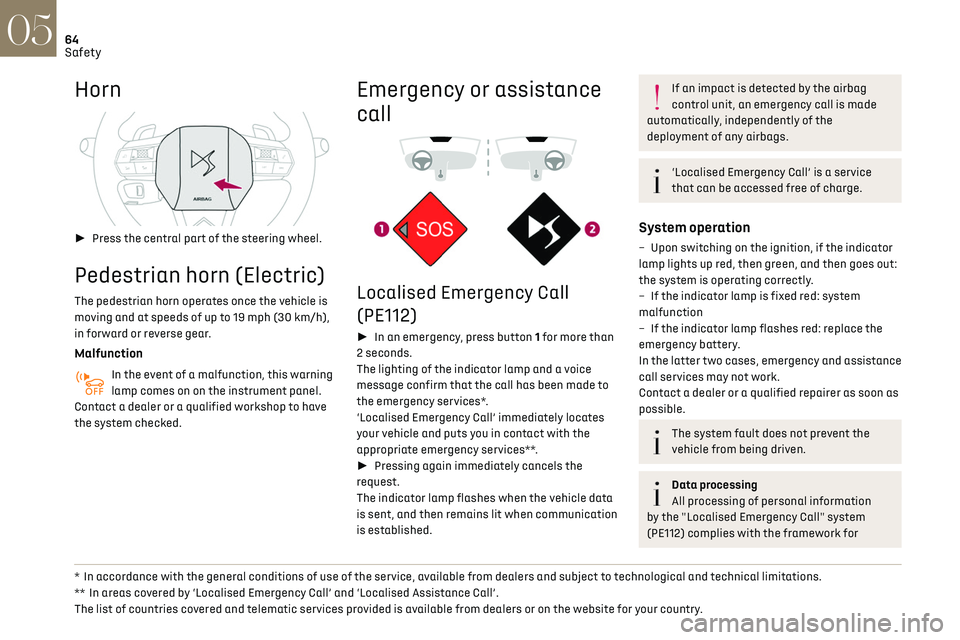
► In an emergency, press button 1 for more than
2 seconds.
The lighting of the indicator lamp and a voice
message confirm that the call has been made to
the emergency services*.
‘Localised Emergency Call’ immediately locates
your vehicle and puts you in contact with the
appropriate emergency services**.
► Pressing again immediately cancels the
request.
The indicator lamp flashes when the vehicle data
is sent, and then remains lit when communication
is established.
If an impact is detected by the airbag
control unit, an emergency call is made
automatically, independently of the
deployment of any airbags.
‘Localised Emergency Call’ is a service
that can be accessed free of charge.
System operation
– Upon switching on the ignition, if the indicator
lamp lights up red, then green, and then goes out:
the system is operating correctly.
–
If the indic
ator lamp is fixed red: system
malfunction
–
If the indic
ator lamp flashes red: replace the
emergency battery.
In the latter two cases, emergency and assistance
call services may not work.
Contact a dealer or a qualified repairer as soon as
possible.
The system fault does not prevent the
vehicle from being driven.
Data processing
All processing of personal information
by the "Localised Emergency Call" system
(PE112) complies with the framework for
Page 68 of 244
66Safety05
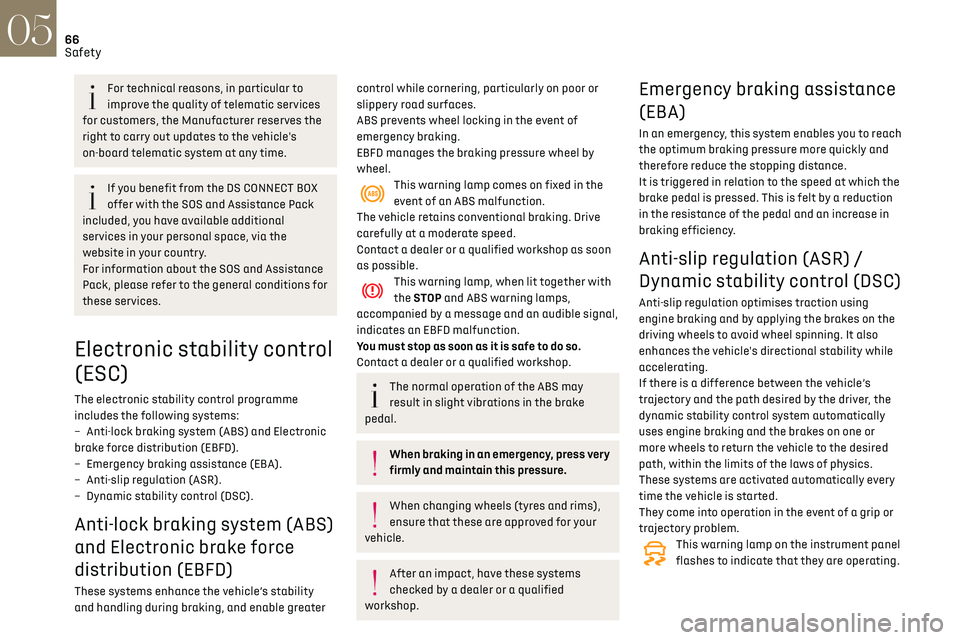
Deactivation / Reactivation
In exceptional conditions (starting a vehicle stuck
in mud, immobilised in snow, on soft ground, etc.),
it may be useful to deactivate the ASR system to
freely spin the wheels and regain traction.
Reactivate the system as soon as the level of grip
permits.
It is set via the Driving / Vehicle touch
screen menu.
Deactivation is confirmed by the
illumination of this indicator lamp in the
instrument panel and the display of a message.
The ASR system is reactivated automatically
every time the ignition is switched back on or
from 31 mph (50 km/h).
Reactivation is manual below 31 mph (50 km/h).
Malfunction
In the event of a system malfunction, this
warning lamp comes on, accompanied by
an onscreen message and audible signal.
Contact a dealer or a qualified workshop to have
the systems checked.
ASR / DSC
These systems enhance safety during
normal driving, but should not encourage the
driver to take extra risks or drive at high speed.
It is in conditions of reduced grip (rain, snow,
ice) that the risk of loss of grip increases. It
is therefore important for your safety to keep
these systems activated in all conditions, and
particularly in difficult conditions.
For technical reasons, in particular to
improve the quality of telematic services
for customers, the Manufacturer reserves the
right to carry out updates to the vehicle's
on-board telematic system at any time.
If you benefit from the DS CONNECT BOX
offer with the SOS and Assistance Pack
included, you have available additional
services in your personal space, via the
website in your country.
For information about the SOS and Assistance
Pack, please refer to the general conditions for
these services.
Electronic stability control
(ESC)
The electronic stability control programme
includes the following systems:
–
An
ti-lock braking system (ABS) and Electronic
brake force distribution (EBFD).
–
Emergenc
y braking assistance (EBA).
–
An
ti-slip regulation (ASR).
–
Dynamic st
ability control (DSC).
Anti-lock braking system (ABS)
and Electronic brake force
distribution (EBFD)
These systems enhance the vehicle’s stability
and handling during braking, and enable greater
control while cornering, particularly on poor or
slippery road surfaces.
ABS prevents wheel locking in the event of
emergency braking.
EBFD manages the braking pressure wheel by
wheel.
This warning lamp comes on fixed in the
event of an ABS malfunction.
The vehicle retains conventional braking. Drive
carefully at a moderate speed.
Contact a dealer or a qualified workshop as soon
as possible.
This warning lamp, when lit together with
the STOP and ABS warning lamps,
accompanied by a message and an audible signal,
indicates an EBFD malfunction.
You must stop as soon as it is safe to do so.
Contact a dealer or a qualified workshop.
The normal operation of the ABS may
result in slight vibrations in the brake
pedal.
When braking in an emergency, press very
firmly and maintain this pressure.
When changing wheels (tyres and rims),
ensure that these are approved for your
vehicle.
After an impact, have these systems
checked by a dealer or a qualified
workshop.
Emergency braking assistance
(EBA)
In an emergency, this system enables you to reach
the optimum braking pressure more quickly and
therefore reduce the stopping distance.
It is triggered in relation to the speed at which the
brake pedal is pressed. This is felt by a reduction
in the resistance of the pedal and an increase in
braking efficiency.
Anti-slip regulation (ASR) /
Dynamic stability control (DSC)
Anti-slip regulation optimises traction using
engine braking and by applying the brakes on the
driving wheels to avoid wheel spinning. It also
enhances the vehicle's directional stability while
accelerating.
If there is a difference between the vehicle’s
trajectory and the path desired by the driver, the
dynamic stability control system automatically
uses engine braking and the brakes on one or
more wheels to return the vehicle to the desired
path, within the limits of the laws of physics.
These systems are activated automatically every
time the vehicle is started.
They come into operation in the event of a grip or
trajectory problem.
This warning lamp on the instrument panel
flashes to indicate that they are operating.
Page 69 of 244
67Safety05
Deactivation / Reactivation
In exceptional conditions (starting a vehicle stuck
in mud, immobilised in snow, on soft ground, etc.),
it may be useful to deactivate the ASR system to
freely spin the wheels and regain traction.
Reactivate the system as soon as the level of grip
permits.
It is set via the Driving / Vehicle touch
screen menu.
Deactivation is confirmed by the
illumination of this indicator lamp in the
instrument panel and the display of a message.
The ASR system is reactivated automatically
every time the ignition is switched back on or
from 31 mph (50 km/h).
Reactivation is manual below 31 mph (50 km/h).
Malfunction
In the event of a system malfunction, this
warning lamp comes on, accompanied by
an onscreen message and audible signal.
Contact a dealer or a qualified workshop to have
the systems checked.
ASR / DSC
These systems enhance safety during
normal driving, but should not encourage the
driver to take extra risks or drive at high speed.
It is in conditions of reduced grip (rain, snow,
ice) that the risk of loss of grip increases. It
is therefore important for your safety to keep
these systems activated in all conditions, and
particularly in difficult conditions.
Correct operation of these systems depends
on compliance with the manufacturer's
recommendations relating to the wheels (tyres
and rims), braking and electronic components,
as well as the assembly and repair procedures
used by dealers.
The use of snow tyres is recommended, to
ensure that these systems remain effective
in winter conditions. All four wheels must be
fitted with tyres approved for the vehicle.
Advanced Traction Control
This special patented traction control system
improves grip on snow, mud and sand.
For optimum grip on snow, it is
recommended to fit the vehicle with
winter tyres.
Activation/Deactivation
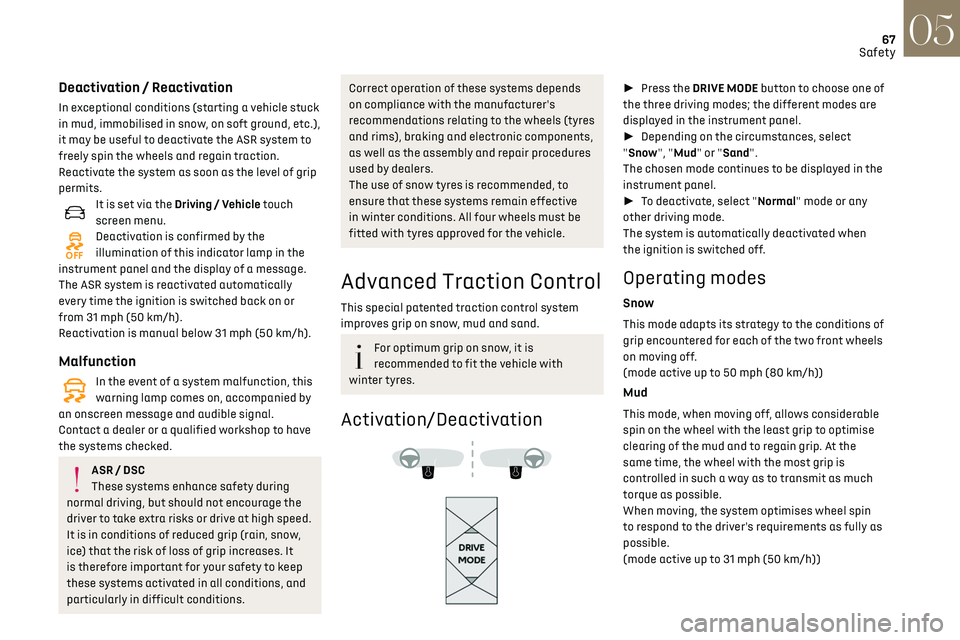
► Press the DRIVE MODE button to choose one of
the three driving modes; the different modes are
displayed in the instrument panel.
► Depending on the circumstances, select
"Snow", "Mud" or "Sand".
The chosen mode continues to be displayed in the
instrument panel.
► To deactivate, select "Normal" mode or any
other driving mode.
The system is automatically deactivated when
the ignition is switched off.
Operating modes
Snow
This mode adapts its strategy to the conditions of
grip encountered for each of the two front wheels
on moving off.
(mode active up to 50 mph (80 km/h))
Mud
This mode, when moving off, allows considerable
spin on the wheel with the least grip to optimise
clearing of the mud and to regain grip. At the
same time, the wheel with the most grip is
controlled in such a way as to transmit as much
torque as possible.
When moving, the system optimises wheel spin
to respond to the driver's requirements as fully as
possible.
(mode active up to 31 mph (50 km/h))
Page 70 of 244
68Safety05
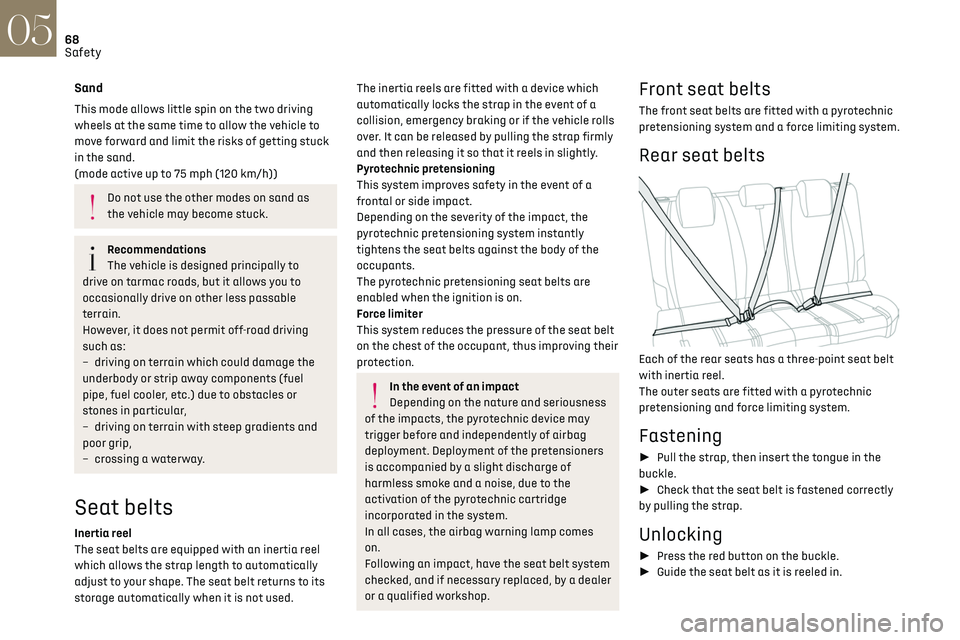
Seat belt not fastened/
unfastened alerts
1. Front left seat belt warning lamp
2. Front right seat belt warning lamp
3. Rear left seat belt warning lamp
4. Rear centre seat belt warning lamp
5. Rear right seat belt warning lamp
If the corresponding seat belt is not fastened
or is unfastened, when the ignition is switched
on, the seat belts warning lamp comes on in the
instrument panel and the corresponding warning
lamp (1 to 5) comes on in red in the seat belt and
front passenger airbag warning lamps display.
If a rear seat belt is not fastened, the
corresponding warning lamp (3 to 5)
comes on for around 30 seconds.
From about 12 mph (20 km/h) and for 2 minutes,
each warning lamp corresponding to an occupied
seat whose seat belt is unfastened flashes,
accompanied by an audible signal. After these 2
minutes, the corresponding seat warning lamp
Sand
This mode allows little spin on the two driving
wheels at the same time to allow the vehicle to
move forward and limit the risks of getting stuck
in the sand.
(mode active up to 75 mph (120 km/h))
Do not use the other modes on sand as
the vehicle may become stuck.
Recommendations
The vehicle is designed principally to
drive on tarmac roads, but it allows you to
occasionally drive on other less passable
terrain.
However, it does not permit off-road driving
such as:
–
driving on t
errain which could damage the
underbody or strip away components (fuel
pipe, fuel cooler, etc.) due to obstacles or
stones in particular,
–
driving on t
errain with steep gradients and
poor grip,
–
cro
ssing a waterway.
Seat belts
Inertia reel
The seat belts are equipped with an inertia reel
which allows the strap length to automatically
adjust to your shape. The seat belt returns to its
storage automatically when it is not used.
The inertia reels are fitted with a device which
automatically locks the strap in the event of a
collision, emergency braking or if the vehicle rolls
over. It can be released by pulling the strap firmly
and then releasing it so that it reels in slightly.
Pyrotechnic pretensioning
This system improves safety in the event of a
frontal or side impact.
Depending on the severity of the impact, the
pyrotechnic pretensioning system instantly
tightens the seat belts against the body of the
occupants.
The pyrotechnic pretensioning seat belts are
enabled when the ignition is on.
Force limiter
This system reduces the pressure of the seat belt
on the chest of the occupant, thus improving their
protection.
In the event of an impact
Depending on the nature and seriousness
of the impacts, the pyrotechnic device may
trigger before and independently of airbag
deployment. Deployment of the pretensioners
is accompanied by a slight discharge of
harmless smoke and a noise, due to the
activation of the pyrotechnic cartridge
incorporated in the system.
In all cases, the airbag warning lamp comes
on.
Following an impact, have the seat belt system
checked, and if necessary replaced, by a dealer
or a qualified workshop.
Front seat belts
The front seat belts are fitted with a pyrotechnic
pretensioning system and a force limiting system.
Rear seat belts
Each of the rear seats has a three-point seat belt
with inertia reel.
The outer seats are fitted with a pyrotechnic
pretensioning and force limiting system.
Fastening
► Pull the strap, then insert the tongue in the
buckle.
► Check that the seat belt is fastened correctly
by pulling the strap.
Unlocking
► Press the red button on the buckle.
► Guide the seat belt as it is reeled in.
Page 71 of 244
69Safety05
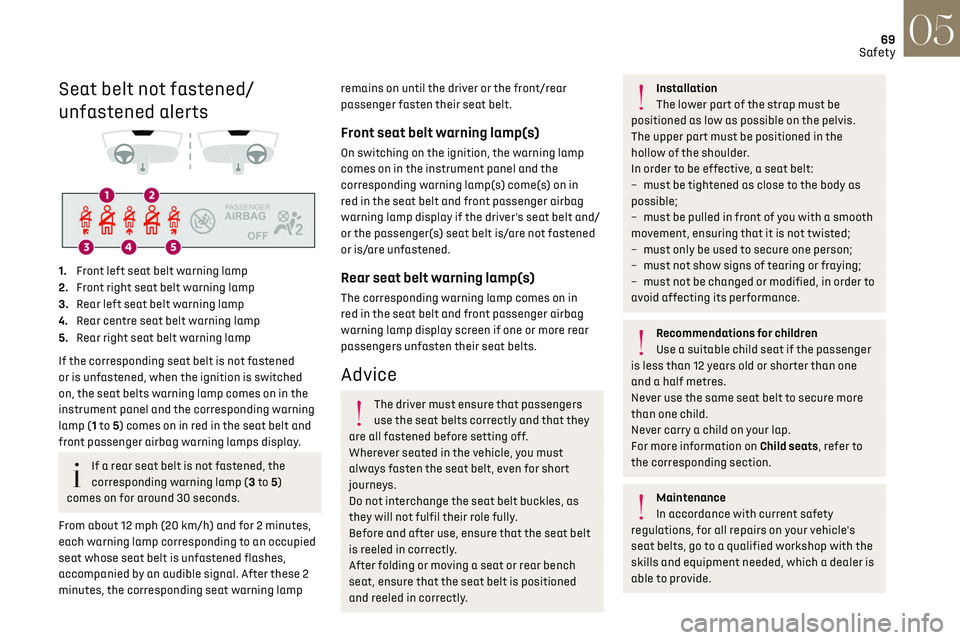
Seat belt not fastened/
unfastened alerts
1. Front left seat belt warning lamp
2. Front right seat belt warning lamp
3. Rear left seat belt warning lamp
4. Rear centre seat belt warning lamp
5. Rear right seat belt warning lamp
If the corresponding seat belt is not fastened
or is unfastened, when the ignition is switched
on, the seat belts warning lamp comes on in the
instrument panel and the corresponding warning
lamp (1 to 5) comes on in red in the seat belt and
front passenger airbag warning lamps display.
If a rear seat belt is not fastened, the
corresponding warning lamp (3 to 5)
comes on for around 30 seconds.
From about 12 mph (20 km/h) and for 2 minutes,
each warning lamp corresponding to an occupied
seat whose seat belt is unfastened flashes,
accompanied by an audible signal. After these 2
minutes, the corresponding seat warning lamp
remains on until the driver or the front/rear
passenger fasten their seat belt.
Front seat belt warning lamp(s)
On switching on the ignition, the warning lamp
comes on in the instrument panel and the
corresponding warning lamp(s) come(s) on in
red in the seat belt and front passenger airbag
warning lamp display if the driver's seat belt and/
or the passenger(s) seat belt is/are not fastened
or is/are unfastened.
Rear seat belt warning lamp(s)
The corresponding warning lamp comes on in
red in the seat belt and front passenger airbag
warning lamp display screen if one or more rear
passengers unfasten their seat belts.
Advice
The driver must ensure that passengers
use the seat belts correctly and that they
are all fastened before setting off.
Wherever seated in the vehicle, you must
always fasten the seat belt, even for short
journeys.
Do not interchange the seat belt buckles, as
they will not fulfil their role fully.
Before and after use, ensure that the seat belt
is reeled in correctly.
After folding or moving a seat or rear bench
seat, ensure that the seat belt is positioned
and reeled in correctly.
Installation
The lower part of the strap must be
positioned as low as possible on the pelvis.
The upper part must be positioned in the
hollow of the shoulder.
In order to be effective, a seat belt:
–
must be tigh
tened as close to the body as
possible;
–
must be pulled in fron
t of you with a smooth
movement, ensuring that it is not twisted;
–
must only be used t
o secure one person;
–
must no
t show signs of tearing or fraying;
–
must no
t be changed or modified, in order to
avoid affecting its performance.
Recommendations for children
Use a suitable child seat if the passenger
is less than 12 years old or shorter than one
and a half metres.
Never use the same seat belt to secure more
than one child.
Never carry a child on your lap.
For more information on Child seats, refer to
the corresponding section.
Maintenance
In accordance with current safety
regulations, for all repairs on your vehicle's
seat belts, go to a qualified workshop with the
skills and equipment needed, which a dealer is
able to provide.
Page 73 of 244
71Safety05
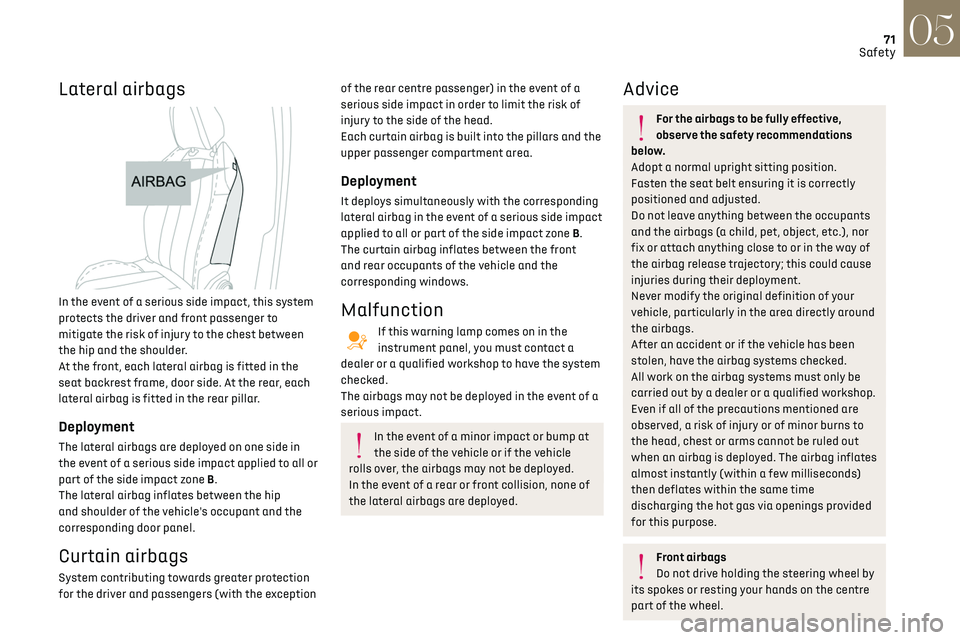
Lateral airbags
In the event of a serious side impact, this system
protects the driver and front passenger to
mitigate the risk of injury to the chest between
the hip and the shoulder.
At the front, each lateral airbag is fitted in the
seat backrest frame, door side. At the rear, each
lateral airbag is fitted in the rear pillar.
Deployment
The lateral airbags are deployed on one side in
the event of a serious side impact applied to all or
part of the side impact zone B.
The lateral airbag inflates between the hip
and shoulder of the vehicle's occupant and the
corresponding door panel.
Curtain airbags
System contributing towards greater protection
for the driver and passengers (with the exception
of the rear centre passenger) in the event of a
serious side impact in order to limit the risk of
injury to the side of the head.
Each curtain airbag is built into the pillars and the
upper passenger compartment area.
Deployment
It deploys simultaneously with the corresponding
lateral airbag in the event of a serious side impact
applied to all or part of the side impact zone B.
The curtain airbag inflates between the front
and rear occupants of the vehicle and the
corresponding windows.
Malfunction
If this warning lamp comes on in the
instrument panel, you must contact a
dealer or a qualified workshop to have the system
checked.
The airbags may not be deployed in the event of a
serious impact.
In the event of a minor impact or bump at
the side of the vehicle or if the vehicle
rolls over, the airbags may not be deployed.
In the event of a rear or front collision, none of
the lateral airbags are deployed.
Advice
For the airbags to be fully effective,
observe the safety recommendations
below.
Adopt a normal upright sitting position.
Fasten the seat belt ensuring it is correctly
positioned and adjusted.
Do not leave anything between the occupants
and the airbags (a child, pet, object, etc.), nor
fix or attach anything close to or in the way of
the airbag release trajectory; this could cause
injuries during their deployment.
Never modify the original definition of your
vehicle, particularly in the area directly around
the airbags.
After an accident or if the vehicle has been
stolen, have the airbag systems checked.
All work on the airbag systems must only be
carried out by a dealer or a qualified workshop.
Even if all of the precautions mentioned are
observed, a risk of injury or of minor burns to
the head, chest or arms cannot be ruled out
when an airbag is deployed. The airbag inflates
almost instantly (within a few milliseconds)
then deflates within the same time
discharging the hot gas via openings provided
for this purpose.
Front airbags
Do not drive holding the steering wheel by
its spokes or resting your hands on the centre
part of the wheel.
Page 84 of 244
82Driving06
The lighting state of the "START/STOP"
button indicates the presence or absence
of the electronic key in the passenger
compartment.
Starting
► With a manual gearbox, place the gear lever in
neutral and fully depress the clutch pedal.
► With an automatic gearbox, select mode P
or N and press the brake pedal.
► Press the "START/STOP" button while
maintaining pressure on the pedal until the engine
starts.
For Diesel engines, when the temperature is below
zero and/or the engine is cold, starting will only
occur once the preheating warning lamp is off.
If this warning lamp comes on after
pressing the "START/STOP" button:
► Keep the pedal fully depressed and do not
press the "START/STOP" button again until the
engine is running.
If one of the starting conditions is not met, a
message is displayed.
In some circumstances, a message indicates
that it is necessary to turn the steering wheel
while pressing the "START/STOP" button to assist
unlocking of the steering column.
With petrol engines, after a cold start,
preheating the catalytic converter can
cause noticeable engine vibrations for
anything up to 2 minutes while stationary with
the engine running (accelerated idle speed).
If the engine stalls, release the clutch
pedal and fully depress it again, the
engine will restart automatically.
Switching off
► Immobilise the vehicle, with the engine at idle.
► With a manual gearbox, ideally put the gear
lever into neutral.
► With an automatic gearbox, ideally select
mode P or N.
► Press the "START/STOP" button..
In some circumstances, it is necessary to turn the
steering wheel to lock the steering column.
If the vehicle is not immobilised, the
engine will not switch off.
With the engine off, the braking and
steering assistance systems are also cut
off - risk of loss of control of the vehicle!
Never leave your vehicle with the
electronic key still inside.
Starting/Switching off the
electric motor
Starting
The drive selector must be in mode P.
► Fully depress the brake pedal and briefly press
the "START/STOP" button.
► Keep your foot on the brake pedal until the
READY indicator lamp comes on and an audible
signal is emitted, indicating that the vehicle is
ready to drive.
► With your foot on the brake, press the
"Unlock" button and select mode D/B or R.
► Release the brake pedal, then accelerate.
On starting, the instrument panel lights up and
the power indicator cursor moves to the "neutral"
position. The steering column automatically
unlocks ( you may hear a sound and feel the
steering wheel move).
Switching off
► Press the "START/STOP" button.
Before exiting the vehicle, check that:
–
The driv
e selector is in mode P.
–
The READY indicator lamp is off.
If the driver's door is opened while the
required conditions for stopping are not
satisfied, an audible signal is emitted,
accompanied by the display of a warning
message.
Switching on the ignition
without starting the engine
With the electronic key in the passenger
compartment, pressing the “START/STOP” button,
without pressing any of the pedals, allows the
ignition to be switched on without starting the
engine.
► Press this button again to switch off the
ignition and allow the vehicle to be locked.
Key not detected
Back-up starting
A back-up reader is fitted to the steering column,
to enable the engine to be started if the system
fails to detect the key in the recognition zone, or if
the battery in the electronic key is discharged.
► Place and hold the remote control against the
reader.
► With a manual gearbox, place the gear lever in
neutral, then fully depress the clutch pedal.
► With an automatic gearbox or a drive selector,
select mode P, then fully depress the brake pedal.
► Press the "START/STOP" button.