air conditioning CITROEN DS3 CROSSBACK 2020 User Guide
[x] Cancel search | Manufacturer: CITROEN, Model Year: 2020, Model line: DS3 CROSSBACK, Model: CITROEN DS3 CROSSBACK 2020Pages: 244, PDF Size: 7.7 MB
Page 47 of 244
45Ease of use and comfort03
Central and side air vents, footwells
Central and side air vents
Windscreen
Windscreen, footwells
Footwells
Air conditioning on / off
The air conditioning system is designed to
operate effectively in all seasons, with the
windows closed.
It is used to:
–
lo
wer the temperature in summer,
–
increase the effectiv
eness of the demisting in
winter, above 3°C.
► Press button 4 to activate/deactivate the air
conditioning system.
Air conditioning does not operate when
the air flow is disabled.
To obtain cool air more quickly, enable interior
air recirculation for a brief period. Then return
to the intake of exterior air.
Switching off the air conditioning may result in
some discomfort (humidity or misting).
System switch-off
► Press this button.
Its indicator lamp comes on and all other indicator
lamps for the system go off.
This action deactivates all functions of the air
conditioning system.
Temperature is no longer regulated. A slight flow
of air can still be felt, resulting from the forward
movement of the vehicle.
Automatic air conditioning
The air conditioning operates with the engine
running, but the ventilation and its controls can
be accessed with the ignition on.
Operation of the air conditioning and regulation
of temperature, air flow and air distribution in the
passenger compartment are automatic.
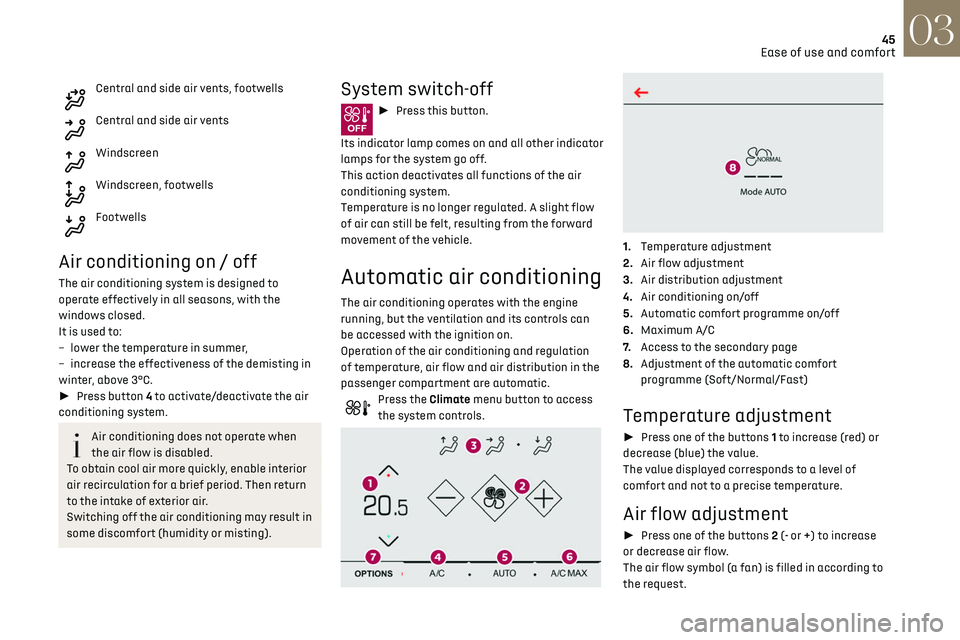
Press the Climate menu button to access
the system controls.
1. Temperature adjustment
2. Air flow adjustment
3. Air distribution adjustment
4. Air conditioning on/off
5. Automatic comfort programme on/off
6. Maximum A/C
7. Access to the secondary page
8. Adjustment of the automatic comfort
programme (Soft/Normal/Fast)
Temperature adjustment
► Press one of the buttons 1 to increase (red) or
decrease (blue) the value.
The value displayed corresponds to a level of
comfort and not to a precise temperature.
Air flow adjustment
► Press one of the buttons 2 (- or +) to increase
or decrease air flow.
The air flow symbol (a fan) is filled in according to
the request.
Page 48 of 244
46Ease of use and comfort03
When the air flow is reduced to a minimum,
ventilation stops.
"OFF" is displayed alongside the fan.
Air distribution adjustment
► Press the buttons 3 to adjust the air flow
distribution inside the passenger compartment.
Windscreen and side windows
Central and side air vents
Footwells
The lighting of the button indicates that air is
being blown in the specified direction.
It is possible to activate all three buttons
simultaneously, for uniform distribution
throughout the passenger compartment.
Air conditioning on / off
The air conditioning system is designed to
operate effectively in all seasons, with the
windows closed.
It is used to:
–
lo
wer the temperature in summer,
–
increase the effectiv
eness of the demisting in
winter, above 3°C.
► Press button 4 to activate/deactivate the air
conditioning system.
Air conditioning does not operate when
the air flow is disabled.
To obtain cool air more quickly, enable interior
air recirculation for a brief period. Then return
to the intake of exterior air.
Switching off the air conditioning may result in
some discomfort (humidity or misting).
Automatic Comfort programme
This automatic mode ensures optimum
management of the passenger compartment
temperature, air flow and air distribution, based
on the selected comfort level.
► Press button 5 to activate or deactivate the air
conditioning system’s automatic mode .
The indicator lamp in the button lights up
when the air conditioning system is operating
automatically.
You can adjust the intensity of the
automatic Comfort programme by using the
"OPTIONS" button to select a profile:
–
"Soft": provides soft and quiet operation by
limiting air flow.
–
"Normal": offers the best compromise between
a comfortable temperature and quiet operation
(default setting).
–
"Fast": provides strong and effective air flow.
To change the current profile (shown by the
corresponding indicator lamp), press button 8
repeatedly until the desired profile is displayed:
The "Normal" or "Fast" profiles are the most
comfortable for passengers in the rear seats.
This profile setting is associated with automatic
mode only. However, on deactivation of the AUTO
mode, the indicator lamp for the most recently
selected profile remains on.
Changing the profile setting does not reactivate
AUTO mode if it was deactivated.
In cold weather with the engine cold, the
air flow is increased gradually until the
comfort setting has been reached, in order to
limit the delivery of cold air into the passenger
compartment.
On entering the vehicle, if the interior
temperature is much colder or warmer than
the comfort setting requested, there is no need
to alter the value displayed to more quickly
reach the required level of comfort. The system
automatically corrects the temperature
difference as quickly as possible.
Maximum air conditioning
This function automatically adjusts the
temperature setting to the lowest possible, the
air distribution towards the central and side air
vents, the air flow to maximum and activates
interior air recirculation.
► Press button 6 to activate / deactivate the
function (the indicator lamp will come on/switch
off).
Once the function is deactivated, the system
returns to the previous settings.
Switching the system off
► Press this button.
Its indicator lamp comes on and all other indicator
lamps for the system go off.
This action deactivates all functions of the air
conditioning system.
The temperature is no longer regulated. A slight
flow of air can still be felt, due to the forward
movement of the vehicle.
Interior air recirculation
The intake of exterior air prevents the formation
of mist on the windscreen and side windows.
Recirculating the interior air isolates the
passenger compartment from outside odours
and fumes and allows the desired passenger
compartment temperature to be achieved more
rapidly.
► Press this button to activate/
deactivate the function (confirmed by the
illumination/extinction of the indicator lamp).
The function is activated automatically
when reverse gear is engaged.
Front demist - defrost
► Press this button to activate/
deactivate the demisting or defrosting of
Page 49 of 244
47Ease of use and comfort03
Switching the system off
► Press this button.
Its indicator lamp comes on and all other indicator
lamps for the system go off.
This action deactivates all functions of the air
conditioning system.
The temperature is no longer regulated. A slight
flow of air can still be felt, due to the forward
movement of the vehicle.
Interior air recirculation
The intake of exterior air prevents the formation
of mist on the windscreen and side windows.
Recirculating the interior air isolates the
passenger compartment from outside odours
and fumes and allows the desired passenger
compartment temperature to be achieved more
rapidly.
► Press this button to activate/
deactivate the function (confirmed by the
illumination/extinction of the indicator lamp).
The function is activated automatically
when reverse gear is engaged.
Front demist - defrost
► Press this button to activate/
deactivate the demisting or defrosting of
the windscreen and side windows (confirmed by
the illumination/extinction of the indicator lamp).
The system automatically manages the air
conditioning, air flow and air intake, and provides
optimum distribution towards the windscreen and
side windows.
Rear screen demist
- defrost
Demisting/defrosting only operates with the
engine running.
Depending on version, this also applies to the door
mirrors.
► Press this button to activate/
deactivate the function (confirmed by the
illumination/extinction of the indicator lamp).
Demisting/defrosting switches off automatically
to prevent an excessive consumption of electrical
current.
Switch off demisting/defrosting as soon
as you no longer consider it necessary,
as reducing the consumption of electrical
current reduces fuel consumption.
Heated windscreen and
washer jets
Depending on country of sale.
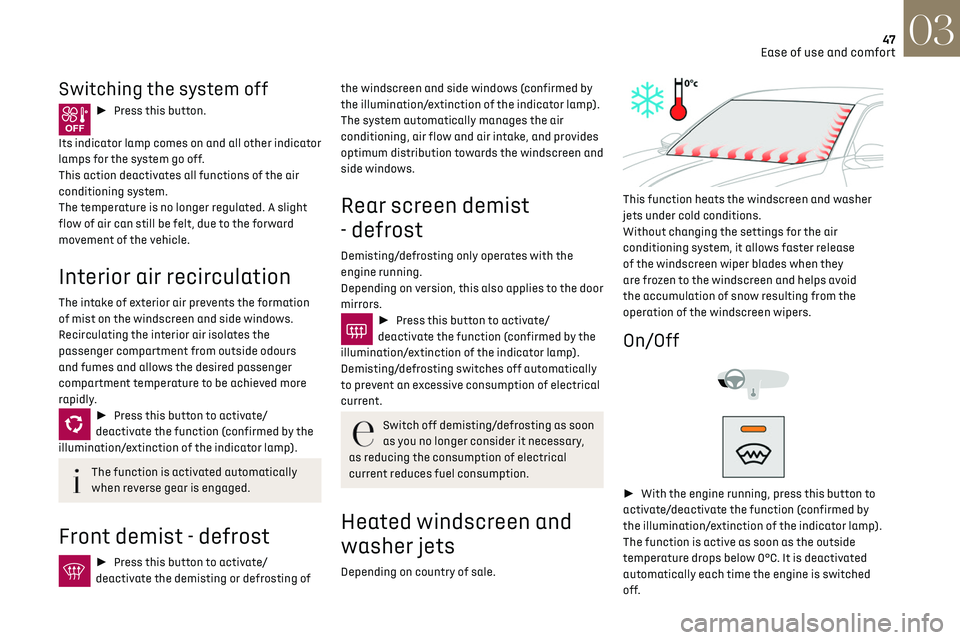
This function heats the windscreen and washer
jets under cold conditions.
Without changing the settings for the air
conditioning system, it allows faster release
of the windscreen wiper blades when they
are frozen to the windscreen and helps avoid
the accumulation of snow resulting from the
operation of the windscreen wipers.
On/Off
► With the engine running, press this button to
activate/deactivate the function (confirmed by
the illumination/extinction of the indicator lamp).
The function is active as soon as the outside
temperature drops below 0°C. It is deactivated
automatically each time the engine is switched
off.
Page 50 of 244
48Ease of use and comfort03
Remote-controlled heating
and air conditioning
(Electric)
This function allows you to programme the
vehicle to adjust the passenger compartment
temperature to a pre-defined, non-modifiable
temperature (approx. 21°C) before you enter the
vehicle, on the days and times of your choice.
Programming
(With DS CONNECT NAV)
In the Climate > OPTIONS menu:
Select Temperature conditioning.
► Press + to programme.
► Select the time of entry into the vehicle and
the desired days. Press OK.
► Press ON to activate this programming.
Pre-conditioning begins approximately 45 minutes
before the programmed time, and is maintained
for 10 minutes afterwards.
You can define multiple programmings.
Each one is saved in the system.
To optimise battery life, we recommend
programming with the vehicle plugged in.
This feature can be programmed using a
smartphone, via the MyDS application.
With DS CONNECT RADIO, the programming can
only be carried out using a smartphone, via the
application. For more information on Remotely operable
features, refer to the corresponding section.
Operating conditions
– The function is only activ
ated when the ignition
is off and the vehicle locked.
–
The function is no
t activated if the battery
charge level is below 50%.
–
If rec
urrent programming is activated (e.g.
from Monday to Friday) and two pre-conditioning
sequences are performed without the vehicle
being used, the programming will be deactivated.
Interior fittings
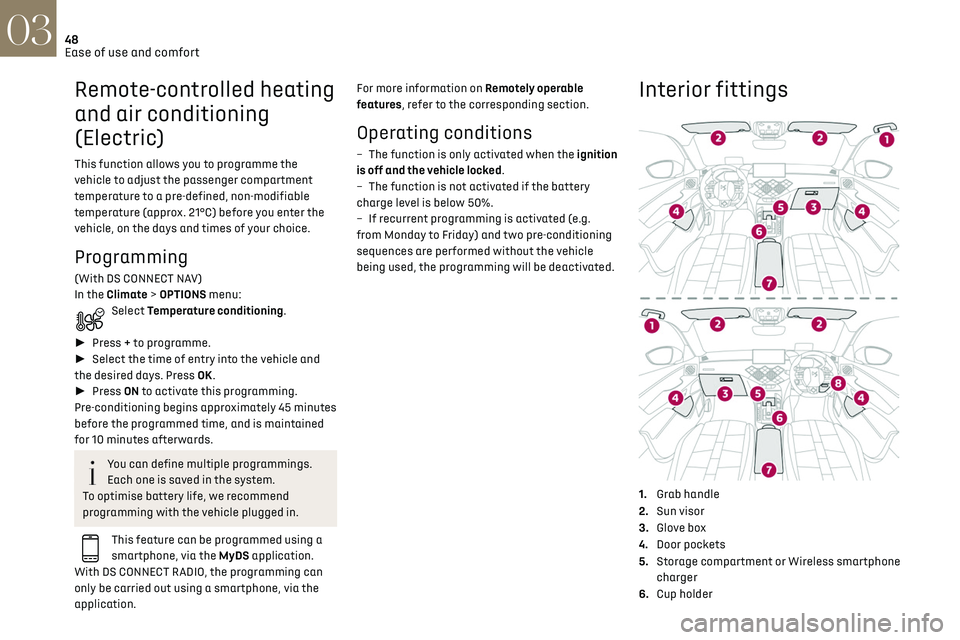
1. Grab handle
2. Sun visor
3. Glove box
4. Door pockets
5. Storage compartment or Wireless smartphone
charger
6. Cup holder
7.Central armrest with USB port and 12 V
accessory socket (depending on version)
8. Storage compartment below the steering
wheel
Sun visor
► With the ignition on, raise the concealing flap;
the mirror is illuminated automatically.
This sun visor is also equipped with a ticket
holder.
Glove box
► To open the glove box, raise the handle.
Page 62 of 244

60
Lighting and visibility04
Wiper control stalk
In wintry conditions, remove snow, ice or
frost present on the windscreen, around
the wiper arms and blades and on the
windscreen seal, before operating the wipers.
Do not operate the wipers on a dry
windscreen. Under extremely hot or cold
conditions, ensure that the wiper blades are
not stuck to the windscreen before operating
the wipers.
Without AUTO wiping
With AUTO wiping
Windscreen wipers
► To select the wiping speed: raise or lower the
stalk to the desired position.
Fast wiping (heavy rain)
Normal wiping (moderate rain)
Intermittent wiping (proportional to the
vehicle’s speed)
Off
Single wipe (press down and release).
or
Automatic.
Refer to the corresponding section.
In position 1 or 2, the wiping frequency is
automatically reduced when the speed of
the vehicle drops below 3 mph (5 km/h).
When the speed is above 6 mph (10 km/h)
again, the wiping frequency returns to the
original frequency (fast or normal).
If the ignition has been switched off with
the windscreen wiper active, it is
necessary to operate the control stalk to
reactivate the wiping when the ignition is
switched on (unless the ignition is off for less
than 1 minute).
Single wipe
► Pull the stalk briefly towards you.
Front screenwash
► Pull the wiper control stalk towards you and
hold.
The screenwash and windscreen wipers operate
for as long as the control stalk is pulled.
Termination of the screenwash is followed by a
final wiping cycle.
With automatic air conditioning, any
action on the screenwash control results
in temporary closure of the air intake to avoid
odours inside the passenger compartment.
To avoid damaging the wiper blades, do
not operate the screenwash if the
screenwash reservoir is empty.
Only operate the screenwash if there is no risk
of the fluid freezing on the windscreen and
hindering visibility. During the winter period,
use "very cold climate" rated products.
Never top up with water.
Rear wiper
► Turn the ring to align the desired symbol with
the marking.
Off
Intermittent wipe
Wash-wipe
Reverse gear
When reverse gear is engaged, the rear wiper will
come into operation automatically if the front
windscreen wipers are operating.
The function is activated or deactivated in
the Driving / Vehicle menu of the touch
screen.
This function is activated by default.
In the event of accumulation of snow or
hard frost or if a bicycle carrier is fitted to
a towing device, deactivate the automatic rear
wiper via the touch screen’s Driving/Vehicle
menu.
Rear screenwash
► Turn the ring all the way towards the
dashboard and hold.
The screenwash and the wiper operate for as long
as the ring remains turned.
A final wiping cycle is performed when
screenwashing ends.
Page 92 of 244
90
Driving06
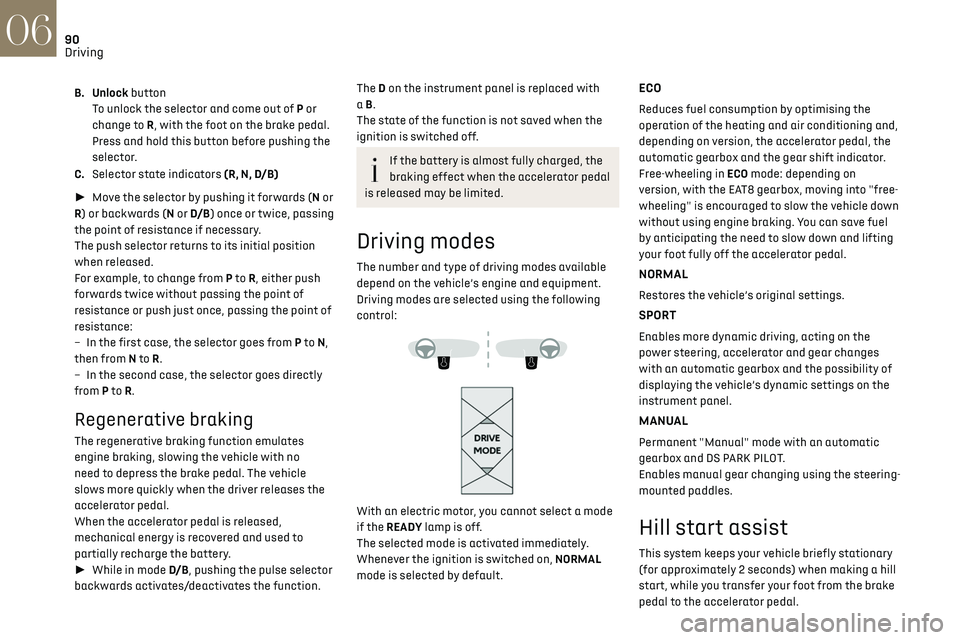
B. Unlock buttonTo unlock the selector and come out of P or
change to R, with the foot on the brake pedal.
Press and hold this button before pushing the
selector.
C. Selector state indicators (R, N, D/B)
► Move the selector by pushing it forwards (N or
R) or backwards (N or D/B ) once or twice, passing
the point of resistance if necessary.
The push selector returns to its initial position
when released.
For example, to change from P to R, either push
forwards twice without passing the point of
resistance or push just once, passing the point of
resistance:
–
In the first c
ase, the selector goes from P to N,
then from N to R.
–
In the sec
ond case, the selector goes directly
from P to R.
Regenerative braking
The regenerative braking function emulates
engine braking, slowing the vehicle with no
need to depress the brake pedal. The vehicle
slows more quickly when the driver releases the
accelerator pedal.
When the accelerator pedal is released,
mechanical energy is recovered and used to
partially recharge the battery.
► While in mode D/B , pushing the pulse selector
backwards activates/deactivates the function.
The D on the instrument panel is replaced with
a B.
The state of the function is not saved when the
ignition is switched off.
If the battery is almost fully charged, the
braking effect when the accelerator pedal
is released may be limited.
Driving modes
The number and type of driving modes available
depend on the vehicle’s engine and equipment.
Driving modes are selected using the following
control:
With an electric motor, you cannot select a mode
if the READY lamp is off.
The selected mode is activated immediately.
Whenever the ignition is switched on, NORMAL
mode is selected by default.
ECO
Reduces fuel consumption by optimising the
operation of the heating and air conditioning and,
depending on version, the accelerator pedal, the
automatic gearbox and the gear shift indicator.
Free-wheeling in ECO mode: depending on
version, with the EAT8 gearbox, moving into "free-
wheeling" is encouraged to slow the vehicle down
without using engine braking. You can save fuel
by anticipating the need to slow down and lifting
your foot fully off the accelerator pedal.
NORMAL
Restores the vehicle’s original settings.
SPORT
Enables more dynamic driving, acting on the
power steering, accelerator and gear changes
with an automatic gearbox and the possibility of
displaying the vehicle’s dynamic settings on the
instrument panel.
MANUAL
Permanent "Manual" mode with an automatic
gearbox and DS PARK PILOT.
Enables manual gear changing using the steering-
mounted paddles.
Hill start assist
This system keeps your vehicle briefly stationary
(for approximately 2 seconds) when making a hill
start, while you transfer your foot from the brake
pedal to the accelerator pedal.
This system is only active when:
– The vehicle is completely stationary, with your
foot on the brake pedal.
– Certain slope conditions are met.
– The driver’s door is closed.
Do not leave the vehicle while it is being
held temporarily by hill start assist.
If someone needs to get out of the vehicle with
the engine running, apply the parking brake
manually. After that, ensure that the parking
brake indicator lamp and the indicator lamp P
in the electric parking brake control lever are
on fixed.
The hill start assist function cannot be
deactivated. However, use of the parking
brake to immobilise the vehicle interrupts its
operation.
Operation
Page 140 of 244
138
Practical information07
If the height exceeds 40 cm, adapt the speed
of the vehicle to the profile of the road to avoid
damaging the roof bars and the fixings on the
vehicle.
Be sure to refer to national legislation in order
to comply with the regulations for transporting
objects which are longer than the vehicle.
Recommendations
Distribute the load uniformly, taking care
to avoid overloading one of the sides.
Arrange the heaviest part of the load as close
as possible to the roof.
Secure the load firmly.
Drive gently: the vehicle will be more
susceptible to the effects of side winds and its
stability may be affected.
Regularly check the security and tight
fastening of the roof bars, at least before each
trip.
Remove the roof bars once they are no longer
needed.
Snow chains
In wintry conditions, snow chains improve
traction as well as the behaviour of the vehicle
when braking.
The snow chains must be fitted only to
the front wheels. They must never be
fitted to "space-saver" type spare wheels.
Take account of the legislation specific to
each country on the use of snow chains
and the maximum authorised speed.
Use only chains designed to be fitted to the type
of wheel fitted to the vehicle:
Original tyre size Chain type 215/65 R16 Cannot be fitted with chains
215/60 R17 Polaire XP9 with manual locking
215/55R18 Cannot be fitted with chains
For more information on snow chains, contact a
dealer or a qualified workshop.
Installation tips
► To fit the chains during a journey, stop the
vehicle on a flat surface on the side of the road.
► Apply the parking brake and position any
wheel chocks under the wheels to prevent
movement of the vehicle.
► Fit the chains following the instructions
provided by the manufacturer.
► Move off gently and drive for a few moments,
without exceeding 31 mph (50 km/h).
► Stop the vehicle and check that the snow
chains are correctly tightened.
It is strongly recommended that before
you leave, you practise fitting the snow
chains on a level and dry surface.
Avoid driving with snow chains on roads
that have been cleared of snow to avoid
damaging the vehicle's tyres and the road
surface. If the vehicle is fitted with alloy
wheels, check that no part of the chain or its
fixings is in contact with the wheel rim.
Energy economy mode
This system manages the duration of use of
certain functions, in order to conserve a sufficient
level of charge in the battery with the ignition off.
After switching off the engine, you can still
use functions such as the audio and telematic
system, the wipers and the dipped beam
headlamps or courtesy lamps, for a combined
duration of approximately 40 minutes.
Selecting the mode
A confirmation message is displayed when
energy economy mode is entered, and the active
functions are placed on standby.
If a telephone call is in progress at the
time, it will be maintained for around 10
minutes via the audio system’s hands-free
system.
Exiting the mode
These functions are automatically reactivated the
next time the vehicle is used.
To restore the use of these functions immediately,
start the engine and let it run:
– For less than 10 minutes, to use the equipment
for approximately 5 minutes.
– For more than 10 minutes, to use the equipment
for approximately 30 minutes.
Let the engine run for the specified duration to
ensure that the battery charge is sufficient.
To recharge the battery, avoid repeatedly or
continuously restarting the engine.
A flat battery prevents the engine from
starting.
For more information on the 12 V battery, refer
to the corresponding section.
Load reduction mode
This system manages the use of certain functions
according to the level of charge remaining in the
battery.
When the vehicle is being driven, the load
reduction function temporarily deactivates
certain functions, such as the air conditioning
and the heated rear screen.
The deactivated functions are reactivated
automatically as soon as conditions permit.
Page 141 of 244
139
Practical information07
Exiting the mode
These functions are automatically reactivated the
next time the vehicle is used.
To restore the use of these functions immediately,
start the engine and let it run:
–
For le
ss than 10 minutes, to use the equipment
for approximately 5 minutes.
–
For more than 10 minut
es, to use the equipment
for approximately 30 minutes.
Let the engine run for the specified duration to
ensure that the battery charge is sufficient.
To recharge the battery, avoid repeatedly or
continuously restarting the engine.
A flat battery prevents the engine from
starting.
For more information on the 12 V battery, refer
to the corresponding section.
Load reduction mode
This system manages the use of certain functions
according to the level of charge remaining in the
battery.
When the vehicle is being driven, the load
reduction function temporarily deactivates
certain functions, such as the air conditioning
and the heated rear screen.
The deactivated functions are reactivated
automatically as soon as conditions permit.
Bonnet
Stop & Start
Before doing anything under the bonnet,
you must switch off the ignition to avoid any
risk of injury resulting from an automatic
change to START mode.
The location of the interior bonnet release
lever prevents the bonnet being opened
when the left-hand front door is closed.
When the engine is hot, handle the
exterior safety catch and the bonnet stay
with care (risk of burns), using the protected
area.
When the bonnet is open, take care not to
damage the safety catch.
Do not open the bonnet under very windy
conditions.
Cooling of the engine when stopped
The engine cooling fan may start after the
engine has been switched off.
Take care with objects or clothing that could
be caught in the blades of the fan!
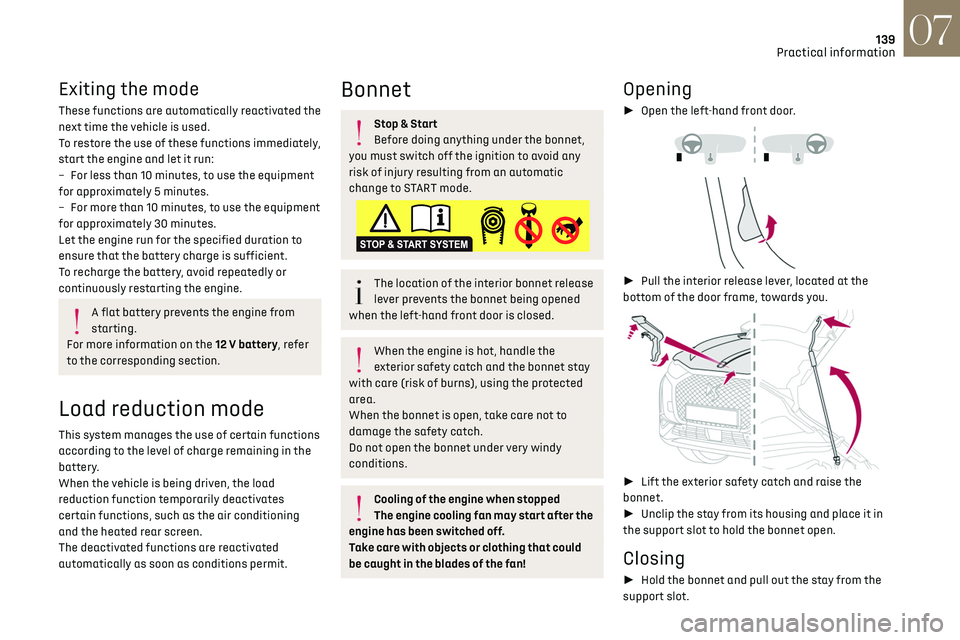
Opening
► Open the left-hand front door.
► Pull the interior release lever, located at the
bottom of the door frame, towards you.
► Lift the exterior safety catch and raise the
bonnet.
► Unclip the stay from its housing and place it in
the support slot to hold the bonnet open.
Closing
► Hold the bonnet and pull out the stay from the
support slot.
Page 144 of 244

142
Practical information07
The check and top-up must only be done with the
engine cold.
A low level presents a risk of serious damage to
the engine.
The level of this fluid should be close to the "MAX"
mark but should never exceed it.
If the level is close to or below the "MIN” mark, it
is essential to top up.
When the engine is hot, the temperature of this
fluid is regulated by the fan.
As the cooling system is pressurised, wait at least
one hour after switching off the engine before
carrying out any work.
In order to avoid the risk of scalding if you need to
top up in an emergency, wrap a cloth around the
cap and unscrew the cap by two turns to allow the
pressure to drop.
Once the pressure has dropped, remove the cap
and top up to the required level.
Screenwash fluid
Top up to the required level when
necessary.
Fluid specification
The fluid must be topped up with a ready-to-use
mixture.
In winter (temperatures below zero), a liquid
containing an agent to prevent freezing must
be used which is appropriate for the prevailing
conditions, in order to protect the elements of the
system (pump, tank, ducts, jets, etc.).
Filling with pure water is prohibited under
all circumstances (risk of freezing,
limestone deposits, etc.).
AdBlue (BlueHDi)
An alert is triggered when the reserve level is
reached.
For more information on Indicators and in
particular the AdBlue range indicators, refer to
the corresponding section.
To avoid the vehicle being immobilised in
accordance with regulations, you must top up the
AdBlue tank.
For more information on AdBlue
® (BlueHDi), and
in particular on the supply of AdBlue, refer to the
corresponding section.
Checks
Unless otherwise indicated, check these
components in accordance with the
manufacturer's service schedule and according to
your engine.
Otherwise, have them checked by a dealer or a
qualified workshop.
Only use products recommended by the
Manufacturer or products of equivalent
quality and specification.
In order to optimise the operation of
components as important as those in the
braking system, the Manufacturer selects and
offers very specific products.
12 V battery
The battery does not require any
maintenance.
However, check regularly that the terminals
are correctly tightened (versions without quick
release terminals) and that the connections are
clean.
For more information on the precautions
to take before any work on the 12 V
battery, refer to the corresponding section.
Versions equipped with Stop & Start are
fitted with a 12 V lead-acid battery of
specific technology and specification.
Its replacement should be carried out only by a
dealer or by a qualified workshop.
Passenger compartment filter
Depending on the environment and the use
of the vehicle (e.g. dusty atmosphere, city
driving), change it twice as often, if necessary.
A clogged passenger compartment filter
can adversely affect air conditioning
system performance and generate undesirable
odours.
Air filter
Depending on the environment and the use
of the vehicle (e.g. dusty atmosphere, city
driving), change it twice as often, if necessary.
Oil filter
Change the oil filter each time the engine
oil is changed.
Particle filter (Diesel)
When the particle filter is approaching
saturation, this warning lamp comes on
temporarily, accompanied by a message warning
of the risk of filter clogging.
As soon as the traffic conditions permit,
regenerate the filter by driving at a speed of at
least 37 mph (60 km/h) until the warning lamp
goes off.
Following prolonged operation of the
vehicle at very low speed or at idle, you
may, in exceptional circumstances, notice the
emission of water vapour at the exhaust while
accelerating. This has no impact on the
vehicle’s behaviour or the environment.
New vehicle
During the first few particle filter
regeneration operations, you may notice a
"burning" smell. This is perfectly normal.
Manual gearbox
The gearbox does not require any
maintenance (no oil change).
Page 177 of 244
175
Touch screen BLUETOOTH audio system10
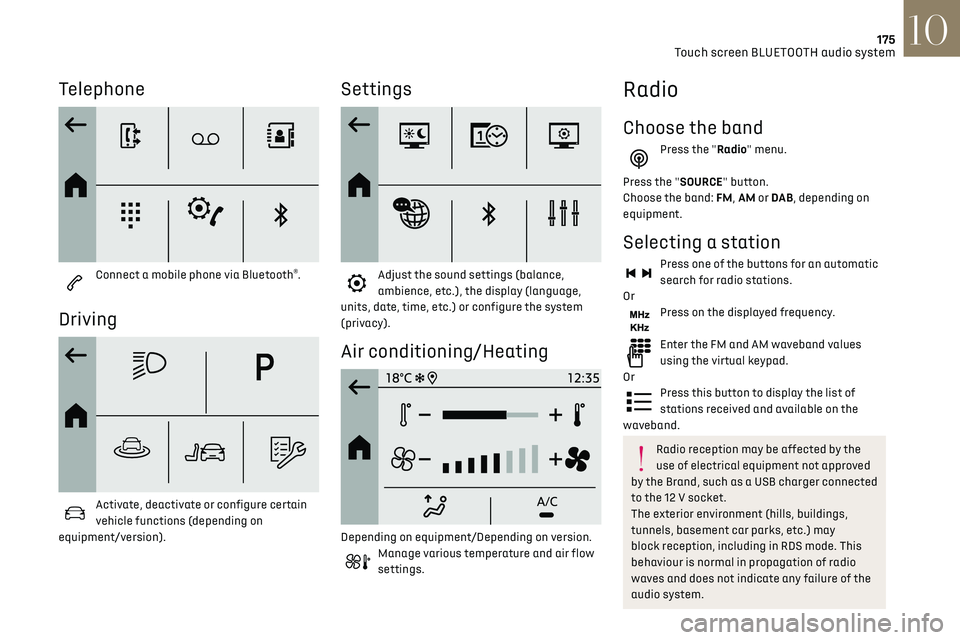
Telephone
Connect a mobile phone via Bluetooth®.
Driving
Activate, deactivate or configure certain
vehicle functions (depending on
equipment/version).
Settings
Adjust the sound settings (balance,
ambience, etc.), the display (language,
units, date, time, etc.) or configure the system
(privacy).
Air conditioning/Heating
Depending on equipment/Depending on version.Manage various temperature and air flow
settings.
Radio
Choose the band
Press the "Radio" menu.
Press the "SOURCE" button.
Choose the band: FM, AM or DAB , depending on
equipment.
Selecting a station
Press one of the buttons for an automatic
search for radio stations.
Or
Press on the displayed frequency.
Enter the FM and AM waveband values
using the virtual keypad.
Or
Press this button to display the list of
stations received and available on the
waveband.
Radio reception may be affected by the
use of electrical equipment not approved
by the Brand, such as a USB charger connected
to the 12 V socket.
The exterior environment (hills, buildings,
tunnels, basement car parks, etc.) may
block reception, including in RDS mode. This
behaviour is normal in propagation of radio
waves and does not indicate any failure of the
audio system.