air conditioning CITROEN DS3 CROSSBACK 2020 Owner's Manual
[x] Cancel search | Manufacturer: CITROEN, Model Year: 2020, Model line: DS3 CROSSBACK, Model: CITROEN DS3 CROSSBACK 2020Pages: 244, PDF Size: 7.7 MB
Page 186 of 244
184
DS CONNECT RADIO11
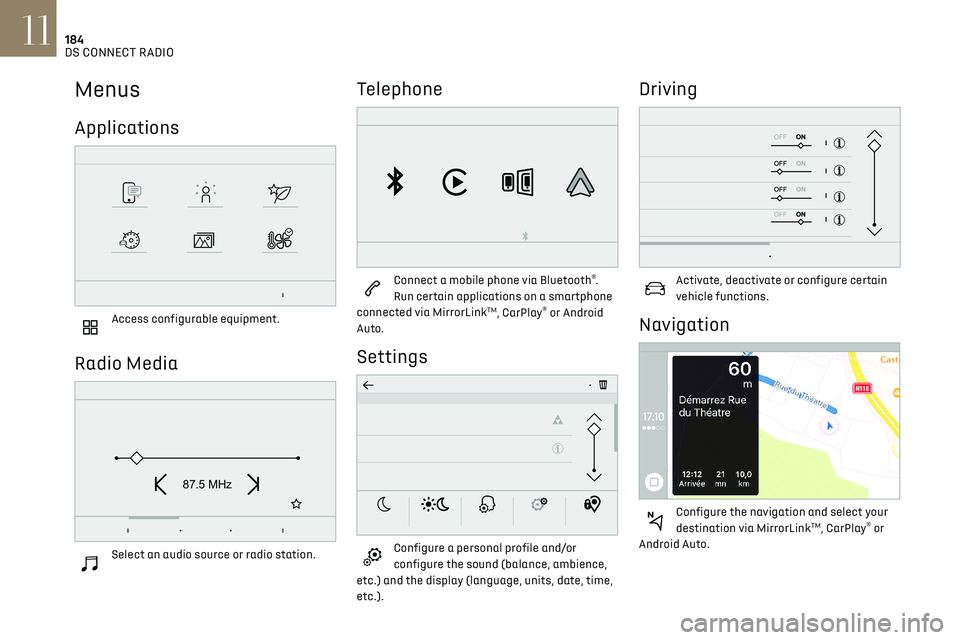
Menus
Applications
Access configurable equipment.
Radio Media
87.5 MHz
Select an audio source or radio station.
Telephone
Connect a mobile phone via Bluetooth®.
Run certain applications on a smartphone
connected via MirrorLink
TM, CarPlay® or Android
Auto.
Settings
Configure a personal profile and/or
configure the sound (balance, ambience,
etc.) and the display (language, units, date, time,
etc.).
Driving
Activate, deactivate or configure certain
vehicle functions.
Navigation
Configure the navigation and select your
destination via MirrorLinkTM, CarPlay® or
Android Auto.
Air conditioning
21,518,5
Manage various temperature and air flow
settings.
Applications
Viewing photos
Insert a USB memory stick in the USB port.
To protect the system, do not use a USB
hub.
The system can read folders and image files in the
formats: .tiff; .gif; .jpg/jpeg; .bmp and .png.
Press Applications to display the main
page.
Press "Photos".
Select a folder.
Select an image to view.
Page 187 of 244
185
DS CONNECT RADIO11
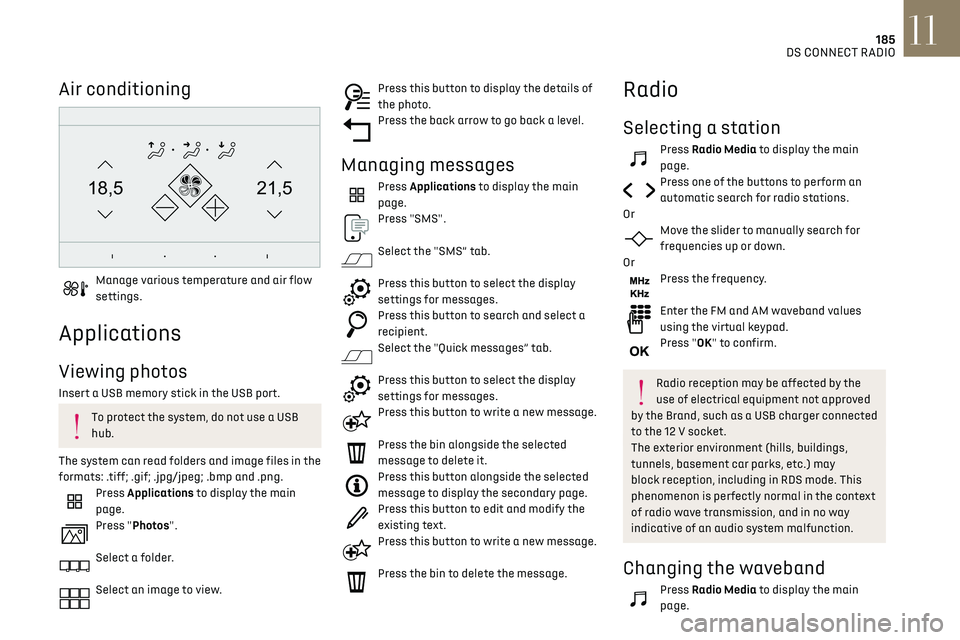
Air conditioning
21,518,5
Manage various temperature and air flow
settings.
Applications
Viewing photos
Insert a USB memory stick in the USB port.
To protect the system, do not use a USB
hub.
The system can read folders and image files in the
formats: .tiff; .gif; .jpg/jpeg; .bmp and .png.
Press Applications to display the main
page.
Press "Photos".
Select a folder.
Select an image to view.
Press this button to display the details of
the photo.
Press the back arrow to go back a level.
Managing messages
Press Applications to display the main
page.
Press "SMS".
Select the "SMS” tab.
Press this button to select the display
settings for messages.
Press this button to search and select a
recipient.
Select the "Quick messages” tab.
Press this button to select the display
settings for messages.
Press this button to write a new message.
Press the bin alongside the selected
message to delete it.
Press this button alongside the selected
message to display the secondary page.
Press this button to edit and modify the
existing text.
Press this button to write a new message.
Press the bin to delete the message.
Radio
Selecting a station
Press Radio Media to display the main
page.
Press one of the buttons to perform an
automatic search for radio stations.
Or
Move the slider to manually search for
frequencies up or down.
Or
Press the frequency.
Enter the FM and AM waveband values
using the virtual keypad.
Press "OK" to confirm.
Radio reception may be affected by the
use of electrical equipment not approved
by the Brand, such as a USB charger connected
to the 12 V socket.
The exterior environment (hills, buildings,
tunnels, basement car parks, etc.) may
block reception, including in RDS mode. This
phenomenon is perfectly normal in the context
of radio wave transmission, and in no way
indicative of an audio system malfunction.
Changing the waveband
Press Radio Media to display the main
page.
Page 199 of 244
197
DS CONNECT NAV12
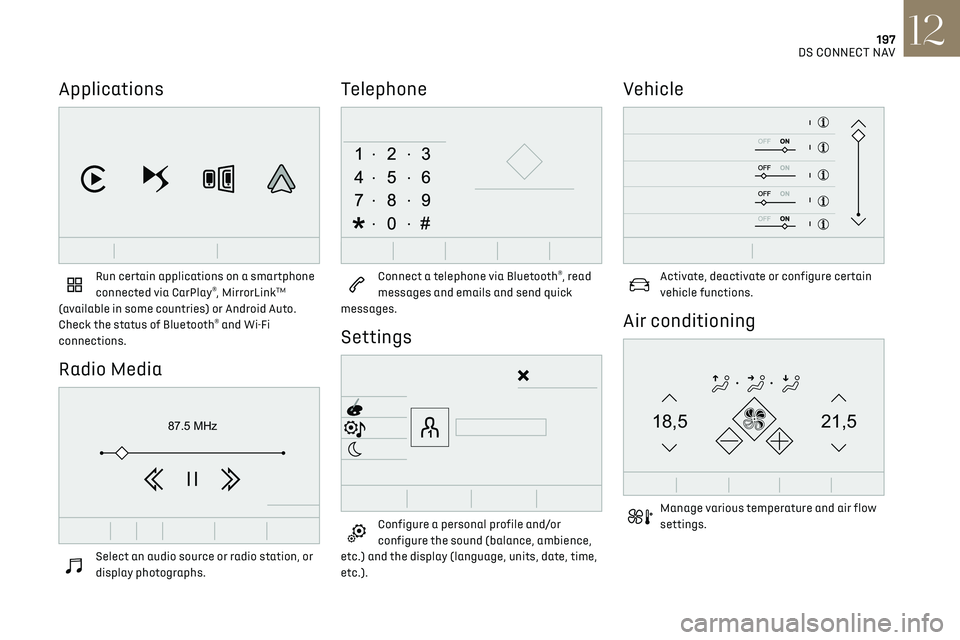
Applications
Run certain applications on a smartphone
connected via CarPlay®, MirrorLinkTM
(available in some countries) or Android Auto.
Check the status of Bluetooth
® and Wi-Fi
connections.
Radio Media
87.5 MHz
Select an audio source or radio station, or
display photographs.
Telephone
Connect a telephone via Bluetooth®, read
messages and emails and send quick
messages.
Settings
Configure a personal profile and/or
configure the sound (balance, ambience,
etc.) and the display (language, units, date, time,
etc.).
Vehicle
Activate, deactivate or configure certain
vehicle functions.
Air conditioning
21,518,5
Manage various temperature and air flow
settings.
Page 222 of 244
220
Alphabetical index
A
ABS 66
Accessories
63
Active Safety Brake
115–117
AdBlue®
18, 144
AdBlue® tank
145
Additive, Diesel
143
Adjusting headlamps
56
Adjusting head restraints
39
Adjusting seat
38–39
Adjusting the air distribution
44, 46
Adjusting the air flow
44–45
Adjusting the date
193, 215
Adjusting the height and reach of
the steering wheel
40
Adjusting the lumbar support
39
Adjusting the seat angle
38
Adjusting the temperature
44–45
Adjusting the time
180, 193, 216
Advanced Traction Control
67
Advice on care and maintenance
131, 146
Advice on driving
7, 80–81
Airbags
70–72, 74
Airbags, curtain
71–72
Airbags, front
70–71, 74
Airbags, lateral
71–72
Air conditioning
43, 46
Air conditioning, automatic
45
Air conditioning, manual
44
Air intake
47
Air vents
43
Alarm
34–36
Amplifier, audio
50
Android Auto connection
207
Anti-lock braking system (ABS)
66
Antitheft / Immobiliser 31, 81
Apple CarPlay connection
189, 206
Applications
207
Armrest, front
49
Assistance call
64
Assistance, emergency braking
66, 116
Audible warning
64
Audio streaming (Bluetooth)
177–178, 187, 211
B
Battery 138
Battery, 12 V
142, 161–164
Battery, ancillaries
161–162
Battery, charging
130, 134, 163–164
Battery, remote control
32–33
Blind spot monitoring system, active
114
Blind spot sensors
113–114
BlueHDi
18, 142, 148
Bluetooth (hands-free)
178, 190, 212
Bluetooth (telephone)
178, 190, 212–213
Bodywork
147
Bonnet
139
Boot
34, 53
Brake discs
143
Brake lamps
157–158
Brakes
143
Braking
90
Braking assistance system
66
Braking, automatic emergency
115–117
Braking, dynamic emergency
84–85
Brightness
179, 192
Bulbs
156
Bulbs (changing)
155–158
C
Cable, audio 211
Cable, Jack
211
Capacity, fuel tank
129
Cap, fuel filler
129
Care of the bodywork
147
CD
177, 187
CD, MP3
177, 187
Central locking
30
Changing a bulb
155–158
Changing a fuse
159–161
Changing a wheel
149, 152
Changing a wiper blade
61
Changing the remote control battery
32
Charger, induction
50
Charger, wireless
50
CHECK
21
Checking the levels
140–142
Checking tyre pressures
(using the kit)
150, 152
Checks
140, 142–144
Checks, routine
142–143
Child lock
79
Children
69, 75–76
Children (safety)
79
Child seats
69, 72–74
Child seats, conventional
74
Child seats, i-Size
76
Child seats, ISOFIX
75–76
Cleaning (advice)
131, 146–147
Closing the boot
30, 34
Closing the doors
29–30, 33
Collision Risk Alert
115–116
Configuration, vehicle
24
Connected applications
207