risk CITROEN DS3 CROSSBACK 2020 Owner's Guide
[x] Cancel search | Manufacturer: CITROEN, Model Year: 2020, Model line: DS3 CROSSBACK, Model: CITROEN DS3 CROSSBACK 2020Pages: 244, PDF Size: 7.7 MB
Page 84 of 244
82Driving06
The lighting state of the "START/STOP"
button indicates the presence or absence
of the electronic key in the passenger
compartment.
Starting
► With a manual gearbox, place the gear lever in
neutral and fully depress the clutch pedal.
► With an automatic gearbox, select mode P
or N and press the brake pedal.
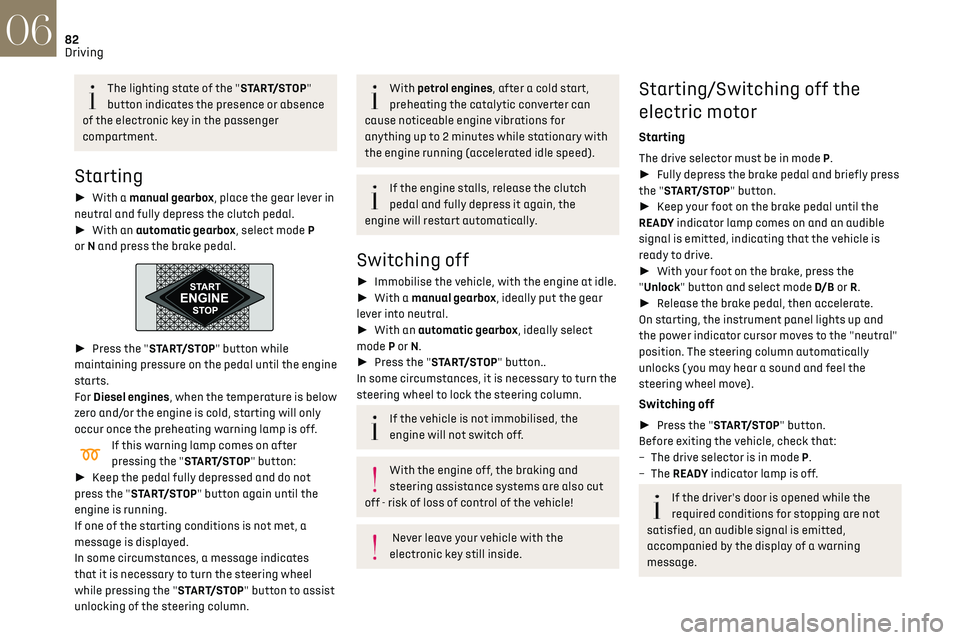
► Press the "START/STOP" button while
maintaining pressure on the pedal until the engine
starts.
For Diesel engines, when the temperature is below
zero and/or the engine is cold, starting will only
occur once the preheating warning lamp is off.
If this warning lamp comes on after
pressing the "START/STOP" button:
► Keep the pedal fully depressed and do not
press the "START/STOP" button again until the
engine is running.
If one of the starting conditions is not met, a
message is displayed.
In some circumstances, a message indicates
that it is necessary to turn the steering wheel
while pressing the "START/STOP" button to assist
unlocking of the steering column.
With petrol engines, after a cold start,
preheating the catalytic converter can
cause noticeable engine vibrations for
anything up to 2 minutes while stationary with
the engine running (accelerated idle speed).
If the engine stalls, release the clutch
pedal and fully depress it again, the
engine will restart automatically.
Switching off
► Immobilise the vehicle, with the engine at idle.
► With a manual gearbox, ideally put the gear
lever into neutral.
► With an automatic gearbox, ideally select
mode P or N.
► Press the "START/STOP" button..
In some circumstances, it is necessary to turn the
steering wheel to lock the steering column.
If the vehicle is not immobilised, the
engine will not switch off.
With the engine off, the braking and
steering assistance systems are also cut
off - risk of loss of control of the vehicle!
Never leave your vehicle with the
electronic key still inside.
Starting/Switching off the
electric motor
Starting
The drive selector must be in mode P.
► Fully depress the brake pedal and briefly press
the "START/STOP" button.
► Keep your foot on the brake pedal until the
READY indicator lamp comes on and an audible
signal is emitted, indicating that the vehicle is
ready to drive.
► With your foot on the brake, press the
"Unlock" button and select mode D/B or R.
► Release the brake pedal, then accelerate.
On starting, the instrument panel lights up and
the power indicator cursor moves to the "neutral"
position. The steering column automatically
unlocks ( you may hear a sound and feel the
steering wheel move).
Switching off
► Press the "START/STOP" button.
Before exiting the vehicle, check that:
–
The driv
e selector is in mode P.
–
The READY indicator lamp is off.
If the driver's door is opened while the
required conditions for stopping are not
satisfied, an audible signal is emitted,
accompanied by the display of a warning
message.
Switching on the ignition
without starting the engine
With the electronic key in the passenger
compartment, pressing the “START/STOP” button,
without pressing any of the pedals, allows the
ignition to be switched on without starting the
engine.
► Press this button again to switch off the
ignition and allow the vehicle to be locked.
Key not detected
Back-up starting
A back-up reader is fitted to the steering column,
to enable the engine to be started if the system
fails to detect the key in the recognition zone, or if
the battery in the electronic key is discharged.
► Place and hold the remote control against the
reader.
► With a manual gearbox, place the gear lever in
neutral, then fully depress the clutch pedal.
► With an automatic gearbox or a drive selector,
select mode P, then fully depress the brake pedal.
► Press the "START/STOP" button.
Page 86 of 244
84Driving06
Indicator lamp
This indicator lamp comes on on the
instrument panel and on the control lever
to confirm the application of the parking brake,
accompanied by the display of the message
"Parking brake applied".
The indicator lamp goes out to confirm the release
of the parking brake, accompanied by the display
of the message "Parking brake released".
The indicator lamp flashes in response to a
manual request to apply or release the brake.
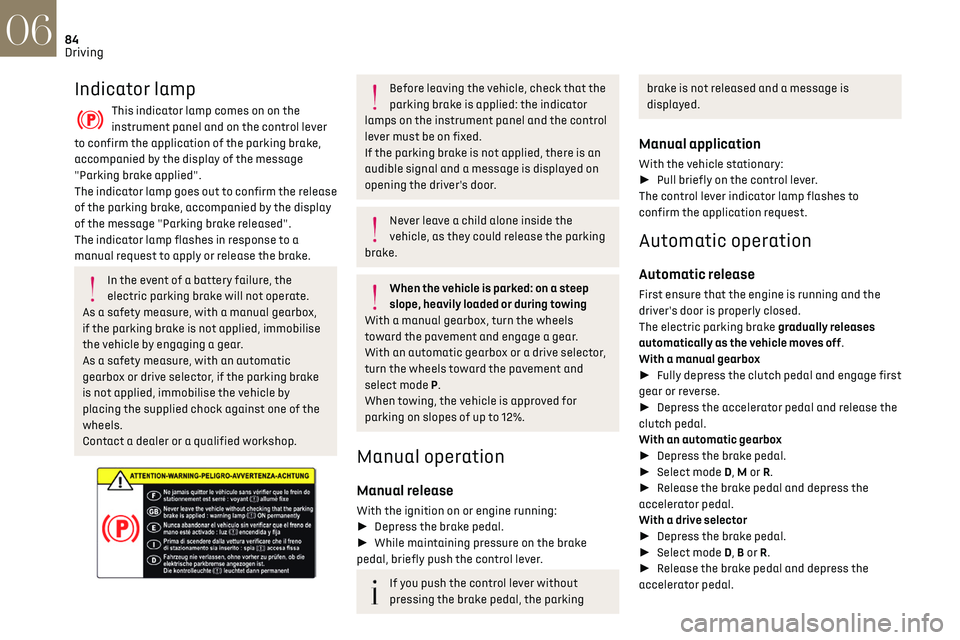
In the event of a battery failure, the
electric parking brake will not operate.
As a safety measure, with a manual gearbox,
if the parking brake is not applied, immobilise
the vehicle by engaging a gear.
As a safety measure, with an automatic
gearbox or drive selector, if the parking brake
is not applied, immobilise the vehicle by
placing the supplied chock against one of the
wheels.
Contact a dealer or a qualified workshop.
Before leaving the vehicle, check that the
parking brake is applied: the indicator
lamps on the instrument panel and the control
lever must be on fixed.
If the parking brake is not applied, there is an
audible signal and a message is displayed on
opening the driver's door.
Never leave a child alone inside the
vehicle, as they could release the parking
brake.
When the vehicle is parked: on a steep
slope, heavily loaded or during towing
With a manual gearbox, turn the wheels
toward the pavement and engage a gear.
With an automatic gearbox or a drive selector,
turn the wheels toward the pavement and
select mode P.
When towing, the vehicle is approved for
parking on slopes of up to 12%.
Manual operation
Manual release
With the ignition on or engine running:
► Depress the brake pedal.
► While maintaining pressure on the brake
pedal, briefly push the control lever.
If you push the control lever without
pressing the brake pedal, the parking
brake is not released and a message is
displayed.
Manual application
With the vehicle stationary:
► Pull briefly on the control lever.
The control lever indicator lamp flashes to
confirm the application request.
Automatic operation
Automatic release
First ensure that the engine is running and the
driver's door is properly closed.
The electric parking brake gradually releases
automatically as the vehicle moves off.
With a manual gearbox
► Fully depress the clutch pedal and engage first
gear or reverse.
► Depress the accelerator pedal and release the
clutch pedal.
With an automatic gearbox
► Depress the brake pedal.
► Select mode D, M or R.
► Release the brake pedal and depress the
accelerator pedal.
With a drive selector
► Depress the brake pedal.
► Select mode D, B or R.
► Release the brake pedal and depress the
accelerator pedal.
With an automatic gearbox or drive
selector, if the brake does not release
automatically, check that the front doors are
correctly closed.
When stationary with the engine running,
do not depress the accelerator pedal
unnecessarily. Risk of parking brake release.
Automatic application
With the vehicle stationary, the parking brake
is automatically applied when the engine is
switched off.
It is not applied automatically if the
engine stalls or enters STOP mode of Stop
& Start.
With automatic operation, it is also
possible to manually apply or release the
parking brake using the control lever.
Special cases
Immobilising the vehicle with the engine
running
To immobilise the vehicle with the engine running,
briefly pull the control lever.
Page 87 of 244
85
Driving06
With an automatic gearbox or drive
selector, if the brake does not release
automatically, check that the front doors are
correctly closed.
When stationary with the engine running,
do not depress the accelerator pedal
unnecessarily. Risk of parking brake release.
Automatic application
With the vehicle stationary, the parking brake
is automatically applied when the engine is
switched off.
It is not applied automatically if the
engine stalls or enters STOP mode of Stop
& Start.
With automatic operation, it is also
possible to manually apply or release the
parking brake using the control lever.
Special cases
Immobilising the vehicle with the engine
running
To immobilise the vehicle with the engine running,
briefly pull the control lever.
Parking the vehicle with the brake
released
In very cold conditions (ice), applying the
parking brake is not recommended.
To immobilise the vehicle, engage a gear or
place the chocks against one of the wheels.
Immobilising the vehicle with the parking brake
released
► Switch off the engine.
► Switch on the ignition again, without starting
the engine.
► Release the parking brake manually by
pushing the control lever while keeping your foot
on the brake pedal.
► Switch off the ignition.
With an automatic gearbox or drive
selector, mode P is automatically selected
when the ignition is switched off. The wheels
are blocked.
For more information on Changing to free-
wheeling, refer to the corresponding section.
With an automatic gearbox or drive
selector, while mode N is selected,
opening the driver’s door triggers an audible
signal. It stops when the driver's door closes
again.
Deactivating automatic
operation
In some situations, for example when it is
extremely cold or when towing (e.g. caravan,
breakdown), it may be necessary to deactivate
automatic operation of the system.
► Start the engine.
► Use the control lever to apply the parking
brake, if it is released.
► Take your foot fully off the brake pedal.
► Hold the control lever pressed in the release
direction for between 10 and a maximum of 15
seconds.
► Release the control lever.
► Depress and hold the brake pedal.
► Pull the control lever in the “Application”
direction for 2 seconds.
This indicator lamp on the instrument
panel comes on to confirm deactivation of
the automatic functions.
► Release the control lever and the brake pedal.
From now on, the parking brake can only be
applied and released manually using the control
lever.
Repeat this procedure to reactivate automatic
operation (confirmed by the indicator lamp on the
instrument panel going off).
Emergency braking
In the event of a fault with the brake pedal or
in an exceptional situation (e.g. driver taken ill,
driver under instruction), a continuous pull on the
Page 89 of 244
87
Driving06
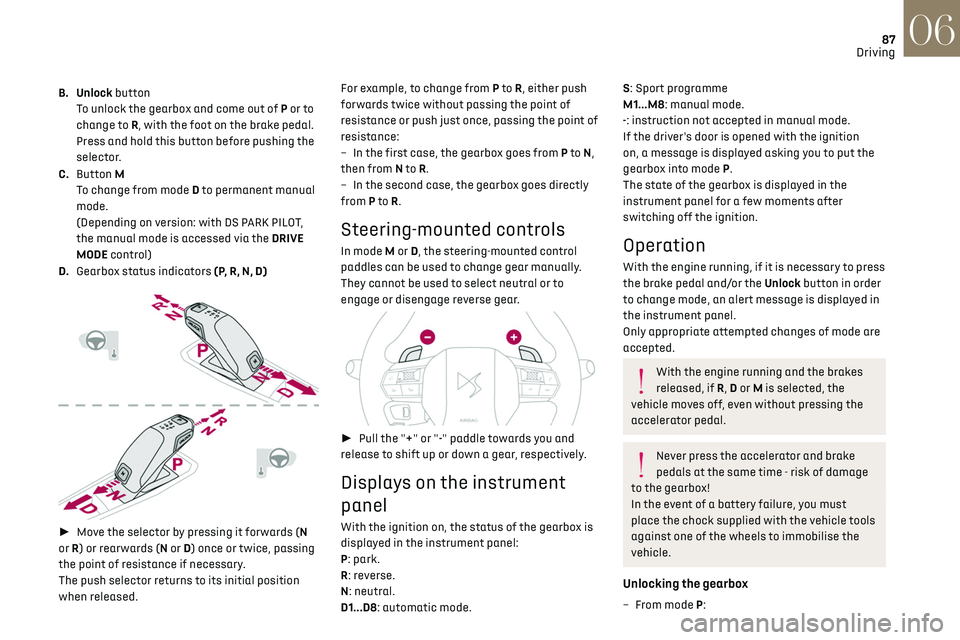
B. Unlock button
To unlock the gearbox and come out of P or to
change to R, with the foot on the brake pedal.
Press and hold this button before pushing the
selector.
C. Button M
To change from mode D to permanent manual
mode.
(Depending on version: with DS PARK PILOT,
the manual mode is accessed via the DRIVE
MODE control)
D. Gearbox status indicators (P, R, N, D)
► Move the selector by pressing it forwards (N
or R) or rearwards (N or D) once or twice, passing
the point of resistance if necessary.
The push selector returns to its initial position
when released. For example, to change from P to
R, either push
forwards twice without passing the point of
resistance or push just once, passing the point of
resistance:
–
In the first c
ase, the gearbox goes from P to
N,
then from N to R.
–
In the sec
ond case, the gearbox goes directly
from P to R.
Steering-mounted controls
In mode M or D, the steering-mounted control
paddles can be used to change gear manually.
They cannot be used to select neutral or to
engage or disengage reverse gear.
► Pull the "+" or "-" paddle towards you and
release to shift up or down a gear, respectively.
Displays on the instrument
panel
With the ignition on, the status of the gearbox is
displayed in the instrument panel:
P: park.
R: reverse.
N: neutral.
D1...D8: automatic mode.
S: Sport programme
M1...M8: manual mode.
-: instruction not accepted in manual mode.
If the driver's door is opened with the ignition
on, a message is displayed asking you to put the
gearbox into mode P.
The state of the gearbox is displayed in the
instrument panel for a few moments after
switching off the ignition.
Operation
With the engine running, if it is necessary to press
the brake pedal and/or the Unlock button in order
to change mode, an alert message is displayed in
the instrument panel.
Only appropriate attempted changes of mode are
accepted.
With the engine running and the brakes
released, if R, D or M is selected, the
vehicle moves off, even without pressing the
accelerator pedal.
Never press the accelerator and brake
pedals at the same time - risk of damage
to the gearbox!
In the event of a battery failure, you must
place the chock supplied with the vehicle tools
against one of the wheels to immobilise the
vehicle.
Unlocking the gearbox
– From mode P:
Page 94 of 244
92
Driving06
Stop & Start
The Stop & Start function puts the engine
temporarily into standby - STOP mode - during
phases when the vehicle is stopped (red lights,
queues, etc.). The engine restarts automatically
- START mode - as soon as the driver wishes to
move off again.
Primarily designed for urban use, the function
is intended to reduce fuel consumption and
exhaust emissions as well as the noise level when
stationary.
The function does not affect the functionalities of
the vehicle, in particular the braking.
Deactivation/Reactivation
The function is activated by default when the
ignition is switched on.
It is set via the Driving / Vehicle touch
screen menu.
A message in the instrument panel confirms the
change of status.
When the function is deactivated, if the engine
was in standby, it restarts immediately.
Associated indicator lamps
Function activated.
Function deactivated or malfunction.
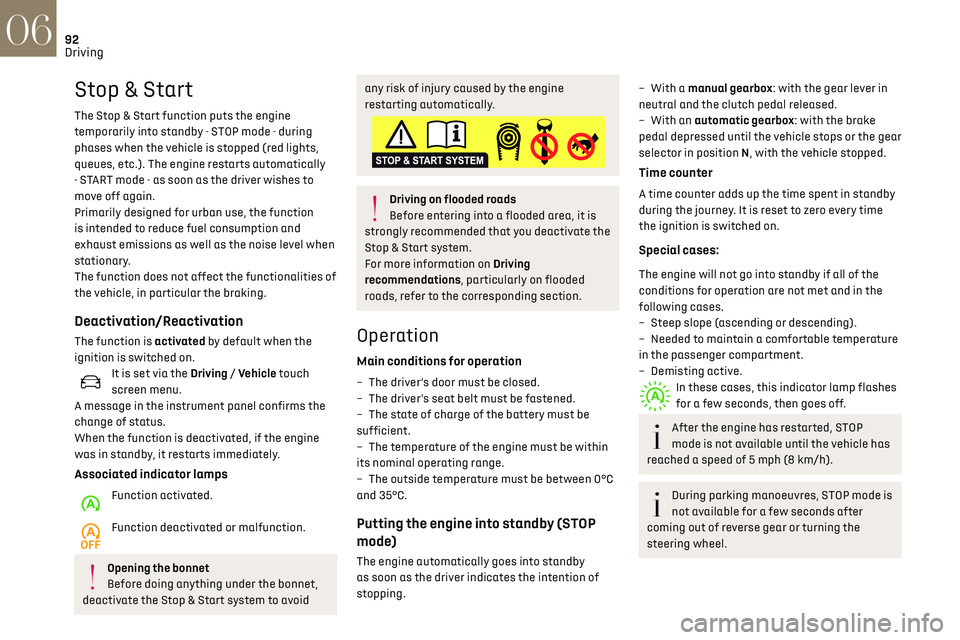
Opening the bonnet
Before doing anything under the bonnet,
deactivate the Stop & Start system to avoid
any risk of injury caused by the engine
restarting automatically.
Driving on flooded roads
Before entering into a flooded area, it is
strongly recommended that you deactivate the
Stop & Start system.
For more information on Driving
recommendations, particularly on flooded
roads, refer to the corresponding section.
Operation
Main conditions for operation
– The driver’s door must be closed.
– The driv er's seat belt must be fastened.
–
The st
ate of charge of the battery must be
sufficient.
–
The t
emperature of the engine must be within
its nominal operating range.
–
The outside t
emperature must be between 0°C
and 35°C.
Putting the engine into standby (STOP
mode)
The engine automatically goes into standby
as soon as the driver indicates the intention of
stopping.
– With a manual gearbox: with the gear lever in
neutral and the clutch pedal released.
–
With an
automatic gearbox: with the brake
pedal depressed until the vehicle stops or the gear
selector in position N, with the vehicle stopped.
Time counter
A time counter adds up the time spent in standby
during the journey. It is reset to zero every time
the ignition is switched on.
Special cases:
The engine will not go into standby if all of the
conditions for operation are not met and in the
following cases.
–
St
eep slope (ascending or descending).
–
Needed t
o maintain a comfortable temperature
in the passenger compartment.
–
Demisting activ
e.
In these cases, this indicator lamp flashes
for a few seconds, then goes off.
After the engine has restarted, STOP
mode is not available until the vehicle has
reached a speed of 5 mph (8 km/h).
During parking manoeuvres, STOP mode is
not available for a few seconds after
coming out of reverse gear or turning the
steering wheel.
Restarting the engine (START mode)
The engine automatically restarts as soon as the
driver indicates the intention of moving off again.
► With a manual gearbox: with the clutch pedal
fully depressed.
► With an automatic gearbox:
• With the selector in position D or M: with the
brake pedal released.
• With the selector in position N and the brake
pedal released: with the selector at D or M.
• With the selector in position P and the brake
pedal depressed: with the selector at R, N, D
or M.
• Reverse gear engaged.
Special cases
The engine restarts automatically if all the
operating conditions are met again and in the
following cases.
– With a manual gearbox: vehicle speed exceeds
2.5 mph (4 km/h),
– With an automatic gearbox, in mode N, vehicle
speed exceeds 0.6 mph (1 km/h).
In these cases, this indicator lamp flashes
for a few seconds, then goes off.
Malfunctions
In the event of a malfunction, this warning
lamp flashes for a few moments, then
remains on, accompanied by an onscreen
message.
Have the vehicle checked by a dealer or a qualified
workshop.
Page 97 of 244
95
Driving06
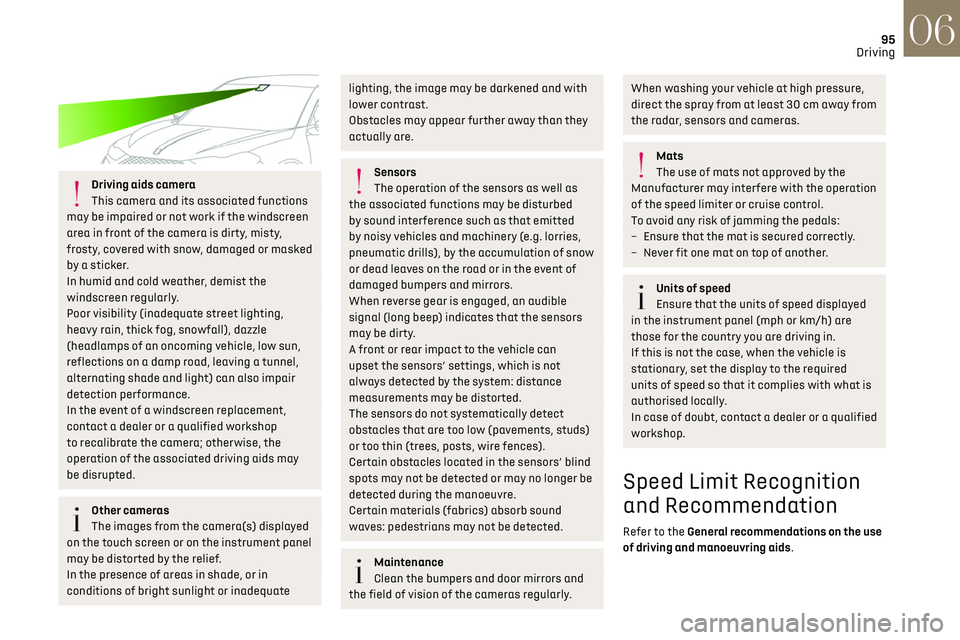
Driving aids camera
This camera and its associated functions
may be impaired or not work if the windscreen
area in front of the camera is dirty, misty,
frosty, covered with snow, damaged or masked
by a sticker.
In humid and cold weather, demist the
windscreen regularly.
Poor visibility (inadequate street lighting,
heavy rain, thick fog, snowfall), dazzle
(headlamps of an oncoming vehicle, low sun,
reflections on a damp road, leaving a tunnel,
alternating shade and light) can also impair
detection performance.
In the event of a windscreen replacement,
contact a dealer or a qualified workshop
to recalibrate the camera; otherwise, the
operation of the associated driving aids may
be disrupted.
Other cameras
The images from the camera(s) displayed
on the touch screen or on the instrument panel
may be distorted by the relief.
In the presence of areas in shade, or in
conditions of bright sunlight or inadequate
lighting, the image may be darkened and with
lower contrast.
Obstacles may appear further away than they
actually are.
Sensors
The operation of the sensors as well as
the associated functions may be disturbed
by sound interference such as that emitted
by noisy vehicles and machinery (e.g. lorries,
pneumatic drills), by the accumulation of snow
or dead leaves on the road or in the event of
damaged bumpers and mirrors.
When reverse gear is engaged, an audible
signal (long beep) indicates that the sensors
may be dirty.
A front or rear impact to the vehicle can
upset the sensors’ settings, which is not
always detected by the system: distance
measurements may be distorted.
The sensors do not systematically detect
obstacles that are too low (pavements, studs)
or too thin (trees, posts, wire fences).
Certain obstacles located in the sensors’ blind
spots may not be detected or may no longer be
detected during the manoeuvre.
Certain materials (fabrics) absorb sound
waves: pedestrians may not be detected.
Maintenance
Clean the bumpers and door mirrors and
the field of vision of the cameras regularly.
When washing your vehicle at high pressure,
direct the spray from at least 30 cm away from
the radar, sensors and cameras.
Mats
The use of mats not approved by the
Manufacturer may interfere with the operation
of the speed limiter or cruise control.
To avoid any risk of jamming the pedals:
–
Ensure tha
t the mat is secured correctly.
–
Ne
ver fit one mat on top of another.
Units of speed
Ensure that the units of speed displayed
in the instrument panel (mph or km/h) are
those for the country you are driving in.
If this is not the case, when the vehicle is
stationary, set the display to the required
units of speed so that it complies with what is
authorised locally.
In case of doubt, contact a dealer or a qualified
workshop.
Speed Limit Recognition
and Recommendation
Refer to the General recommendations on the use
of driving and manoeuvring aids.
Page 102 of 244
100
Driving06
Adjusting the limit speed
setting
You do not have to switch the speed limiter on in
order to set the speed.
To modify the limit speed setting based on the
vehicle’s current speed:
► Briefly press button 2 or 3 to change the value
in steps of + or - 1 mph (1.6 km/h).
► Press and hold button 2 or 3 to change the
value in steps of + or - 5 mph (8 km/h).
To change the limit speed setting using
memorised speeds, via the touch screen:
► Press button 5 to display the memorised speed
settings.
► Press the touch screen button for the desired
speed setting.
The selection screen closes after a few moments.
This setting becomes the new limit speed.
To modify the cruise speed setting based on the
speed suggested by the Speed Limit Recognition
and Recommendation, as shown on the
instrument panel:
► Press button 5 once; a message is displayed to
confirm the memorisation request.
► Press button 5 again to save the suggested
speed.
The speed is immediately shown on the
instrument panel as the new speed setting.
Temporarily exceeding the
speed setting
► Press the accelerator pedal down fully.
The speed limiter is deactivated temporarily and
the displayed speed setting flashes.
► Release the accelerator pedal to return to
below the programmed speed.
When the limit speed is exceeded but this is not
due to action by the driver (in case of a steep
slope, for example), an audible signal triggers
immediately.
On a steep descent or in the event of
sharp acceleration, the speed limiter will
not be able to prevent the vehicle from
exceeding the speed setting.
Brake if necessary to control the speed of your
vehicle.
Once the speed of the vehicle returns to the
programmed setting, the speed limiter functions
again: the display of the speed setting becomes
fixed again.
Switching off
► Turn the thumbwheel 1 to the "OFF" position:
the display of information on the speed limiter
disappears.
Malfunction
The display of dashes (flashing then fixed)
indicates a fault with the speed limiter.
Have it checked by a dealer or a qualified
workshop.
Cruise control - particular
recommendations
For the safety of everyone, only use the
cruise control where the driving
conditions allow running at a constant speed
and keeping an adequate safety distance.
Remain vigilant when the cruise control is
activated. If you hold one of the speed setting
modification buttons down, a very rapid
change in the speed of your vehicle may occur.
When descending a steep hill, the cruise
control system cannot prevent the vehicle from
exceeding the set speed. Brake if necessary to
control the speed of your vehicle.
On steep climbs or when towing, the set speed
may not be reached or maintained.
Exceeding the programmed speed setting
The speed setting can be exceeded
temporarily by pressing the accelerator pedal
(the programmed speed flashes).
To return to the speed setting, release the
accelerator pedal (when this speed is reached
again, the display of the speed stops flashing).
Operating limits
Never use the system in the following
situations:
– In an urban area with the risk of pedestrians
crossing the road.
– In heavy traffic (except versions with the
Stop & Go function).
– On winding or steep roads.
– On slippery or flooded roads.
– In poor weather conditions.
– Driving on a speed circuit.
– Driving on a rolling road.
– When using snow chains, non-slip covers or
studded tyres.
Cruise control
Refer to the General recommendations on the use
of driving and manoeuvring aids and to Cruise
control - particular recommendations.
This system automatically keeps the
vehicle’s speed at the cruise value
programmed by the driver (speed setting),
without using the accelerator pedal.
Cruise control is switched on manually.
It requires a minimum vehicle speed of 25 mph
(40 km/h).
With a manual gearbox, third gear or higher must
be engaged.
With an automatic gearbox, mode D or second
gear or higher in mode M must be engaged.
With a drive selector, mode D or B must be
engaged.
Page 103 of 244
101
Driving06
– In an urban area with the risk o f pedestrians
crossing the road.
–
In hea
vy traffic (except versions with the
Stop & Go function).
–
O
n winding or steep roads.
–
O
n slippery or flooded roads.
–
In poor w
eather conditions.
–
D
riving on a speed circuit.
–
D
riving on a rolling road.
–
When using sno
w chains, non-slip covers or
studded tyres.
Cruise control
Refer to the General recommendations on the use
of driving and manoeuvring aids and to Cruise
control - particular recommendations.
This system automatically keeps the
vehicle’s speed at the cruise value
programmed by the driver (speed setting),
without using the accelerator pedal.
Cruise control is switched on manually.
It requires a minimum vehicle speed of 25 mph
(40 km/h).
With a manual gearbox, third gear or higher must
be engaged.
With an automatic gearbox, mode D or second
gear or higher in mode M must be engaged.
With a drive selector, mode D or B must be
engaged.
Cruise control remains active after
changing gear, regardless of the gearbox
type, on engines fitted with Stop & Start.
Switching off the ignition cancels any
speed setting.
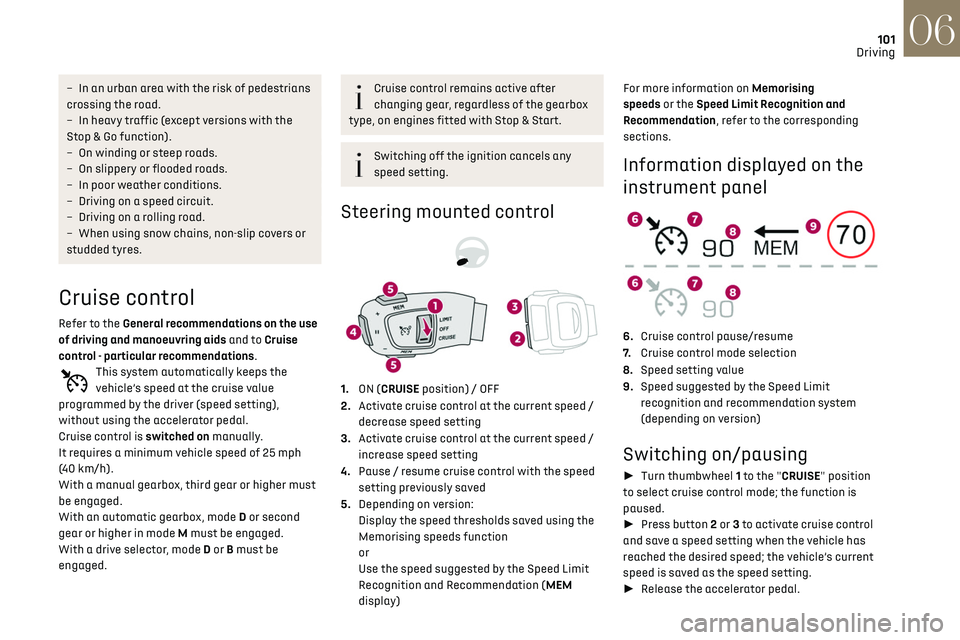
Steering mounted control
1. ON (CRUISE position) / OFF
2. Activate cruise control at the current speed /
decrease speed setting
3. Activate cruise control at the current speed /
increase speed setting
4. Pause / resume cruise control with the speed
setting previously saved
5. Depending on version:
Display the speed thresholds saved using the
Memorising speeds function
or
Use the speed suggested by the Speed Limit
Recognition and Recommendation (MEM
display) For more information on Memorising
speeds or the Speed Limit Recognition and
Recommendation, refer to the corresponding
sections.
Information displayed on the
instrument panel
6.
Cruise control pause/resume
7. Cruise control mode selection
8. Speed setting value
9. Speed suggested by the Speed Limit
recognition and recommendation system
(depending on version)
Switching on/pausing
► Turn thumbwheel 1 to the "CRUISE" position
to select cruise control mode; the function is
paused.
► Press button 2 or 3 to activate cruise control
and save a speed setting when the vehicle has
reached the desired speed; the vehicle’s current
speed is saved as the speed setting.
► Release the accelerator pedal.
Page 112 of 244

110
Driving06
The system must not be activated in the
following situations:
–
D
riving with a "space-saver" type spare
wheel.
–
When t
owing, especially with an
unconnected or unapproved trailer.
–
Poor w
eather conditions.
–
D
riving on slippery road surfaces (risk of
aquaplaning, snow, ice).
–
D
riving on racing circuits.
–
D
riving on a rolling road.
Malfunction
A system malfunction is indicated
by the Service warning lamp coming
on and this (orange) symbol, accompanied by an
alert message and an audible signal.
Active Lane Departure
Warning System
Refer to the General recommendations on the use
of driving and manoeuvring aids.
Using a camera located at the top of the
windscreen to identify lane markings on the
road and at the edges of the road (depending on
version), the system corrects the trajectory of the
vehicle while alerting the driver if it detects a risk
of unintentionally crossing a line or hard shoulder
(depending on version).
This system is particularly useful on motorways
and main roads.
Conditions for operation
– Vehicle speed between 40 and 112 mph (65 and
180 km/h).
–
R
oad marked with a central dividing line.
–
St
eering wheel held in both hands.
–
Direction indic
ators not activated.
–
ESC s
ystem activated and operational.
The system helps the driver only if there is
a risk of the vehicle unintentionally
wandering from the lane it is being driven in. It
does not manage the safe driving distance,
vehicle speed or brakes.
The driver must hold the steering wheel with
both hands in a way that allows control to
be maintained in circumstances where the
system is not able to intervene (for example, if
the central dividing line disappears).
Operation
Once the system identifies a risk of the vehicle
involuntarily crossing one of the lane markings
detected or a lane limit (e.g. grass border), it
makes the necessary trajectory correction to
return the vehicle to its initial path.
The driver will notice a turning movement of the
steering wheel.
This warning lamp flashes during
trajectory correction.
The driver can prevent the correction by
keeping a firm grip on the wheel (during
an avoiding manoeuvre, for example).
The correction is interrupted immediately if
the direction indicators are operated.
While the direction indicators are on and for
a few seconds after switching them off, the
system considers that any change of trajectory is
intentional and no correction is triggered during
this period.
However, with the Blind Spot Detection system
activated, if the driver starts changing lanes and
another vehicle is detected in the vehicle's blind
spot, the system will correct the trajectory even
though the direction indicators are on.
For more information on the Blind Spot Detection,
refer to the corresponding section.
Driving situations and related alerts
The table below describes the alerts and messages displayed in different driving situations.
These alerts are not displayed sequentially.
Function status Indicator lamp Display and/or associated
messageComments
OFF
(grey)
Function deactivated.
ON
(grey) System active, conditions not met:
–
speed below 40 mph (65 km/h),
– no lane marking recognised,
– ASR/DSC systems deactivated or operation of ESC
system triggered,
– "sport" driving.
ON
(grey)
Automatic deactivation/standby of the function (for
example, due to detection of a trailer or use of the "space-
saver" spare wheel provided with the vehicle).
ON
(green) Lane marking detection.
Speed above 40 mph (65 km/h).
Page 114 of 244

112
Driving06
Function statusIndicator lamp Display and/or associated
messageComments
ON
(orange)/(green)
The system corrects the trajectory on the side where the
risk of unintentional crossing is detected (orange line).
ON
(orange)/(green)
"Hold the wheel" –
If
, while correcting the trajectory, the system determines
that the correction will not be enough and that a solid line
will be crossed (orange line): the driver is warned that they
must provide additional trajectory adjustment.
– If the st eering wheel is not held properly, an audible
warning sounds, accompanied by a message, until the
trajectory correction is completed or the driver has grasped
the steering wheel correctly.
The duration of audible warnings will increase if multiple
corrections are performed in quick succession. The warning
will become continuous, persisting until the driver responds.
Operating limits
The system goes into standby automatically in
the following cases:
–
ESC deactiv
ated or operation triggered,
–
speed belo
w 40 mph (65 km/h) or greater than
112 mph (180 km/h),
–
electric
al connection of a trailer,
–
use o
f the "space-saver" spare wheel detected
(as detection is not immediate, deactivation of
the system is recommended),
–
dynamic driving style det
ected, pressure on the
brake or accelerator pedal,
–
driving where there are no lane markings,
– activation of the direction indicators,
– cro ssing the inside line on a bend,
–
driving in a tigh
t corner,
–
inactivity b
y the driver detected during
correction.
The following situations may interfere
with the operation of the system or
prevent it from working:
–
insufficien
t contrast between the road
surface and the shoulders (e.g. shade),
–
lane markings w
orn, hidden (snow, mud) or
multiple (roadworks, etc.),
– running clo se to the vehicle in front (the lane
markings may not be detected),
–
roads tha
t are narrow, winding, etc.
Risk of undesirable operation
We recommend deactivating the system in the
following driving situations:
–
driving on damaged, unst
able or very slippery
(ice) road surfaces,
–
un
favourable weather conditions,
–
driving on a speed circ
uit,
–
driving on a rolling road.
Deactivation / Activation
► Press this button to deactivate / reactivate
the system at any time.
Deactivation is signalled by the lighting of
the indicator lamp in the button and this
warning lamp in the instrument panel.
The system is automatically reactivated every
time the ignition is switched on.
Malfunction
In the event of a system
malfunction, these warning lamps
come on on the instrument panel, accompanied
by an onscreen message and an audible signal.
Have the system checked by a dealer or a
qualified workshop.
Blind Spot Detection
Refer to the General recommendations on the use
of driving and manoeuvring aids.