mirrors CITROEN DS3 CROSSBACK 2023 Owners Manual
[x] Cancel search | Manufacturer: CITROEN, Model Year: 2023, Model line: DS3 CROSSBACK, Model: CITROEN DS3 CROSSBACK 2023Pages: 244, PDF Size: 7.7 MB
Page 4 of 244
2
Contents
Overview
Eco-driving
01 Instruments
9 Digital instrument panel
10 Head-up display
11 Warning and indicator lamps
17 Indicators
21 Manual test
21 Total distance recorder
21 Lighting dimmer
22 Trip computer
22 5-inch touch screen
23 7-inch or 10-inch touch screen
26 Remotely operable features (Electric)
02 Access
27 Electronic key with remote control function and
built-in key,
28
Proximity Keyless Entry and Start
30 DS SMART ACCESS
30 Central locking
31 Emergency procedures
33 Doors
34 Boot
34 Alarm
36 Electric windows
03 Ease of use and comfort
38 Front seats
40 Steering wheel adjustment
41 Mirrors
42 Rear bench seat
43 Heating and Ventilation
44 Manual air conditioning
45 Automatic air conditioning
47 Front demist - defrost
47 Rear screen demist - defrost
47 Heated windscreen and washer jets
48 Remote-controlled heating and air conditioning
(Electric)
48
Interior fittings
51 Courtesy lamps
52 Touch-sensitive courtesy lamps
52 Boot fittings
04 Lighting and visibility
54 Exterior lighting control stalk
55 Daytime running lamps/Sidelamps
55 Direction indicators
55 Automatic illumination of headlamps
56 Headlamp beam height adjustment
56 Guide-me-home and welcome lighting
57 Automatic headlamp dipping
58 DS MATRIX LED VISION
60 Wiper control stalk
61 Changing a wiper blade
62 Automatic wipers
05 Safety
63 General safety recommendations
63 Hazard warning lamps
64 Horn
64 Pedestrian horn (Electric)
64 Emergency or assistance call
66 Electronic stability control (ESC)
67 Advanced Traction Control
68 Seat belts
70 Airbags
72 Child seats
74 Deactivating the front passenger airbag
75 ISOFIX child seats
76 i-Size child seats
79 Child lock
06 Driving
80 Driving recommendations
81 Anti-theft protection
81 Starting/Switching off the engine
83 Starting/Switching off the engine with DS
SMART ACCESS
83
Electric parking brake
86 6-speed manual gearbox
86 Automatic gearbox (EAT8)
89 Drive selector (Electric)
90 Driving modes
90 Hill start assist
91 Gear shift indicator
92 Stop & Start
93 Under-inflation detection
94 Driving and manoeuvring aids - General
recommendations
95
Speed Limit Recognition and Recommendation
99 Speed limiter
100 Cruise control - particular recommendations
101 Cruise control
102 Memorising speeds
103 DS DRIVE ASSIST
103 Adaptive Cruise Control
106 Active Lane Keeping Assist
110 Active Lane Departure Warning System
113 Blind Spot Detection
114 Active Blind Spot Detection
Page 7 of 244
5
Overview
F. Select an audio source
G. Display the list of radio stations/audio tracks
5. Horn
6. Controls for Speed limiter/Cruise control/
Adaptive Cruise Control
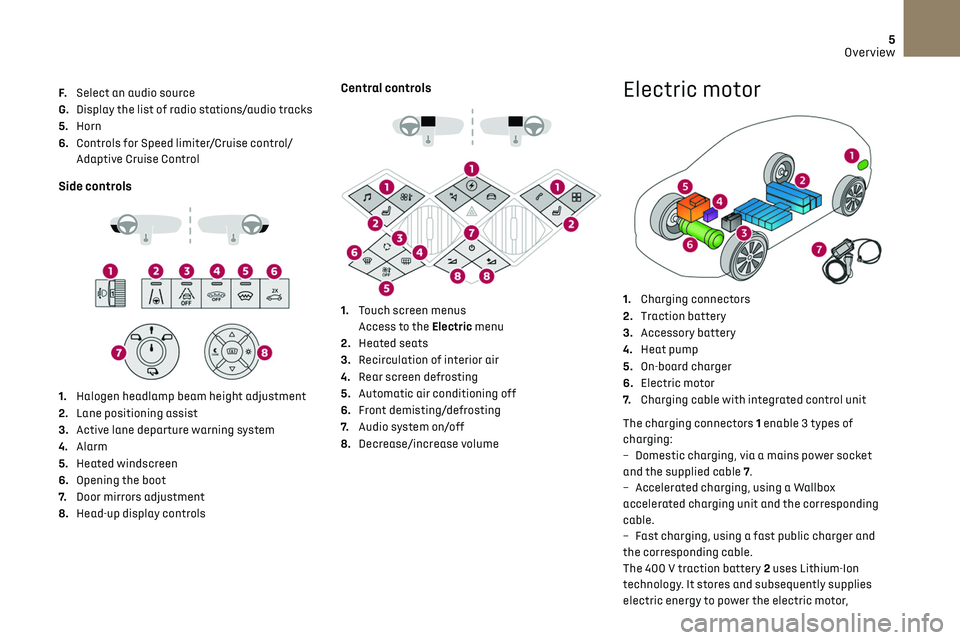
Side controls
1. Halogen headlamp beam height adjustment
2. Lane positioning assist
3. Active lane departure warning system
4. Alarm
5. Heated windscreen
6. Opening the boot
7. Door mirrors adjustment
8. Head-up display controls
Central controls
1. Touch screen menus
Access to the Electric menu
2. Heated seats
3. Recirculation of interior air
4. Rear screen defrosting
5. Automatic air conditioning off
6. Front demisting/defrosting
7. Audio system on/off
8. Decrease/increase volume
Electric motor
1.Charging connectors
2. Traction battery
3. Accessory battery
4. Heat pump
5. On-board charger
6. Electric motor
7. Charging cable with integrated control unit
The charging connectors 1 enable 3 types of
charging:
–
Dome
stic charging, via a mains power socket
and the supplied cable 7.
–
Ac
celerated charging, using a Wallbox
accelerated charging unit and the corresponding
cable.
–
Fast charging, using a fast public charger and
the c
orresponding cable.
The 400 V traction battery 2 uses Lithium-Ion
technology. It stores and subsequently supplies
electric energy to power the electric motor,
Page 29 of 244
27
Access02
Electronic key with remote
control function and
built-in key,
Remote control function
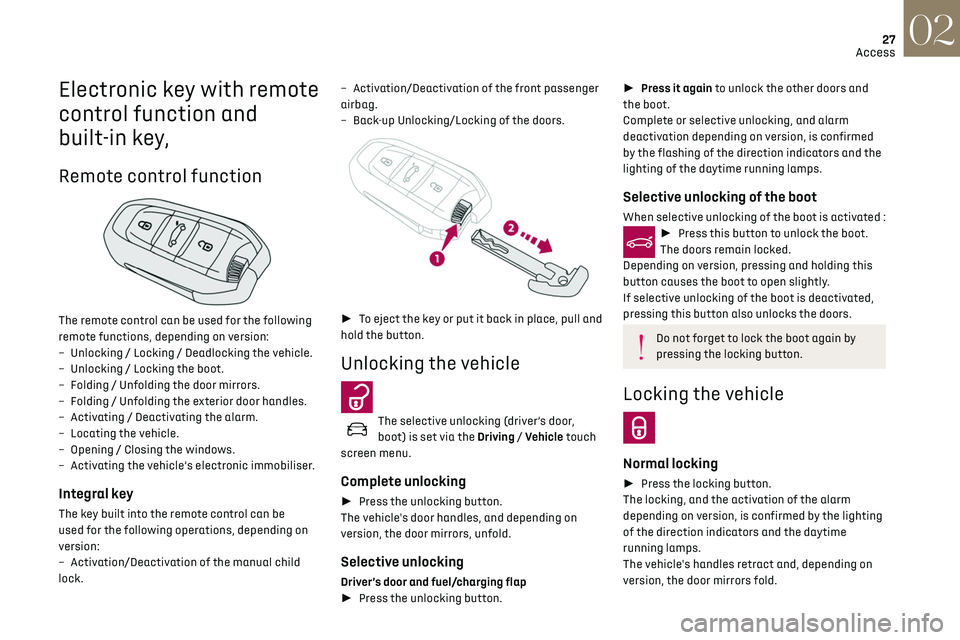
The remote control can be used for the following
remote functions, depending on version:
–
U
nlocking / Locking / Deadlocking the vehicle.
–
U
nlocking / Locking the boot.
–
Folding / U
nfolding the door mirrors.
–
Folding / U
nfolding the exterior door handles.
–
Activ
ating / Deactivating the alarm.
–
Loc
ating the vehicle.
–
O
pening / Closing the windows.
–
Activ
ating the vehicle’s electronic immobiliser.
Integral key
The key built into the remote control can be
used for the following operations, depending on
version:
–
Activ
ation/Deactivation of the manual child
lock. –
Activ
ation/Deactivation of the front passenger
airbag.
–
Back
-up Unlocking/Locking of the doors.
►
To eject the key or put it back in place, pull and
hold the button.
Unlocking the vehicle
The selective unlocking (driver’s door,
boot) is set via the Driving / Vehicle touch
screen menu.
Complete unlocking
► Press the unlocking button.
The vehicle's door handles, and depending on
version, the door mirrors, unfold.
Selective unlocking
Driver’s door and fuel/charging flap
► Press the unlocking button.
► Press it again to unlock the other doors and
the boot.
Complete or selective unlocking, and alarm
deactivation depending on version, is confirmed
by the flashing of the direction indicators and the
lighting of the daytime running lamps.
Selective unlocking of the boot
When selective unlocking of the boot is activated :► Press this button to unlock the boot.
The doors remain locked.
Depending on version, pressing and holding this
button causes the boot to open slightly.
If selective unlocking of the boot is deactivated,
pressing this button also unlocks the doors.
Do not forget to lock the boot again by
pressing the locking button.
Locking the vehicle
Normal locking
► Press the locking button.
The locking, and the activation of the alarm
depending on version, is confirmed by the lighting
of the direction indicators and the daytime
running lamps.
The vehicle's handles retract and, depending on
version, the door mirrors fold.
Page 30 of 244
28
Access02
Unlocking the vehicle
Selective unlocking (driver’s door, boot) is
configured in the Driving/Vehicle touch
screen menu.
Selective unlocking is deactivated by default.
Complete unlocking
The vehicle (doors and boot) unlocks:
► either automatically when the driver is
approaching (zone C), if the automatic functions
are activated;
► or by a light press on a handle.
The unlocking, and the deactivation of the
alarm depending on version, is confirmed by
flashing of the direction indicators and lighting of
the daytime running lamps.
The vehicle door handles, and depending on
version, the door mirrors, unfold.
If the key remains in zone B for more than
15 minutes without any action on the
vehicle doors, the automatic functions are
An access (door or boot) that is not
properly closed prevents locking of the
vehicle. However, if the vehicle has an alarm, it
will be activated after 45 seconds.
If the vehicle is unlocked and there is no
action at the doors or boot, the vehicle will
automatically lock itself again after about
30 seconds. If the vehicle has an alarm, it will
also be reactivated automatically.
Deadlocking
► Press the locking button again within
3 seconds to deadlock the vehicle (confirmed by
the temporary lighting of the direction indicators).
Deadlocking renders the interior door
controls inoperative. It also deactivates
the central locking button.
The horn remains operational.
Never leave anyone inside the vehicle when it
is deadlocked.
Closing the windows
Holding the locking button pressed for
more than 3 seconds closes the windows.
When closing the windows, ensure that
no person or object could prevent their
correct closure.
To leave the windows partly open on versions
with alarm, you must first deactivate the
interior volumetric alarm protection.
For more information on the Alarm, refer to the
corresponding section.
Locating the vehicle
This function helps you to spot your vehicle from a
distance, with the vehicle locked:
–
The direction indic
ators flash for approximately
10 seconds.
–
The door mirror spo
tlamps come on.
–
The c
ourtesy lamps come on.
► Press this button.
Proximity Keyless Entry
and Start
This Keyless Entry and Starting system enables
automatic vehicle locking/unlocking simply by
detection of the electronic key.
As long as the driver has the electronic key on
their person, the vehicle unlocks as they approach
and locks when they walk away.
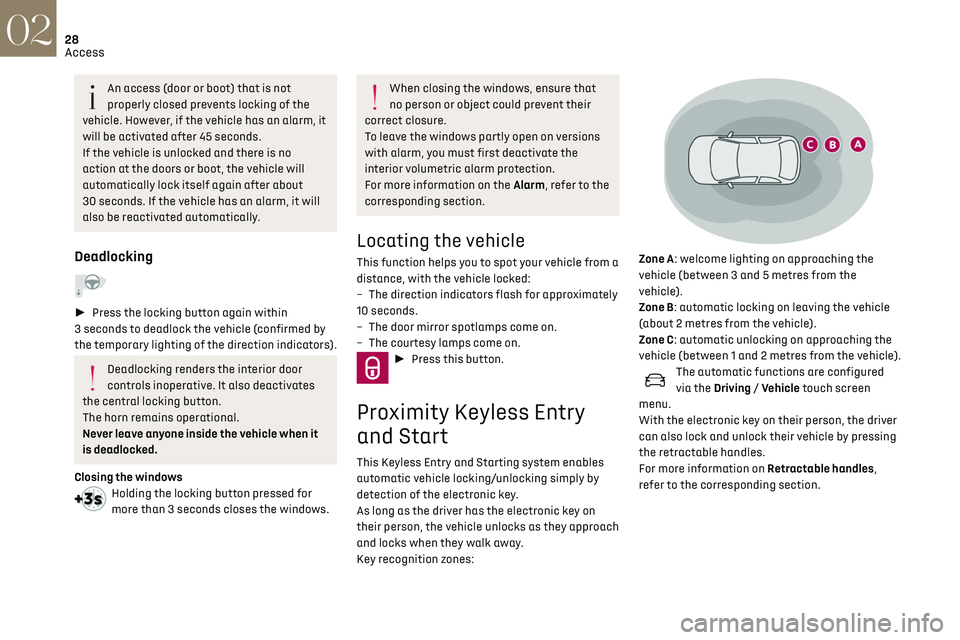
Key recognition zones:
Zone A: welcome lighting on approaching the
vehicle (between 3 and 5 metres from the
vehicle).
Zone B: automatic locking on leaving the vehicle
(about 2 metres from the vehicle).
Zone C: automatic unlocking on approaching the
vehicle (between 1 and 2 metres from the vehicle).
The automatic functions are configured
via the Driving / Vehicle touch screen
menu.
With the electronic key on their person, the driver
can also lock and unlock their vehicle by pressing
the retractable handles.
For more information on Retractable handles,
refer to the corresponding section.
Page 31 of 244
29
Access02
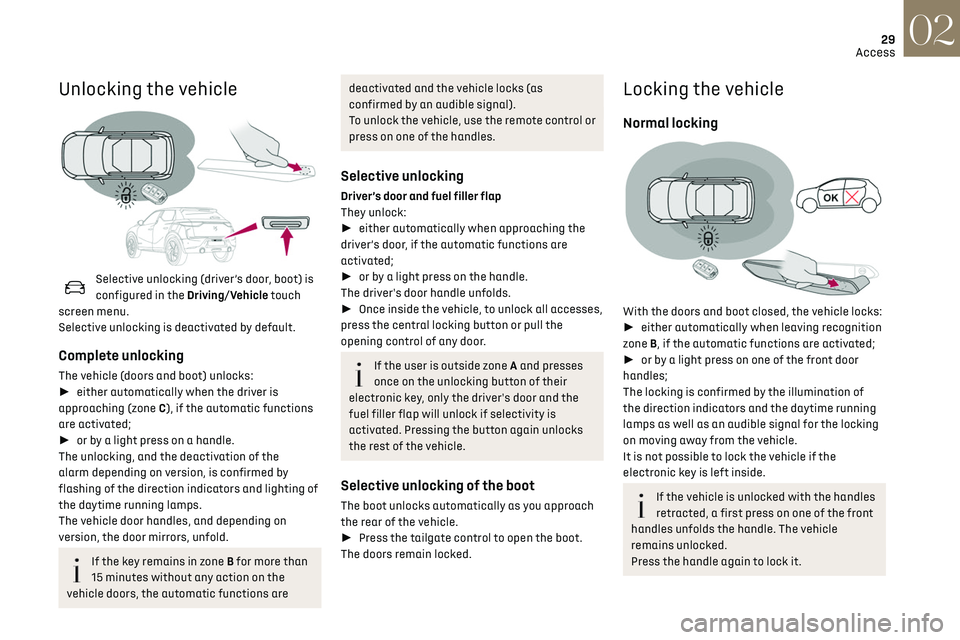
Unlocking the vehicle
Selective unlocking (driver’s door, boot) is
configured in the Driving/Vehicle touch
screen menu.
Selective unlocking is deactivated by default.
Complete unlocking
The vehicle (doors and boot) unlocks:
► either automatically when the driver is
approaching (zone C), if the automatic functions
are activated;
► or by a light press on a handle.
The unlocking, and the deactivation of the
alarm depending on version, is confirmed by
flashing of the direction indicators and lighting of
the daytime running lamps.
The vehicle door handles, and depending on
version, the door mirrors, unfold.
If the key remains in zone B for more than
15 minutes without any action on the
vehicle doors, the automatic functions are
deactivated and the vehicle locks (as
confirmed by an audible signal).
To unlock the vehicle, use the remote control or
press on one of the handles.
Selective unlocking
Driver’s door and fuel filler flap
They unlock:
► either automatically when approaching the
driver’s door, if the automatic functions are
activated;
► or by a light press on the handle.
The driver's door handle unfolds.
► Once inside the vehicle, to unlock all accesses,
press the central locking button or pull the
opening control of any door.
If the user is outside zone A and presses
once on the unlocking button of their
electronic key, only the driver's door and the
fuel filler flap will unlock if selectivity is
activated. Pressing the button again unlocks
the rest of the vehicle.
Selective unlocking of the boot
The boot unlocks automatically as you approach
the rear of the vehicle.
► Press the tailgate control to open the boot.
The doors remain locked.
Locking the vehicle
Normal locking
With the doors and boot closed, the vehicle locks:
► either automatically when leaving recognition
zone B, if the automatic functions are activated;
► or by a light press on one of the front door
handles;
The locking is confirmed by the illumination of
the direction indicators and the daytime running
lamps as well as an audible signal for the locking
on moving away from the vehicle.
It is not possible to lock the vehicle if the
electronic key is left inside.
If the vehicle is unlocked with the handles
retracted, a first press on one of the front
handles unfolds the handle. The vehicle
remains unlocked.
Press the handle again to lock it.
Page 40 of 244
38
Ease of use and comfort03
Correct driving position
For safety reasons, adjustments must
only be made when the vehicle is
stationary.
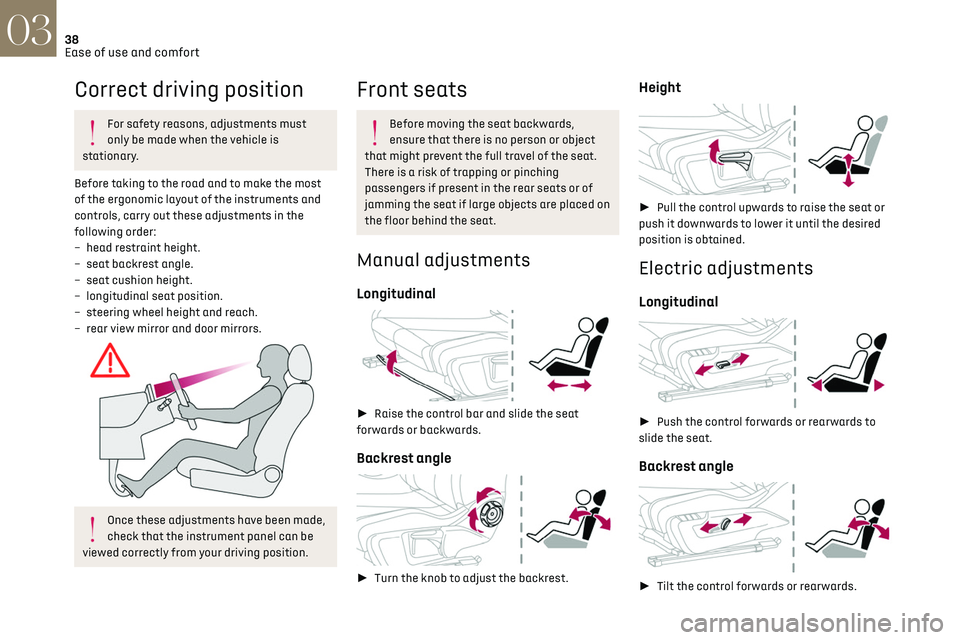
Before taking to the road and to make the most
of the ergonomic layout of the instruments and
controls, carry out these adjustments in the
following order:
–
head re
straint height.
–
sea
t backrest angle.
–
sea
t cushion height.
–
longit
udinal seat position.
–
st
eering wheel height and reach.
–
rear vie
w mirror and door mirrors.
Once these adjustments have been made,
check that the instrument panel can be
viewed correctly from your driving position.
Front seats
Before moving the seat backwards,
ensure that there is no person or object
that might prevent the full travel of the seat.
There is a risk of trapping or pinching
passengers if present in the rear seats or of
jamming the seat if large objects are placed on
the floor behind the seat.
Manual adjustments
Longitudinal
► Raise the control bar and slide the seat
forwards or backwards.
Backrest angle
► Turn the knob to adjust the backrest.
Height
► Pull the control upwards to raise the seat or
push it downwards to lower it until the desired
position is obtained.
Electric adjustments
Longitudinal
► Push the control forwards or rearwards to
slide the seat.
Backrest angle
► Tilt the control forwards or rearwards.
Cushion height and angle
► Tilt the rear of the control upwards or
downwards to obtain the required height and
angle.
Front head restraints
Height adjustment
► Upward: pull the head restraint up to the
desired position; the head restraint can be felt to
click into position.
► Downward: press lug A to lower the head
restraint.
Page 42 of 244
40
Ease of use and comfort03
Activation/Deactivation
► Press this button to activate/
deactivate the function.
Upon activation, the indicator lamp comes on.
The massage function is activated for a period of
one hour.
During this time, massage is performed in 6 cycles
of 10 minutes (6 minutes of massage followed by
a 4-minute break).
After one hour, the function is deactivated; the
indicator lamp goes off.
Heated seats
The function is active only with the engine
running.
On/Off
► Press the button corresponding to your seat.
► Each press changes the heating level; the
corresponding number of indicator lamps come
on.
► To stop heating, press the button again until
all the indicator lamps are off.
The system status is memorised when the ignition
is switched off.
Do not use the function when the seat is
not occupied.
Reduce the heating intensity as soon as
possible.
When the seat and passenger compartment
have reached a satisfactory temperature,
switch the function off; reducing electricity
consumption in turn decreases fuel
consumption.
Prolonged use of heated seats is not
recommended for people with sensitive
skin.
There is a risk of burns for people whose
perception of heat is impaired (illness, taking
medication, etc.).
To keep the heated pad intact and to prevent a
short circuit:
–
Do no
t place heavy or sharp objects on the
seat.
–
Do no
t kneel or stand on the seat.
–
Do no
t spill liquids onto the seat.
–
Ne
ver use the heating function if the seat
is damp.
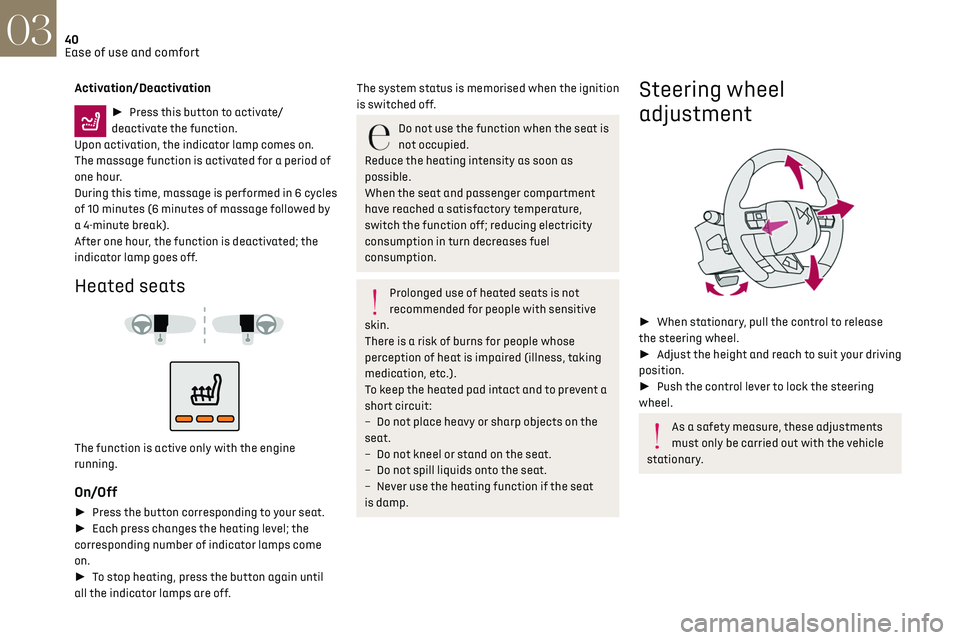
Steering wheel
adjustment
► When stationary, pull the control to release
the steering wheel.
► Adjust the height and reach to suit your driving
position.
► Push the control lever to lock the steering
wheel.
As a safety measure, these adjustments
must only be carried out with the vehicle
stationary.
Mirrors
Door mirrors
Adjustment
► Turn control A to the right or to the left to
select the corresponding mirror.
► Move the control in any of the four directions
to adjust.
► Return the control to the central position.
As a safety measure, the mirrors should
be adjusted to reduce the blind spots.
The objects observed are, in reality, closer than
they appear. Take this into account in order
to correctly judge the distance of vehicles
approaching from behind.
Manual folding
The mirrors can be folded manually (parking
obstruction, narrow garage, etc.).
Page 43 of 244
41
Ease of use and comfort03
Mirrors
Door mirrors
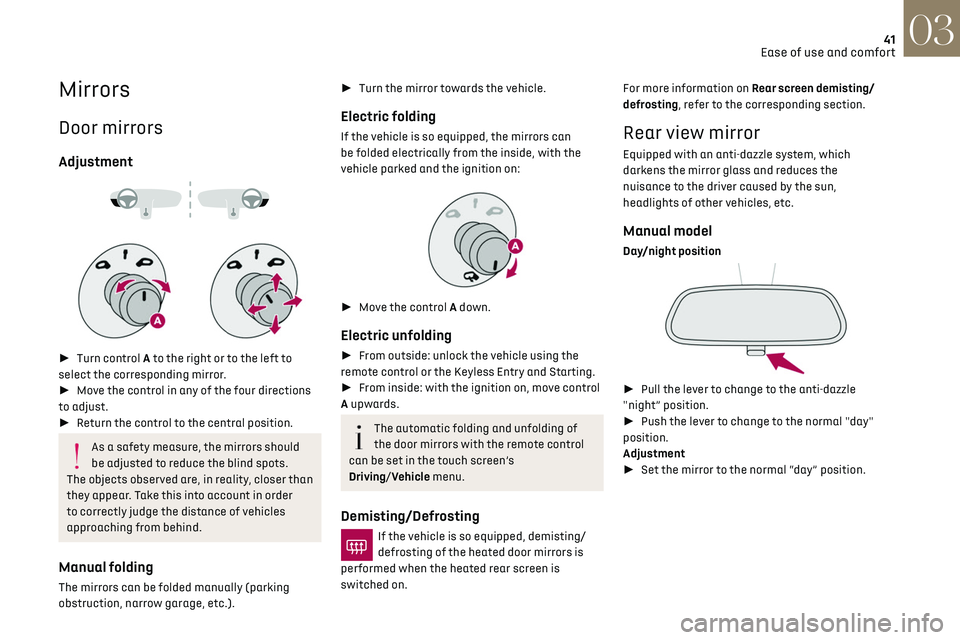
Adjustment
► Turn control A to the right or to the left to
select the corresponding mirror.
► Move the control in any of the four directions
to adjust.
► Return the control to the central position.
As a safety measure, the mirrors should
be adjusted to reduce the blind spots.
The objects observed are, in reality, closer than
they appear. Take this into account in order
to correctly judge the distance of vehicles
approaching from behind.
Manual folding
The mirrors can be folded manually (parking
obstruction, narrow garage, etc.).
► Turn the mirror towards the vehicle.
Electric folding
If the vehicle is so equipped, the mirrors can
be folded electrically from the inside, with the
vehicle parked and the ignition on:
► Move the control A down.
Electric unfolding
► From outside: unlock the vehicle using the
remote control or the Keyless Entry and Starting.
► From inside: with the ignition on, move control
A upwards.
The automatic folding and unfolding of
the door mirrors with the remote control
can be set in the touch screen’s
Driving/Vehicle menu.
Demisting/Defrosting
If the vehicle is so equipped, demisting/
defrosting of the heated door mirrors is
performed when the heated rear screen is
switched on. For more information on Rear screen demisting/
defrosting, refer to the corresponding section.
Rear view mirror
Equipped with an anti-dazzle system, which
darkens the mirror glass and reduces the
nuisance to the driver caused by the sun,
headlights of other vehicles, etc.
Manual model
Day/night position
►
Pull the lever to change to the anti-dazzle
"night” position.
► Push the lever to change to the normal "day"
position.
Adjustment
► Set the mirror to the normal “day” position.
Page 49 of 244
47Ease of use and comfort03
Switching the system off
► Press this button.
Its indicator lamp comes on and all other indicator
lamps for the system go off.
This action deactivates all functions of the air
conditioning system.
The temperature is no longer regulated. A slight
flow of air can still be felt, due to the forward
movement of the vehicle.
Interior air recirculation
The intake of exterior air prevents the formation
of mist on the windscreen and side windows.
Recirculating the interior air isolates the
passenger compartment from outside odours
and fumes and allows the desired passenger
compartment temperature to be achieved more
rapidly.
► Press this button to activate/
deactivate the function (confirmed by the
illumination/extinction of the indicator lamp).
The function is activated automatically
when reverse gear is engaged.
Front demist - defrost
► Press this button to activate/
deactivate the demisting or defrosting of
the windscreen and side windows (confirmed by
the illumination/extinction of the indicator lamp).
The system automatically manages the air
conditioning, air flow and air intake, and provides
optimum distribution towards the windscreen and
side windows.
Rear screen demist
- defrost
Demisting/defrosting only operates with the
engine running.
Depending on version, this also applies to the door
mirrors.
► Press this button to activate/
deactivate the function (confirmed by the
illumination/extinction of the indicator lamp).
Demisting/defrosting switches off automatically
to prevent an excessive consumption of electrical
current.
Switch off demisting/defrosting as soon
as you no longer consider it necessary,
as reducing the consumption of electrical
current reduces fuel consumption.
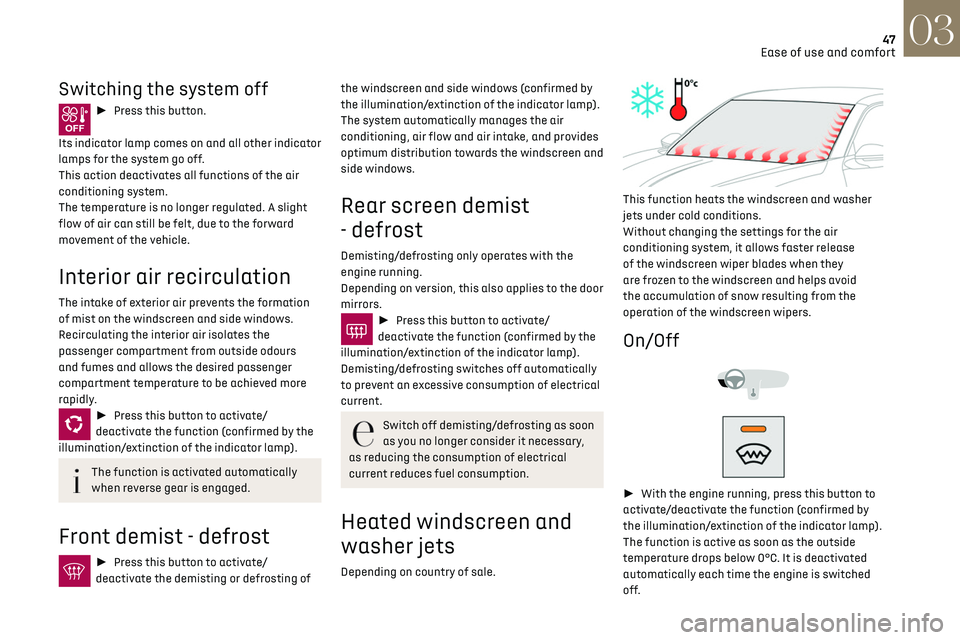
Heated windscreen and
washer jets
Depending on country of sale.
This function heats the windscreen and washer
jets under cold conditions.
Without changing the settings for the air
conditioning system, it allows faster release
of the windscreen wiper blades when they
are frozen to the windscreen and helps avoid
the accumulation of snow resulting from the
operation of the windscreen wipers.
On/Off
► With the engine running, press this button to
activate/deactivate the function (confirmed by
the illumination/extinction of the indicator lamp).
The function is active as soon as the outside
temperature drops below 0°C. It is deactivated
automatically each time the engine is switched
off.
Page 96 of 244

94
Driving06
The loss of pressure detected does not
always cause visible bulging of the tyre.
Do not rely on just a visual check.
► Using a compressor, such as the one in
the temporary puncture repair kit, check the
pressures of the four tyres when cold.
► If it is not possible to make this check
immediately, drive carefully at reduced speed.
► In the event of a puncture, use the temporary
puncture repair kit or the spare wheel (depending
on equipment).
The alert is kept active until the system is
reinitialised.
Reinitialisation
The system must be reinitialised after any
adjustment to the pressure of one or more tyres,
and after changing one or more wheels.
Before reinitialising the system, make
sure that the pressures of the four tyres
are correct for the conditions of use of the
vehicle and conform to the values written on
the tyre pressure label.
Check the pressures of the four tyres before
performing the reinitialisation.
The system does not advise if a pressure is
incorrect at the time of reinitialisation.
With the vehicle stationary, the system is
reinitialised via the Driving / Vehicle touch
screen menu..
Snow chains
The system does not have to be
reinitialised after fitting or removing snow
chains.
Malfunction
These warning lamps come on in
the event of a malfunction.
A message appears, accompanied by an audible
signal.
In this case, the tyre under-inflation monitoring
function is no longer performed.
Have the system checked by a dealer or a
qualified workshop.
Driving and manoeuvring
aids - General
recommendations
Driving and manoeuvring aids cannot, in
any circumstances, replace the need for
vigilance on the part of the driver.
The driver must comply with the Highway
Code, must remain in control of the vehicle in
all circumstances and must be able to retake
control of it at all times. The driver must adapt
the speed to climactic conditions, traffic and
the state of the road.
It is the driver's responsibility to constantly
check the traffic, to assess the relative
distances and speeds of other vehicles and to
anticipate their movements before indicating
and changing lane.
The systems cannot exceed the limits of the
laws of physics.
Driving aids
You should hold the steering wheel
with both hands, always use the interior and
exterior rear view mirrors, always keep the feet
close to the pedals and take a break every two
hours.
Manoeuvring aids
The driver must always check the
surroundings of the vehicle before and during
the whole manoeuvre, in particular using the
mirrors.
Radar
The operation of the radar as well as the
associated functions may be impaired through
the accumulation of dirt (mud, frost, etc.),
in certain difficult weather conditions (very
heavy rain, snow) or if the bumper is damaged.
If the front bumper is to be repainted, contact
a dealer or a qualified workshop; certain types
of paint could interfere with the operation of
the radar.
Driving aids camera
This camera and its associated functions
may be impaired or not work if the windscreen
area in front of the camera is dirty, misty,
frosty, covered with snow, damaged or masked
by a sticker.
In humid and cold weather, demist the
windscreen regularly.
Poor visibility (inadequate street lighting,
heavy rain, thick fog, snowfall), dazzle
(headlamps of an oncoming vehicle, low sun,
reflections on a damp road, leaving a tunnel,
alternating shade and light) can also impair
detection performance.
In the event of a windscreen replacement,
contact a dealer or a qualified workshop
to recalibrate the camera; otherwise, the
operation of the associated driving aids may
be disrupted.
Other cameras
The images from the camera(s) displayed
on the touch screen or on the instrument panel
may be distorted by the relief.
In the presence of areas in shade, or in
conditions of bright sunlight or inadequate