mirrors CITROEN DS3 CROSSBACK 2023 User Guide
[x] Cancel search | Manufacturer: CITROEN, Model Year: 2023, Model line: DS3 CROSSBACK, Model: CITROEN DS3 CROSSBACK 2023Pages: 244, PDF Size: 7.7 MB
Page 97 of 244

95
Driving06
Driving aids camera
This camera and its associated functions
may be impaired or not work if the windscreen
area in front of the camera is dirty, misty,
frosty, covered with snow, damaged or masked
by a sticker.
In humid and cold weather, demist the
windscreen regularly.
Poor visibility (inadequate street lighting,
heavy rain, thick fog, snowfall), dazzle
(headlamps of an oncoming vehicle, low sun,
reflections on a damp road, leaving a tunnel,
alternating shade and light) can also impair
detection performance.
In the event of a windscreen replacement,
contact a dealer or a qualified workshop
to recalibrate the camera; otherwise, the
operation of the associated driving aids may
be disrupted.
Other cameras
The images from the camera(s) displayed
on the touch screen or on the instrument panel
may be distorted by the relief.
In the presence of areas in shade, or in
conditions of bright sunlight or inadequate
lighting, the image may be darkened and with
lower contrast.
Obstacles may appear further away than they
actually are.
Sensors
The operation of the sensors as well as
the associated functions may be disturbed
by sound interference such as that emitted
by noisy vehicles and machinery (e.g. lorries,
pneumatic drills), by the accumulation of snow
or dead leaves on the road or in the event of
damaged bumpers and mirrors.
When reverse gear is engaged, an audible
signal (long beep) indicates that the sensors
may be dirty.
A front or rear impact to the vehicle can
upset the sensors’ settings, which is not
always detected by the system: distance
measurements may be distorted.
The sensors do not systematically detect
obstacles that are too low (pavements, studs)
or too thin (trees, posts, wire fences).
Certain obstacles located in the sensors’ blind
spots may not be detected or may no longer be
detected during the manoeuvre.
Certain materials (fabrics) absorb sound
waves: pedestrians may not be detected.
Maintenance
Clean the bumpers and door mirrors and
the field of vision of the cameras regularly.
When washing your vehicle at high pressure,
direct the spray from at least 30 cm away from
the radar, sensors and cameras.
Mats
The use of mats not approved by the
Manufacturer may interfere with the operation
of the speed limiter or cruise control.
To avoid any risk of jamming the pedals:
–
Ensure tha
t the mat is secured correctly.
–
Ne
ver fit one mat on top of another.
Units of speed
Ensure that the units of speed displayed
in the instrument panel (mph or km/h) are
those for the country you are driving in.
If this is not the case, when the vehicle is
stationary, set the display to the required
units of speed so that it complies with what is
authorised locally.
In case of doubt, contact a dealer or a qualified
workshop.
Speed Limit Recognition
and Recommendation
Refer to the General recommendations on the use
of driving and manoeuvring aids.
Page 116 of 244

114
Driving06
Operating limits
No alert is triggered in the following conditions:
– In the pre sence of non-moving objects (parked
vehicles, barriers, street lamps, road signs, etc.).
–
O
ncoming traffic.
–
D
riving on a winding road or a sharp corner.
–
When o
vertaking or being overtaken by a very
long vehicle (lorry, bus, etc.) that is detected
in the rear blind spot but is also present in the
driver’s front field of vision.
–
When o
vertaking quickly.
–
In v
ery heavy traffic: vehicles detected in
front and behind are confused with a lorry or a
stationary object.
–
If the Park As
sist or DS PARK PILOT function is
activated.
Malfunction
If the event of malfunction, this warning
lamp comes on in the instrument panel,
accompanied by the display of a message.
Contact a dealer or a qualified workshop to have
the system checked.
The system may suffer temporary
interference in certain weather conditions
(rain, hail, etc.).
In particular, driving on a wet surface or
moving from a dry area to a wet area can
cause false alerts (for example, the presence
of a fog of water droplets in the blind spot
angle is interpreted as a vehicle).
In bad or wintry weather, ensure that the
sensors are not covered by mud, ice or snow.
Take care not to cover the warning zone in
the door mirrors or the detection zones on the
front and rear bumpers with adhesive labels
or other objects; they may hamper correct
operation of the system.
Active Blind Spot
Detection
In addition to the fixed warning lamp in the door
mirror on the side in question, a correction of
trajectory will be felt if you attempt to cross
a lane marking with the direction indicator
activated, to help you avoid a collision.
This system is the combination of the Active
Lane Departure Warning System and Blind Spot
Detection.
These two functions must be activated and in
operation.
The speed of the vehicle must be between 40 and
87 mph (65 and 140 km/h).
These functions are especially suitable for driving
on motorways and main roads.
For more information on the Active Lane
Departure Warning System and Blind Spot
Detection, refer to the corresponding sections.
Active Safety Brake with
Collision Risk Alert and
Intelligent emergency
braking assistance
Refer to the General recommendations on the use
of driving and manoeuvring aids.
This system:
– warns the driver that their vehicle is at risk of
collision with the vehicle in front, a pedestrian or,
depending on version, a cyclist.
– reduces the vehicle's speed to avoid a collision
or limit its severity.
The system also takes motorcyclists and
animals into account; however, animals
below 0.5 m tall and objects on the road are
not necessarily detected.
This system is comprised of three functions:
– Collision Risk Alert.
– Intelligent emergency braking assistance.
– Active Safety Brake (automatic emergency
braking).
Page 122 of 244
120
Driving06
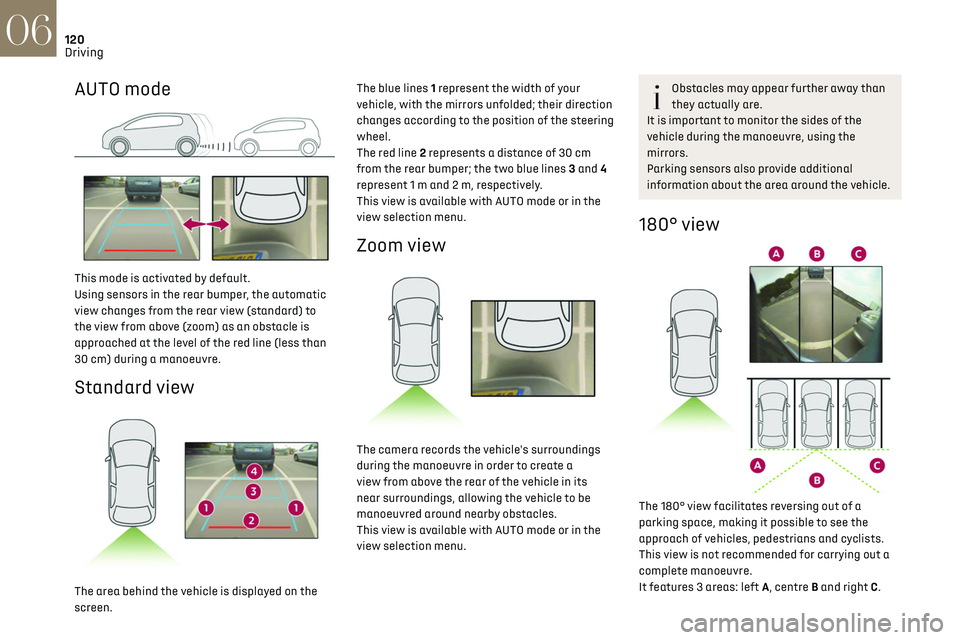
AUTO mode
This mode is activated by default.
Using sensors in the rear bumper, the automatic
view changes from the rear view (standard) to
the view from above (zoom) as an obstacle is
approached at the level of the red line (less than
30 cm) during a manoeuvre.
Standard view
The area behind the vehicle is displayed on the
screen.The blue lines 1 represent the width of your
vehicle, with the mirrors unfolded; their direction
changes according to the position of the steering
wheel.
The red line 2 represents a distance of 30 cm
from the rear bumper; the two blue lines 3 and 4
represent 1 m and 2 m, respectively.
This view is available with AUTO mode or in the
view selection menu.
Zoom view
The camera records the vehicle's surroundings
during the manoeuvre in order to create a
view from above the rear of the vehicle in its
near surroundings, allowing the vehicle to be
manoeuvred around nearby obstacles.
This view is available with AUTO mode or in the
view selection menu.
Obstacles may appear further away than
they actually are.
It is important to monitor the sides of the
vehicle during the manoeuvre, using the
mirrors.
Parking sensors also provide additional
information about the area around the vehicle.
180° view
The 180° view facilitates reversing out of a
parking space, making it possible to see the
approach of vehicles, pedestrians and cyclists.
This view is not recommended for carrying out a
complete manoeuvre.
It features 3 areas: left A, centre B and right C.
This view is only available via the view selection
menu.
Park Assist
Refer to the General recommendations on the use
of driving and manoeuvring aids.
This system provides active parking assistance
for vehicles fitted with a manual gearbox: it
detects a parking space and then steers in
the appropriate direction to park in this space
while the driver controls the driving direction,
engagement of gears, acceleration and braking.
To assist the driver in monitoring the correct
manoeuvring operation, the system automatically
triggers the display of Reversing camera and the
activation of the parking sensors.
The system performs the measurements of
available parking spaces and calculations of
distances to obstacles using ultrasonic sensors
built into the front and rear bumpers of the
vehicle.
The system assists with the following
manoeuvres:
Page 162 of 244

160In the event of a breakdown08
The Manufacturer accepts no
responsibility for the cost incurred in
repairing your vehicle or for rectifying
malfunctions resulting from the installation of
accessories not supplied and not
recommended and not installed in accordance
with specifications, in particular when the
combined power consumption of all of the
additional equipment connected exceeds 10
milliamperes.
Fuses in the dashboard
The fusebox is located in the lower dashboard
(left-hand side).
To access the fuses, follow the same procedure
as that described for accessing the tool kit for
changing fuses.
For more information on Access to the tool kit,
refer to the corresponding section.
Fuse tables
Box 1
Fuse N° Rating (A) Functions
F1 10AElectrochrome
interior rear view
mirror, radar,
electric power
steering.
F5 20 ARear
screenwash
pump.
F6 20 AFront
screenwash
pump.
F12 7.5 A Diagnostic
socket.
Fuse N° Rating (A) Functions
F14 5 AEmergency and
assistance calls,
alarm control
unit.
F19 3 ATrailer interface
unit, top of
steering column.
F24 5 AHi-Fi amplifier,
parking sensors,
camera, touch
screen.
Box 2
Fuse N° Rating (A) Functions
F1 40 AHeated rear
screen.
F2 10AHeated door
mirrors.
F3 30 AFront electric
windows.
Fuse N° Rating (A) Functions
F5 30 ARear electric
windows.
F6 10 AFolding door
mirrors.
F7 10 AFolding door
mirrors.
F8 20 ALeft-hand side
retractable
handles.
F9 25 AHi-Fi amplifier.
F10 20 ARight-hand side
retractable
handles.
Engine compartment fuses
The fusebox is placed in the engine compartment
near the battery.
Page 163 of 244
161In the event of a breakdown08
Fuse N° Rating (A) FunctionsF5 30 ARear electric
windows.
F6 10 AFolding door
mirrors.
F7 10 AFolding door
mirrors.
F8 20 ALeft-hand side
retractable
handles.
F9 25 AHi-Fi amplifier.
F10 20 ARight-hand side
retractable
handles.
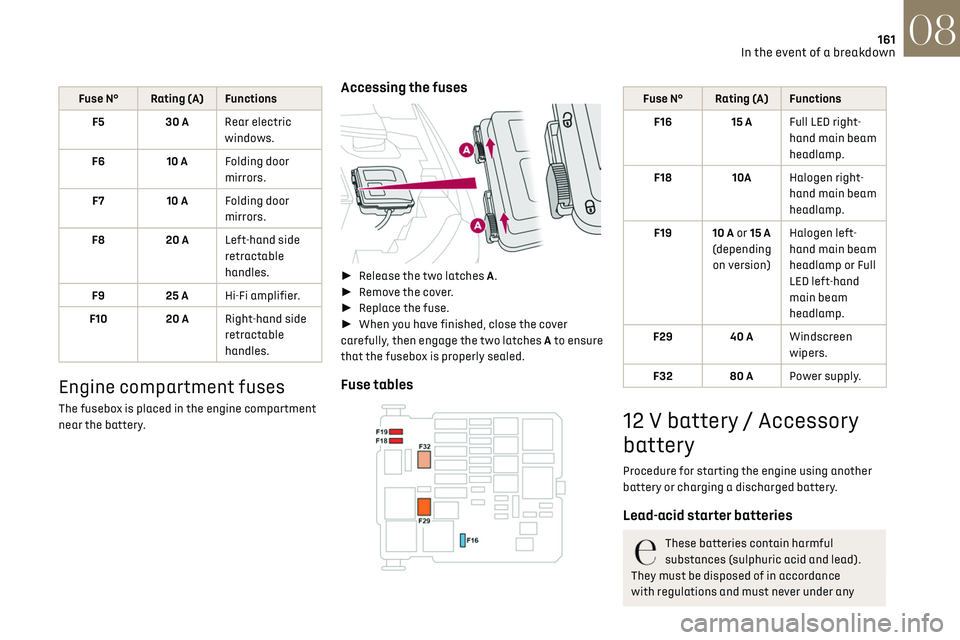
Engine compartment fuses
The fusebox is placed in the engine compartment
near the battery.
Accessing the fuses
► Release the two latches A.
► Remove the cover.
► Replace the fuse.
► When you have finished, close the cover
carefully, then engage the two latches A to ensure
that the fusebox is properly sealed.
Fuse tables
Fuse N° Rating (A) Functions
F16 15 A Full LED right-
hand main beam
headlamp.
F18 10AHalogen right-
hand main beam
headlamp.
F19 10 A or 15 A
(depending on version) Halogen left-
hand main beam
headlamp or Full
LED left-hand
main beam
headlamp.
F29 40 A Windscreen
wipers.
F32 80 A Power supply.
12 V battery / Accessory
battery
Procedure for starting the engine using another
battery or charging a discharged battery.
Lead-acid starter batteries
These batteries contain harmful
substances (sulphuric acid and lead).
They must be disposed of in accordance
with regulations and must never under any
Page 174 of 244

172
Technical data09
Identification markings
Various visible markings for the identification and
research of your vehicle.
A. Vehicle Identification Number (VIN), under the
bonnet.
Stamped on the chassis, near the right-hand
front wheel arch.
B. Vehicle Identification Number (VIN), on the
dashboard.
Engraved on a label, visible through the
windscreen.
C. Manufacturer's label.
Affixed to the centre pillar.
Bears the following information:
–
Manufact
urer’s name.
–
European whole v
ehicle type approval number.
–
V
ehicle Identification number (VIN).
–
G
ross vehicle weight (GVW).
–
G
ross train weight (GTW).
–
Maximum w
eight on the front axle.
–
Maximum w
eight on the rear axle.
D. Tyres / paint code label.
Affixed to the driver's door.
Bears the following information about the tyres:
–
tyre pre
ssures, unladen and laden.
–
tyre specific
ation, made up of the dimensions
and type as well as the load and speed indices.
–
spare tyre pre
ssure.
Also indicates the paint colour code.
Dimensions (in mm)
These dimensions have been measured on an
unladen vehicle.
* Mirrors folded
Page 225 of 244
223
Alphabetical index
Maintenance (advice) 131, 146
Maintenance, routine
95, 142
Manoeuvring aids (recommendations)
94
Map reading lamps
51–52
Markings, identification
172
Massage function
39–40
Mat
51, 95
Memorising a speed
102
Menu
189
Menu, main
24
Menus (audio)
174–175, 184–185, 196–197
Menu short cuts
24
Messages
214
Messages, quick
214
Mirror, rear view
41
Mirrors, door
41, 47, 113
Mirror, vanity
49
Misfuel prevention
130
Motor, electric
5, 82, 130, 171
Mountings, ISOFIX
75
N
Navigation 202–204
Navigation, connected
204–206
Net, high load retaining
53
O
Obstacle detection 117
Oil change
141
Oil consumption
141
OIl, engine
141
On-board tools 53, 148–150
Opening the bonnet
139
Opening the boot
29, 34
Opening the doors
29, 33–34
Opening the windows
27
P
Pads, brake 143
Paint
147, 172
Paint colour code
172
Parcel shelf, rear
53
Park Assist
121
Parking brake
143
Parking brake, electric
83–85
Parking sensors, audible and visual
117
Parking sensors, front
118
Parking sensors, rear
117
Personalisation
9–10
Plates, identification
172
Player, Apple®
177, 188
Player, Apple®
211
Player, USB
177, 187, 210
Port, USB
49, 177, 187, 206, 210
Power
19
Power indicator
19
Pressures, tyres
143, 152
Pre-tensioning seat belts
69
Priming the fuel system
148
Profiles
192, 215
Protecting children
70, 72–76
Puncture
150, 152
R
Radar (warnings) 94
Radio
175–176, 185, 187, 209
Radio, digital (Digital Audio
Broadcasting - DAB)
176, 187–188, 210
Range, AdBlue
18, 142
RDS
176, 186, 209
Rear screen, demisting
47
Recharging the battery
163–164
Recirculation, air
47
Recovery
165–167
Reduction of electrical load
139
Regeneration of the particle filter
143
Reinitialisation of the under-inflation
detection system
94
Reinitialising the remote control
33
Reminder, lighting on
54
Remote control
27, 29–31
Removing a wheel
153–154
Removing the mat
51
Replacing bulbs
155–158
Replacing fuses
159–161
Replacing the air filter
142
Replacing the oil filter
143
Replacing the passenger compartment
filter
142
Reservoir, screenwash
142
Reset trip
22
Rev counter
9
Reversing camera
95, 118–119
Reversing lamp
158
Roof bars
137–138
Running out of fuel (Diesel)
148