audio CITROEN DS4 2010 User Guide
[x] Cancel search | Manufacturer: CITROEN, Model Year: 2010, Model line: DS4, Model: CITROEN DS4 2010Pages: 421, PDF Size: 8.05 MB
Page 115 of 421

11 3
This connection box comprises a USB port and
a Jack auxiliary socket.For more information on the Audio and
telematics
, refer to the corresponding
section.
USB port
The USB port allows the connection of a
portable device, such as a digital audio player
of the iPod
® type or a USB memory stick.
The USB player reads your audio files, which
are transmitted to your audio system and
played via the vehicle's speakers.
The management of these files is from the
steering mounted controls or the audio system.
USB Player
When connected to the USB port, the
portable device charges automatically.
While charging, a message is displayed
if the power consumption of the
portable device exceeds the current
delivered by the vehicle.
Jack auxiliary socket
The Jack auxiliary socket allows the connection
of a portable device, such as a digital audio
player, so that your audio files can be heard
through the vehicle's speakers.
The management of these files is from the
portable device.
The USB also allows a telephone to be
connected by a MirrorLink™ connection, so
that use can be made in the touch screen tablet
of certain applications on the telephone.
03
Ease of use and comfort
Page 145 of 421

143
Interior mood lighting
At night, the audio system and digital air
conditioning illumination, together with the
illumination of the central dashboard storage
box, comes on automatically when the
sidelamps are on.The interior mood lighting switches off
automatically when the sidelamps are
switched off.
It can be switched off manually by adjusting the
instrument panel lighting dimmer button to one
of the lowest settings.
On certain versions, three LEDs, located in the
rail linking the rear view mirror to the roof come
on as well.
Switching on
Switching off
The dimmed passenger compartment lighting improves visibility in the vehicle when
the light is poor.
04
Lighting and visibility
Page 190 of 421

188
Key left in the "Ignition on"
position
If the key has been left in the ignition switch
at position 2 (Ignition on), the ignition will
be switched off automatically after one hour.
To switch the ignition back on, turn the
key to position 1 (Stop) , then back to
position
2
(Ignition on) .
F Stop the vehicle.
F
W ith the engine running at idle, turn the key
to position 1 .
F
R
emove the key from the ignition switch.
F
T
o lock the steering column, turn the
steering until it locks.
Switching off the engine
To facilitate unlocking of the steering
column, it is recommended that the
wheels be returned to the straight ahead
position before switching off the engine. When you leave the vehicle, keep the
key with you and lock the vehicle.
For more information on Energy
economy mode
, refer to the
corresponding section.
Never switch off the ignition before the
vehicle is at a complete stop. With the
engine off, the braking and steering
assistance systems are also cut off:
risk of loss of control of the vehicle.Energy economy mode
After switching off the engine (position 1- Stop
),
for a maximum of 30 minutes you can still use
functions such as the audio and telematic
system, the wipers, dipped beam headlamps,
courtesy lamps, ...
F
C
heck that the parking brake is correctly
applied, particularly on sloping ground.
06
Driving
Page 215 of 421

213
Memorising speeds
"MEM" button
F Press this button to display the list of memorised speed settings.
F
G
o to the main menu by pressing the
"MENU" button:
F
Sel
ect the "Personalisation-configuration"
menu and confirm.
F
S
elect " Vehicle parameters" menu and
confirm.
F
S
elect the "Driving assistance" line and
conform.
F
S
elect "Speeds memorised" line and
confirm.
F
S
elect "Activation" to activate the function.
With your Audio system
As a safety measure, the driver must
only modify a speed setting when
stationary.
This function allows speed settings to be registered which will then be offered as settings for two systems: the speed limiter (a maximum speed) and
the cruise control (cruising speed).
You can memorise up to six speed settings in the system, depending on version. By default, some speed settings are already memorised.
F
S
elect the speed setting to be modified and
confirm.
F
M
odify the speed setting.
F
Sel
ect "
OK" and confirm to save the
modifications.
Activating the function
Modifying a speed setting
06
Driving
Page 218 of 421

216
Switching on
F Turn the wheel 1 to the "LIMIT" position
to select the speed limiter; the function is
paused.
F
I
f the speed setting is suitable (last speed
setting programmed in the system) press
button 4 to switch the speed limiter on.
F
P
ressing button 4 temporarily interrupts the
function (pause).
Adjusting the limit speed setting
You do not have to switch the speed limiter on
in order to set the speed. To modify the limit speed setting from the
current speed of the vehicle:
F
i
n steps of +/- 1 mph (km/h), make
successive short presses on button 2 or 3 ,
F
c
ontinuously, in steps of +/- 5 mph (km/h),
press and hold button 2 or 3 .
To modify the limit speed setting using
memorised speeds and from your Audio
system:
F
f
irst activate the system,
F
m
ake a long press on button 2 or 3 , the
system displays the memorised speed
closest to the actual speed of the vehicle;
this setting becomes the new limit speed,
F
t
o choose another memorised speed, make
another long press on button 2 or 3.
For more information on Memorising speeds ,
refer to the corresponding section.
To modify the limit speed setting using
memorised speeds and from the touch screen:
F
p
ress button 5 to display the six memorised
speed settings,
F
p
ress the button for the desired speed
setting.
This setting becomes the new limit speed.
06
Driving
Page 221 of 421
219
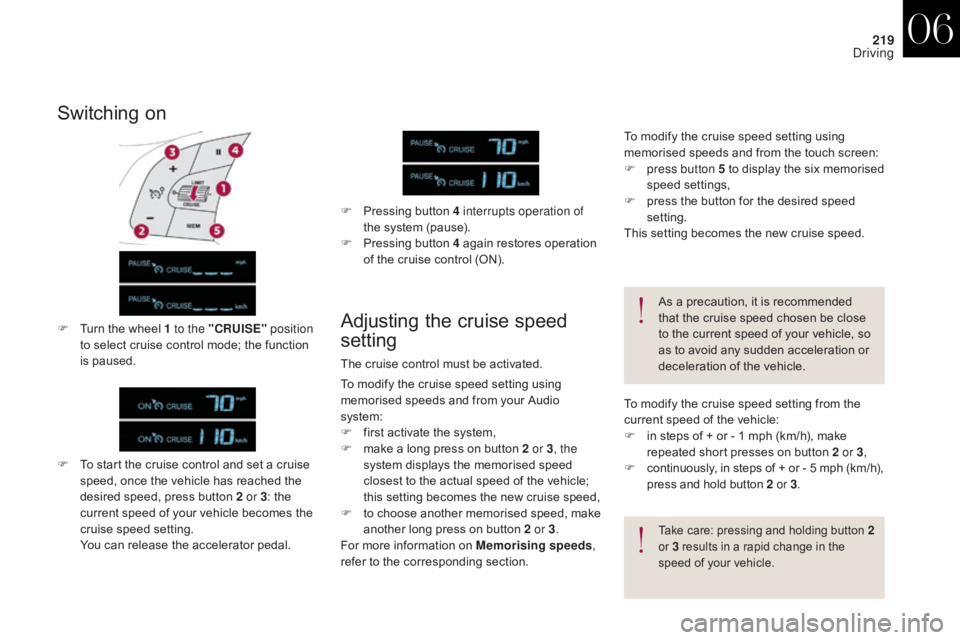
Switching on
F To start the cruise control and set a cruise speed, once the vehicle has reached the
desired speed, press button 2 or 3 : the
current speed of your vehicle becomes the
cruise speed setting.
Y
ou can release the accelerator pedal.
Adjusting the cruise speed
settingF Turn the wheel 1 to the "CRUISE" position
to select cruise control mode; the function
is paused. F
P
ressing button 4 interrupts operation of
the system (pause).
F
P
ressing button 4 again restores operation
of the cruise control (ON).
The cruise control must be activated. As a precaution, it is recommended
that the cruise speed chosen be close
to the current speed of your vehicle, so
as to avoid any sudden acceleration or
deceleration of the vehicle.
Take care: pressing and holding button 2
o r 3 results in a rapid change in the
speed of your vehicle.
To modify the cruise speed setting from the
current speed of the vehicle:
F
i
n steps of + or - 1 mph (km/h), make
repeated short presses on button 2 or 3 ,
F
c
ontinuously, in steps of + or - 5 mph (km/h),
press and hold button 2 or 3.
To modify the cruise speed setting using
memorised speeds and from your Audio
system:
F
f
irst activate the system,
F
m
ake a long press on button 2 or 3 , the
system displays the memorised speed
closest to the actual speed of the vehicle;
this setting becomes the new cruise speed,
F
t
o choose another memorised speed, make
another long press on button 2 or 3.
For more information on Memorising speeds ,
refer to the corresponding section. To modify the cruise speed setting using
memorised speeds and from the touch screen:
F
p
ress button 5 to display the six memorised
speed settings,
F
p
ress the button for the desired speed
setting.
This setting becomes the new cruise speed.
06
Driving
Page 241 of 421

239
Energy economy modeSystem which manages the period of use of certain functions to conserve a sufficient level of
charge in the battery.
After the engine has stopped, you can still use functions such as the audio equipment, windscreen
wipers, dipped beam headlamps,
courtesy lamps, etc. for a maximum combined period of thirty
minutes.
This period may be greatly reduced if
the battery is not fully charged.
A flat battery prevents the engine from
starting.
For more information on the 12 V
battery, refer to the corresponding
section.
If the telephone is being used at the
same time with the touch screen tablet,
it will be interrupted after 10 minutes.
Switching to economy mode
Once this period has elapsed, a message
appears in the screen indicating that the
vehicle has switched to economy mode and the
active functions are put on standby.
Exiting economy mode
These functions are reactivated automatically
the next time the vehicle is driven.
F
I
n order to resume the use of these
functions immediately, start the engine and
let it run for a few minutes.
The time available to you will then be double
the period for which the engine is left running.
However, this period will always be between
five and thirty minutes.
Load reduction modeSystem which manages the use of certain
functions according to the level of charge
remaining in the battery.
When the vehicle is being driven, the load
reduction function temporarily deactivates
certain functions, such as the air conditioning,
the heated rear screen...
The deactivated functions are reactivated
automatically as soon as conditions permit.
07
Practical information
Page 292 of 421

290
Fuse N°Rating Functions
F8 3 AAlarm siren, alarm ECU.
F13 10 ACigarette lighter / Front 12 V socket.
F14 10 A12 V socket in boot.
F16 3 ALighting for the large multifunctional storage unit, rear map
reading lamps, glove box illumination.
F17 3 ASun visor illumination, front map reading lamps.
F28 15 AAudio system, radio (after-market).
F30 20 ARear wiper.
F32 10 AHi-Fi amplifier.
Fusebox 2 Fuse N° Rating Functions
F36 15 ARear 12 V socket.
F37 -Not used.
F38 -Not used.
F39 -Not used.
F40 25 A230 V / 50 Hz socket.
Fuse tablesFusebox 1
08
In the event of a breakdown
Page 295 of 421
293
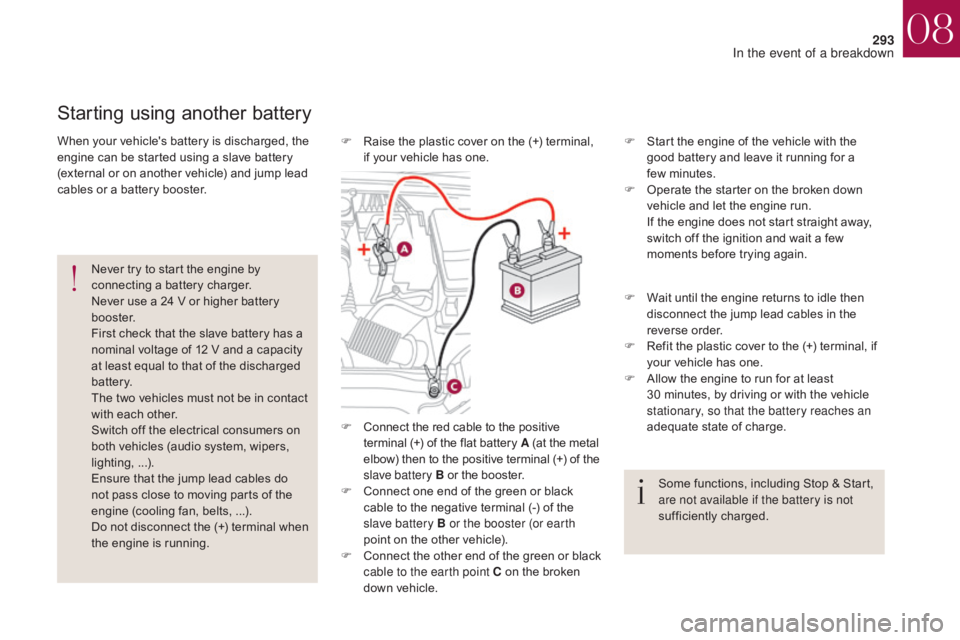
F Connect the red cable to the positive terminal (+) of the flat battery A (at the metal
elbow) then to the positive terminal
(+) of the
slave battery B or the booster.
F
C
onnect one end of the green or black
cable to the negative terminal (-) of the
slave battery B or the booster (or earth
point on the other vehicle).
F
C
onnect the other end of the green or black
cable to the earth point C on the broken
down vehicle. F
S
tart the engine of the vehicle with the
good battery and leave it running for a
few
m
inutes.
F
O
perate the starter on the broken down
vehicle and let the engine run.
I
f the engine does not start straight away,
switch off the ignition and wait a few
moments before trying again.
Starting using another battery
Never try to start the engine by
connecting a battery charger.
Never use a 24 V or higher battery
b o o s t e r.
First check that the slave battery has a
nominal voltage of 12 V and a capacity
at least equal to that of the discharged
battery.
The two vehicles must not be in contact
with each other.
Switch off the electrical consumers on
both vehicles (audio system, wipers,
lighting, ...).
Ensure that the jump lead cables do
not pass close to moving parts of the
engine (cooling fan, belts, ...).
Do not disconnect the (+) terminal when
the engine is running.
When your vehicle's battery is discharged, the
engine can be started using a slave battery
(external or on another vehicle) and jump lead
cables or a battery booster.
F
W
ait until the engine returns to idle then
disconnect the jump lead cables in the
reverse order.
F
R
efit the plastic cover to the (+) terminal, if
your vehicle has one.
F
A
llow the engine to run for at least
30
minutes, by driving or with the vehicle
stationary, so that the battery reaches an
adequate state of charge.
Some functions, including Stop & Start,
are not available if the battery is not
sufficiently charged.
F
R
aise the plastic cover on the (+) terminal,
if your vehicle has one.
08
In the event of a breakdown
Page 296 of 421

294
If you envisage charging your vehicle's
battery yourself, use only a charger
compatible with lead-acid batteries of a
nominal voltage of 12 V.
If this label is present, it is essential
to use only a 12 V charger, to avoid
causing irreversible damage to the
electrical components related to the
Stop & Start system.Never try to charge a frozen battery.
If the battery has been frozen, have
it checked by a CITROËN dealer or
a qualified workshop, who will check
that the internal components have not
been damaged and the casing is not
cracked, which could cause a leak of
toxic and corrosive acid.
Charging the battery using a battery charger
For optimum service life of the battery, it is
essential to maintain an adequate state of
charge.
In some circumstances it may be necessary to
charge the battery:
-
i
f you use your vehicle essentially for short
journeys,
-
i
f the vehicle is to be taken off the road for
several weeks.
Contact a CITROËN dealer or a qualified
workshop. It is not necessary to disconnect the
battery. Follow the instructions for use provided
by the manufacturer of the charger.
Never reverse polarities.
F
S
witch off the ignition.
F
S
witch off all electrical consumers (audio
system, lighting, wipers, ...).
F
S
witch off the charger B before connecting
the cables to the battery, so as to avoid any
dangerous sparks.
F
E
nsure that the charger cables are in good
condition.
F
R
aise the plastic cover, if your vehicle has
one, on the (+) terminal.
F
C
onnect the charger B cables as follows:
-
t
he positive (+) red cable to the (+)
terminal of the battery A ,
-
t
he negative (-) black cable to the earth
point C on the vehicle.
F
A
t the end of the charging operation, switch
off the charger B before disconnecting the
cables from the battery A .
08
In the event of a breakdown