lock CITROEN DS4 2010 Repair Manual
[x] Cancel search | Manufacturer: CITROEN, Model Year: 2010, Model line: DS4, Model: CITROEN DS4 2010Pages: 421, PDF Size: 8.05 MB
Page 257 of 421

255
Never store bottles of AdBlue® in your
vehicle.
Recommendations on storage
AdBlue® freezes at about -11°C and
deteriorates above 25°C. It is recommended
that bottles be stored in a cool area and
protected from direct sunlight .
Under these conditions, the fluid can be kept
for at least a year .
If the additive has frozen, it can be used once it
has completely thawed out. Before starting the top-up procedure, ensure
that the vehicle is parked on a flat and level
sur face.
Procedure
F Switch off the ignition and remove the
key, or if your vehicle has one, press the
START/STOP button to switch off the
engine.
F
R
aise the boot floor for access to the
AdBlue
® tank. S
ecure the boot floor by attaching its cord
to the hook on the parcel shelf support.
F
U
nclip the black plastic blanking plug using
its tab.
F
I
nsert your fingers into the aperture and
turn the blue cap a 6
th of a turn anti-
clockwise.
F
C
arefully lift off the cap, without dropping it.
Do not dispose of AdBlue
® bottles or
containers in the household waste.
Place them in a container provided
for this purpose or take them to your
dealer.
07
Practical information
Page 258 of 421

256
Never dispose of AdBlue® additive
bottles in the household waste. Place
them in a special container provided
this purpose or take them to your
dealer.
Important: if your vehicle's AdBlue
®
tank is completely empty - which
is confirmed by the alert displays
and the impossibility of starting the
engine
- you must add at least 3.8 litres
(so
two
1.89
litre bottles). If any additive is split or splashed, wash
immediately with cold water or wipe
with a damp cloth.
If the additive has crystallised, clean it
off using a sponge and hot water.
Important:
in the event of a top-
up after a breakdown because of
a lack of additive , you must wait
around 5 minutes before switching
on the ignition, without opening the
driver's door, locking the vehicle,
introducing the key into the ignition
switch, or introducing the key of the
"Keyless Entr y and Star ting" system
into the passenger compartment .
Switch on the ignition, then, after
10 seconds, start the engine.
F
O
btain a bottle of AdBlue
®. After first
checking the use-by date, read carefully
the instructions on use on the label before
pouring the contents of the bottle into your
vehicle's AdBlue
® tank. F
A
fter emptying the bottle, wipe away any
spillage around the tank filler using a damp
cloth.
F R efit the blue cap to the tank and turn it a
6th of a turn clockwise, to its stop.
F
R
efit the black plastic blanking plug,
clipping it in on the flap
F
D
etach the cord from the parcel shelf
support and lower the boot floor.
07
Practical information
Page 267 of 421

265
Removing the pipe and cartridge
F Turn the pipe assembly 2 to the left until it contacts the unit.
F
D
isconnect the union 1 from the cartridge
by turning it a quarter turn anti-clockwise.
F
E
xtract the pipe assembly 2 , then
disconnect the union 3 from the air delivery
pipe by turning it a quarter turn anti-
clockwise. Beware of discharges of fluid.
The expiry date of the fluid is indicated
on the cartridge.
The sealant cartridge is designed for
single use; even if only partly used, it
must be replaced.
After use, do not discard the cartridge
into the environment, take it to an
authorised waste disposal site or a
CITROËN dealer.
Do not forget to obtain a new sealant
cartridge, available from CITROËN
dealers or from a qualified workshop.
F
R emove the pipe assembly 2
.
F S upport the compressor vertically.
F
U
nscrew the cartridge 4 from the bottom.
To fit the new cartridge and new pipe, carry out
these operations in reverse order.
08
In the event of a breakdown
Page 277 of 421
275
Removing a wheel
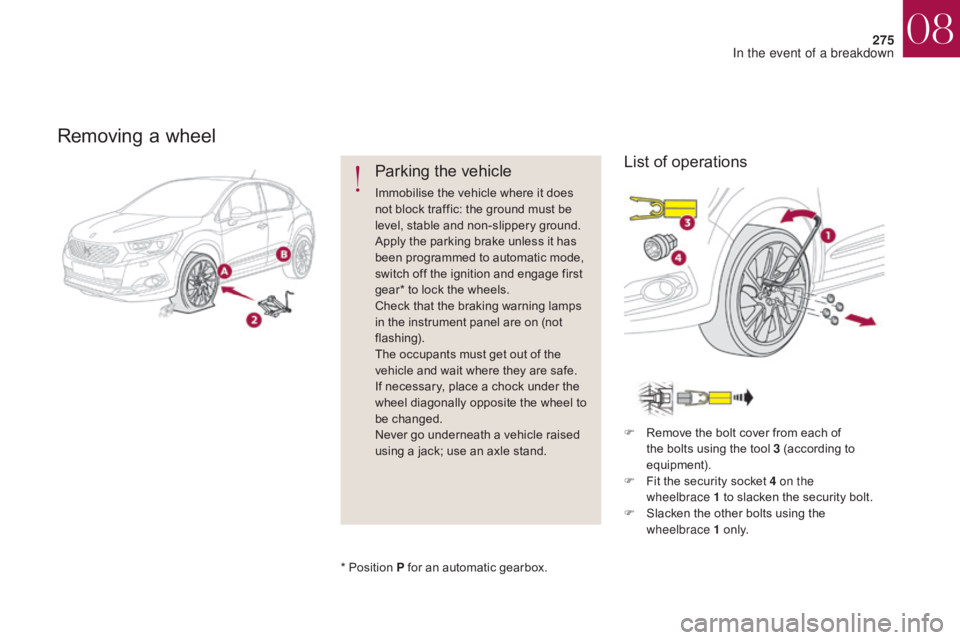
Parking the vehicle
Immobilise the vehicle where it does
not block traffic: the ground must be
level, stable and non-slippery ground.
Apply the parking brake unless it has
been programmed to automatic mode,
switch off the ignition and engage first
gear* to lock the wheels.
Check that the braking warning lamps
in the instrument panel are on (not
flashing).
The occupants must get out of the
vehicle and wait where they are safe.
If necessary, place a chock under the
wheel diagonally opposite the wheel to
be changed.
Never go underneath a vehicle raised
using a jack; use an axle stand.F
R
emove the bolt cover from each of
the bolts using the tool 3 (according to
equipment).
F
F
it the security socket 4 on the
wheelbrace
1 to slacken the security bolt.
F
S
lacken the other bolts using the
wheelbrace 1 o n l y.
*
Position P for an automatic gearbox.
List of operations
08
In the event of a breakdown
Page 297 of 421

295
In order to maintain an adequate state
of charge for starting the engine, it is
recommended that the battery be disconnected
if the vehicle is taken out of service for a long
period.
Before disconnecting the battery:
F
c
lose all openings (doors, boot, windows),
F
s
witch off all electrical consumers (audio
system, wipers, lighting, etc.),
F
s
witch off the ignition and wait for
four
m
inutes.
At the battery, it is only necessary to
disconnect the (+) terminal.
Disconnecting the battery
The Stop & Start system may not be
operational during the trip following the
first engine start.
In this case, the system will only be
available again after a continuous
period of immobilisation of the vehicle,
a period which depends on the exterior
temperature and the state of charge of
the battery (up to about 8 hours).
F
Ra
ise the lever A fully.
F
R
efit the open clamp B on the (+)
terminal.
F
P
ush the clamp B fully down.
F
L
ower the lever A to lock the clamp B
.
Do not force the lever as locking
will not be possible if the clamp is
not positioned correctly; start the
procedure again.
Following reconnection of the
battery
After reconnecting the battery, switch on the
ignition and wait 1 minute before starting to
allow initialisation of the electronic systems.
However, if minor problems persist following
this operation, contact a CITROËN dealer or a
qualified workshop.
Referring to the corresponding section, you
must yourself initialise or reset certain systems,
such as:
-
t
he one-touch electric windows,
-
t
he date and time,
-
t
he settings of the audio system or of the
satellite navigation system.
Quick-release terminal clamp
F Raise the lever A fully to release the clamp B .
F R emove the clamp B by lifting it off.
Disconnecting the (+) terminal Reconnecting the (+) terminal
08
In the event of a breakdown
Page 298 of 421

296
Towing the vehicleProcedure for having your vehicle towed or for towing another vehicle using a removable towing eye.
The towing eye is installed in the boot under
the floor.
To gain access to it:
F
o
pen the boot,
Access to the tools
General recommendations
Observe the legislation in force in your
c o unt r y.
Ensure that the weight of the towing
vehicle is higher than that of the towed
vehicle.
The driver must remain at the wheel
of the towed vehicle and must have a
valid driving licence.
When towing a vehicle with all four
wheels on the ground, always use an
approved towing arm; rope and straps
are prohibited.
The towing vehicle must move off
g e nt l y.
When towing a vehicle with the engine
off, there is no longer any power
assistance for braking or steering. In the following cases, you must always call
on a professional recovery service:
-
v
ehicle broken down on a motor way or
fast road,
-
f
our-wheel drive vehicle,
-
w
hen it is not possible to put the gearbox
into neutral, unlock the steering, or
release the parking brake,
-
t
owing with only two wheels on the
ground,
-
w
here there is no approved towing arm
available...
F
r
aise the floor,
F
s
ecure it by hooking its cord on the hook
on the rear parcel shelf support,
F
r
emove the towing eye from the holder.
08
In the event of a breakdown
Page 299 of 421

297
F On the front bumper, unclip the cover by pressing on the left.
F
S
crew the towing eye in fully.
F
I
nstall the towing arm.
Towing your vehicle Towing another vehicle
F Place the gear lever in neutral
(position N on an automatic
gearbox).
F
ailure to observe this instruction
could result in damage to
certain components (braking,
transmission...) and the absence
of braking assistance the next time
the engine is started.
F
U
nlock the steering and release the
parking brake.
F
S
witch on the hazard warning lamps on
both vehicles.
F
M
ove off gently, drive slowly and for a short
distance. F
O
n the rear bumper, unclip the cover by
pressing at the top.
F
S
crew the towing eye in fully.
F
I
nstall the towing arm.
F
S
witch on the hazard warning lamps on
both vehicles.
F
M
ove off gently, drive slowly and for a short
distance.
08
In the event of a breakdown
Page 357 of 421
355
As a safety measure and because it
requires sustained attention by the
driver, using a smartphone when
driving is prohibited.
All operations must be done with the
vehicle stationary.
The synchronisation of a
smartphone allows applications on a
smartphone that are adapted to the
MirrorLink
TM technology to be displayed
i
n the vehicle's screen.
The principles and standards
are constantly evolving. For the
communication process between the
smartphone and the system to work
correctly, the smartphone must be
unlocked; update the operating system
of your smartphone as well as the date
and time in the smartphone and the
system.
For the list of eligible smartphones,
connect to the brand's internet website
in your country. Please note:
-
i
f your smartphone is supported, to
make it "MirrorLink
TM" compatible,
some phone manufacturers
nevertheless invite you to first
download a dedicated application.
When connecting a smartphone to
the system, it is recommended that
Bluetooth
® be started on the smartphone.
Start the application on the
smartphone (optional, depending
on the smartphone and operating
syste m).
Access to the different audio sources remains
accessible in the margin of the MirrorLink
TM
display, using touch buttons in the upper bar.
Access to the menus for the system is possible
at any time using the dedicated buttons. During the procedure, several screen
pages relating to certain functions
are displayed.
Accept to start and end the
connection.
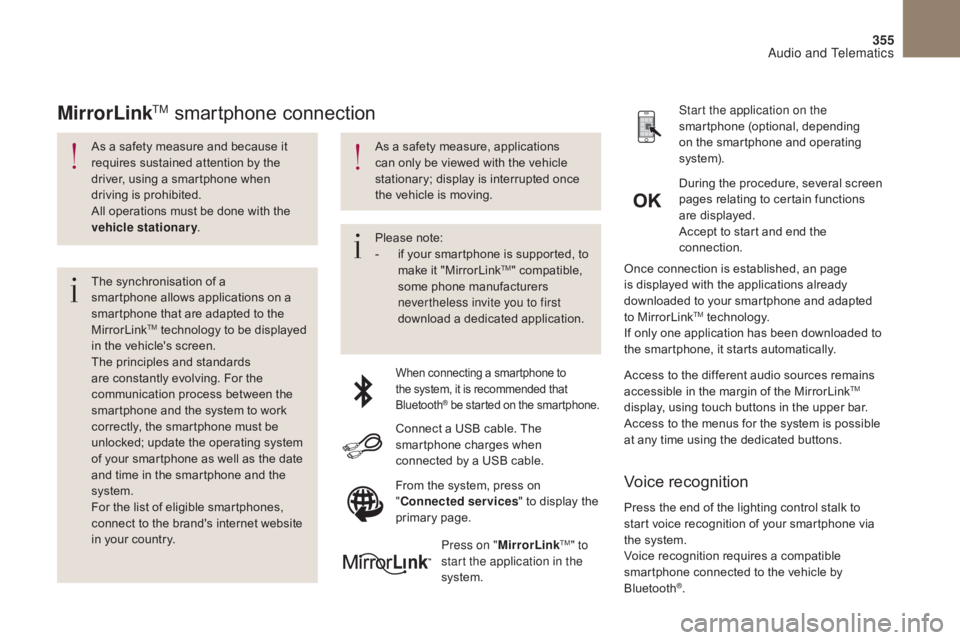
Connect a USB cable. The
smartphone charges when
connected by a USB cable. Press on " MirrorLink
TM" to
start the application in the
system. Once connection is established, an page
is displayed with the applications already
downloaded to your smartphone and adapted
to MirrorLink
TM technology.
If only one application has been downloaded to
the smartphone, it starts automatically.
MirrorLinkTM smartphone connection
Press the end of the lighting control stalk to
start voice recognition of your smartphone via
the system.
Voice recognition requires a compatible
smartphone connected to the vehicle by
Bluetooth
®.
Voice recognition
As a safety measure, applications
can only be viewed with the vehicle
stationary; display is interrupted once
the vehicle is moving.
From the system, press on
"Connected services " to display the
primary page.
Audio and Telematics
Page 372 of 421

370
Radio
QUESTIONANSWER SOLUTION
The quality of reception of
the radio station listened
to gradually deteriorates
or the stored stations do
not function (no sound,
87.5
Mhz is displayed...). The vehicle is too far from the transmitter used by the station
listened to or there is no transmitter in the geographical area
through which the vehicle is travelling.
Activate the "RDS" function by means of the
short-cut menu to enable the system to check
whether there is a more power ful transmitter in
the geographical area.
The environment (hills, buildings, tunnels, basement car parks...)
block reception, including in RDS mode. This phenomenon is normal and does not
indicate a fault with the audio system.
The aerial is absent or has been damaged (for example when going
through a car wash or into an underground car park). Have the aerial checked by a CITROËN dealer.
I cannot find some radio
stations in the list of
stations received. The station is not received or its name has changed in the list. Press and hold the "List" button at the steering
mounted controls to update the list of stations
received or press on the system update function:
"Update list".
Some radio stations send other information in place of their name
(the title of the song for example).
The system interprets this information as the name of the station.
The name of the radio
station changes.
Audio and Telematics
Page 403 of 421

401
QUESTIONANSWER SOLUTION
The quality of reception of
the radio station listened
to gradually deteriorates
or the stored stations do
not function (no sound,
87.5
MHz is displayed...). The vehicle is too far from the transmitter used by the station
listened to or there is no transmitter in the geographical area
through which the vehicle is travelling.
Activate the RDS function to enable the system
to check whether there is a more power ful
transmitter in the geographical area.
The environment (hills, buildings, tunnels, basement car parks...)
block reception, including in RDS mode. This phenomenon is normal and does not indicate
a failure of the audio equipment.
The aerial is absent or has been damaged (for example when going
through an automatic car wash or in an underground car park). Have the aerial checked by a CITROËN dealer.
Sound cut-outs of 1 to
2
seconds in radio mode. During this brief sound cut-out, the RDS searches for another
frequency giving better reception of the station. Deactivate the RDS function if the phenomenon is
too frequent and always on the same route.
The traffic announcement
(TA) is displayed. I do
not receive any traffic
information. The radio station does not broadcast traffic information.
Tune to a radio station which broadcasts traffic
information.
The stored stations are not
found (no sound, 87.5 MHz
is displayed...). An incorrect waveband is selected.
Press the BAND button to return to the waveband
on which the stations are stored.
Audio and Telematics