Dash Citroen DS4 2011 1.G User Guide
[x] Cancel search | Manufacturer: CITROEN, Model Year: 2011, Model line: DS4, Model: Citroen DS4 2011 1.GPages: 396, PDF Size: 31.05 MB
Page 223 of 396
221Driving
)
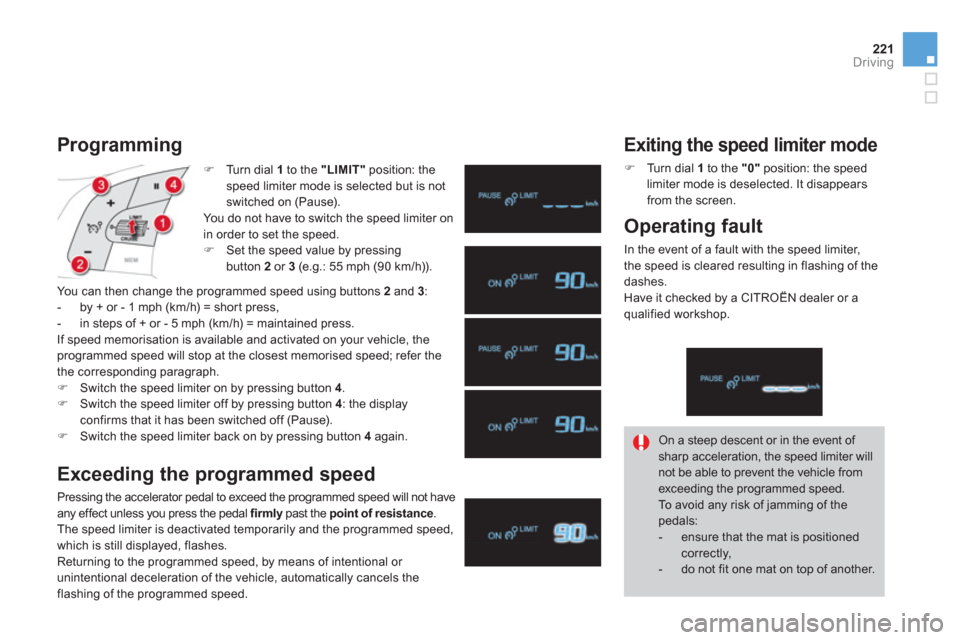
Tu r n d i a l 1
to the "LIMIT"
position: the
speed limiter mode is selected but is not
switched on (Pause).
You do not have to switch the speed limiter on
in order to set the speed.
)
Set the speed value by pressing
button 2
or 3
(e.g.: 55 mph (90 km/h)).
Programming
You can then change the programmed speed using buttons 2
and 3
:
- by + or - 1 mph (km/h) = shor t press,
- in steps of + or - 5 mph (km/h) = maintained press.
If speed memorisation is available and activated on your vehicle, the
programmed speed will stop at the closest memorised speed; refer the
the corresponding paragraph.
)
Switch the speed limiter on by pressing button 4
.
)
Switch the speed limiter off by pressing button 4
: the display
confirms that it has been switched off (Pause).
)
Switch the speed limiter back on by pressing button 4
again.
Exceeding the programmed speed
Pressing the accelerator pedal to exceed the programmed speed will not have
any effect unless you press the pedal firmly
past the point of resistance
.
The speed limiter is deactivated temporarily and the programmed speed,
which is still displayed, flashes.
Returning to the programmed speed, by means of intentional or
unintentional deceleration of the vehicle, automatically cancels the
flashing of the programmed speed. On a steep descent or in the event of
sharp acceleration, the speed limiter will
not be able to prevent the vehicle from
exceeding the programmed speed.
To avoid any risk of jamming of the
pedals:
- ensure that the mat is positioned
correctly,
- do not fit one mat on top of another.
Exiting the speed limiter mode
)
Tu r n d i a l 1
to the "0"
position: the speed
limiter mode is deselected. It disappears
from the screen.
Operating fault
In the event of a fault with the speed limiter,
the speed is cleared resulting in flashing of the
dashes.
Have it checked by a CITROËN dealer or a
qualified workshop.
Page 225 of 396
223Driving
Programming
)
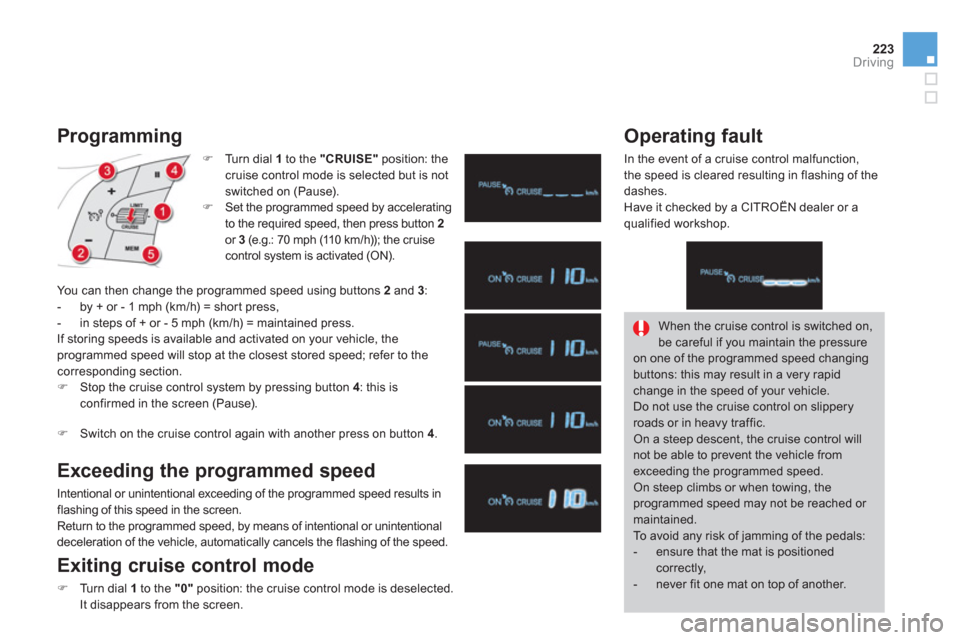
Tu r n d i a l 1
to the "CRUISE"
position: the
cruise control mode is selected but is not
switched on (Pause).
)
Set the programmed speed by accelerating
to the required speed, then press button 2
or 3
(e.g.: 70 mph (110 km/h)); the cruise
control system is activated (ON).
You can then change the programmed speed using buttons 2
and 3
:
- by + or - 1 mph (km/h) = shor t press,
- in steps of + or - 5 mph (km/h) = maintained press.
If storing speeds is available and activated on your vehicle, the
programmed speed will stop at the closest stored speed; refer to the
corresponding section.
)
Stop the cruise control system by pressing button 4
: this is
confirmed in the screen (Pause).
)
Switch on the cruise control again with another press on button 4
.
Exceeding the programmed speed
Intentional or unintentional exceeding of the programmed speed results in
flashing of this speed in the screen.
Return to the programmed speed, by means of intentional or unintentional
deceleration of the vehicle, automatically cancels the flashing of the speed.
Exiting cruise control mode
)
Turn dial 1
to the "0"
position: the cruise control mode is deselected.
It disappears from the screen.
Operating fault
In the event of a cruise control malfunction,
the speed is cleared resulting in flashing of the
dashes.
Have it checked by a CITROËN dealer or a
qualified workshop.
When the cruise control is switched on,
be careful if you maintain the pressure
on one of the programmed speed changing
buttons: this may result in a very rapid
change in the speed of your vehicle.
Do not use the cruise control on slippery
roads or in heavy traffic.
On a steep descent, the cruise control will
not be able to prevent the vehicle from
exceeding the programmed speed.
On steep climbs or when towing, the
programmed speed may not be reached or
maintained.
To avoid any risk of jamming of the pedals:
- ensure that the mat is positioned
correctly,
- never fit one mat on top of another.
Page 265 of 396
263Practical information
Changing a fuse
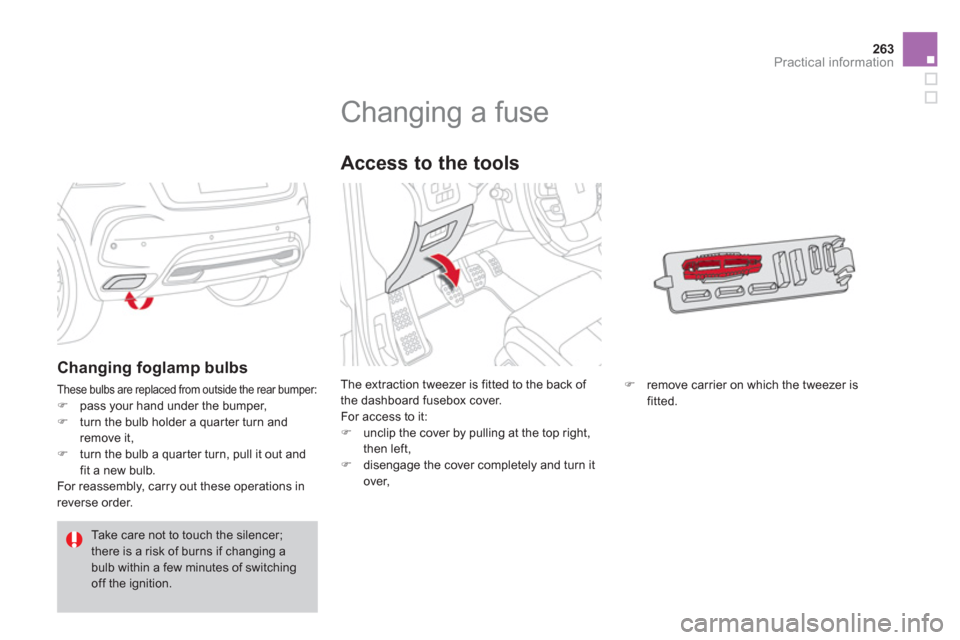
The extraction tweezer is fitted to the back of
the dashboard fusebox cover.
For access to it:
)
unclip the cover by pulling at the top right,
then left,
)
disengage the cover completely and turn it
over,
Access to the tools
)
remove carrier on which the tweezer is
fitted.
Changing foglamp bulbs
These bulbs are replaced from outside the rear bumper:
)
pass your hand under the bumper,
)
turn the bulb holder a quar ter turn and
remove it,
)
turn the bulb a quar ter turn, pull it out and
fit a new bulb.
For reassembly, carry out these operations in
reverse order.
Take care not to touch the silencer;
there is a risk of burns if changing a
bulb within a few minutes of switching
off the ignition.
Page 267 of 396
265Practical information
Dashboard fuses
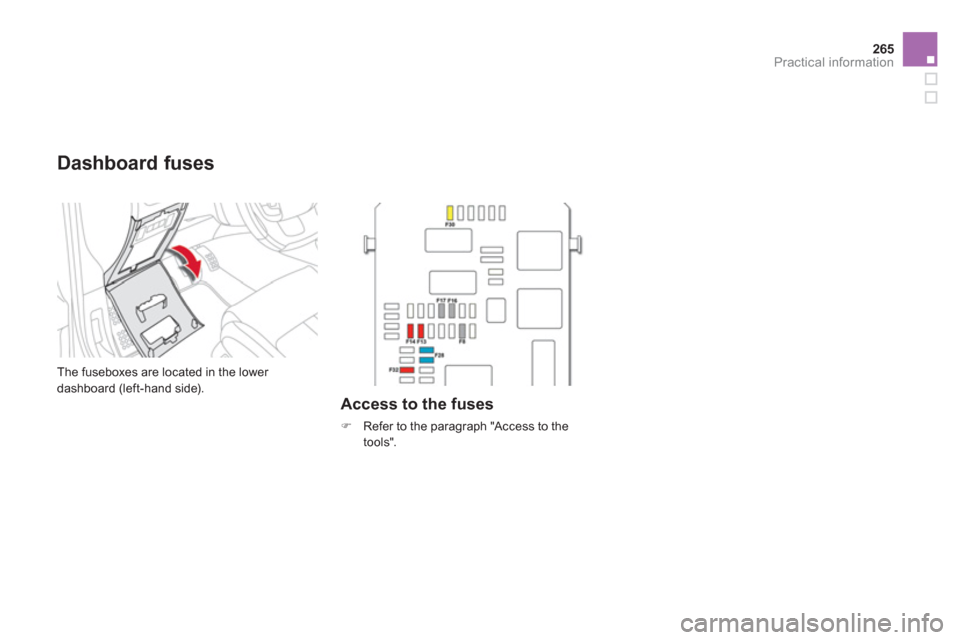
The fuseboxes are located in the lower
dashboard (left-hand side).
Access to the fuses
)
Refer to the paragraph "Access to the
tools".
Page 289 of 396
287Technical data
Identifi cation markings
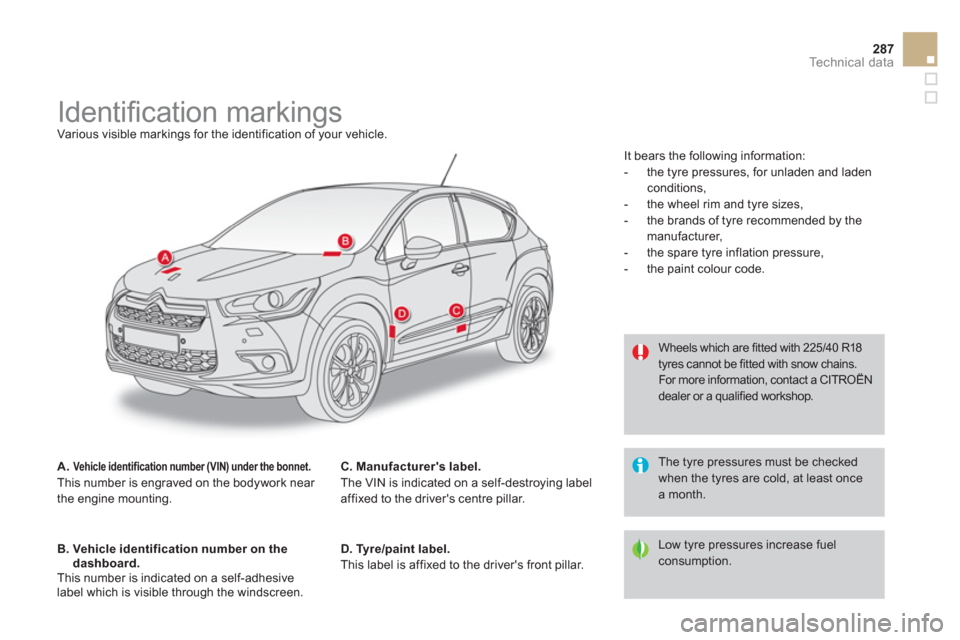
Various visible markings for the identification of your vehicle.
A.
Vehicle identification number (VIN) under the bonnet.
This number is engraved on the bodywork near
the engine mounting.
B. Vehicle identification number on the
dashboard.
This number is indicated on a self-adhesive
label which is visible through the windscreen.
D. Tyre/paint label.
This label is affixed to the driver's front pillar. Wheels which are fitted with 225/40 R18
tyres cannot be fitted with snow chains.
For more information, contact a CITROËN
dealer or a qualified workshop.
Low tyre pressures increase fuel
consumption. The tyre pressures must be checked
when the tyres are cold, at least once
a month.
C. Manufacturer's label.
The VIN is indicated on a self-destroying label
affixed to the driver's centre pillar. It bears the following information:
- the tyre pressures, for unladen and laden
conditions,
- the wheel rim and tyre sizes,
- the brands of tyre recommended by the
manufacturer,
- the spare tyre inflation pressure,
- the paint colour code.
Page 372 of 396
370
08 TRIP COMPUTER
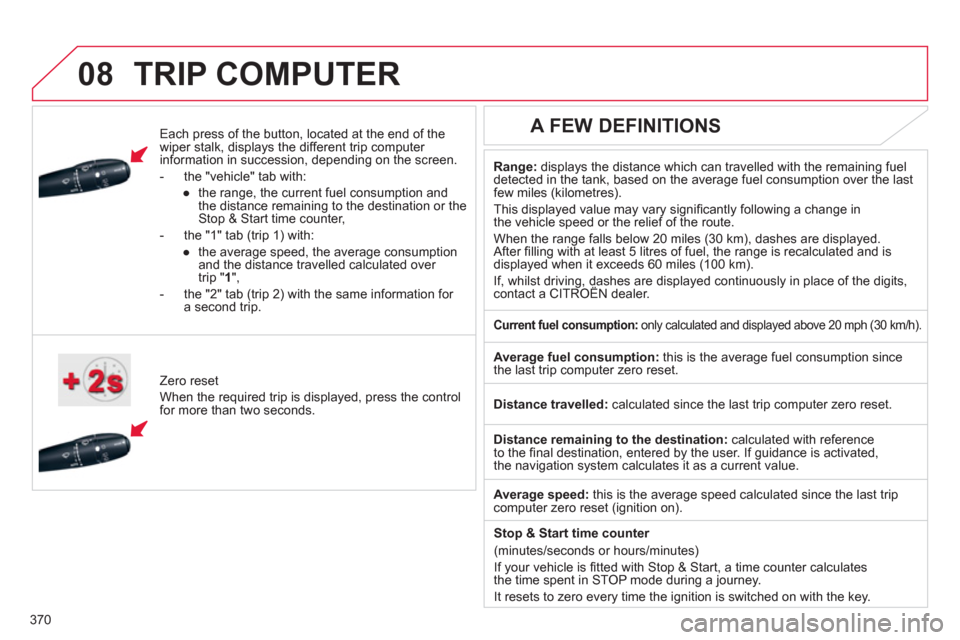
Each press of the button, located at the end of the
wiper stalk, displays the different trip computer
information in succession, depending on the screen.
- the "vehicle " tab with:
●
the range, the current fuel consumption and
the distance remaining to the destination or the
Stop & Start time counter,
- the "1" tab (trip 1) with:
●
the average speed, the average consumption
and the distance travelled calculated over
trip " 1
",
- the "2" tab (trip 2) with the same information for
a second trip.
Zero reset
When the required trip is displayed, press the control
for more than two seconds.
Range:
displays the distance which can travelled with the remaining fuel
detected in the tank, based on the average fuel consumption over the last
few miles (kilometres).
This displayed value may vary signifi cantly following a change in
the vehicle speed or the relief of the route.
When the range falls below 20 miles (30 km), dashes are displayed.
After fi lling with at least 5 litres of fuel, the range is recalculated and is
displayed when it exceeds 60 miles (100 km).
If, whilst driving, dashes are displayed continuously in place of the digits,
contact a CITROËN dealer.
A FEW DEFINITIONS
Current fuel consumption:
only calculated and displayed above 20 mph (30 km/h).
Average fuel consumption:
this is the average fuel consumption since
the last trip computer zero reset.
Distance travelled:
calculated since the last trip computer zero reset.
Distance remaining to the destination:
calculated with reference
to the fi nal destination, entered by the user. If guidance is activated,
the navigation system calculates it as a current value.
Average speed:
this is the average speed calculated since the last trip
computer zero reset (ignition on).
Stop & Start time counter
(minutes/seconds or hours/minutes)
If your vehicle is fi tted with Stop & Start, a time counter calculates
the time spent in STOP mode during a journey.
It resets to zero every time the ignition is switched on with the key.
Page 384 of 396
Instruments and controls
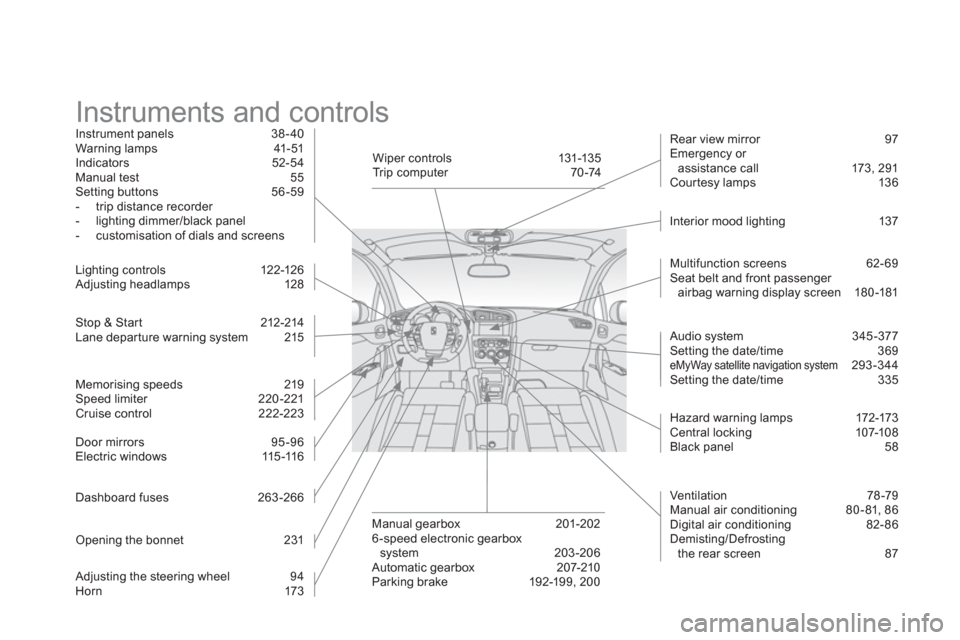
Instrument panels 38 - 40
Warning lamps 41-51
Indicators 52-54
Manual test 55
Setting buttons 56 -59
- trip distance recorder
- lighting dimmer/black panel
- customisation of dials and screens
Stop & Star t 212-214
Lane depar ture warning system 215
Lighting c ontrols 12 2-126
Adjusting headlamps 128
Door mirrors 95 -96
Electric windows 115 -116
Dashboard fuses 263 -266
Opening the bonnet 231
Adjusting the steering wheel 94
Horn 173
Multifunction screens 62- 69
Seat belt and front passenger
airbag warning display screen 180 -181
Manual gearbox 201-202
6 -speed electronic gearbox
system 203-206
Automatic gearbox 207-210
Parking brake 192-199, 200
Rear view mirror 97
Emergency or
assistance call 173, 291
Cour tesy lamps 136
Wiper controls 131-135
Trip computer 70 -74
Ventilation 78 -79
Manual air conditioning 80 - 81, 86
Digital air conditioning 82- 86
Demisting/Defrosting
the rear screen 87
Audio system 345 -377
Setting the date/time 369
eMyWay satellite navigation system 293-344
Setting the date/time 335
Interior mood lighting 137
Hazard warning lamps 172-173
Central locking 107-108
Black panel 58
Memorising speeds 219
Speed limiter 220 -221
Cruise control 222-223
Page 387 of 396
385Alphabetical index
Directional lighting .............................. 129, 130
Direction indicators ..... 125, 172, 257, 258, 261
Doors ........................................................... 112
Doors emergency control ........................... 113
Door trays .................................................... 142
Driving economically .................................... 34
Driving positions (storing) ............................. 92
Dynamic emergency braking ...................... 195
EBA
(Emergency braking assistance) ...... 176, 177
Eco-driving ................................................... 34
Economy mode ........................................... 272
Electric window controls ............................. 115
Electronic brake force distribution
(EBFD) ...................................................... 176
Electronic engine immobiliser ............. 103, 106
Electronic stability control (ESC) ................ 177
Emergency boot release ............................. 114
Emergency braking assistance .................. 177
Emergency call ................................... 173, 292
Emergency warning lamps ................. 172, 173
eMyWay ................................................66, 293
Energy economy mode ............................... 272
Engine, Diesel .....................118, 232, 234, 284
Engine, petrol .............................. 118, 233, 282
Engine compartment ...........................233, 234
Engine compartment fusebox ..................... 267Engine oil level indicator .................52, 55, 235
Engines ...............................................282, 284
Environment ..... 34, 79, 87, 106, 210, 237, 270
Equipment settings ...........................62, 66, 68
ESC/ASR ..................................................... 177
ESP ............................................................. 177
E
Gearbox, electronic.....................203, 212, 239
Gearbox, manual ................ 201, 202, 212, 239
Gear efficiency indicator ............................. 202
Gear lever,
automatic gearbox .................................... 207
Gear lever,
electronic gearbox system ....................... 203
Gear lever, manual gearbox ....................... 201
Glove box .................................................... 143
Guidance .....................................................299
Guide-me-home .......................................... 125
Filling with fuel ......................................117-119
Fitting a wheel .............................................254
Fittings, boot ............................................... 153
Flashing indicators ..............125, 172, 258, 259
Foglamps, rear ............................ 124, 261, 263
Front foglamps .................... 124, 130, 257, 260
Front seats ........................................88, 89, 92
Fuel....................................................... 34, 118
Fuel consumption ......................................... 34
Fuel filler flap ........................................ 117, 119
Fuel gauge ............................................ 23, 117
Fuel tank ............................................... 117, 119
Fusebox, dashboard ................................... 265
Fuses ........................................................... 263
F
G.P.S. ..........................................................299
Gearbox, automatic ............................ 207, 239
G
Halogen headlamps .................................... 257
Hands-free kit...................................... 316, 359
Hazard warning lamps ........................ 172, 173
Headlamp adjustment ................................. 128
Headlamps, directional ............... 128, 129, 257
Headlamp wash .......................................... 133
Head restraints, front .................................... 90
Head restraints, rear ..................................... 94
Heated seats ................................................. 90
Heating ................................................... 34, 80
Height and reach adjustment,
steering wheel ............................................ 94
Hill star t assist ............................................. 211
Hooks .......................................................... 154
H