ad blue CITROEN DS4 2018 Owner's Manual
[x] Cancel search | Manufacturer: CITROEN, Model Year: 2018, Model line: DS4, Model: CITROEN DS4 2018Pages: 296, PDF Size: 9.91 MB
Page 187 of 296
185
Keep AdBlue® out of the reach of children,
in its original container or bottle.
Never transfer AdBlue
® to another
container: it would lose its purity.
Never dilute AdBlue
® with water.
Never pour AdBlue® into the Diesel fuel
tank. Containers or bottles are available from the
dealer network or a qualified workshop.
Never top up from an AdBlue
® dispenser
reserved for heavy goods vehicles.
Recommendations on storage
AdBlue® freezes below around -11°C and
deteriorates above 25°C. It is recommended
that bottles or containers be stored in a cool
place and protected from direct sunlight.
Under these conditions, the fluid can be kept
for at least a year.
If the additive has frozen, it can be used once it
has completely thawed out.
Never store bottles or containers of
AdBlue
® in your vehicle.
Procedure
Before topping up, ensure that the vehicle is
parked on a flat and level sur face.
In wintry conditions, ensure that the
temperature of the vehicle is above -11°C.
Otherwise the AdBlue
® may be frozen and F
S
witch off the ignition and remove the key,
or if your vehicle has one, press the START/
STOP button to switch off the engine.
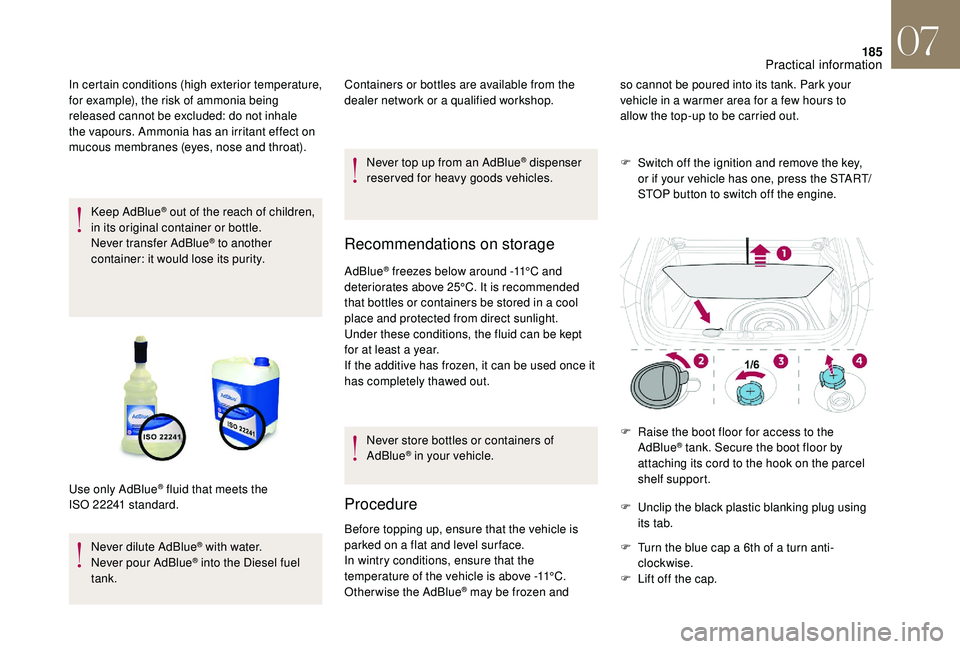
F
R
aise the boot floor for access to the
AdBlue
® tank. Secure the boot floor by
attaching its cord to the hook on the parcel
shelf support.
F
U
nclip the black plastic blanking plug using
its tab.
F
T
urn the blue cap a 6th of a turn anti-
clockwise.
F
L
ift off the cap.
In certain conditions (high exterior temperature,
for example), the risk of ammonia being
released cannot be excluded: do not inhale
the vapours. Ammonia has an irritant effect on
mucous membranes (eyes, nose and throat).
Use only AdBlue
® fluid that meets the
ISO
22241 standard. so cannot be poured into its tank. Park your
vehicle in a warmer area for a few hours to
allow the top-up to be carried out.
07
Practical information
Page 188 of 296
186
Important: if your vehicle's AdBlue® tank
i
s completely empty – which is
confirmed by the alert messages and the
impossibility of starting the engine – you
must add at least 4 litres.
F
A
fter emptying the container or bottle, wipe
away any spillage around the tank filler
using a damp cloth. If any AdBlue
® additive is spilt or splashed,
wash immediately with cold water or wipe
with a damp cloth.
If the AdBlue
® has crystallised, clean it off
using a sponge and hot water.
F
R
efit the blue cap to the tank filler and turn it
a 6th of a turn clockwise, to its stop.
F
R
efit the black plastic blanking plug, clipping
it in on the flap.
F
R
efit the boot carpet and close the tailgate.
Important: in the event of a top-up after
a breakdown because of a lack of
AdBlue, you must wait around 5 minutes
before switching on the ignition, without
opening the driver’s door, unlocking
the vehicle, introducing the key into
the ignition switch, or introducing
the key of the "Keyless Entr y and
Star ting" system into the passenger
compartment .
Switch on the ignition, then wait for
10
seconds before starting the engine.
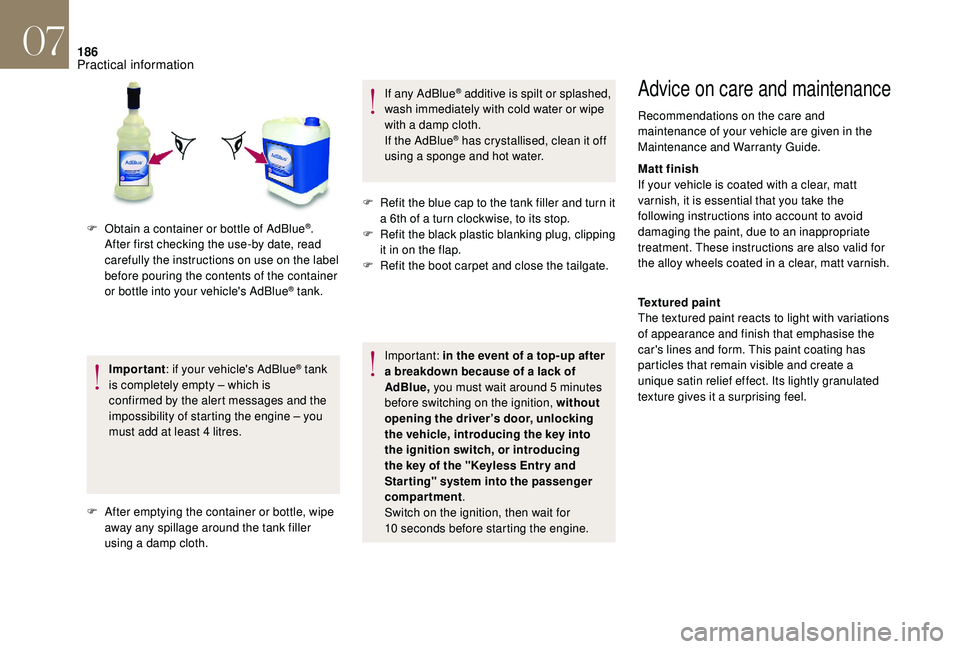
F
O
btain a container or bottle of AdBlue
®.
After first checking the use-by date, read
carefully the instructions on use on the label
before pouring the contents of the container
or bottle into your vehicle's AdBlue
® tank.
Advice on care and maintenance
Recommendations on the care and
maintenance of your vehicle are given in the
Maintenance and Warranty Guide.
Matt finish
If your vehicle is coated with a clear, matt
varnish, it is essential that you take the
following instructions into account to avoid
damaging the paint, due to an inappropriate
treatment. These instructions are also valid for
the alloy wheels coated in a clear, matt varnish.
Textured paint
The textured paint reacts to light with variations
of appearance and finish that emphasise the
car's lines and form. This paint coating has
particles that remain visible and create a
unique satin relief effect. Its lightly granulated
texture gives it a surprising feel.
07
Practical information
Page 195 of 296
193
List of tools
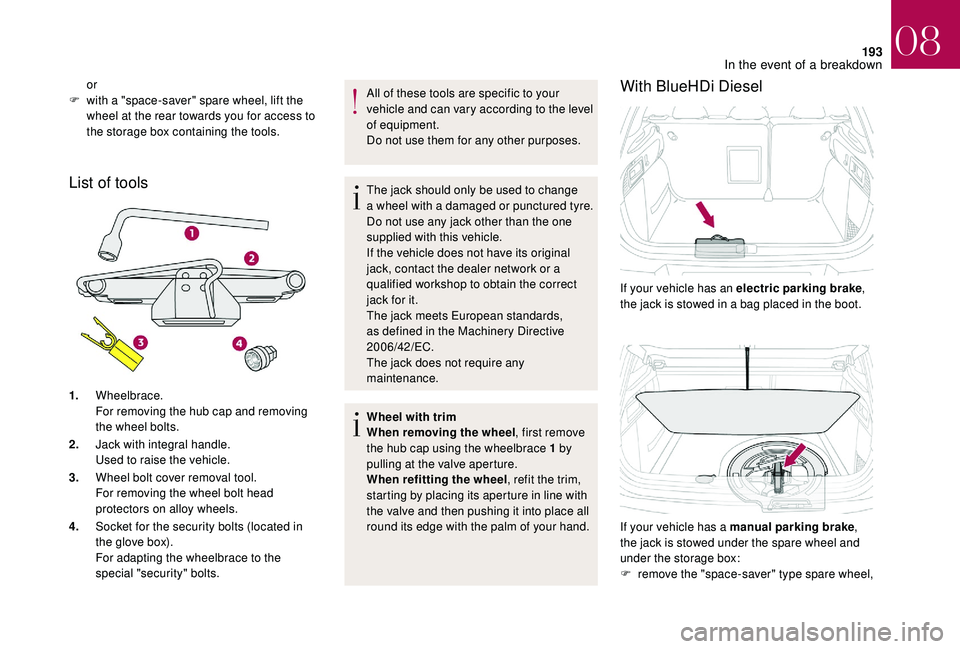
1.Wheelbrace.
For removing the hub cap and removing
the wheel bolts.
2. Jack with integral handle.
Used to raise the vehicle.
3. Wheel bolt cover removal tool.
For removing the wheel bolt head
protectors on alloy wheels.
4. Socket for the security bolts (located in
the glove box).
For adapting the wheelbrace to the
special "security" bolts. All of these tools are specific to your
vehicle and can vary according to the level
of equipment.
Do not use them for any other purposes.
The jack should only be used to change
a wheel with a damaged or punctured tyre.
Do not use any jack other than the one
supplied with this vehicle.
If the vehicle does not have its original
jack, contact the dealer network or a
qualified workshop to obtain the correct
jack for it.
The jack meets European standards,
as defined in the Machinery Directive
2006/42/EC.
The jack does not require any
maintenance.
Wheel with trim
When removing the wheel
, first remove
the hub cap using the wheelbrace 1 by
pulling at the valve aperture.
When refitting the wheel , refit the trim,
starting by placing its aperture in line with
the valve and then pushing it into place all
round its edge with the palm of your hand.
With BlueHDi Diesel
If your vehicle has an electric parking brake ,
the jack is stowed in a bag placed in the boot.
or
F
w
ith a "space-saver" spare wheel, lift the
wheel at the rear towards you for access to
the storage box containing the tools.
If your vehicle has a manual parking brake,
the jack is stowed under the spare wheel and
under the storage box:
F
r
emove the "space-saver" type spare wheel,
08
In the event of a breakdown
Page 216 of 296
214
Running out of fuel
(Diesel)
On vehicles fitted with Diesel engines, the fuel
system must be primed if you run out of fuel.
For all versions other than BlueHDi, refer to the
corresponding engine compartment view.For more information on Diesel misfuel
prevention , refer to the corresponding
section.
If the engine does not start first time, do
not keep trying but start the procedure
again from the beginning.
BlueHDi engines
F Fill the fuel tank with at least five litres of Diesel.
F
S
witch on the ignition (without starting the
engine).
F
W
ait around 6 seconds and switch off the
ignition.
F
R
epeat the operation 10 times.
F
O
perate the starter to run the engine.
Other HDi engines
(Except BlueHDi version)
F
F
ill the fuel tank with at least five litres of
Diesel.
F
O
pen the bonnet.
F
I
f necessary, unclip the cover to access the
priming pump.
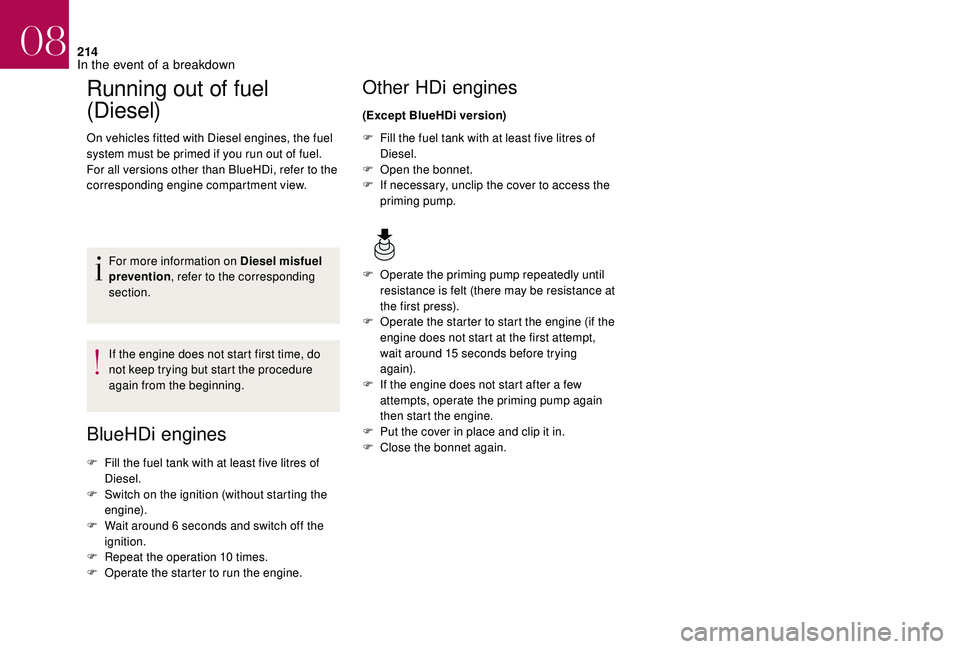
F
O
perate the priming pump repeatedly until
resistance is felt (there may be resistance at
the first press).
F
O
perate the starter to start the engine (if the
engine does not start at the first attempt,
wait around 15 seconds before trying
again).
F
I
f the engine does not start after a few
attempts, operate the priming pump again
then start the engine.
F
P
ut the cover in place and clip it in.
F
C
lose the bonnet again.
08
In the event of a breakdown
Page 221 of 296
219
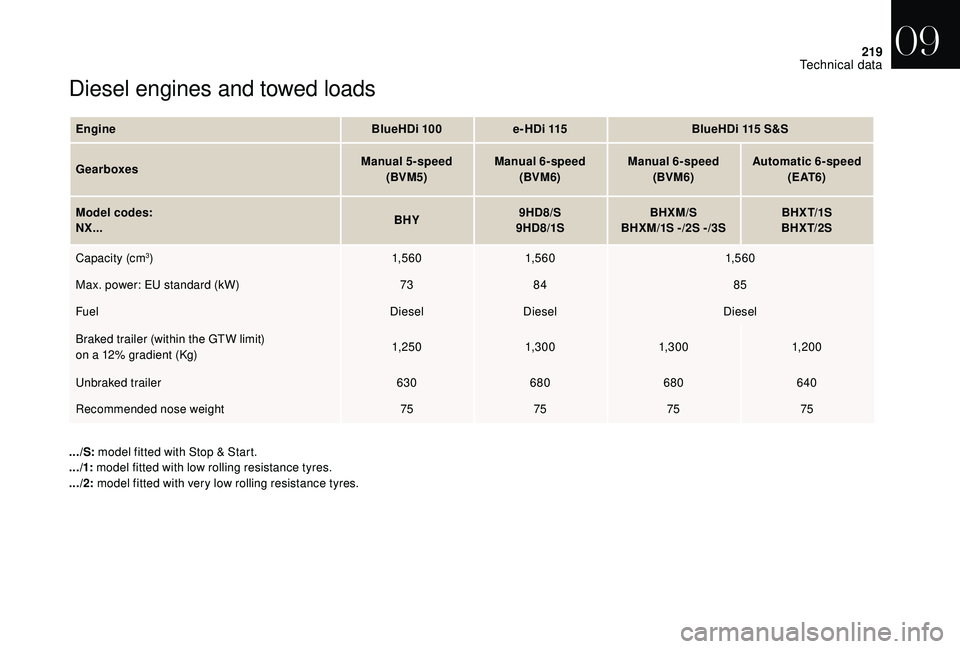
Diesel engines and towed loads
EngineBlueHDi 100e-HDi 115 BlueHDi 115 S&S
Gearboxes Manual 5-speed
(BVM5) Manual 6-speed
(BVM6) Manual 6-speed
(BVM6) Automatic 6-speed
( E AT 6 )
Model codes:
NX... BHY9HD8/S
9HD8/1S BHXM/S
BHXM/1S - /2S - /3S BHX T/1S
BHX T/2S
Capacity (cm
3) 1,5 6 01,5 6 0 1,5 6 0
Max. power: EU standard (kW) 7384 85
Fuel DieselDiesel Diesel
Braked trailer (within the GTW limit)
on a 12% gradient (Kg) 1, 25 0
1,3 0 0 1,3 0 01, 20 0
Unbraked trailer 630680 680640
Recommended nose weight 75757575
.../S: model fitted with Stop & Start.
.../1: model fitted with low rolling resistance tyres.
.../2: model fitted with very low rolling resistance tyres.
09
Technical data
Page 222 of 296
220
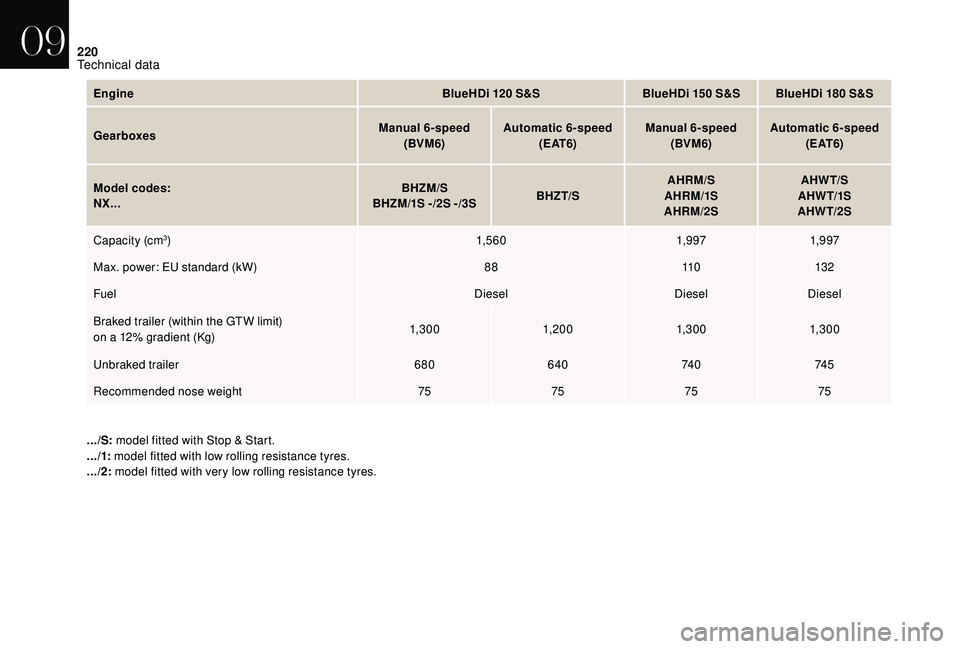
EngineBlueHDi 120 S&SBlueHDi 150 S&S BlueHDi 180 S&S
Gearboxes Manual 6-speed
(BVM6) Automatic 6-speed
( E AT 6 ) Manual 6-speed
(BVM6) Automatic 6-speed
( E AT 6 )
Model codes:
NX... BHZM/S
BHZM/1S - /2S - /3S BHZT/SAHRM/S
AHRM/1S
AHRM/2S AHW T/S
AHW T/1S
AHW T/2S
Capacity (cm
3) 1,5 6 01,9 971,9 97
Max. power: EU standard (kW) 8811 0132
Fuel DieselDieselDiesel
Braked trailer (within the GTW limit)
on a 12% gradient (Kg) 1,3 0 0
1, 20 0 1,3 0 01,3 0 0
Unbraked trailer 680640 74 074 5
Recommended nose weight 75757575
.../S: model fitted with Stop & Start.
.../1: model fitted with low rolling resistance tyres.
.../2: model fitted with very low rolling resistance tyres.
09
Technical data
Page 225 of 296
1
GPS satellite navigation –
Applications – Multimedia
audio system – Bluetooth
®
telephone
Contents The different functions and settings
described vary according to the version
and configuration of your vehicle.
As a safety measure and because it
requires sustained attention by the
driver, the pairing of a Bluetooth mobile
telephone with the Bluetooth hands-free
system of your audio system must be
done with the vehicle stationary
and the
ignition on.
The system is protected in such a way that
it will only operate in your vehicle.
The display of the message Energy
Economy Mode signals that a change to
standby is imminent.
The link below gives access to OSS (Open
Source Software) codes for the system.
https://www.groupe-psa.com/fr/oss/
https://www.groupe-psa.com/en/oss/
DS Connect Nav
First steps 2
S teering mounted controls 3
M
enus
4
V
oice commands
5
N
avigation
1
1
Connected navigation
1
4
Applications
1
7
Radio
2
3
DAB radio (Digital Audio Broadcasting)
2
5
Media
26
T
elephone
2
8
Settings
3
4
Frequently asked questions
3
7
DS Connect Nav
Page 226 of 296
2
12:13
18,5 21,5
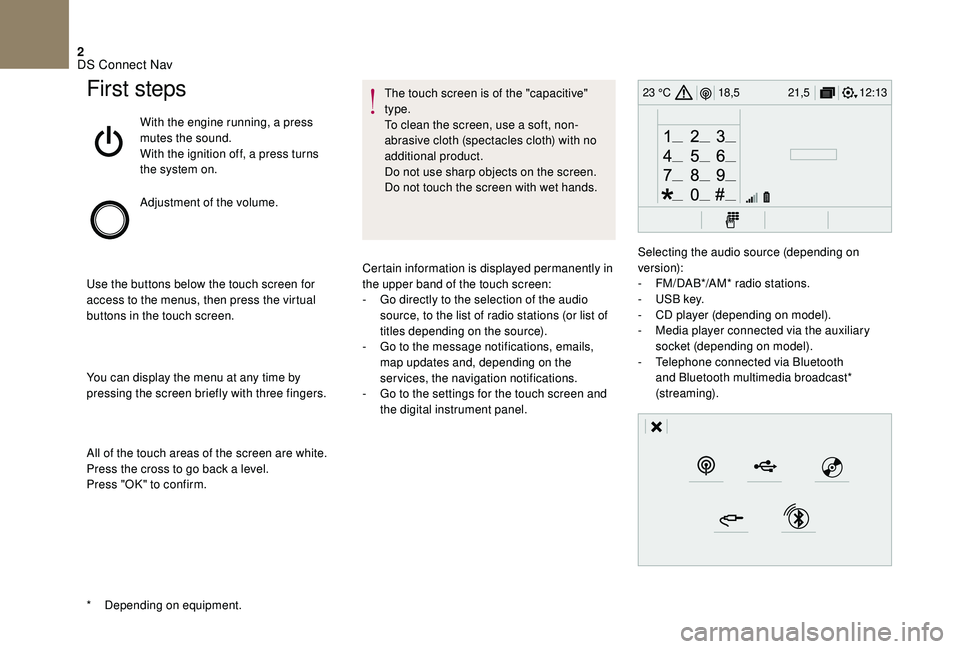
23 °CFirst steps
With the engine running, a press
mutes the sound.
With the ignition off, a press turns
the system on.
Adjustment of the volume.
Use the buttons below the touch screen for
access to the menus, then press the virtual
buttons in the touch screen.
You can display the menu at any time by
pressing the screen briefly with three fingers.
All of the touch areas of the screen are white.
Press the cross to go back a level.
Press "OK" to confirm. The touch screen is of the "capacitive"
type.
To clean the screen, use a soft, non-
abrasive cloth (spectacles cloth) with no
additional product.
Do not use sharp objects on the screen.
Do not touch the screen with wet hands.
*
D
epending on equipment. Certain information is displayed permanently in
the upper band of the touch screen:
-
G
o directly to the selection of the audio
source, to the list of radio stations (or list of
titles depending on the source).
-
G
o to the message notifications, emails,
map updates and, depending on the
services, the navigation notifications.
-
G
o to the settings for the touch screen and
the digital instrument panel. Selecting the audio source (depending on
version):
-
F
M/DAB*/AM* radio stations.
-
U
SB key.
-
C
D player (depending on model).
-
M
edia player connected via the auxiliary
socket (depending on model).
-
T
elephone connected via Bluetooth
and Bluetooth multimedia broadcast*
(streaming).
DS Connect Nav
Page 228 of 296
4
12:13
18,5 21,5
23 °C
FM/87.5 MHz
87.5MHz
12:13
18,5 21,5
23 °C
12:13
18,5 21,5
23 °C
12:13
18,5 21,5
23 °C
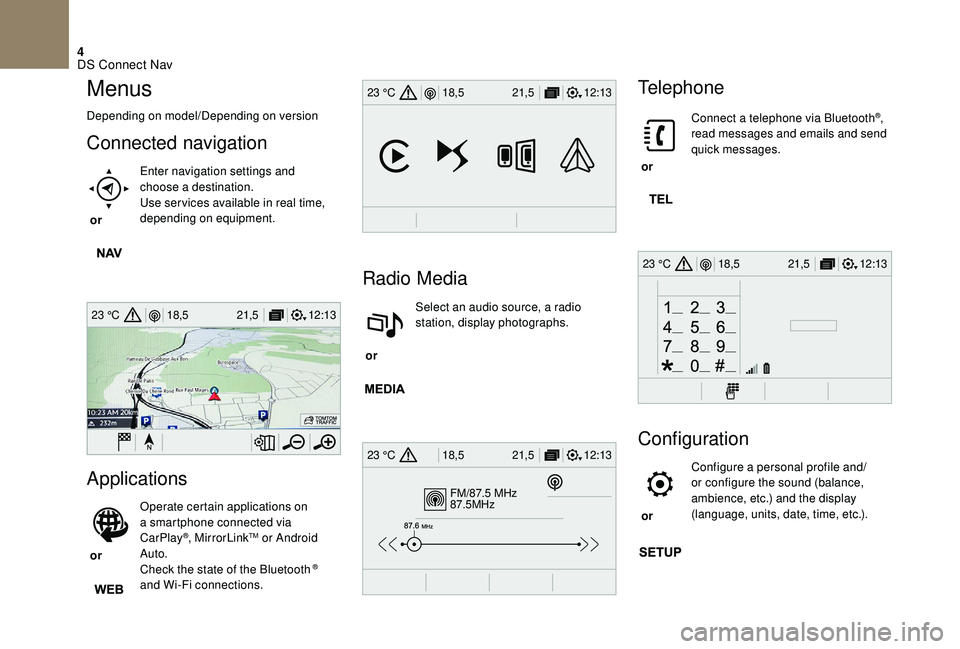
Menus
Depending on model/Depending on version
Connected navigation
or Enter navigation settings and
choose a destination.
Use ser vices available in real time,
depending on equipment.
Applications
or Operate certain applications on
a smartphone connected via
CarPlay
®, MirrorLinkTM or Android
Auto.
Check the state of the Bluetooth
®
and Wi-Fi connections.
Radio Media
or Select an audio source, a radio
station, display photographs.
Telephone
or Connect a telephone via Bluetooth
®,
read messages and emails and send
quick messages.
Configuration
or Configure a personal profile and/
or configure the sound (balance,
ambience, etc.) and the display
(language, units, date, time, etc.).
DS Connect Nav
Page 233 of 296
9
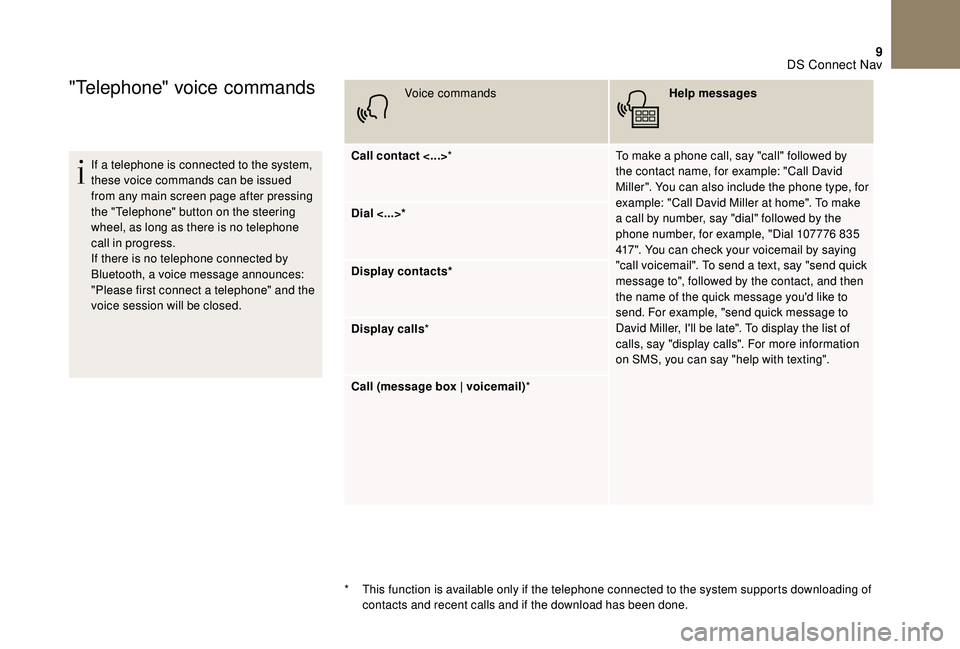
"Telephone" voice commands
If a telephone is connected to the system,
these voice commands can be issued
from any main screen page after pressing
the "Telephone" button on the steering
wheel, as long as there is no telephone
call in progress.
If there is no telephone connected by
Bluetooth, a voice message announces:
"Please first connect a telephone" and the
voice session will be closed.Voice commands
Help messages
Call contact <...> * To make a phone call, say "call" followed by
the contact name, for example: "Call David
Miller". You can also include the phone type, for
example: "Call David Miller at home". To make
a call by number, say "dial" followed by the
phone number, for example, "Dial 107776 835
417". You can check your voicemail by saying
"call voicemail". To send a text, say "send quick
message to", followed by the contact, and then
the name of the quick message you'd like to
send. For example, "send quick message to
David Miller, I'll be late". To display the list of
calls, say "display calls". For more information
on SMS, you can say "help with texting".
Dial <...>*
Display contacts*
Display calls
*
Call (message box | voicemail) *
*
T
his function is available only if the telephone connected to the system supports downloading of
contacts and recent calls and if the download has been done.
DS Connect Nav