USB Citroen DS5 2011 1.G User Guide
[x] Cancel search | Manufacturer: CITROEN, Model Year: 2011, Model line: DS5, Model: Citroen DS5 2011 1.GPages: 348, PDF Size: 10.33 MB
Page 286 of 348
09
/
/
//
//
/ +/
-
+
/
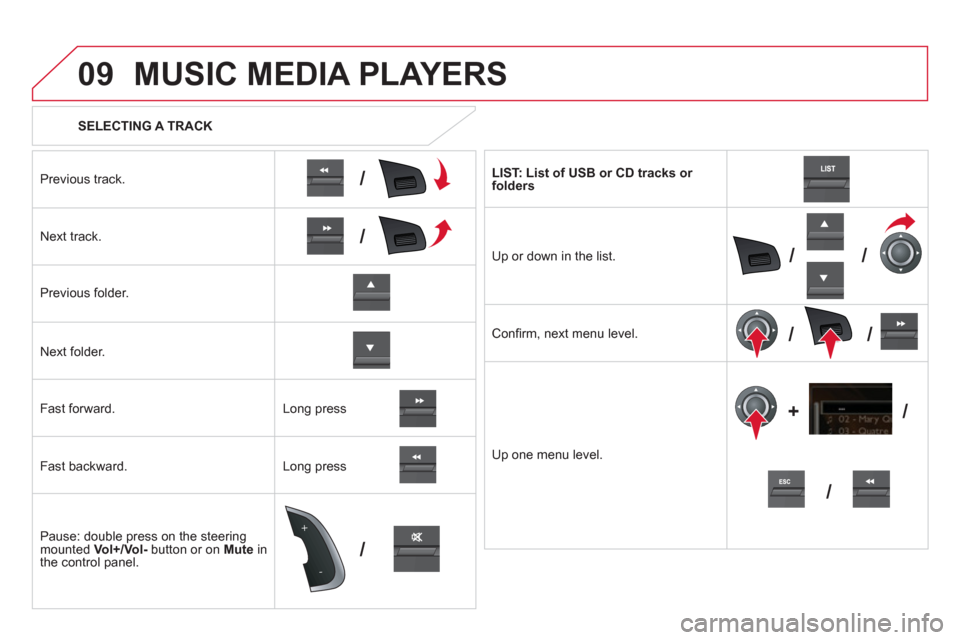
SELECTING A TRACK
MUSIC MEDIA PLAYERS
Previous track.
N
ext track.
Pr
evious folder.
N
ext folder.
F
ast forward.
Fast backward.
Pause: double press on the steerin
g mounted Vol+/Vol-button or on Muteinthe control panel. LI
ST: List of USB or CD tracks or folders
Up or down in the list.
Confi rm
, next menu level.
Up one menu level.
Lon
g press
Long press
Page 287 of 348
1
2
1
2
09
285
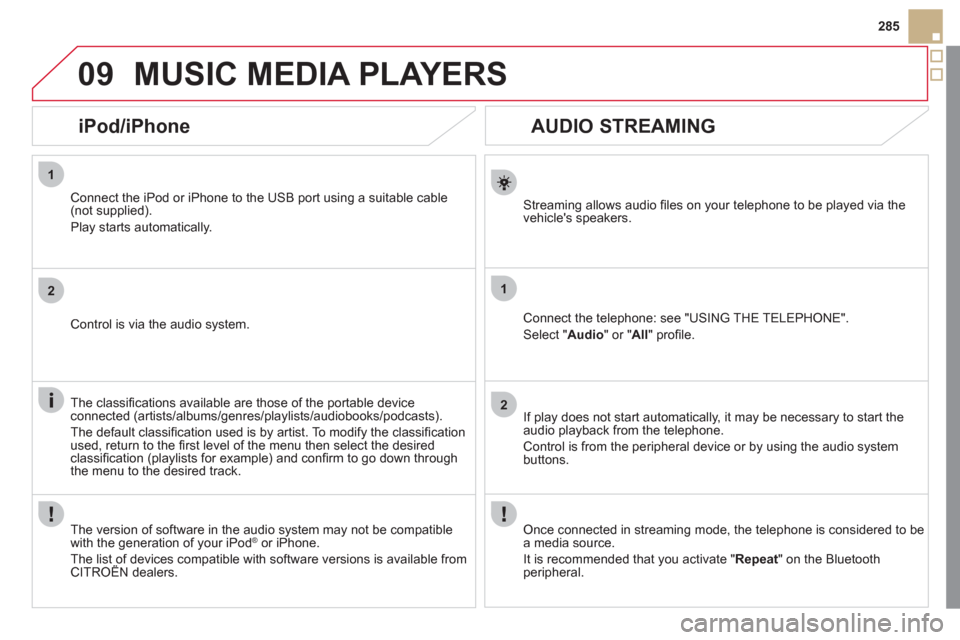
AUDIO STREAMING
Streaming allows audio fi les on your telephone to be played via the
vehicle's speakers.
Connect the telephone: see "USING THE TELEPHONE".
Select " Audio" or " All" profi le.
I
f play does not start automatically, it may be necessary to start the audio playback from the telephone.
Control is from the peripheral device or b
y using the audio system buttons.
Once connected in streaming mode, the telephone is considered to bea media source.
It is recommended that
you activate " Repeat" on the Bluetooth
peripheral.
MUSIC MEDIA PLAYERS
iPod/iPhone
Connect the iPod or iPhone to the USB port using a suitable cable (not supplied).
Play starts automatically.
Control is via the audio system.
The classifi cations available are those of the portable device
connected (artists/albums/genres/playlists/audiobooks/podcasts).
The de
fault classifi cation used is by artist. To modify the classifi cationused, return to the fi rst level of the menu then select the desired classifi cation (playlists for example) and confi rm to go down through
the menu to the desired track.
The version o
f software in the audio system may not be compatible
with the generation of your iPodÆor iPhone.
The list of devices compatible with software versions is available from CITROÀN dealers.
Page 294 of 348
12 SCREEN MENU MAP
2
3
3
1
4
2
2
1
4
4
2
2
1
1
1
2
1
1
2
2
2
2
2
2
2
3
3
2
2
2
1
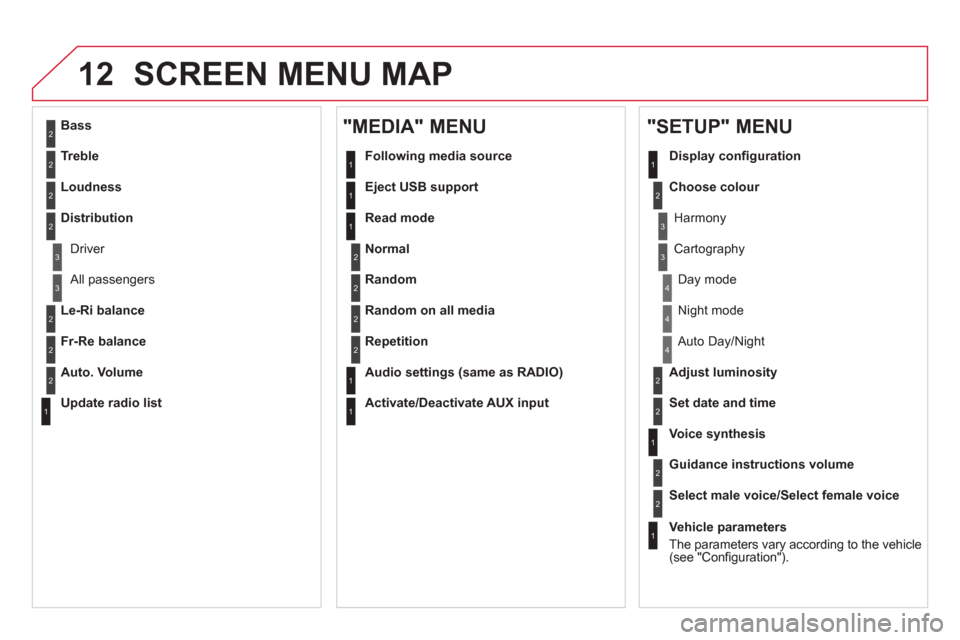
Random on all media
Repetition
Audio settin
gs (same as RADIO)
Activate/Deactivate AUX input
"MEDIA" MENU
Following media source
E
ject USB support
Read mode
Norma
l
Random
All passengers
Le-Ri balance
Fr-Re balance
Auto. Volume
Update radio list
Bass
Treble
Loudness
Distribution
Driv
er
Ni
ght mode
Auto Day/Night
Ad
just luminosity
Set date and time
"SETUP" MENU
Display confi guration
Choose colou
r
Harmony
Cartography
Da
y mode
Voice synthesis
Guidance instructions volume
Select male voice/Select female voice
1
Vehicle parameters
The parameters var
y according to the vehicle(see "Confi guration").
Page 297 of 348
295
FREQUENTLY ASKED QUESTIONS
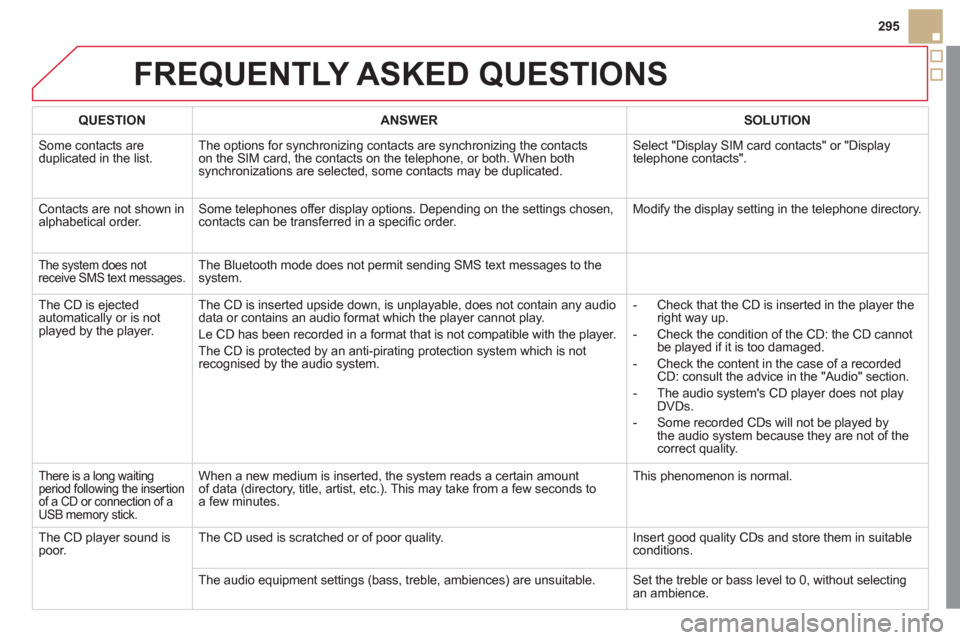
QUESTIONANSWER SOLUTION
Some contacts are
duplicated in the list. The options for synchronizing contacts are synchronizing the contacts
on the SIM card, the contacts on the telephone, or both. When both
synchronizations are selected, some contacts may be duplicated.
Select "Display SIM card contacts" or "Displaytelephone contacts".
Contacts are not shown in
alphabetical order.Some telephones offer display options. Depending on the settings chosen, contacts can be transferred in a specifi c order.Modify the display setting in the telephone directory.
The system does notreceive SMS text messages. The Bluetooth mode does not permit sending SMS text messages to the
system.
The CD is ejected
automatically or is not played by the player.
The CD is inserted upside down, is unplayable, does not contain any audio
data or contains an audio format which the player cannot play.
Le CD has been recorded in a format that is not compatible with the player.
The CD is protected by an anti-pirating protection system which is not recognised by the audio system.
-
Check that the CD is inserted in the player the
right way up.
-
Check the condition of the CD: the CD cannot
be played if it is too damaged.
-
Check the content in the case of a recordedCD: consult the advice in the "Audio" section.
-
The audio system's CD player does not play DVDs.
-
Some recorded CDs will not be played bythe audio system because they are not of thecorrect quality.
There is a long waiting
period following the insertion
of a CD or connection of a USB memory stick.
When a new medium is inserted, the system reads a certain amount
of data (directory, title, artist, etc.). This may take from a few seconds to a few minutes.
This phenomenon is normal.
The CD player sound is poor. The CD used is scratched or of poor quality.Insert good quality CDs and store them in suitableconditions.
The audio equipment settings (bass, treble, ambiences) are unsuitable. Set the treble or bass level to 0, without selectingan ambience.
Page 300 of 348
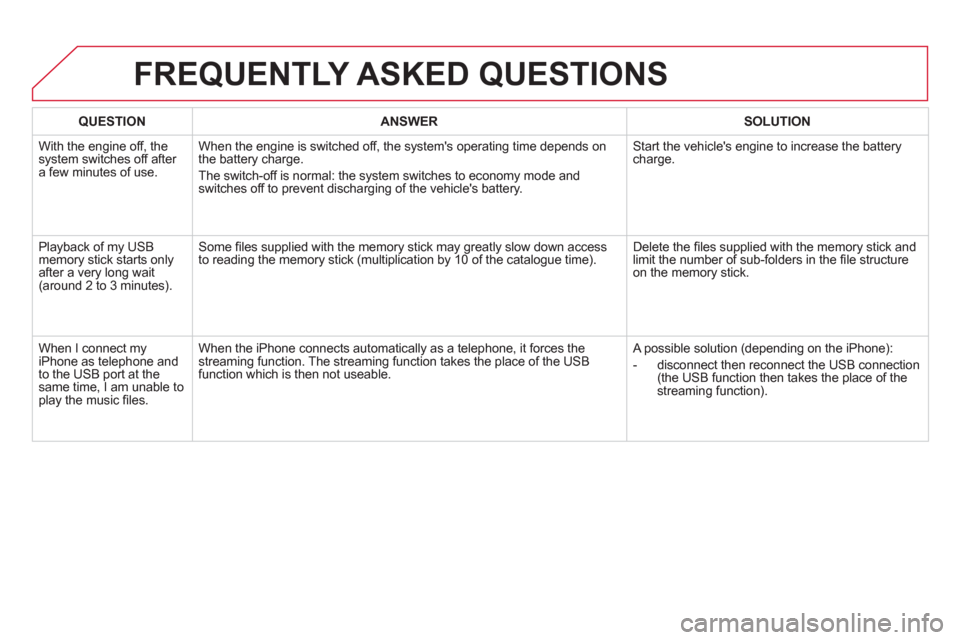
QUESTIONANSWER SOLUTION
With the engine off, thesystem switches off after a few minutes of use.
When the engine is switched off, the system's operating time depends on
the battery charge.
The switch-off is normal: the system switches to economy mode and
switches off to prevent discharging of the vehicle's battery.
Start the vehicle's engine to increase the battery charge.
Playback of my USB memory stick starts onlyafter a very long wait (around 2 to 3 minutes).
Some fi les supplied with the memory stick may greatly slow down access
to reading the memory stick (multiplication by 10 of the catalogue time).Delete the fi les supplied with the memory stick and limit the number of sub-folders in the fi le structure
on the memory stick.
W
hen I connect myiPhone as telephone and
to the USB port at the same time, I am unable to play the music fi les.W
hen the iPhone connects automatically as a telephone, it forces the
streaming function. The streaming function takes the place of the USB
function which is then not useable.
A possible solution (depending on the iPhone):
- disconnect then reconnect the
USB connection(the USB function then takes the place of the
streaming function).
FREQUENTLY ASKED QUESTIONS
Page 302 of 348
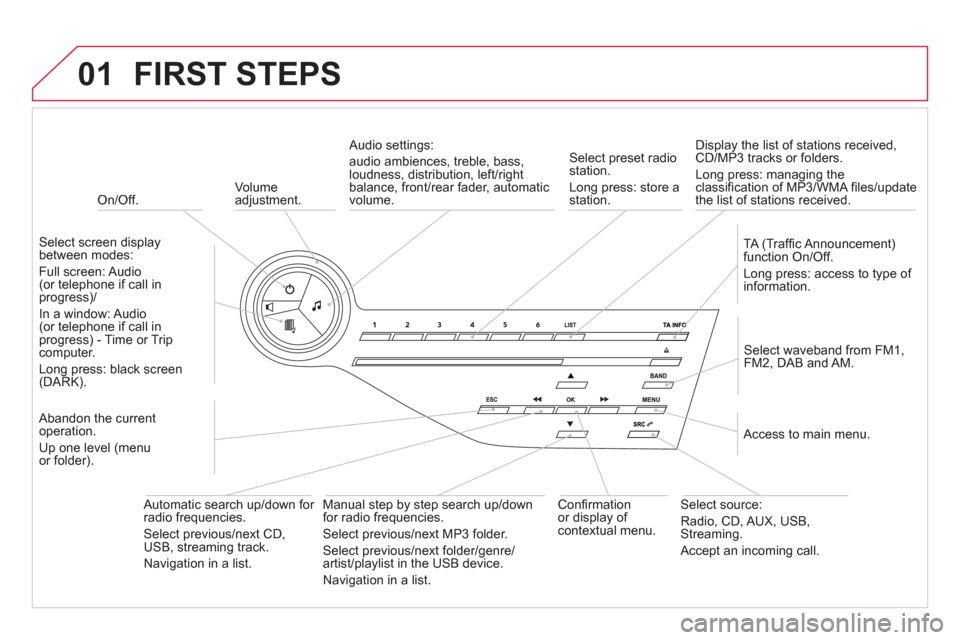
01
On/Off.
FIRST STEPS
Volume
adjustment.
Select screen displaybetween modes:
F
ull screen: Audio (or telephone if call inprogress)/
In
a window: Audio(or telephone if call inprogress) - Time or Trip computer.
Long press: black screen(DARK).
Select waveband from FM1
,
FM2, DAB and AM.
Select preset radiostation.
Long press: store a
station.
Displa
y the list of stations received,CD/MP3 tracks or folders.
Long press: managing the classifi cation of MP3/WMA fi les/update
the list of stations received.
TA
(Traffi c Announcement)function On/Off.
Lon
g press: access to type of
information.
Confi rmationor display of contextual menu.
Automatic search u
p/down for radio frequencies.
Select previous/next CD, USB, streaming track.
Navigation in a list.
Abandon the current
operation.
Up one level
(menu
or folder).
Manual step b
y step search up/down
for radio frequencies.
Select previous/next MP3 folder.
Select previous/next folder/genre/
artist/playlist in the USB device.
Navigation in a list.
Select source:
Radio, CD, AUX, USB,Streaming.
Accept an incoming call.
A
ccess to main menu.
Audio settings:
au
dio ambiences, treble, bass, loudness, distribution, left/right
balance, front/rear fader, automatic
volume.
Page 306 of 348
1
2
04
1
1
2
RDS, if displayed, enables you to continue listening to the samestation by automatic retuning to alternative frequencies. However,
in certain conditions, coverage of an RDS station may not be
assured throughout the country as radio stations do not cover
100 % of the territory. This explains the loss of reception of the station during a journey.
AUDIO
RDS
RECEIVING TA MESSAGES
The TA (Traffi c Announcement) function gives priority to TA alert messages. To operate, this function needs good reception of a radio station transmitting this type of message. When a traffi c report is transmitted, the current audio source (Radio, CD,
USB, ...) is interrupted automatically to play the TA message. Normal playback of the audio source resumes at the end of the
transmission of the message.
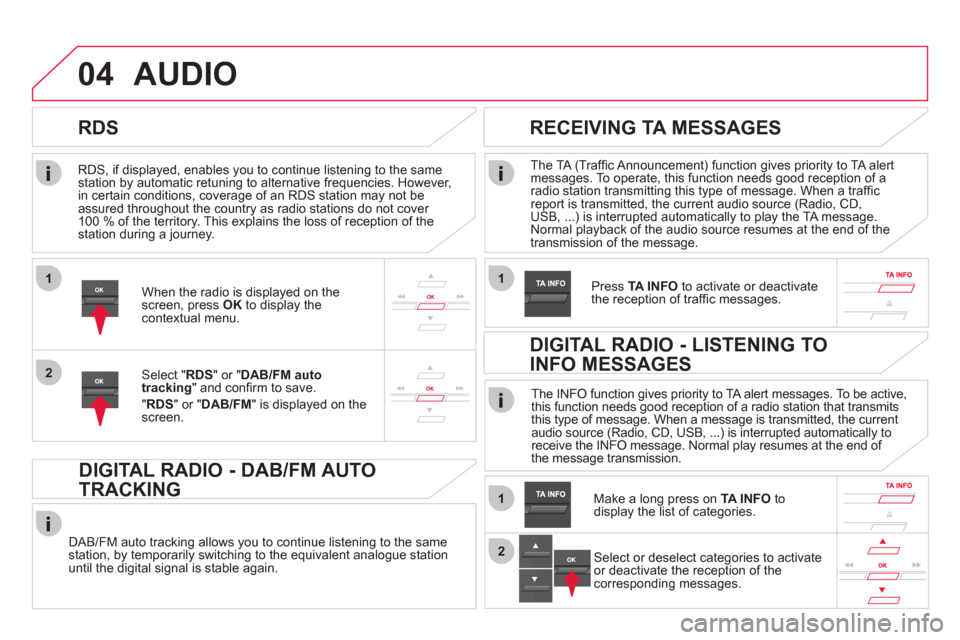
Pr
ess TA INFO
to activate or deactivatethe reception of traffi c messages.When the radio is displayed on the screen, press OKto display thecontextual menu.
Select " RDS
" or " DAB/FM auto
tracking" and confi rm to save.
"RDS " or "DAB/FM" is displayed on the screen.
DIGITAL RADIO - DAB/FM AUTO
TRACKING
DAB/FM auto tracking allows you to continue listening to the same station, by temporarily switching to the equivalent analogue station
until the digital signal is stable again. The INF
O function gives priority to TA alert messages. To be active,
this function needs good reception of a radio station that transmits
this type of message. When a message is transmitted, the current
audio source (Radio, CD, USB, ...) is interrupted automatically to
receive the INFO message. Normal play resumes at the end of
the message transmission.
Make a long press on
TA INFO
to
display the list of categories.
DIGITAL RADIO - LISTENING TO
INFO MESSAGES
Select or deselect categories to activate
or deactivate the reception of the
corresponding messages.
Page 309 of 348
04
307
AUDIO
CD, USB
INFORMATION AND ADVICE
On a single disc, the CD player can read up to 255 MP3 fi les spread
over 8 directory levels. However, it is recommended that this be kept
to 2 levels so as to limit the time taken to access and play the CD.
Durin
g play, the folder structure is not observed.
In order to be able to pla
y a recorded CDR or CDRW, when recordingit is preferable to select standards ISO 9660 level 1.2 or Joliet.
If the disc is recorded in another format, it ma
y not be played correctly.
It is recommended that the same recording standard is always usedfor an individual disc, with as low a speed as possible (4x maximum)for optimum sound quality.
In the particular case o
f a multi-session CD, the Joliet standard is
recommended.
Do not connect a hard disk or U
SB device other than audio players to
the USB port. This may cause damage to your installation.
The audio system will only play
fi les with extension ".mp3" or ".wma"
and a compression rate that is constant or variable between 32 Kbps
and 320 Kbps.
It is advisable to restrict fi le names to 20 characters without usin
gspecial characters (e.g. " ? ; ù) to avoid any playing or displaying problems.
The pla
ylists accepted are types .m3u and .pls.
The number o
f fi les is limited to 5 000 in 500 directories on a maximum of 8 levels.
Page 310 of 348
04
1
3
2
4
5
CD, USB
AUDIO
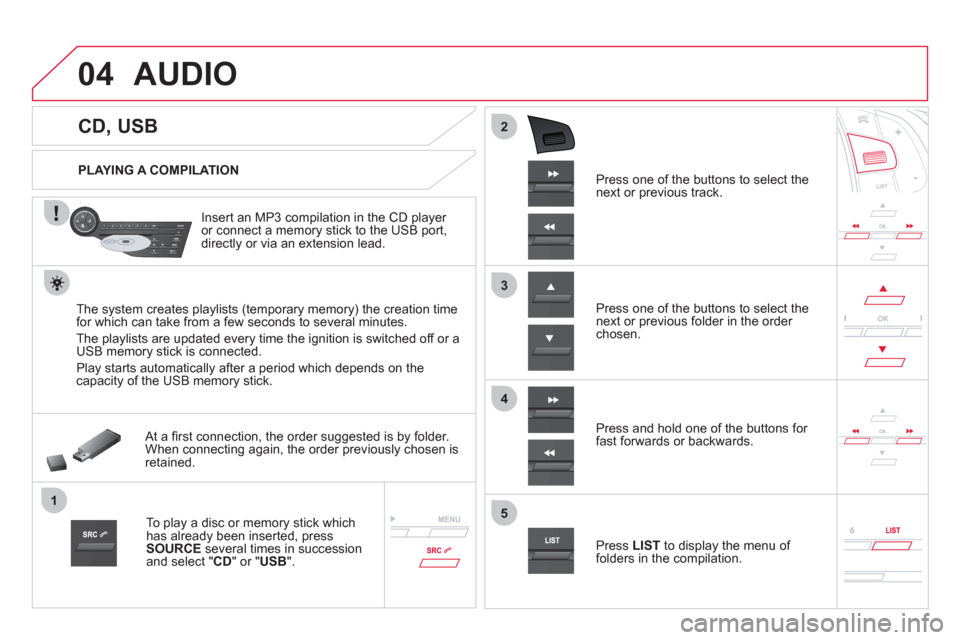
PLAYING A COMPILATION
Insert an MP3 compilation in the
CD player or connect a memory stick to the USB port,
directly or via an extension lead.
The s
ystem creates playlists (temporary memory) the creation time
for which can take from a few seconds to several minutes.
The pla
ylists are updated every time the ignition is switched off or aUSB memory stick is connected.
Pla
y starts automatically after a period which depends on the capacity of the USB memory stick.
At a fi rst connection, the order suggested is by folder.When connecting again, the order previously chosen is retained.
To play a disc or memory stick whichhas already been inserted, press
SOURCE
several times in successionand select " CD" or "USB".
Pr
ess one of the buttons to select the next or previous track.
Pr
ess one of the buttons to select the next or previous folder in the order chosen.
Pr
ess and hold one of the buttons for
fast forwards or backwards.
Press LISTto display the menu of folders in the compilation.
Page 311 of 348
7
6
8
9
2
1
04
309
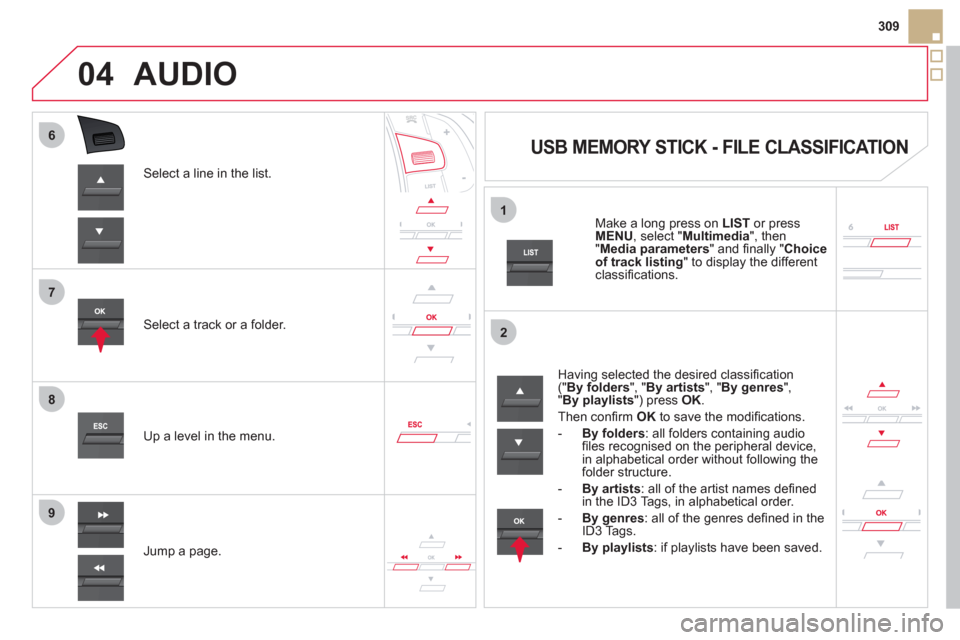
Select a line in the list.
Select a track or a folder.
Jump a pa
ge. Up a level in the menu.
AUDIO
USB MEMORY STICK - FILE CLASSIFICATION
Having selected the desired classifi cation (" By folders", " By artists", " By genres",
"By playlists ") press OK.
Then confi rm OKto save the modifi cations.
-
By folders: all folders containing audiofi les recognised on the peripheral device, in alphabetical order without following the folder structure.
-
By artists
: all of the artist names defi ned in the ID3 Tags, in alphabetical order.
-By genres
: all of the genres defi ned in the ID3 Tags.
-
By playlists
: if playlists have been saved.
Make a long press on LISTor press
MENU , select " Multimedia
", then
" Media parameters" and fi nally "Choice of track listing
" to display the differentclassifi cations.