radio Citroen DS5 2011 1.G Owner's Guide
[x] Cancel search | Manufacturer: CITROEN, Model Year: 2011, Model line: DS5, Model: Citroen DS5 2011 1.GPages: 348, PDF Size: 10.33 MB
Page 305 of 348
1
2
1
04
303
AUDIO
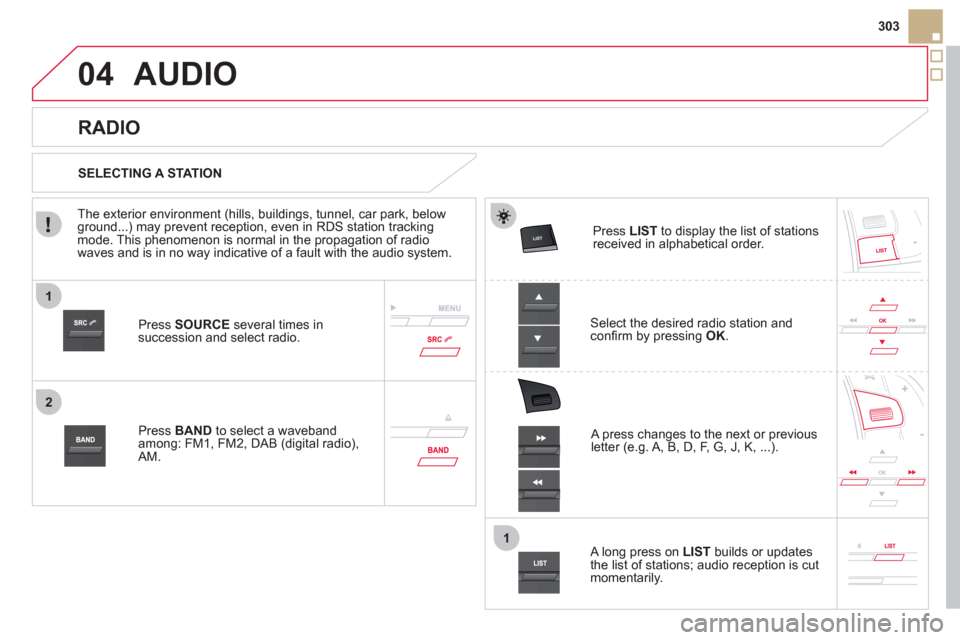
Press SOURCEseveral times in succession and select radio.
Pr
ess BAND to select a waveband among: FM1, FM2, DAB (digital radio), AM.
Press LISTto display the list of stationsreceived in alphabetical order.
A press changes to the next or previous letter (e.g. A, B, D, F, G, J, K, ...).
RADIO
Select the desired radio station andconfi rm by pressing OK.
SELECTING A STATION
A lon
g press on LIST
builds or updates
the list of stations; audio reception is cut
momentarily.
The exterior environment
(hills, buildings, tunnel, car park, belowground...) may prevent reception, even in RDS station tracking mode. This phenomenon is normal in the propagation of radio
waves and is in no way indicative of a fault with the audio system.
Page 306 of 348
1
2
04
1
1
2
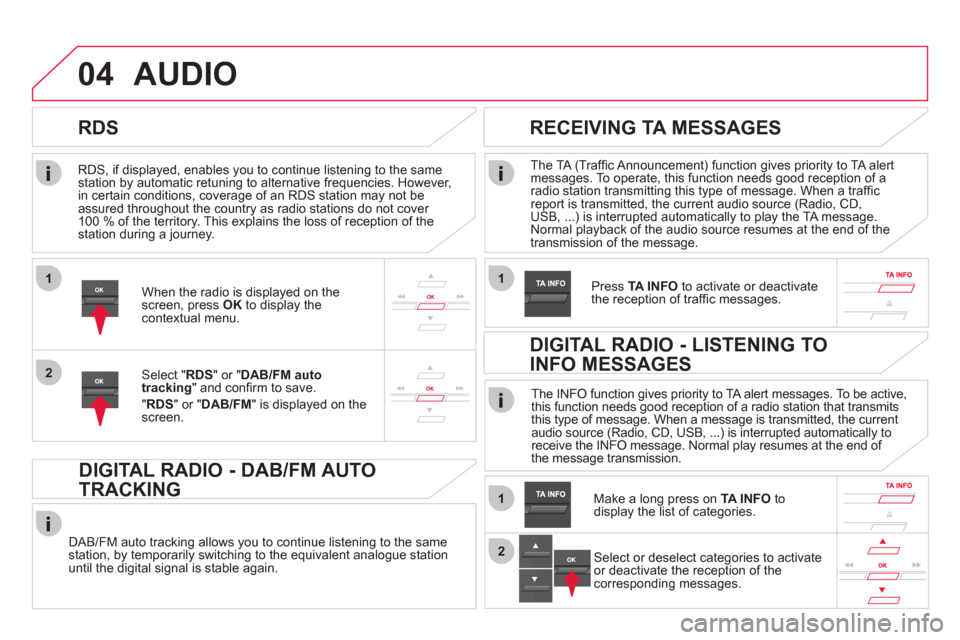
RDS, if displayed, enables you to continue listening to the samestation by automatic retuning to alternative frequencies. However,
in certain conditions, coverage of an RDS station may not be
assured throughout the country as radio stations do not cover
100 % of the territory. This explains the loss of reception of the station during a journey.
AUDIO
RDS
RECEIVING TA MESSAGES
The TA (Traffi c Announcement) function gives priority to TA alert messages. To operate, this function needs good reception of a radio station transmitting this type of message. When a traffi c report is transmitted, the current audio source (Radio, CD,
USB, ...) is interrupted automatically to play the TA message. Normal playback of the audio source resumes at the end of the
transmission of the message.
Pr
ess TA INFO
to activate or deactivatethe reception of traffi c messages.When the radio is displayed on the screen, press OKto display thecontextual menu.
Select " RDS
" or " DAB/FM auto
tracking" and confi rm to save.
"RDS " or "DAB/FM" is displayed on the screen.
DIGITAL RADIO - DAB/FM AUTO
TRACKING
DAB/FM auto tracking allows you to continue listening to the same station, by temporarily switching to the equivalent analogue station
until the digital signal is stable again. The INF
O function gives priority to TA alert messages. To be active,
this function needs good reception of a radio station that transmits
this type of message. When a message is transmitted, the current
audio source (Radio, CD, USB, ...) is interrupted automatically to
receive the INFO message. Normal play resumes at the end of
the message transmission.
Make a long press on
TA INFO
to
display the list of categories.
DIGITAL RADIO - LISTENING TO
INFO MESSAGES
Select or deselect categories to activate
or deactivate the reception of the
corresponding messages.
Page 307 of 348
1
2
04
305
AUDIO
Radio text is information transmitted by the radio station related to the current programme or song.
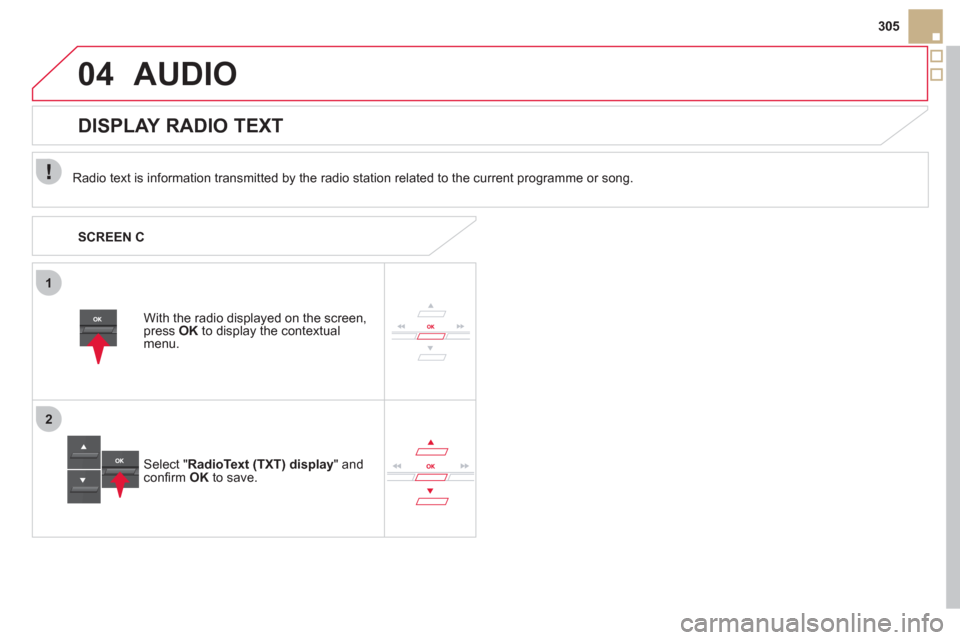
With the radio displa
yed on the screen, press OKto display the contextual menu.
Select " RadioText (TXT) display" andconfi rm OK
to save.
DISPLAY RADIO TEXT
SCREEN C
Page 324 of 348
1
2
3
06
Press ‘
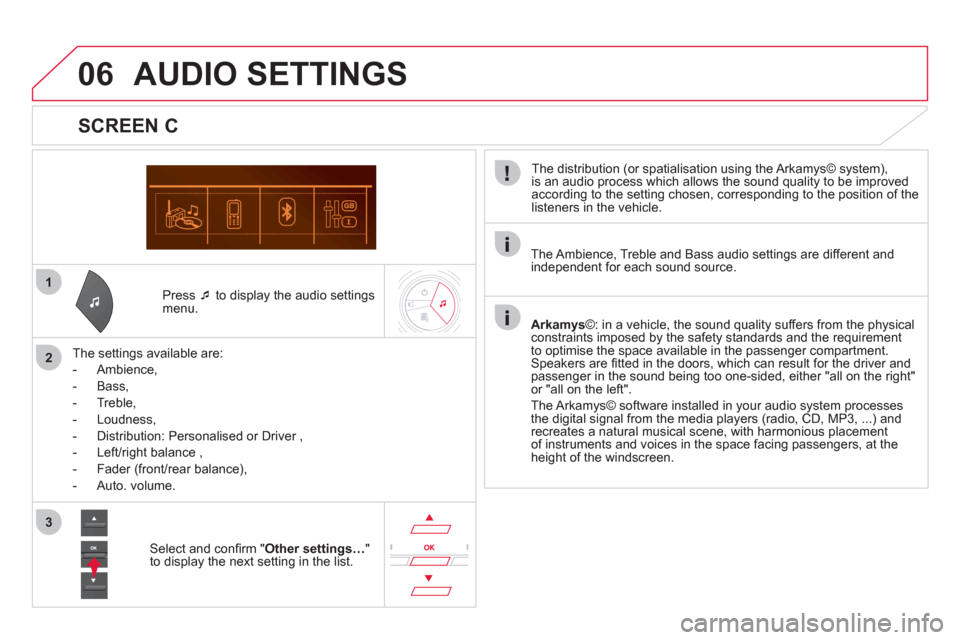
to display the audio settingsmenu.
The settin
gs available are:
-
Ambience,
- Bass,
-
Treble,
- Loudness,
- Distribution: Personalised or Driver ,
- Left/ri
ght balance ,
- Fader
(front/rear balance),
-
Auto. volume.
SCREEN C
The distribution (or spatialisation using the Arkamys© system),
is an audio process which allows the sound quality to be improved
according to the setting chosen, corresponding to the position of the
listeners in the vehicle.
AUDIO SETTINGS
Select and confi rm " Other settings…"
to display the next setting in the list. The Ambience, Treble and Bass audio settin
gs are different andindependent for each sound source.
Arkamys©: in a vehicle, the sound quality suffers from the physicalconstraints imposed by the safety standards and the requirement
to optimise the space available in the passenger compartment. Speakers are fi tted in the doors, which can result for the driver and passenger in the sound being too one-sided, either "all on the right"or "all on the left".
The Arkam
ys© software installed in your audio system processes
the digital signal from the media players (radio, CD, MP3, ...) and recreates a natural musical scene, with harmonious placement
of instruments and voices in the space facing passengers, at the height of the windscreen.
Page 327 of 348
09
325
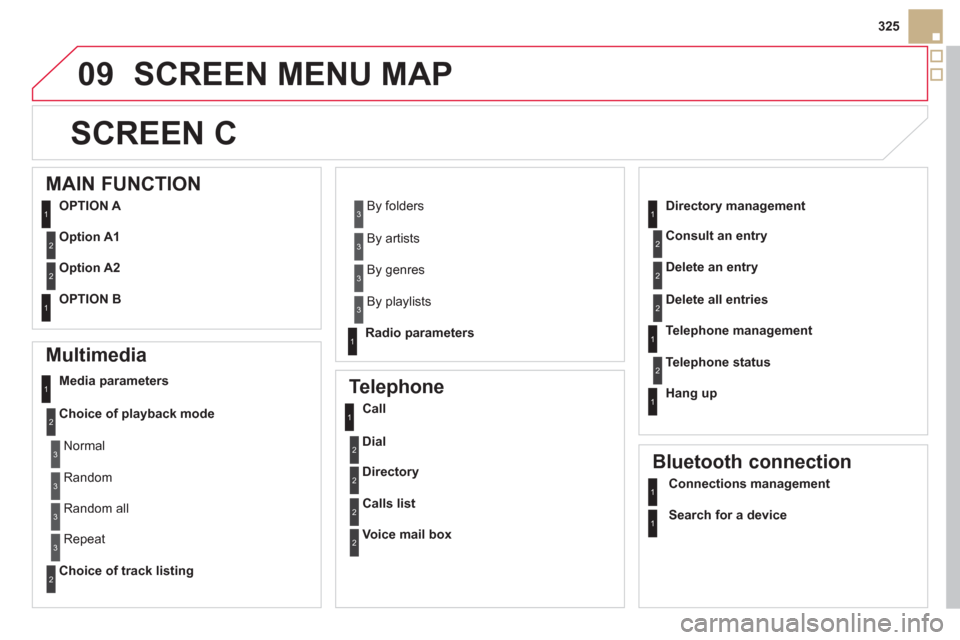
SCREEN MENU MAP
SCREEN C
Multimedia
Media parameters
Choice of pla
yback mode
Choice of track listing
Telephone
Call
Dial
Directory
Calls list
Voice mail box
Directory management
Consult an entr
y
Delete an entry
Delete all entries
Telephone mana
gement
Telephone status
Hang up
Bluetooth connection
Normal
Random
R
andom all
Repeat B
y folders
B
y artists
B
y genres
B
y playlists
Radio parameters
1
2
2
1
2
2
2
2
1
2
2
2
1
2
1
1
1
3
3
3
3
3
3
3
3
1
MAIN FUNCTION
OPTION A
O
ption A1
Option A2
OPTION B
1
2
2
1
Connections management
Search for a device
Page 329 of 348
327
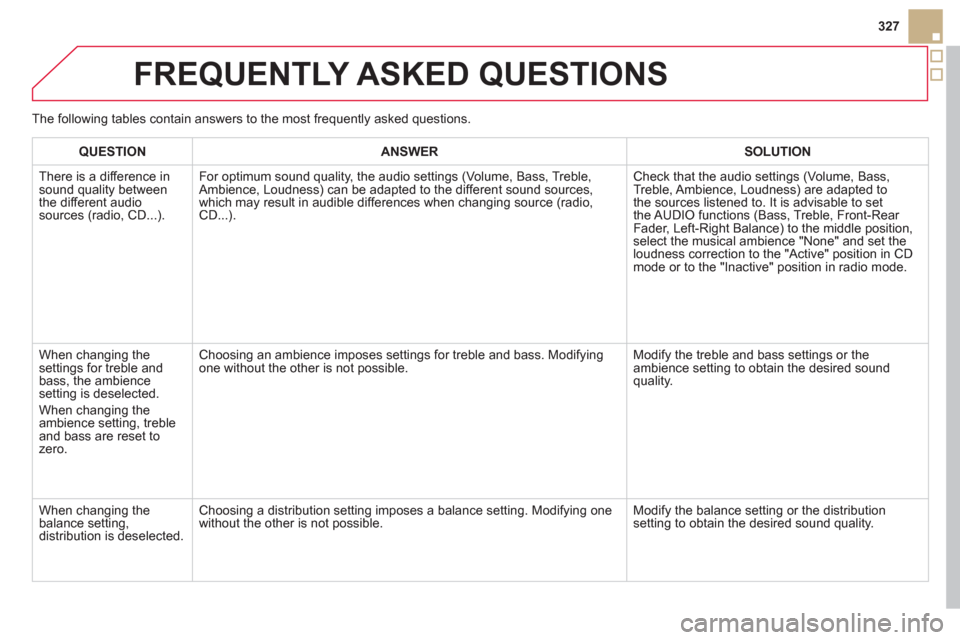
FREQUENTLY ASKED QUESTIONS
QUESTIONANSWERSOLUTION
There is a difference in
sound quality between
the different audiosources (radio, CD...).
For optimum sound qualit
y, the audio settings (Volume, Bass, Treble,
Ambience, Loudness) can be adapted to the different sound sources,
which may result in audible differences when changing source (radio, CD...).Check that the audio settin
gs (Volume, Bass,
Treble, Ambience, Loudness) are adapted to
the sources listened to. It is advisable to set
the AUDIO functions (Bass, Treble, Front-Rear Fader, Left-Right Balance) to the middle position, select the musical ambience "None" and set theloudness correction to the "Active" position in CD
mode or to the "Inactive" position in radio mode.
When chan
ging the
settings for treble andbass, the ambience
setting is deselected.
When changing the
ambience settin
g, trebleand bass are reset to
zero.Choosin
g an ambience imposes settings for treble and bass. Modifying
one without the other is not possible.Modify the treble and bass settings or the ambience setting to obtain the desired sound
quality.
When changing the
balance setting,
distribution is deselected.
Choosing a distribution setting imposes a balance setting. Modifying one
without the other is not possible.Modify the balance setting or the distribution
setting to obtain the desired sound quality. The
following tables contain answers to the most frequently asked questions.
Page 330 of 348
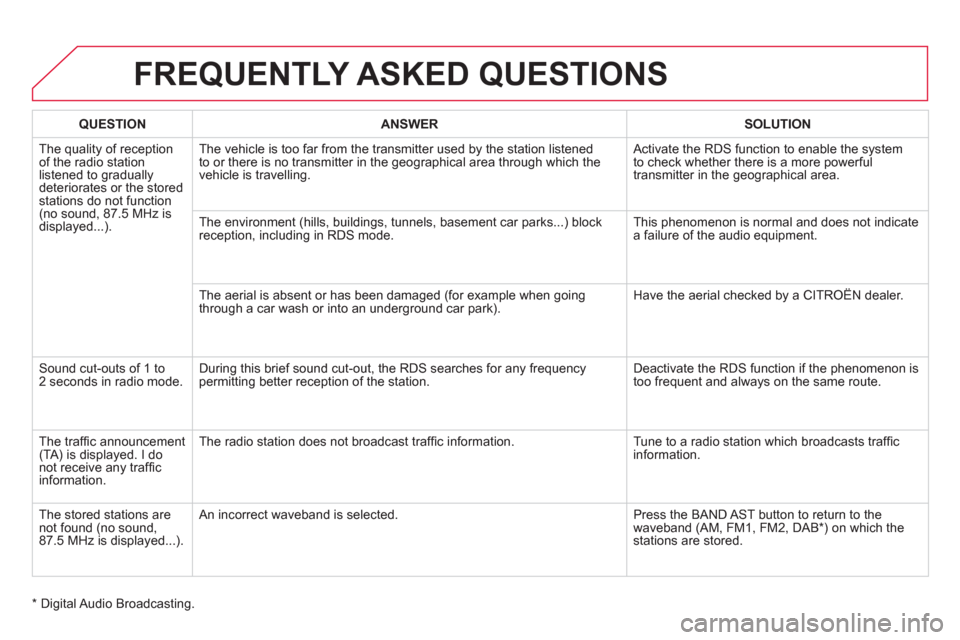
FREQUENTLY ASKED QUESTIONS
QUESTIONANSWERSOLUTION
The quality of reception of the radio stationlistened to graduallydeteriorates or the storedstations do not function (no sound, 87.5 MHz is
displayed...).The vehicle is too far from the transmitter used b
y the station listened
to or there is no transmitter in the geographical area through which the
vehicle is travelling. Activate the RDS function to enable the s
ystem
to check whether there is a more powerful
transm
itter in the geographical area.
The environment
(hills, buildings, tunnels, basement car parks...) block
reception, including in RDS mode. This phenomenon is normal and does not indicatea failure of the audio equipment.
The aerial is absent or has been dama
ged (for example when goingthrough a car wash or into an underground car park). Have the aerial checked by a CITROËN dealer.
Sound cut-outs of 1 to2 seconds in radio mode. During this brief sound cut-out, the RDS searches for any frequency
permitting better reception of the station. Deactivate the RDS function if the phenomenon is
too frequent and always on the same route.
Th
e traffi c announcement (TA) is displayed. I do not receive any traffi cinformation.Th
e radio station does not broadcast traffi c information. Tune to a radio station which broadcasts traffi c
information.
Th
e stored stations arenot found (no sound,87.5 MHz is displayed...). An in
correct waveband is selected. Press the BAND AST button to return to the
waveband (AM, FM1, FM2, DAB * ) on which thestations are stored.
*
Digital Audio Broadcasting.
Page 339 of 348
337
Alphabetical index
Paint colour code........................................239Parking brake, electric...................97-10 4, 228
Parking lamps .............................................138Parking sensors, front .................................128Parking sensors, rear..................................r127Particle emission filter........................r225,227Passenger compartment filter....................r227Player, CD MP3...........................282,307,308Port, USB.....................................80, 282,309Priming the fuel system..............................222Protecting children................152-161, 172, 174Puncture......................................................180
P
R
Radio ...................................................278,303Rear foglamp ...............................134, 198, 199Rear screen (demisting)................................90Recharging the battery...............................205Reduction of electrical load........................206Reinitialising the remote control...................53Remote control ........................................48-54Removing a wheel......................................189Removing the mat.........................................79Repair kit, puncture ..................................... 180Replacing bulbs .................................. 193-200Replacing fuses...................................201-203Replacing the air filter.................................r227Replacing the oil filter.................................r227Replacing the particle emission filter.........r227
T
Replacing the passenger compartment filter....................................r227Replacing wiper blades .......................146,208Resetting the service indicator.....................r40Resetting the trip recorder............................r42Reversing camera ....................................... 129Reversing lamp...........................................198Roof bars.....................................................212Routine checks...................................223-228Running out of fuel (Diesel)........................222
Table of weights..................................233, 236Ta b l e s o f e ngines ................................232, 235Tables of fuses............................................201Tank, fuel .......................................................64Technical data .....................................232-238
Te l ephone........................................... 268, 313
Short-cut menus.........................................250Sidelamps...........................13 3,193, 196, 198Side repeater...............................................197Ski flap..........................................................81Spare wheel ................................................186Speed limiter.......................................r122, 123Spotlamps, side .................................. 139,197Stability control (DSC)................................169Starting the vehicle.................94, 96,108,112Steering mounted controls,audio.................................................248,301Stopping the vehicle ...............94, 96,108,112Stop & Start........................45, 63,87,90,116,204,219,226, 324Storage..............................................78, 80-82Storing driving positions ...............................70Stowing rings................................................82Switching on the ignition.........................51,95Synchronising the remote control.................53Synthesiser, voice.......................................262System, navigation ......................................251Systems, ASR and DSC .............................169
S
Safety for children.................152-161, 172, 174Screen, colour and mapping ....................... 249Screen, instrument panel..............................28Screen, monochrome.........................302, 325Screen, multifunction (with audio equipment).............................302Screen-wash reservoir................................225Screen menu map ...............................290, 325Screenwash, front.......................................144Screenwash fluid level ................................225Seat, rear bench .....................................73, 75Seat adjustment......................................68,69Seat belts.............................................170-172Seats, rear...............................................r73, 75Serial number, vehicle................................239Ser vice indicator...........................................r39Servicing .................................................24, 39Setting the clock ..........................43, 288, 323