level Citroen DS5 2014 1.G Service Manual
[x] Cancel search | Manufacturer: CITROEN, Model Year: 2014, Model line: DS5, Model: Citroen DS5 2014 1.GPages: 372, PDF Size: 32.58 MB
Page 246 of 372
Avoid prolonged contact of used oil or
fluids with the skin.
Most of these fluids are harmful to
health or indeed very corrosive.
Do not discard used oil or fluids into
sewers or onto the ground.
Take used oil to a CITROËN dealer or
a qualified workshop (France) or to an
authorised waste disposal site.
Used products
Topping up
This additive must be topped up by a CITROËN
dealer or a qualified workshop without delay.
Diesel additive level
(Diesel engine with particle
emission filter)
A low additive level is
indicated by illumination of
the ser vice warning lamp,
accompanied by an audible warning and a
message in the instrument panel screen.
Page 248 of 372
Particle emission filter (Diesel)
The start of saturation of the
par ticle filter is indicated by
the temporary illumination of
this warning lamp accompanied by a message
in the multi-function screen.
As soon as the traffic conditions permit,
regenerate the filter by driving at a
speed of at least 40 mph (60 km/h) until
the warning lamp goes off.
If the warning lamp stays on, this
indicates a low additive level.
On a new vehicle, the first particle
filter regeneration operations may be
accompanied by a "burning" smell,
which is per fectly normal.
Following prolonged operation of the
vehicle at very low speed or at idle,
you may, in exceptional circumstances,
notice the emission of water vapour at
the exhaust on acceleration. This does
not affect the behaviour of the vehicle
or the environment.
Refer to the maintenance and
warranty guide for details of the
replacement inter vals for these
components.
Air filter and passenger compartment filter
Replace the oil filter each time the
engine oil is changed.
Refer to the maintenance and
warranty guide for details of the
replacement inter val for this
component.
Oil filter
Depending on the environment (e.g. dusty
atmosphere) and the use of the vehicle
(e.g. city driving), replace them twice as often
if necessary
.
A clogged passenger compartment filter may
have an adverse effect on the per formance
of the air conditioning system and generate
undesirable odours.
Manual gearbox
The gearbox does not require any
maintenance (no oil change).
Refer to the maintenance and
warranty guide for the details of
the level checking inter val for this
component.
Electronic gearbox
The gearbox does not require any
maintenance (no oil change).
Refer to the maintenance and
warranty guide for details of the
checking inter val for this component.
Automatic gearbox
The gearbox does not require any
maintenance (no oil change).
Refer to the maintenance and
warranty guide for details of the level
checking inter val for this component.
Page 249 of 372
247Checks
Brake wear depends on the style
of driving, particularly in the case
of vehicles used in town, over short
distances. It may be necessary to
have the condition of the brakes checked, even
between vehicle ser vices.
Unless there is a leak in the circuit, a drop in
the brake fluid level indicates that the brake
pads are worn.
Brake pads
For information on checking brake
disc wear, contact a CITROËN dealer
or a qualified workshop.
Brake disc wear
Electric parking brake
This system does not require any
routine ser vicing. However, in the
event of a problem, have the system
checked by a CITROËN dealer or a
qualified workshop.
Only use products recommended by
CITROËN or products of equivalent
quality and specification.
In order to optimise the operation of
units as important as those in the
braking system, CITROËN selects and
offers very specific products.
After washing the vehicle, dampness,
or in wintry conditions, ice can form
on the brake discs and pads: braking
efficiency may be reduced. Make light
brake applications to dry and defrost
the brakes.
For more information, refer to the "Electric
parking brake - Operating faults" section.
Page 270 of 372
01 FIRST STEPS
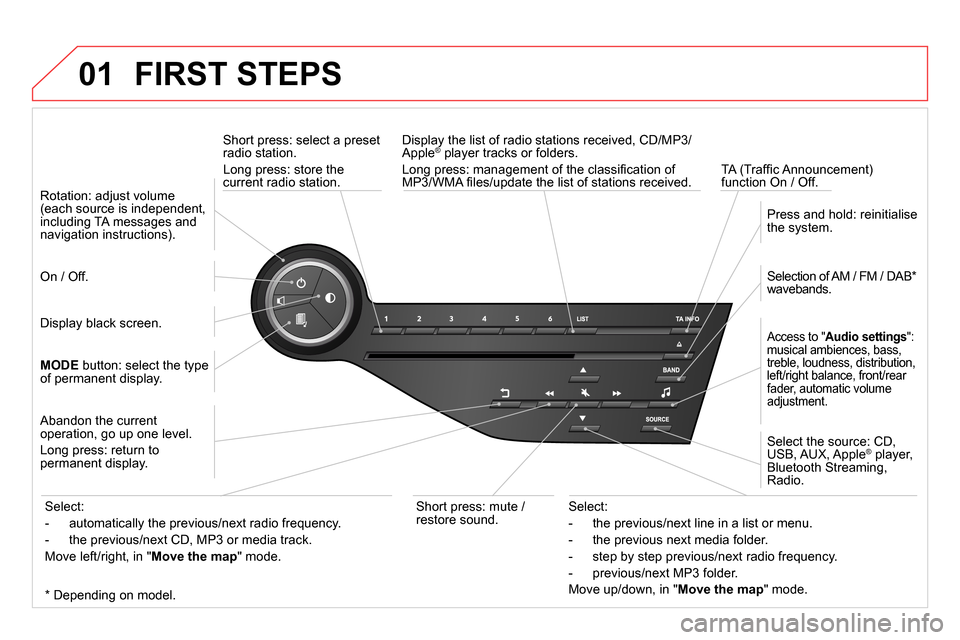
Short press: select a preset
radio station.
Long press: store the
current radio station.
TA (Traffi c Announcement)
function On / Off.
Display the list of radio stations received, CD/MP3/
Apple ® player tracks or folders.
Long press: management of the classifi cation of
MP3/WMA fi les/update the list of stations received.
Access to " Audio settings
":
musical ambiences, bass,
treble, loudness, distribution,
left/right balance, front/rear
fader, automatic volume
adjustment.
Selection of AM / FM / DAB *
wavebands.
Press and hold: reinitialise
the system.
Select the source: CD,
USB, AUX, Apple
® player,
Bluetooth Streaming,
Radio.
Abandon the current
operation, go up one level.
Long press: return to
permanent display.
On / Off.
MODE
button: select the type
of permanent display.
Rotation: adjust volume
(each source is independent,
including TA messages and
navigation instructions).
Select:
- the previous/next line in a list or menu.
- the previous next media folder.
- step by step previous/next radio frequency.
- previous/next MP3 folder.
Move up/down, in " Move the map
" mode.
Select:
- automatically the previous/next radio frequency.
- the previous/next CD, MP3 or media track.
Move left/right, in " Move the map
" mode.
Display black screen.
Short press: mute /
restore sound.
*
Depending on model.
Page 271 of 372
01
269
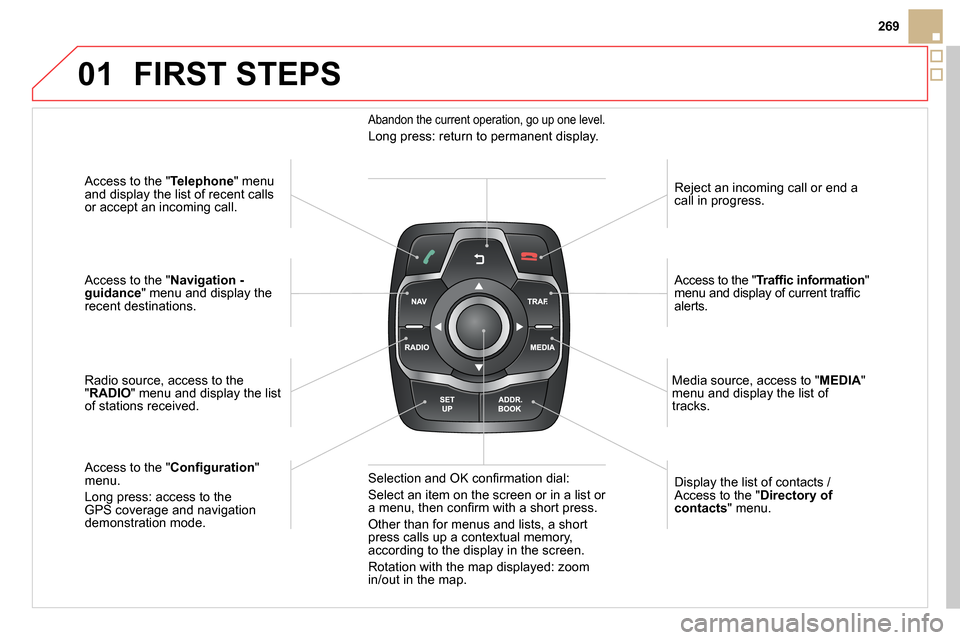
Access to the " Telephone
" menu
and display the list of recent calls
or accept an incoming call.
Access to the " Navigation -
guidance
" menu and display the
recent destinations.
Radio source, access to the
" RADIO
" menu and display the list
of stations received.
Access to the " Confi guration
"
menu.
Long press: access to the
GPS coverage and navigation
demonstration mode.
Reject an incoming call or end a
call in progress.
Access to the " Traffi c information
"
menu and display of current traffi c
alerts.
Display the list of contacts /
Access to the " Directory of
contacts
" menu.
Media source, access to " MEDIA
"
menu and display the list of
tracks.
Abandon the current operation, go up one level.
Long press: return to permanent display.
Selection and OK confi rmation dial:
Select an item on the screen or in a list or
a menu, then confi rm with a short press.
Other than for menus and lists, a short
press calls up a contextual memory,
according to the display in the screen.
Rotation with the map displayed: zoom
in/out in the map.
FIRST STEPS
Page 286 of 372

04 NAVIGATION - GUIDANCE
Press NAV
to display the " Navigation -
guidance
" menu.
Navigation voice synthesis
Select " Guidance options
" and confi rm.
Adjusting the volume / Deactivation
Select " Set speech synthesis
" and
confi rm.
Select the volume graph and confi rm.
Select " Deactivate
" to deactivate voice messages.
Select " OK
" and press the dial to
confi rm.
Adjust the volume to the desired level
and confi rm.
The volume of messages can be adjusted during the transmission
of the message using the volume adjustment control.
The volume setting of guidance messages is also accessible via
the " SETUP
" / " Voice synthesis
" menu.
Page 307 of 372
09
305
MUSIC MEDIA PLAYERS
CD, MP3 CD / USB player
The audio equipment will only play audio fi les with ".wma, .aac, .fl ac,
.ogg and .mp3" fi le extensions and with a bit rate of between 32 Kbps
and 320 Kbps.
It also supports VBR (Variable Bit Rate) mode.
No other type of fi le (.mp4, .m3u…) can be played.
WMA fi les must be of the standard wma 9 type.
The sampling rates supported are greater than 32 KHz.
It is advisable to restrict fi le names to 20 characters, without using of
special characters (e.g.: " " ? ; ù) to avoid any playing and displaying
problems.
In order to be able to play a recorded CDR or CDRW, when recording
it is preferable to select the ISO 9660 level 1, 2 or Joliet standard.
If the disc is recorded in another format (udf, …), it may not be played
correctly.
It is recommended that the same recording standard is always used
for an individual disc, with as low a speed as possible (4x maximum)
for optimum sound quality.
In the particular case of a multi-session CD, the Joliet standard is
recommended.
Information and advice
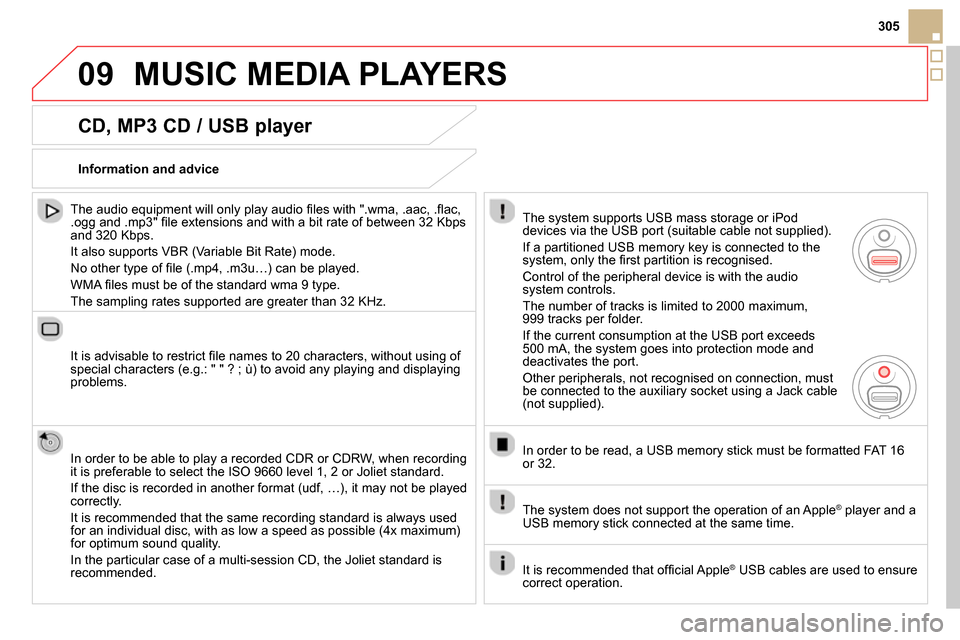
The system supports USB mass storage or iPod
devices via the USB port (suitable cable not supplied).
If a partitioned USB memory key is connected to the
system, only the fi rst partition is recognised.
Control of the peripheral device is with the audio
system controls.
The number of tracks is limited to 2000 maximum,
999 tracks per folder.
If the current consumption at the USB port exceeds
500 mA, the system goes into protection mode and
deactivates the port.
Other peripherals, not recognised on connection, must
be connected to the auxiliary socket using a Jack cable
(not supplied).
In order to be read, a USB memory stick must be formatted FAT 16
or 32.
The system does not support the operation of an Apple
®
player and a
USB memory stick connected at the same time.
It is recommended that offi cial Apple
®
USB cables are used to ensure
correct operation.
Page 309 of 372
09
/
/
//
//
/ +/
-
+
/
307
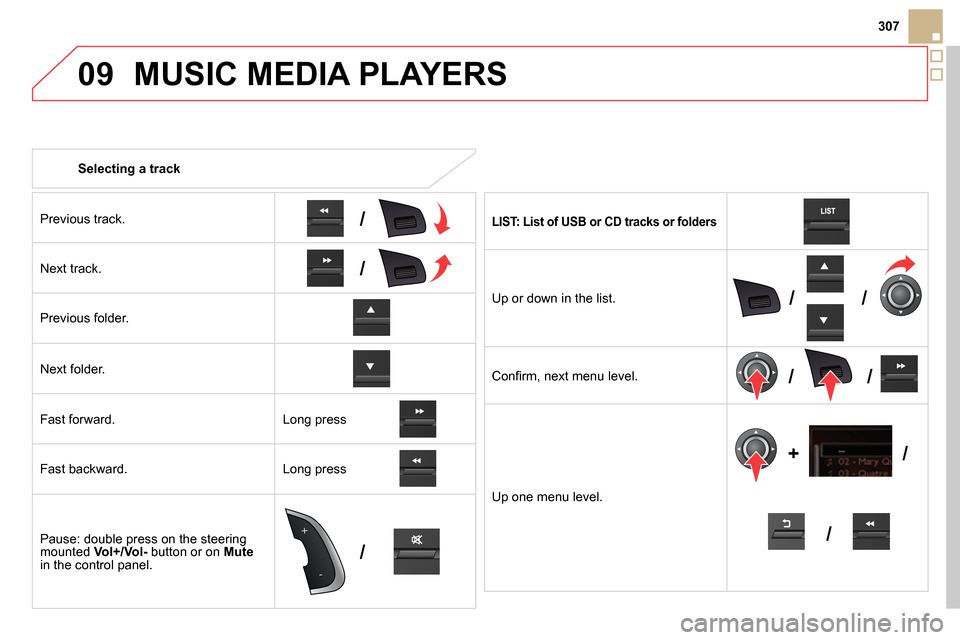
Selecting a track
MUSIC MEDIA PLAYERS
Previous track.
Next track.
Previous folder.
Next folder.
Fast forward.
Fast backward.
Pause: double press on the steering
mounted Vol+/Vol-
button or on Mute
in the control panel.
LIST: List of USB or CD tracks or folders
Up or down in the list.
Confi rm, next menu level.
Up one menu level.
Long press
Long press
Page 310 of 372
09
Audio streaming
Streaming allows audio fi les on your telephone to be played via the
vehicle's speakers.
Connect the telephone: see " USING THE TELEPHONE
".
Select " Audio
" or " All
" profi le.
If play does not start automatically, it may be necessary to start the
audio playback from the telephone.
Control is from the peripheral device or by using the audio system
buttons.
Once connected in streaming mode, the telephone is considered to be
a media source.
It is recommended that you activate " Repeat
" on the Bluetooth
peripheral.
MUSIC MEDIA PLAYERS
Connecting APPLE ®
players
Connect the Apple ®
player to the USB port using a suitable cable
(not supplied).
Play starts automatically.
Control is via the audio system.
The classifi cations available are those of the portable device
connected (artists / albums / genres / playlists / audiobooks /
podcasts).
The default classifi cation used is by artist. To modify the classifi cation
used, return to the fi rst level of the menu then select the desired
classifi cation (playlists for example) and confi rm to go down through
the menu to the desired track.
The "Shuffl e tracks" mode on an iPod
®
corresponds to the "Random"
mode on the audio system.
The "Shuffl e albums" mode on an iPod
®
corresponds to the "Random
all" on the audio system.
"Shuffl e tracks" is restored by default on each connection.
The version of software in the audio system may not be compatible
with the generation of your Apple
® player.
Page 311 of 372
09
309
MUSIC MEDIA PLAYERS
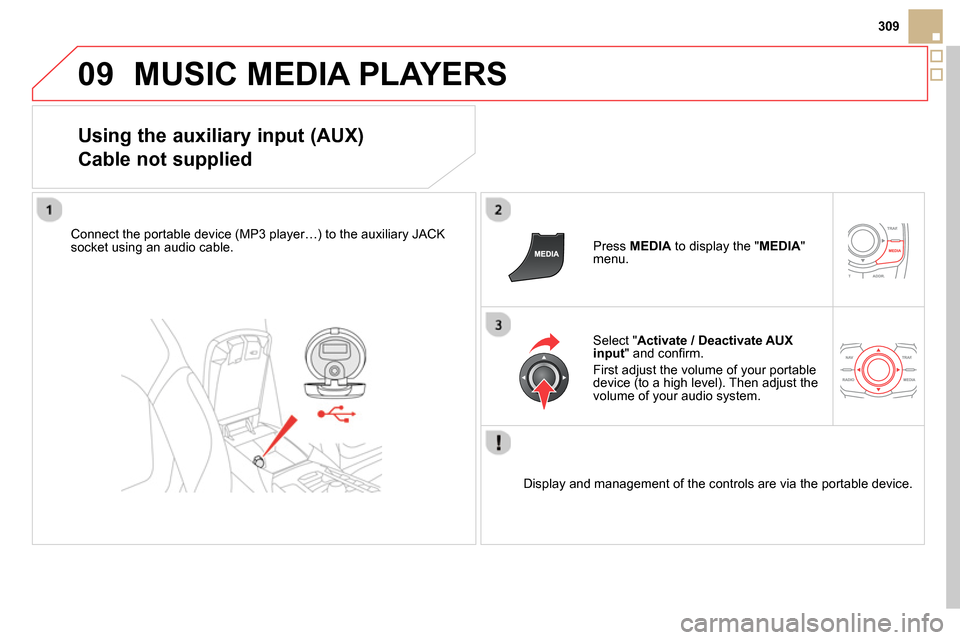
Using the auxiliary input (AUX)
Cable not supplied
Connect the portable device (MP3 player…) to the auxiliary JACK
socket using an audio cable.
Press MEDIA
to display the " MEDIA
"
menu.
Select " Activate / Deactivate AUX
input
" and confi rm.
First adjust the volume of your portable
device (to a high level). Then adjust the
volume of your audio system.
Display and management of the controls are via the portable device.